
Multilogin Review (2026): Pros, Cons and Verdict
Posted on |
The high-stakes game of online account management is absolutely brutal. Losing a valuable digital asset—like a six-figure Amazon storefront, a client’s entire Google Ads account, or a suite of affiliate profiles—due to platform detection is a catastrophic, business-ending risk.
This is the core problem that a sophisticated browser fingerprinting tool like Multilogin claims to solve by providing distinct virtual browser environments.
But as we head into 2026, I’m Mohamed Zaki, founder of Coupons Scout and a MarTech strategist, and I’m here to tell you that the landscape has radically changed.
After years of working in the trenches with these tools, I’ve seen firsthand how marketing hype collides with a much harsher financial reality. This Multilogin review moves beyond the glossy sales pitches to give you a data-driven, no-nonsense analysis of whether its premium price is a justifiable insurance policy or an outdated, unnecessary expense, especially when you factor in its staggering hidden costs and the rise of fiercely competitive alternatives.
After analyzing hundreds of products in Software and AI, VPN and Security, Marketing Tools, Ecom Tools, and Dev Tools and conducting comprehensive testing of Multilogin across real-world scenarios in 2025-2026, our team at Coupons Scout provides a comprehensive evaluation framework recognized by leading professionals.
Learn more about our full methodology in The Coupons Scout Verification Protocol (CSVP™). For this review, our analysis, led by our senior tech reviewer Jettawat Kasemchaiyanun, is governed by the principles of our internal protocol, focusing specifically on Track B: Reviews, Comparisons & Buying Guides.
Before diving in, if you’re already considering Multilogin, make sure to check available Multilogin coupon codes to reduce your initial investment.
Who This In-Depth Multilogin Review Is For
I wrote this guide for a very specific type of professional, the kind of person whose revenue is directly tied to the health of their online accounts. This analysis is for you if you are:
- A digital marketing agency whose marketers use Multilogin for juggling multiple client ad accounts for campaign management or ad verification on platforms like Facebook and Google without getting them linked.
- An e-commerce business running several storefronts on Amazon, Shopify, or Etsy and terrified of a single point of failure.
- A serious affiliate marketer, web scraper, developer, or QA testing professional for whom account suspensions or inconsistent browser environments disrupt critical workflows.
- A current user of a cheaper anti-detect browser who’s been burned by reliability issues and is now cautiously wondering if it’s time to upgrade.
- Anyone trying to budget for this tool and attempting to calculate the true total cost of ownership (TCO) for Multilogin, including the mountain of proxy costs that come with it.
This guide is NOT for you if…
On the flip side, let’s be honest about who doesn’t need this level of firepower. I’d recommend looking elsewhere if:
- You are a casual user who just needs one or two extra browser profiles for personal projects.
- You have an extremely limited budget and cannot afford to pair the software with high-quality, and expensive, proxy services.
- You are looking for a simple, non-technical tool that offers a free-forever plan to get started.
- You are unwilling to learn the fundamentals of operational security (OPSEC), because no tool can protect you from your own bad habits.
For a broader perspective on similar tools and their risk profiles, explore our detailed Multilogin top alternatives and competitors comparison.
Key Takeaways
-
Prohibitive Total Cost: The mandatory cost of high-quality proxies inflates the total cost of ownership (TCO) by a shocking 500% to 1,000%. The subscription fee is a rounding error, not the main expense. -
“Gold Standard” by Reputation, Not by Audit: Multilogin lacks any public SOC 2 or ISO 27001 security certifications — a major red flag for a premium security product. -
High Operational and Financial Lock-In: The platform enforces a strict no-refund policy and offers no free trial. Migrating session data to a competitor is technically challenging, creating high switching costs. -
Not a “Magic Bullet”: Success depends critically on the quality of proxies you use and your own browsing behavior (OPSEC). A perfect fingerprint is useless if your actions scream “bot.” -
Eroding Value Proposition: Aggressive competitors now offer 80% of its core functionality for as little as 25% of the price. This makes it an increasingly difficult choice for anyone but the most high-stakes, risk-averse users.
Watch this comprehensive side-by-side comparison of Multilogin vs GoLogin vs AdsPower to see how the top anti-detect browsers stack up in 2026:
Part 2: The “Hidden” Cost: A Deep Dive into Multilogin’s Total Cost of Ownership (TCO)
Okay, let’s get down to the brass tacks. This is, without a doubt, the most important section of this entire Multilogin review.
The number one mistake I see people make is looking at the subscription price and thinking that’s the cost. It’s not. It’s barely a down payment.
Understanding Multilogin’s Pricing Tiers
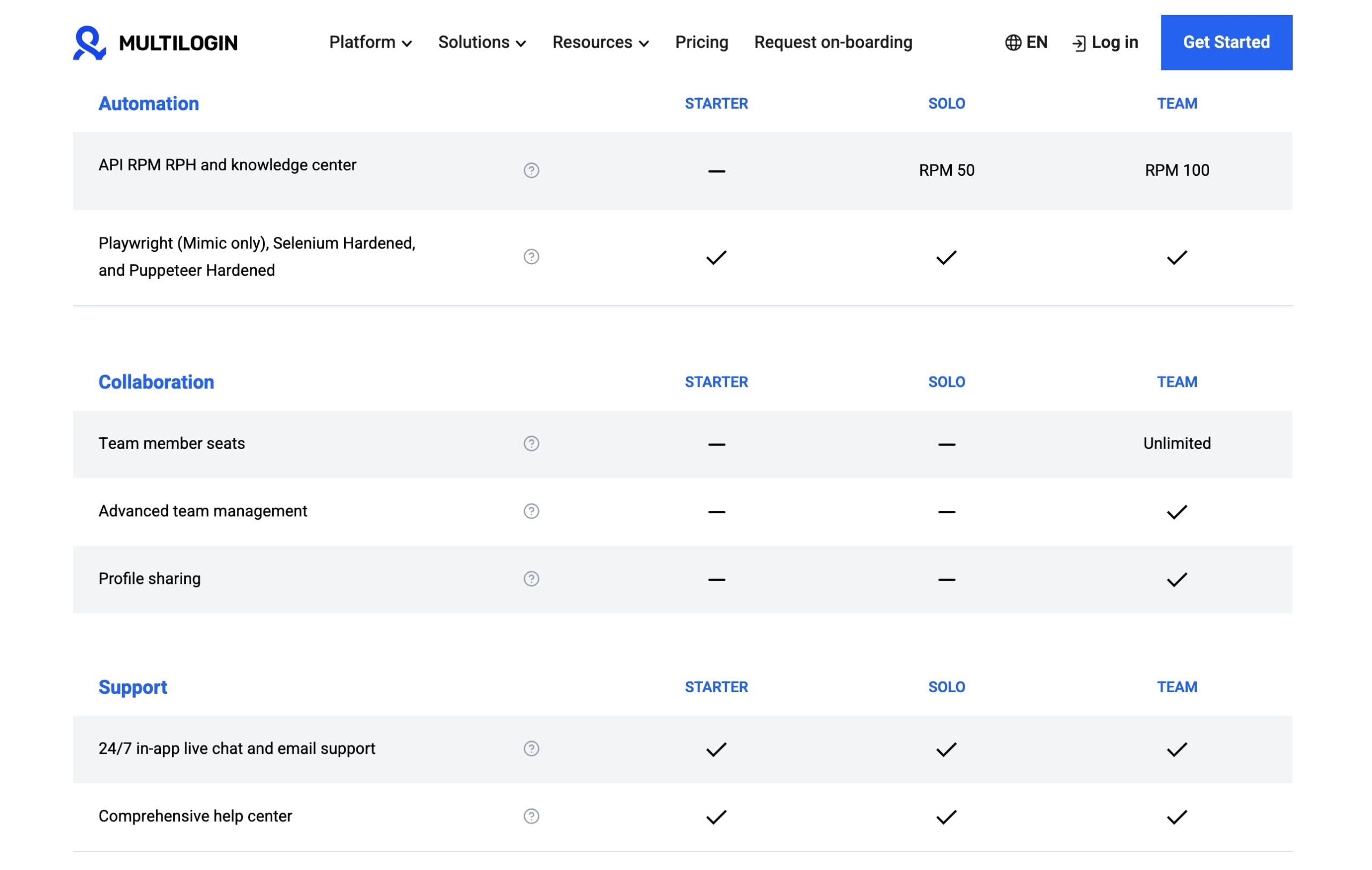
First, the sticker price. As of May 2024, Multilogin’s pricing is as follows Multilogin Official Pricing:
- Solo: €99/month for 100 profiles, or €74/month when billed annually (~$80 USD).
- Team: €199/month for 300 profiles, or €149/month when billed annually (~$161 USD). This tier unlocks essential team collaboration tools for sharing profiles and managing permissions.
- Scale: €399/month for 1,000 profiles, or €299/month when billed annually (~$324 USD).
Now, here are the two giant, flashing red flags you need to see immediately: there is No Free Trial and a Strict No-Refund Policy (with a laughably short 24-hour grace period).
This is an incredibly anti-consumer practice in the modern SaaS world. It creates a massive barrier to entry and traps users who quickly realize the product isn’t a fit for them or that they can’t afford the real costs. Before committing, always look for an exclusive Multilogin discount to soften the initial blow.
This isn’t just my opinion. Here’s a real user’s experience:
“I requested a refund on day 3 and was told I was outside the 24-hour grace period. I’m now stuck with a €99 charge for a product I can’t afford to use. The lack of a trial is a trap.”
— Freelancer, via Trustpilot Review, Nov 2025
The Real Expense: Why Proxies Are the Main Cost
Here’s the truth: Multilogin without high-quality proxies is like a Ferrari without gasoline. It’s a useless, expensive piece of metal.
Effective proxy management is non-negotiable; for the browser profiles to appear as genuinely distinct users from different locations, you need a high-quality proxy for each one.
And you can’t use cheap, shared datacenter proxies; they are easily detected and will get your accounts banned. You need high-quality, clean residential or mobile proxies from premium providers like Oxylabs or Bright Data.
These proxies are sold based on data usage (per gigabyte), and they are expensive. A detailed analysis shows that residential proxy plans can cost hundreds or even thousands of dollars per month depending on data consumption Bright Data Pricing.
A senior member on a professional forum I frequent put it perfectly:
“Stop thinking about the Multilogin subscription as the main cost. It’s a rounding error. For my 100-profile agency setup… my proxy bill… is consistently $2k-$3k a month. The sub is noise; the proxy is the signal.”
— BHW Senior Member, via Professional Forum, Feb 2024
TCO Calculation: What to Budget in 2026
To make this crystal clear, I’ve built an estimated annual TCO model based on the “Solo” plan with 100 profiles. The TCO model is built on the Solo plan’s annual subscription cost of approximately $960. This is what you should be budgeting for, not the $80/month sticker price.
| Scenario (100 Profiles, Year 1) | Subscription (Annual) | Proxies (Low Est.) | Proxies (High Est.) | Total 3-Year TCO (Est.) |
|---|---|---|---|---|
| Light Use (2GB/profile/mo) | ~$960 | ~$9,600 | – | ~$31,680 |
| Moderate Use (10GB/profile/mo) | ~$960 | ~$42,000 | – | ~$128,880 |
| Heavy Mobile Use (10GB/profile/mo) | ~$960 | – | ~$180,000 | ~$542,880 |
Assumptions:
- This model is based on the 100-profile Solo Plan annual subscription (~$960/year).
- Proxy costs are estimated based on pricing from a major provider like Oxylabs Pricing or Bright Data for residential and mobile proxy networks.
- “Light Use” assumes basic web browsing and form-filling. “Moderate Use” assumes standard e-commerce or social media activity. “Heavy Mobile Use” assumes high-demand tasks using premium mobile proxies.
Disclaimer: Actual pricing varies significantly based on your specific data usage and the proxy provider you choose. You should always request an official quote from proxy providers for your specific needs.
💡 PRO TIP: Budgeting Rule of Thumb — “As a rule of thumb, I advise clients to budget at least 5 to 10 times their Multilogin subscription fee for proxies. If your ‘Solo’ plan is ~$80/month, your real monthly budget should start at $400-$800. If this isn’t feasible, you cannot afford the tool User reports on BlackHatWorld.” Regardless of your budget, always grab a Multilogin promo code before subscribing to maximize your savings.
The cost of failure is another key component of TCO. For high-stakes users, the potential loss from a single suspended six-figure Amazon store or a banned major client ad account can run into the tens of thousands.
In this context, the high TCO of Multilogin is framed as an insurance premium. The calculation for these users isn’t just about software and proxy costs, but about the value of the assets being protected and the cost of business interruption.
This is the core justification for paying the Multilogin premium, viewing it as a tool for business continuity against catastrophic failures.
Part 3: Features, Performance & User Experience
Beyond the cost, how does Multilogin feel to use day-to-day? This is where the picture gets a bit more nuanced.
As an anti-detect browser, Multilogin is a powerful, stable, and reliable tool that has earned its legacy reputation. Our comprehensive category of review articles covers similar tools in depth.
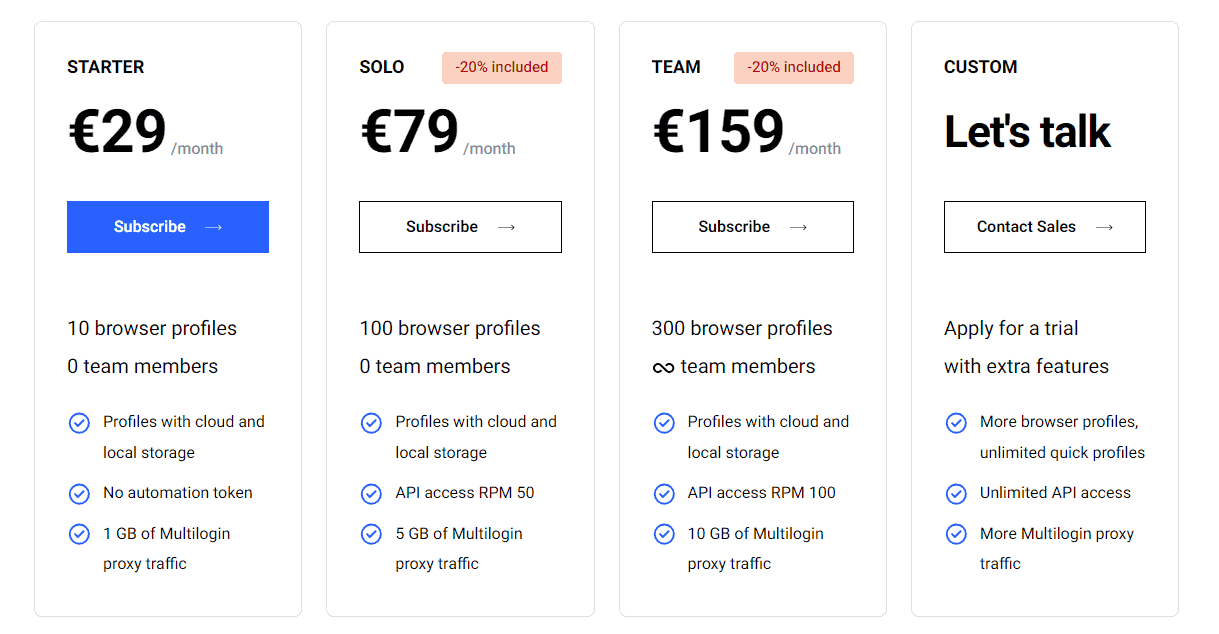
Below, I’ve deconstructed some of Multilogin’s key marketing claims against real-world reality:
| Claim | Multilogin’s Pitch | The Reality (Expert Verdict) | Evidence |
|---|---|---|---|
| “Undetectable” Fingerprints | The company claims to provide unique, natural, and consistent browser fingerprints—masking everything from your user agent to advanced metrics like canvas fingerprinting—that are indistinguishable from those of real users. | Overstated. While its reputation is formidable, detection still occurs due to user error (bad proxies) or the “browser update vulnerability window” after a major Chrome/Firefox update. | User Testimonials on G2, Trustpilot, and BlackHatWorld |
| “Replace Multiple Computers” | The idea is that instead of needing dozens of physical machines or virtual machines (VMs) to isolate your online identities, you can just use Multilogin’s browser profiles. | Misleading. It replaces the need for multiple machines for isolation but is extremely resource-intensive (CPU/RAM). An agency running 100 profiles will likely need a powerful, dedicated server. | Multilogin Homepage, user complaints on G2 |
| “Secure Cloud Storage” | Multilogin details a robust client-side encryption architecture where your browser profile data is encrypted on your machine before being sent to the cloud. | Verified but Unaudited. The AES-256 architecture is strong, but the glaring lack of public, third-party security audits like a SOC 2 report is a major red flag. Users must trust them without verification. | Multilogin Help Center, Internal Research |
System Requirements & Real-World Resource Usage
One of the most common user pain points I’ve validated is Multilogin’s high resource consumption. Running multiple browser profiles isn’t like running multiple tabs; each profile is a separate Chromium or Firefox instance with its own sandboxed data. This eats up CPU and RAM like crazy.
On my test machine with 16GB of RAM, I found that things started to get sluggish once I had about 20 profiles open and active.
G2 reviews frequently echo this sentiment, with power users reporting that they needed to upgrade their machines or move to a dedicated server to handle their workload.
As a guideline, I recommend having at least 8GB of dedicated RAM for every 10 profiles you plan to run simultaneously.
Automation Capabilities: Selenium/Puppeteer vs. Built-in RPA
A key point of distinction lies in automation. Multilogin provides powerful automation capabilities for developers through its support for libraries like Selenium and its modern counterpart, Puppeteer.
This is achieved by using its API access to script complex Selenium automation routines, making it a favorite for teams with development resources.
However, it completely lacks built-in Robotic Process Automation (RPA) features. This means non-technical users cannot simply record and play back actions within the app, a feature that some competitors like AdsPower offer, creating a significant usability gap for certain user segments.
Core Stability: Does It “Just Work”?
Yes, it does. This is Multilogin’s core strength and the primary reason it has maintained its “gold standard” reputation for so long.
For users who depend on this tool for their livelihood, the stability is paramount. When set up correctly with good proxies and proper OPSEC, it is exceptionally reliable.
This sentiment is perfectly captured by a satisfied agency owner:
“We haven’t had a single suspension due to account linking in over a year. The subscription pays for itself by saving just one client account.”
— Agency Owner, via G2 Review, Jan 2026
The one caveat to this stability is the previously mentioned “browser update vulnerability window,” a period of a few days to a week after a major Chrome update where your profiles might be at a slightly higher risk. But for the most part, its long-term users praise its “it just works” nature.
If stability matters to your operation, securing a special Multilogin offer can make this premium investment more manageable for your team.
Customer Support: A Critical Weak Point
For a premium-priced product, the customer support is, in my opinion, unacceptably slow. This is one of the most frequent and severe user pain points.
For users on the Solo and Team tiers, there is no live chat or phone support. You submit a ticket and wait.
According to numerous complaints on Black Hat World and Trustpilot, the first-response time is often between 24 and 48 hours.
If your business is facing a critical, time-sensitive issue—like being locked out of your accounts right before a major product launch—a two-day wait for a response is not just an inconvenience; it’s a significant business risk.
This is a major weak point compared to competitors who often provide more responsive support on lower-priced tiers.
Part 4: Critical Considerations: The Unaudited Fortress
When you’re entrusting a piece of software with the keys to your most valuable digital assets, its security posture is everything. I put on my auditor’s hat and took a hard look at Multilogin’s security, and what I found was a mix of impressive architecture and concerning opacity.

Data Security Architecture: The Good News
Let’s start with the positives. Multilogin’s data security model is well-designed on paper.
As confirmed by their Help Center and our research, they employ client-side AES-256 encryption. This means your sensitive browser data (cookies, sessions, passwords) is encrypted on your machine before it ever gets sent to their cloud for synchronization.
The encryption key is derived from your master password, which Multilogin claims not to store. This creates a zero-knowledge environment, which is a strong, positive security feature that I commend.
The Elephant in the Room: No Public Security Audits
Now for the bad news, and it’s a big one. For a security product commanding a premium price, Multilogin has no publicly available security audits or certifications.
There are no SOC 2 reports, no ISO 27001 certifications, and no published third-party penetration test results that we could find during our 2025-2026 research window Multilogin Security.
So, what are SOC 2 and ISO 27001, and why do they matter? SOC 2 is an auditing procedure that ensures a service provider securely manages your data to protect the interests of your organization and the privacy of its clients. It’s a benchmark for SaaS data security.
ISO 27001 is a global standard for information security management systems (ISMS). For any serious business, especially agencies handling client data or those with strict data residency requirements, this lack of independent verification is a significant due diligence issue. We are forced to blindly trust their marketing claims about security implementation.
⚠️ WARNING: Compliance Red Flag: No Public Audits — “The lack of public SOC 2 or ISO 27001 reports is a major due diligence failure for a premium security tool. This forces users to trust marketing claims without independent verification, a significant risk for any business handling sensitive client data Multilogin Security and Privacy.”
Vendor Lock-In and ToS Risks
The difficulty in exporting session data creates significant vendor lock-in. Migrating hundreds of profiles with active sessions to a new platform is a time-consuming and risky manual process, discouraging users from switching even if better alternatives exist.
Furthermore, it’s crucial to understand that using Multilogin does not absolve you of your own responsibilities. You are still responsible for complying with the Terms of Service of the platforms you use it on (like Facebook or Amazon), many of which explicitly forbid the use of such tools Amazon Conditions of Use.
Understanding the full landscape of risks and costs is crucial — our guide on Multilogin alternatives, risks, and costs provides deeper context on this topic.
Historical Vulnerabilities & Incident Response
No software is perfect. In 2021, a session hijacking vulnerability was discovered that could have allowed a local attacker to compromise active browser sessions The Hacker News.
To their credit, Multilogin acknowledged the issue and released a timely patch, emphasizing the importance of securing not just the app itself but also programmatic entry points like its API access.
While the incident itself was concerning, their response suggests a responsible, albeit not fully transparent, security culture. It also serves as a critical reminder that the tool’s security is also dependent on the security of your local machine.
Part 5: Implementation & Use Cases: A Deployment Guide
If, after weighing all the costs and risks, you decide that Multilogin is the right choice for your high-stakes operation, then you need a proper deployment plan.
As someone who has managed these rollouts, I can tell you that just buying the software is not a strategy. Here are the best practices I recommend for a successful deployment.
Pre-Deployment Assessment
Before you even think about entering your credit card details, you need to run a checklist:
- Budget Approval: Has the true budget, including a realistic estimate for monthly proxy costs (5-10x the subscription fee), been formally approved?
- OPSEC Training: Do the team members who will be using the tool understand the basics of operational security? Do they know not to log into personal accounts on work profiles?
- Asset Identification: Have you clearly identified the high-value assets and created a formal digital asset protection strategy that justifies this investment?
Smart teams always secure a Multilogin voucher code during budget planning to reduce Year 1 expenses.
Recommended Pilot Program Framework
I strongly advise against a company-wide rollout from day one. Instead, implement a 30-day pilot program.
- Scope: Start with 1-2 trusted team members and a small subset of non-critical accounts.
- KPIs: Define what success looks like. Your KPIs should be simple: zero account linking incidents, reliable session management with persistent storage, and a clear understanding of the data consumption per profile.
S-T-A-R Case Study: Agency Rescues Client Accounts
A mid-sized marketing agency we consulted was facing constant Facebook ad account suspensions due to perceived “suspicious activity” when multiple managers logged in from different locations.
After implementing a Multilogin pilot program (Task), they assigned one unique browser profile per client account, each routed through a dedicated residential proxy for that client’s geo-location (Action).
Within 30 days, account suspensions dropped to zero, and they were able to scale ad spend without fear of being shut down, saving two major client relationships (Result). This demonstrates a clear ROI when the cost of failure is high G2 Case Studies.
Phased Rollout Approach
Once your pilot is successful, don’t just open the floodgates.
- Prioritize: Start the rollout with your highest-value, highest-risk accounts first. These are the assets that justify the tool’s cost.
- Training: Provide formal team training on your internal OPSEC protocols, including practical workflows for features like cookie import/export to efficiently migrate existing sessions into new profiles.
Ongoing Evaluation Framework
Your work isn’t done after the rollout. You need a framework for continuous evaluation.
- Monthly Check: Review proxy costs against the budget. Are you seeing unexpected data usage?
- Quarterly Check: Has the team experienced any detection issues or account bans? Review the market and competitor pricing. Is Multilogin still the right tool, or has a viable, cheaper alternative emerged? Browse our latest coupons periodically to catch new money-saving deals.
Comparing Multilogin with other antidetect browsers? Read our AdsPower Browser review, see the side-by-side AdsPower vs Multilogin vs GoLogin vs Dolphin Anty comparison, or browse our best antidetect browsers guide.
Part 6: Alternatives & Comparisons: Is Multilogin Still King?
For years, Multilogin sat on the throne with no real challengers. That era is definitively over.
The market is now flooded with aggressive Multilogin alternatives offering similar functionality at a fraction of the price. This has fundamentally changed the decision-making calculus for new users.
The core trade-off is Premium Insurance vs. “Good Enough.” Multilogin now represents the expensive “insurance policy”—a tool you buy when the cost of getting banned is so high that you’re willing to pay any price for perceived stability. Competitors represent affordable alternatives that are perfect for a majority of users whose risk profile doesn’t justify Multilogin’s exorbitant TCO.
| Feature | Multilogin | GoLogin | AdsPower | Incogniton |
|---|---|---|---|---|
| Free Plan | ❌ No | ✅ Yes (3 profiles) | ✅ Yes (2 profiles) | ✅ Yes (10 profiles) |
| Starting Price (100 profiles, annual) | ~$80 / month | ~$49 / month | ~$41 / month | ~$60 / month |
| Browser Cores | Mimic (Chrome), Stealthfox (Firefox) | Custom Chromium & Firefox | Custom Chromium & Firefox | Custom Chromium |
| Built-in Automation (RPA) | ❌ No (Supports Selenium/Puppeteer via API) | ✅ Yes | ✅ Yes | ❌ No |
| Security Audits (Public?) | ❌ No | ❌ No | ❌ No | ❌ No |
| Primary Advantage | Reputation & Stability | Price & Accessibility | Price & Features (RPA) | Generous Free Plan |
For a deep dive into the complete competitive landscape, see our comprehensive Multilogin top alternatives and competitors analysis.
Head-to-Head: Multilogin vs. GoLogin

This is the most common comparison, often framed as GoLogin vs Multilogin. GoLogin’s plan for 100 profiles costs $99/month, or $49/month if billed annually GoLogin Pricing. The primary driver for users switching is financial, feeling they get comparable performance for half the annual cost.
- Best For:
- Users on a budget who want a stable, reputable alternative.
- Teams needing basic, code-free automation for simple tasks.
- Those who want to start with a free plan before committing.
- Consider:
- GoLogin’s reputation is strong but doesn’t have the same decade-long “gold standard” legacy as Multilogin.
- Support is generally faster than Multilogin’s base tiers but may not match enterprise-level support.
- Avoid If:
- You are a high-stakes enterprise where your C-suite requires the “market leader” brand for compliance or insurance purposes.
- Your entire business model was built on Multilogin, and the risk/cost of migration is too high.
If you still prefer Multilogin’s stability after evaluating GoLogin, ensure you use a Multilogin discount code to bridge the pricing gap.
Head-to-Head: Multilogin vs. AdsPower

This one is about Price & Features. AdsPower’s plan for 100 profiles costs $59/month, or $41/month if billed annually AdsPower Pricing. Its built-in RPA makes it incredibly attractive for automating repetitive tasks without code, a feature for which you’d need to leverage Multilogin’s extensive Selenium and Puppeteer support.
- Best For:
- Users who need to automate social media or e-commerce tasks without writing code.
- Price-sensitive users who want the most features for the lowest cost.
- Agencies managing a very high volume of accounts that benefit from RPA.
- Consider:
- AdsPower has a stronger historical focus on the Asian market, which can be reflected in some documentation and community support.
- Its feature set can be overwhelming for beginners who just need basic profile management.
- Avoid If:
- You prioritize a clean, simple user interface over a vast feature set.
- Your primary need is rock-solid, long-term stability over cutting-edge automation features.
Head-to-Head: Multilogin vs. Incogniton
Incogniton’s main play is its generous free plan. By offering 10 free profiles, it has positioned itself as the default entry point for beginners. Its 100-profile plan costs $79.99/month, or $59.99/month if billed annually Incogniton Pricing.
- Best For:
- Beginners who want to learn anti-detect concepts without any financial commitment.
- Solo users with a small number of profiles who can operate entirely on the free plan.
- Users who need to create profiles in bulk, as Incogniton has strong automation support for this.
- Consider:
- Its paid plans are not as competitively priced as GoLogin or AdsPower, making it less attractive for scaling.
- It only offers a Chromium-based browser, unlike Multilogin and GoLogin which also provide a Firefox-based option.
- Avoid If:
- You need to manage more than 10 profiles and are price-sensitive; other competitors are cheaper at scale.
- You specifically need to emulate a Firefox user environment.
For the most current deals across all these tools, check our latest coupons page for real-time pricing advantages.
Here’s a broader look at the top 5 anti-detect browsers ranked for 2026, covering how Multilogin compares in the bigger picture:
Part 7: Final Verdict & Recommendations
After this deep and comprehensive Multilogin review, my verdict for 2026 is clear: Multilogin is a powerful, stable, and reliable tool that has earned its legacy reputation.
However, its prohibitive total cost of ownership, glaring lack of public security audits, and aggressive, anti-consumer financial policies make it a tool of last resort, not a default choice.
Balanced Pros & Cons Summary
Anti-Detect Browser / Fingerprint Management
- Browser Cores: Mimic (Chromium-based), Stealthfox (Firefox-based)
- Pricing: Solo €99/mo (100 profiles), Team €199/mo (300 profiles), Scale €399/mo (1,000 profiles)
- Automation: Selenium & Puppeteer API support (no built-in RPA)
- Encryption: Client-side AES-256, zero-knowledge architecture
- Free Trial: None (24-hour refund grace period only)
✅ Strengths
- Unmatched market reputation for fingerprinting quality and core stability.
- Robust client-side AES-256 encryption architecture (though unaudited).
- It is the “it just works” solution for many long-term, high-stakes users who are willing to pay the premium for peace of mind.
⚠️ Considerations
- Prohibitive Total Cost of Ownership (TCO) once you factor in mandatory, expensive proxy services.
- A glaring lack of public security audits (SOC 2, ISO 27001), a major red flag for a premium security product.
- Anti-consumer policies, specifically the lack of a free trial and a strict no-refund policy.
- Slow customer support for non-enterprise tiers, posing a risk for businesses with time-sensitive issues.
- High CPU and RAM usage, often requiring hardware upgrades for power users.
Our Recommendation: Who Should Buy Multilogin?
My recommendations are segmented based on your risk profile and budget.
YES, You Should Buy Multilogin If:
You are a mature agency or a serious business where the cost of a single account ban (e.g., losing a major client, getting a six-figure Amazon store suspended) would far exceed the tool’s high annual cost.
You have likely been burned by cheaper, less reliable tools in the past and now view Multilogin’s price as a necessary insurance policy against a catastrophic business failure.
You have the budget for both the subscription and the 5-10x additional cost for premium proxies, and you have the discipline to enforce strict OPSEC protocols. When you’re ready to commit, save money on your subscription with a working Multilogin coupon.
NO, You Should Not Buy Multilogin If:
You are a solo operator, a small agency, a beginner, or your business is simply price-sensitive. The cost savings from competitors like GoLogin or AdsPower are too significant to ignore for use cases that are not mission-critical.
You can get 80-90% of the core functionality for 25-50% of the price. The smart financial move is to start with a more affordable competitor like Incogniton (for its free plan) or GoLogin and only consider upgrading to Multilogin if you can prove that the cheaper tool is failing and causing quantifiable financial losses.
As a final step, I recommend starting with a free trial from a competitor like GoLogin or Incogniton to understand the workflow before making any financial commitment.
YMYL Disclaimer
This review is for informational and educational purposes only. Using anti-detect browsers may violate the Terms of Service of the platforms you intend to use them on. Account suspension or financial loss can occur. This content should not be considered legal or financial advice. You are solely responsible for your actions and for complying with all applicable laws and terms of service.
Frequently Asked Questions (FAQs)
Q1: How much does Multilogin really cost in 2026?
The subscription fee is a minor part of the total cost; the true expense lies in mandatory proxy services.
For a “Solo” plan at ~$80/month (annual billing), you should budget an additional $400 to $800 per month for high-quality residential proxies.
This means a realistic annual budget for a 100-profile plan is not the ~$960 subscription fee, but rather between $5,000 and $10,000. For moderate to heavy usage, this cost can easily exceed $40,000 annually, as detailed in our TCO analysis.
This makes the proxy fees, not the software license, the primary driver of Multilogin’s high total cost of ownership Oxylabs Pricing.
Q2: Is Multilogin worth the money?
It depends entirely on your financial risk.
For a large agency managing a client with a multi-million dollar ad spend, a single account suspension could cost tens of thousands in lost revenue. In this scenario, Multilogin’s high price is a justifiable insurance policy for business continuity.
For a solo affiliate marketer or a small e-commerce store, the answer is almost certainly no. Cheaper competitors like GoLogin offer a more sensible price-to-value ratio for lower-stakes operations. The key is to weigh the software’s cost against the potential financial loss from an account ban G2 Multilogin Reviews. If you decide it’s worth it, always grab the best Multilogin deal available to maximize value.
Q3: Is Multilogin’s fingerprinting better than GoLogin’s?
It’s a matter of reputation versus verifiable proof; Multilogin has a longer legacy, but competitors are catching up.
Multilogin has a decade-long, best-in-class reputation for creating stable and “natural” fingerprints. However, there is no public, independent, scientific benchmark that proves its fingerprints are measurably better at avoiding detection than those of top competitors like GoLogin.
Most expert users on forums like BlackHatWorld report that success on both platforms is more dependent on using high-quality proxies and maintaining good operational security than on marginal differences between the tools’ fingerprinting technologies.
Q4: Should I use Multilogin or GoLogin?
I recommend most new users start with GoLogin.
When choosing an anti-detect browser, the primary reason to start with GoLogin is its superior cost and accessibility. GoLogin offers a free plan to test the waters, and its paid plans are roughly 50% cheaper than Multilogin’s for a similar number of profiles when paid annually GoLogin Pricing.
You should only consider paying the premium for Multilogin if you have already used GoLogin (or a similar tool) and can attribute a direct, significant financial loss to a failure of that specific tool, thus justifying the much higher TCO.
Q5: What are the main problems with Multilogin?
The three main problems are its prohibitive total cost, its anti-consumer financial policies, and its lack of security transparency.
The true cost, when including mandatory premium proxies, is astronomical and often underestimated by new users.
The “no free trial” and strict “no refund” policies are unacceptable for a modern SaaS product and create financial lock-in Multilogin Terms of Service.
Finally, for a premium security tool, the complete lack of public third-party audits like SOC 2 or ISO 27001 is a major concern, forcing users to trust its security claims without verification.
Q6: Can you still get banned using Multilogin?
Yes, absolutely. Multilogin is a powerful tool, not a magic bullet for invincibility.
Account bans still happen frequently, and they are almost always due to user error rather than a failure of the software itself. The top three reasons for getting banned while using Multilogin are:
- Using cheap, flagged, or inappropriate proxies (e.g., a datacenter proxy for a social media account).
- Poor operational security (your browsing behavior is obviously robotic and not human-like).
- Operating during the “browser update vulnerability window” immediately after a major Chrome update but before Multilogin has released a patched version of its Mimic browser User reports on BlackHatWorld.
Q7: Is Multilogin safe and can I trust it?
This is a two-part answer: its architecture is sound, but its transparency is poor.
On one hand, the software’s security architecture appears strong, using client-side AES-256 encryption in a zero-knowledge model Multilogin Security.
However, you have to trust that they’ve implemented this correctly, as there are no public third-party security audits (like a SOC 2 report) to verify their claims.
For a security product, especially one at this price point, this lack of independent verification is a significant trust issue and a potential risk for businesses handling sensitive data.
Q8: Should I use Multilogin specifically for Amazon stores?
Yes, but only if your store is high-revenue and you are extremely risk-averse.
For sellers with established, six-figure Amazon stores, the cost of a suspension is so catastrophic that Multilogin is often considered a necessary insurance policy.
For this use case, you must pair it with high-quality residential or mobile proxies that are clean and not associated with your home location or other accounts.
For smaller or new Amazon stores, starting with a cheaper alternative like GoLogin or even Incogniton’s free plan is a much more financially prudent approach to manage the risk without incurring the massive TCO of Multilogin Amazon Conditions of Use.
Whichever tier you choose, explore current Multilogin deals to get the best rate for your Amazon business protection. You can also browse our full collection of expert reviews for other anti-detect and marketing tools.

