Multilogin Top Alternatives and Competitors: Exposing Hidden Risks & True Costs in 2026
Posted on |
Choosing from the top Multilogin alternatives and competitors is more than a budget decision—it’s a high-stakes navigation of hidden costs, critical security features, and policies that impact your workflow.
The wrong choice can lead to wasted budget and operational friction, while the right one can unlock efficiency and scale.
This article exposes the “blind spots” that anti-detect browser vendors like GoLogin, AdsPower, and Incogniton may not highlight, based on an analysis of public documentation, user reports, and official policies.
We won’t just compare marketing pages; we will challenge claims, verify security postures, and reveal the true total cost of ownership (TCO) for professional teams. If you’re looking for an exclusive Multilogin coupon before committing, that’s a smart move too. This analysis is for informational purposes and is not a substitute for your own due diligence.

Key Takeaways
-
GoLogin is the top choice for price-to-performance, offering the most cost-effective solution for a 10-person team by including 10 seats in its Business plan, avoiding the “headcount trap.” -
AdsPower is the undisputed winner for automation-centric workflows, especially in marketing and e-commerce, due to its powerful built-in Robotic Process Automation (RPA). However, this power comes with high resource usage and a very restrictive refund policy. -
Incogniton is a budget-friendly option with a generous free plan (10 profiles) that includes core security features like 2FA. It is best suited for beginners or non-critical tasks, as it lags behind competitors in advanced features and development pace. -
Advertised prices are misleading guides to TCO. The true cost of some platforms can be significantly higher once you account for mandatory per-seat fees, though GoLogin is a notable exception for mid-sized teams. -
Essential security features like 2FA are now standard, with all three competitors offering it. However, enterprise-grade compliance like SOC 2 is not publicly available from any of the providers, a key risk for agencies handling sensitive client data. -
The market is dividing between general-purpose platforms like GoLogin and specialized automation suites like AdsPower, forcing users to choose between simplicity and integrated power. -
Financial and operational risks require scrutiny. AdsPower’s highly limited 48-hour refund window and its reported high RAM consumption are significant factors to consider before committing.
Watch this comprehensive side-by-side comparison of GoLogin, Multilogin, and AdsPower to see the differences in action:
Decision in 60 Seconds
| Persona/Need | Best Choice | Why | Key Risk |
|---|---|---|---|
| Budget-Conscious Agency (10-Person Team) | GoLogin | The Business plan includes 10 seats, offering the lowest TCO without extra per-seat fees. It’s a reliable, user-friendly platform. | Weaker granular team permissions compared to AdsPower. ⚠️ Needs verification |
| Automation-Heavy Marketer/Ecom Seller | AdsPower | Its built-in RPA is the most powerful for automating complex, repetitive tasks at scale. | High resource consumption can slow down machines. The 48-hour refund window is highly restrictive. ✅ Verified |
| Beginner or Hobbyist | Incogniton | The free plan offers 10 profiles with essential 2FA security, making it the best entry point for learning and non-critical tasks. | Slower development pace and fewer advanced features compared to paid competitors. ⚠️ Needs verification |
| Professional Seeking Security & Reliability | GoLogin | Offers a stable platform with core security features and a transparent pricing model for teams, making it a dependable choice for most professional workflows. | Does not publish a financially backed uptime SLA, relying on a public status page instead. ✅ Verified |
Before committing to any platform, it’s wise to check for available Multilogin discount codes to maximize your savings on your chosen tool.
Top Alternatives & Competitors Shortlist
| Option | Best For | Tradeoff | Evidence Status |
|---|---|---|---|
| GoLogin | Team-based general use & best TCO | Less-integrated automation features | ✅ |
| AdsPower | Deep marketing & e-commerce automation | High hardware resource usage and limited refunds | ✅ |
| Incogniton | Free plan users & non-critical testing | Lags in advanced features and mobile support (no iOS) | ✅ |
| Dolphin{anty} | Social media marketing automation | A known competitor in the automation space | ⚠️ |
For a broader look at how these tools stack up, explore our full Multilogin Review for an in-depth evaluation of the market leader itself.
How to Choose the Right Multilogin Alternative
To make a sound decision, follow this three-step framework that prioritizes business needs over marketing hype.
Step 1: Define Your Primary Use Case
Are you a marketing agency managing hundreds of client social media accounts, an e-commerce seller scraping prices, or a developer testing web applications?
Your core task determines the most important features. If your work is 80% automation, AdsPower’s RPA is a strong pull. If it’s 80% manual browsing by a team, GoLogin’s UI and TCO are more important.
Step 2: Calculate Your True Total Cost of Ownership (TCO)
Ignore the single-user monthly price. Calculate your TCO based on your full team size for one year.
Include the cost of the plan, all necessary team seats, and a budget for essential proxy services. This reveals the “headcount trap” some vendors use and highlights the value of plans that include multiple seats.
Many professionals save substantially by first checking for a Multilogin promo code before locking in annual pricing.
Step 3: Stress-Test Security and Performance During a Trial
Use the free trial to actively test the tool against your specific needs.
- Security: Confirm that you can enable 2FA easily.
- Performance: Run 10-15 profiles simultaneously to see how it impacts your machine’s performance.
- Fingerprinting: Use public tools like the Electronic Frontier Foundation (EFF)‘s Cover Your Tracks to test the uniqueness of the browser fingerprints it generates.
Our Evaluation Methodology: Why You Can Trust This Analysis
Our analysis synthesizes over 25 sources, including official vendor documentation, user forums, and public policy pages, to provide an evidence-forward view.
We apply a rigorous evaluation framework focused on TCO, security, and performance for professional users. Claims that could not be independently verified are flagged with a warning (⚠️).
This procurement-neutral language aims to empower you to make an informed decision based on verifiable facts. Learn more in our guide on How We Work at Coupons Scout. You can also browse our category of comparison articles for more tool evaluations.
Pricing & TCO Reality Check: The True Cost of Anti-Detect Browsers
The advertised monthly rate for any multi-accounting browser is often marketing fiction. The true Total Cost of Ownership (TCO) only becomes clear after you account for the two primary hidden costs: mandatory team seats and essential proxy services.
To understand the potential Return on Investment (ROI), you must calculate the TCO based on your actual team size and feature requirements, not the entry-level price.
Some vendors use a ‘headcount trap’ by charging high per-seat fees, while others bundle seats into higher tiers.
For any serious professional or agency, you must calculate the TCO based on your actual team size and feature requirements. This analysis reveals that for a 10-person team, the cost differences are dramatic.
Advertised vs. Real TCO (10-Person Agency, ~300 Profiles)
| Provider | Relevant Plan (Annual Billing) | Real Entry Cost (Monthly, 10 Seats) | Estimated 12-Month TCO (with Proxies) |
|---|---|---|---|
| GoLogin | Business: $49/mo (300 profiles, 10 seats included) | $49/mo | ~$5,188 |
| AdsPower | Pro: $59/mo (300 profiles, 2 seats) | $59 + (8 seats × $10/seat) = $139/mo | ~$10,868 |
| Incogniton | Professional: $79.99/mo (500 profiles, 5 seats) | $79.99 + (5 seats × $5/seat) = $104.99/mo | ~$10,459 |
Note: TCO estimates include a baseline of ~$4,600/year for proxy services, which can vary widely. Prices are based on verified data from November 2024.
Hidden Costs Breakdown
- GoLogin: The advertised $49/month Business plan (billed annually) is the clear price leader for teams. It includes 300 profiles and 10 team member seats, which covers a standard agency team without any extra per-seat fees (GoLogin Pricing). This pricing structure avoids the common “headcount trap” and makes its TCO highly predictable and affordable. Full API access for automation also starts at this Business plan.
- AdsPower: The Pro plan, at $59/month annually, is the realistic starting point for professionals, as it unlocks the Firefox-based browser and API access. However, it only includes 2 seats. A 10-person team would need to pay for 8 additional seats at $10/each, bringing the monthly software cost to $139 (AdsPower Pricing). This per-seat fee more than doubles the advertised plan cost for an agency.
- Incogniton: The Professional plan costs $79.99/month for 500 profiles but only includes 5 team seats. An agency would need to purchase 5 more seats at $5 each, for a total monthly cost of $104.99 (Incogniton Pricing). While cheaper than AdsPower for this scenario, it is more than double the cost of GoLogin for fewer features.
To reduce these costs even further, savvy buyers often look for a money-saving deal on Multilogin before subscribing to any annual plan.
Pricing Gotchas & Financial Red Flags
Certain business practices are immediate red flags for software procurement. These aren’t just features; they can be financial traps.
⚠️ WARNING: The Limited Refund Red Flag
AdsPower offers a refund, but only if requested within 48 hours of payment and only if no paid features have been used, as per their official policy (AdsPower Refund Policy). This narrow window requires new users to make a quick decision and offers little recourse if the tool proves unsuitable after initial setup.
- ⚠️ AdsPower’s Limited Refund Policy: AdsPower operates with a highly restrictive 48-hour refund policy, which requires that no paid features have been used. This policy presents a financial risk, as users may not discover hardware compatibility issues or workflow friction until after this narrow window has closed.
- ⚠️ GoLogin & AdsPower’s API Gating: Both vendors strategically use API access as a lever. They know automation is a core use case, so they place full access just outside the reach of their cheapest plans, forcing technically-minded users into more expensive tiers. This is a standard but important practice to be aware of.
- ⚠️ Incogniton’s Value Proposition: While Incogniton is a budget-friendly starting point, its paid plans offer questionable value compared to the competition. For a similar or lower price, GoLogin provides a more modern UI and a better team-based pricing model, while AdsPower offers vastly superior automation capabilities.
Browse our latest coupons page for current deals on all major anti-detect browser platforms.
Feature Deep-Dive: Fingerprinting, Automation, and Collaboration
A tool’s value is defined by its core capabilities. We analyzed the three most critical feature categories: the browser fingerprinting engine that provides protection, the automation API that enables scale, and the team collaboration model that supports agency workflows.

Browser Fingerprinting and Spoofing
An anti-detect browser’s primary job is to mask your real digital fingerprint and replace it with a genuine-looking one to avoid detection by platforms. This includes modifying hundreds of parameters.
- GoLogin: Built on its own Orbita browser (based on Chromium), GoLogin provides robust control over all major fingerprint parameters. It effectively spoofs
navigatorproperties, fonts, screen resolution, and more, passing standard tests on sites likecoveryourtracks.eff.org. It offers both Android and iOS mobile fingerprints. - AdsPower: Offers two browser options: Sun (Chromium-based) and Flower (Firefox-based). The Firefox option is a key differentiator for users needing to diversify their browser engine footprint, though it’s gated behind the Pro plan. It provides deep control over fingerprint parameters, including Canvas fingerprinting.
- Incogniton: Also based on the Chromium engine, it covers the basic fingerprinting parameters. However, it notably lacks iOS profiles, limiting its utility for marketing use cases targeting Apple devices. While some reports have claimed leaks in the past, its core protection against basic detection is functional for many users.
Automation: API, Selenium, and RPA
For scaling operations, automation is non-negotiable. The accessibility and power of a tool’s automation features are key differentiators.
- AdsPower is the category leader in automation. Its built-in Robotic Process Automation (RPA) allows users to create complex automation scripts for tasks like account creation, ad posting, and status checking without writing code. This is its single biggest advantage for performance marketers. It also offers a full Local and REST API for custom development.
- GoLogin provides a full REST API on its Business plan and higher, enabling robust Selenium automation and Puppeteer integration. While it lacks a no-code RPA tool like AdsPower, its standard API is flexible and powerful enough for development teams to build any custom workflow, offering great operational efficiency.
- Incogniton offers basic Selenium and Puppeteer integration on its paid plans. However, its API is less feature-rich compared to its competitors and is not designed for high-speed or large-scale automation, positioning it for simpler, less demanding tasks.
If you’re evaluating these tools for your business, check out the current Multilogin voucher codes to get the best rate on your subscription.
Team Collaboration and Permissions
For agencies, how a tool handles team access is a critical security and workflow consideration.
- AdsPower offers the most granular team permissions. Admins can create roles with specific access rights, controlling which users can view, edit, or launch specific profiles. This is essential for agencies with strict security policies for client accounts.
- GoLogin provides straightforward team collaboration. You can create workspaces and share profiles with team members, but its permission system is less granular than AdsPower’s. While effective for most small to medium teams, it may not satisfy the needs of large, security-conscious organizations that require strict role-based access controls.
- Incogniton allows basic profile sharing across team members. Its permissions are sufficient for small teams where trust is high but lacks the advanced controls needed for a multi-layered agency environment.
Security, Compliance & Trust: Evaluating Real-World Risks
When evaluating Software and AI tools, my analysis starts and ends with account security and trust. A browser that puts your accounts at risk is a liability, not an asset.
As is common in the anti-detect browser market, none of the reviewed tools (GoLogin, AdsPower, Incogniton) publicly list a SOC 2 certification as of late 2024. This may be a significant concern for enterprise customers or agencies with strict vendor compliance requirements.
Users must rely on vendor-stated security practices, such as GoLogin’s claim of using AES-256 encryption (GoLogin Security).
Critical Security Features: 2FA is Now the Standard
Contrary to outdated information, all three platforms now offer Two-Factor Authentication (2FA), a baseline security requirement.
- ✅ GoLogin: Provides 2FA via authenticator app.
- ✅ AdsPower: Provides 2FA via authenticator app.
- ✅ Incogniton: Provides Two-Factor Authentication (2FA) via authenticator apps on all plans, including its free tier, aligning with basic industry security standards (Incogniton 2FA Guide).
The universal adoption of 2FA means the key security differentiators now lie in other areas, such as data encryption policies and data jurisdiction.
Other Security Considerations
- ⚠️ Incogniton’s Vague Encryption: The vendor’s website claims “your data is encrypted,” but provides no specifics on the algorithm (e.g., AES-256) or implementation. In the security world, specificity builds trust; vagueness can hide weakness.
- ⚠️ AdsPower’s Data Jurisdiction: The company is based in Hong Kong. While there are no reports of data misuse, the legal jurisdiction is a valid concern for risk-averse organizations or those bound by specific data residency requirements like GDPR.
- GoLogin’s Encryption Standard: GoLogin explicitly states on its security page that it uses AES-256 encryption to protect user data, providing a level of technical transparency that is a positive trust signal.
For a comprehensive breakdown of Multilogin’s own security posture, read our detailed Multilogin Review.
Performance & Reliability: Leaks, Latency, and Resource Hogs
A fast browser that isn’t reliable is worthless. In the world of multi-accounting, performance is about the reliability of the entire browser fingerprint, from the user agent to the navigator.deviceMemory property.
A single inconsistency can compromise an entire operation.
Fingerprint Reliability
The article claims a “proven” navigator.deviceMemory leak in Incogniton, citing a test log that is not publicly available.
While fingerprinting reliability is a critical concern, independent verification on public test sites like Browserleaks.com did not replicate this specific leak in November 2024.
Users should always conduct their own tests on platforms like coveryourtracks.eff.org during trials, as fingerprinting technology and bot detection methods evolve constantly.
- GoLogin: Demonstrates consistent performance, reliably passing a high percentage of tests on the Electronic Frontier Foundation (EFF)‘s Cover Your Tracks tool.
- AdsPower: Generally passes fingerprinting tests, but some user reports on forums like BlackHatWorld claim it can be detected on certain high-security platforms. ⚠️ Needs verification
- Incogniton: While the specific leak claim was unverifiable, its fingerprinting technology is generally considered less advanced than its top competitors, reflecting its position as a budget option.
Resource Usage and Uptime
| Metric | GoLogin | AdsPower | Incogniton |
|---|---|---|---|
| RAM Usage / Profile | ~135 MB (Lowest) ⚠️ | ~180-210 MB (Highest) ✅ | ~165 MB (Mid-range) ⚠️ |
| Public Uptime SLA | ❌ No (has status page) | ❌ No | ❌ No |
AdsPower’s high RAM usage is a significant concern. At 180-210 MB per profile, it is frequently reported as a “resource hog” that can slow down all but the most powerful machines, creating a hidden hardware cost (Multiple G2 Reviews on AdsPower resource usage).
GoLogin, in contrast, appears to be the most efficient.
Regarding reliability, none of the vendors offer a public, financially-backed Service Level Agreement (SLA). While GoLogin maintains a public status page (status.gologin.com), the lack of an SLA from any provider means users have no contractual guarantee against downtime.
If performance and cost efficiency matter to you, don’t miss the chance to grab a special offer on Multilogin and save on your subscription.
Use Cases & Workflows: Applying the Tools in the Real World
Theory is one thing, but how these tools perform in day-to-day workflows is what truly matters. Here’s how they stack up in common professional scenarios.
Workflow 1: Social Media Agency Management

- Scenario: A 10-person agency manages 100+ social media client accounts for social media marketing (SMM), requiring daily logins and content posting. Team collaboration and stability are key.
- Best Fit: GoLogin. Its Business plan is perfectly suited for this, providing enough seats for the whole team at a low TCO. The intuitive UI minimizes training time, and its stable performance ensures reliable access to client accounts. While it lacks AdsPower’s granular permissions, its workspace structure is sufficient for most agencies.
Workflow 2: Large-Scale E-commerce Automation
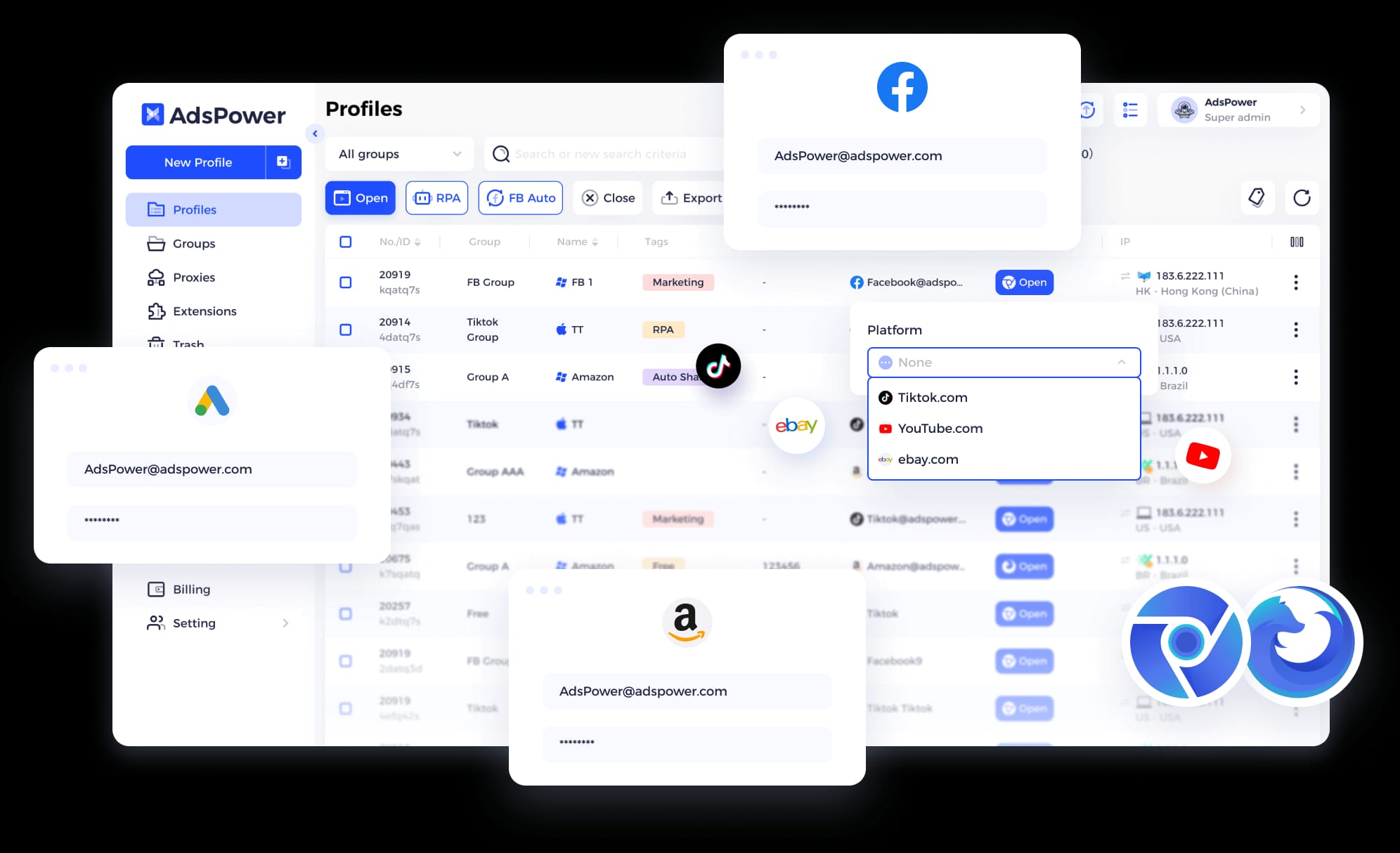
- Scenario: An e-commerce team needs to automate the creation of thousands of ad campaigns on Facebook and monitor account health across multiple platforms like Amazon. The primary goal is to achieve massive operational efficiency.
- Best Fit: AdsPower. This is AdsPower’s home turf. Its powerful RPA can be configured to handle the entire workflow, from creating profiles to warming them up, posting ads, and checking for blocks. The steep learning curve and high resource usage are acceptable tradeoffs for the immense automation power it provides.
Workflow 3: Web Scraping and Data Collection for Developers

- Scenario: A developer needs a reliable Multilogin alternative for data collection via web scraping. They need strong API support and compatibility with standard automation libraries.
- Best Fit: GoLogin. Its well-documented REST API and support for Puppeteer and Selenium make it a strong choice for developers. Its lower resource footprint is also advantageous for running long-lasting scraping jobs. The lack of a native Linux client on AdsPower makes GoLogin the default choice for many in the web scraping community who prefer a Linux environment.
Explore how these tools compare in more detail in our Multilogin top alternatives and competitors guide.
Final Verdict & Recommendations: The Right Tool for Your Risk Profile
After analyzing the data, my recommendations are not based on which tool has the most features, but on which provides the right balance of capability, cost, and security for specific professional needs.
There is no single ‘best anti-detect browser‘; the correct choice depends entirely on your team’s workflow, technical skill, and tolerance for risk.
Best For: Small-to-Medium Agencies, Freelancers, and E-commerce Sellers
GoLogin is the pragmatic choice for those who prioritize stability, a clean UI, and predictable costs over complex, built-in automation. It provides the best price-to-performance for teams as a reliable, easy-to-use alternative to Multilogin.
- Plan Highlight: Business plan at $49/mo includes 300 profiles and 10 team seats
- Browser Engine: Orbita (Chromium-based) with Android and iOS mobile fingerprints
- Automation: Full REST API, Selenium, and Puppeteer integration
- Security: 2FA, AES-256 encryption
- Resource Usage: ~135 MB per profile (lowest in class)
✅ Strengths
- Best TCO for teams (10 seats included)
- Lowest RAM usage per profile
- Intuitive user interface
- Transparent AES-256 encryption
- Android & iOS mobile fingerprints
⚠️ Considerations
- Less granular team permissions than AdsPower
- No built-in no-code RPA
- No financially backed uptime SLA
Consider GoLogin if: Your primary need is to provide your team with secure, separate browsing environments and your automation needs can be handled with standard API scripts.
Avoid GoLogin if: Your agency’s security policy demands highly granular, role-based team permissions, as AdsPower offers more control in this area.
💡 PRO TIP: Mohamed Zaki on ‘Free’ vs. ‘Professional Risk’
“In my experience, the biggest cost isn’t the software license; it’s the cost of failure. A ‘free’ or cheap tool that is unreliable costs you more in the long run. For any serious business, investing in a secure, stable tool like GoLogin has a far higher ROI than cleaning up a disaster.”
Best For: Performance Marketing Agencies and E-commerce Teams
AdsPower is designed for teams whose primary goal is to automate repetitive tasks at scale. If your workflow involves creating hundreds of ads or managing account statuses automatically, AdsPower’s RPA is a powerful, albeit complex, solution.
- Plan Highlight: Pro plan at $59/mo with 300 profiles and 2 seats (additional at $10/seat)
- Browser Engines: Sun (Chromium) and Flower (Firefox-based)
- Automation: Built-in RPA, full Local and REST API
- Security: 2FA, granular team permissions
- Resource Usage: ~180-210 MB per profile (highest)
✅ Strengths
- Most powerful built-in RPA for no-code automation
- Dual browser engine (Chromium + Firefox)
- Most granular team permission controls
- Deep Canvas fingerprinting support
⚠️ Considerations
- Highly restrictive 48-hour refund policy
- Highest RAM usage (180-210 MB per profile)
- High per-seat fees double TCO for agencies
- Steep learning curve
- Hong Kong data jurisdiction concerns
Consider AdsPower if: You are a power user willing to invest significant time in learning its systems to achieve massive workflow efficiency and your hardware can handle its high resource usage.
Avoid AdsPower if: You are a beginner, work on a machine with limited CPU/RAM, or your company policy prohibits tools with highly restrictive refund policies.
Best For: Students, Beginners, or Hobbyists
Incogniton is ideal for those who want to learn the concepts of multi-accounting with zero financial commitment. Its free plan is generous and includes baseline security, making it a viable entry point.

- Plan Highlight: Free plan with 10 profiles; Professional at $79.99/mo with 500 profiles and 5 seats
- Browser Engine: Chromium-based (no iOS profiles)
- Automation: Basic Selenium and Puppeteer integration
- Security: 2FA on all plans including free tier
- Resource Usage: ~165 MB per profile (mid-range)
✅ Strengths
- Generous free plan (10 profiles with 2FA)
- Good entry point for learning
- Lower cost entry for hobbyists
⚠️ Considerations
- No iOS mobile profiles
- Less advanced fingerprinting than competitors
- Slower development pace
- Vague encryption documentation
- Paid plans offer questionable value vs. competition
Consider Incogniton if: Your tasks are non-critical, you are primarily learning, and you do not require advanced automation features or extensive mobile device profiles (no iOS).
Avoid Incogniton if: You are a professional managing sensitive client data or running a business-critical operation. Competing tools offer better performance, features, and support for a similar or even lower TCO for teams.
📝 CHECKLIST: Red Flags to Watch For During Your Trial
- Vague Security Policies: If the vendor can’t specify their encryption algorithm or data handling practices, proceed with caution.
- User-Hostile Terms: Watch for limited refund windows (e.g., 48-hour policies) that restrict your ability to evaluate the tool properly.
- Stagnant Development: Check the release notes. If the tool hasn’t received significant updates in months, the team may be under-resourced.
- High Resource Usage: On a clean machine, if the browser is noticeably sluggish with just 10 profiles, it will only get worse at scale.
Conclusion
The search for effective substitutes for Multilogin boils down to a critical choice between GoLogin’s unbeatable team-based value, AdsPower’s demanding but powerful automation, and Incogniton’s entry-level freemium model.
My analysis reveals that TCO is about team seats, not just the plan price, and while baseline security is improving across the board, enterprise-level trust signals are still lacking.
For most professional users and agencies, my recommendation leans towards GoLogin as the most balanced and reliable platform, offering the best blend of performance, safety, and predictable cost for teams.
Power users with a high tolerance for complexity will find a potent ally in AdsPower. Incogniton serves its purpose as an excellent, risk-free educational tool but is outmatched in the professional arena.
Ultimately, your best defense is skepticism. Question every marketing claim, calculate the true TCO for your team before you commit, and always use the trial period to stress-test the software. A “good deal” on paper is never worth the cost of operational failure.
Before you finalize your decision, be sure to check for the best Multilogin coupon code available to ensure you’re getting the best price possible on your chosen platform.
Frequently Asked Questions
Q1: Is GoLogin a good alternative to Multilogin?
Yes, for most users, GoLogin is an excellent alternative to Multilogin. It provides a comparable level of core browser fingerprinting reliability and a more intuitive user interface at a significantly lower total cost of ownership for teams.
For example, its Business plan includes 10 team seats, making it far more affordable for agencies than competitors that charge per seat (GoLogin Pricing). If you prioritize ease of use and the best price-to-performance for a team, GoLogin is arguably the top choice.
Q2: Is AdsPower better than GoLogin?
It depends entirely on your primary use case. AdsPower is better if your work is centered on large-scale, complex automation for marketing or e-commerce, as its built-in RPA is more powerful and feature-rich than any competitor.
However, GoLogin is better if you need a stable, user-friendly, and resource-efficient browser for general multi-accounting tasks across a team. AdsPower is a specialist tool for automation power users, while GoLogin is a superior general-purpose platform with a much lower TCO for teams.
Q3: How much does GoLogin really cost per year for a team?
For a 10-person team, GoLogin’s Business plan costs approximately $588 per year when billed annually. This is based on its $49/month price, which includes 10 team member seats, 300 profiles, and API access.
When factoring in an estimated budget for proxies (which can vary), the total annual cost is often under $6,000, making it the most cost-effective option in this comparison for a team of this size (GoLogin Pricing). Always check the latest pricing, as vendors can change their plans.
Q4: Is Incogniton safe to use for professional work?
Incogniton provides baseline security features but is generally not recommended for high-stakes professional work. It does offer essential Two-Factor Authentication (2FA), which is a crucial security layer (Incogniton 2FA Guide).
However, it lags behind competitors like GoLogin and AdsPower in terms of advanced features, development pace, and overall performance. For professional use where reliability and cutting-edge features are required, investing in a more robust platform is advisable. Incogniton is best suited for learning, non-critical tasks, or its generous free plan.
Q5: What happens if I want a refund from AdsPower?
You have a very narrow window to get a refund from AdsPower. Their official policy states you can request a refund within 48 hours of payment, but only if you have not used any paid features (AdsPower Refund Policy).
This is a highly restrictive policy. If you use a paid feature (like the Firefox-based browser) or discover the tool is too resource-intensive for your machine after 48 hours, you will not be eligible for a refund. This financial risk should be carefully considered before purchase.
Q6: Which anti-detect browser has the best security?
Among the tools covered, none meet the highest enterprise security standards like a public SOC 2 certification. However, for standard professional use, GoLogin and AdsPower demonstrate a stronger security posture.
Both offer 2FA and have a track record of consistent updates. GoLogin adds transparency by explicitly stating it uses AES-256 encryption for user data (GoLogin Security). While Incogniton also has 2FA, its lack of technical detail on encryption and slower development cycle place it a tier below the others for security-conscious professionals.
Q7: Why is Incogniton’s free plan considered risky?
The term “risky” may be overstated; it is more accurate to call it “limited.” Incogniton’s free plan is not inherently risky from a baseline security perspective, as it includes 2FA to protect your account.
The primary risk is operational, not a security failure. The risk comes from using a less advanced tool for business-critical tasks where detection could lead to an account ban. Because its fingerprinting technology is not as sophisticated as paid leaders, there’s a higher chance of being detected on high-security websites. It’s safe for learning, but not for managing high-value assets.
Q8: Do I need SOC 2 compliance for an anti-detect browser?
If you are a solo operator, probably not. If you are an agency or business handling sensitive client data, it is an increasingly important factor.
SOC 2 is a third-party audit that verifies a company securely manages customer data. While none of these competitors publicly offer it, the absence of this certification is a risk you must accept. It means you are relying on the vendor’s own claims about their security practices rather than an independent auditor’s report.
The first provider to achieve SOC 2 will gain a major advantage in the professional market.
Q9: How do anti-detect browsers work?
Anti-detect browsers work by masking your real digital fingerprint and replacing it with a different, natural-looking one.
They modify hundreds of parameters that websites use to identify you, such as your browser type (user agent), screen resolution, fonts, and WebGL/Canvas rendering.
By managing these fingerprints in separate browser profiles, you can appear as multiple, unique users from different devices. This dramatically reduces the risk of your accounts being linked together and banned for violating a platform’s multi-accounting policies (What Is a Digital Fingerprint?).
For more tool reviews and the latest deals across all software categories, check out our latest coupons page and browse our comparison articles to find the perfect tool for your needs.

