PopAI Review 2026: AI Presentations, ChatPDF, Pros & Cons
Posted on |
By Mohamed Zaki · Researched and updated October 2, 2026 · Coupons Scout may earn a commission when you buy through links on this page, at no extra cost to you. Affiliate disclosure.
This PopAI review is for anyone who turns documents and research into slides: students, teachers, consultants and marketers. PopAI is an AI workspace that builds presentations, chats with your PDFs and writes text, all in one place. Below we cover what it does well, how the plans and credits work in 2026, and how to pay less with current PopAI promo codes.
Quick Verdict
Our score: 4.5/5 · A strong all-in-one AI workspace for slides and documents
PopAI turns a prompt, PDF, Word file, PowerPoint or web page into a full slide deck, and its ChatPDF tool summarizes and answers questions across up to 20 documents at once. It also includes AI writing, chat and images with models from several leading AI labs. Start free, then pick a plan by credits; just note that refunds are limited outside the EEA and UK.
Best for: students, teachers, consultants and marketers who build slides from documents and research.
Consider an alternative if: you need a refund window outside the EEA/UK, or you only need a design-first slide tool.
Key Takeaways
- PopAI is an AI workspace from 01.AI Pte. Ltd. (Singapore) that creates presentations, chats with PDFs and writes text, on the web, in Chrome and on iOS and Android.
- PopAI can build a slide deck from a prompt or from PDF, Word, PowerPoint, image or HTML files, and export paid-plan decks as PPTX or PDF.
- As of October 2026, PopAI’s plans are Free (500 credits total), Plus (10,000 credits a month), Pro (50,000 credits a month) and Unlimited.
- PopAI does not show web prices without signing in; on Apple’s App Store, Pro is listed at $12.00 per month or $99.00 per year, and Unlimited at $47.00 per month.
- PopAI’s homepage says it has 16M+ users, and its ChatPDF accepts up to 20 documents at once with 5,000 pages in total.
- Coupons Scout rates PopAI 4.5 out of 5 as an all-in-one AI tool for slides and documents.
PopAI at a Glance
| Detail | PopAI |
|---|---|
| Company | 01.AI Pte. Ltd., Singapore |
| Main tools | AI presentations, AI ChatPDF, AI writing, AI chat, AI images |
| Slide sources | Prompt, PDF, Word, PowerPoint, image, HTML or web page |
| Platforms | Web, Chrome extension, iOS, Android |
| Plans | Free (500 credits total), Plus (10,000/month), Pro (50,000/month), Unlimited |
| App Store prices | Pro $12.00/month or $99.00/year; Unlimited $47.00/month |
| Export | PPTX and PDF without watermark on paid plans |
| Refunds | EEA and UK: within 14 days; other regions: no refund after use |
Facts from PopAI’s homepage, pricing page and terms, and Apple’s App Store listing, checked October 2, 2026.
What Is PopAI and Who Is It For?
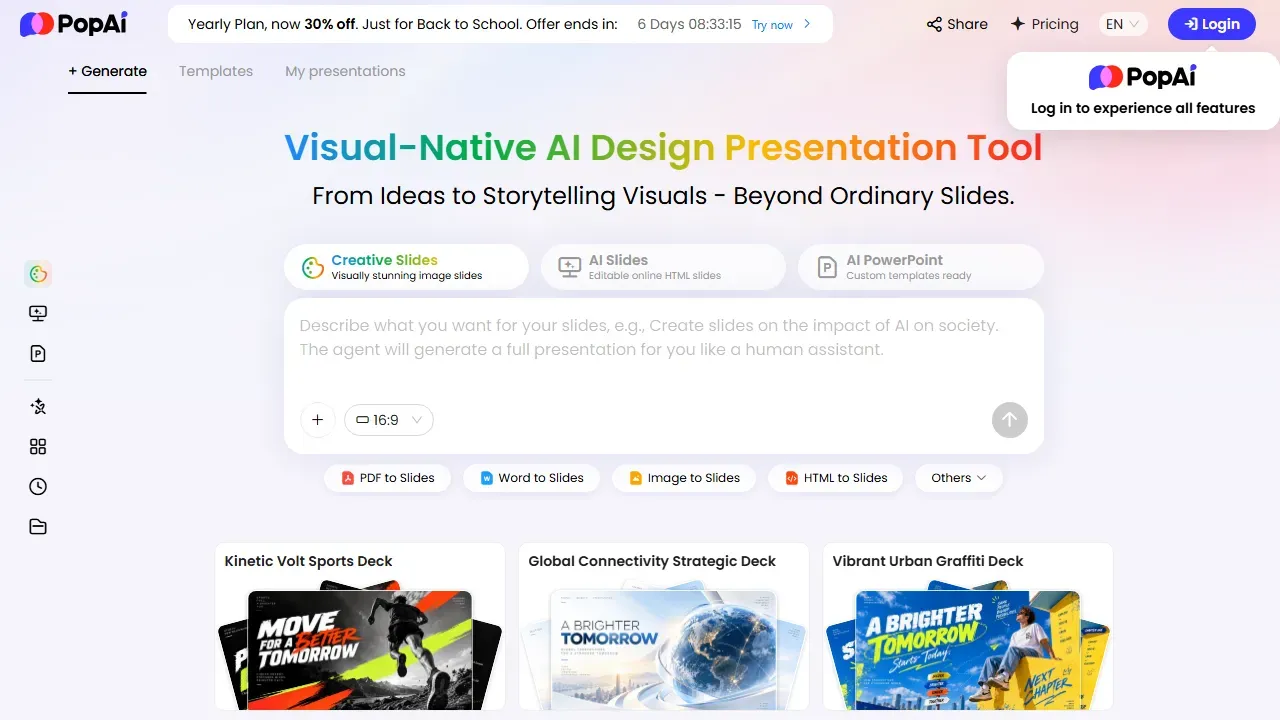
PopAI describes itself as a visual-native AI presentation tool that goes from ideas to storytelling visuals. It combines a slide generator with document chat and writing tools, and its homepage says 16M+ users rely on it. When we checked on October 2, 2026, the site was also promoting 30% off the yearly plan as a back-to-school offer.
PopAI is a great fit for:
- Students and teachers who turn readings, notes and papers into slides and summaries.
- Consultants and analysts who build decks from reports and PDFs.
- Marketers and founders who need pitch decks and content drafts quickly.
- Researchers who need to question many documents at once.
PopAI Review: Key Features
How Does the PopAI Presentation Maker Work?
You describe the deck you want, or start from a file: PDF to Slides, Word to Slides, Image to Slides and HTML to Slides are one click away, and you can also upload a PowerPoint to polish it. PopAI offers several styles (Creative Slides with image-led designs, editable AI Slides and AI PowerPoint with custom templates), and paid plans export the result as PPTX or PDF without a watermark.
What Can PopAI ChatPDF Do?
ChatPDF summarizes documents in one click and answers questions about them. According to PopAI’s pricing page, you can upload up to 20 documents at once with 5,000 pages in total, which is handy for literature reviews, due diligence or comparing reports.
Which AI Models Does PopAI Use?
PopAI lets you work with models from several leading labs. Its pricing page lists models from OpenAI (GPT), Anthropic (Claude), Google (Gemini), xAI (Grok) and DeepSeek, plus an image model, so you can pick the model that fits each task.
Where Can You Use PopAI?
PopAI runs in the browser, as a Chrome extension and in mobile apps for iOS and Android, so you can start a deck on your laptop and review it on your phone.
PopAI Pricing and Plans in 2026
PopAI plans are built around monthly credits that all its tools share. Here is what each plan includes according to its pricing page:
| Plan | Credits | Presentations | ChatPDF | AI chat |
|---|---|---|---|---|
| Free | 500 total | About 1 generation | About 50 docs | About 150 chats |
| Plus | 10,000/month | 15 to 20 generations, PPTX/PDF export, no watermark | About 975 docs | About 3,000 chats |
| Pro | 50,000/month | 75 to 100 generations | About 4,875 docs | About 15,000 chats |
| Unlimited | Most limits removed | For heavy daily use |
From popai.pro/en/pricing on October 2, 2026. Usage figures are PopAI’s own estimates.
How Much Does PopAI Cost?
PopAI shows web prices after you sign in. On Apple’s App Store, PopAI lists Pro at $12.00 per month (also $14.99 for another monthly option), $30.00 per quarter and $99.00 per year, and Unlimited at $47.00 per month. App-store prices include Apple’s billing and can differ from web prices, so compare before you subscribe.
How Can You Pay Less for PopAI?
- Use a promo code. Our PopAI coupon page lists codes for about 30% off, labelled by how strongly each one is confirmed.
- Watch for yearly-plan offers such as the 30% back-to-school discount PopAI promoted in early October 2026.
- Start on Free to test slides and ChatPDF before you pay.
- Pick the right plan size: Plus for occasional decks, Pro or Unlimited for daily work.
Pros and Cons of PopAI
✅ What We Like
- Builds full slide decks from a prompt or from PDF, Word, PowerPoint, image or HTML files.
- ChatPDF handles up to 20 documents at once (5,000 pages in total) with one-click summaries.
- One workspace for slides, document chat, writing, chat and images.
- Choice of AI models from OpenAI, Anthropic, Google, xAI and DeepSeek.
- Works on the web, as a Chrome extension and on iOS and Android.
- Free plan to start, then credit-based plans that scale with use.
- Paid plans export editable PPTX and PDF files without a watermark.
💡 Things to Consider
- Web prices appear only after you sign in; compare the plan page and app store before paying.
- Refunds are limited to EEA and UK users within 14 days, so test on the Free plan first.
- Credits are shared across tools, so heavy ChatPDF use reduces your slide budget; choose Pro or Unlimited for daily use.
PopAI’s strengths are breadth and speed: slides, documents and writing in one place, from almost any starting file. The points to consider are easy to manage by testing on the Free plan and choosing a plan that matches your monthly workload.
Is PopAI Safe and Legit?
Yes. PopAI is operated by 01.AI Pte. Ltd. in Singapore and publishes clear terms of service. You can cancel a subscription anytime and keep access until the end of the billing period. Refunds follow its terms: users in the EEA and UK can get a refund within 14 days of purchase, while users elsewhere are not refunded after paying and using the service. As with any AI tool, avoid uploading confidential documents you are not allowed to share.
How We Rated PopAI
| Criterion | Score | Why |
|---|---|---|
| Features | 4.7/5 | Slides, ChatPDF, writing, chat and images in one workspace. |
| Presentation quality | 4.5/5 | Full decks from documents or prompts, with themes and PPTX export on paid plans. |
| Ease of use | 4.6/5 | Simple prompt box, one-click PDF-to-slides and Word-to-slides tools. |
| Value | 4.4/5 | Free plan plus credit-based plans; app-store Pro from $12 a month. |
| Trust & policies | 4.2/5 | Clear terms and cancel-anytime; refunds limited outside the EEA and UK. |
| Overall | 4.5/5 | A strong all-in-one AI workspace for slides and documents |
How we score: we read PopAI’s official homepage, pricing page, terms and app store listing, and compared them with other AI presentation tools. Scores reflect that research, not a sponsorship. PopAI has not reviewed or approved this article.
How PopAI Compares to Other AI Presentation Tools
| Tool | Free option | Paid entry price | Stand-out strength |
|---|---|---|---|
| PopAI | 500 credits | Pro $12.00/mo on the App Store | Slides + ChatPDF + writing in one place |
| Gamma | 400 credits at signup | Plus $9/mo billed annually | Polished decks, docs and websites |
| Beautiful.ai | 14-day trial (card required) | Pro $14.50/mo billed annually | Smart Slide auto-formatting |
| Canva | Free plan | Pro US$144/year | Huge template and stock library |
| Monica | Free daily allowance | Pro $99/year | Browser AI assistant with ChatPDF |
From each official pricing page on October 2, 2026.
See the full breakdown in our PopAI alternatives and competitors comparison and our best AI presentation makers guide. Prefer interactive slides for classes and events? Read our AhaSlides review, or check Monica coupons and WPS Office coupons.
How to Get Started with PopAI
- Create a free PopAI account on the web, or install the Chrome extension or mobile app.
- Click PDF to Slides or Word to Slides, or type a prompt describing your deck.
- Pick a style and slide ratio, then edit the text and images PopAI generates.
- Use ChatPDF to summarize your sources and add key facts to the slides.
- Upgrade with a promo code from our coupon page when you need PPTX export or more credits.
Final Verdict: Is PopAI Worth It?
Yes, especially if your slides start from documents. PopAI combines a fast presentation maker, multi-document ChatPDF and writing tools in one credit-based workspace, available on web, Chrome and mobile. Test it on the Free plan, then choose Plus, Pro or Unlimited with a promo code. You can also try PopAI on its website.
Frequently Asked Questions
Is PopAI free?
Yes. PopAI has a Free plan with 500 credits in total, enough for about one presentation, around 50 ChatPDF documents or about 150 chats. Paid plans add monthly credits and PPTX/PDF export without a watermark.
How much does PopAI cost?
PopAI shows web prices after you sign in. On Apple’s App Store, PopAI Pro is listed at $12.00 per month or $99.00 per year, and Unlimited at $47.00 per month, as of October 2026.
Can PopAI make a presentation from a PDF?
Yes. PopAI’s PDF to Slides tool turns a PDF into a slide deck, and it also converts Word files, images, HTML pages and existing PowerPoint files.
Does PopAI export to PowerPoint?
Yes. Paid plans include full presentation export as PPTX or PDF with watermark removal.
Does PopAI offer refunds?
PopAI’s terms give users in the EEA and UK a refund within 14 days of purchase. Users in other regions are not refunded after paying and using the service, so test the Free plan first.
Are there PopAI promo codes?
Yes. Our PopAI coupon page lists promo codes for about 30% off, labelled by how strongly each one is confirmed.
About the author: Mohamed Zaki, Founder & Chief MarTech Strategist, Coupons Scout. Mohamed Zaki is the founder of Coupons Scout and leads how the team finds deals and researches the software behind them. He focuses on marketing technology, automation tools and ways to pay less for them.
Editorial note: this article is based on research of official product pages, help centers and policies, last checked October 2, 2026. Scores are our editorial opinion. Coupons Scout may earn a commission from some links, which never changes our rankings.
Sources
Official pages we used for this article, checked October 2, 2026. Prices and plans can change, so confirm on the official site before you buy.

