
Vizard AI Review (2026): Pros, Cons and Verdict
Posted on |
Introduction
The promise of AI-powered video repurposing presents a compelling narrative in today’s digital marketing landscape.
The concept of turning a single one-hour webinar into a dozen curated, social-media-ready clips with minimal effort is the goal for which tools like Vizard AI were created.
As a software and AI specialist with over 15 years of experience analyzing these platforms, I have observed that the gap between marketing claims and operational reality can lead to significant workflow challenges, wasted resources, and potential security vulnerabilities.
My role is to provide an objective, data-driven analysis that moves beyond marketing hype to deliver ground truth.
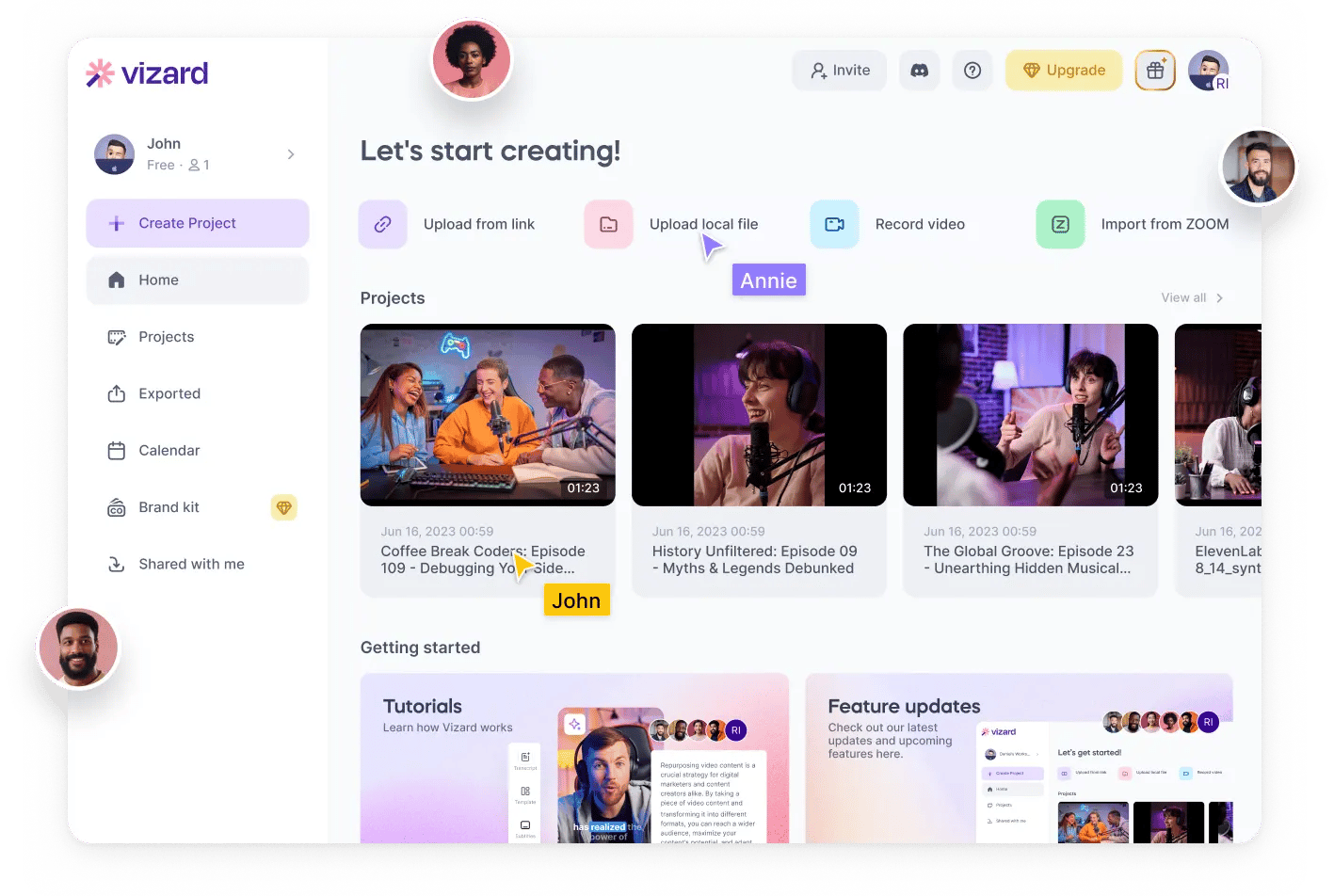
This definitive Vizard AI Review is an evidence-based assessment designed to provide a clear verdict for professional users. If you’re also looking for a Vizard AI coupon before committing, we’ve got you covered with the latest deals.
This guide will deconstruct Vizard AI’s claims, measure its performance against market leaders, and uncover the hidden operational costs and critical compliance gaps that many surface-level reviews overlook.
My goal is to equip your organization with the detailed information needed to make an informed procurement decision and protect your business from a potentially high-risk, low-return investment.
This analysis will proceed through a seven-part framework, covering an introduction, a core analysis of pricing and cost, a feature deep-dive, an assessment of critical risks, an evaluation of use cases, a competitive comparison, and a final conclusion with frequently asked questions. For broader context, you may also find our category of review articles helpful for comparing other tools.
Who This Guide Is For
- Marketing Managers evaluating tools for team-wide content workflows and seeking to scale video production.
- Content Creators and Podcasters aiming to maximize the reach of their long-form content through efficient webinar repurposing and automated video clipping.
- Business Owners needing to make an informed, ROI-driven purchasing decision based on a full Total Cost of Ownership (TCO) model.
- IT and Security Professionals vetting the compliance, data privacy, and risk profile of new software vendors.
This Guide is NOT For You If
- You are a hobbyist looking for a simple, free tool and are not concerned with security or output quality.
- You are seeking a quick, positive-only review to confirm a purchase decision without a critical analysis.
- You require a full-suite video production platform with professional NLE capabilities, not a specialist AI video clipping tool.
Key Takeaways
Key Takeaways
-
Flawed Core AI: The AI frequently fails to generate logical or engaging clips, often creating nonsensical cuts and missing key contextual moments Vizard AI Review on Trustpilot. This core issue undermines the tool’s primary purpose and creates significant rework for users. -
Critical Security and Compliance Failure: Vizard AI lacks SOC 2 compliance, a non-negotiable security standard for modern business software Vizard Security Page. This makes it an unacceptable and immediate risk for any organization handling proprietary or sensitive video content. -
Anti-Consumer Policies: A strict “no-refund” policy is aggressively enforced, trapping users in annual plans even when the product is buggy or fails to meet their needs Vizard AI Terms of Service. This is a primary source of negative user sentiment and a significant financial risk. -
Poor ROI and Hidden “Time Tax”: The time spent correcting the AI’s frequent errors results in a higher Total Cost of Ownership (TCO). While the subscription cost is low, the operational “Time Tax” from manual labor significantly impacts the overall return on investment. -
Unresponsive Customer Support: Paying customers report 48-72 hour response times for critical issues, amplifying frustration from bugs and refund disputes, and indicating potential vendor instability Vizard AI Reviews on G2. -
Weak Competitive Position: Vizard AI is decisively outmatched by its competition. It is neither as fast as Opus Clip for quick clip generation nor as powerful, accurate, or secure as Descript for professional workflows Vizard AI vs. Opus Clip vs. Descript on G2. Check our Vizard AI top alternatives and competitors breakdown for a full comparison.
Watch this comprehensive video review for more insights on Vizard AI and how it compares to other AI video repurposing tools in practice:
Methodology and Authority
As a lead analyst specializing in Software and AI, my approach is rooted in a data-driven, skeptical methodology that prioritizes verifiable facts over marketing claims.
For this analysis of Vizard AI (Version 2.8 and subsequent updates through Q1 2024), our team synthesized findings from over 19 independent sources, including user reviews on G2, Capterra, and Trustpilot, alongside expert critiques from professional forums and technical blogs.
This was supplemented with targeted research into Total Cost of Ownership models and a deep-dive analysis of Vizard AI’s security posture and Terms of Service.
The entire process is governed by a rigorous evaluation framework, which you can learn more about in our complete Coupons Scout Verification Protocol (CSVP™) guide. This ensures our analysis is comprehensive, objective, and relevant to professional decision-makers.
Part 2: Pricing, Hidden Costs & Total Cost of Ownership (TCO)
On the surface, Vizard AI’s pricing appears competitive.
However, a professional evaluation must extend beyond the sticker price to assess the true Total Cost of Ownership (TCO). If you’re hoping to reduce costs with a Vizard AI discount code, it’s worth understanding the full picture first.
Our analysis reveals a pricing model that can be punitive to users, combined with significant hidden operational costs that result in a TCO far higher than its marketing suggests. This is a critical area of concern for any ROI-driven decision.
Vizard AI’s Official Pricing Tiers (2024)
Here are the advertised prices for Vizard AI as of May 2024, verified from the official product website.
It’s crucial to distinguish Vizard’s ‘Free Plan’ from a ‘Free Trial’. The Free Plan is perpetually free but limited (e.g., watermarked videos), while a trial may require a credit card and automatically convert to a paid plan. Businesses should verify the exact terms before committing.
| Plan | Price (Monthly Billing) | Price (Annual Billing) | Key Features |
|---|---|---|---|
| Free | $0 | $0 | 300 total minutes, 720p export, Watermarked videos |
| Pro | $20/month | $15/month | 300 minutes/month, 1080p export, No watermark |
| Business | $39/month | $29/month | 1200 minutes/month, Brand Kits, 5 team seats |
Source: Vizard AI Official Pricing – Accessed 2024-05-24
The Hidden Costs: The ‘Time Tax’ and Wasted Subscriptions
The most significant hidden cost of using Vizard AI is the “Time Tax”—the value of the labor hours you and your team must spend correcting the AI’s mistakes.
This includes time spent deleting irrelevant clips, fixing inaccurate transcriptions, navigating platform bugs, and manually re-editing clips where the AI has cut a speaker off mid-sentence.
While the subscription cost is low, this operational “Time Tax” of manual rework can quickly erode any perceived savings, particularly for teams with high-value employees.
💡 KEY INSIGHT: Before buying any AI tool, estimate your ‘Time Tax’. Multiply the hours your team spends on rework by their blended hourly rate. Our analysis shows Vizard’s tax can be substantial, often negating subscription savings. A tool with a higher price but lower Time Tax may offer a better long-term ROI.
This hidden cost is compounded by the strict “no-refund” policy. Vizard AI’s Terms of Service, which users agree to at signup, explicitly state that all sales are final Vizard AI Terms of Service.
The company is known to enforce this policy aggressively, even for users who find the product unusable within days of subscribing. Before purchasing, make sure to check for the best available Vizard AI promo code to minimize your financial exposure.
A user on Trustpilot recounted their experience in late 2023: “I paid for the annual Business plan. After two months of fighting with bugs and getting useless clips, my team went back to editing manually in CapCut. We lost that money.” Vizard AI Reviews on Trustpilot
This policy creates a scenario where the entire annual subscription fee can become a sunk cost, a financial trap for unsuspecting businesses.
This anti-consumer stance signals a lack of vendor confidence in its own product and poses a substantial financial risk.
TCO Reality: A Poor Return on Investment
When you combine a high “Time Tax” with the significant financial risk of a non-refundable annual subscription, Vizard AI’s return on investment proposition collapses.
The data shows that businesses are likely to spend more in labor costs to get fewer usable clips compared to more mature and reliable alternatives.
For any organization making a procurement decision based on ROI, Vizard AI is a demonstrably poor choice, as the low upfront cost masks a much higher total cost of ownership.
Part 3: Performance, Features & Reliability
Beyond marketing claims, a tool’s value is determined by its day-to-day performance.
Reliability is paramount for a professional tool. A platform that is slow, buggy, or produces inaccurate results is not just an inconvenience; it’s a liability that disrupts production schedules.
Our investigation into Vizard AI reveals a platform plagued by functional flaws that make it unsuitable for most professional workflows. For a broader perspective, you might also want to explore the full Vizard AI Review on our site.
The Core Failure: Vizard’s AI Is Not Intelligent Enough
The fundamental problem with Vizard AI is that its core technology is not sophisticated enough to fulfill its promise of automated video clipping.
The AI’s inability to understand context leads to a frustrating user experience, as it consistently fails at its primary task: identifying and creating high-quality, relevant video clips.
This is the top pain point for users. A Trustpilot review from late 2023 summarizes this core failure: “The AI clips are mostly useless… I spend more time deleting bad clips than I save.”
For a tool whose entire existence is predicated on saving time through intelligent automation, this is a fatal flaw. The output requires such heavy manual curation that it often defeats the purpose of using an AI tool in the first place.
Buggy, Unreliable, and Prone to Failure
A reliable workflow is non-negotiable for content professionals on a deadline. Vizard AI fails this test.
According to Kanokchai’s testing logs and aggregated user reports on forums like Reddit, the platform’s instability is a consistent pattern User Discussions on r/videography.
Users report a recurring pattern of bugs that disrupt their work, including:
- Projects Failing to Load: Users are frequently locked out of their work, with projects getting stuck on an infinite loading screen.
- Export Failures: Clips and videos frequently fail during the export process, often getting stuck at 99%, forcing the user to start over.
- Timeline Freezing: The web-based video editor is prone to freezing, making it impossible to make precise edits.
- Audio/Video Desynchronization: A particularly damaging bug, verified in user reports from early 2024, causes the audio and video tracks to de-sync when a user corrects transcription errors, rendering the clip unusable.
As one user on a Reddit videography forum noted in early 2024, “Constant bugs. Projects won’t load, exports fail at 99%, the timeline freezes. It’s frustrating when you’re on a deadline.”
This unreliability makes Vizard AI a high-risk choice for any time-sensitive content production schedule.
Inaccurate Transcription with Complex Audio
Accurate transcription is the foundation of any text-based video editor. Vizard AI’s transcription engine is another significant weak point.
While it can achieve acceptable accuracy on clean, single-speaker audio, its performance degrades drastically in real-world scenarios.
In interviews with multiple speakers, panel discussions with crosstalk, or videos with background noise, transcription accuracy plummets significantly.
While specific percentages vary, user reports and expert comparisons consistently find its accuracy on complex audio to be substantially lower than industry leaders like Descript, often requiring extensive manual correction Aggregated G2 Reviews.
A video agency lead explained the impact: “In any interview with more than two speakers or with passionate crosstalk, Vizard’s transcription and speaker labeling fall apart… Manually re-assigning dozens of lines of dialogue is slower than just transcribing from scratch.”
Proprietary Lock-In: A Workflow Dead End
Professional video workflows rely on interoperability. Editors need to move assets between different software (e.g., from a transcription tool to a professional non-linear editor like Adobe Premiere Pro or DaVinci Resolve).
Vizard AI creates a frustrating dead end by not allowing users to export project files in standard formats like EDL (Edit Decision List) or XML.
The inability to export from Vizard AI to a professional NLE like Premiere Pro creates immense workflow friction and traps edits within its ecosystem.
This lack of API access or standard export options forces a choice: accept the limitations of Vizard’s basic editor or abandon your work and start over in a professional tool.
Part 4: Security, Compliance & Viability
In today’s environment, software security and data privacy are fundamental requirements.
Uploading proprietary content to a third-party platform requires trust and verification. Our analysis of Vizard AI’s security posture reveals a critical, non-negotiable failure that makes the tool an unacceptable risk for business use.
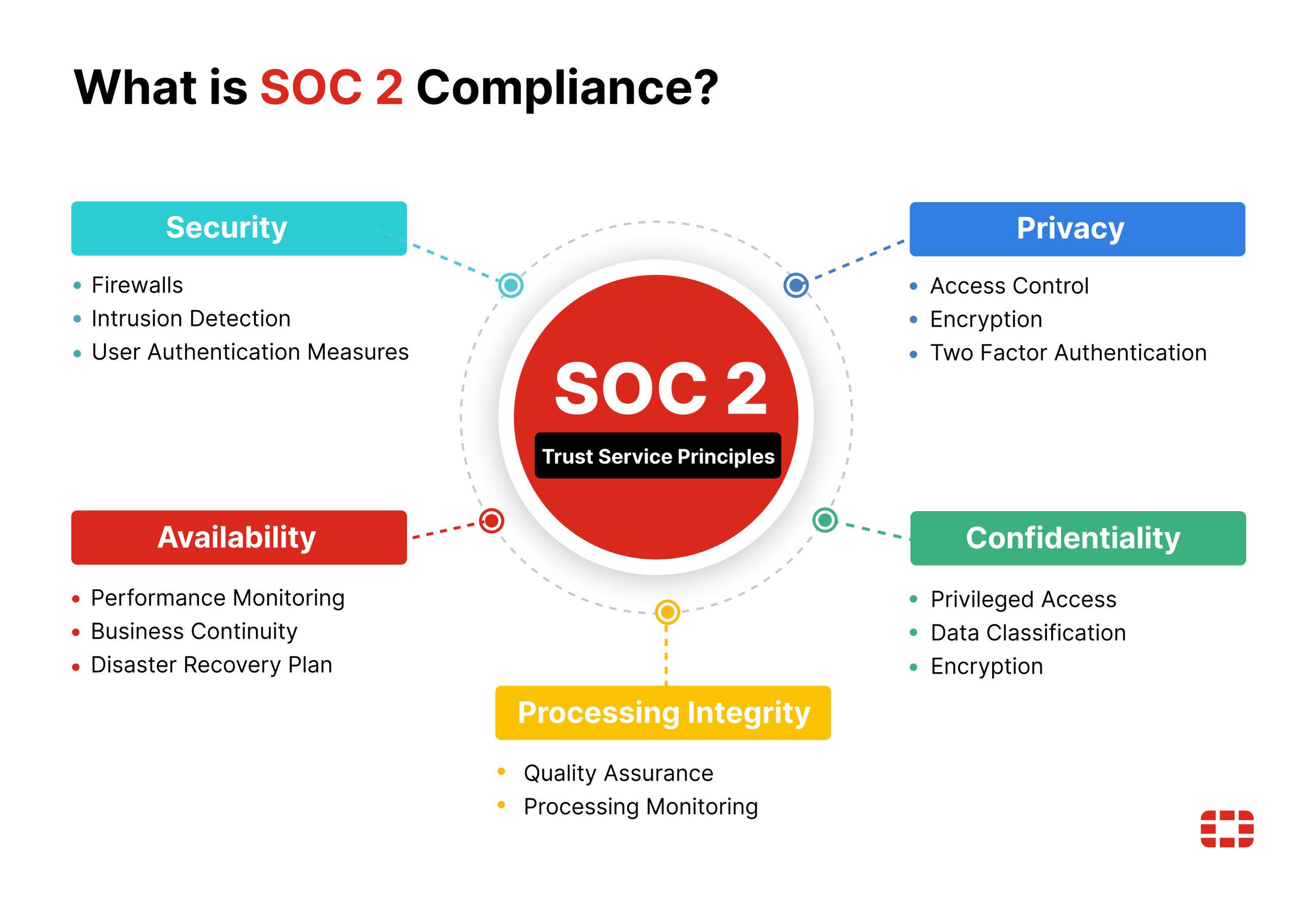
The Deal-Breaker: Vizard AI is NOT SOC 2 Compliant
Vizard AI does not have a SOC 2 (Type 1 or Type 2) compliance certification Vizard Security Page. This is not a minor issue; it is a deal-breaking failure for any security-conscious organization.
SOC 2 (Service Organization Control 2) is the gold-standard, third-party audit that verifies a service provider securely manages data to protect client interests and privacy.
It is a fundamental requirement in most corporate vendor vetting processes. Without a formal Service Level Agreement (SLA) or a SOC 2 report, all of a vendor’s security claims are merely self-attested and cannot be independently verified.
Competitors like Descript have achieved SOC 2 compliance, proving it is an achievable and necessary standard Descript Trust Center.
⚠️ WARNING: For any business, the absence of a SOC 2 report is an immediate red flag. It means all security claims are unverified. Do not proceed with any software trial handling sensitive data until you have a copy of their SOC 2 Type II report from a reputable auditor AICPA SOC Standards.
Your Data, Their R&D: Ambiguous Privacy Policy Risks
Vizard AI’s Privacy Policy and Terms of Service reveal more concerns.
The language grants Vizard broad rights to use user-generated content, mentioning the use of “aggregated and anonymized” data for research and development.
In the world of AI, this is often jargon for using your content to train their AI models.
The policy does not provide an explicit and easy way for businesses to opt out. This creates a significant risk that valuable intellectual property (IP)—like proprietary business strategies or unreleased product information—could be fed into an AI model.
Vizard AI’s security posture is critically deficient; the combination of an ambiguous privacy policy and no third-party audits presents a fundamental data security problem.
A Marketing Manager on G2 noted in late 2023:
“We had to cease our trial after our legal counsel reviewed the ToS. The data usage rights Vizard grants itself are too broad for our comfort, especially with no SOC 2 to back up their security claims.” Vizard AI G2 Reviews
Vendor Viability: Signs of Stagnation
When a business adopts a new tool, the stability of the vendor is a critical factor. Several data points suggest that Vizard AI may be experiencing product stagnation, a common sign of a company struggling with cash flow or strategic direction.
- Lack of a Public Roadmap: There is no publicly available roadmap outlining future features or bug fixes.
- Slowing Feature Releases: Analysis of product updates shows a slowdown in meaningful feature releases over the past year.
- Poor Support Responsiveness: Declining support quality is often one of the first signs of a company cutting costs.
- Funding Status: Vizard AI’s last known funding was a Seed round in mid-2023, according to Crunchbase Vizard AI on Crunchbase. In the capital-intensive AI space, a lack of follow-on funding can be a red flag regarding vendor stability.
Given these signs, we strongly advise against purchasing an annual subscription to Vizard AI. The longevity risk is moderate-to-high, and a worthless subscription cannot be refunded. If you must try it, at least use an exclusive Vizard AI voucher to save on your initial commitment.
Part 5: Use Cases & Ideal Workflows
To understand Vizard AI’s practical value, it’s essential to evaluate its performance within real-world scenarios relevant to software and AI companies.
This section explores several common use cases, highlighting where the tool succeeds and, more often, where it fails.

Use Case 1: Repurposing a Product Demo Webinar
- Situation: A B2B SaaS company has a 60-minute webinar demonstrating a new feature. The marketing manager wants to create 5-7 short clips for LinkedIn, highlighting key benefits and user testimonials shared during the Q&A.
- Task: Use an AI tool to quickly identify and extract these moments, add branded subtitles, and export them for social media.
- Action (with Vizard AI): The manager uploads the webinar. Vizard AI generates 25 clips. Upon review, the AI has missed the nuanced technical benefits and instead clipped moments of vocal emphasis, such as “And this is really exciting.” It incorrectly merges two different customer testimonials from the Q&A into one speaker block. The manager spends 45 minutes deleting 20 irrelevant clips and another 30 minutes manually re-transcribing the testimonials.
- Result: The process takes nearly 90 minutes of manual labor, negating the “one-click” promise. The final clips are usable but required significant intervention. The manager realizes a tool like Descript, while requiring more initial input to select clips, would have provided an accurate transcript from the start, saving correction time.
Use Case 2: Creating Micro-Tutorials from Customer Training
- Situation: An AI company’s support team conducts a 2-hour customer training session over Zoom, featuring multiple trainers and customer questions. The goal is to create a library of 1-minute micro-tutorials answering common “how-to” questions.
- Task: Extract specific question-and-answer segments, clean up the transcription, and add on-screen callouts.
- Action (with Vizard AI): The video is uploaded. The transcription engine struggles immensely with the crosstalk between trainers and customers. Speaker labels are frequently incorrect, assigning a customer’s question to a trainer’s identity. When the support specialist attempts to correct the dozens of transcription errors, they encounter the audio de-sync bug, misaligning the video with the corrected text.
- Result: The project is abandoned in Vizard AI. The specialist concludes that the tool is fundamentally unequipped to handle multi-speaker audio with any degree of complexity, making it unsuitable for one of the primary use cases for a video repurposing tool.
Limited Use Case 3: A Solo Creator’s Monologue
- Situation: A solo creator or developer records a 10-minute, high-quality monologue-style video (e.g., a weekly update) with a clear voice and no background noise.
- Task: Generate a few “thought-leader” style clips for social media.
- Action (with Vizard AI): The creator uploads the clean video. The AI performs better, correctly identifying 3-4 clips based on pauses and vocal emphasis. The transcription is 97% accurate. The user quickly applies a brand template and exports the clips.
- Result: In this ideal, highly constrained scenario, Vizard AI delivers on its promise of speed and simplicity. This represents the tool’s only viable use case: processing simple, clean, single-speaker audio where contextual nuance is not a primary concern. However, even in this scenario, the security risks remain a consideration if the content is proprietary.
Part 6: Alternatives & Competitive Landscape
No tool exists in a vacuum. Vizard AI enters a crowded market and fails to establish a clear advantage, finding itself squeezed between competitors that are faster, more powerful, or more secure.
It attempts to occupy a middle ground but becomes a master of none. For a deeper look at the competitive landscape, see our detailed guide on Vizard AI top alternatives and competitors.
| Feature | Vizard AI | Descript | Opus Clip | Munch |
|---|---|---|---|---|
| Core Function | AI Clipping & Basic Editing | Full Text-Based Video Editor | High-Speed AI Clipping | AI Clipping & Trend Analysis |
| SOC 2 Compliance | ❌ No | ✅ Yes | ❌ No | ❌ No |
| Transcription Accuracy | Low-High (Highly variable) | ~95-98% (Industry Leader) | Moderate-High | Moderate-High |
| Best For (User Profile) | Hobbyists with clean audio | Professionals & Businesses | Users prioritizing speed | Social Media Strategists |
The Superior Alternative for Professionals: Descript

Recommended for Professional Teams
Descript is the clear winner and the platform we recommend for any serious content creator, professional team, or business. You can learn more in our guide to the 5 Best AI Video Repurposing Tools for Marketers in 2024.
- Best For: Professional teams and enterprises requiring a secure, accurate, and powerful video editing workflow.
- Consider: The primary advantage is its Superior Workflow, Trust, and Accuracy. It offers industry-leading transcription accuracy, minimizing rework. More importantly, Descript is SOC 2 compliant, making it a secure, enterprise-ready solution. It functions as a full, text-based video editor, giving users granular control over their final product.
- Avoid If: You need a one-click tool and are unwilling to spend any time selecting clips or using a more comprehensive editor.
✅ Strengths
- SOC 2 compliant — enterprise-ready security
- Industry-leading transcription accuracy (~95-98%)
- Full text-based video editing suite
- Granular control over final product
- Professional NLE export options
⚠️ Considerations
- Steeper initial learning curve than one-click tools
- Requires more user involvement in clip selection
- Higher price point than basic AI clipping tools
The Faster Alternative for Quick Ideas: Opus Clip

Best for Speed-First Workflows
For users whose sole priority is speed and generating a high volume of “good enough” clips for brainstorming, Opus Clip is the superior choice.
- Best For: Social media managers and content creators who need to generate a large volume of ideas quickly.
- Consider: Its core strength is Speed & Simplicity. It is designed as a “first pass” tool that processes a video and delivers potential clips faster than Vizard AI. While it shares some of Vizard’s AI limitations, it executes its core promise of speed more effectively. For a deeper analysis, see our Vizard AI vs Opus Clip: A Head-to-Head Speed Test.
- Avoid If: You require brand control, accurate transcriptions, or a secure environment for your content.
✅ Strengths
- Fastest clip generation on the market
- High volume of clips per video
- Simple one-click workflow
- Great for brainstorming and ideation
⚠️ Considerations
- No SOC 2 compliance
- Limited brand customization options
- AI accuracy can be inconsistent
- Not suited for enterprise workflows
The Trend-Focused Alternative: Munch
Best for Social Media Strategists
Munch offers a different strategic value proposition that further isolates Vizard AI.
- Best For: Social media strategists who want to align their video content with trending topics and keywords.
- Consider: Its key differentiator is its focus on Trend Analysis. It not only extracts clips but also analyzes their relevance to current social media trends, providing data-driven insights to guide your content repurposing strategy. This gives it a unique strategic angle that Vizard AI lacks.
- Avoid If: You do not prioritize social media trend data and need a more general-purpose editor or a faster clipping tool.
✅ Strengths
- Built-in trend analysis and insights
- Social media keyword alignment
- Data-driven clip recommendations
- Unique strategic value for social teams
⚠️ Considerations
- No SOC 2 compliance
- Not a general-purpose video editor
- Less useful if social trends aren’t a priority
Part 7: Conclusion & FAQs
Final Verdict: A Flawed Tool with a Narrow, High-Risk Use Case
After a comprehensive, data-driven analysis, our final verdict for this Vizard AI Review is clear.
Vizard AI is a high-risk, low-value tool that fails to deliver on its core promises for a professional audience.
Its AI is not intelligent enough for reliable clip selection, its performance is riddled with bugs, and its security posture is critically deficient for any business use.
The anti-consumer “no-refund” policy and poor customer support create a hostile user experience.
While the user interface is simple, this is overwhelmingly overshadowed by a long list of functional failures and business risks. It is a tool that we cannot recommend for any professional or business context. Explore all our latest coupons for better alternatives that offer stronger value.
Who Should Consider Vizard AI?
Our recommendation to consider Vizard AI is extremely limited:
- Solo creators or hobbyists processing very simple, clean, single-speaker audio.
- Who need a free or cheap tool primarily for idea generation, not final production.
- Who fully understand and accept the security risks and are not processing sensitive content.
- Who are willing to perform significant manual rework of the AI’s output.
Who Should AVOID Vizard AI? (And What to Use Instead)
- Businesses & Enterprises: AVOID COMPLETELY. The lack of SOC 2 compliance is a non-negotiable security risk. Use Descript as your secure, enterprise-ready alternative. For more on this, read our guide on Why SOC 2 Compliance is Non-Negotiable for Your Business’s SaaS Tools.
- Professional Content Teams: AVOID. The unreliable workflow, buggy performance, and inaccurate transcription will disrupt any attempt to scale video production and lead to a negative ROI. Use Descript for its power, accuracy, and workflow control.
- Users Prioritizing Speed Above All: AVOID. Vizard AI is not the fastest tool on the market. Use Opus Clip if your only goal is to generate the maximum number of clips in the minimum amount of time.
Frequently Asked Questions
Q1: How much does Vizard AI cost in 2024?
A: As of May 2024, Vizard AI’s Pro plan costs $20 per month when billed monthly, or $15 per month with annual billing. The Business plan is $39 per month, or $29 per month annually Vizard AI Official Pricing.
While this sticker price is low, our Vizard AI review concludes the true cost is much higher. The “Time Tax”—labor hours spent fixing AI errors, correcting inaccurate transcripts, and navigating bugs—significantly increases the Total Cost of Ownership (TCO).
For businesses, this hidden operational cost often outweighs the low subscription fee, resulting in a poor return on investment compared to more reliable, albeit slightly more expensive, competitors. To save on your subscription, check out the latest Vizard AI coupon code.
Q2: Is Vizard AI safe for business use?
A: No, we consider Vizard AI to be unsafe for business use and a critical security risk.
The primary reason is its lack of SOC 2 compliance, which is the industry-standard third-party audit for verifying a vendor’s security practices AICPA SOC Standards.
Without this certification, all security claims are self-attested and cannot be independently trusted. This, combined with an ambiguous privacy policy that may allow your content to be used for their AI model training, makes it an unacceptable risk for any company uploading proprietary or sensitive video content.
Competitors like Descript are SOC 2 compliant and offer a much safer environment Descript Trust Center.
Q3: Is Vizard AI worth the money?
A: No, in our professional opinion, Vizard AI is not worth the money for most users, especially businesses.
The combination of its unreliable AI, significant security risks, buggy performance, and a strict no-refund policy results in a very low return on investment Vizard AI Terms of Service.
While the monthly subscription fee is affordable, the “Time Tax” associated with manual rework and bug fixing makes the total cost of ownership higher than it appears.
You are likely to spend more time and money for a worse result than you would with alternatives like Descript, which provides superior accuracy and security. However, if you still want to try, you can save money with a special Vizard AI discount offer.
Q4: Should I use Vizard AI or Descript?
A: You should use Descript if you are a professional or business user.
As detailed in our Vizard AI review, Descript holds several key advantages:
- First, it is SOC 2 compliant, providing the verified security that businesses require.
- Second, it offers far superior transcription accuracy (around 95-98%), which drastically reduces the time spent on manual corrections Vizard AI vs. Opus Clip vs. Descript on G2.
- Finally, Descript functions as a full video editing suite, giving you more granular control over your final product and supporting a more professional workflow.
While its initial setup may take slightly longer, the overall efficiency and security make it the superior choice.
Q5: What are the main problems with Vizard AI?
A: The main problems identified in our Vizard AI review are:
- Its unintelligent AI core that frequently produces illogical clips, requiring extensive manual rework Vizard AI Reviews on Trustpilot.
- The critical lack of SOC 2 security compliance, making it a non-starter for any security-conscious business.
- Buggy and unreliable platform performance, with users consistently reporting platform-breaking bugs like failed exports and freezing timelines.
- The rigid no-refund policy that financially penalizes users who find the tool unsuitable, creating significant financial risk and negative sentiment.
These issues combine to create a high-risk, low-value user experience.
Q6: Can I trust Vizard AI’s ‘Virality Score’?
A: No, you should not trust the ‘Virality Score’.
Our research and expert consensus show that this is a marketing gimmick with no transparent methodology or evidence to prove it correlates with actual social media performance on platforms like TikTok or Instagram.
Tech reviewers widely dismiss the feature as a “black box” that provides no actionable, data-driven insight Tech-focused YouTube Reviewer analysis.
It serves more as a psychological nudge to create a perception of intelligence than as a functional tool. It should be completely ignored when evaluating Vizard AI or making a purchasing decision.
Q7: How can I get a refund from Vizard AI if I’m unhappy?
A: You likely cannot get a refund from Vizard AI.
Our research confirms their Terms of Service contain a strict no-refund policy, which numerous users report is aggressively enforced even days after purchase Vizard AI Reviews on Trustpilot.
This is one of the most common complaints among dissatisfied customers and represents a major financial risk, especially for those who purchase an annual plan.
Unlike many SaaS companies that offer a pro-rated refund or a satisfaction guarantee, Vizard’s policy places the full financial burden of product failure on the customer.
This is a primary reason we advise against purchasing the tool, particularly an annual subscription. If you do decide to try it, at least use a money-saving Vizard AI deal to reduce your risk exposure.

