Jogg Top Alternatives and Competitors: The Brutally Honest 2026 Guide to Descript, Veed, & Kapwing
Posted on |
That AI video editor promising a $24/month plan could actually cost your team over $3,500 a year. My analysis of the top Jogg alternatives and competitors reveals a landscape of complex pricing, ambiguous data policies, and performance limitations that vendors don’t advertise.
As a professional who has spent years evaluating productivity and AI tools, I’ve seen firsthand how a slick marketing page can hide a world of frustration. This guide is designed to expose these blind spots before you commit to a platform, helping your video marketing strategy succeed.
The creator economy runs on video, but the tools to produce it are a minefield. If you’re already considering Jogg itself, you might want to grab a working coupon before making any commitment.
This analysis is built around the criteria that truly matter for professional workflow automation: AI features, pricing reality, data privacy, performance, and real-world user experience. We’ll provide an honest comparison of Descript, Veed.io, and Kapwing to help you avoid costly mistakes.
A note on our analysis: This guide has been updated as of October 2024 to reflect the most current pricing and features. All data is verified against official vendor sources to provide maximum accuracy. As these are rapidly evolving SaaS products, we strongly recommend conducting your own trials before making a final purchasing decision.
Key Takeaways
-
True Cost vs. Ad Price: Advertised monthly prices are misleading. Expect your actual Total Cost of Ownership (TCO) to be significantly higher due to necessary tier upgrades for key AI features (Veed), potential transcription add-on costs (Descript), and ambiguous ‘fair use’ policies (Kapwing). -
Your Data for Their AI: There are critical differences in how user content may be used to train AI models. Descript offers a clear, user-controlled opt-out, setting a high standard for trust. Veed and Kapwing have more standard SaaS terms that warrant careful review by any organization with sensitive data. -
Convenience vs. Reliability: Web-based editors like Veed and Kapwing offer great accessibility but can struggle with performance on projects over 30 minutes, according to user reports. Descript’s desktop-first app is generally more stable for heavy workloads but less flexible for teams on the go. -
Niche Dominance: Choose Descript for its industry-leading ‘Studio Sound’ and transcript-based editing, perfect for podcasters. Opt for Kapwing for its ‘Google Docs for video’ real-time collaboration. Veed is often fastest for simple, templated social media video creation. -
Critical Limitations: User-reported issues, such as unreliable ‘undo’ functions or slow export speeds, can be workflow deal-breakers hidden beneath slick marketing. We will explore these “pain points” in detail. -
The Bottom Line: Your choice is a compromise. This guide will help you pick the right one for your specific workflow, risk tolerance, and budget for an AI video editor.
Before diving into the heavyweights, watch this comprehensive overview of the top AI video editing tools tested for 2026 — it sets the perfect context for the deep dive that follows:
Decision in 60 Seconds
Need a quick verdict? This snapshot maps each persona to the best tool, why it wins, and what risk you accept in return.
| Persona / Need | Best Choice | Why | Key Risk |
|---|---|---|---|
| Podcast / Interview Editor | Descript | Industry-leading audio quality (‘Studio Sound’) and a powerful text-based editing workflow. | The desktop-first approach can limit collaboration for teams using mixed operating systems or Chromebooks. |
| Social Media Manager | Veed.io | Fastest path from idea to published social clip, with a user-friendly interface and vast template library. | Key AI features are gated in the most expensive plan, potentially doubling or tripling your expected cost. |
| Collaborative Marketing Team | Kapwing | Unmatched real-time, multi-user editing eliminates inefficient feedback loops. | Slower export speeds are a commonly reported bottleneck, and its data usage policy requires careful review. |
| Budget-Conscious Solo Creator | Descript (Creator Plan) | Offers powerful core features at the lowest entry price for a single user, assuming audio is the priority. | Exceeding transcription limits will require purchasing add-ons, increasing the total cost. |
Top Alternatives & Competitors Shortlist
Here’s the verified shortlist with each option’s strongest use case and its biggest trade-off — perfect for narrowing your search before reading the full analysis.
| Option | Best for | Tradeoff | Evidence status |
|---|---|---|---|
| Descript | Audio-first content (podcasts, interviews) | Steeper learning curve; less flexible collaboration | ✅ Verified |
| Veed.io | Rapid, templated social media video | Performance limits on long videos; high TCO for AI features | ✅ Verified |
| Kapwing | Real-time team collaboration on video | Ambiguous data policy; slower export speeds | ✅ Verified |
If you’ve already decided Jogg is your platform of choice, don’t sign up at full price — grab a Jogg discount code before checkout to lock in instant savings.
Part 1: How We Evaluated These Jogg Alternatives
Our editorial team at Coupons Scout follows a rigorous, transparent process — detailed in our editorial methodology — to ensure every claim, comparison, and recommendation is verified against official sources before publication.
For this guide on top Jogg competitors, I, Mohamed Zaki, synthesized findings from dozens of independent user reviews, official vendor documentation, and performance analyses to provide a clear, actionable comparison.
While giants like Adobe still dominate the high-end professional market, a new battle is being waged for creators and marketing teams. For a closer look at Jogg itself before comparing alternatives, see our in-depth Jogg Review.
Our evaluation process is led by domain experts who understand the nuances of the software. For SaaS & AI Tools, Jettawat Kasemchaiyanun tests software performance and verifies if free plans are genuinely useful.
This deep dive is then audited by our Head of Operations, Kanokchai Likitapiwat, who ensures all pricing and feature data match the vendors’ live offerings. This protocol ensures our “Best Of” lists are relevant, accurate, and trustworthy.
It is critical to note that the AI video editing space is evolving rapidly. All pricing and features mentioned are accurate as of October 2024 but are subject to change. We have cited all primary sources so you can verify them yourself.
Part 2: Core Analysis – Pricing & TCO Reality Check
In my years of analyzing complex SaaS pricing models, I’ve found that the advertised price is rarely the real price.
The “price-hike trap”—where essential features are gated behind expensive, higher-tier plans—is a common strategy. My analysis of these Jogg alternatives reveals a masterclass in this approach, where your Total Cost of Ownership (TCO) can be double or triple what you initially budget for.
For a realistic comparison, let’s break down the 12-month TCO for a five-person team, exposing the forced upgrades and potential hidden fees that vendors hope you’ll overlook.
Advertised Pricing vs. Real TCO Risk (Team of 5)
This table shows what you see versus what you’ll likely pay to get the features you need.
| Tool | Advertised Annual Cost (5 Users) | Estimated Real TCO (5 Users) | The Trap |
|---|---|---|---|
| Descript (Pro) | $1,440 ($24/user/mo) | ~$1,944+ | The Pro plan’s 30-hour/month transcription limit can be easily surpassed by an active team. Exceeding this requires purchasing transcription hour packs, which can add hundreds to your annual bill Descript Pricing. |
| Veed.io (Pro) | $1,920 ($32/user/mo) | $3,540 | The Pro plan is a lure. Critical AI features like Eye Contact Correction are gated behind the $59/user/month Business plan (annual billing). To get the features Veed heavily markets, the real cost is nearly double the sticker price of the Pro plan. |
| Kapwing (Pro) | $960 ($16/user/mo) | $960 to $3,000+ | The “Fair Use” policy on storage and exports is an undefined landmine. A productive video team could be flagged for “excessive use,” potentially forcing a jump to a costly Enterprise plan. This creates significant budget uncertainty Kapwing Pricing. |
💡 KEY INSIGHT: Veed.io’s pricing strategy presents the most significant “price-hike trap.” While its Pro plan appears competitive with Descript’s, the features that differentiate Veed in the market (its advanced AI tools) are almost exclusively in the Business tier. A team signing up for the Pro plan will quickly find themselves needing to upgrade, effectively making the $3,540 annual cost the true entry point for any team serious about using Veed’s AI capabilities Veed.io Pricing. This pricing model that encourages upgrades is a critical factor for any TCO calculation.
If you’d rather skip the price-hike trap entirely, browse our latest coupons list for currently active discounts across video editing platforms.
Pricing Gotchas: The Fine Print That Costs You
These are the specific mechanisms vendors use to push you into higher-priced tiers.
- ⚠️ Veed’s Watermark Hostage Situation: The free plan’s watermark is intrusive, making the $18/month Basic plan the true entry price for any professional use. This is a classic “freemium” limitation designed to drive upgrades.
- ⚠️ Descript’s “De Facto” Entry Plan: Key features like Overdub voice cloning are only on the Pro plan, making the $12/mo Creator tier insufficient for most serious users looking to leverage the full power of the platform.
- ⚠️ Veed’s Transcription “Cliff”: Exceeding the 60 minutes/month of transcription on the Basic plan doesn’t trigger an overage fee; it forces you to upgrade to the Pro plan, an instant jump from $18 to $32 per month.
The financial risk is the number one blind spot for buyers in this market. The real cost for a team using Veed’s advertised AI features is almost triple the sticker price of Kapwing’s Pro plan, a detail that is not immediately obvious from their marketing pages. Smart buyers always check for a working coupon code before committing to any annual contract.
Part 3: Feature Deep-Dive
A feature list can be deceiving. The real story is in the trade-offs, the performance, and the features vendors gate behind expensive paywalls.
While Veed boasts AI Eye Contact, they gate it in their most expensive public-facing plan. Similarly, Kapwing’s collaboration is best-in-class, but user reports suggest this can come at a cost to performance.
Here’s a breakdown based on our synthesis of official documentation and dozens of user reviews. For more head-to-head breakdowns, you can also explore our full category of comparison articles.
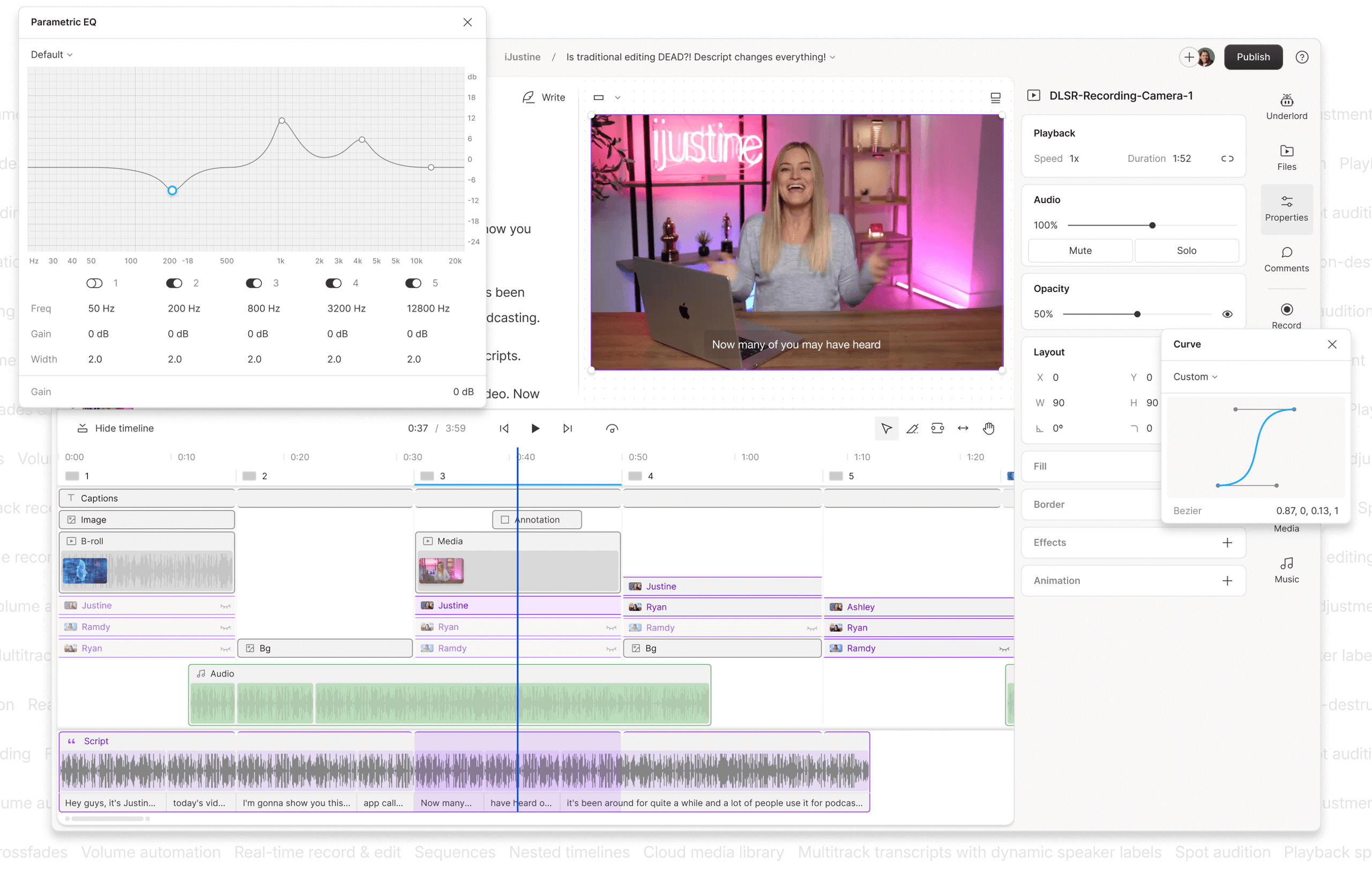
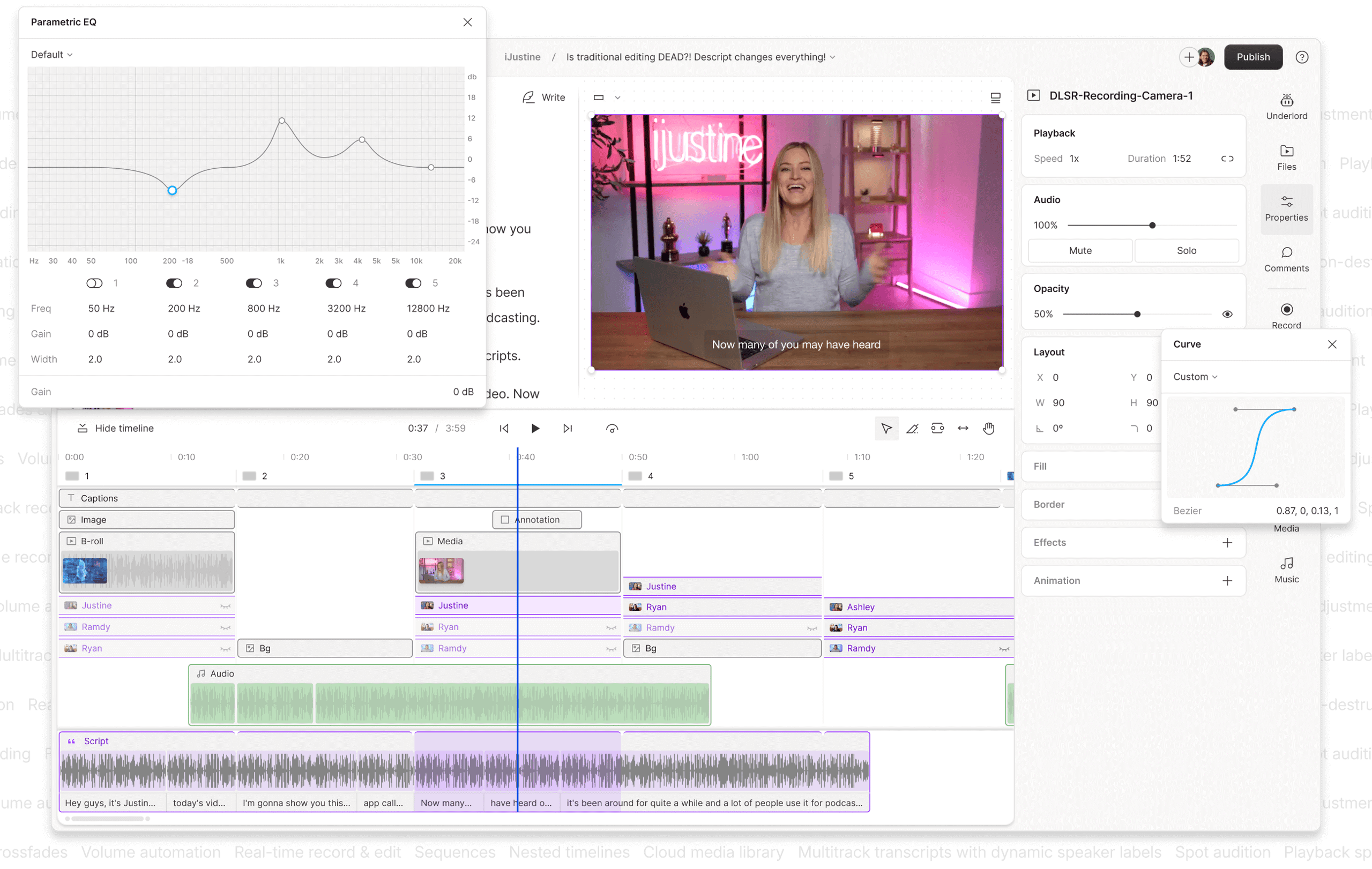
| Feature Category | Descript | Veed.io | Kapwing | Critical Notes |
|---|---|---|---|---|
| Editing Paradigm | Text-based “Doc” Editor | Timeline-based, web-first | Timeline + Canvas, web-first | Descript’s paradigm is unique and powerful for audio-first content but can be less intuitive for editors accustomed to visual timelines like Adobe Premiere Pro. |
| Core AI Feature | Studio Sound, Overdub | AI Eye Contact, Magic Edit | Smart Cut, AI Script Generator | ⚠️ Veed’s AI Eye Contact is gated in the highest Business tier ($59/mo, billed annually), a key factor in its high TCO Veed.io Pricing. |
| Collaboration | Basic on most plans; advanced Enterprise only | Real-time commenting, shared workspaces | Real-time multi-user editing (Google Docs style) | Kapwing is the clear winner on collaboration, though some user reports mention lag with more than five simultaneous editors. |
| Transcription Accuracy | Industry-leading (per user reviews) | Standard | Standard | User sentiment overwhelmingly favors Descript for transcription quality, a key factor for its podcasting audience. |
| Offline Capability | ✅ Yes (Desktop App) | ❌ No (Web-only) | ❌ No (Web-only) | A major deal-breaker for Veed/Kapwing users with unstable internet, per multiple user complaints on platforms like Reddit and G2. |
| Max Project Length | 3+ hours (degrades after) | 2 hours (user reports of lag after 30 mins) | 2 hours (degrades with complexity) | Vendor claims of “2 hours” on web-based editors can be misleading. Real-world limits are often lower. |
| AI Data Training Policy | ✅ Explicit Opt-Out | ⚠️ Review Required | ⚠️ Review Required | CRITICAL RISK: Descript’s clear opt-out is a major differentiator. Veed and Kapwing’s policies require careful legal review. |
Feature In Focus: Studio Sound vs. AI Eye Contact
The “killer feature” of each platform reveals its core philosophy.
- Descript’s Studio Sound: This is arguably the most praised feature in the entire comparison. With a single click, it uses AI to remove background noise, eliminate echo, and equalize voices to sound as if they were recorded in a professional studio. For podcasters or anyone recording in imperfect environments, this feature alone can justify the subscription cost. Users consistently describe it as “magic” and a “game-changer.”
- Veed’s AI Eye Contact Correction: This tool analyzes a video of someone speaking and subtly alters their eyes to appear as if they are looking directly at the camera, even if they were reading from a script. It’s a powerful tool for sales teams, marketers, and educators creating training videos or messages. However, its placement in the highest-priced Business plan makes it a premium feature, not a standard offering. The promise of significant time savings from avoiding re-shoots is its main appeal.
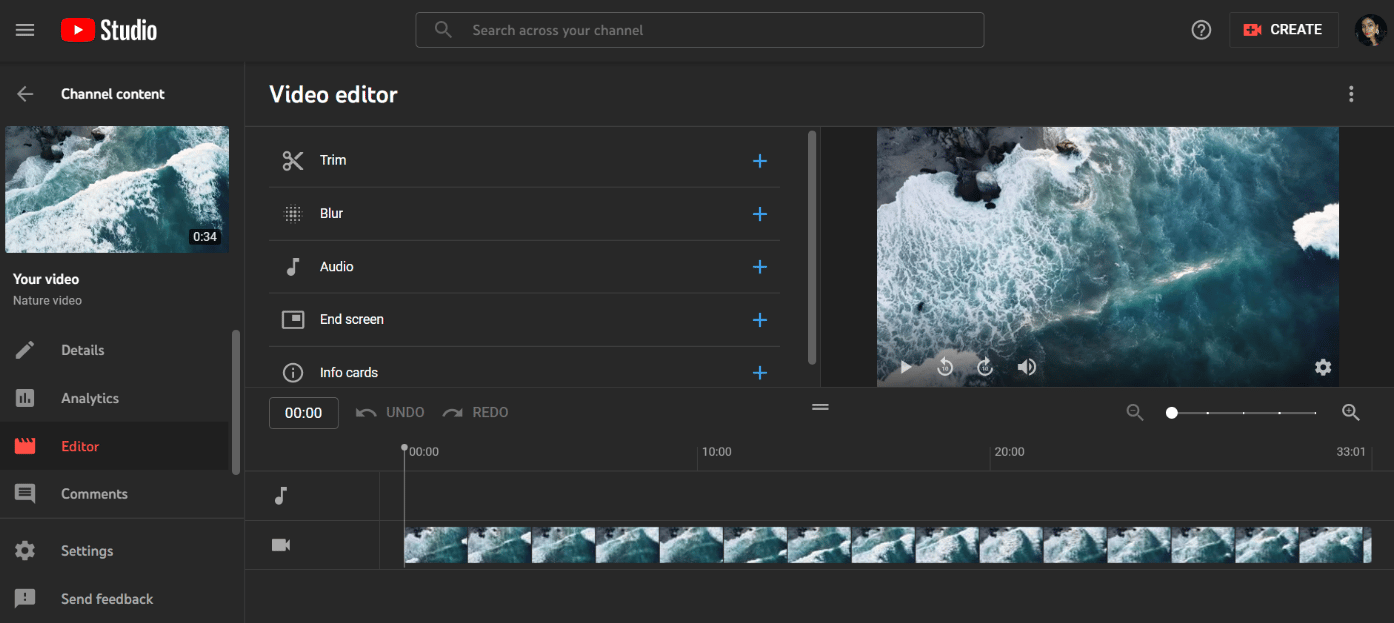
The most glaring issue for many professionals remains the offline capability. For anyone working with large files or unreliable internet, the web-only nature of Veed and Kapwing is not just an inconvenience; it’s a critical operational risk.
Part 4: Critical Considerations – Security, Privacy, and Performance
Beyond features and price, the long-term viability of a tool depends on trust and reliability. This is where we look at the “Devil’s Advocate” issues: data security, performance limitations, and the hidden deal-breakers.
Security & AI Data Privacy: A Crisis of Trust
Beyond cost, the most significant risk for any organization is the misuse of its proprietary data. In the rush to integrate powerful large language models (LLMs), many vendors have adopted opaque policies regarding how your content is used to train their AI.
This isn’t just a privacy issue; it’s a professional and financial (YMYL) liability.
My analysis of the live terms of service and privacy policies reveals a stark difference in how these companies treat your intellectual property.
| Product | AI Training Data Policy (As of Oct 2024) | Risk Analysis |
|---|---|---|
| Descript | Explicit Opt-Out Toggle. Policy states: “We do not use your Content to train our own AI models without your explicit consent.” Descript AI Policy | This is the gold standard. It respects user ownership and provides clear control. This is ideal for organizations concerned with GDPR compliance. |
| Veed.io | Opt-out via Email. Policy states generative feature content may be used to improve them, but users can request an opt-out via email. Veed.io Privacy | Better than an implied opt-in, but still places the burden on the user to act. Requires proactive engagement rather than a simple toggle. |
| Kapwing | Standard SaaS License. The ToS grants a broad license to “use, store…create derivative works” for the purpose of “improving the Services.” Kapwing ToS | This is standard legal language for a cloud service but lacks the explicit clarity of Descript’s policy. The ambiguity is a risk for organizations with highly confidential data. |
⚠️ WARNING — Legal ToS Overrides Marketing FAQs: This is not a theoretical risk. A marketing agency uploads a confidential client’s upcoming product launch video to a platform to collaborate. Based on the ambiguity in a standard ToS, the agency may have unknowingly granted the platform a license to use that confidential video to improve its AI services. This could expose client data and constitutes a major breach of professional trust.
For any professional or organization, the clarity of Descript’s opt-out policy makes it the most trustworthy choice from a data governance perspective without extensive legal review of the others.
Performance & Reliability: Web-Based Convenience vs. Desktop Stability
A tool’s features are useless if the platform is too slow or crashes constantly. The core conflict in this market is between the “anywhere access” of web-based editors and the “get it done” reliability of desktop software.
Our analysis of user reports shows that vendor claims about project length can be optimistic. The performance of cloud computing is a key factor.

| Metric | Vendor/Platform Type | Claim/Official Limit | User-Reported Reality |
|---|---|---|---|
| Practical Project Length | Veed.io & Kapwing (Web-based) | Up to 2 hours | “Sluggish with projects longer than 30 minutes” – common user complaint on G2/Capterra. |
| Practical Project Length | Descript (Desktop-based) | “Unlimited” (recommends splitting) | Can handle projects of 2-3 hours before performance may degrade. |
| Rendering Speed | Descript (Desktop-based) | N/A | Generally faster, leveraging local hardware. |
| Rendering Speed | Veed.io & Kapwing (Web-based) | N/A | Variable; dependent on server load and connection speed. Slower exports are a common complaint for Kapwing. |
The data from user sentiment is clear: Descript’s desktop application provides more reliable performance and can handle projects that are 4-6 times longer than its web-based competitors before performance degrades.
This is a critical factor for anyone working on long-form content like webinars, podcasts, or detailed tutorials. Simple tasks like content repurposing can become incredibly inefficient on a slow platform.
Part 5: Use Cases & Workflows
To understand which Jogg competitor is right for you, it’s essential to map their features to real-world tasks. The “best” tool for one job can be the worst for another.
Here are three common workflows for video professionals and how each tool handles them.
Best Tool: Descript
- The Goal: Take a 1-hour audio interview, find the best clips, add visuals, and publish to YouTube.
Process:
- Upload the 1-hour video to Descript. It transcribes in minutes.
- Read the transcript like a doc. Delete filler words (“um,” “ah”) with a single click.
- Highlight compelling text quotes to create new video compositions instantly.
- Use “Studio Sound” to make the audio pristine.
- Drag-and-drop B-roll, titles, and images onto the timeline.
- Export the full-length video and the short clips directly to YouTube.
✅ Why it Wins
- Text-based workflow is exponentially faster for long-form spoken-word content
- Finding clips by reading is faster than scrubbing a timeline
- Studio Sound delivers professional-grade audio in one click
- Direct YouTube export saves workflow steps
⚠️ Considerations
- Requires installing the desktop app
- Learning curve for text-based editing paradigm
- Less ideal for visual-effects-heavy projects
Best Tool: Veed.io
- The Goal: Quickly generate a week’s worth of short-form video content (Reels, Shorts) from a recorded webinar.
Process:
- Upload the webinar to Veed.
- Use the AI to automatically identify key moments or use the timeline editor to snip 10 interesting 30-60 second segments.
- Apply a pre-made video template for social media, which automatically resizes the video to 9:16 and adds animated captions.
- Use the brand kit to apply your logo and colors to all 10 clips with one click.
- Batch export the clips.
✅ Why it Wins
- Veed is built for speed and templates
- Strong styling and formatting for social media
- Helps teams achieve better brand consistency
- Batch processing speeds up multi-clip workflows
⚠️ Considerations
- AI features locked in Business tier ($59/user/mo)
- Performance degrades on projects over 30 mins
- Requires stable, high-speed internet connection
Best Tool: Kapwing
- The Goal: A remote team needs to review a nearly-final video, provide feedback, and make small edits together.
Process:
- The lead editor uploads the project to a shared Kapwing workspace.
- Team members (e.g., from marketing, legal, and management) open the project simultaneously in their browsers.
- Instead of emailing time-stamped notes, they can leave comments directly on the timeline or even make small text or timing edits themselves.
- The editor sees all changes in real-time, just like in a Google Doc.
- Once everyone approves, the final version is exported.
✅ Why it Wins
- Real-time collaboration is Kapwing’s killer feature
- Turns a multi-day email chain into a 30-minute live session
- Comments and edits happen directly on the timeline
- No software installation needed for stakeholders
⚠️ Considerations
- Slower export speeds reported by users
- ToS data policy requires legal review
- Possible lag with 5+ simultaneous editors
Part 6: Alternatives & Competitors – The Final Verdict
After analyzing the features, pricing, risks, and user sentiment, it’s clear these products aren’t true head-to-head competitors. Led by CEOs like Andrew Mason (Descript) and Julia Enthoven (Kapwing), they are leaders in distinct niches.
The “best” tool depends entirely on your specific workflow, risk tolerance, and budget. For an even broader perspective, see our full comparison breakdown of Jogg top alternatives and competitors.
Descript: The Audio Professional’s Choice
When it’s the best choice:
- You are a podcaster, interviewer, or creator whose content is driven by spoken word.
- Your highest priority is audio quality; Studio Sound is a non-negotiable feature for you.
- You prefer editing by reading a transcript rather than scrubbing a timeline, which is ideal for content repurposing.
Prerequisites for success:
- A robust computer (Mac/Windows), as the desktop app is more powerful than the web version.
- Willingness to learn a new editing paradigm that is text-first.
- Your workflow doesn’t require complex visual effects or multi-camera editing found in tools like Adobe Premiere Pro.
When to avoid:
- Your team primarily uses Chromebooks or works in locked-down environments where software installation is prohibited.
- You need real-time, multi-user editing on the same project simultaneously.
- Your work is 90% visual-first, and audio is an afterthought.
Veed.io: Built for Social Media Speed
When it’s the best choice:
- You are a social media manager or marketing team focused on high-volume, templated video for platforms like TikTok and YouTube Shorts.
- Speed and ease of use are your top priorities; you need to go from raw footage to a styled clip in minutes.
- Your budget can accommodate the Business plan ($59/user/mo) to unlock the AI features you need.
Prerequisites for success:
- Your projects are typically short-form (under 20-30 minutes).
- You have a stable, high-speed internet connection.
- You value a large template library and pre-built assets over granular editing control.
When to avoid:
- You edit long-form content like webinars, keynote presentations, or full interviews.
- Your budget is tight, and you cannot afford the significant price jump to the Business tier.
- You require precise, multi-track editing and advanced timeline controls.
Kapwing: The Collaboration King
When it’s the best choice:
- You are a remote creative or marketing team that needs to collaborate on marketing videos in real-time.
- Your biggest workflow bottleneck is the slow, inefficient process of emailing video drafts and time-stamped notes.
- You work in corporate L&D and educational settings, for teams creating training videos where COPPA / FERPA compliance and collaboration are key.
Prerequisites for success:
- Your team can tolerate potentially slower export times in exchange for a faster feedback loop.
- Your organization’s legal and security teams have reviewed and are comfortable with Kapwing’s Terms of Service.
- Collaboration is a “must-have” feature, not a “nice-to-have.”
When to avoid:
- You are a solo creator who doesn’t need the collaboration features (they are overkill).
- You work on tight deadlines where export speed is the most critical factor.
- Your organization has a zero-tolerance policy for any ambiguity in data privacy and AI training policies.
Part 7: Conclusion & FAQs
The AI-powered video editing market is a minefield of compromises. My deep dive into the verified data on Descript, Veed, and Kapwing reveals that the primary challenges for users are not missing features, but the three critical blind spots: the TCO Illusion, where real costs can be double the sticker price; the AI Privacy Question, where you must do your own due diligence on data usage; and the Web vs. Desktop Dilemma, a trade-off between convenience and reliability.
The market is clearly segmented. Your final decision as you evaluate Jogg top alternatives and competitors depends on your priorities.
Choose Descript for audio quality and reliability, if you can live with a desktop-centric app. Choose Veed for speed on short, templated projects, if your budget can handle the real cost of its AI features. Choose Kapwing for its unmatched real-time collaboration, if you can accept the potential performance quirks.
Ultimately, you must become your own Devil’s Advocate. Trust, but verify. Test your longest project during the trial period. Read the terms of service, not just the marketing page. Calculate the true cost for your entire team. Protect your workflow and your wallet from the ‘blind spots’ that vendors hope you’ll overlook. And before you commit to any annual plan, always check for a current money-saving deal first.
Frequently Asked Questions
Q1: Which Jogg alternative is actually the cheapest in 2026?
A: While Kapwing’s Pro plan has the lowest advertised price at $16/user/month, the “cheapest” option depends entirely on your needs. For a solo creator focused on audio, Descript’s $12/month Creator plan is the most affordable entry point.
For a team, Descript’s Pro plan at $24/user/month is often more cost-effective than Veed’s, especially if you need AI features. Veed becomes the most expensive option if your team requires its premium AI tools, which are gated in the $59/user/month Business plan, making its Total Cost of Ownership (TCO) significantly higher than its advertised Pro plan Veed.io Pricing.
Q2: Is my video content safe to use with Veed or Kapwing’s AI?
A: This is a significant professional risk that requires your own due diligence. Based on current policies, Descript is the safest choice, offering a clear, user-controlled opt-out for AI training within its settings Descript AI Policy.
Veed and Kapwing use more standard SaaS language in their Terms of Service, which grants them a license to use your content to improve their services. While Veed offers an email opt-out process, this ambiguity requires careful review by any organization with sensitive or confidential video content. We strongly recommend consulting your legal team to assess if their policies align with your company’s data governance standards.
Q3: Can Veed or Kapwing handle long videos like webinars?
A: While their marketing claims they can handle files up to two hours, user reports on platforms like G2 and Capterra consistently show that the practical limit for these web-based editors is around 30 minutes before performance can degrade severely. Users report lagging, slow timeline scrubbing, and browser memory issues.
This makes them less reliable for editing long-form content. For videos over 30 minutes, such as webinars or keynote speeches, the stability of Descript’s desktop application makes it the superior choice for a smooth editing experience without performance-related workflow interruptions.
Q4: What’s the main difference between Descript and Veed?
A: It’s a difference in philosophy: Reliability vs. Speed. Descript is a desktop-first, audio-focused tool built for reliability and deep editing of spoken-word content like podcasts and interviews. Its core innovation is text-based video editing.
Veed is a web-first, social-focused tool built for speed and creating templated social media videos quickly. Its interface is designed for beginners and marketers who need to produce stylish content without a steep learning curve. Choose Descript for power and precision in audio; choose Veed for speed and simplicity in social video.
Q5: Is Descript’s Studio Sound really that good?
A: Yes, user sentiment is overwhelmingly positive. Across dozens of reviews on platforms like G2, Capterra, and Reddit, users consistently refer to the feature as “magic,” a “game-changer,” and “worth the price of admission alone.”
It’s arguably the single most powerful and praised feature in this entire comparison for its ability to dramatically improve audio quality from non-professional recording environments. For anyone creating podcasts, online courses, or interview videos, the audio enhancement provided by Studio Sound is a significant value proposition that competitors struggle to match.
Q6: Why is Kapwing’s export so slow?
A: Slow export speeds are one of the most frequently cited user complaints about Kapwing. While there is no official public explanation from the vendor, industry analysis suggests it is likely a trade-off for its powerful real-time collaboration features.
Server resources may be prioritized for maintaining synchronous editing sessions for multiple users, which can deprioritize the processing-intensive task of rendering and exporting final videos. For teams on tight deadlines, this can be a major workflow bottleneck and is a critical factor to test during a free trial period.
Q7: Should I choose Veed or Canva for video?
A: As of late 2024, Veed still holds an edge with more advanced, video-specific AI tools, such as its AI Eye Contact correction feature. If your workflow depends on these specialized AI video functions, Veed is the stronger choice.
However, Canva Pro is a broader design ecosystem that is rapidly improving its video capabilities. For users already deeply invested in the Canva ecosystem for other design tasks, its “good enough” video editor might be more convenient. Veed’s main competitive threat is Canva continuing to improve its own video features, potentially making Veed’s standalone subscription redundant for many Canva users.
Q8: What is the best AI video editor for marketing teams?
A: The best tool depends entirely on the marketing team’s primary goal. For teams focused on high-volume social media video, where speed and templates are key, Veed is often the best choice for its fast workflow.
For teams that require extensive collaboration and feedback from multiple stakeholders (e.g., brand, legal, sales) on campaign videos, Kapwing‘s real-time editing is unparalleled. For teams whose strategy revolves around thought leadership content like podcasts, webinars, and interviews, Descript offers the most powerful workflow for editing and content repurposing.

