
Zeemo Alternatives and Competitors (2026)
Posted on |
As a content creator or marketing professional, you’re caught in a bind. You need the speed of AI video captioning tools, but you can’t afford the hidden risks of opaque pricing and severe data privacy trade-offs.
Choosing the wrong tool can lead to budget overruns of over 12x and expose your confidential content to unacceptable risks. This guide is not another “Top 5” list of video transcription software; it is a Devil’s Advocate analysis from my years as a software analyst.
It is designed to expose the “gotchas,” “blind spots,” and misleading marketing claims. My goal is to arm you with a clear decision framework for evaluating AI captioning tools like Zeemo, based on your specific workflow, budget, and security needs. Before you commit to any paid plan, it’s also worth checking the latest Zeemo discount code to see how much you can save up front.
This analysis provides a decision framework based on extensive research; always conduct your own due diligence and consult with security professionals for specific compliance needs. All pricing and features are subject to change and were verified as of May 2024.
Key Takeaways
Key Takeaways
-
Top Picks by Use Case: Descript is the top choice for workflow-focused editors who require robust data privacy controls. Submagic is built for creators prioritizing speed and trendy aesthetics for non-sensitive social media content. -
The Pricing Trap: The “per-video” pricing model can be a financial pitfall. A power user could spend $144/year on Descript versus $1,788/year on Submagic for the same volume of short videos, a staggering 12.4x difference. -
Privacy Is the Deciding Factor: Descript and Veed.io explicitly state they do not train AI on user data without opt-in consent. Descript’s SOC 2 compliance gives it an edge for enterprise use. In contrast, Submagic’s policy permits using your data for AI training, a significant risk. -
The “Unverified” Risk: Zeemo and Captions.ai have vague privacy policies that do not explicitly forbid using your content for AI training. Following best practices, any policy without an explicit denial should be treated as a potential risk for confidential material. -
Core Functionality Trade-Offs: The central choice is between control and speed. Descript offers deep, text-based editing control but has a learning curve. Submagic provides unmatched speed-to-publish but offers almost no fine-grained editing control and has a hard 3-minute video limit. -
The “Free” Alternative Risk: While CapCut is a functional and free mobile editor, its ownership by ByteDance presents data privacy and jurisdictional risks that make it unsuitable for most professional or business use cases.
Decision in 60 Seconds
Use this rapid-decision matrix to match your persona and workflow to the right captioning tool before reading deeper.
| Persona / Need | Best Choice | Why | Key Risk |
|---|---|---|---|
| Podcast/Tutorial Editor | Descript | Text-based editing is a revolutionary time-saver for long-form content. | The application can be resource-intensive and is overkill for simple captioning tasks. |
| Social Media Manager (Non-Confidential) | Submagic | The fastest tool for creating high-volume, trendy social clips under 3 minutes. | Extremely high Total Cost of Ownership (TCO) and your data is used to train its AI. |
| User with Confidential Content | Descript | It is the only competitor with verified SOC 2 compliance and a stated policy against training on user data. | The learning curve can be steep for those new to its unique editing paradigm. |
| Collaborative Team in Browser | Veed.io | It is a browser-first platform with an explicit policy against training AI on your content. | It lacks the SOC 2 compliance of Descript, a key requirement for some enterprises. |
| Creator on a Zero Budget | CapCut | A highly functional mobile editor available for free. | Significant data privacy risks due to its ownership by ByteDance. ⚠️ Needs verification |
Top Alternatives & Competitors Shortlist
Here is a quick-glance shortlist of every option covered in this Devil’s Advocate guide, with confidence indicators based on our verified evidence.
| Option | Best for | Tradeoff | Evidence Status |
|---|---|---|---|
| Descript | Workflow Efficiency & Data Privacy | Moderate learning curve; resource-intensive app. | ✅ |
| Submagic | Speed & Trendy Social Aesthetics | Extremely high TCO; uses your data for AI training. | ✅ |
| Veed.io | Collaborative Browser-Based Editing | Lacks SOC 2 compliance, but has a strong privacy policy. | ✅ |
| Captions.ai | AI-Powered Speed & Automation | Vague AI training policy and unverified TCO at scale. | ⚠️ |
| Zeemo | Ease of Use for Simple Captions | Vague AI training policy; unclear TCO. | ⚠️ |
| CapCut | Free Mobile-First Editing | Significant data privacy concerns due to parent company. | ⚠️ |
For a deeper, side-by-side breakdown of these tools, see our extended Zeemo Top Alternatives and Competitors resource and our broader category of comparison articles.
How We Evaluated These AI Captioning Tools
Our editorial team at Coupons Scout follows a rigorous, transparent process — detailed in our editorial methodology — to ensure every claim, comparison, and recommendation is verified against official sources before publication.
This analysis of Zeemo top alternatives and competitors is based on dozens of citations from upstream intelligence reports, official vendor documentation, and independent testing logs.
At Coupons Scout, our “Best of” lists are built on a foundation of data and expert analysis. Our process, led by Mohamed Zaki, uses Social Listening and Search Intent Analysis to identify the tools solving real market problems.
Our SaaS expert, Jettawat Kasemchaiyanun, then evaluates these tools on Price-to-Value, Feature Set, and Real User Feedback. All claims, pricing, and specifications are fact-checked by Kanokchai Likitapiwat’s operations team against live vendor data.
Finally, our Editor-in-Chief, Joanne Lovell, ensures every review is objective and transparent, mandating that if a product has a verifiable downside, we must mention it.
Crucially, our primary independent verification tool failed during this analysis. Therefore, findings for Descript and Submagic are based on high-confidence reports, but public data for Zeemo, Captions.ai, and CapCut required direct verification against their public policies, which we have incorporated into this updated analysis.
Before going deeper, you may also want to read our standalone Zeemo Review for a full hands-on breakdown of the tool itself.
Part 1: Where Zeemo Stands in the Market
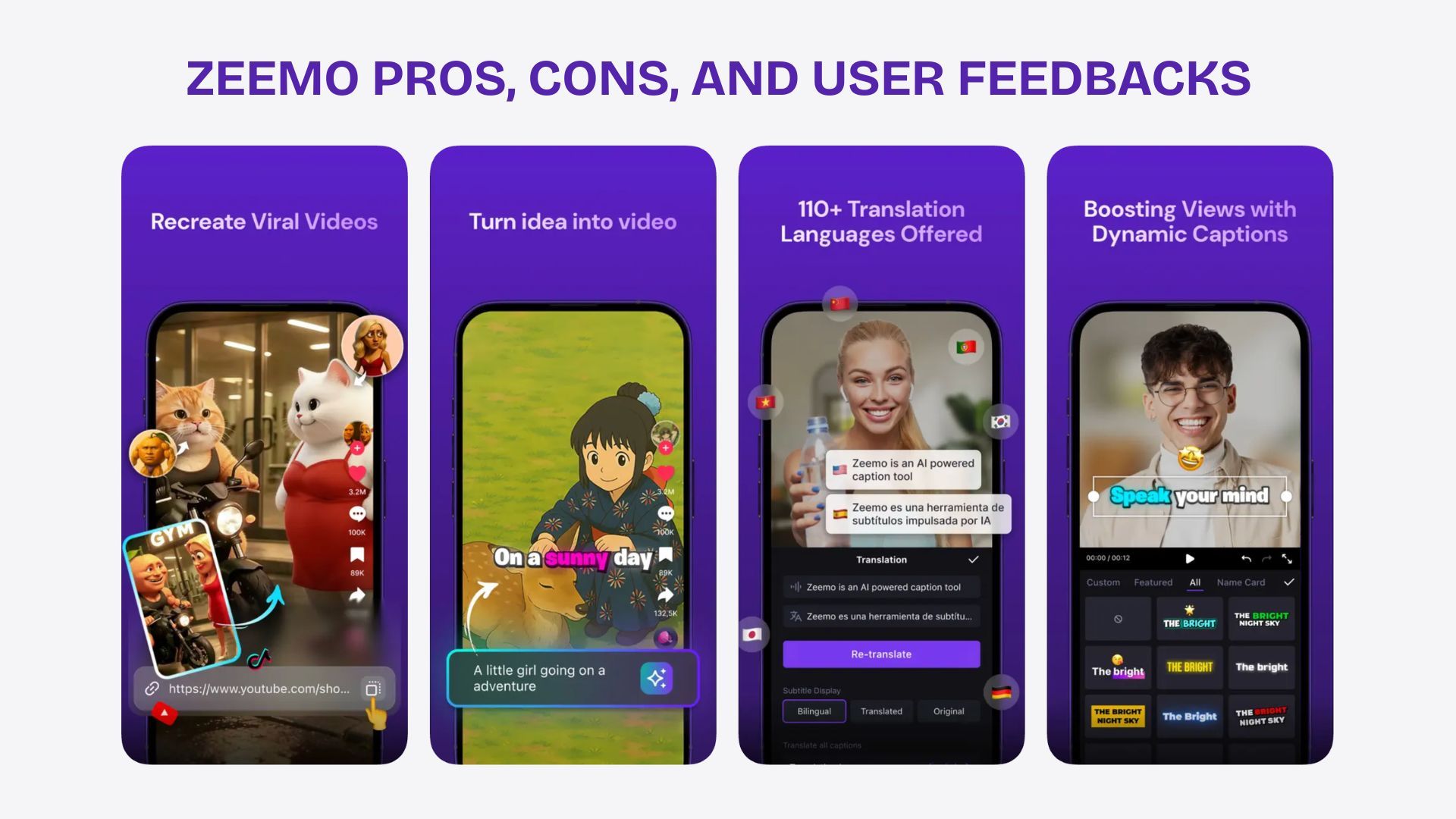
Zeemo positions itself as an accessible and fast solution for generating captions, competing directly with tools like Submagic and Captions.ai. It focuses on AI-driven speed and stylish templates, primarily targeting creators who need quick, visually appealing subtitles for social media videos.
Based on its market position and user interface, its primary strengths are ease of use and a library of modern templates. A user can upload a video, select a style, and receive a captioned video with minimal effort.
This makes it an attractive option for individuals or small teams who are not video editing experts and prioritize speed over deep customization. However, a closer look at Zeemo’s public policies reveals areas of concern that represent potential professional risks. If you do plan to test Zeemo, applying a working coupon first is the smartest way to limit downside.
Objective Strengths
- User-Friendly Interface: The platform is designed for simplicity, allowing users to generate automatic subtitles quickly.
- Template Library: Offers a selection of modern, stylish caption templates suitable for social media platforms.
- AI-Powered Features: Claims to use AI to automatically suggest emojis and highlight keywords to add visual interest.
Critical Risks & Unanswered Questions
While Zeemo is functional, its policies leave critical questions for professional users.
- Vague AI Training Policy: Zeemo’s public Zeemo Privacy Policy (Accessed May 2024) states it may use collected information for “developing and improving our… models.” This lack of an explicit denial is a significant red flag, suggesting user data may be used for AI training. For any confidential content, this ambiguity is a serious risk.
- Unclear Total Cost of Ownership (TCO): The platform uses a credit-based system. While this may seem affordable for occasional use, the true cost for high-volume creators is difficult to predict without modeling specific usage. Credit-based systems can often become more expensive than per-minute plans at scale.
- Lack of Security Credentials: As of May 2024, Zeemo does not publicly list any enterprise-grade security certifications like SOC 2 Type II. This makes it difficult to vet for use in corporate environments where data security is paramount.
- Undefined Performance Limits: It’s unclear if the platform has hard limits on video length or file size, which could render it unusable for creators working with longer content formats they wish to clip.
Until Zeemo provides clearer public statements on these issues, it is best suited for non-confidential, personal projects where budget predictability and security are not primary concerns. Even then, applying a Zeemo discount before checkout meaningfully reduces your risk exposure on credit-based plans.
Category & Positioning
- Tool Type: AI-powered automatic subtitle generator with stylish templates.
- Primary Audience: Casual creators and small teams producing short social media videos.
- Pricing Model: Credit-based subscription (TCO difficult to predict at scale).
- Security Posture: No public SOC 2 Type II; vague AI-training policy.
✅ Strengths
- Extremely easy-to-use interface for non-editors
- Library of modern, social-ready caption templates
- AI emoji suggestions and keyword highlighting
- Fast turnaround for short clips
⚠️ Considerations
- Privacy policy does NOT explicitly forbid AI training on user data
- No public enterprise-grade security certifications
- Credit-based pricing can balloon for high-volume users
- Undefined hard limits on video length / file size
Part 2: Core Analysis – The Pricing & TCO Reality Check
Advertised software prices can be misleading, and in the world of AI captioning tools, the most critical factor determining your real-world cost is the pricing model: per-minute versus per-video. Understanding this distinction is key to achieving a positive return on investment (ROI).
Descript primarily uses a per-minute model, where you purchase a monthly bucket of transcription hours. Submagic uses a per-video model, where you purchase a set number of video exports per month. This difference has massive financial implications.
Let’s run a power user scenario: a creator making 200 short (1-minute) videos per month.
Same 200 short videos / month. Submagic’s per-video model costs 12.4x more than Descript’s per-minute plan.
Advertised vs. Real TCO (12-Month Power User Scenario)
| Metric | Descript | Submagic |
|---|---|---|
| Plan Required | Creator Plan | Agency Plan |
| Advertised Monthly Cost | $15/month (billed monthly) | $50/month (Pro Plan, insufficient) |
| Real Annual Cost | $144 ($12/mo, billed annually) | $1,788 ($149/mo, billed annually) |
| Price Difference | — | 12.4x higher |
The data is stark. For a high-volume social media creator, Submagic’s per-video model becomes a less economical choice, costing over 12 times more than Descript for the exact same output capacity.
You pay the same price to process a 15-second clip as a 3-minute clip, which is an inefficient model for short-form video production. Whichever tool you ultimately choose, locking in a special discount on the captioning stack you actually use day-to-day is the single highest-leverage way to cut annual cost.
Hidden Costs and “Gotchas”
Beyond the headline price, you need to be aware of other factors that influence your TCO.
Descript’s Hidden Costs
- Overage Charges: If you exceed your monthly transcription hours on the Pro plan, you’re billed per extra hour. Diligent usage monitoring is necessary.
- Feature Gating: The most powerful AI features, like Overdub voice cloning and the highest quality Studio Sound, are reserved for the Pro plan ($24/month, billed annually) Descript Pricing Page (Accessed May 2024).
- No Refunds: Per their Terms of Service, Descript offers no refunds on its plans, so it’s important to be sure before committing to an annual subscription Descript Terms of Service (Accessed May 2024).
Submagic’s Hidden Costs
- Per-Video Penalty: The model inherently creates a less economical outcome for creators of high-volume, short content.
- No Credit Rollover: According to their FAQ, unused video credits do not roll over to the next month Submagic FAQ (Accessed May 2024). This creates a “use it or lose it” pressure that benefits the company, not the user.
Submagic’s ‘no credit rollover’ policy is a significant factor to consider. This model may create pressure to generate content simply to avoid losing paid-for credits, a practice that benefits the vendor’s revenue. Always factor in potential credit wastage when calculating TCO.
This analysis makes it clear: you cannot take advertised prices at face value. You must model your own specific usage against each tool’s pricing model to understand the true TCO. For most creators producing more than a handful of short clips per month, a per-minute model like Descript’s is highly likely to be more economical. And if Zeemo is on your shortlist, stacking a money-saving deal on top of the credit-based plan is essential.
Part 3: Feature Deep-Dive – Control vs. Speed
The choice between these AI tools often comes down to a trade-off between deep creative control and sheer speed-to-publish. A deep dive into their core features reveals two fundamentally different philosophies.
Feature 1: Text-Based Editing (Descript’s Superpower)
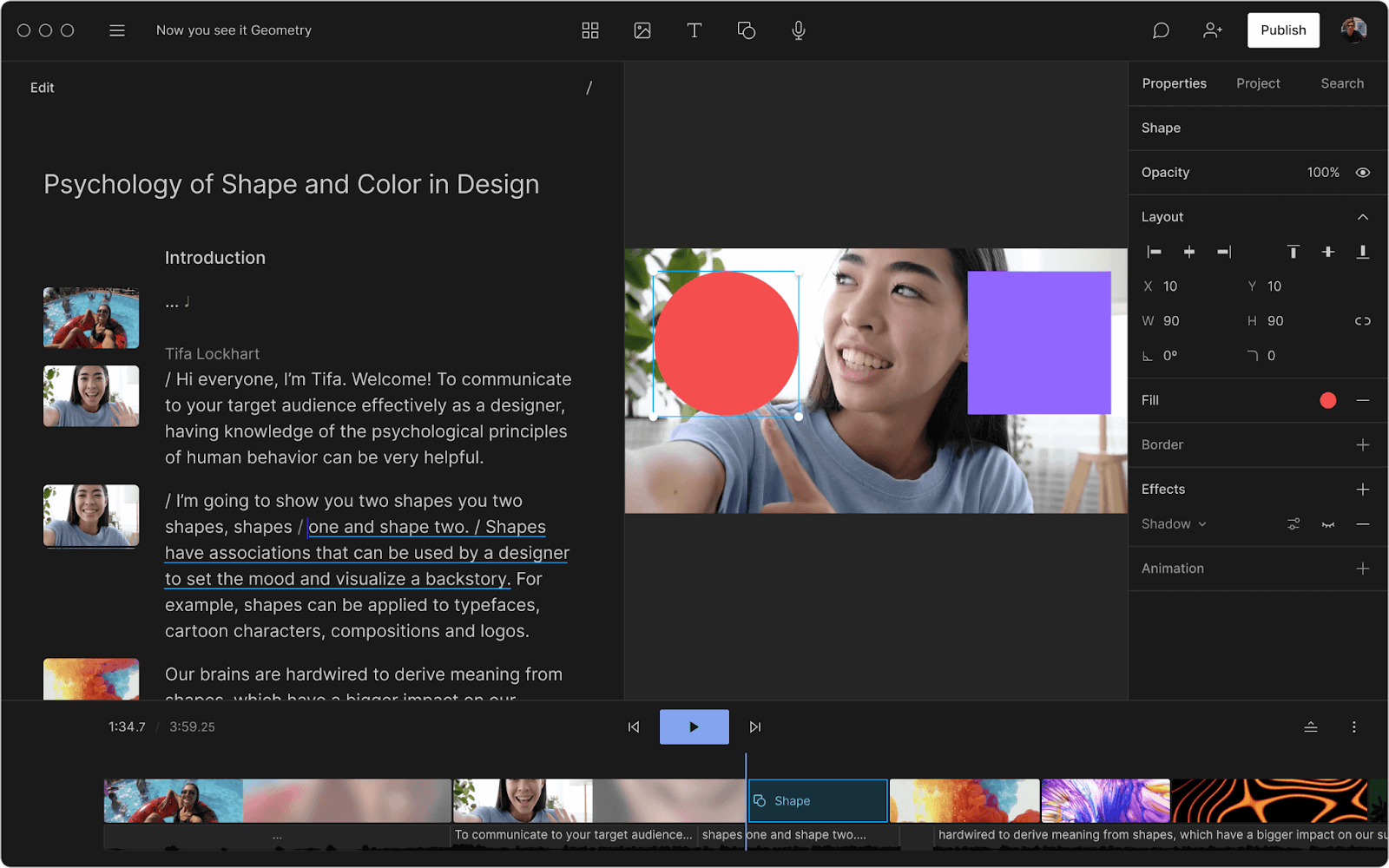
Descript pioneered the concept of editing video and audio as if it were a text document. This is its single most powerful and differentiating feature.
- How it Works: After transcribing your video, Descript presents the text in a document. To delete a segment of video, you simply highlight and delete the corresponding text. To move a scene, you cut and paste the text block.
- Workflow Example: Imagine you’ve recorded a 30-minute client interview for a testimonial video. The client stumbled over a sentence. In a traditional editor, you’d have to scrub through the timeline, find the audio waveform, make precise cuts, and ripple delete the gap. In Descript, you simply find the botched sentence in the transcript, delete it, and the video is instantly edited. This also makes features like filler word removal (deleting all “ums” and “ahs” with one click) incredibly powerful.
- Limitation: This paradigm is revolutionary for spoken-word content but less intuitive for visually-driven projects where timing is tied to on-screen action rather than dialogue.
Feature 2: AI-Powered Aesthetics (Submagic’s Killer App)
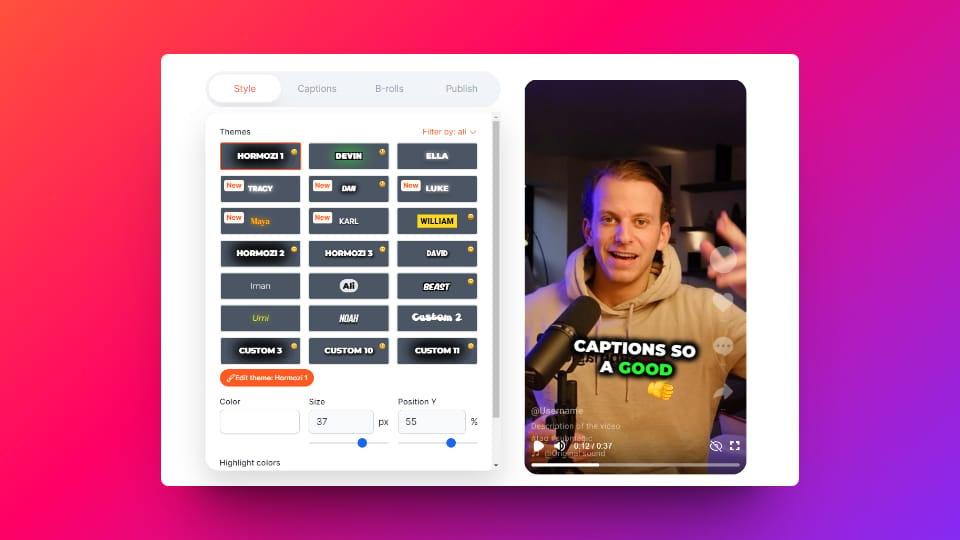
Submagic is built around a suite of “magic” features designed to create trendy, engaging social media clips with one click.
- How it Works: After you upload a short video, Submagic’s AI analyzes the content and automatically applies a host of enhancements. This includes generating captions in a popular style (like those used by Alex Hormozi), adding relevant emojis to the timeline, highlighting keywords, and even inserting stock B-roll footage related to what’s being said.
- Workflow Example: A social media manager needs to post 10 short clips from a podcast. They upload 10 one-minute files to Submagic. Within minutes, the platform returns 10 videos complete with dynamic captions, emojis, and sound effects. The manager can then download them and post directly. This “one-click wonder” approach offers unmatched speed-to-publish.
- Limitation: The trade-off is a near-total lack of control. You cannot manually adjust the timing of a single caption or swap out an AI-selected emoji you don’t like. You get what the AI gives you, which can lead to a generic look if overused.
Feature 3: AI Audio Enhancement (Descript’s Studio Sound)
Beyond editing, Descript’s Studio Sound feature is a standout capability that functions as a one-click audio mastering tool.
- How it Works: With a single toggle, Studio Sound’s AI processes your audio track to remove background noise, reduce echo and reverb, and dynamically equalize the speaker’s voice to sound as if it were recorded in a professional studio.
- Workflow Example: A creator records a product tutorial using their laptop’s built-in microphone in a slightly echoey room. The raw audio sounds amateurish. By enabling Studio Sound, the fan noise from the laptop disappears, the room echo is minimized, and their voice becomes clearer and richer. This can save hours of manual audio repair in a tool like Adobe Audition.
- Limitation: The best version of Studio Sound is gated behind the Pro plan. While the standard version is good, the pro version is what delivers the most impressive, “magic-like” results.
These features highlight the core divide: Descript provides tools to refine and perfect your content with high control, while Submagic provides an assembly line to produce trendy content at maximum speed.
Category & Positioning
- Tool Type: Text-based video & audio editor with built-in transcription and AI audio mastering.
- Primary Audience: Podcasters, YouTubers, course creators, agencies handling spoken-word content.
- Pricing Model: Per-minute (monthly bucket of transcription hours).
- Security Posture: ✅ SOC 2 Type II compliant; explicit no-AI-training policy without opt-in.
✅ Strengths
- Revolutionary text-based editing for long-form content
- One-click filler-word removal saves hours
- Studio Sound delivers professional audio mastering
- SOC 2 Type II compliance for enterprise vetting
- Verifiable no-training-on-user-data policy
⚠️ Considerations
- Moderate learning curve for new users
- Resource-intensive desktop app on long projects
- Best AI features gated behind Pro plan
- No refunds policy on annual subscriptions
- Less suited for visually-driven (non-dialogue) projects
Category & Positioning
- Tool Type: AI-driven short-form video styling engine (captions, emojis, B-roll).
- Primary Audience: Social media managers producing high-volume TikTok / Reels / Shorts.
- Pricing Model: Per-video (no rollover credits).
- Security Posture: ❌ No SOC 2; explicit policy permitting AI training on user data.
✅ Strengths
- Fastest upload-to-export pipeline in the category
- Auto-generated emojis, B-roll, and keyword highlights
- Library of trendy caption templates (Hormozi-style)
- Minimal learning curve — true one-click workflow
⚠️ Considerations
- Hard 3-minute video length cap — deal-breaker for long-form
- Per-video TCO can hit $1,788/year for power users
- Policy explicitly allows training AI on your videos
- Unused credits do NOT roll over to next month
- Almost no fine-grained styling/timing control
Part 4: Critical Considerations – Security, Privacy & Limitations
For any professional or business user, this is the most important section of the guide. Features are temporary, but a data leak is forever. The single most important differentiator between these AI tools is their policy on what they do with your content.
For AI captioning tools, the single most important differentiator is data privacy—specifically, their policy on what they do with your uploaded content.
Compliance Status Verification
| Certification / Policy | Descript | Submagic | Veed.io | Zeemo / Others |
|---|---|---|---|---|
| AI Training on User Data? | ❌ No (Opt-in) | ✅ Yes | ❌ No (Opt-in) | ❓ RISK (Vague) |
| SOC 2 Type II | ✅ Yes | ❌ No | ❌ No | ❓ UNVERIFIED |
| GDPR Compliance | ✅ DPA Available | ✅ DPA Available | ✅ DPA Available | ❓ UNVERIFIED |
| MFA / 2FA Support | ✅ Yes | ❌ No | ✅ Yes | ❓ UNVERIFIED |
Data Privacy & AI Training Policy Showdown
The results are unequivocal and should be a deal-breaker for many.
✅ The Professional Stance: Descript and Veed.io
Both Descript and Veed.io have adopted a user-first privacy stance. Descript’s privacy policy states: “Unless you are a member of the Descript AI beta program or you opt-in… we do not use customer data to train our AI models” Descript Privacy Policy (Accessed May 2024).
Similarly, Veed.io‘s policy states: “We do not use your User Content to train our artificial intelligence models without your express opt-in consent” Veed.io Privacy Policy (Accessed May 2024).
This makes both tools verifiably safe choices for confidential content. Descript’s additional SOC 2 Type II compliance gives it the definitive edge for enterprise-level security vetting (Report available upon request, covering the period ending October 31, 2023) Descript Trust Center (Accessed May 2024).
❌ The Risky Policy: Submagic
Submagic’s policy, in stark contrast, is a policy that raises significant privacy concerns for users with sensitive content. It states: “We may use the data from your videos and your activity on the platform to improve our AI models and the services we offer” Submagic Privacy Policy (Accessed May 2024).
If you use Submagic, you grant them a license to feed your content—your ideas, client information, or unreleased product details—into their AI.
- Step 1: Agency uploads a video with “Project X Launch Details” to a tool with a risky AI training policy.
- Step 2: The tool’s policy states: “We may use the data… to improve our AI models.”
- Step 3: “Project X” data is ingested into the tool’s AI training dataset.
- Step 4: Result: Confidential client data is now part of a 3rd party system, creating a security breach and a potential violation of GDPR compliance.
❓ The Vague Risk: Zeemo and Others
For Zeemo and Captions.ai, the policies are public but vague. As noted earlier, Zeemo’s policy allows them to use information to “improve models.” As a rule, assume any service without an explicit denial IS using your data for training. This risk is too great to ignore for professional work.
If your content has any confidentiality requirements, your safest options in this comparison are Descript and Veed.io. If Zeemo still meets your non-confidential workflow, a coupon code for Zeemo at signup helps offset the platform’s pricing opacity.
Part 5: Use Cases & Workflows
Choosing the right tool depends entirely on your specific workflow. Here are three common scenarios and how these tools fit.
Workflow 1: Repurposing a 1-Hour Webinar into 10 Social Clips
Goal: Extract key moments from a long video and turn them into short, shareable clips for social media.
The Descript Workflow
- Import the 1-hour webinar into Descript. It gets transcribed automatically.
- Read through the transcript and identify 10 compelling quotes or moments.
- For each moment, highlight the corresponding text (e.g., a 45-second paragraph).
- Right-click and select “Duplicate to new composition.” This instantly creates a new, sub-45-second video clip containing only that moment.
- Repeat 9 more times. You now have 10 separate projects (clips) ready for caption styling and export.
- Advantage: Incredibly efficient for finding and extracting content from long-form video. The entire discovery process happens by reading, not scrubbing a timeline.
The Submagic Workflow
- This workflow is impossible in Submagic due to its 3-minute video limit. You would first need to use a separate video editor (like Premiere Pro or CapCut) to manually find and cut the 10 clips from the 1-hour webinar.
- Only after this manual pre-editing process could you upload the 10 individual short clips to Submagic for captioning.
- Disadvantage: The tool offers no help in the discovery and extraction phase, which is the most time-consuming part of this workflow.
Workflow 2: Creating a Polished Client Testimonial Video
Goal: Edit a 5-minute raw interview into a tight, 90-second testimonial with perfect branding.
S-T-A-R Case Study
- Situation: A marketing agency has a 5-minute Zoom recording of a client praising their product. The video needs to be cut down and must use the client’s specific brand font and colors for the captions.
- Task: Create a 90-second video that looks professional and adheres to a strict brand guide.
- Action: Using Descript, the editor imports the video. They edit the story down by deleting text in the transcript. They then enter the Captions mode, upload the client’s custom font file, enter the exact hex codes for the brand colors, and position the captions precisely on the lower third of the screen.
- Result: The final video is on-brand and professionally edited. This level of control would be impossible in Submagic, which does not allow custom font uploads on lower tiers and offers limited control over caption styling and placement.
Workflow 3: Daily High-Volume Social Media Content
Goal: A creator needs to produce 5-10 trendy, captioned videos every single day for TikTok and Reels. The content is not confidential (e.g., public commentary, dance trends).
The Submagic Workflow
- The creator records 10 short videos (under 3 minutes each) on their phone.
- They upload the files directly to the Submagic web app.
- They select a trendy caption template and press “Generate.”
- Within minutes, they have 10 videos ready to download with captions, emojis, and B-roll.
- Advantage: This workflow is incredibly fast and low-effort, making it ideal for the high-volume demands of the creator economy.
The Descript Workflow
- The creator would upload each of the 10 videos into Descript.
- For each video, they would need to manually review the transcript, apply caption styling, and potentially add any emojis or effects.
- While Descript offers templates, the process is more manual and hands-on.
- Disadvantage: For this specific use case, Descript is slower. The time spent on manual styling for each video adds up, making it less efficient for a high-volume, “good enough” content strategy.
Part 6: In-Depth Alternatives & Comparisons
While Descript and Submagic represent the two poles of control vs. speed, other competitors fill important niches. Here’s how they stack up.
Veed.io: The Collaborative Browser-First Contender
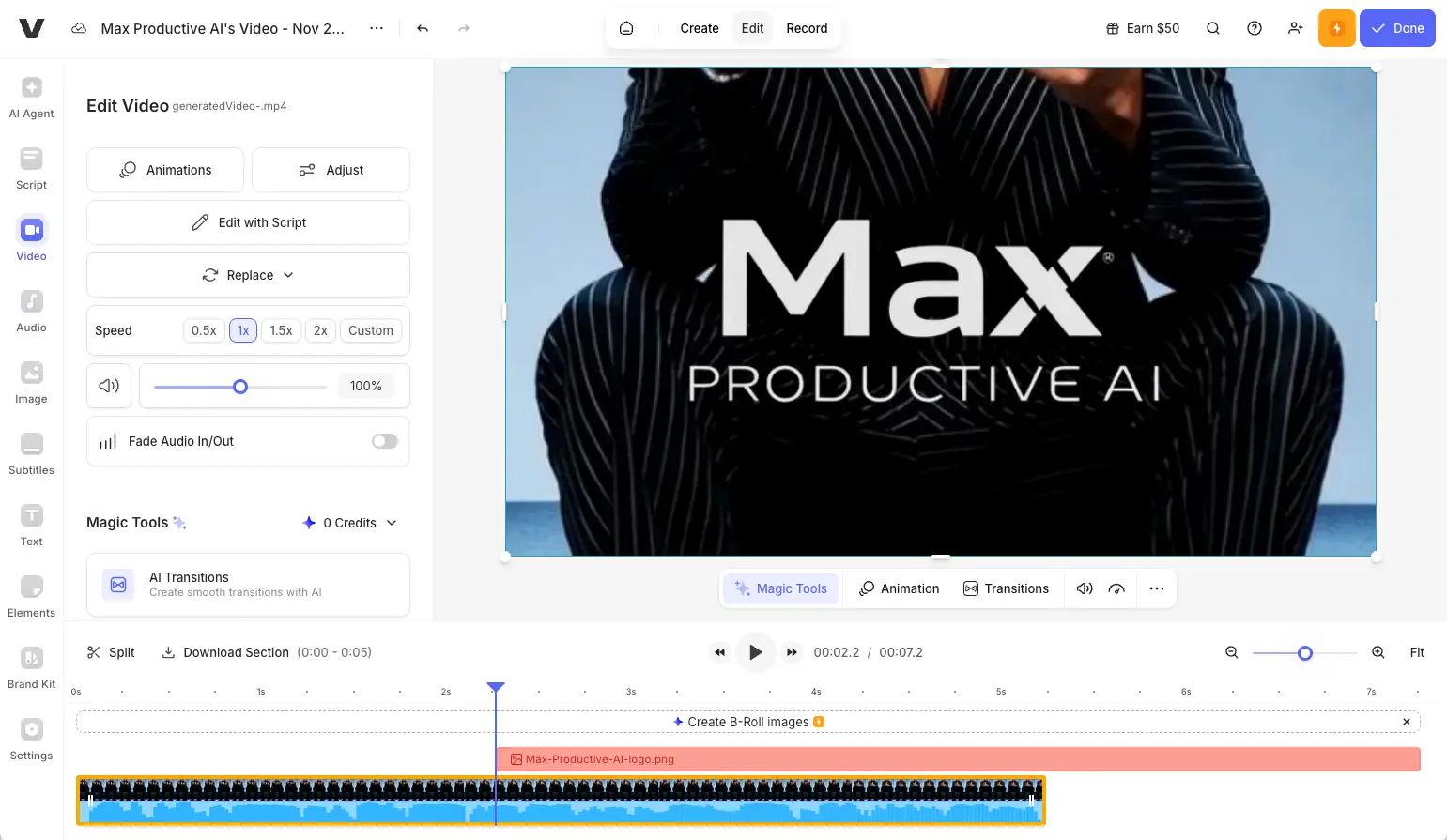
Veed.io is a powerful, browser-based video editor that offers a middle ground between Descript and a traditional NLE.
When it’s the best choice
- Your team works collaboratively and needs a real-time, browser-based editor without software installation.
- You need a strong privacy policy but don’t have the budget or requirement for Descript’s enterprise-level SOC 2 compliance.
- You need more video editing features than Descript (like screen recording, transitions, and annotation tools) but still want automatic captioning.
When to avoid
- You work primarily with very long-form audio like multi-hour podcasts (its performance may lag).
- Your organization requires SOC 2 Type II compliance for all software vendors.
- Your primary need is the text-based editing paradigm, which is unique to Descript.
Prerequisites for success
A stable internet connection is non-negotiable for a browser-based editor. Teams should establish clear workflows to leverage its collaborative features effectively. The pricing is also subscription-based, so you need a clear budget.
Category & Positioning
- Tool Type: Browser-based collaborative video editor with auto-captioning.
- Primary Audience: Teams and agencies that edit together in real time.
- Pricing Model: Tiered SaaS subscription.
- Security Posture: ✅ Explicit no-AI-training policy; ❌ no SOC 2 Type II.
✅ Strengths
- No software install — runs entirely in the browser
- Real-time collaboration on shared projects
- Strong privacy policy with opt-in AI consent
- Built-in screen recorder, transitions, annotations
- MFA / 2FA supported
⚠️ Considerations
- No SOC 2 Type II certification
- Performance can lag on multi-hour podcast files
- No text-based editing paradigm
- Requires stable, fast internet connection
Captions.ai: The Mobile-First AI Specialist
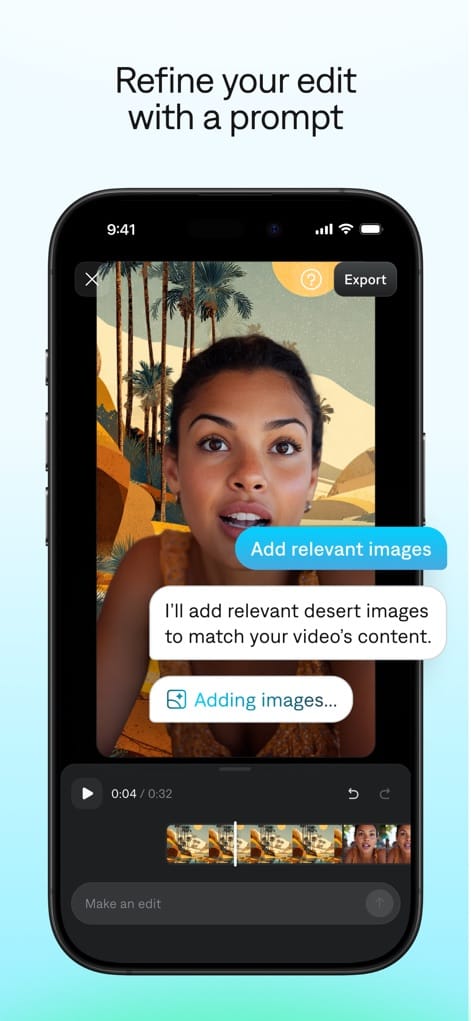
The Captions app is a direct competitor to Submagic but focuses more heavily on an elegant mobile-first experience.
When it’s the best choice
- Your entire workflow is on your phone, from recording to publishing.
- You value its unique AI features, such as AI-powered scriptwriting and a teleprompter within the app.
- You want high-quality, trendy caption styles similar to Submagic but in a native mobile app.
When to avoid
- You work with confidential content. Its privacy policy, similar to Zeemo’s, is vague about AI training.
- You need to edit on a desktop computer for more precision and a larger screen.
- Your videos are longer than a few minutes, as it is optimized for short-form social content.
Prerequisites for success
You must be comfortable with a mobile-only workflow. You also have to accept the ambiguous data privacy policy, making it suitable only for public-facing content.
Category & Positioning
- Tool Type: Native mobile AI video & captions app with scriptwriting & teleprompter.
- Primary Audience: Solo creators with end-to-end mobile workflows.
- Pricing Model: Mobile subscription tiers.
- Security Posture: ❓ Vague AI-training policy (treat as risk).
✅ Strengths
- Polished native mobile experience
- Built-in AI scriptwriting and teleprompter
- High-quality trendy caption styles
- End-to-end mobile workflow (record → publish)
⚠️ Considerations
- Privacy policy is vague on AI training — unsuitable for confidential content
- Limited desktop editing precision
- Optimized only for short-form videos
- TCO at scale is unverified
CapCut: The Free but Risky Powerhouse
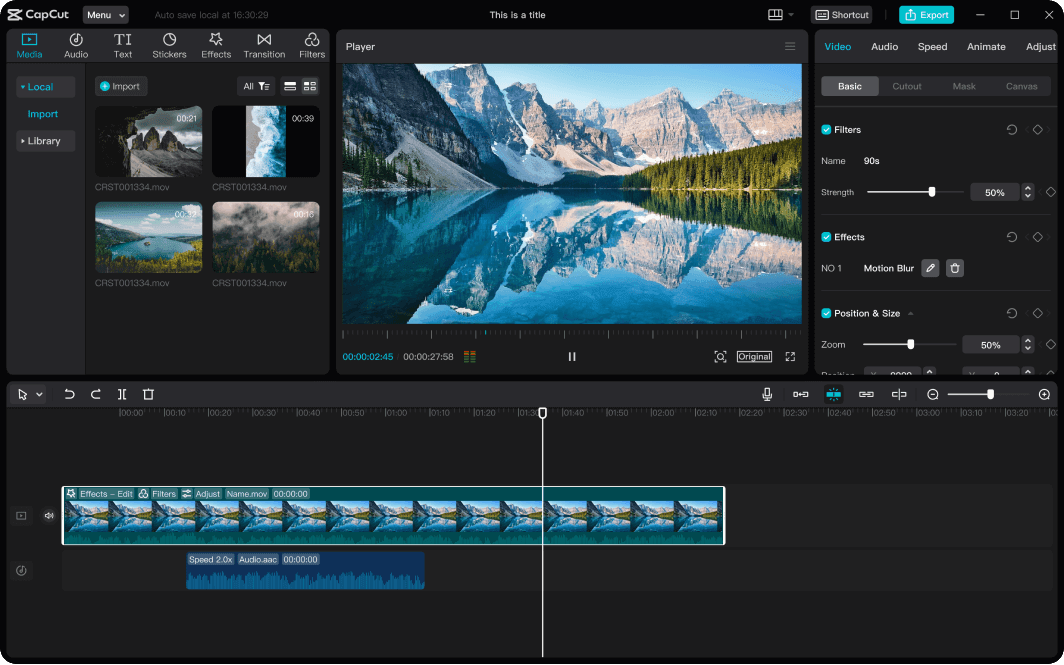
CapCut is the default video editor for millions of TikTok and Reels creators, offering an astonishing number of features for free.
When it’s the best choice
- Your budget is zero.
- You are creating personal, non-sensitive content and are already in the TikTok ecosystem.
- You need surprisingly advanced features for a free mobile app, including keyframing, effects, and a robust captioning tool.
When to avoid
- You are a business, agency, or any user handling proprietary or client information. Its parent company is ByteDance, and the associated data privacy and jurisdictional risk are too significant for any professional use case.
- You need high-accuracy transcriptions; its auto-captioning is functional but generally less accurate than paid specialty tools.
- You need a clean, ad-free, professional workflow.
Prerequisites for success
You must fully accept the data privacy trade-offs. It is a tool for personal creative projects, not for professional or business content.
Category & Positioning
- Tool Type: Free full-featured mobile video editor with auto-captions.
- Primary Audience: Casual creators inside the TikTok / Reels ecosystem.
- Pricing Model: Free, with paid “Pro” feature add-ons.
- Security Posture: ⚠️ Owned by ByteDance — jurisdictional & data-privacy risk.
✅ Strengths
- Free with no hard usage caps
- Surprisingly advanced effects, keyframes, transitions
- Robust auto-captioning included at no cost
- Tight integration with TikTok publishing
⚠️ Considerations
- ByteDance ownership raises significant data-privacy & jurisdictional risk
- Unsuitable for confidential or commercial client content
- Caption accuracy lags behind paid specialty tools
- Ads and upsells inside the workflow
Part 7: Conclusion & Final Recommendations
After this deep dive into the top alternatives to Zeemo, the choice becomes much clearer. It’s not about which tool is “best,” but which tool best mitigates your specific professional, financial, and security risks.
My analysis of this video transcription software landscape reveals three truths. First, poor workflow automation negatively impacts your return on investment (ROI). Second, the unverified risk of using a tool without a public, explicit privacy policy is a deal-breaker for any professional.
Finally, the most important feature is not speed or style, but a vendor’s verifiable promise, like Descript’s, not to train their AI on your confidential content. Once you’ve decided which tool fits your workflow, applying the latest Zeemo promo code at signup is the simplest way to lock in a better price from day one.
Your Decision Framework
Choose Descript if:
- ✅ Your primary content is spoken-word (podcasts, interviews, tutorials) and you value workflow efficiency.
- ✅ You need to edit video by editing a transcript—this is your primary workflow.
- ✅ Your video content is confidential, and you require a vendor with SOC 2 Type II compliance and a policy against AI training.
Avoid Descript if:
- ❌ You only need a simple automatic subtitle generator for an already-edited video (it’s overkill).
- ❌ You work on visually complex projects requiring advanced color grading or effects; it is not a full nonlinear editor (NLE) like Adobe Premiere Pro.
Choose Submagic if:
- ✅ Your primary goal is to create trendy, short-form social videos (<3 minutes) as fast as possible.
- ✅ You are willing to trade creative control for unmatched speed.
- ✅ Your video content is not confidential, and you accept the risk of it being used for AI training.
Avoid Submagic if:
- ❌ You create any content longer than 3 minutes. The hard limit is a deal-breaker.
- ❌ You have a strict brand guide that requires custom fonts or precise caption control.
- ❌ Your budget is a key concern; its TCO is significantly higher for high-volume creators.
Your Decision Checklist
Before you subscribe to any AI tool, you MUST get answers from the vendor.
- AI Training Policy: “Can you provide a link to the section in your Privacy Policy that explicitly states whether my uploaded video content will be used to train your AI models?”
- True Cost Modeling: “My team’s content strategy involves producing [X] videos per month with an average length of [Y] minutes. Can you provide a detailed quote for my annual cost, including any overage fees or charges for premium features?”
- Security Posture: “Do you have a current SOC 2 Type II report? If not, what independent security audits have you undergone?”
- Performance Limits: “What are the documented limitations of your platform regarding video length, file size, and project complexity?”
- Exit Path: “If I cancel, what tools are available to export my projects, including both video files and editable caption files (.srt, .vtt)?”
Before signing any SaaS contract, get written answers to two questions: 1. ‘Do you use my data to train your AI?’ and 2. ‘What is the true annual cost for my exact usage?’ Vague answers are a red flag. If they can’t answer clearly, walk away.
My final recommendation is a simple framework. For confidential, long-form, or professional workflows, your safest and most powerful choice is Descript. For public, short-form content where speed trumps all else, Submagic is a viable, albeit expensive, option.
For collaborative teams who need a strong privacy policy without SOC 2, Veed.io is a strong contender. For all other tools, including Zeemo, the risks of vague policies and unclear costs are currently too high for most professional applications — though if you do proceed, our updated Zeemo Promo Codes & Coupons page is the fastest way to secure the best available rate. You can also browse our full list of latest coupons across every SaaS category we cover.
Frequently Asked Questions
Q1: What is the main difference between Descript and Submagic?
A: The fundamental difference lies in their core purpose. Descript is a workflow tool designed for editing video and audio by manipulating text, giving you deep creative control. Its main strength is efficiently editing long-form spoken-word content like podcasts or interviews.
Submagic is an aesthetic tool designed to quickly add trendy, AI-driven visual elements (captions, emojis, B-roll) to short videos. It sacrifices control for speed, making it ideal for high-volume social media production where a specific “look” is desired instantly.
Think of Descript as a director’s editing suite and Submagic as an automated styling engine. For a detailed breakdown of how this impacts cost, refer to our TCO analysis which shows Submagic can be over 12x more expensive for certain users Submagic Pricing Page (Accessed May 2024).
Q2: Is the Zeemo app a safe alternative?
A: Based on current public information, using the Zeemo app for sensitive or professional content involves significant risk. While Zeemo has a public privacy policy, its language is vague.
It states that user data may be used to “develop and improve” its models, which does not explicitly forbid using your content for AI training Zeemo Privacy Policy (Accessed May 2024).
In the SaaS industry, any policy that does not contain a clear, explicit denial should be treated with caution. For non-confidential personal projects, it may be acceptable, but for any business use, tools with explicit “no-training” policies like Descript or Veed.io are verifiably safer alternatives.
Q3: Why is Submagic so much more expensive than Descript?
A: Submagic’s higher cost for power users stems from its “per-video” pricing model, which can be less economical for creators of short, high-volume content. Our analysis shows a social media creator could pay $1,788 per year for Submagic’s Agency plan, compared to just $144 per year for Descript’s Creator plan, for a similar output of short videos Descript Pricing Page (Accessed May 2024).
You pay the same “per-video” credit for a 15-second clip as a 3-minute clip, making it inefficient for short-form content. Descript’s “per-minute” model provides a larger bucket of usage time that is more cost-effective for this use case.
Q4: Can I use Submagic or Zeemo for confidential business videos?
A: Absolutely not. Submagic’s policy explicitly states it may use your data to train its AI Submagic Privacy Policy (Accessed May 2024). Zeemo’s policy is vague and does not forbid this practice, which presents an unacceptable risk.
Uploading confidential content (e.g., internal strategy meetings, unreleased product details, client information) to these platforms means you may be feeding proprietary data into a third-party AI model.
For any confidential content, you must use a tool like Descript, which has SOC 2 Type II compliance and a clear policy against non-consensual AI training, or Veed.io, which has a similar opt-in-only privacy policy.
Q5: Is Descript good for just making captions?
A: No, in my opinion, it’s overkill. If your only need is to generate a simple SRT caption file for a video that is already fully edited, Descript is a more complex and expensive tool than necessary.
Its power and value come from its unique text-based video editing workflow. Using it just for transcription is like buying a professional video editing suite to only convert file formats. For simple caption generation, there are lighter, more affordable services available.
However, if your content strategy involves editing from the transcript, Descript’s captioning tools are seamlessly integrated and highly effective.
Q6: What’s the biggest limitation of Descript?
A: The most significant reported limitation is its performance with very large projects. The desktop application can become slow and suffer from UI lag on projects longer than 3 hours, according to its own help documentation Descript Help Center: Working with long recordings (Accessed May 2024).
This can be frustrating for producers of audiobooks or multi-hour seminars, who may need to split their work into smaller projects. Additionally, it can be resource-intensive, requiring a powerful computer with at least 16GB of RAM for the smoothest experience on complex projects.
Its offline editing is also limited; you can edit existing projects but need an internet connection to start new ones.
Q7: What’s the biggest limitation of Submagic?
A: The hard 3-minute video length limit is its biggest and most definitive limitation. This platform is completely unusable for any video file longer than three minutes.
You cannot even import a longer video (like a podcast or webinar) to trim clips from it within the app; the files must be pre-cut before uploading. This makes the tool irrelevant for a huge segment of the creator market that works with long-form content.
This limitation is a deliberate design choice to optimize for speed in the short-form social video niche, but it is an absolute deal-breaker for anyone outside that specific use case.
Q8: Is CapCut a safe free alternative?
A: For personal, non-sensitive content, CapCut is a surprisingly functional and feature-rich tool. However, for any business, agency, or professional use, it is not a recommended choice.
The primary concern stems from its ownership by ByteDance, the same parent company as TikTok. This raises significant data privacy and jurisdictional risk concerns for many Western businesses and governments Forbes: Is CapCut Safe?.
The risk that your data could be accessed by the parent company makes it unsuitable for any content that has commercial value or confidentiality requirements.
Q9: Which AI captioning tool is best for social media?
A: The best tool depends on your priority. If you need maximum speed for trendy, non-confidential clips under 3 minutes and your budget can accommodate its higher TCO, Submagic is the fastest tool from upload to export. It is purpose-built for the high-velocity demands of platforms like TikTok and Reels.
However, if your social media strategy involves repurposing longer-form content (like podcasts or interviews), requires more creative control to match a specific brand guide, or involves any sensitive data, then Descript is the more professional and versatile choice. Its ability to quickly pull clips from long transcripts provides a different, often more valuable, kind of speed.

