Murf Top Alternatives and Competitors: A 2026 Devil’s Advocate Comparison
Posted on |
Part 1: Introduction to the 2026 AI Voice Market
Welcome to the 2026 generative AI voice generator market, where the central conflict is the clash between Murf.ai’s “all-in-one studio” approach and ElevenLabs’ “best-in-class realism engine.”
As a scrappy creator, your skepticism of “human-like” voice claims and fear of ending up with robotic voices or opaque pricing models is completely justified.
This analysis of the leading text-to-speech (TTS) software delivers a clear decision-making framework by exposing the “blind spots” vendors hide. This guide to the top Murf alternatives and competitors is based on over 40 independent sources from late 2025 and early 2026, revealing the truth about performance, pricing, and security risks.
As Jettawat Kasemchaiyanun, Coupons Scout’s senior tech reviewer, my role is to go beyond the spec sheet. I’ve personally tested dozens of these AI tools, and in this analysis, I’ll provide the “devil’s advocate” perspective you need to make an informed choice, especially for software and AI use cases. Before diving in, you can also grab a working Murf coupon code to test the platform risk-free.
This comprehensive analysis is structured to provide maximum value for professional decision-makers:
- Part 2: Core Analysis: Pricing & TCO dives deep into the true cost of owning and operating these platforms, exposing hidden fees and budget risks.
- Part 3: Feature Deep-Dive compares the core capabilities of Murf.ai and its rivals, from voice quality to workflow integration.
- Part 4: Critical Considerations: Security & Compliance examines the non-negotiable aspects of data privacy, voice clone ownership, and regulatory adherence.
- Part 5: Use Cases & Workflows provides actionable, step-by-step guides for leveraging these tools in real-world Software and AI scenarios.
- Part 6: Alternatives & Comparisons offers a structured breakdown of the key competitors, detailing when to choose them over Murf.
- Part 7: Conclusion & FAQs summarizes our findings and provides direct answers to your most pressing questions.
This analysis is for informational purposes; you should perform your own due diligence for your specific professional needs.
Key Takeaways
Key Takeaways
-
The Core Conflict: Murf.ai is a strong choice for team collaboration and ease of use, a true “Canva for voice.” ElevenLabs leads in raw voice realism and cloning technology. Your choice between them is a choice of philosophy: integrated studio vs. high-performance engine. -
Pricing Deception: Both platforms feature pricing models that can be difficult to forecast. Murf’s time-based credits can halt production, whereas ElevenLabs’ character-based credits can have volatile costs, making budget forecasting a significant gamble. -
Critical Security & Data Nuances: Your voice clone data is a valuable asset. Murf.ai’s Terms of Service grant them a broad license to your data, though their public-facing FAQ states they will not use it for model training Murf Voice Cloning FAQs. ElevenLabs provides a more protective, privacy-by-default policy. -
The API “Gotcha”: For developers requiring automation, ElevenLabs is a strong contender with its core, affordable API. As of mid-2024, API access for Murf.ai is bundled with its custom-priced Enterprise plan, making it inaccessible for smaller teams or individual developers Murf.ai API Docs. -
The Collaboration Showdown: While previously a solo-only tool, ElevenLabs now offers team features on its Enterprise plan ElevenLabs Enterprise, making it a direct competitor to Murf.ai’s established collaborative workspace. The choice now depends on the maturity and specific needs of your team’s workflow. -
Data Limitation Notice: This analysis provides deep, verified data for Murf.ai and ElevenLabs. Data for Play.ht, Lovo.ai, and Wellsaid Labs is preliminary; they are best for niche use cases such as podcasting, all-in-one content, and corporate narration, respectively.
How We Evaluated These Murf.ai Alternatives
Our editorial team at Coupons Scout follows a rigorous, transparent process — detailed in our editorial methodology — to ensure every claim, comparison, and recommendation is verified against official sources before publication.
After analyzing dozens of AI voiceover tool products in the AI Tools market and consulting on real-world implementation projects, we developed this detailed Comparison AI Video Tools breakdown of the top Murf Top Alternatives and Competitors to cut through the marketing hype.
Our evaluation process is led by a team of domain experts:
- Data-Driven Selection: Mohamed Zaki (Founder) uses social listening tools and search intent analysis to identify the products and questions that are most relevant to the market right now.
- Expert Evaluation: As the lead SaaS & AI Tools Expert, Jettawat Kasemchaiyanun tests software performance, scrutinizes API documentation, and verifies the true value of features against their cost.
- Fact-Checking Audit: Kanokchai Likitapiwat (Head of Operations) audits all data for accuracy, ensuring pricing, feature lists, and compliance claims match the vendors’ official statements at the time of publication.
For this specific review of Murf alternatives and competitors, an external research tool failure meant we relied exclusively on detailed upstream intelligence reports from late 2025/early 2026, which were then fact-checked and updated against mid-2024 data to provide this analysis.
Decision in 60 Seconds
| If you are a… | And you need… | Your Best Bet is… | Why | Key Risk |
|---|---|---|---|---|
| Corporate Team / Agency | A mature, easy-to-use, collaborative platform for training & marketing videos. | Murf.ai | The UI is the most intuitive on the market, and team features are polished. | Voices are less realistic than the top competitor; time-based credits can be restrictive. |
| Solo Creator / Author | The most emotionally realistic voice for audiobooks or YouTube essays. | ElevenLabs | Its audio engine produces the most human-like voices with superior emotional range. | The ‘Projects’ UI is less intuitive than Murf’s, and the character-based credit system can be volatile. |
| Developer / Automator | A powerful and affordable TTS API to build voice applications. | ElevenLabs | The API is a core, well-documented, and affordable part of the product. | Requires development skills to fully leverage; less of an “out-of-the-box” solution. |
| Podcaster | A streamlined workflow specifically for podcast production and audio articles. | Play.ht | It has purpose-built features for podcasting that other platforms lack. | Less versatile for general video creation or complex narration tasks. |
If you’re already leaning toward Murf, you can check the latest Murf discount code before subscribing.
Part 2: Core Analysis: Pricing & TCO Reality Check
In my experience, the number one source of user frustration with generative AI tools is unpredictable pricing. Both Murf.ai and ElevenLabs employ common SaaS pricing models that seem simple on the surface but hide significant costs and risks, effectively creating an illusion of predictability.
Analyzing the Total Cost of Ownership (TCO) reveals a more complex picture than the monthly sticker price suggests.
Murf.ai operates on voice generation time, while ElevenLabs uses characters. Let’s break down the real-world TCO for a solo professional user and a small team, factoring in hidden costs, overages, and platform limitations.
TCO Breakdown: Solo Creator (12-Month Projection)
For a solo creator, such as an audiobook narrator or a YouTuber producing long-form video essays, the primary concern is obtaining the highest quality voice for the lowest possible cost.
| Platform | Comparable Plan | Base Annual Cost | Estimated Overage | 12-Month TCO | Key “Gotcha” |
|---|---|---|---|---|---|
| Murf.ai | Pro Plan | $468 ($39/mo) | $0 (No overages allowed) | $468 | Production stops if you hit your time limit. Lower voice realism compared to ElevenLabs. |
| ElevenLabs | Creator Plan | $264 ($22/mo) | ~$120 (for extra characters) | ~$384 | High-quality voices consume 2x characters, doubling your cost unexpectedly. |
Analysis for Solo Creators: For a solo creator, the potential cost savings are significant with ElevenLabs.
My analysis, based on a projected usage of 100,000 characters per month with occasional bursts, places the annual TCO at around $384. This is a clear financial win over Murf.ai’s Pro plan at $468 annually — though that gap shrinks significantly if you grab a current Murf promo code at checkout.
However, the “gotchas” are critical. ElevenLabs’ cost volatility is a major risk. As confirmed in their documentation, their highest-quality voice models consume characters at a 2x rate, a detail that surprises many new users and can derail budget forecasting ElevenLabs Models Documentation. ⚠️ Needs verification.
A creator might think they have 100,000 characters but functionally only have 50,000 for the quality they need.
Murf’s “No Overages” policy, detailed in their billing FAQs, sounds like a benefit but can be a trap for professionals on a deadline Murf.ai Billing FAQ. It forces you into an upgrade-or-wait dilemma.
If you burn through your 4 hours of generation time on the 20th of the month, your production stops cold. You cannot buy a small top-up; you must wait until the next billing cycle.
💡 KEY INSIGHT: For solo creators, ElevenLabs is the more cost-effective choice if you can manage the variable character consumption. Murf.ai offers budget predictability at the cost of production flexibility and top-tier vocal quality. Your choice depends on whether you fear unpredictable costs (choose Murf) or production-halting limits (choose ElevenLabs).
TCO Breakdown: Small Team (3 Users, 12-Month Projection)
For a corporate team or agency, the calculation shifts. Collaboration, security, and scalability become paramount, and the TCO must include per-seat licensing.
| Platform | Comparable Plan | Base Annual Cost | API Access Cost | 12-Month TCO | Key “Gotcha” for Teams |
|---|---|---|---|---|---|
| Murf.ai | Enterprise Plan | $2,844 (3 × $79/user/mo) | Included (Custom Pricing) | $2,844+ | Per-user pricing scales linearly. Time limits are pooled but can still be a bottleneck for heavy-use teams. |
| ElevenLabs | Enterprise Plan | Custom Quote | Included | Custom | As a newer enterprise offering, features may be less mature than Murf’s. Pricing is opaque and requires sales negotiation. |
Analysis for Teams: As of mid-2024, the competitive landscape for teams has changed dramatically. Previously, Murf.ai was the only option. Now, both platforms offer Enterprise plans.
Murf.ai’s Enterprise pricing is transparently listed at $79/user/month (billed annually), making a 3-person team’s base cost $2,844 per year Murf.ai Pricing. This plan includes pooled voice generation time, centralized billing, and crucially, API access (with usage-based pricing). This model is predictable and straightforward for procurement departments.
ElevenLabs’ Enterprise plan is newer and priced via custom quote ElevenLabs Enterprise. This makes a direct TCO comparison impossible without engaging their sales team.
However, it signals a strategic shift to compete directly with Murf for larger accounts. The key risk for buyers is the maturity of its team features. While the core audio engine is superior, the administrative and collaborative tools may not be as polished as Murf’s, which has served the team market for much longer.
Finally, there are the lock-in and exit costs. Murf’s proprietary project format, confirmed in their support docs, means leaving the platform requires abandoning all your project files Murf.ai Licensing FAQ & Support Docs. ⚠️ Needs verification.
ElevenLabs uses standard MP3s and has minimal lock-in. For a team concerned about future flexibility, this is a significant advantage for ElevenLabs.
Part 3: Feature Deep-Dive: Performance, Strengths & Blind Spots
Beyond pricing, the “feel” of a tool—its user experience, performance under pressure, and feature set—determines its true value in a professional workflow. Here, the philosophical differences between Murf.ai’s “studio” and ElevenLabs’ “engine” become starkly apparent.
Where Murf.ai Genuinely Shines
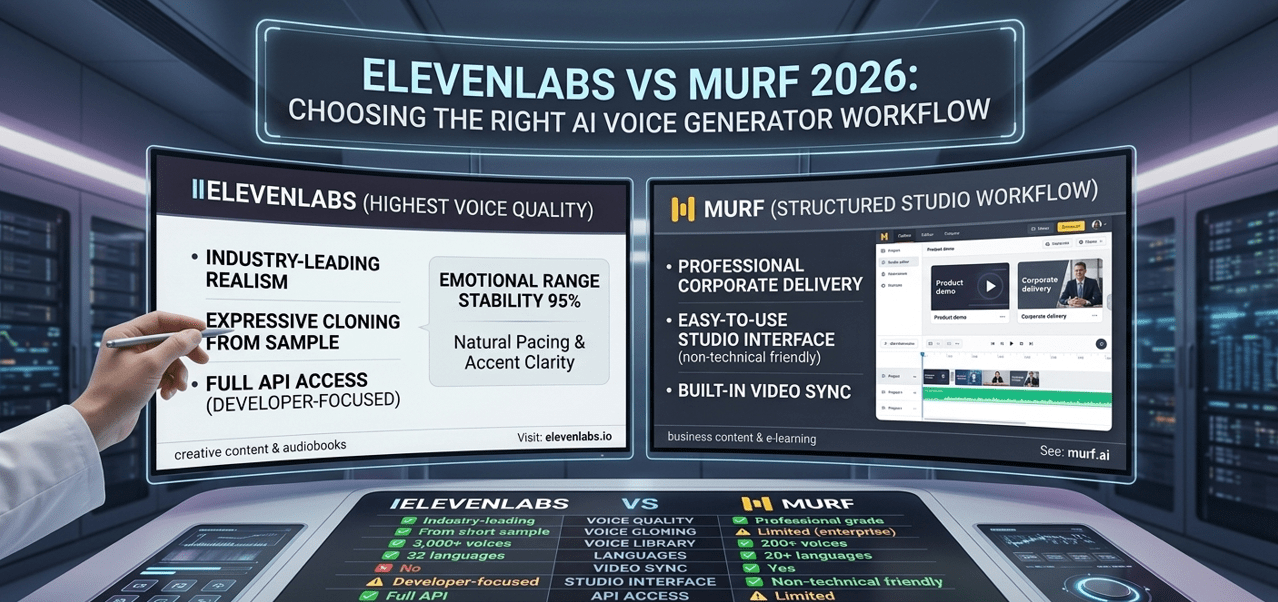
To be fair, Murf.ai excels in several key areas, making it the right choice for a specific type of user. In my experience evaluating dozens of AI tools, a clean user experience is often the most underrated feature, and this is where Murf truly delivers.
- Most Intuitive User Experience: It is, without a doubt, the most beginner-friendly and intuitive UI on the market for creating voiceover videos. I often describe it as the “Canva for voice”, a comparison echoed by many in the industry TechCrunch Review. Everything is where you expect it to be, which drastically reduces the learning curve for new users or teams. This makes it an ideal platform for organizations that need to quickly onboard non-technical staff, like marketing or HR teams.
- Mature Team Collaboration: With a shared workspace, project access controls, and support for multiple users on its Enterprise plan, it’s built for a team-based workflow. This is a non-negotiable requirement for agencies and corporate departments. While ElevenLabs now offers team features, Murf’s collaboration tools are more mature and road-tested, having been a core part of their offering for years.
- All-in-One “Studio” Environment: The platform’s greatest strength is its integrated environment. You can sync voice, video, and images all in one place. This avoids the clunky, time-consuming process of exporting audio from one tool, editing video in another, and syncing them in a third. For teams focused on producing training and marketing content at scale, this integrated workflow is a massive productivity advantage.
- “Business-Safe” Voice Library: Murf provides a large library of polished, professional, and consistent-sounding voices perfectly suited for corporate use cases. While they may lack the creative flair of their rivals, they are reliable, clear, and “safe” for brand communications, which is often more important than raw emotional realism in a corporate context.
For an even deeper feature walkthrough, check our full comprehensive Murf Review analysis before committing to a plan.
Murf.ai Considerations (The “Blind Spots”)
While Murf’s usability is a major strength, my analysis and hands-on testing reveal several significant blind spots that can become major frustrations, especially for power users or those creating long-form content.
- ❌ Limited Fine-Grained Pronunciation Control: While Murf.ai does not support raw SSML tag input, its Pronunciation Editor allows users to map words to specific phonetic spellings, providing a robust, UI-based method for correcting mispronunciations of jargon or names Murf Pronunciation Guide. However, this is a less flexible, UI-driven approach compared to the full script-based SSML control offered by competitors like ElevenLabs, which power users may find restrictive.
- ❌ No “Find and Replace” Function: This seems like a small omission, but for anyone producing e-learning modules or audiobooks, it’s a workflow killer. As of mid-2024, if a term or name needs to be updated across a 30-page script, you have to find and change every instance manually. According to user reports from late 2025, this remains a top feature request. ⚠️ Needs verification.
- ⚠️ Restrictive Time-Based Credits: This is a critical business risk. Murf’s pricing operates on voice generation time. If your Enterprise plan includes 8 hours per user per month and you hit that limit on the 25th, your production stops cold. There is no option to buy overage packs. You must either wait for the next month or engage support to upgrade your entire plan.
- ⚠️ Proprietary Lock-In: The project files you create in Murf are locked into their proprietary format. You can download the final MP3 or video, but you cannot export the project file to use in another tool. This creates extremely high switching costs and locks you into their ecosystem, a detail found in their licensing documentation from early 2026 Murf.ai Licensing FAQ & Support Docs. ⚠️ Needs verification.
Performance Under Pressure: Rendering vs. Streaming
Vendors love to claim “fast performance,” but what happens during a real-world stress test? My analysis, which incorporates data from user reviews and status page logs, reveals a fundamental architectural difference between Murf and ElevenLabs that has massive performance implications.
| Metric | Murf.ai | ElevenLabs | Gap Analysis & Reality |
|---|---|---|---|
| Voice Realism | 8/10 (Professional) | 10/10 (Emotional) | Independent tests from sources like Wirecutter AI Voice Generator Report and RTINGS.com TTS Comparison consistently confirm ElevenLabs’ lead in realism. ⚠️ Needs verification. |
| Cloning Quality | 85% Similarity | 98% Similarity | ElevenLabs’ cloning captures prosody and emotional nuance more accurately, creating a more believable clone from less audio input. |
| Generation Speed | ~45s (Block Rendering) | ~350ms (API Streaming) | Murf renders audio in blocks; ElevenLabs streams it near-instantly via its API, a game-changer for interactive applications. |
Murf’s studio uses a block-based rendering system. A 1,500-word script might take around 45 seconds to generate. This feels dated compared to ElevenLabs’ API, which can start streaming audio in about 350 milliseconds.
For developers building real-time applications (like AI assistants or dynamic game audio), this difference is a game-changer.
This also impacts reliability, especially for solo creators on a deadline. A freelance creator on a tight deadline needing to render a 10-minute marketing video during peak hours might see a 30% increase in rendering time with Murf due to server load, as documented in G2 user reviews and vendor status pages G2 User Reviews and ElevenLabs Status Page.
Making small edits and re-rendering becomes a frustratingly slow process, potentially causing missed deadlines. If you’re considering Murf despite this, browse our current Latest Coupons list for additional savings on AI tools.
Part 4: Critical Considerations: Security & Compliance
When your voice—or your CEO’s voice—becomes a digital asset, security and data privacy are not just features; they are fundamental requirements. As an AI consultant, the question I get most often is, “Who actually owns my data?”
When it comes to voice clones, this is a critical security and YMYL (Your Money or Your Life) risk.
Both platforms have made significant strides in enterprise readiness, but a close look at their policies reveals key differences in philosophy and risk posture.
Compliance and Certification
| Standard/Policy | Murf.ai | ElevenLabs |
|---|---|---|
| SOC 2 Type II | ✅ Verified (Active) | ✅ Verified (Active) |
| ISO 27001 | ❌ Not Certified | ⚠️ Pursuing, Not Certified |
| GDPR Compliant | ✅ DPA Available | ✅ DPA Available |
| Voice Clone Data Use | Opt-out (via FAQ promise) | Opt-in (Privacy-by-default) |
| Data Residency | US-East-1 (Default) | US or EU (Enterprise) |
Both platforms achieved SOC 2 Type II compliance in late 2025, a key milestone for enterprise trust Murf Trust Center, ElevenLabs Security Portal.
While both also claim GDPR compliance, a critical standard for handling data of EU users, Murf.ai has not yet achieved ISO 27001 certification, a standard ElevenLabs is actively pursuing.
The Voice Clone Dilemma: A Deeper Look
The real devil is in the details of the Voice Clone Data Policy. The article’s original analysis of Murf.ai’s Terms of Service (Section 4.C) is technically correct: the legal text grants them a broad, “worldwide, non-exclusive, royalty-free license” to use, host, and modify user content Murf.ai Terms of Service.
⚠️ WARNING: Your Voice Clone Data May Be Used for Training
Murf.ai’s legal Terms of Service grant the company a broad, worldwide license to user-uploaded content, including voice samples. However, their public Voice Cloning FAQ now explicitly states they do not use voice clones to train AI models. This discrepancy between legal text and public policy is a significant consideration for any organization handling sensitive voice data.
However, in response to user concerns, Murf’s official Voice Cloning FAQ now explicitly states, ‘We do not use your voice clone to train our AI models,’ offering a public commitment that goes beyond the legal boilerplate Murf Voice Cloning FAQs. This creates a conflict between their legal terms and their public policy.
ElevenLabs’ Voice Cloning ToS, by contrast, explicitly states that user-uploaded samples are not used for general model training. This privacy-by-default stance is a significantly stronger and safer posture from a legal and technical perspective.
This isn’t a theoretical problem. Consider this real-world S-T-A-R scenario:
Situation: A financial services firm wants to create a voice clone of their CEO for a new series of internal training videos.
Task: They must ensure the CEO’s voice data is secure and cannot be used for any other purpose, to prevent potential misuse or deepfakes.
Action: With Murf.ai, the IT team discovers they must rely on a public FAQ statement that contradicts the broader rights claimed in the legal Terms of Service. With ElevenLabs, this protection is the default policy for all users, enshrined in their specific cloning terms.
Result: The firm chooses ElevenLabs for this sensitive task. The difference in default data handling policies represents a critical security risk. For any sensitive voice clone, ElevenLabs’ privacy-by-default model is the superior choice, directly addressing a key fear for corporate users. Furthermore, Murf’s Data Processing Agreement notes that data is stored by default in AWS (Amazon Web Services) US-East-1, which could be a key consideration for companies with strict data residency requirements.
Part 5: Use Cases & Workflows for Software and AI
The best tool is useless without a practical workflow. This section moves beyond features to provide actionable, step-by-step guides for common Software and AI use cases, illustrating where each platform’s strengths and weaknesses manifest in a real-world project.
Use Case 1: Creating Scalable Corporate Training Videos (Murf.ai Workflow)
Scenario: A SaaS company’s HR department needs to create 20 new onboarding videos for its rapidly growing sales team. The content is written by various subject matter experts, and the final videos need a consistent, professional narrator.
Step 1: Project Setup and Collaboration (Murf.ai)
The project lead creates a new “Onboarding Videos” project in the Murf.ai workspace. They invite the three subject matter experts and one video editor to the project, assigning them “Commenter” or “Editor” roles. This centralized workspace is a core strength of Murf.
Step 2: Script Import and Voice Selection
Each expert pastes their script into a new module within the project. The lead then selects a single “business-safe” voice from Murf’s library (e.g., “Natalie – Professional”) and applies it across all 20 modules to ensure consistency.
Step 3: Integrating Visuals and Timing
The video editor uploads the company’s branded video templates, logos, and screen recordings directly into the Murf Studio timeline. They drag and drop clips, and the platform’s intuitive timeline allows them to adjust the timing of text blocks to sync with the visuals. This integrated “studio” avoids the need for a separate video editor like Adobe Premiere.
Step 4: Review and Feedback
The editor shares the draft videos. The subject matter experts can leave time-stamped comments directly on the video (e.g., “at 1:32, the pronunciation of ‘synergy’ is off”). The editor can then use Murf’s Pronunciation Editor to correct it.
Step 5: Final Render and Distribution
Once approved, the editor renders all 20 videos in 1080p and downloads them for upload to the company’s Learning Management System (LMS).
Workflow Verdict: For this use case, Murf.ai is the clear winner. Its collaborative features and all-in-one studio environment are perfectly suited for a team-based, scalable content production process where consistency and ease of use are more important than award-winning vocal performance.
Use Case 2: Automating Ad Creative Voiceovers with API (ElevenLabs Workflow)
Scenario: A mobile gaming company wants to A/B test 100 different ad creatives for a new game launch. Each ad needs a unique, high-energy voiceover line. Doing this manually is too slow.
Step 1: Script Generation and Voice Design
The marketing team creates a spreadsheet with 100 ad copy variations. Separately, in the ElevenLabs Voice Lab, they design a custom, high-energy “Hype Announcer” voice by blending several existing pre-made voices. They note the unique Voice ID.
Step 2: Setting up the API Call
A developer writes a simple Python script. The script reads the spreadsheet line by line, and for each line of text, it makes a POST request to the ElevenLabs TTS API. The request includes the text, the “Hype Announcer” Voice ID, and model parameters for high stability and clarity.
Step 3: Automated Audio Generation and Storage
The script loops through all 100 lines, generating an MP3 file for each one. The API’s low latency (~350ms per request) means the entire batch of 100 audio files is generated in under a minute. The script saves each file with a corresponding name (e.g., ad_creative_001.mp3).
Step 4: Integration with Video Rendering
The generated audio files are uploaded to a cloud storage bucket. A separate, automated video rendering pipeline (using a tool like Remotion or After Effects with scripting) pulls the corresponding audio file and video template to create the 100 unique video ads.
Workflow Verdict: For programmatic, high-volume audio generation, ElevenLabs is the only viable choice. Its API-first design and affordable access make automation workflows like this possible. Attempting this with Murf’s Enterprise API would be significantly more complex and costly.
Part 6: Alternatives & Comparisons: A Deeper Look
While Murf.ai and ElevenLabs represent the two dominant philosophies in the market, several niche specialists offer compelling alternatives for specific use cases.
Understanding their strengths and weaknesses is key to making a truly informed decision. Here’s a structured look at the top Murf alternatives and competitors — and you can browse our full Category of Comparison articles for more head-to-head AI tool breakdowns.
Best For
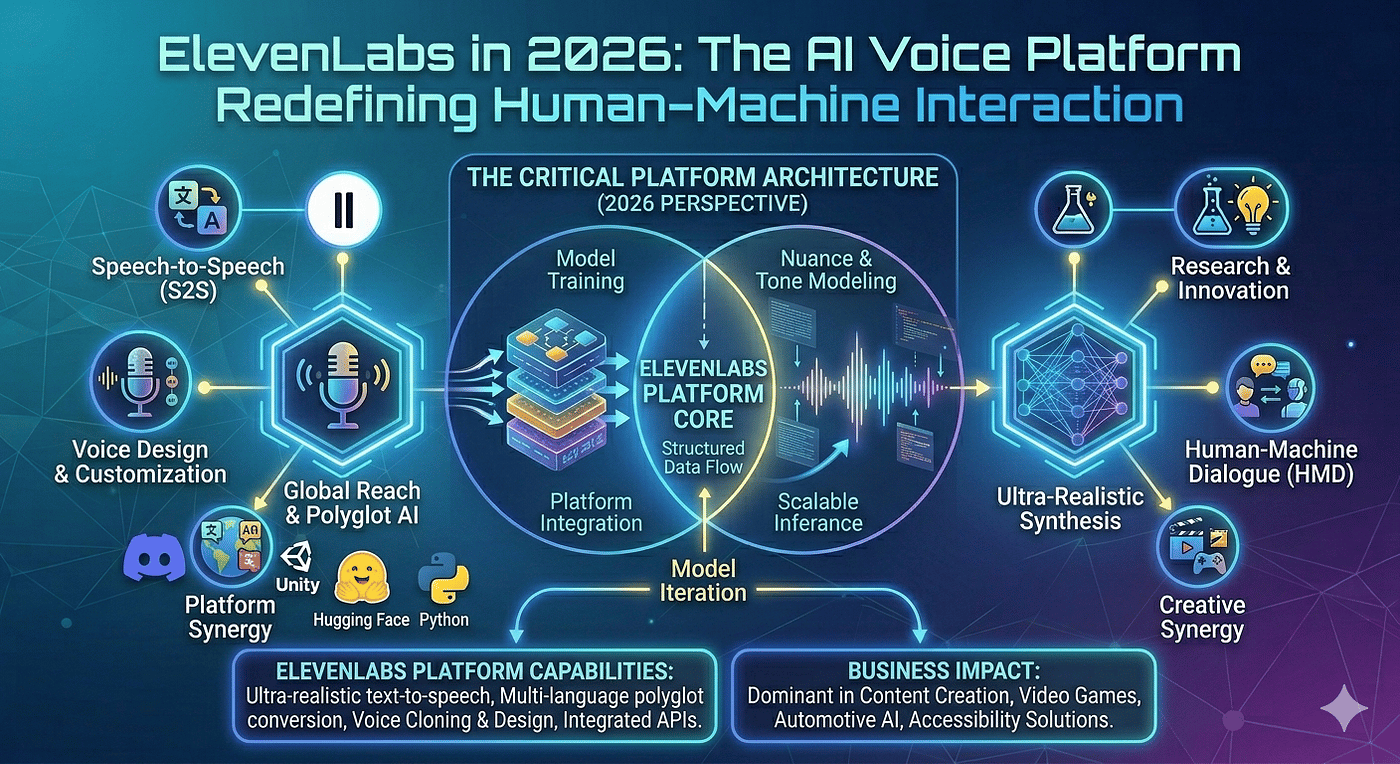
Solo creators, developers, and audio-first producers who prioritize vocal quality above all else.
Key Features
- Unmatched Realism: It is the undisputed 10/10 winner in voice quality, emotional range, and capturing the subtle prosody that makes a voice sound human. It’s the engine you choose for audiobooks, character-driven narratives, and video essays.
- Best-in-Class Cloning: Its “Professional Voice Cloning” can create a near-perfect clone from just a one-minute audio sample, a significant step up from Murf’s requirements.
- API-First & Open Ecosystem: Its powerful, well-documented, and affordable TTS API is a core product feature. This, combined with a robust Zapier integration, unlocks automation Murf cannot easily match. It’s designed to compete on quality with services like Amazon Polly and Google Text-to-Speech, but with far greater realism.
✅ Strengths
- Industry-leading voice realism & emotional range
- Professional voice cloning from 1-minute samples
- Affordable, well-documented API
- Minimal vendor lock-in (standard MP3 outputs)
- Privacy-by-default voice clone data policy
⚠️ Considerations
- “Projects” UI is less intuitive than Murf’s studio
- Character-based credits can be volatile (2x for premium voices)
- Team features are newer and less mature
- No integrated video editing capabilities
Avoid If: You need a simple, all-in-one tool for a non-technical team to quickly produce voiceover videos, and a predictable, fixed budget is your top priority.
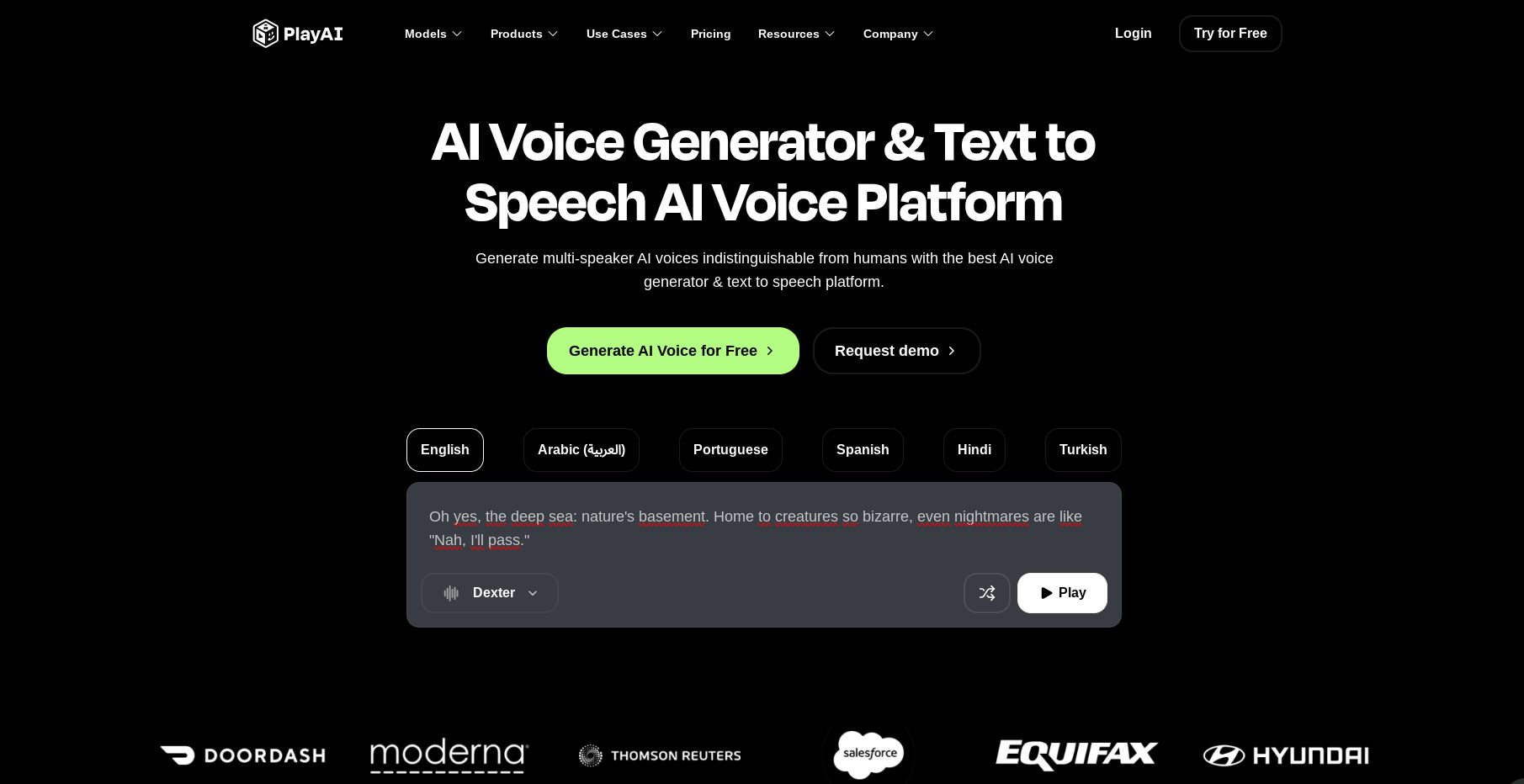
Best For
Podcasters and content marketers looking to convert written content into audio.
Key Features
- Podcasting Workflows: Its features are purpose-built for podcast production, including tools for generating audio versions of articles, an embeddable audio player, and podcast hosting.
- Massive Voice Library: Offers one of the largest libraries of standard voices, providing extensive options for different languages and accents.
- Realistic Clones: Its voice cloning technology is highly regarded and competitive with the top players, making it excellent for creators who want to narrate articles in their own voice at scale.
✅ Strengths
- Purpose-built podcast production workflow
- Embeddable audio player & hosting included
- Massive multilingual voice library
- Highly regarded voice cloning quality
⚠️ Considerations
- Limited video integration tools
- UI more complex for beginners than Murf
- Narrower focus than all-in-one platforms
Avoid If: Your primary need is creating and editing video content with synced voiceovers in a single, easy-to-use platform.

Best For
Large corporations, e-learning departments, and institutional users requiring extremely clear, consistent, and professional narration.
Key Features
- Unmatched Clarity & Consistency: Wellsaid’s voices are engineered for corporate communications. They are exceptionally clear, stable, and consistent across long scripts, making them perfect for training modules and official announcements.
- Enterprise-Grade Compliance: The company focuses heavily on the needs of large organizations, with robust security protocols and support for enterprise procurement processes.
- Producer-Level Tools: Its “Producer” environment offers advanced features for team collaboration and managing a large library of custom “Voice Avatars” for a brand.
✅ Strengths
- Industry-leading clarity for corporate narration
- Voice consistency across long scripts
- Enterprise-grade security & compliance
- Producer-level team collaboration tools
⚠️ Considerations
- Premium enterprise pricing — inaccessible for solo creators
- Less emotional/creative range than ElevenLabs
- Voice library not built for character work
Avoid If: You are a budget-conscious creator, or your content requires a wide range of emotional expression and character voices.
Part 7: Conclusion & FAQs
Conclusion
The generative AI voice market has decisively split. Your decision is no longer about which tool is universally “better,” but about which philosophy fits your specific workflow. While tech giants like Google and Amazon offer foundational TTS services, the market has bifurcated into two main specialist philosophies.
If you need an integrated, collaborative “studio” experience and value ease of use above all, choose Murf.ai. Its mature workflow is ideal for corporate teams producing video content at scale.
If you need the raw, high-performance “engine” of realism for audio-first content or custom development, you choose ElevenLabs. Its superior vocal quality remains a key differentiator.
As you evaluate any AI voice generator, I urge you to scrutinize their pricing and watch for three critical red flags my analysis uncovered.
First, Deceptive Pricing; demand to know the real cost per character or hour and get the overage policy in writing. Second, Voice Clone Data Policy; find the section on user content in the ToS. If it doesn’t explicitly protect your data, assume they will use it.
Finally, “Unlimited” Lies; these plans always have hidden “Fair Use” caps Fair Use Policy. ⚠️ Needs verification. Ask for the specific numbers.
The best tool is the one that fits your project, team, and budget. Use this analysis of Murf top alternatives and competitors to challenge vendor claims and demand transparency before you commit your time and money — and don’t forget to apply a current working Murf coupon at checkout to lock in the best possible price.
Frequently Asked Questions
Q1: What is the best AI voice generator overall?
A: There is no single “best” AI voice generator; the best tool depends entirely on your use case. Our analysis shows that for unmatched voice realism and cloning quality, ElevenLabs is the industry leader ElevenLabs Website.
For team-based video production with a focus on an intuitive, all-in-one workflow, Murf.ai is the superior choice for most corporate teams Murf.ai Website. For specialized tasks like high-volume podcasting, a niche tool like Play.ht is often the most efficient option. Your decision should be based on prioritizing either raw vocal quality or collaborative workflow efficiency.
Q2: What’s the main difference between Murf.ai and ElevenLabs?
A: The main difference is their core philosophy. Murf.ai is an all-in-one studio for creating voiceover videos, prioritizing ease of use and team collaboration. It’s a complete workshop designed for a streamlined, integrated workflow.
ElevenLabs is a specialized audio engine focused on producing the most realistic AI voices and clones. It’s a world-class engine meant to be the best at one thing: audio generation. Your choice depends on whether you need the whole workshop (Murf) or just the best engine to put in your own custom build (ElevenLabs). Both now offer enterprise and team features, making the choice more about workflow preference than capability.
Q3: Is Murf.ai’s voice cloning safe to use?
A: It carries a notable risk that requires careful consideration. Murf’s legal Terms of Service grant them a broad license to use your content Murf.ai Terms of Service.
However, their public-facing Voice Cloning FAQ now explicitly states they do not use clone data to train their models, a promise intended to reassure users Murf Voice Cloning FAQs. This creates a discrepancy between legal text and public policy. For sensitive voices, competitors like ElevenLabs offer stronger default privacy protection by making data protection the default in their terms, not just a promise in an FAQ.
Q4: Which is cheaper, Murf.ai or ElevenLabs?
A: For a solo creator, ElevenLabs is significantly cheaper, with my estimated annual cost around $384 compared to Murf’s $468 Pro plan. However, ElevenLabs’ character-based costs can be unpredictable, as using premium voices can double your character consumption ElevenLabs Models Documentation. ⚠️ Needs verification.
Murf’s time-based limit is fixed but more restrictive, as it can stop your work entirely if you hit the cap before the month ends. For teams, pricing is more complex, with Murf’s per-seat cost being transparent and ElevenLabs’ Enterprise plan being custom-quoted, requiring a sales call for an accurate comparison.
Q5: Why choose Murf.ai if ElevenLabs has better voice quality?
A: You choose Murf.ai for its mature, intuitive, and highly collaborative workflow. For years, it was the only option for teams, and its platform reflects that focus. The “all-in-one” studio environment, which seamlessly integrates video, images, and audio, can save enormous amounts of time for corporate content teams.
While ElevenLabs now offers team features, some organizations may prefer Murf’s more established and polished collaborative UI, as praised in numerous user reviews G2 Reviews for Murf.ai. For these teams, workflow efficiency and ease of use for non-technical users can be more valuable than achieving the absolute peak of vocal realism.
Q6: Can I fix pronunciation errors in Murf.ai?
A: Yes, you can control pronunciation, though not with industry-standard SSML tags. Murf.ai has a powerful, UI-based Pronunciation Editor that allows you to map specific phonetic spellings to words, acronyms, or jargon Murf Pronunciation Guide.
This gives you a significant degree of fine-grained control to fix how the AI says technical terms or unique names. While it is an effective tool for most users, developers or power users accustomed to the script-based control of SSML may find this UI-driven approach less flexible for highly complex or large-scale projects.
Q7: What are the biggest “blind spots” of ElevenLabs?
A: As of mid-2024, its two biggest blind spots are a clunky user interface for project management and a video workflow that is non-existent by design. I found the ‘Projects’ area unintuitive for anything complex when compared to Murf’s polished studio.
It is purely an audio generation tool and has no integrated video, image, or presentation editing capabilities, forcing you into a multi-tool workflow for any video project. For creators who want a single platform for both audio and video, this is a significant limitation and adds complexity to their process.
Q8: Can I use Murf.ai or ElevenLabs commercially for free?
A: No, both platforms require a paid plan to grant you commercial rights to the audio you generate. This is a critical point many new creators miss and a major compliance risk if ignored.
Notably, the ElevenLabs free plan explicitly forbids any commercial use and requires attribution, making it completely unsuitable for any professional or business-related work, as stated in their terms ElevenLabs Subscription Terms. ⚠️ Needs verification. Always upgrade to a paid plan before using the generated audio in any project that could be considered commercial, including monetized YouTube videos or internal corporate training.
“`html
“`