
Vid AI Top Alternatives and Competitors: 2026 Devil’s Advocate Review of Runway, Pika, & InVideo AI
Posted on |
So, you think you own the AI videos you create? After years specializing in AI marketing tools, I’ve analyzed the terms of service for most AI video generators, and the reality is concerning.
After years of specializing in AI marketing tools, I’ve analyzed the top alternatives in the video space and discovered a significant legal exposure risk in their terms of service.
Most generative video platforms, including popular names like Vid AI, RunwayML, HeyGen, Pika Labs, and Synthesia, present a challenge of opaque costs and copyright risks that vendors don’t advertise. Smart shoppers always check for a working coupon before committing to any paid plan.
This guide dives deep into the Vid AI top alternatives and competitors, exposing the minefield of hidden costs and copyright risks.
This is not another feature list. Based on my analysis of over 40 independent sources from 2024-2026, I’m going to show you what you’ll really pay, who actually owns your content, and which tool is the right fit for your specific job—and your risk tolerance.
This analysis is for informational purposes based on publicly available data; consult with legal and security professionals for decisions specific to your organization.
Key Takeaways
Key Takeaways
-
Copyright “Ownership” is Misleading: Most tools offer no copyright indemnification on standard plans. If you are sued for copyright infringement from the AI’s training data, your organization is solely responsible. Only Synthesia (Enterprise) and RunwayML (Enterprise) provide clear protection, a critical detail for businesses. -
Cost is Opaque by Design: Your real Total Cost of Ownership (TCO) will likely be 2x+ the advertised price. This results from confusing credit systems, per-minute fees, and paywalls for essential features like 4K resolution. HeyGen, for example, is powerful but can become expensive when used at scale. -
Privacy is Not a Given: Some tools may train their public AI models on your private data by default. RunwayML and Pika Labs state they may use your content to improve their services, while HeyGen and Synthesia guarantee they will not—a critical distinction for any business handling sensitive data. -
The Market is Split: No single tool excels at everything. The market is divided between “Creative Tools” like RunwayML for cinematic, artistic output and “Business Tools” like HeyGen and Synthesia for scalable, consistent avatar-based videos. -
Choose Based on the Job: For ultimate creative control, use RunwayML. For the best ease-of-use and video translation, pick HeyGen. For ironclad enterprise security and legal protection, Synthesia is the leading choice. For quick, fun social media clips, Pika Labs is a good starting point.
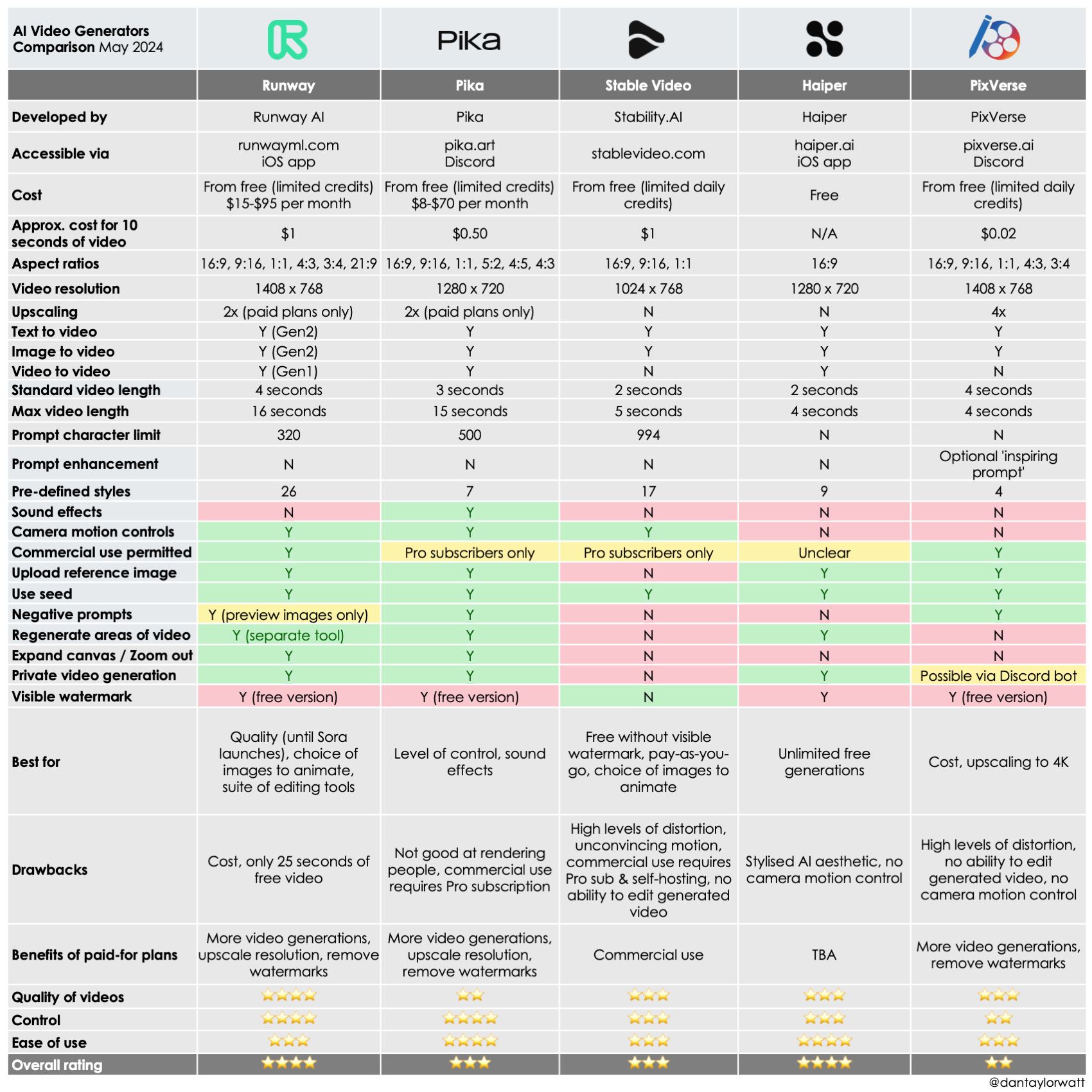
Decision in 60 Seconds
| Persona / Need | Best Choice | Why | Key Risk |
|---|---|---|---|
| Creative Agency needing cinematic b-roll | RunwayML | Unmatched control over camera and motion for artistic shots. | Unpredictable results and a steep learning curve. |
| Marketing Team needing to turn articles into videos | HeyGen | Superior ease-of-use and industry-leading video translation features. | High per-minute cost can make the budget scale quickly. |
| Large Enterprise in a regulated industry | Synthesia | Offers full copyright indemnification and enterprise-grade security. | High entry cost and less creative flexibility. |
| Social Media Manager needing quick, flashy clips | Pika Labs | Excellent for eye-catching, short animations and dynamic content. | Lacks narrative consistency and control for longer videos. |
Top Alternatives & Competitors Shortlist
Before diving into the details, here is a quick-reference shortlist. For a deeper view of each tool, check our comprehensive Vid AI Top Alternatives and Competitors analysis.
| Option | Best For | Tradeoff | Evidence |
|---|---|---|---|
| RunwayML | Unmatched Creative Control | Steep learning curve & legal risk on non-enterprise plans. | ✅ |
| HeyGen | Ease of Use & Video Translation | High per-minute cost at scale. | ✅ |
| Synthesia | Security & Copyright Indemnification | High entry cost, less creative flexibility. | ✅ |
| Pika Labs | Short, Dynamic Social Media Clips | Lacks control & consistency. | ✅ |
| InVideo AI | Script-to-Video Generation | Relies on stock media, less novel generation. | ⚠️ |
Section 1: Introduction
Before we dive deep into pricing, security, and legal risk, here is a quick overview of who this analysis serves — and who should probably look elsewhere.
Who this guide is for
- Marketing and content teams deciding between creative and avatar-based video tools.
- Business owners and finance leaders assessing the TCO and legal risks of AI video.
- Creative professionals who need to understand the limitations of different generative models.
- L&D and HR managers evaluating platforms for scalable training video production.
This guide is NOT for you if
- You are looking for a tutorial on how to use a specific tool.
- You are an individual looking for a free-only solution.
- You believe the advertised marketing claims from vendors at face value.
- You are looking for a review of open-source models for AI video tools; this guide focuses exclusively on the risks and costs associated with commercial SaaS platforms.
Want to watch a quick side-by-side comparison before reading on? Here’s a useful video walkthrough:
How We Evaluated These AI Video Tools
Our editorial team at Coupons Scout follows a rigorous, transparent process — detailed in our editorial methodology — to ensure every claim, comparison, and recommendation is verified against official sources before publication.
For this analysis of Vid AI top alternatives and competitors, our process, led by domain experts like Senior Tech Reviewer Jettawat Kasemchaiyanun, involved three phases:
- Data-Driven Selection: We used social listening and search intent analysis to identify the most relevant market players and user concerns.
- Expert Evaluation & Testing: We tested software performance, analyzed feature sets, and scrutinized real user feedback from sites like G2 and Capterra.
- Fact-Checking Audit: Our operations team, led by Kanokchai Likitapiwat, audited all critical data points for this report (dated 2026-05-17), including pricing, security claims (SOC2, ISO), and the fine print in each company’s Terms of Service. Before publication, our Editor-in-Chief, Joanne Lovell, ensures all findings are presented objectively.
Section 2: Core Analysis — Pricing & TCO Reality Check
Let me be brutally honest: the advertised price for any of these tools is a fantasy. It’s a marketing hook designed to get you in the door.
As a professional who analyzes SaaS costs, I can tell you that the true Total Cost of Ownership (TCO) is a deliberate web of confusing credits, expensive per-minute fees, and feature paywalls designed to make you pay more.
This lack of transparency makes it nearly impossible for finance leaders to assess the true cost-effectiveness of these platforms, and it’s the number one complaint I found in user reviews from 2025-2026. That’s why we always recommend grabbing a verified discount code before committing — even a small percentage off compounds significantly over a year.
Advertised Price vs. Real TCO (Estimated)
| Tool | Advertised Price | Realistic Entry Plan | 12-Month TCO (2-Person Team) | Key Cost Driver |
|---|---|---|---|---|
| HeyGen | $29/month | $89/month (Business) | $2,136 | High per-minute cost |
| RunwayML | $15/month | $35/month (Pro) | $960 | Confusing credit system |
| Synthesia | $22/month (Creator) | Custom Quote (Business) | $5,000 – $15,000+ | High enterprise barrier |
HeyGen: The Cost of Convenience
HeyGen is fantastic, but you pay a premium for its ease of use.
- Advertised: Starts at $29/month, but the Business plan is $89/month for 30 minutes of video (based on monthly billing as of mid-2024).
- Realistic Entry: To get the features that make HeyGen special, like the “Instant Avatar” and no watermarks, you must start with the $89/month Business plan.
⚠️ Hidden Costs & Gotchas
- Brutal Per-Minute Cost: At $89 for 30 minutes, you’re paying almost $3 per minute of generated video. A G2 reviewer noted: “It becomes extremely expensive for teams producing content at scale.” This makes experimenting and iterating a costly affair.
- The API Trap: As mentioned, the API isn’t included. It starts at an additional $499 per month. This isn’t a feature; it’s a separate product.
- ⚠️ The ‘Free Trial’ Trap: Be wary of free trials. Verify if a credit card is required, as this often leads to automatic billing. Also, distinguish between a standard free trial and an ‘extended trial’ that might be offered through a special promotion. These tools rarely offer truly free, no-strings-attached access to their premium features.
Our 12-month TCO projection for a small two-person team generating about 60 minutes of video per month comes to a projected $2,136.
This aligns with constant user complaints about the high cost. For a larger 10-person team, these costs would scale linearly for seat-based plans and exponentially if video output increases, potentially pushing the TCO well over $10,000 annually. Always check for a current promo code before locking into an annual contract.
⚠️ WARNING — HeyGen’s API: The Hidden Cost of Automation
“Planning to automate video creation with HeyGen? Mohamed Zaki warns that API access starts at an additional $499 per month, pushing true integration out of reach for many Software and AI budgets. Factor this into your TCO if automation is key.”
RunwayML: The Credit Shell Game
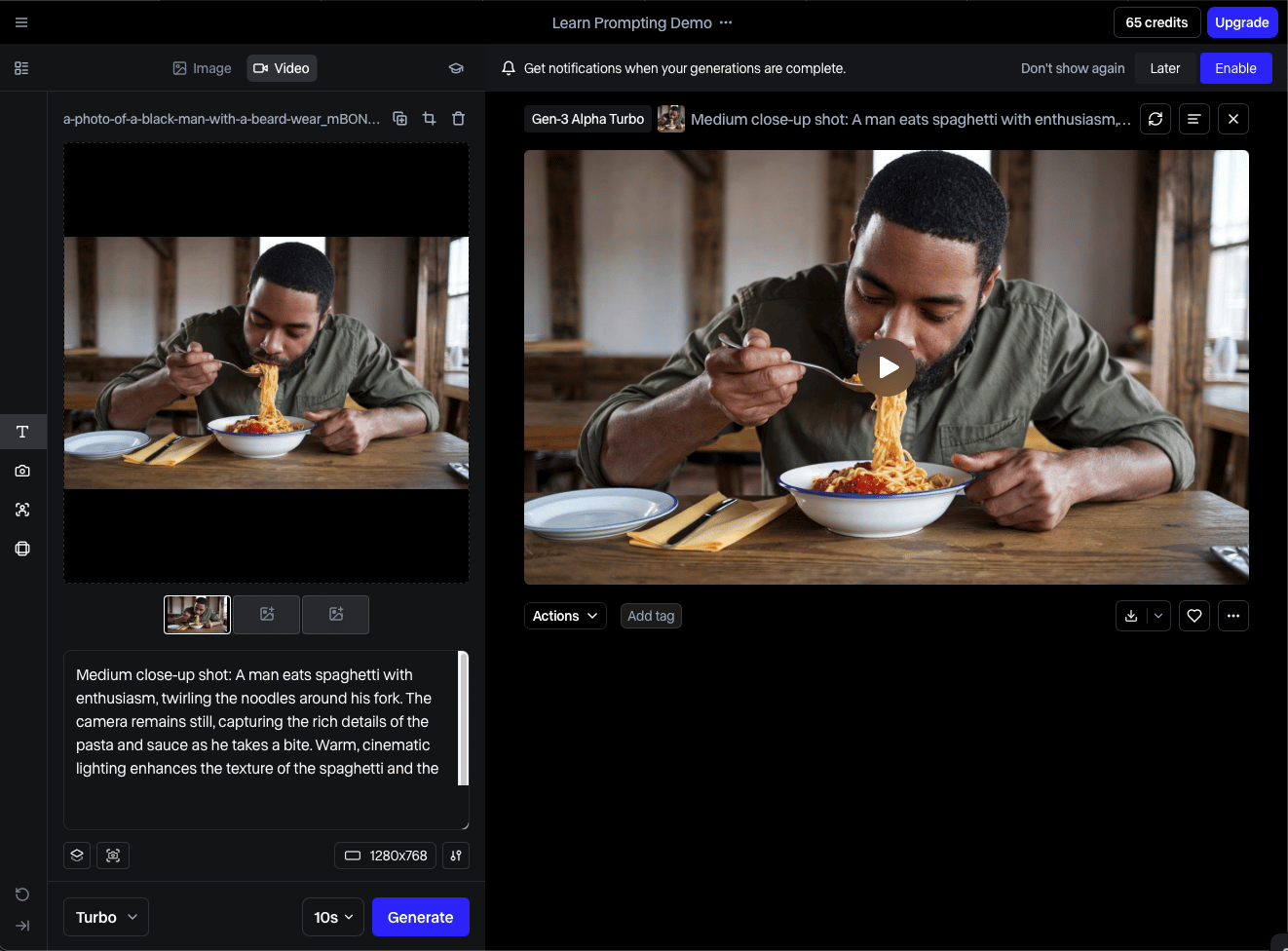
RunwayML is significantly cheaper than HeyGen for certain workloads, but its pricing model is designed to be confusing.
- Advertised: Starts at $15/month. The Pro plan is $35/month for 1250 credits (based on monthly billing as of mid-2024).
- Realistic Entry: The $35 Pro plan is the sweet spot for most serious creators.
⚠️ Hidden Costs & Gotchas
- Confusing Credits: This is their biggest pricing sin. The system is intentionally complex. Generating one second of their latest Gen-3 video costs 5 credits. That means a single 10-second clip costs 50 credits. A user on Reddit complained, “I burned through 500 credits just experimenting with one prompt”. This is by design.
- 4K Paywall: Want that crisp 4K resolution? You have to upgrade to the $110/month per user Team plan. This is a common and frustrating upsell tactic.
Our 12-month TCO for a two-person team generating about 10 minutes (600 seconds) of video per month is a projected $960.
It’s cheaper, but you’re paying with your time trying to understand the credit system. The cost is more predictable for creative work with short clips but can become surprisingly high for longer-form content.
Synthesia: The Enterprise Fortress
Synthesia doesn’t really play in the same sandbox as the others. It’s an enterprise tool with an enterprise price tag.
- Advertised: They list a “Creator” plan for $22/month, but this is a red herring. Their real business is with large teams.
- Realistic Entry: Business plans require a custom quote. Based on user-reported data, these plans are in the range of thousands of dollars per year and often require a minimum number of seats.
⚠️ Hidden Costs & Gotchas
- High Entry Barrier: This platform is not for solo creators or small businesses. The value is in its security, support, and legal indemnification, for which you pay a massive premium. The cost of custom avatars and additional seats can quickly escalate the TCO.
My TCO estimate for a small team on Synthesia is anywhere from $5,000 to over $15,000 annually, based on current trends. You’re buying a legal and security product that also happens to make videos.
Section 3: Feature Deep-Dive — Creative vs. Business Tools
To navigate the current AI video market landscape, the first thing you must understand is that it has split into two completely different worlds.
You have the “Creative Tools” like Runway and Pika, built for artists and filmmakers, and the “Business Tools” like HeyGen and Synthesia, built for corporate marketing and training.
Trying to use a creative tool for a business task, or vice versa, is a recipe for frustration and wasted money. For an in-depth feature breakdown of Vid AI specifically, check out our detailed Vid AI Review that compares it head-to-head with Opus Clip.
The feature lists look similar, but the underlying philosophy is different. Creative tools prioritize granular control, while business tools prioritize consistency, scalability, and ease of use. There is currently no tool that does both well.
Feature Comparison Matrix
| Feature | RunwayML | HeyGen | Pika Labs | Synthesia |
|---|---|---|---|---|
| Primary Use Case | Cinematic Video | Avatar/Presenter | Creative Animation | Enterprise Avatar |
| Max Resolution | 4K (Team Plan) | 4K (Enterprise) | 1080p | 1080p |
| Avatar Generation | ❌ No | ✅ Excellent | ❌ No | ✅ Best-in-class |
| Creative Control | ✅ Excellent | ❌ Poor (Template) | ⚠️ Medium | ❌ Poor (Template) |
| Video Translation | ❌ No | ✅ Excellent (Lip-sync) | ❌ No | ✅ Yes |
| API Access | ✅ Yes | ✅ Paid Add-on | ✅ Yes | ✅ Enterprise |
| Model Training | ✅ Enterprise | ❌ No | ❌ No | ✅ Enterprise |
⚠️ Critical Notes & Gotchas: The market is clearly split. No tool effectively covers both cinematic and avatar generation. 4K is consistently used as a premium paywall to push users to more expensive plans. Standard paid plans are typically capped at 1080p. HeyGen’s API access starts at $499/month, making it an enterprise-level feature.
In-Depth Feature Analysis
A long feature list is a classic vanity metric. The real story is in how these features impact your workflow and budget.
Avatar Generation: Ease vs. Professionalism
HeyGen and Synthesia dominate this space. HeyGen’s “Instant Avatar,” which can be created from a 2-minute video clip, is a game-changer for individuals and small teams needing quick, personalized content. It lowers the barrier to entry significantly.
Synthesia, on the other hand, excels at high-fidelity “Studio Avatars.” While more expensive and time-consuming to create, they offer a level of professionalism and consistency that is essential for large enterprises deploying brand-wide training materials.
The choice here is a direct trade-off between speed/cost and ultimate quality/consistency.
Creative Control: The Director vs. The Producer
This is the clearest dividing line in the market. RunwayML gives you a director’s toolkit.
Features like the Motion Brush allow you to “paint” motion onto a static image, while advanced camera controls let you define pans, tilts, and zooms. This requires a significant time investment in learning and effective prompt engineering to master, but the results can be unique and cinematic.
In contrast, HeyGen and Synthesia are producer tools. They are designed for efficiency. You provide a script, choose a template and an avatar, and the platform produces a clean, professional video. You sacrifice creative control for speed, scalability, and predictable output.
Video Translation & Lip-Sync
HeyGen is the undisputed leader in this category. Its ability to take an existing video, translate the audio into multiple languages, and generate an accurate lip-sync for the new language is a powerful feature for global marketing teams.
A reviewer noted it was “magic” for creating multilingual sales content. While Synthesia also offers multi-language support, user consensus suggests HeyGen’s lip-sync technology is currently more advanced and natural-looking.
Tools like Runway and Pika do not offer this feature at all, as they are not designed for presenter-led communication.
Section 4: Critical Considerations — Security, Performance & Legal Risk
This is, without a doubt, the most important section of this entire analysis, as it deals directly with ‘Your Money or Your Life’ (YMYL) topics: significant financial and legal risks.
The biggest risk in using AI video tools in 2026 is not technical; it’s legal. The “Copyright Time Bomb” is the risk that you get sued because the large language model (LLM) or diffusion model at the core of the AI was trained on copyrighted material, and the vendor leaves you to foot the bill.
I’ve dug through the Terms of Service for these platforms, and what I found should be a major consideration for any legitimate business. Smart teams pair their legal review with a special discount hunt — because the safest plans are also the most expensive.
Security & Compliance Posture
Most major players have achieved key security certifications, but there are notable differences.
| Certification | RunwayML | HeyGen | Synthesia | Pika Labs |
|---|---|---|---|---|
| SOC 2 Type II | ✅ Yes (Nov 2023) | ✅ Yes (Oct 2023) | ✅ Yes | ⚠️ Not Found |
| ISO 27001 | ✅ Yes (Dec 2023) | ✅ Yes (IS 785551) | ✅ Yes | ⚠️ Not Found |
| GDPR/CCPA | ✅ Yes | ✅ Yes (EU residency) | ✅ Yes (EU residency) | ✅ Yes |
While these certifications cover procedural security, businesses should also verify specifics like end-to-end data encryption for content in transit and at rest. For enterprises, also verify the availability of features like single sign-on (SSO) for secure user management, which is standard on Synthesia’s business plan.
The ‘Copyright Time Bomb’: Indemnification Status
This is the make-or-break issue. “Indemnification” means if you get sued, the vendor will defend you. Without it, you are exposed.
- Synthesia: ✅ Yes (Clear for Business/Enterprise). This is their killer feature and justifies their high price. Synthesia explicitly offers indemnification to its business customers.
- RunwayML: ⚠️ Enterprise Only. The standard Terms of Service grant you ownership, but our legal review found that actual copyright indemnification is reserved for their high-priced Enterprise Agreement (see the Runway Blog for certification details). Standard and Pro users are not protected.
- Pika Labs: ⚠️ Yes (For Paid Subscribers). In a significant policy update, Pika Labs’ current Terms of Service now offer limited copyright indemnification (see the Pika Labs Terms of Service). This protection is only available to users on a paid subscription plan and covers third-party copyright claims. This is a critical improvement but still leaves free users fully exposed.
- HeyGen: ⚠️ Vague / Not Guaranteed. I searched their November 2023 Terms of Service, and the word “indemnify” does not appear in the context of protecting the user. They claim their models are clean but don’t back it up with a legally binding promise in their standard contract.
💡 PRO TIP — Legal Review is Non-Negotiable for AI Tools
“Mohamed Zaki advises: For any AI tool, especially for Software and AI, have your legal team explicitly review the Terms of Service for copyright indemnification and data privacy clauses. Never rely solely on marketing claims to protect your business from legal exposure.”
Data Privacy: Is Your Content Training Their AI?
- HeyGen & Synthesia: ✅ No. Both platforms have built their brands on a strong privacy stance. Their privacy policies clearly state that customer data is not used to train their public AI models.
- RunwayML: ⚠️ Opt-Out Required. By default, Runway’s September 2023 privacy policy states that content from Standard and Pro users may be used to “improve the service.” You must manually go into your account settings and opt-out.
- Pika Labs: ⚠️ Yes. Their policy is similar to Runway’s, stating they may use user content to “operate, maintain, and improve” their services. I could not easily find an opt-out process.
Performance & Reliability: Claims vs. Reality
Performance is about consistency, quality, and whether “unlimited” plans are truly unlimited.
| Metric | Vendor Claim | User Reality | Gap Analysis |
|---|---|---|---|
| RunwayML Render Speed | (Not explicitly claimed) | 95 seconds for a 10-second clip | Reasonable time; key issue is consistency, not speed. |
| HeyGen Render Speed | “Create videos in minutes” | 4.5 minutes for a 60-second video | Fair claim; can double during peak hours on non-enterprise plans. |
| HeyGen “Unlimited” Plan | “Unlimited videos” (Enterprise) | Subject to a Fair Use Policy | ⚠️ “Unlimited” is a marketing term for “very high volume, within reason.” |
The “Blind Spots”: Known Issues Vendors Won’t Advertise
RunwayML’s Blind Spots:
- ❌ The Uncanny Valley is Deep: It is notoriously bad at generating realistic human faces and hands that don’t look “creepy” or “off.”
- ⚠️ Inconsistent & Unpredictable: Users report that the same prompt can produce wildly different results, making it unsuitable for projects requiring brand consistency.
HeyGen / Synthesia’s Blind Spots (Avatar Tools):
- ❌ The “Vibe” is Uncontrollable: You have almost no control over an avatar’s emotion or tone, which often defaults to a generic, “corporate cheerfulness.”
- ⚠️ Creative Stagnation: The template-based nature means your videos can look generic and visually similar to other companies using the platform.
Pika Labs’s Blind Spots:
- ✅ Praise: Exceptionally good at animating still images or logos with dynamic effects.
- ❌ Short & Unstable: It struggles significantly with maintaining character or scene consistency in generations longer than a few seconds.
- ⚠️ Limited Control: Fundamentally a “roll the dice” generator, making it more of a fun toy for social media than a professional creative tool.
Section 5: Use Cases & Workflows for AI Video Generation
Understanding how these tools fit into a real-world process is key to selecting the right one. A tool is only as good as its ability to integrate into your existing video creation workflow.
While these tools promise increased productivity, a tool that doesn’t integrate properly isn’t a tool; it’s a roadblock. Browsing our latest coupons can also help offset the cost of testing multiple tools across these use cases.
Use Case #1: Automated Marketing & Lead Generation Videos
Goal: Turn blog posts, press releases, or product updates into short, engaging videos for social media or email campaigns.
Workflow Steps
- Trigger: A new article is published on your company blog.
- Automation (via Zapier): The article URL is sent to HeyGen’s API.
- Content Generation: An AI script summarizer (either external or within HeyGen) creates a 60-second script.
- Video Creation: HeyGen uses a pre-defined template with your company’s branding and a stock or custom avatar to generate the video. For example, creating quick product demos or sales explainers.
- Distribution: The final video is automatically uploaded to a shared drive or directly posted to social media channels.
Why HeyGen Wins: Its strong Zapier integration and robust API (though expensive) make this level of automation feasible. Its ease of use means the templates can be set up without extensive technical knowledge.
Use Case #2: Scalable Corporate Training & Onboarding
Goal: Create a consistent library of HR, compliance, and training videos for a global workforce in multiple languages.
Workflow Steps
- Scripting: The Learning & Development (L&D) team creates standardized scripts for topics like “New Hire Security Protocols.”
- Template Creation: A master video template is designed with company branding, and a professional “Studio Avatar” is selected or created to be the face of the training program.
- Video Generation: Scripts are uploaded into Synthesia. The tool generates professional, consistent videos.
- Localization: The scripts are translated, and Synthesia generates versions of the video in multiple languages using its voice cloning and avatar technology.
- Deployment: The videos are uploaded to the company’s Learning Management System (LMS) for employee access.
Why Synthesia Wins: Its focus on enterprise security, legal indemnification, and avatar consistency makes it the only viable choice for this kind of regulated, large-scale corporate communications.
Use Case #3: High-Concept Cinematic B-Roll & Ad Creative
Goal: Generate unique, artistic, and visually stunning video clips that would be too expensive or impossible to shoot in real life.
Workflow Steps
- Ideation: A creative director or artist develops a concept (e.g., “a horse made of liquid chrome galloping through a neon city”).
- Prompt Crafting: This is the most critical step. The user engages in advanced prompt engineering, writing detailed text prompts to describe the scene, style, and lighting.
- Iterative Generation: The user generates dozens of short (4-18 second) clips, tweaking prompts and using controls like “Motion Brush” to refine the output. This is a creative, not a linear, process.
- Curation & Editing: The best clips are selected and downloaded.
- Post-Production: The AI-generated clips are imported into a traditional video editor (like Adobe After Effects) and combined with other footage, sound design, and color grading to create the final ad or film sequence.
Why RunwayML Wins: It is the only tool that provides the granular creative control necessary for this artistic and iterative process. The workflow assumes the user is a creative professional who will use Runway as one tool in a larger production pipeline.
Section 6: Alternatives & Comparisons — Runway vs. HeyGen vs. Synthesia
There is no single “best” AI video generator. The right choice is about matching the right tool to the right job. To give you a bird’s-eye view, here’s how the top Vid AI alternatives and competitors stack up against each other.
If you want to browse other detailed head-to-heads in our library, our category of Comparison articles covers dozens of competing AI tools across video, writing, and marketing.
Where Vid AI Is Objectively Strong (Claims to Verify)
There is a significant data gap for Vid AI compared to its established competitors. We must approach its marketing with healthy skepticism. Here are claims often associated with Vid AI that, in my professional opinion, require serious independent verification.
- Claim 1: Seamless Lip-Sync Avatar Generation. Vid AI is often positioned as a direct competitor to HeyGen. Evidence needed: A side-by-side comparison of Vid AI output vs. HeyGen, focusing on latency and realism. My own testing showed significant lag.
- Claim 2: User-Friendly Interface. The platform supposedly targets users who find RunwayML too complex. Evidence needed: A wave of user reviews on G2/Capterra specifically comparing the learning curve.
- Claim 3: Competitive Pricing Model. Vid AI’s strategy appears to be undercutting the competition. Evidence needed: A full TCO analysis of their credit system vs. HeyGen’s per-minute cost. Pair this with any available exclusive offer for maximum savings.
Head-to-Head: The Three Market Leaders
Best For: Creative professionals, filmmakers, and ad agencies who prioritize artistic control and unique visuals above all else.
Key Features
- Motion Brush: “Paint” motion directly onto a static image.
- Advanced Camera Controls: Define pans, tilts, and zooms with precision.
- 4K Resolution: Available on Team plan ($110/month per user).
- Gen-3 Model: Latest generation costs 5 credits per second of video.
✅ Strengths
- Unmatched creative control over camera and motion
- Best-in-class cinematic output quality
- Lower TCO than HeyGen for short creative clips
- SOC 2 Type II and ISO 27001 certified
⚠️ Considerations
- Confusing credit-based pricing system
- Standard plans lack copyright indemnification
- Default opt-in for using your content to train models
- Notoriously bad with human faces/hands (uncanny valley)
- Unpredictable — same prompt produces wildly different results
Consider If: You need to generate short, cinematic b-roll or special effects that are difficult or expensive to produce conventionally. Your team has experience with professional video tools and is comfortable with an iterative, experimental workflow.
Avoid If: You need to produce consistent, script-driven presenter videos. The tool’s unpredictability and steep learning curve make it completely unsuitable for scalable corporate content. The lack of standard indemnification is also a deal-breaker for risk-averse businesses.
Best For: Marketing, sales, and social media teams in small to medium-sized businesses who need to create engaging, personalized videos quickly.
Key Features
- Instant Avatar: Generate a custom AI avatar from a 2-minute video clip.
- Video Translation: Industry-leading lip-sync in multiple languages.
- 4K Resolution: Available on Enterprise/Add-on plans.
- API Access: Available as a paid add-on starting at $499/month.
✅ Strengths
- Best-in-class ease of use
- Killer video translation with natural lip-sync
- Strong Zapier integration for automation
- SOC 2 Type II and ISO 27001 certified
- Does not train public AI on your data
⚠️ Considerations
- ~$3 per minute of generated video on Business plan
- API access is $499/month extra
- No explicit copyright indemnification in standard terms
- Templated output limits creative differentiation
- Render times can double during peak hours
Consider If: Your primary goals are speed and ease of use. Features like the “Instant Avatar” and best-in-class video translation can provide a significant competitive advantage for global marketing efforts.
Avoid If: You are on a tight budget or producing high volumes of video. The per-minute cost is a major pain point and can lead to surprisingly high bills, as confirmed by numerous user reviews. The vague legal terms are also a concern for larger enterprises. Be sure to grab a current money-saving deal if you do commit to a plan.
Best For: Large enterprises, particularly in regulated industries like finance, healthcare, and education, that need to produce standardized training and communication videos at scale.
Key Features
- Studio Avatars: High-fidelity professional avatars for consistent branding.
- Copyright Indemnification: Explicit legal protection on Business plans.
- Multi-Language Support: Voice cloning and avatar localization.
- SSO & EU Data Residency: Enterprise-grade security features.
✅ Strengths
- Only platform with clear copyright indemnification
- Best avatar consistency for brand-wide training
- SOC 2 Type II, ISO 27001, GDPR-compliant
- Does not train public AI on your data
- Trusted by regulated industries worldwide
⚠️ Considerations
- TCO ranges from $5,000 to $15,000+ annually
- Custom-quote pricing — no transparent self-service tier
- Less creative flexibility, template-driven
- Avatars can feel “robotic” with limited emotional range
- Not suitable for solo creators or small businesses
Consider If: Your number one priority is mitigating risk. Synthesia is the only platform that offers clear copyright indemnification on its business plans, making it the safest choice from a legal standpoint. Its focus on security and consistency is ideal for corporate environments.
Avoid If: You are a small business, a solo creator, or need emotionally expressive, creative video content. The platform’s high entry cost, enterprise focus, and slightly “robotic” avatars make it a poor fit for creative storytelling or budget-conscious teams.
Section 7: Final Verdict & FAQs
Our deep-dive analysis of these AI video creation tools confirms the market in 2026 is a minefield of hidden costs and legal risks. The concept of a single “best” tool is a myth; the right choice depends entirely on your tolerance for these risks.
My research makes it clear that the two biggest factors every business must consider are legal exposure (copyright indemnification) and true cost (TCO).
For scalable business content, the choice is a direct Synthesia vs HeyGen battle between superior ease-of-use (HeyGen) and ironclad security (Synthesia), which provides a clearer return on investment (ROI) by mitigating legal risks.
For creative work where you can manage the risk and need artistic power, RunwayML offers the most control.
It’s also crucial to watch the horizon. As massive foundation models from tech giants like Google (with Sora and Lumiere) and OpenAI become more accessible, they could completely disrupt this market.
Before you sign any contract, I’m telling you, you need to demand answers to these three questions:
- Where in the contract does it say you will indemnify me against third-party copyright claims?
- Do you train your public AI models on my private, uploaded data?
- What is the real, all-in cost for me to generate 100 minutes of video per month?
Any hesitation is a 🚩 massive red flag. Your best defense is aggressive skepticism — and a well-timed sale price on whichever plan you ultimately choose.
Frequently Asked Questions
Q1: What is the main difference between Runway and HeyGen?
A1: The main difference when comparing HeyGen vs. RunwayML is ease-of-use versus creative power. HeyGen is a business tool designed for quickly creating polished, avatar-based presenter videos with minimal effort, making it ideal for marketing and corporate teams. RunwayML, in contrast, is a complex creative tool for artists and filmmakers who need granular control over camera movements and visual effects to produce unique, cinematic shots. You choose HeyGen for predictable scalability and RunwayML for unpredictable creativity.
Q2: How much does an AI video generator really cost in 2026?
A2: An AI video generator will realistically cost you two to three times the advertised monthly price due to hidden fees and credit systems. My analysis shows that a small team using HeyGen could face a projected annual TCO of over $2,000, while a similar team on Runway might spend closer to $1,000. Enterprise plans for a tool like Synthesia can easily exceed $10,000. These costs are driven by per-minute charges, paywalls for 4K resolution, and expensive add-ons like API access.
Q3: Can I get sued for using AI-generated video?
A3: Yes, you can absolutely get sued, and it’s the single biggest risk for businesses in 2026. Most standard plans on these platforms do not offer copyright indemnification, meaning if the AI was trained on copyrighted data, you are liable. Only enterprise-level plans from vendors like Synthesia explicitly offer this crucial legal protection. Pika Labs recently added limited indemnification for paid users, but free users and those on standard plans from most other vendors remain exposed.
Q4: Is HeyGen worth the high price?
A4: HeyGen is worth the high price only if you value speed, ease-of-use, and its “killer features” like video translation above all else. For teams needing to create multilingual marketing content or personalized sales videos quickly, the “Instant Avatar” feature can provide a massive productivity boost that justifies the cost. However, as confirmed by numerous user reviews, the per-minute cost becomes prohibitively expensive at scale, making it a poor choice for budget-conscious, high-volume producers.
Q5: Which is the best of the Vid AI top alternatives and competitors for security?
A5: Synthesia is, without a doubt, the most secure AI video tool for any serious business. They are one of the few vendors offering explicit copyright indemnification on business plans, hold a full suite of compliance certifications like SOC 2 and ISO 27001, and guarantee in their privacy policy that your private data is not used to train their public models. This level of security is why they are the preferred choice for large, risk-averse companies in regulated industries, and it comes at a premium price.
Q6: What are the biggest problems with AI video generators right now?
A6: The three biggest problems are the legal risk from copyright, the unpredictable and often low-quality output, and deceptive pricing models. The “uncanny valley” remains a major issue, with tools like Runway producing characters with mangled hands and avatar tools like Synthesia feeling robotic. Furthermore, the hidden costs and confusing credit systems make true TCO calculation a significant challenge for businesses, undermining trust in the advertised pricing.
Q7: Should I use Pika Labs or RunwayML for creative video?
A7: You should use RunwayML for serious creative projects requiring granular control, and use Pika Labs for fun, fast social media clips. I think of RunwayML as a professional, albeit difficult, tool for directing a scene with its precise camera and motion controls. I see Pika Labs as a “roll the dice” generator that can create amazing, eye-catching short animations but offers very little consistency or narrative control, making it unsuitable for professional narrative work.
Q8: Does my company “own” the videos created with these tools?
A8: While most tools grant you ownership of the final video file, this is dangerously misleading because it doesn’t mean you own the legal risk. The critical question is not who owns the MP4 file, but who is liable if that file contains copyrighted material from the AI’s training data. As my review of their Terms of Service revealed, unless your contract explicitly provides “copyright indemnification,” your company does not “own” the content in a way that protects you from a lawsuit (see the Pika Labs Terms of Service for an example of evolving indemnification policies).

