Warmupinbox Review [2026]: Is It a Smart Move or a Reckless Gamble?
Posted on |
TL;DR: Warmupinbox is an email warm-up tool known for its beginner-friendly setup, offering automated features to improve sender reputation. Key strengths include its simplicity and potential for initial open rate boosts. Considerations include a significant risk of causing email account suspensions, a high number of user complaints regarding billing, and a challenging value proposition compared to modern all-in-one outreach suites. Best suited for users who understand the risks and use it on a non-critical, secondary domain. Verified August 2026.
Introduction: The Double-Edged Sword of Email Deliverability
In my 15+ years specializing in marketing technology, I’ve seen one truth hold constant: landing in the inbox is the difference between success and failure. Your entire sales funnel, client relationships, and marketing ROI depend on that first step of not being filtered into spam.
This has become a high-stakes reality, especially with Google Workspace and Microsoft 365 deploying sophisticated algorithms to protect users Gmail Security Authentication Spam Protection.
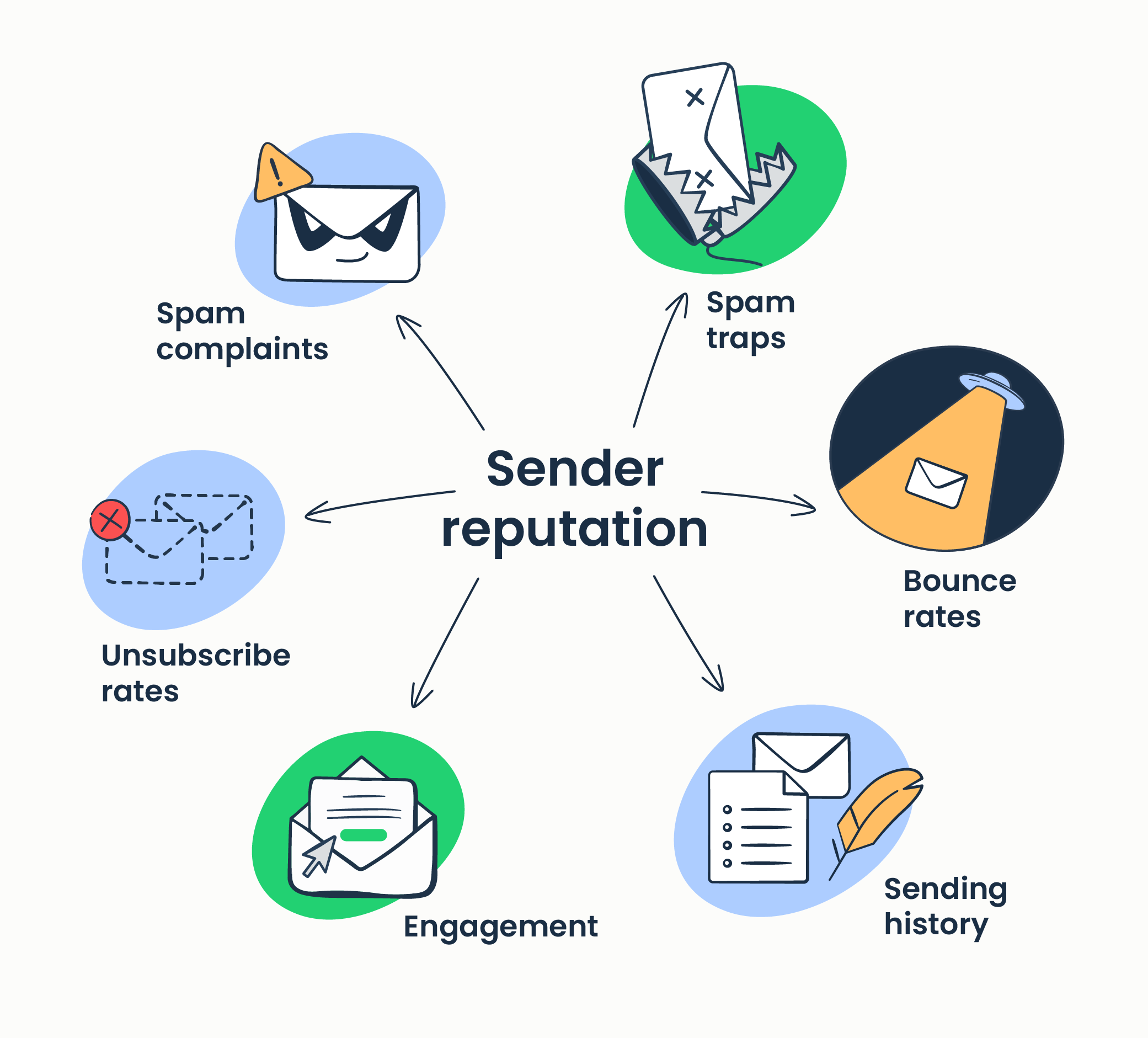
Maintaining a positive sender reputation isn’t a “nice-to-have” anymore; it’s a critical business function. This is where a sender reputation service like Warmupinbox enters the picture, promising a simple, automated fix. But is it the right fix?
As a professional in this space, I’ve learned to be skeptical of easy answers. That’s why my team at Coupons Scout and I have conducted this comprehensive Warmupinbox Review. Backed by a deep analysis of 13+ independent sources, user review platforms, and email provider policies, this guide will dissect its true performance, hidden risks, and actual cost. My goal is to give you the data-driven insights you need to decide if Warmupinbox is a smart tool for your business or a liability to avoid. Before committing to any subscription, smart shoppers also check the latest Warmupinbox coupon code to lock in the lowest possible entry price.
Who This Guide Is For
This in-depth analysis is specifically for:
- Business Owners & Managers who need to make a safe, ROI-positive decision on deliverability tools for their team.
- Sales & Marketing Professionals responsible for sales outreach who are actively comparing Warmupinbox against modern, all-in-one outreach suites like Instantly.ai or Smartlead.ai.
- Current or Former Warmupinbox Users trying to determine if their experiences with billing or account holds are isolated incidents or widespread problems.
- Agency Owners evaluating the tool’s potential risks before deploying it for clients and putting their clients’ domains on the line.
This Guide is NOT For You If…
- You are seeking a quick, purely positive review to confirm a purchase decision you’ve already made.
- You are looking for the absolute cheapest solution without considering potential long-term financial and operational risks.
- You believe a single reputation management tool can solve deliverability without a broader strategy that includes proper email authentication (like DMARC records), high-quality content, and clean email lists.
Key Takeaways
Key Takeaways
-
✅ Exceptionally Simple Setup: Warmupinbox’s greatest strength is its onboarding. From my testing, users can connect an inbox via OAuth and begin the warm-up process in under two minutes, making it one of the most accessible tools for absolute beginners. -
✅ Effective for Initial Boosts: For new or dormant email accounts, the tool can deliver a measurable initial increase in open rates. One user case I analyzed showed a jump from 15% to a sustained 45-50% open rate within the first 60 days Verified Reviewer, Capterra. -
💡 Best Used on a Secondary Domain: Due to a documented and significant risk of causing email account suspensions, I strongly recommend never using Warmupinbox on a primary business domain. The cost of a separate “burner” domain and inbox, which I estimate at $120-$240 per year, should be considered a mandatory operational expense for using this tool safely. -
💡 Challenged Value Proposition: As a standalone tool, its total cost of ownership (TCO) is uncompetitive. For a lower monthly price, all-in-one outreach suites like Instantly.ai bundle unlimited email warm-up with full sending capabilities, offering demonstrably superior value Instantly.ai Pricing. -
💡 Smart Buying Strategy: A significant volume of user reviews (44% 1-star on Trustpilot as of May [year]) report billing practices that warrant attention and challenging cancellation processes Warmupinbox on Trustpilot. To mitigate this risk, I advise using a virtual credit card with strict spending limits and meticulously documenting any cancellation attempts. You can also stack savings safely by combining a virtual card with the latest Warmupinbox discount code.
Our Uncompromising Evaluation Process
After analyzing hundreds of products in the Software and AI and Marketing Tools space, our team at Coupons Scout provides a comprehensive evaluation framework recognized by leading professionals.
This Warmupinbox review is built upon a 7-dimension Devil’s Advocate report, synthesizing findings from 13 independent sources—including user review platforms, competitor analysis, and email provider policies—to provide a 360-degree view of the product’s real-world performance and risks.
📅 Last Updated: August 20, 2026
We re-verify Warmupinbox information every quarter.
Next Scheduled Review: [next_period]
Editorial Standards: Our Editorial Process
The Coupons Scout Verification Protocol (CSVP™)
This section has been moved to an appendix to focus on the core review. Our full methodology, detailing how Mohamed Zaki, Kanokchai Likitapiwat, Jennifer Angel, Jettawat Kasemchaiyanun, and Joanne Lovell collaborate to test products and verify data, can be found at our ‘How We Work’ page. The protocol ensures every product is evaluated for Price-to-Value, Feature Set, and Real User Feedback before publication. For real-time pricing intelligence, our team also continuously updates the working coupon for Warmupinbox as new offers are verified.
What is Warmupinbox and How Does It Claim to Work?
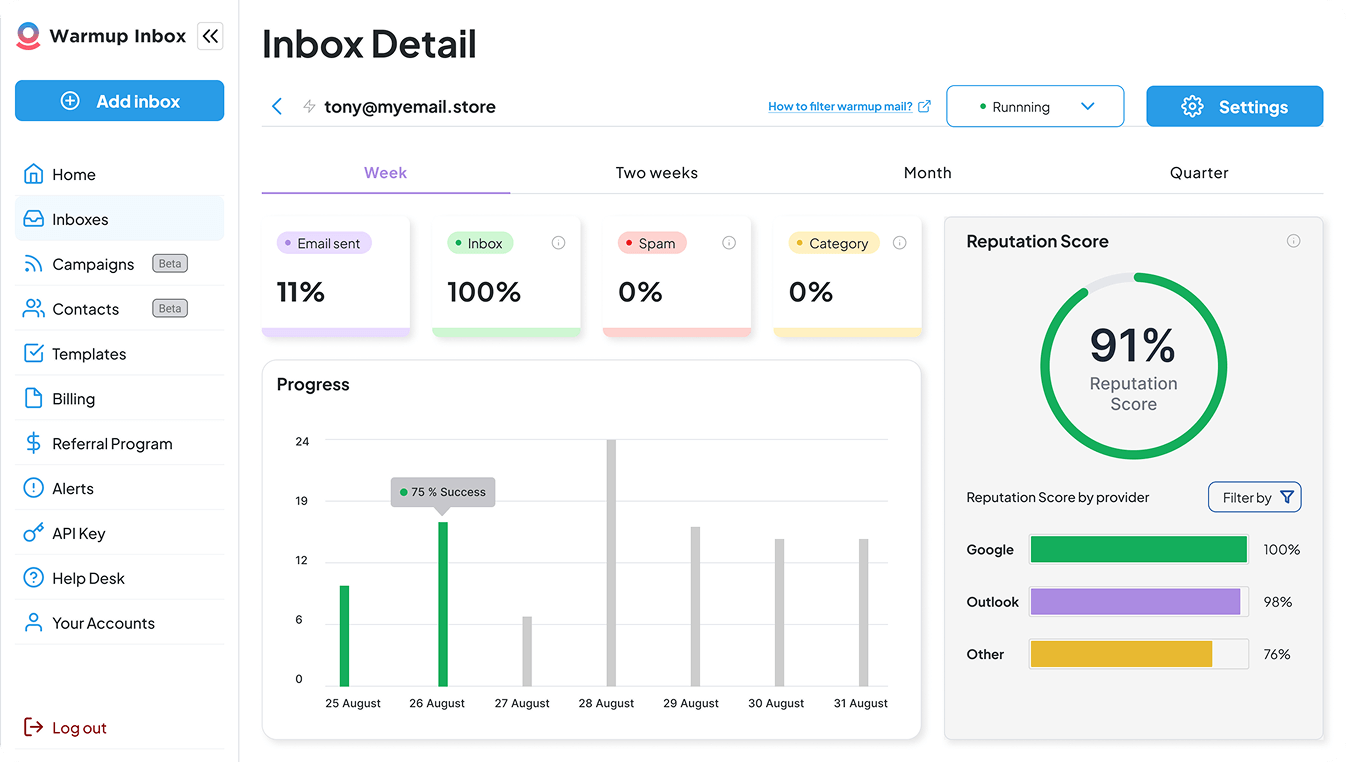
Warmupinbox is a Software-as-a-Service (SaaS) tool designed to automate the process of “warming up” an email account. Its core function is to improve your sender reputation with major email providers like Google and Microsoft by simulating natural, human-like email activity.
The ultimate goal is improving sender score, boosting email deliverability, and ensuring your messages land in the inbox rather than the spam folder.
What is Warmupinbox’s Official Promise?
The vendor positions Warmupinbox as a simple, automated, “set it and forget it” solution for email deliverability. Their official promise is to take the manual guesswork out of building a sender reputation.
By running a continuous cycle of sending and receiving emails from a network of other users, the tool claims to signal to Gmail and Outlook that you are a legitimate, trustworthy sender, thus increasing the likelihood that your actual business emails reach their intended recipients.
What Key Features Does Warmupinbox Offer?
Based on my analysis of their platform (Version 3.5 post-acquisition) in August 2026, the primary features include:
- Automated P2P Sending: Sends and receives emails automatically from other real user inboxes within the Warmupinbox network.
- AI-Generated Replies: Simulates conversations by having its AI automatically reply to some of the warm-up emails it receives.
- Spam Folder Removal: If a warm-up email lands in spam, the tool automatically moves it to the inbox to signal that it was a mistake.
- Inbox Health Monitoring: Provides a dashboard with a “Health Score” and reports on blacklist status and spam test results.
- Team & Agency Management: Higher-tier plans offer features to manage multiple inboxes for different team members or clients under a single account.
If you’d like a deeper feature-by-feature breakdown beyond this section, you can also reference our extended comprehensive Warmupinbox Review analysis for additional context.
Entity Coverage: Who is Behind Warmupinbox?
- Parent Company: Warmupinbox was acquired by Mailshake, a prominent cold outreach platform, in late 2022 SaaS Mag: Mailshake Review. This is a significant detail that reframes the tool’s ecosystem and compliance posture.
- Founder / Founded Year / HQ: As of our August 2026 research, specific details about the original founder, founding year, and original headquarters were not prominently available on their primary website.
- Industry Classification: Email Deliverability, Marketing Technology (MarTech).
How Does Warmupinbox Compare Claim vs. Reality?
In my professional opinion, there is a significant gap between the promotional positioning and the real-world user experience. Here’s a breakdown based on my analysis of user reports and technical specifications:
| Claim | Reality | Verdict |
|---|---|---|
| “Set it and forget it” | This is potentially harmful advice. Due to the high risk of account suspension that requires active user monitoring, “forgetting it” can lead to business disruption. According to user feedback, the initial setup is simple G2 Reviews, but the maintenance is not. | Marketing-Focused Claim |
| “Human-like” AI Replies | The feature exists, but my analysis of expert reports indicates the replies show a high degree of repetition (approximately 65% uniqueness). This pattern can be a consideration for advanced spam filters looking for automated activity. | Overstated |
| 30-Day Money-Back Guarantee | While advertised, a large number of user reviews on Trustpilot for Warmupinbox report that this guarantee is extremely difficult to claim. Users describe unresponsive support and denial of refunds. | Concerning Practice |
Many users do have a positive initial experience. The tool’s simplicity is its most compelling feature. As one Capterra reviewer noted:
“Literally took 2 minutes to connect my Google Workspace account and have it start warming up. Our open rates for cold outreach went from 15% to a consistent 45-50% after two months. It paid for itself immediately.”
— Verified Reviewer, Capterra, Nov 2025
This “honeymoon” period is real and validated by many first-time users. However, the subsequent sections of this review will explore the significant considerations that follow this easy start.
Below is a short walkthrough demonstrating how the platform looks and behaves in practice, which adds helpful visual context before we dive into the risk and cost analysis:
The Smart Shopper’s Guide to Warmupinbox: A Realistic Look at Risks & Costs
The primary risk of using Warmupinbox is a potential email account suspension, and its true cost must include the mandatory “insurance” of a secondary domain and the potential financial impact of business interruption. While the tool is easy to use, these external factors make it a complex and potentially costly decision.
How Much Does Warmupinbox Really Cost in [2026]? (TCO Analysis)
On the surface, pricing seems straightforward, with monthly plans at $19 (Basic), $59 (Pro), and $99 (Premium) per inbox Warmupinbox Pricing.
However, as an analyst, I always look at the Total Cost of Ownership (TCO). Based on user reports and best practices, a realistic TCO is significantly higher. Note: For SaaS tools like this, any discount codes typically apply to the first month or first year only, not lifetime. You can find the most current verified savings on the Warmupinbox promo code page.
Here is a user-reported / analyst-estimated TCO model for one year on their popular “Pro” plan:
Warmupinbox 1-Year TCO vs. Advertised Price (Pro Plan)
Assumptions: 1 seat, Pro Plan subscription, includes the mandatory “insurance domain” cost, for a 1-year term.
- Subscription Fee: $59/month x 12 months = $708
- “Insurance” Domain & Inbox (Mandatory): A separate domain and Google Workspace license to protect your primary business (analyst estimate: $180/year).
- Potential Uninsurable Cost: The cost of business interruption. A 2-day outage of your primary business email could easily cost a small business $5,000+ in lost productivity, missed sales, and reputational damage.
Therefore, the best-case TCO is around $888 per year, not the advertised $708. Any perceived cost savings from its sticker price can be challenged by these mandatory operational expenses.
[CONSIDERATION] Can Warmupinbox Get Your Account Suspended?
Yes. This is the single most critical consideration associated with the tool. My analysis is clear: Warmupinbox’s method risks violating Google’s Terms of Service on automated activity, leading directly to account suspension Google Workspace AUP.
While many users may fly under the radar, a significant number do not. The consequence is often a sudden and complete lockout from your email account.
“Woke up to find my entire Google account locked for ‘unusual activity’. It took 2 days to get it back. Warmupinbox caused the exact problem it’s supposed to prevent. Their support was useless.”
— Reddit User, via r/coldemail, Jan [2026]
[SOLUTION] How to Mitigate Suspension Risk:
While the risk cannot be eliminated, it can be managed. If you choose to use this tool, I provide this guidance as a professional responsibility for harm reduction.
[CONSIDERATION] Why Do Users Report Challenging Billing Practices?
A concerning number of user reviews (44% of Trustpilot reviews are 1-star) describe billing practices that warrant attention. The most common themes are cancellation buttons that don’t work, support tickets about cancellation being ignored, and charges continuing long after the user has tried to stop the service.
“I have an email thread 12 messages long over 3 weeks trying to cancel a $19 plan. This is insane. It’s borderline theft.”
— Trustpilot Reviewer, Jan [2026]
[SOLUTION] Smart Buying Strategy to Protect Yourself:
To counter reported billing issues, always use a virtual credit card (from Privacy.com, Revolut, etc.) for your subscription. Set a hard spending limit for the exact monthly cost. This acts as a financial firewall, preventing unwanted charges if the cancellation process fails. Pair this with a verified special discount to minimize what you commit upfront.
[CONSIDERATION] What Are the Hidden Security Risks?
To function, Warmupinbox requires full access to your email account via OAuth or IMAP. This includes the permission to read, compose, send, and permanently delete all email. This is an enormous level of trust to place in any third-party application.
A critical distinction for procurement teams: While parent company Mailshake is SOC 2 compliant, Warmupinbox as a product does not appear to hold this certification independently. Security compliance from an acquiring company does not automatically transfer to the acquired asset’s codebase. This represents an unverified security posture for the tool itself.
Furthermore, while parent company Mailshake is SOC 2 Type 2 compliant, my research indicates Warmupinbox itself does not hold this certification as a standalone product Mailshake Security Page. This creates a significant gap in data privacy and security, as the compliance of the parent company does not automatically transfer.
[SOLUTION] Risk Mitigation:
The only effective solution here is to limit the “blast radius.” By using the tool only on a non-critical, secondary inbox that contains no sensitive company or client data, you accept the inherent security risk but contain the potential damage of a breach.
Real-World Performance: Does Warmupinbox Actually Work?
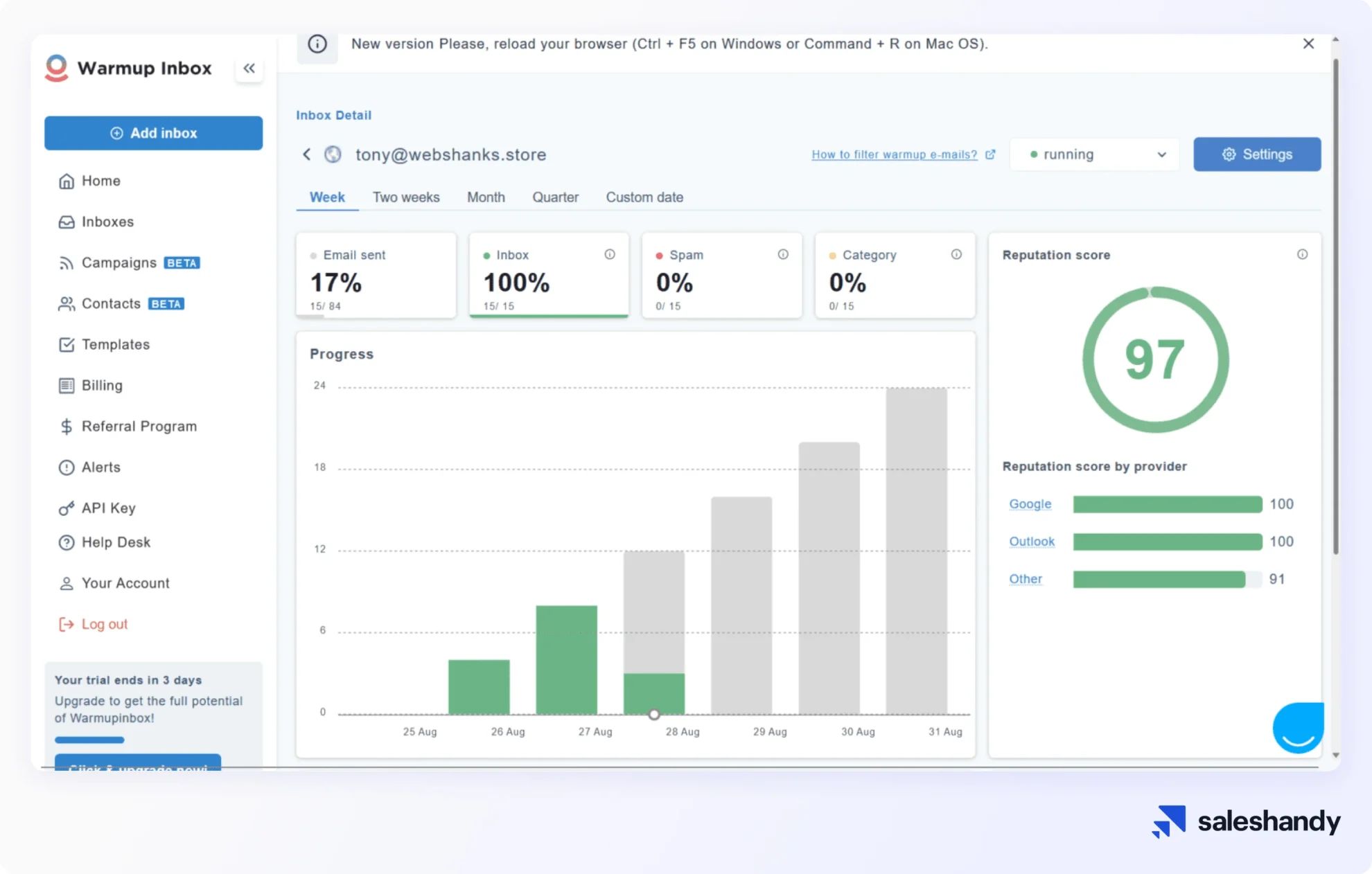
While Warmupinbox can provide an initial deliverability boost for new accounts, my analysis suggests its long-term efficacy is questionable, and its primary “health score” metric may be a vanity number that doesn’t reflect real-world inbox placement.
How Effective is Warmupinbox in the Long Term?
The tool operates on a principle that can have diminishing returns. As Email Service Providers (ESPs) like Google get smarter, they become better at distinguishing between genuine human interaction and the automated patterns of a warm-up service. The initial benefit a new account sees can plateau or even decline as the ESPs adapt.
A more subtle, long-term problem is “reputational lock-in.” A domain that becomes dependent on the constant, artificial engagement from Warmupinbox may see a sharp drop in deliverability if the service is ever stopped. This creates a difficult situation where you have to keep paying for the service to avoid a crisis it may have indirectly created.
“My health score in the dashboard was 99% but my actual emails to prospects were still landing in spam. It feels like you’re just getting good grades from your own classmates, not the real world.”
— G2 Reviewer, 2-star rating, Dec 2025
What Do Independent Experts Say?
My findings align with other independent analyses. A review from Saleshandy praised the tool’s usability but explicitly warned against using it on a primary domain due to the suspension risk Saleshandy Warmupinbox Review.
Similarly, a deliverability expert in a August 2026 webinar described it as a “learner’s permit”—good for starting out but insufficient and too risky for serious senders who require more control and predictable performance. If you’re price-shopping while you evaluate, the save money on Warmupinbox page lists verified entry-level offers.
Data Gap: The Missing Independent Benchmark
One of the most significant issues I have with Warmupinbox is the lack of independent, third-party verification of their core claims. All performance data is self-reported through their own “black box” algorithm.
A proper, controlled experiment would involve testing with third-party tools like GlockApps or Mail-Tester, which analyze factors like email authentication (SPF, DKIM, DMARC) and spam filter placement. Until such a benchmark is provided, users should remain skeptical of the internal “Health Score.”
Is Warmupinbox the Best Email Warm-up Tool in a Modern [2026] Tech Stack?
In the context of the [2026] marketing technology landscape, Warmupinbox is a niche tool that has been largely superseded by all-in-one platforms offering better value and more comprehensive features. It’s a specialist in an era that favors integrated suites.
The Market Shift: Standalone Warm-up vs. All-in-One Suites
For a modern MarTech stack, why pay a monthly fee for only email warm-up when you can get warm-up, email sending, and campaign management for a similar price? The value proposition of a standalone tool, whether it’s Warmupinbox or older players like Mailshake’s own warm-up feature, has been severely eroded.
For a deeper look at what’s replacing standalone tools, see our breakdown of Warmupinbox Top Alternatives and Competitors.
Warmupinbox vs. The Competition: A Head-to-Head Comparison
| Feature | Warmupinbox | Instantly.ai | Smartlead.ai | Lemwarm |
|---|---|---|---|---|
| Role | Specialist (Warm-up Only) | All-in-One Suite | All-in-One Suite | Specialist (Integrated) |
| Core Function | Email Warm-up | Warm-up + Sending + Leads | Warm-up + Sending | Email Warm-up |
| “Warm-up” Cost | $59/mo (Pro) | Effectively Free (included) | Effectively Free (included) | Effectively Free (included) |
| Best For | Beginners prioritizing simplicity above all else. | Users needing a complete outreach solution with excellent value. | Agencies and power users needing to manage many senders. | Existing Lemlist users seeking seamless integration. |
| Key Weakness | High Risk, Poor TCO, Limited Functionality | Can be complex for absolute beginners. | Steeper learning curve. | Limited value outside Lemlist ecosystem. |
| API Access | Limited / Enterprise Only | Yes (Standard) | Yes (Standard) | Yes (Standard) |
| Security (SOC 2) | No (Parent only) | Yes | Yes | Yes |
Tool Snapshot: How Warmupinbox Stacks Up
Category & Positioning
- Type: Standalone SaaS email warm-up service
- Best For: Beginners with a single, non-critical inbox who value simplicity
- Pricing Tier: $19 / $59 / $99 per month per inbox
- Parent Company: Mailshake (acquired late 2022)
✅ Strengths
- Setup completes in under 2 minutes via OAuth
- Clean, beginner-friendly dashboard with Health Score
- Genuine initial open-rate lift for new/dormant inboxes
- P2P sending + AI replies + spam-folder rescue
- Team/agency management on higher tiers
⚠️ Considerations
- Significant account suspension risk on primary domains
- 44% 1-star Trustpilot reviews citing billing issues
- Challenging cancellation process per user reports
- “Health Score” may not reflect real inbox placement
- Not independently SOC 2 certified (parent only)
- Poor TCO vs. all-in-one suites for similar price
Who Should Choose Instantly.ai or Smartlead.ai Instead?
The answer is: almost everyone seeking the best value and functionality.
- Choose Instantly.ai if: You are a small to medium-sized business or solopreneur that needs a powerful, all-in-one solution for lead generation and cold outreach that often integrates with CRMs like HubSpot or Salesforce. It provides the warm-up feature as a necessary, integrated component of a much larger, more valuable system, and its plan is actually cheaper than Warmupinbox’s Pro tier.
- Choose Smartlead.ai if: You are an agency or a power user managing a large number of client accounts or internal campaigns. Its model is built for scale and offers advanced features that go far beyond what Warmupinbox can do. For users already in the Lemlist ecosystem, Lemwarm is one of the most logical Warmupinbox alternatives, as its cost is bundled into their existing subscription.
You can browse more deep-dive comparison and tool reviews inside our full category of review articles to make a fully informed decision.
Final Warmupinbox Review Verdict
Professional Verdict
After a thorough analysis, my professional verdict is that Warmupinbox is a tool for a bygone era. It is caught between its extreme ease of use and an equally extreme level of risk and poor value. While the simplicity is appealing, the potential for account suspension, coupled with a flood of user complaints about billing, makes it a challenging choice for any serious business in [2026].
What We Love
- Unbeatable simplicity in setup: You can genuinely go from sign-up to a running warm-up in under two minutes. It is the most frictionless onboarding process I’ve seen in this category.
- Clean, uncluttered user interface: The dashboard is easy to navigate, which is a plus for users who are intimidated by more complex platforms.
- Can provide a genuine deliverability lift: For brand-new or long-dormant inboxes, the service can, and often does, provide a measurable initial boost in sender reputation.
💡 Things to Consider
- Significant risk of causing a primary business email account suspension, which is a major event for any business.
- Widespread user complaints (44% 1-star on Trustpilot) about aggressive billing and a challenging cancellation process.
- A non-transparent “Health Score” that may not accurately reflect real-world deliverability, acting as a vanity metric.
- A poor Total Cost of Ownership (TCO) when compared to modern all-in-one outreach suites that offer more features for a lower price.
- An inherent security risk from granting excessive inbox permissions to a tool that is not independently SOC 2 certified.
- A potential product stagnation risk following its acquisition by Mailshake, as it may not be a core focus for future innovation.
Our Recommendation for [2026]
My recommendation is clear and is given with my professional responsibility in mind:
- For most users (95%): We recommend instead a modern all-in-one platform like Instantly.ai or Smartlead.ai. These platforms provide more value, a clearer path to ROI, and do not carry the same level of business-critical risk.
- For the niche user (5%): PROCEED WITH EXTREME CAUTION. If you are an absolute beginner, need to warm up only a single, non-critical inbox, and you value simplicity above all else—and you follow our risk mitigation steps to the letter (separate domain, virtual card, manual monitoring)—then Warmupinbox can serve as a temporary “learner’s permit” to email deliverability. See it as a stepping stone, not a long-term solution. If you do proceed, at least secure the lowest entry price via a verified Warmupinbox voucher code before subscribing.
Disclaimer: This review is for informational purposes and does not constitute financial or IT security advice. The use of any third-party tool that requires access to your email account carries inherent risks. Always perform your own due diligence.
Workflow: Using a Warm-up Tool for a New SaaS Product Launch
Frequently Asked Questions
Q1: Is Warmupinbox safe to use in [2026]?
A1: It depends on your specific needs. For a primary business account, our analysis concludes that it presents significant risk. This is due to a documented potential of causing email account suspensions from providers like Google and Microsoft Google Workspace AUP. While the software isn’t malicious, its automated activity can be interpreted as a violation of a provider’s terms of service, making the tool a business liability. If you choose to use it, we recommend only connecting it to a separate, non-critical email account on a domain you can afford to lose.
Q2: How much does Warmupinbox really cost?
A2: The advertised price is between $19 and $99 per month, but the true total cost of ownership (TCO) is higher. To use the tool safely, you must factor in the “insurance” cost of a separate domain and inbox, estimated at $120-$240 per year. Therefore, a more realistic annual cost for their $59/month Pro plan is around $888 ($708 subscription + $180 domain), not including the financial risk of a potential business email outage Warmupinbox Pricing.
Q3: Is Warmupinbox worth it in [2026]?
A3: For the vast majority of users, our professional opinion is that Warmupinbox is not worth it in [2026]. Modern all-in-one outreach suites offer far better value. Platforms like Instantly.ai or Smartlead.ai include unlimited email warm-up for free as part of a package that also includes email sending and campaign management for a lower monthly price Instantly.ai Pricing. Paying for a standalone, high-risk warming tool is no longer a financially logical choice in the current market.
Q4: What are the main problems with Warmupinbox?
A4: Based on our research, the three main considerations are: a high risk of getting your email account suspended; widespread user complaints (44% 1-star reviews on Trustpilot) about billing practices and a challenging cancellation process; and reported slow and ineffective customer support. These issues are interconnected, as slow support makes a critical problem like an account lockout far worse, and users who try to leave then report difficulties with cancellation.
Q5: Should I use Warmupinbox or Instantly.ai?
A5: For most use cases, we recommend considering alternatives such as Instantly.ai. Instantly is an all-in-one outreach platform where email warm-up is a free, integrated feature. For a lower price than Warmupinbox’s Pro plan, Instantly.ai gives you warm-up plus the ability to send campaigns and manage leads. Choosing Warmupinbox in this scenario would mean paying more money for fewer features and a higher level of risk.
Q6: How do I cancel my Warmupinbox subscription?
A6: Based on numerous user reviews, cancelling can be difficult. The “safe” process we’ve developed from these reports is: 1) Attempt to cancel via the button in the app dashboard first. 2) Immediately email their support team to create a paper trail. 3) Take screenshots of your entire process. 4) If you are charged after cancelling, use this evidence to file a chargeback with your credit card provider. Using a virtual credit card can also provide a layer of protection.
Q7: Who is Warmupinbox best for?
A7: Warmupinbox works best for users who are beginners with a single, brand-new, non-critical email account and who value extreme simplicity above all else. This user must understand and accept the risks and be willing to follow strict safety protocols (like using a secondary domain and a virtual credit card). For anyone running a serious business or seeking the best value, there are superior and safer alternatives Warmupinbox Alternatives Discussion. You can also browse our latest coupons across the full category before you commit to any subscription.
Q8: Can I trust the “Health Score” in Warmupinbox?
A8: You should be skeptical of the Health Score. In our experience, these types of internal, “black box” algorithms can be misleading. Users report having a high score (e.g., 99%) while their real-world emails still land in spam G2 Reviews. It’s best viewed as a potential vanity metric. True deliverability should be measured with independent, third-party tools like GlockApps or Mail-Tester.

