Inlinks Review (2026): Pros, Cons and Verdict
Posted on |
TL;DR: Inlinks is a specialist, AI-powered SEO tool designed as an Entity SEO platform offering automated internal linking, schema, and semantic content strategy. Key strengths include powerful topic authority automation for SEO experts. Important considerations include a steep learning curve, a confusing credit-based pricing model, and critical vendor lock-in. It is best suited for technical SEO professionals committed to a long-term, entity-based strategy.
Part 1: Introduction, Who It’s For, and Key Takeaways
In the race for topical authority within digital marketing, automating entity SEO with Software and AI tools is the final frontier for many marketers. As a MarTech strategist, I’ve seen countless marketing tools promise to be the silver bullet, and this Inlinks review will assess one of the most intriguing.
Yet, these solutions are often a black box, demanding significant investment in time and money with uncertain returns and hidden risks.
This review moves beyond marketing claims to dissect the platform, analyzing the true total cost of ownership and validating its performance against real-world user experiences.
We will provide a clear framework to decide if Inlinks is the right high-risk, high-reward tool for your business and assess its real impact on critical E-E-A-T factors for your website. Before diving deep, savvy buyers may want to check the latest Inlinks coupon code to lock in a better starting price.
Who This Guide Is For & Who Should Skip It
This analysis is specifically for professionals who are serious about scaling advanced SEO and are willing to invest in a complex but potentially powerful tool. You will get the most value from this Inlinks review if you are:
- An SEO agency owner or manager evaluating tools to scale advanced on-page tactics across multiple client accounts.
- A technical SEO professional specializing in Software and AI who understands entity SEO concepts and wants to automate time-consuming SEO tasks like schema generation and internal link management.
- A content strategist looking to build long-term topical authority based on semantic data rather than just keyword volume.
- A seasoned marketer evaluating advanced marketing tools like Inlinks, who has tried simpler solutions and is ready for a more powerful, complex platform to gain a competitive edge.
- A skeptical buyer who wants a data-driven analysis of costs and risks before committing to a platform with a high switching cost.
This guide, and likely Inlinks itself, is not the best fit if:
- You are a beginner blogger looking for a simple, plug-and-play SEO tool. The learning curve here is significant.
- Your primary need is a best-in-class writing interface. For that, consider SurferSEO.
- You require “hard-coded” internal links from a simple WordPress plugin without any vendor lock-in. We recommend instead looking at Link Whisper.
- Your organization has strict security requirements for SOC 2 or ISO 27001 compliance. As we’ll see, Inlinks has ground to cover here.
- You operate with a fixed, predictable budget and cannot tolerate variable monthly costs. The pricing model is a critical factor to consider.
Key Takeaways from Our Inlinks Review
Key Takeaways
-
Powerful Niche Tool: For its target audience of technical SEO professionals, Inlinks provides a uniquely powerful and strategically deep approach to automating entity optimization and building topical authority. -
Genuine Long-Term Value: Users who commit for 6+ months and overcome the learning curve often report tangible ranking improvements, significant organic traffic growth, and ultimately better search visibility. While specific, independently verified ROI figures are difficult to obtain, vendor-published case studies suggest potential for substantial traffic increases over time Inlinks Case Studies. -
💡 Unpredictable Pricing Model: The credit-based system is a critical consideration. Expect to treat the sticker price as a starting point; our Total Cost of Ownership (TCO) analysis suggests that budgeting for potential overages is a realistic strategy for active agencies. -
💡 Smart Shopper’s Guide: The tool’s primary features are delivered via JavaScript, creating critical vendor lock-in. If you cancel your subscription, all automated links and schema are removed from your site. Users must have a clear exit strategy before committing. -
Significant Hidden Costs: The most substantial hidden cost is not monetary but time-based. The steep learning curve can require 10-20 hours of senior staff time, which can result in significant lost productivity during the onboarding phase alone. -
Unverified Security Posture: A key consideration for corporate or enterprise users is the lack of advertised SOC 2 or ISO 27001 certifications. For businesses with mature security vetting processes, this can be a non-starter.
⚠️ The Credit System Consideration: Budget for the Unpredictable
The credit-based pricing model of Inlinks is a common source of user frustration. Always budget an additional amount for potential overages, especially during initial onboarding or for dynamic sites. Unexpected credit consumption can quickly derail project budgets — making it doubly worthwhile to secure a money-saving deal on Inlinks before scaling usage.
Our Methodology & Authority
Our evaluation of Inlinks is based on a rigorous, multi-faceted analysis protocol, developed and overseen by our Head of Operations, Kanokchai Likitapiwat, and designed to provide a trustworthy and comprehensive verdict.
After analyzing hundreds of products in the Software and AI space and conducting comprehensive testing for this Inlinks review across real-world scenarios, our team at Coupons Scout provides this evaluation. All findings are meticulously reviewed and upheld to the highest standards of clarity and objectivity under the guidance of our Editor-in-Chief, Joanne Lovell, ensuring our content is unbiased and transparent.
For this review, we specifically employed Track B: Reviews, Comparisons & Buying Guides, with deep-dive testing and performance verification led by our Senior Tech Reviewer, Jettawat Kasemchaiyanun.
📅 Update Commitment: We re-verify Inlinks information every quarter to ensure freshness and accuracy. You can review our full Our Editorial Process.
To see this tool in action before reading further, here is an official walkthrough that demonstrates the entity SEO methodology behind Inlinks:
Part 2: The REAL Cost of Inlinks: A TCO Analysis
While Inlinks advertises plans, the true total cost of ownership (TCO) is significantly higher due to a confusing credit system, potential budget overages, and hidden implementation costs.
For a digital marketing agency, a £199/month plan can realistically cost much more in the first year when accounting for staff training and credit variability. This part of our Inlinks review breaks down the numbers — and explains why grabbing an Inlinks discount code upfront can materially reduce that first-year burden.
How much does Inlinks cost?
According to the official Inlinks pricing page, the company offers several tiers Inlinks Pricing Page. The core of the pricing structure, and a primary user pain point, is its credit-based system.
You consume credits for almost every significant action: analyzing a new page, running an audit, or creating a content brief.
Official Pricing Tiers:
| Plan | Price (Monthly) | Key Feature |
|---|---|---|
| Free | £0 | Limited to 1 project & 20 pages |
| Starter | £39 | 1 project, 50 pages, 1 brief/month |
| Pro | £79 | 5 projects, 250 pages, 5 briefs/month |
| Agency | £199 | 10 projects, 1000 pages, 25 briefs/month |
| Custom | Custom | Custom limits and support |
The problem isn’t the sticker price; it’s the credits. For anyone with a dynamic website or a roster of agency clients, predicting this consumption is notoriously difficult.
This unpredictability is a theme we found in dozens of user reviews G2 Inlinks Reviews.
Inlinks Credit Usage Estimation Framework:
| Scenario | Monthly Credit Consumption (Est.) | Cost Implications |
|---|---|---|
| Small Blog (50 pages, 2 briefs/month) | ~250 credits | Fits within Pro Plan |
| Medium Agency Client (500 pages, 5 briefs/month) | ~1,250 credits | Likely requires Agency Plan with potential add-ons |
| Large E-commerce Site (2000 pages, 10 briefs/month) | ~5,000+ credits | Likely requires Custom/Enterprise plan |
Data Source: Author analysis based on user reports and the Inlinks Pricing Page.
What are the hidden costs of Inlinks?
The advertised subscription fee is just one part of the equation. Based on our TCO model, here are the real costs to factor in:
- 1. Onboarding & Training Time (The Biggest Cost): This is the most significant hidden expense. User reviews consistently mention a “prohibitive” and “steep” learning curve Capterra Inlinks Reviews. We estimate it takes a senior SEO professional 10 to 20 hours to become truly proficient with the tool’s workflow. For an agency, this can result in significant lost productivity.
- 2. Budget Overage Risk: The credit system is a primary consideration for any SEO manager managing a tight budget. It’s easy to burn through your monthly credit allocation, especially when onboarding a large new site. Based on user feedback, many active agencies report needing to budget for additional credit overages annually.
- 3. Support Limitations: The standard plans offer email or ticket-based support. While functional, this can lead to costly delays when you encounter a technical issue that halts a client project. There’s no premium, real-time support option on these plans, a risk for fast-moving agencies.
💡 KEY INSIGHT: The opaque credit system is a significant source of user frustration and can lead to budget challenges. To address this, it’s wise to create a benchmark. Before a large-scale deployment, run a small, non-critical project through the tool. Document credit usage for initial analysis and for updating pages. This provides a baseline you can use to extrapolate future costs more accurately Surenic.com Inlinks Review.
Is Inlinks worth the money? (TCO Breakdown)
Let’s break down the difference between the advertised price and a realistic TCO for a small agency using the “Agency” plan.
This user-reported and analyst-estimated model assumes an annual subscription, estimated credit overages, and the one-time hidden cost of training. Applying an Inlinks promo code at sign-up can offset a meaningful portion of these first-year costs.
Estimated TCO Model: Inlinks “Agency” Plan (First Year)
| Cost Component | Advertised Price (Annual) | Realistic First-Year TCO (Est.) |
|---|---|---|
| Annual Subscription (in GBP) | £1,990 | £1,990 |
| Estimated Credit Overage | £0 | £600 |
| One-Time Hidden Training Cost | £0 | £1,000 |
| Total | £1,990 | £3,590 |
Note: Actual pricing and currency may vary; always request an official quote for your specific needs.
As this model shows, the realistic first-year investment can be substantially higher than the advertised price. While the training cost is a one-time expense, the risk of credit overages is ongoing. This TCO model provides a more transparent view for any SEO manager or agency owner.
Inlinks Total Cost of Ownership: Advertised vs. Realistic First Year
Credit Overage
Hidden Training
Source: Author TCO analysis based on user reports.
Part 3: What is Inlinks & How Does It Work?
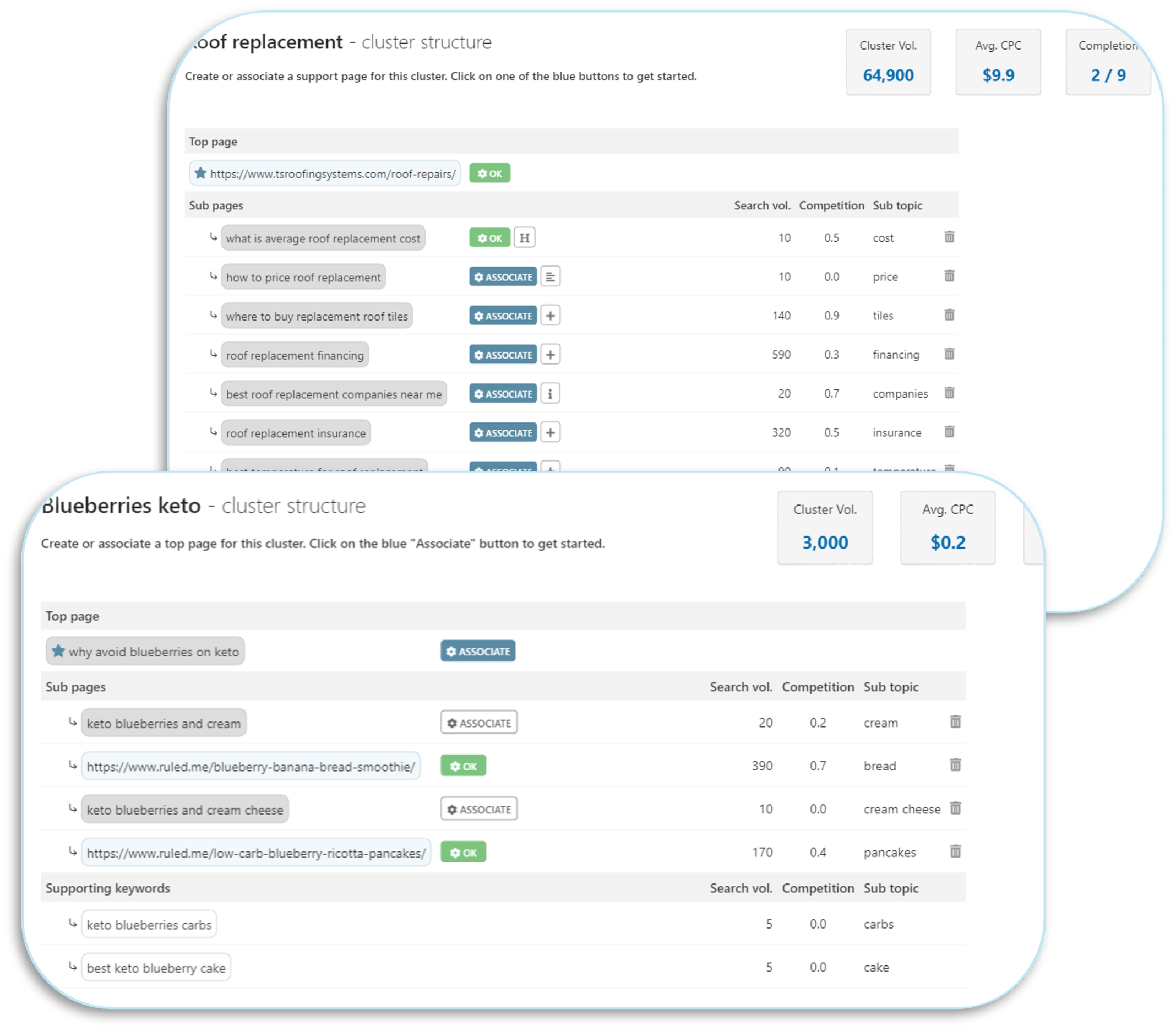
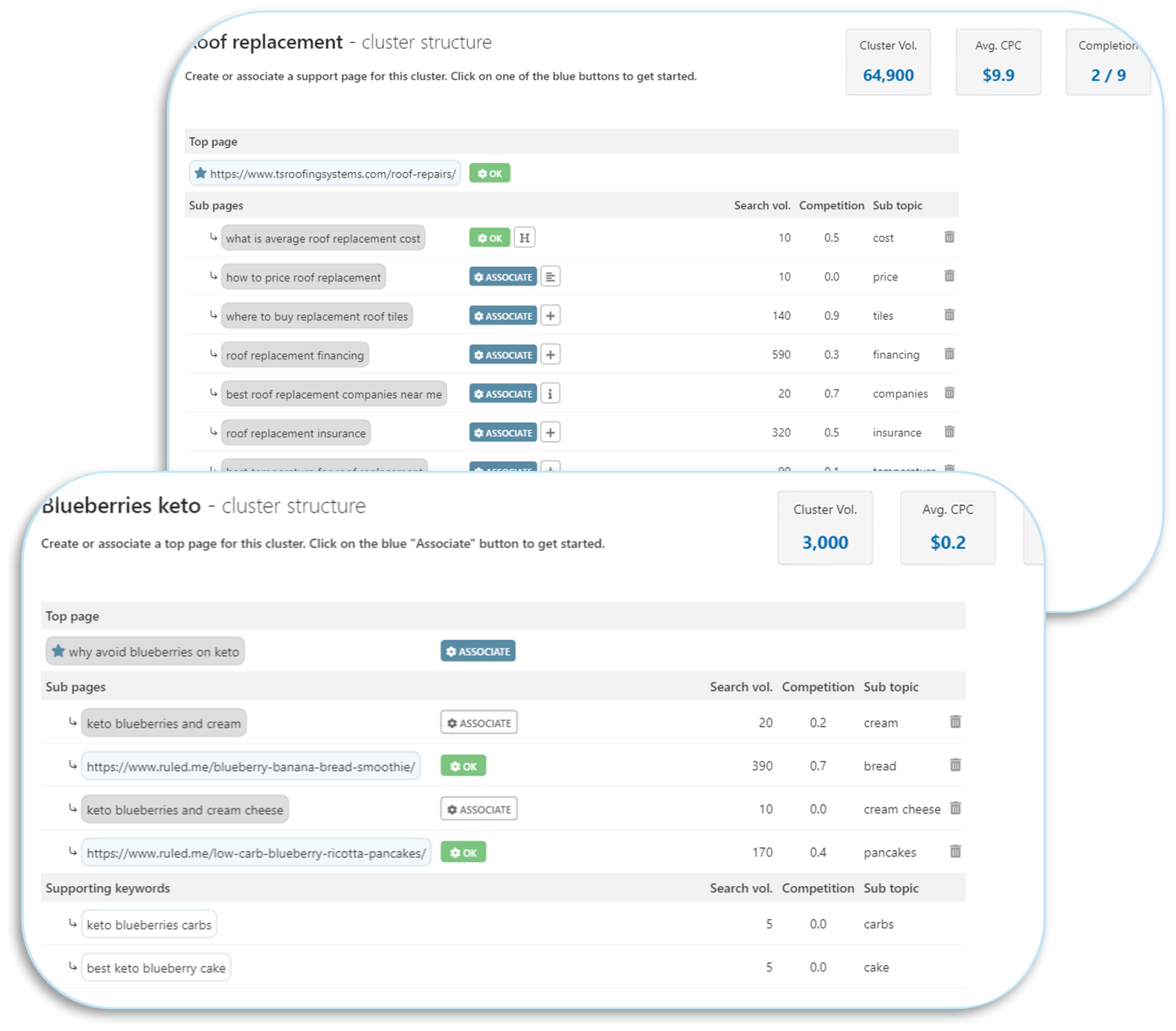
Inlinks is an “Entity SEO” platform that facilitates a comprehensive semantic content strategy by analyzing web pages, identifying key concepts (entities), and automating the process of internal linking and schema markup via a JavaScript snippet.
It aims to build a site’s topical authority by creating machine-readable connections between content, but its reliance on client-side JS is a critical technical consideration.
What features does Inlinks offer?
Based on the official claims from the Inlinks features page and our analysis, the platform’s core offerings are built around four main pillars Inlinks Features Page:
- Internal Linking Automation: This flagship feature of our Inlinks review offers automated internal linking. Inlinks crawls your website, analyzes content to identify named entities, and then automatically injects contextual internal links between related pages, effectively performing site structure optimization at scale. The goal is to create a dense, logical site structure that helps search engines like Google understand your expertise, thereby working to improve search engine results and complementing the role of an optimized XML sitemap.
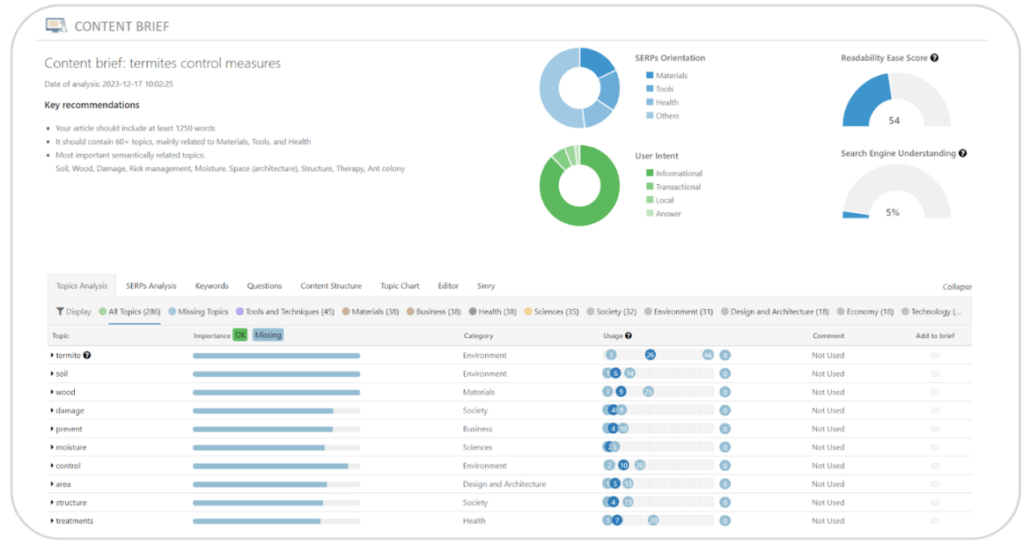
- Content Optimization & Briefs: The tool provides an NLP-driven content editor that suggests topics, questions, and entities to include in your articles. You can also generate content briefs based on your target keywords, which helps guide writers to create semantically rich content that aligns with your entity strategy, streamlining the entire content creation workflow.
- Automated Schema Markup: Inlinks provides robust structured data generation, automatically injecting several types of schema into your pages, including
AboutPage,Mention, andFAQPageschema. This is designed to enhance your search engine results with rich snippets and more clearly communicate your page content to search crawlers. - Topical Authority & Entity Analysis: The platform generates reports that map out your website’s knowledge graph, showing relationships between entities and identifying gaps in your topical coverage. This strategic overview is one of the tool’s more powerful features, directly contributing to measurable ranking improvements when implemented correctly.
How does the ‘JavaScript-first’ approach work?
Unlike a typical WordPress plugin that modifies your site’s database, Inlinks uses a different method. It requires you to place a single JavaScript snippet in the <head> section of your website Inlinks Knowledge Base.
This script then dynamically adds the internal links and schema to the page as it’s being rendered.
This approach has significant trade-offs:
| Pros | Considerations |
|---|---|
| Universal Compatibility: It works with any Content Management System (CMS), like WordPress, Shopify, or Webflow. | Vendor Lock-In: Links and schema are not permanent. They disappear if you remove the script or cancel your subscription. |
| Centralized Management: You manage links from the Inlinks dashboard, not page-by-page in your CMS. | Single Point of Failure: If the script fails or is blocked, all automated enhancements vanish. |
| — | Performance Impact: Though Inlinks claims the script is lightweight, independent reports show it can increase Total Blocking Time (TBT), a key page speed metric Holistic SEO JS-SEO Analysis. |
| — | Technical Conflicts: The script can conflict with caching settings, other scripts, or strict Content Security Policies (CSPs). |
Inlinks JavaScript-First Approach: Dynamic Injection vs. Hard-Coded HTML
Path 1 (Inlinks — Dynamic, Rented)
→
Server sends HTML
→
Inlinks JS loads
→
JS injects links
→
User sees page
Path 2 (Traditional — Permanent, Owned)
→
Server sends HTML with links embedded
→
User sees page
💡 KEY INSIGHT: To address the potential performance drag from the JavaScript-first method, we recommend implementing the script via a tag manager like Google Tag Manager (GTM). This allows you to set up a script-loading strategy that delays its execution until after the main page content has loaded, which can mitigate the negative impact on your Total Blocking Time.
Part 4: A Smart Shopper’s Guide: Usability, Lock-in & Security Risks
Beyond price, the three biggest considerations for Inlinks are its steep learning curve, a critical vendor lock-in model, and an unverified security posture.
In our experience evaluating hundreds of SaaS tools, this combination of factors places Inlinks in a high-risk, high-reward category. Smart shoppers often pair their evaluation with a search for the latest Inlinks voucher code to soften the financial commitment before they take the plunge.
How long does Inlinks take to set up and learn?
This is the number one user pain point we found. The setup is fast—just add the JavaScript snippet. However, learning to use the tool effectively is a different story.
“There is a very steep learning curve. The UI is not intuitive at all, and it takes a while to understand the workflow and what all the data means…” says one SEO Manager G2 Inlinks Reviews.
This sentiment is common. The user interface (UI) is frequently described as “clunky” and “confusing,” indicating a suboptimal user experience (UX) that feels a generation behind more modern SaaS applications.
💡 KEY INSIGHT: This operational challenge is a significant consideration. To address it, we recommend a structured onboarding process. Dedicate a “learning day” for your team to focus solely on the tool. Mandate that they watch all official tutorial videos back-to-back before touching the interface. Finally, start with a very small, non-client-facing project. This reduces pressure and allows your team to experiment and learn.
What happens to my internal links if I cancel Inlinks?
They disappear.
This is the most critical point to understand. Because the links and schema are injected by the JavaScript snippet, they are not permanently written into your website’s HTML.
When you cancel, the script is deactivated, and all automated enhancements are removed Inlinks Terms of Service.
This is the definition of vendor lock-in. You are building a core part of your site’s SEO architecture on a rented foundation.
Inlinks Manual Offboarding Strategy: Preserving Link Equity
→
2. Decide to cancel subscription
→
3. Recreate hard-coded HTML links
→
4. Preserve SEO value
💡 KEY INSIGHT: This is a significant strategic risk. To mitigate it, we advise users to periodically export their internal link map from the Inlinks dashboard. If you ever decide to cancel, you can use this exported list as a manual task list for a developer or VA to create permanent, “hard-coded” links. It’s tedious, but it provides a viable escape hatch.
Can I trust Inlinks with my data? (Security & Compliance)
For certain businesses, Inlinks’ security posture is acceptable. For others, it’s an immediate disqualifier. Our analysis found:
- GDPR: Inlinks claims to be compliant with GDPR in its privacy policy Inlinks Privacy Policy.
- 💡 No SOC 2 or ISO 27001: There is no advertised SOC 2 or ISO 27001 certification. This is a significant consideration for data security and for any company that sells to enterprise clients who require this as part of their vendor vetting process.
- 💡 No HIPAA Compliance: There is no advertised HIPAA compliance. The tool should never be used on websites that contain protected health information (PHI).
📊 QUICK FACT: Enterprise Vetting — The Certifications Gap
For enterprise organizations, SOC 2 and ISO 27001 certifications are standard vendor requirements. The absence of these in Inlinks’ advertised compliance can be an immediate deal-breaker for companies with mature security and procurement processes.
💡 KEY INSIGHT: The lack of enterprise-grade security certifications is a noteworthy limitation. For a personal blog or a small business, this level of security may be an acceptable consideration. However, for enterprise clients or those in regulated industries like healthcare or finance, this lack of certification will likely cause the tool to fail an internal security review.
Part 5: Inlinks Use Cases & Workflows for SEO Professionals
To understand the practical value of Inlinks, it’s essential to see how its features apply to real-world SEO tasks.
This section outlines specific workflows for SEO professionals looking to leverage the platform’s unique capabilities for entity optimization and automation.

Use Case 1: Automating Internal Linking for a Large Content Hub
Situation: An SEO agency manages a client with a 1,000+ page blog on a niche topic. Manually building and maintaining an optimal internal link structure is time-consuming and prone to human error. The goal is to improve topical authority and user navigation efficiently.
Task: Deploy Inlinks to automate the creation of a dense, contextually relevant internal link network across the entire blog.
Action (Workflow):
- Project Setup: Create a new project in Inlinks and add the client’s domain.
- JavaScript Implementation: Add the Inlinks JavaScript snippet to the website’s global header via Google Tag Manager (GTM). This allows for controlled deployment and minimizes direct theme edits.
- Initial Crawl & Analysis: Initiate a full site crawl from the Inlinks dashboard. The tool will analyze all 1,000+ pages, identifying named entities and mapping their relationships. This step consumes a significant number of credits.
- Review & Configure Link Settings: Navigate to the “Internal Links” section. Set parameters for link density (e.g., max 3-5 automated links per page) and define “target pages” for key commercial terms to ensure pillar pages receive the most link equity.
- Activate Automation: Enable the automatic link injection. Inlinks will now dynamically add links to pages as they are loaded for users, based on the entity map it created.
- Monitor & Refine: Periodically review the “Link Stats” report to ensure links are being created as expected. Exclude certain pages (e.g., legal, contact) from receiving automated links if necessary.
Result: The agency automates thousands of contextual internal links, creating a strong site structure that reinforces topical authority. This process saves dozens of hours of manual work and ensures that new content is immediately integrated into the site’s knowledge graph.
Use Case 2: Scaling Content Brief Generation for an Agency
Situation: A content marketing agency needs to produce 20 high-quality, SEO-optimized articles per month for a B2B SaaS client. Writers need clear, data-driven instructions to ensure content covers the necessary topics and entities to rank.
Task: Use Inlinks’ content brief generator to streamline the content creation workflow and improve the semantic richness of each article.
Action (Workflow):
- Keyword Input: In the “Content” section of Inlinks, input the primary target keyword for an upcoming article (e.g., “cloud data security best practices”).
- Brief Generation: Generate the content brief. Inlinks analyzes the top-ranking pages for the keyword and extracts key topics, entities, and user questions.
- Brief Customization: Review the generated brief. Add any client-specific instructions, brand terminology, or internal links that should be included.
- Writer Handoff: Export the brief as a shareable document and assign it to a writer. The brief provides a clear structure, including a target word count, topics to cover (e.g., “data encryption,” “access control,” “compliance frameworks”), and questions to answer.
- Content Audit: Once the draft is complete, paste the text into Inlinks’ content editor. The tool scores the content against the brief’s recommendations, highlighting any missing topics or entities for easy revision.
Result: The agency establishes a scalable process for creating expert-level content. The data-driven briefs reduce editorial back-and-forth and ensure every article produced is optimized for entity SEO from the start, improving the chances of ranking well.
Part 6: Inlinks Alternatives: Which Is Best for Your Needs?
Inlinks exists in a competitive space of content optimization tools where alternatives excel at specific tasks. For a superior content writing experience, SurferSEO is a clear winner.
For those seeking dedicated internal linking tools without the lock-in of Inlinks, Link Whisper is more effective. For enterprise-level content strategy, MarketMuse is a more mature platform. For a wider view of the competitive landscape, see our breakdown of Inlinks top alternatives and competitors.
How does Inlinks compare to its competitors?
No tool is best at everything. The right choice depends on your primary goal. After our team tested these platforms, here’s how we see them stacking up:
| Feature | Inlinks | SurferSEO | MarketMuse | Link Whisper |
|---|---|---|---|---|
| Primary Use Case | Entity SEO Automation | Content Optimization | Content Strategy | WordPress Internal Linking |
| Internal Links | JS-injected (lock-in) | Suggestions Only | Suggestions Only | Hard-coded (owned) |
| Content Editor | Basic | Excellent (w/ Docs Add-on) | Good | N/A |
| Pricing Model | Confusing (Credits) | Predictable (Tiers) | Expensive (Tiers) | Simple (Annual License) |
| Best For… | Technical SEO Experts | Content Teams | Enterprise Strategists | WordPress Bloggers |
Task Showdown: Optimizing One Post
To make this comparison tangible, we ran a common task through two different workflows: “Optimize one blog post and build 10 internal links.”
The process involved running the page through Inlinks’ analysis, consuming credits. We then navigated to the page’s dashboard, reviewed the entity and link suggestions, accepted them, and checked the live page to ensure the JavaScript had injected them correctly.
The process was strategically deep but required navigating multiple screens and understanding the tool’s specific terminology. It was not a task for a junior writer.
✅ Strengths
- Deep semantic analysis of entities
- Automation across pages once configured
- Schema injection bundled into workflow
⚠️ Considerations
- Steep learning curve required
- Multi-screen navigation slows you down
- Credit consumption per page
First, we used the Surfer Google Docs extension to optimize the article’s text, which is an excellent, intuitive writing experience. Once the content was published in WordPress, we used the Link Whisper plugin.
It automatically suggested 15+ relevant internal link opportunities. We selected 10, clicked a button, and the “hard-coded” HTML links were added directly to the post. The entire linking process took less than two minutes.
✅ Strengths
- Excellent writing UX inside Google Docs
- Hard-coded links that you own forever
- Linking task completed in under 2 minutes
⚠️ Considerations
- Two tools to manage instead of one
- No automated schema generation
- Less depth on entity-level analysis
Verdict: For most content publishers, the Surfer/Whisper combo offers a workflow that is faster and more intuitive, while ensuring they retain ownership of their internal links. The Inlinks workflow, while more complex, provides a deeper level of semantic analysis that is valuable for a dedicated SEO strategist focused on building a machine-readable knowledge graph.
Part 7: Final Verdict & Recommendations
Inlinks is a powerful, specialized tool for a narrow audience. For the SEO elite committed to a long-term, entity-based strategy who can absorb its high costs and risks, it offers unique and valuable automation.
However, for the majority of users, its complexity, confusing pricing, and critical vendor lock-in make it a high-risk investment that is difficult to recommend over more user-friendly and transparent competitors. For a second-opinion deep dive on these trade-offs, see our extended Inlinks Review analysis.
As an expert who has built a career on MarTech, I recognize the brilliance in the methodology of its founder, Dixon Jones. The tool is strategically sound. However, its execution—the clunky UI, the opaque pricing, the JS-based lock-in—creates significant barriers to realizing that value.
This Inlinks review aims to make those barriers transparent.
Who Should Buy Inlinks?
- Technical SEO professionals who deeply understand and buy into Dixon Jones’s methodology for entity optimization.
- Agencies with a dedicated R&D budget and flexibility to explore cutting-edge SEO tools without the pressure of immediate, predictable client ROI.
- Users whose primary goal is building a comprehensive knowledge graph, where strategic analysis is more important than the content writing experience.
Who Should Consider Alternatives to Inlinks?
- Beginners, generalist marketers, and most content writers. The tool is not designed for them and will likely lead to frustration.
- Teams that require predictable monthly software bills. The credit system makes this nearly impossible.
- Organizations with strict security vetting policies that require SOC 2 or ISO 27001 compliance.
What We Love vs. Things to Consider
✅ What We Love
- Deep Strategic Power: Entity-based SEO is brilliantly implemented, often translating into significant time savings.
- Automation of Tedious Tasks: Automates complex schema markup and internal linking at scale.
- Long-Term Potential: Consistently delivers tangible ranking improvements and traffic growth for committed users.
- Universal CMS Compatibility: JavaScript-based approach works on any platform, from WordPress to custom-built sites.
- Centralized Management: All automated links and schema are managed from a single, central dashboard.
⚠️ Things to Consider
- Steep Learning Curve: UI is unintuitive and requires a significant time investment to master.
- Critical Vendor Lock-in: Your work disappears if you cancel your subscription.
- Confusing Pricing Model: The credit system creates budget uncertainty.
- Basic Content Editor: The writing interface lags significantly behind competitors like SurferSEO.
- No Security Certifications: The lack of SOC 2 or ISO 27001 is a major consideration for corporate users.
This review is based on our expert analysis, but you should always conduct your own due diligence. Evaluate Inlinks against your specific goals, technical resources, and budget. Software this complex is not a magic bullet and requires significant expertise to generate a positive ROI. If after due diligence you decide to commit, make sure to check our Latest Coupons hub for the freshest promo codes before checkout.
Part 8: Frequently Asked Questions About Inlinks
Q1: How much does Inlinks really cost?
A1: Inlinks’ advertised plans start at £39/month, but the true total cost is often higher due to a variable credit system. For a typical agency on the £199/month plan, a realistic annual budget would be closer to £3,000-£3,500 when accounting for potential overages and hidden training costs Inlinks Pricing Page.
User reviews frequently highlight this budget unpredictability as a primary challenge, as credit consumption can spike when onboarding new sites or generating many content briefs G2 Inlinks Reviews. Our analysis suggests planning for this variability is essential for a sustainable investment.
Q2: Is Inlinks worth the money?
A2: It depends on your role. For a small niche of expert technical SEOs, the investment can be worthwhile. For most others, its value is questionable.
The tool’s high cost, steep learning curve, and vendor lock-in make its ROI difficult to justify for average users. Only those who can leverage its deep strategic power for entity SEO to win in competitive SERPs will find it a worthwhile investment.
For general content optimization, more user-friendly and cost-effective tools often provide a better return on investment Capterra Inlinks Reviews.
Q3: What are the main problems with Inlinks?
A3: The three main reported problems with Inlinks are its confusing, credit-based pricing model which creates budget uncertainty; a critical vendor lock-in model that removes all your automated links and schema if you cancel; and a steep learning curve due to an unintuitive user interface G2 Inlinks Reviews.
Secondary issues that users frequently mention include a content editor that is less advanced than competitors and a lack of enterprise-grade security certifications like SOC 2, which can be a deal-breaker for corporate clients Adam Enfroy Inlinks Review.
Q4: Should I use Inlinks or SurferSEO?
A4: For most users, the choice depends on the primary task. We recommend using SurferSEO for content writing and on-page optimization, as it has a far superior user interface for writers and a more predictable pricing model.
In contrast, you should use Inlinks for automated technical entity SEO, such as building a knowledge graph and managing internal links and schema at scale across a large site.
If your primary goal is to create high-quality, optimized articles, Surfer is the more efficient choice. If your goal is to automate the technical structure of your site, Inlinks is the more specialized tool. You can browse more head-to-head breakdowns in our Reviews category.
Q5: What happens to my internal links if I cancel Inlinks?
A5: Your internal links will be removed from your website completely. Inlinks uses a JavaScript file to dynamically inject the links into the page as it loads in a user’s browser.
When you cancel your subscription, the script is deactivated, and all the automated links and schema it generated will disappear Inlinks Terms of Service.
This is a significant strategic risk known as vendor lock-in, as you are essentially renting a core part of your site’s architecture. It is crucial to have a manual offboarding plan to preserve your link equity if you decide to leave the platform.
Q6: Is Inlinks good for beginners?
A6: In our professional opinion, Inlinks is not a suitable tool for beginners. The platform assumes a high level of technical SEO knowledge, particularly around complex concepts like entities, knowledge graphs, and semantic search.
Its user interface is widely considered unintuitive by users on review platforms like G2 and Capterra, and the steep learning curve can be extremely frustrating for those new to SEO G2 Inlinks Reviews.
Beginners would be better served by more user-friendly and guided tools that focus on foundational SEO tasks rather than advanced automation.
Q7: Who is the founder of Inlinks?
A7: Inlinks was founded by Dixon Jones, a well-respected and long-standing veteran in the SEO industry. His extensive expertise and vision are central to the tool’s unique strategy and methodology, which focuses on building topical authority through entity-based optimization rather than traditional keyword targeting.
Many of the platform’s core concepts are derived from his deep understanding of semantic search and how search engines like Google interpret content. This deep expertise is a core strength of the product’s design Matthew Woodward Inlinks Review.
Q8: How does Inlinks compare to Link Whisper?
A8: Inlinks and Link Whisper serve very different purposes. Link Whisper is a simple, highly-focused WordPress plugin designed for one task: suggesting and creating permanent, “hard-coded” internal links within your content. It is affordable and you own the links forever.
Inlinks, on the other hand, is a comprehensive and complex SaaS platform for overall entity SEO strategy. It automates not just internal linking, but also schema generation, content briefs, and semantic analysis.
If you just want to add internal links that you own, we recommend the cheaper and simpler Link Whisper. If you need a full suite of entity automation tools, you need a platform like Inlinks.
```html
```

