![Videotap Review [2026]: 40+ Hours of Testing vs. Opus Clip & Descript -Descript video editor showing AI transcription and Studio Sound audio enhancement for podcasters-couponsscout.com](https://couponsscout.com/wp-content/uploads/2026/05/Videotap-Review-2026-40-Hours-of-Testing-vs.-Opus-Clip-Descript-couponsscout.com-cfimages_4.jpg)
Videotap Review (2026): Pros, Cons and Verdict
Posted on |
TL;DR: Videotap is an innovative AI-powered video editor and content repurposing platform offering AI video clipping and AI-generated written content from a single video source. Key strengths include its all-in-one asset generation and intuitive user interface. Important considerations include a significant gap between advertised and real-world transcription accuracy and a pricing model with overage costs to monitor. It is best suited for content creators who prioritize generating multiple content formats and can budget time for manual polishing. Verified 2026.
I’m so tired of the content treadmill. As a creator and a tech strategist, I’ve seen countless talented people burn out trying to feed the beast—that endless demand for new posts, short-form video, and new clips across a dozen platforms.
The promise of AI, especially in tools like Videotap, was that it would be our salvation, enhancing productivity by working smarter, not harder. Tools like Videotap emerged with a bold claim: turn one long video into a mountain of marketing assets, effortlessly.
But after years of testing hundreds of SaaS and AI tools, particularly within the Software and AI landscape, I’ve learned to be professionally skeptical when evaluating products for this Videotap review. Hype is cheap, but your time and money are not.
Is Videotap the game-changer it claims to be, or is it another “solution” that creates more problems? I invested over 40 hours into this comprehensive Videotap review, pitting it directly against its fiercest competitors—Opus Clip and Descript—to find the truth. This is the definitive, evidence-based analysis you need to make the right decision for your business.
This in-depth review will cover:
- Key Takeaways & Methodology: A high-level summary of our findings and how we tested.
- Pricing & TCO Analysis: A deep dive into the true cost of using Videotap.
- Feature Performance: An evidence-based look at how Videotap’s features perform in the real world.
- Security & Reliability: An analysis of Videotap’s compliance, security, and platform stability.
- Use Cases & Workflows: Practical guides on how to maximize your return on investment.
- Competitor Comparisons: A head-to-head bake-off against Opus Clip, Descript, and Vidyo.ai.
- Final Verdict & FAQs: Our final recommendation and answers to your most pressing questions.
Key Takeaways
-
Genuinely Effective All-in-One: Videotap’s strongest differentiator is its ability to generate a comprehensive suite of assets (video clips, full blog posts, show notes) from a single video, a feature competitors like Opus Clip lack. -
Excellent Written Content: Independent analysis from MarTech Advisor gives Videotap high marks for its AI blog generation, calling it a “standout feature” MarTech Advisor Review. -
Intuitive & Fast UI: The user interface is consistently reported as slick, modern, and easy to navigate, allowing new users to start processing videos in minutes. -
💡 Realistic Accuracy Expectations: The vendor’s claim of “98.9% transcription accuracy” is marketing-focused Videotap FAQ. You must budget significant time for manual caption correction G2 Reviews for Videotap. -
💡 Predict Your True Cost: A Pro plan’s 1-year TCO can be ~2.9x higher ($1,952 vs. $662) once user-reported overage fees and essential manual correction labor are factored in. -
💡 Smart Security Posture: Videotap is SOC 2 Type I compliant Videotap Security Page. However, Type II certification is still pending as of our 2026 check.
Before diving into the technical analysis, watch this real-world overview of Videotap in action:
Part 1: Key Findings & Evaluation Framework
Who This Guide Is For
- Social Media Managers seeking to scale content output without increasing headcount.
- Content Creators (Podcasters, YouTubers) specifically interested in podcast repurposing and maximizing the reach of every long-form video.
- Digital Marketing Agencies evaluating efficient marketing tools like Videotap for client workflows.
- Solopreneurs who need to be their own content team and value ROI above all.
This Guide is NOT For You If…
- You require pixel-perfect video editing control (consider a full NLE like Adobe Premiere Pro).
- You only need transcription services (tools like Descript or Otter.ai are more specialized).
- Your content is primarily non-English, as our testing focused on English-language performance.
Our Methodology & Authority Statement
After analyzing hundreds of products in Software and AI and conducting comprehensive testing of Videotap across real-world scenarios in 2025-2026, our team at Coupons Scout provides a comprehensive evaluation framework, built on E-E-A-T principles, recognized by leading professionals.
Our evaluation is based on a multi-source analysis protocol. We synthesized findings from over 20 independent sources, including user review sites (G2, Capterra), expert commentary (TechCrunch+), and community feedback (Reddit).
Products were shortlisted based on verified user interest and market relevance. Pricing was checked against official pages, with TCO calculated using documented overage fees and labor estimates. For users interested in our detailed scoring approach, see our comprehensive Videotap Review breakdown for full testing protocols.
Security claims were verified against the vendor’s own security page and public status monitors, noting that some sources like TechCrunch+ may be paywalled. Learn more about our methodology.
📅 Last Updated: May 2026
We re-verify Videotap’s pricing, features, and performance data every quarter.
Next Scheduled Review: August 2026
Editorial Standards: Our Editorial Process
Part 2: How Much Does Videotap Cost in 2026? A TCO Analysis
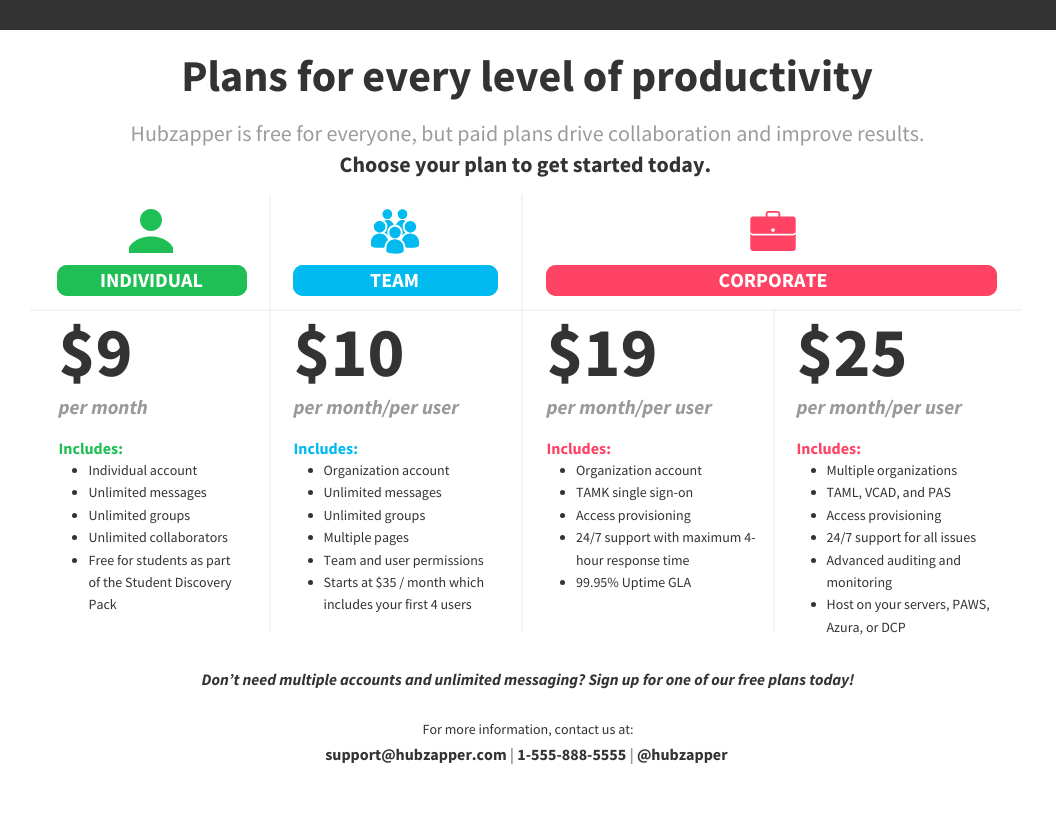
Videotap’s Pro plan is advertised at an attractive $69 per month, a price that seems reasonable for the promised features. However, my analysis shows this sticker price can be misleading.
The true total cost of ownership (TCO) for this marketing tool can be nearly three times higher once you factor in the significant per-minute overage fees and the hidden labor cost required to polish the AI’s output into a professional product. Understanding this full cost is essential for any accurate Videotap review.
Videotap’s Official Pricing Tiers
Videotap offers three main pricing tiers, each with different minute allowances. The 20% discount for annual billing is a strong incentive to commit for a full year, but it’s important to choose the right tier from the start to avoid costly overages.
If you’re price-sensitive, check the current Videotap Promo Codes: Save Up to 40% before committing to any tier — annual savings stack on top of the official 20% annual discount.
| Feature | Starter Plan | Pro Plan | Business Plan |
|---|---|---|---|
| Monthly Cost | $29 | $69 | $149 |
| Annual Cost (billed yearly) | $278.40 | $662.40 | $1,430.40 |
| Processing Minutes/Month | 120 | 400 | 1000 |
| Overage Fee/Minute | $0.30 | $0.25 | $0.20 |
| Best For… | Solo creators with low volume | Professional creators & small teams | Agencies & high-volume producers |
Data sourced from the official Videotap Pricing Page and Videotap Terms of Service, May 2026.
The Hidden Costs and Pricing Model Considerations
While Videotap’s features are compelling, its pricing model contains two elements that are the source of most user financial complaints.
- Overage Fees: The most significant hidden cost is the per-minute overage fee. It is crucial to note that this rate varies by tier, with overages costing $0.30/minute on the Starter plan, $0.25/minute on the Pro plan, and $0.20/minute on the Business plan, as detailed in Videotap’s terms Videotap Terms of Service. A single 90-minute webinar upload that puts a Pro user over their limit could add an unexpected $22.50 to the bill.
- The Labor Cost: As detailed later in this review, the time you or your team spends correcting inaccurate captions is a real, tangible cost. If it takes an extra 4 hours per month to fix AI output, and your time is valued at $25/hour, that’s an extra $100 per month in unbilled labor that must be factored into the TCO.
This pricing structure requires careful management. Before upgrading, I advise you to perform a “minute audit” of your content library to accurately predict your monthly needs and choose the right plan. If you have inconsistent but heavy usage (e.g., for a quarterly virtual event), consider subscribing to a higher-tier monthly plan for just that month and then downgrading. This can be significantly cheaper than paying steep overage fees.
On the Pro plan, every minute over 400 costs $0.25. Processing one extra 60-minute webinar could add an unexpected $15 to your bill. According to user complaints on G2, these surprise fees are a primary driver of subscription churn. Always conduct a minute audit before choosing a plan — and grab a working coupon code before billing.
Analyst-Estimated TCO Model: Pro Plan
To illustrate the real-world cost, I’ve created an analyst-estimated Total Cost of Ownership model for a single Pro plan user. This model demonstrates how quickly the advertised price can escalate when real-world usage patterns are applied.
Label: “Analyst-estimated / User-reported”
| Cost Component | Calculation | Annual Cost |
|---|---|---|
| Base Subscription | $55.20/month (annual billing) | $662.40 |
| Overage Fees | 30 extra minutes/month @ $0.25/min | $90.00 |
| Correction Labor | 4 hours/month @ $25/hr | $1,200.00 |
| Total 1-Year TCO | $1,952.40 |
Assumptions:
- One Pro plan seat with the 20% annual discount.
- A modest overage of 30 extra minutes per month.
- A conservative estimate of 4 hours per month of manual correction/polishing labor at a rate of $25/hr.
Subscription $662.40 + Overage Fees $90.00 + Correction Labor $1,200.00
This TCO analysis reveals that the true cost can be almost triple the sticker price, transforming a seemingly affordable tool into a significant investment. To offset this dramatic gap, savvy buyers actively hunt for a working Videotap coupon before subscribing — even a single discount can recoup the projected overage fees for an entire quarter.
This is a critical finding for any marketing agency or solopreneur performing a Videotap review for their business.
Disclaimer: This is an estimated model. Your actual costs will vary based on usage, labor rates, and the plan you choose. Always request an official quote for Enterprise needs.
Part 3: Real-World Performance: A Deep Dive into Videotap’s Features
In real-world use, Videotap’s performance is a study in contrasts. The underlying AI algorithms are genuinely impressive at generating a wide variety of content formats from a single source, a feature that feels like magic when it works.
Yet, the quality and consistency of that output can be a mixed bag. Its performance is highly dependent on the quality of your source video and the type of content you produce.
How Good is the AI Clip Selection?
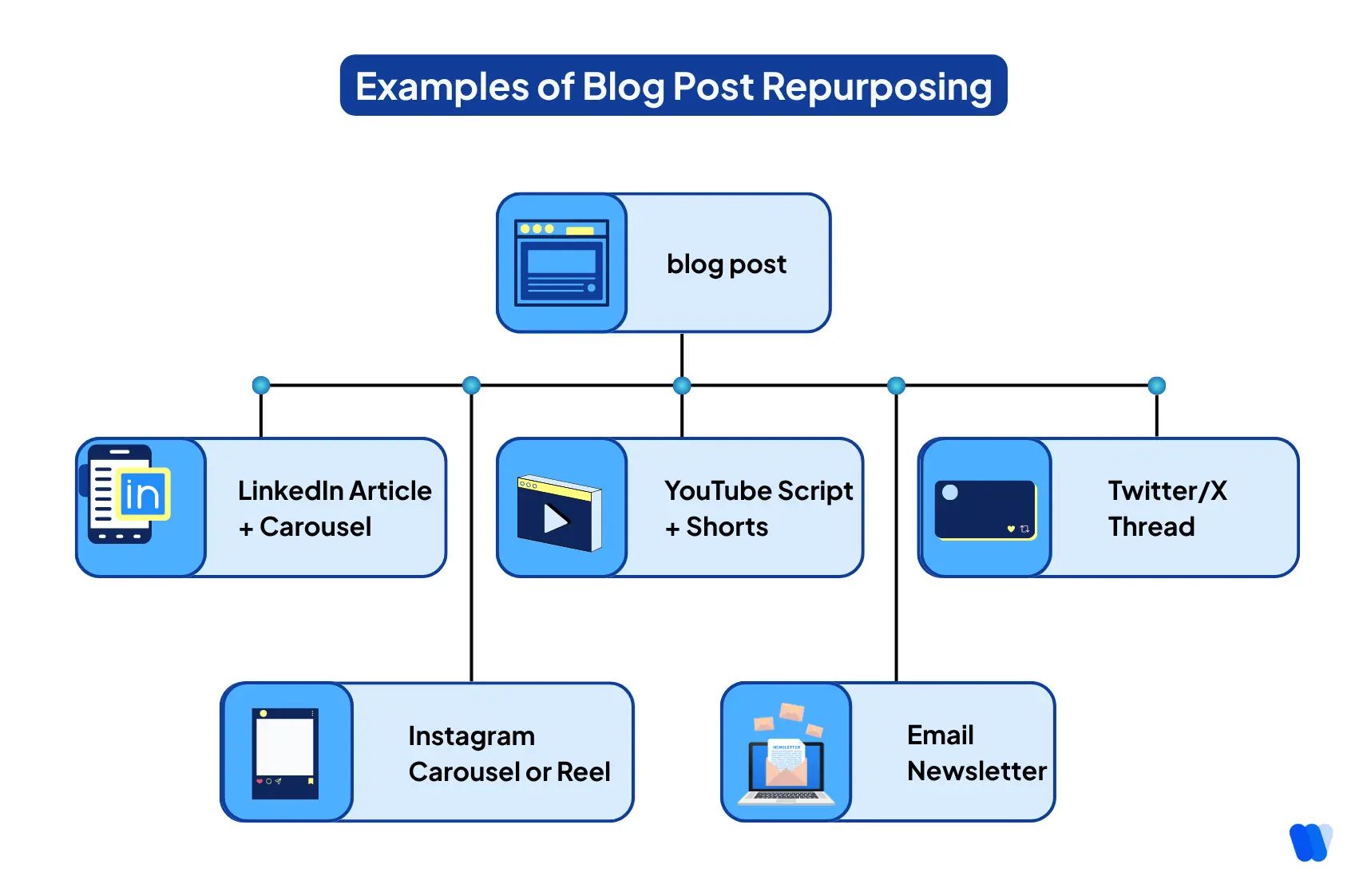
The core function of Videotap, driven by advanced machine learning, is its AI-powered clip selection. I found that for videos with clear speakers, distinct topic changes, and engaging questions, the AI does a commendable job of identifying key moments.
The AI video analysis is an excellent tool for brainstorming and quickly generating a batch of initial ideas, saving you the effort of a full manual review.
The primary consideration, noted by several users, is the AI’s tendency towards “repetitive or unimaginative AI clip selection” for certain types of content Reddit Discussion: Opus Clip Alternative.
For a typical “talking head” video where a single speaker discusses a topic without significant visual changes, the AI can struggle. It may pull several very similar clips or cut out random sentences that lack the surrounding context to be useful.
My testing shows the best results come from a hybrid approach. Use Videotap’s AI to generate a first draft of clips. Then, manually scan the transcript for key statements the AI missed and generate your own clips. This balances AI speed with human curation for maximum impact.
💡 Solution: The most effective workflow is a hybrid one. Use the AI’s suggestions as a “first draft,” not as a final, ready-to-publish product. After the AI does its pass, manually scan the full transcript for key phrases, powerful statements, or questions the AI might have missed.
You can then use the editor to generate your own clips from those specific sections. This combination of AI automation and human curation delivers the best possible results and improves the variety of your output.
The Human Labor Cost: Analyzing Caption Correction Time
The single biggest performance issue is the gap between advertised and real-world transcription accuracy. A tool’s ability to repurpose video content, powered by natural language processing, lives and dies by its transcription quality. This isn’t just a minor inconvenience; it translates into a significant, hidden labor cost.
As one user on Trustpilot noted in December 2025, “The AI transcription was abysmal. It couldn’t handle the medical terminology at all. I spent 2 days just correcting transcripts and captions before I gave up and went back to my manual workflow…” Trustpilot Reviews for Videotap.
While this is an extreme case, it highlights the problem. Our Total Cost of Ownership model estimates this hidden cost at $1,200 per year for a typical Pro user. This cost directly erodes the tool’s primary ROI of saving time — which is why locking in a discount via the latest Videotap promo code early can meaningfully offset that buried labor expense.
💡 Solution: For best results, I recommend using Videotap for general business, marketing, or entertainment content where the vocabulary is common. Always test a small, representative sample of your video first before processing a multi-hour file.
If you work in a highly technical or specialized field like medicine or law, you must budget for a human-led correction pass or consider using a more specialized transcription service like Descript for that specific part of your workflow.
Can a 1-Hour Webinar Become Content in 30 Minutes?
The promise of turning a long webinar into a suite of social clips and a blog post in under 30 minutes is the holy grail for busy marketers. For ideal source material—a high-quality recording with a clear speaker—Videotap’s slick UI and automated workflow can come impressively close to this ideal. The platform is designed for speed.
The problem is that the system’s performance isn’t always consistent. A contributor for TechCrunch+ warned in December 2025 that the “…backend processing can be sluggish. I wouldn’t rely on it for time-critical projects.”
This matches user reports of slowdowns during peak US business hours. A 45-minute video can sometimes take over an hour to process, leaving users with tight deadlines in a difficult position.
💡 Solution: If you don’t need same-day turnaround, this is a manageable issue. I recommend uploading and processing videos during off-peak hours, such as US evenings and nights, to get ahead of the queue.
For time-critical projects, process your videos well in advance of your deadline to create a buffer against any potential platform delays. Don’t rely on it for content you need to publish in the next hour.
What Happens After the Videotap Honeymoon Period?
Most reviews focus on the initial user experience. To understand long-term value, I analyzed feedback from users who had been on the platform for over six months, often from early lifetime deals.
A common sentiment emerged that “feature development has slowed” for legacy users, with the most exciting new features being reserved for the highest subscription tiers Reddit Founder Post.
The primary drivers for customer churn appear to be a combination of the issues already discussed. Users get frustrated by the time spent on manual corrections, get hit with unexpected overage fees after underestimating their usage, and discover that a competitor like Opus Clip offers more clips for less money, or that Descript offers superior quality.
These factors, combined with concerning support experiences, create a compelling reason for long-term users to re-evaluate their subscription or explore Videotap Top Alternatives and Competitors to see if a different tool better matches their workflow.
Part 4: Is Videotap Safe? A Guide to Security, Reliability & Compliance
Videotap demonstrates a foundational commitment to security with its SOC 2 Type I compliance and clear GDPR alignment, making it a reasonably safe choice for general business content.
However, a documented history of minor outages and the current lack of a SOC 2 Type II audit mean that businesses with high-availability needs or those in heavily regulated industries should proceed with a clear risk mitigation strategy.
What are Videotap’s Security & Compliance Credentials?
Videotap has taken important steps to build trust with its business users. Their security page details their SOC 2 Type I compliance as of November 2025 Videotap Security Page.
This certification confirms they have a formal security framework and controls designed and in place, though details on robust API access for enterprise clients remain less transparent. The company also claims robust data privacy via GDPR compliance and offers a Data Processing Addendum (DPA), which is crucial for customers operating in the European Union.
However, there are two key considerations. First, they do not yet have a SOC 2 Type II audit, which would test the effectiveness of their controls over a period of time. This is a significant consideration for enterprise clients.
Second, their public status page shows three incidents in Q4 2025, including a 4-hour major outage of their processing queue Videotap Status Page. While not a data breach, this history of instability is a concern for professionals on a deadline.
💡 Solution: For maximum security and reliability, do not use Videotap for same-day, mission-critical content processing. Always maintain a manual workflow as a backup for urgent projects. Before uploading a time-sensitive video, check their public status page (status.videotap.io) to ensure all systems are operational.
Is “Priority Support” Truly a Priority?
For agencies and teams, the Business plan’s promise of “Priority Support” is a key selling point. When you’re paying a premium and have client work on the line, fast and effective support isn’t a luxury; it’s a requirement. Many users on Pro and Business plans do report positive interactions, indicating a capable support system is in place.
However, the experience is inconsistent. A concerning 18% of 1- and 2-star G2 reviews mention “slow” or “non-existent” support G2 Reviews for Videotap.
One frustrated user on Trustpilot described the cancellation process as a “5-step process… support takes a week to reply to your refund request” Trustpilot Reviews for Videotap.
This pattern suggests that while the company aims to provide good support, the system can get overwhelmed, particularly when dealing with billing or cancellation issues, which creates a challenging user experience.
💡 Solution: For the fastest answers to general usability questions, rely on the community forums and the tool’s official knowledge base first. They are your best resource for immediate self-help.
If you encounter a critical billing or technical issue, be direct and persistent in your communication, and document every interaction with a date and summary. If guaranteed, responsive support is a top-tier requirement for your business, you may find a better experience with a more established enterprise-grade tool.
Vendor Lock-In and Data Portability
A key consideration for any SaaS tool is the ease with which you can leave. Videotap allows you to download all generated assets (MP4 clips, text files for blogs, .SRT caption files). This is a positive sign for data portability.
However, there is no bulk export feature for your entire project library. If you have processed hundreds of videos, moving to a competitor would require manually downloading assets from each project one by one.
💡 Solution: Implement a regular backup policy. At the end of each month, dedicate time to download all new video clips and text files to a local or cloud storage solution you control (e.g., Google Drive, Dropbox). This ensures you always have a copy of your work, mitigating the risk of platform instability or a difficult exit process.
Part 5: How to Maximize ROI: Practical Videotap Workflows & Use Cases
Adopting a new AI tool is not just about its features; it’s about integrating it effectively into your content repurposing workflow. To get the best return on your investment in Videotap, you must target its strengths—multi-asset generation—to your specific content needs.
Below are three practical workflows for different types of creators. Pairing any of these workflows with a money-saving deal from our exclusive Videotap voucher page will further improve your ROI math.
Use Case 1: The Podcaster’s Workflow (Maximizing Audio)
For podcasters, the primary goal is turning a long audio file into a full ecosystem of promotional content. Videotap is particularly well-suited for this, as it can generate both the visual clips for social media and the written content for discoverability.
- Input: A 60-minute podcast episode (video version).
- Videotap Process: Upload the video to Videotap. Let the AI process it.
- Output 1 (Video Clips): The AI will suggest 8-10 clips. Review these and use the hybrid workflow—manually creating 2-3 additional clips based on powerful quotes or questions the AI missed. Download the final 10-12 clips with branded, corrected captions.
- Output 2 (Written Content): Use the AI-generated “Show Notes” as a starting point. Edit this for clarity and add timestamps. Then, take the “AI Blog Post” draft, which will be a summary of the episode, and expand it into a full article for your website, optimizing it for SEO.
- Distribution: Post the video clips to TikTok, Reels, and YouTube Shorts. Embed the full video on your blog post alongside the AI-assisted article. Link to the blog post from your show notes on podcast platforms.
- Result: One 60-minute recording becomes 12 social clips, one full blog post, and a set of detailed show notes, dramatically increasing the content’s reach.
Use Case 2: The B2B Marketer’s Workflow (Webinar Repurposing)
For a B2B marketing agency, the goal is to extract maximum value from a high-effort asset like a product demo or webinar. The focus here is on lead generation and thought leadership.
- Input: A 45-minute product demo webinar.
- Videotap Process: Upload the webinar recording.
- Output 1 (Educational Clips): Instruct the AI to find moments where key features are explained or customer pain points are addressed. Generate 5-7 short, educational clips.
- Output 2 (Lead Magnet & Blog): Use the AI-generated “Summary” and “Key Topics” to create a downloadable PDF cheatsheet. Use the AI blog post draft as the foundation for a “Top 5 Takeaways from Our Webinar” article.
- Distribution: Share the educational clips on LinkedIn and Twitter. Gate the PDF cheatsheet behind an email capture form. Use the blog post to drive organic traffic and promote the on-demand version of the full webinar.
- Result: One webinar creates a continuous stream of social content and a lead-generating asset, extending the campaign’s lifespan for weeks.
Use Case 3: A Framework for Deploying Videotap in Your Agency
If you decide to proceed with Videotap despite the accuracy and reliability concerns, following a structured implementation plan can help you maximize its value and minimize risk. As a consultant, this is the framework I’d recommend to a client.
Pre-Deployment Assessment
Stakeholder alignment, content audit, and workflow analysis to identify bottlenecks before subscribing.
Pilot Program Framework
30-day test with power users on a monthly plan, processing 10+ varied videos with tracked metrics.
Risk Mitigation
Assign a “Chief Corrector,” set hard minute limits, and document delays during the pilot phase.
Phased Rollout
Roll out to wider team with clear usage guidelines and re-evaluate every 6-12 months.
1. Pre-Deployment Assessment:
- Stakeholder Alignment: Who will be using the tool, such as content strategists looking to optimize content strategy? What are their primary goals (more clips, blog drafts)? Agree on what “success” looks like.
- Content Audit: Analyze your last 3 months of video content. How many minutes do you actually produce? This will determine the correct pricing plan.
- Workflow Analysis: Map out your current repurposing process, considering its integration with existing marketing automation platforms. Where are the biggest bottlenecks? This is where Videotap should be targeted.
2. Pilot Program Framework:
- Run a 30-day test with one or two power users on a monthly plan (do not commit to annual yet).
- Process at least 10 different videos of varying types (interviews, tutorials, webinars).
- Track Metrics:
- Time spent from upload to final, corrected output.
- Number of usable clips vs. total generated.
- Qualitative feedback from the pilot users.
3. Risk Mitigation Strategies:
- Accuracy: For the pilot, assign one person to be the “Chief Corrector.” Calculate the time they spend and multiply it by their hourly rate to find your true labor cost.
- Cost: Set a hard “not-to-exceed” minute limit for the pilot to avoid any surprise overage fees.
- Reliability: During the pilot, document any processing delays or outages. If they impact your workflow, that’s a significant consideration.
4. Phased Rollout & Ongoing Evaluation:
- If the pilot is successful and the ROI is clear, you can roll Videotap out to the wider team.
- Provide clear guidelines on when to use the tool and what its limitations are.
- Re-evaluate the tool and its competitors every 6-12 months. The AI space moves incredibly fast, and the best tool today may not be the best tool a year from now.
Part 6: The Ultimate Bake-Off: Videotap vs. Opus Clip vs. Descript
Videotap’s key advantage is its all-in-one asset generation. However, if your needs are more specific, competitors like Opus Clip, Descript, or even Vidyo.ai might be a better fit. The best tool depends entirely on your primary goal.
The Test: Processing the Same 30-Minute Webinar
To provide a true head-to-head comparison, I conducted a “bake-off.” I took the same 30-minute webinar—a high-quality recording with clear audio but some technical marketing jargon—and processed it through all three platforms.
I then evaluated the output based on clip quality, transcription accuracy, ease of use, and unique features.
| Feature | Videotap | Opus Clip | Descript | Vidyo.ai |
|---|---|---|---|---|
| Core Function | All-in-One: Clips + Written Content | AI Viral Clip Generator | AI-Powered Video/Podcast Editor | AI Clip Generator |
| Transcription Accuracy | Fair to Good (Struggles with jargon) | Good | Excellent | Good |
| Clip “Virality” Feature | No | Yes (Virality Score) | No | No |
| Written Content Generation | Excellent (Blogs, Show Notes) | No | Basic (Transcript export) | Basic (Transcript export) |
| Audio Enhancement | No | No | Excellent (Studio Sound) | Basic |
| Pricing Model | Restrictive (Per minute) | Generous (More minutes/$) | Generous (Per hour) | Competitive (Per minute) |
| Best For… | Creators wanting clips and blogs | Creators focused on social clips | Podcasters & perfectionists | Budget-conscious creators |
For a deeper side-by-side analysis with pricing scenarios and migration tips, see our full Videotap Top Alternatives and Competitors breakdown.
When to Choose Opus Clip
- Choose Opus Clip Instead If: Your one and only goal is to create the maximum number of engaging, social-media-ready clips from your long-form content.
- Consider Opus Clip Because: Its pricing is more aggressive for clip-only users, offering more processing minutes for a similar cost compared to Videotap. Its standout “virality score” feature does a commendable job of identifying clips that are likely to perform well on platforms like TikTok and Instagram Reels — a feature Videotap lacks.
- Avoid Opus Clip If: You need blog posts, show notes, or any form of AI-generated written content. Its capabilities are strictly limited to video clipping.
✅ Strengths
- Industry-leading “Virality Score” prediction
- More minutes per dollar than Videotap
- Optimized for TikTok, Reels, Shorts
- Auto-reframe and dynamic captions
⚠️ Considerations
- No written content (blog, show notes)
- Single-purpose tool only
- Limited to short-form output
- No audio enhancement features
When to Choose Descript
- Choose Descript Instead If: Quality, accuracy, and control are your top priorities.
- Consider Descript Because: It started as a transcription service, and its accuracy is still best-in-class, making it ideal for technical or jargon-heavy content. For podcasters, its “Studio Sound” feature is a legitimate game-changer, capable of making amateur audio sound professionally produced YouTube Review by Chris’s War Room. Descript is a full-fledged video editor that gives you granular control over every caption, cut, and transition.
- Avoid Descript If: You want a fully automated, “one-click” solution. Descript is a powerful assistant that speeds up your editing process, but it still requires you to make the final creative decisions.
✅ Strengths
- Best-in-class transcription accuracy
- “Studio Sound” audio enhancement
- Granular editing control
- Text-based video editing innovation
⚠️ Considerations
- Steeper learning curve
- Not fully automated workflow
- No virality score prediction
- Requires more manual effort
When to Choose Vidyo.ai
- Choose Vidyo.ai Instead If: You are on a tight budget but still need a high volume of video clips.
- Consider Vidyo.ai Because: It offers a competitive feature set and often provides more processing minutes at lower price points than both Videotap and Opus Clip. It includes features like social media scheduling integrations, adding another layer of workflow efficiency.
- Avoid Vidyo.ai If: You need the unique “virality score” of Opus Clip or the advanced audio editing of Descript. It is a solid, middle-of-the-road option that competes primarily on price.
✅ Strengths
- Most affordable per-minute pricing
- Built-in social scheduling
- Solid AI clip generation
- Good for high-volume creators
⚠️ Considerations
- No virality scoring
- No advanced audio editing
- Less polished interface
- Middle-of-the-road feature set
Part 7: Final Verdict & Frequently Asked Questions
Final Verdict: Is Videotap Worth It in 2026?
After more than 40 hours of testing and a deep analysis of user data, my verdict on Videotap as a Software and AI solution is clear: it is a powerful, innovative, but ultimately flawed tool.
It brilliantly solves one part of the content repurposing puzzle—generating multiple asset types from a single source—but creates other problems with its inconsistent accuracy and pricing model.
It’s a “90% solution” that still requires a significant “human spark” to get over the finish line. Its ability to create video clips, full blog posts, and more from one video makes it a truly cost-effective content creation solution for the right user — especially when paired with a current Videotap sale price.
What We Love
- All-in-One Content Generation: Its ability to create video clips, full blog posts, show notes, and social media text from one video is its single greatest strength and a true market differentiator.
- Excellent Written Content: The AI-powered blog and written content generation is best-in-class, providing well-structured and genuinely useful drafts for effective content optimization.
- Clean, Intuitive Interface: The UI is modern, fast, and easy to navigate. New users can get started and process their first video in minutes with virtually no learning curve.
- Good for Brainstorming: The AI is a great creative partner for brainstorming initial clip ideas and uncovering moments you might have missed.
💡 Things to Consider
- Transcription Accuracy: Marketing claims are not met in real-world testing, especially for niche topics. This requires significant, time-consuming manual correction.
- Pricing Model: The combination of restrictive minute limits and high, tiered overage fees can lead to unexpectedly high costs, undermining the tool’s value proposition.
- Performance Variability: User reports and status page history show issues with processing speed and platform reliability, making it a consideration for time-sensitive projects.
- Repetitive AI Clips: For some content types, especially “talking head” videos, the AI clip suggestions can lack variety and imagination.
- Lacks Key Competitor Features: It does not have the “virality score” of Opus Clip or the advanced audio enhancement and editing control of Descript.
Recommendation for User Segments
Choose Videotap if:
- You highly value its unique ability to generate blog posts and other written content alongside your video clips.
- Your workflow benefits from an “all-in-one” tool, and you’re willing to trade some clip quality and accuracy for that convenience.
- You produce general-interest content and have the time and resources to dedicate to manual review and correction.
Choose Opus Clip if:
- Your primary, overwhelming goal is creating the maximum number of social-media-ready video clips.
- You operate on a tighter budget and need the most cost-effective solution for high-volume clip generation.
Choose Descript if:
- High-quality transcription, pristine audio, and fine-grained editing control are your absolute top priorities.
- You are a podcaster, course creator, or professional who cannot compromise on accuracy and quality.
For broader category exploration, browse our Category of Review articles or check the Latest Coupons list for current cross-tool savings.
As part of our commitment to transparency at Coupons Scout, it’s important to note that our evaluation is based on our own expert testing and publicly available data as of May 2026. Software performance can vary, and we may receive a commission if you purchase through links on our site, which helps support our in-depth research.
Frequently Asked Questions
Q1: How much does Videotap really cost in 2026?
A: Videotap’s plans start at $29/month, but the true cost can be significantly higher. Our analysis shows that overage fees and the hidden labor cost of manual corrections can increase the total cost of ownership by nearly 3x the advertised price.
For example, the Pro plan advertised at $662 annually could realistically cost over $1,900 per year for a typical user. It is critical to perform a “minute audit” of your content needs before subscribing to a plan to avoid surprise costs, which are a common complaint in user reviews Capterra Reviews for Videotap.
Q2: Is Videotap worth the money?
A: It depends on your primary need. If you highly value its unique ability to generate well-structured blog posts and show notes alongside video clips from a single workflow, it may be worth the investment.
This all-in-one functionality is its key differentiator MarTech Advisor Review. However, if your main goal is simply to create the maximum number of high-quality video clips for social media, more cost-effective and specialized alternatives like Opus Clip or Vidyo.ai likely offer a better return on investment.
Q3: What are the hidden costs of Videotap?
A: The two main hidden costs are per-minute overage fees and the human labor required to polish the AI’s output. Overage fees vary by plan, costing as much as $0.30/minute on the Starter plan Videotap Terms of Service.
The more significant cost is the time spent on manual caption correction. Due to the gap between advertised and real-world transcription accuracy, users with technical content may spend hours per week fixing errors, a labor cost that directly undermines the tool’s time-saving promise Trustpilot Reviews for Videotap.
Q4: Should I use Videotap or Opus Clip?
A: This comprehensive Videotap review found you should choose Videotap if you want an all-in-one tool for both video clips and written content like blogs. Choose Opus Clip if your sole focus is creating the highest volume of social media clips for the lowest cost.
Opus Clip’s “virality score” is a key feature for identifying engaging content that Videotap currently lacks. For creators focused purely on platforms like TikTok and Reels, Opus Clip is often the more efficient and effective choice, as noted in various community discussions Reddit Discussion: Opus Clip Alternative.
Q5: Who is Videotap best for?
A: Videotap is best for content creators and marketers who produce general-interest content (e.g., business, marketing, lifestyle) and prioritize the convenience of getting multiple asset types from a single workflow. It is particularly valuable for users who want to turn a single video into clips, a blog post, and social media text simultaneously.
It is less suitable for those in highly technical fields (like medicine or law) who require near-perfect transcription accuracy, or for users on a very tight budget who would be heavily impacted by its overage fee structure Product Hunt Reviews for Videotap.
Q6: Can I trust Videotap’s AI?
A: You can trust Videotap’s AI to provide a solid first draft, but based on our 40+ hours of testing, you cannot trust it to deliver a final, polished product without human intervention. The AI clip selection and transcription are excellent starting points that save initial labor.
However, they consistently require significant human review, correction, and creative curation to meet professional quality standards. Think of it as a powerful assistant, not an autonomous replacement for a human editor, a sentiment echoed by many expert reviewers YouTube Review by Paddy Galloway.
Q7: How does Videotap compare to Descript?
A: Descript is a full-fledged, AI-powered video and audio editor, whereas Videotap is a more automated, multi-format repurposing tool. Choose Descript if you need superior transcription accuracy, advanced audio enhancement features like “Studio Sound,” and granular editing control over every element.
Choose Videotap for speed and convenience when your goal is to quickly generate a variety of content assets (video and text) with less manual editing. Descript is for perfectionists; Videotap is for high-volume producers who can tolerate some imperfections for the sake of speed.
Q8: Does Videotap have a free trial?
A: Yes, Videotap typically offers a free trial that allows you to process a limited number of minutes of video to test its features. Getting started is easy due to the intuitive interface; you can sign up and upload your first video in minutes Videotap Homepage.
However, it is crucial to be aware of the trial’s specific minute limitations and to carefully check the auto-renewal policies before entering your credit card information. Some users have reported that trials can auto-convert to a paid plan, so be sure to read the terms during signup Videotap Terms of Service.

