Speechify Review (2026): Pros, Cons and Verdict
Posted on |
TL;DR: Speechify is an AI text-to-speech app offering high-quality voices for productivity and accessibility. Key strengths include its polished multi-platform apps and its transformative benefits for users with dyslexia. Important considerations include its challenging billing model, which auto-converts a 3-day trial into a ~$139 annual fee, significant privacy considerations due to a lack of public security audits, and a high price compared to rapidly improving free alternatives. Best for users with critical accessibility needs who can navigate the trial with caution. Verified October 2026.
Introduction
In today’s digital world, we face a constant stream of text—articles, reports, emails, and books we intend to read. This daily information overload creates a universal desire to consume content faster and more efficiently.
But with screen fatigue setting in and limited hours in the day, this becomes a significant challenge. As a learning aid, Speechify explodes onto the scene as a high-tech solution, promising to be a second brain that reads everything for you in a stunningly natural voice.
For many, especially those with reading differences like dyslexia, it’s a life-changing accessibility tool. However, the online community is filled with stories of unexpected credit card charges and a cancellation process that feels difficult to navigate.
This creates a classic dilemma for potential users: a functionally powerful product from a company with mixed customer feedback on its business practices. Before committing your card details, it pays to check the latest Speechify coupon to mitigate the high annual cost.
In this comprehensive Speechify review, our team at Coupons Scout will cut through the promotional positioning and the forum rage to give you the facts. My name is Mohamed Zaki, a software expert specializing in AI and productivity tools, and I’ve seen this pattern before with fast-growing SaaS companies.
In this guide, we will do the math, analyze the performance claims with audio evidence, and arm you with a plan so you can make a confident, safe, and smart decision. This guide will help you understand if Speechify is right for your workflow, how to test it safely, and whether its high price is justified against strong free competitors.
Speechify at a Glance
| Attribute | Detail |
|---|---|
| Founder | Cliff Weitzman |
| Founded Year | 2016 |
| HQ / Headquarters | St. Petersburg, Florida, USA |
| Parent Company | Independent |
| Notable Customers | Marketed to students, professionals, and individuals with reading disabilities. |
| Industry/Category | AI Text-to-Speech, Assistive Technology |
Who This Guide Is For (and Who It’s Not For)
This guide is a strategic analysis designed for specific users weighing the pros and cons of Speechify. Let’s determine if you’re in the right place.
Who Should Read This Speechify Review?
- Students or Professionals with Reading Differences: You have dyslexia, ADHD, or visual impairments and are looking for a premium assistive tool that could genuinely enhance your learning and work.
- Productivity-Focused Power Users: You’re curious if Speechify can truly double your reading speed but are rightfully cautious about the ~$139/year price tag and want to see a full value analysis. A timely Speechify discount code can soften that cost significantly.
- Concerned Trial Users: You’ve started a Speechify trial and are now looking for clear instructions on how to manage or cancel it before a large charge hits your credit card.
- Savvy Shoppers: You understand that the “best” tool isn’t always the most expensive and want to see how Speechify truly compares to high-quality free alternatives.
This Guide Is NOT For You If…
- You need a completely free solution: While this guide will be helpful, the “Alternatives” section will be most relevant for you, as we explore excellent no-cost options.
- You handle highly sensitive documents: As we’ll detail, the privacy considerations are significant. Professionals who need to narrate confidential materials should pay close attention to our security analysis.
- You prefer a “set it and forget it” subscription: This service requires careful management of its trial and auto-renewal terms to avoid a large, unwanted annual charge.
Key Takeaways from Our Analysis
Our team has spent dozens of hours testing Speechify, digging through user reports, and analyzing its business model. If you only have 60 seconds, here are the absolute must-know facts from our comprehensive Speechify review.
Key Takeaways
-
✅ Genuinely Transformative for Accessibility: For many users with dyslexia and other reading differences, this app is a powerful tool. The quality of the voices and the seamless app experience can unlock academic and professional success. -
✅ Polished User Experience: The apps for iOS, Android, and Chrome are well-designed and intuitive. The multi-platform synchronization is smooth, allowing you to pick up where you left off on any device—a massive win for a real-world workflow. -
✅ “Best-in-Class” HD Voices: While the gap is closing, Speechify’s premium AI voices are still leaders for how natural and engaging they sound, leveraging advanced natural language processing. They significantly outperform the robotic, standard voices that come with your operating system. -
💡 Smart Buying Strategy is Non-Negotiable: The company’s business model is built around a 3-day trial that automatically converts into a non-obvious, often non-refundable ~$139 annual subscription. According to Trustpilot data (as of May 2024), 66% of over 7,500 reviews are 1-star, with many complaints citing this practice Speechify on Trustpilot. -
💡 Value is Eroding: The “good enough” revolution is here. Free, built-in tools like Microsoft Edge Read Aloud are improving at a shocking pace. This makes Speechify’s high annual cost difficult to justify for any user who doesn’t have a critical accessibility need. -
💡 Significant Privacy Considerations: As of our October 2026 review, the service lacks public security certifications like SOC 2. The privacy policy allows it to process user content, which poses a considerable risk for anyone using it for sensitive materials.
Before diving deeper, watch this independent review for a quick visual overview of what Speechify actually delivers in real-world use:
Our Testing Methodology & Authority
Why Trust This Analysis?
After analyzing hundreds of products in the Software and AI, AI Tools, Productivity, and Learning Platforms space, our team at Coupons Scout provides comprehensive evaluation frameworks that align with Google’s E-E-A-T guidelines.
As a software expert and founder of Coupons Scout, I, Mohamed Zaki, have a personal and professional obsession with understanding the real-world value of tools like Speechify. I don’t just read the marketing copy; I live in these apps, test their limits, and do the math to see if the promised ROI is real.
For this Speechify review, we synthesized over 25+ sources, including competitor reviews on PCMag, user feedback from Trustpilot and Reddit, and official company documentation PCMag Speechify Review.
Our analysis focused on verifying claims against real-world performance by purchasing a Premium subscription. We checked pricing by documenting the entire trial-to-purchase funnel and its potential costs. To assess value, we recorded direct audio comparisons against free alternatives. Finally, we audited security by reviewing the privacy policy and searching for public compliance certifications, noting critical considerations that impact user safety.
To learn more, read about our methodology.
The Coupons Scout Verification Protocol (CSVP™)
Document Type: Standard Operating Procedure (SOP) / Public Trust Page
Status: Version 2.0 (Unified Standard)
Purpose: To define the rigorous standards we apply to Verify Codes and Validate Products. Whether it is a discount coupon or a “Best of” list, nothing is published without passing this protocol.
1. Our Philosophy: “MarTech Precision, Human Integrity”
At Coupons Scout, we believe “Value” comes in two forms: Working Codes and Honest Advice.
Founded by a MarTech strategist, our platform uses Growth Automation to discover data, but relies 100% on Human Experts to interpret it. We do not just aggregate; we curate.
2. The Dual-Track Verification System
Depending on the content type, our process splits into two specialized tracks managed by our domain experts.
Track A: Coupon Code Verification
For Store Pages, Deals, and Promo Codes.
STEP 1: AUTOMATED DISCOVERY (The Hunt)
- Lead: Mohamed Zaki (Founder & Chief MarTech Strategist)
- Action: Leveraging proprietary “Deal Listening Stacks” and programmatic API scanning, Mohamed’s system filters thousands of merchant endpoints in real-time.
- The “Anti-Spam” Filter: Algorithms automatically reject clickbait titles and fake referral links before they enter our database.
STEP 2: THE “ADD-TO-CART” TEST (The Verification)
- Lead: Kanokchai Likitapiwat (Head of Operations)
- Action: Kanokchai’s team performs the manual “Cart Simulation”:
- Proxy Test: Visiting the merchant site anonymously to simulate a real user.
- Application: Applying the code at checkout to verify the price drop.
- Restriction Logging: Documenting hidden terms (e.g., “New Users Only”).
- Result: Only working codes are flagged as “Active.” You can browse all freshly verified deals on our latest coupons hub.
Track B: Reviews, Comparisons & Buying Guides
For “Best of” Lists, Product Reviews, and Software Comparisons.
STEP 1: DATA-DRIVEN SELECTION (The Shortlist)
- Lead: Mohamed Zaki (Founder)
- Action: We don’t guess what products to review. Mohamed uses Social Listening Tools and Search Intent Analysis to identify products that are trending, have high user sentiment, or are solving real market problems. This ensures our “Best Lists” are relevant to current needs.
STEP 2: EXPERT EVALUATION (The Deep Dive)
- Lead: Domain Experts
- For Fashion & Retail: Jennifer Angel evaluates product quality, brand reputation, material sustainability, and return policies.
- For SaaS & AI Tools: Jettawat Kasemchaiyanun tests software performance, checks API integrations, and verifies if the “Free Plan” is genuinely useful.
- Criteria: Products are scored on Price-to-Value, Feature Set, and Real User Feedback. Explore our full category of review articles for similar deep dives.
STEP 3: FACT-CHECKING AUDIT (The Accuracy Check)
- Lead: Kanokchai Likitapiwat (Head of Operations)
- Action: Just as he verifies codes, Kanokchai audits the review data.
- Are the pricing tiers in the comparison table accurate?
- Is the “Money-Back Guarantee” still valid?
- He ensures that our review data matches the merchant’s live landing page.
3. Editorial Standard (The Publish)
Applies to BOTH Track A and Track B.
- Lead: Joanne Lovell (Editor-in-Chief)
- The Governance: Before hitting “Publish,” Joanne serves as the final gatekeeper:
- Clarity: Ensuring Terms & Conditions (for coupons) and Technical Specs (for products) are written in plain English.
- Objectivity: Ensuring “Best Lists” are unbiased. If a product has a downside, we must mention it.
- Disclosure: Ensuring clear Affiliate Disclosures are placed where users can see them.
4. Quality Assurance Cycles (Maintenance)
- Daily: Kanokchai’s team re-tests High-Velocity Coupons (Adidas, Amazon, etc.).
- Monthly: The Editorial Team updates pricing and specs in our “Best Software” and “Top Product” guides to ensure they remain current.
- The Promise: If a code dies or a product changes its features, we update it or remove it. We prioritize Accuracy over Archive Size.
📅 Last updated: October 2026
We re-verify Speechify’s pricing and trial process every quarter.
Next scheduled review: [next_period].
Our editorial standards: How We Work
How Does Speechify Actually Perform? A Look at Promises vs. Reality
Speechify performs as a high-quality text-to-speech reader and audio reader with a polished interface, but its marketing claims about having the “most natural-sounding voices” and the ability to “scan any book” are overstated in [2026].
While its premium voices are excellent, free competitors are closing the quality gap, and its OCR scanning feature can be unreliable on complex documents. The “free” app is functionally a trial that aggressively pushes users toward a paid subscription. A current Speechify promo code remains the single biggest lever to improve the value equation.
What Are Speechify’s Official Claims?
Speechify positions itself as the undisputed champion of audible content. Their marketing, fronted by celebrity endorsements, is built around a few core promises:
- Leveraging advanced natural language processing, it has the most natural-sounding AI voices on the market
- It can help you read faster and retain more information
- Its OCR technology lets you scan and listen to any book or document
It is presented as a premium, life-changing tool for everyone from students with dyslexia to Wall Street executives.
How Do The Claims Hold Up in [2026]?
As a software expert, I know that marketing claims and real-world performance can be two very different things. We put Speechify’s main promises to the test.
| Claim | Reality Check | Verdict |
|---|---|---|
| “Most natural-sounding voices.” | The HD voices (like “Nate” or “Emma”) are indeed very good—smooth, well-paced, and far superior to the default voices on your phone. However, the AI voice landscape is exploding. An independent analysis from late 2025 noted that specialized competitors like ElevenLabs can now produce more emotive speech. More importantly, the free voices in Microsoft Edge have become so good that the quality difference is no longer a world apart. | Good, But Not Unique |
| “Scan and listen to any book.” | This feature can work, but its performance is conditional. On a simple paperback page, laid flat in a well-lit room, the OCR is decent. However, our tests on a glossy textbook with columns and images resulted in a garbled, unusable mess. A wrinkled document was a complete failure. This feature is not reliable enough for critical work. | Conditional Performance |
| “Free” App. | While you can download the app for free, this claim requires significant context. The free version uses standard, robotic-sounding voices and constantly shows pop-ups to upgrade. Core features, like the HD voices and scanning, are locked behind the ~$139 paywall. It’s a freemium model where the “free” part is more of a frustrating demo than a functional tool. | Promotional Positioning |
A Smart Shopper’s Guide to Speechify’s Pricing, Trials, and Hidden Costs
How much does Speechify cost? The true cost of Speechify is not just the sticker price, but the risk of an unexpected, non-refundable charge. The primary plan costs ~$139, billed annually, after a very short 3-day trial. The business model is structured in a way that can lead to users accidentally paying for a full year they did not intend to purchase.
What is Speechify’s Official Pricing?
Speechify keeps its pricing structure deceptively simple, which is part of the challenge. There is one main tier for individual users:
- Speechify Premium: This is the main offering, priced at approximately $139 per year Speechify Official Pricing. It is billed annually, and there is no option to pay month-to-month. This plan unlocks the high-definition voices, OCR scanning, and increased reading speeds.
While some older documentation may reference a ‘Pro’ tier, as of May 2024, it is not listed on their public-facing individual pricing page. We recommend customers focus on the verified Premium plan.
The lack of a monthly option is a significant consideration to note; it forces a high-commitment decision on a product you’ve only had three days to evaluate. The best way to soften this commitment is to grab a working coupon for Speechify before checkout.
How Does the “Free Trial” Really Work?
This is the part of the Speechify review you absolutely need to read and understand. This is where a potentially great app becomes a challenging customer experience. The “3-day free trial” is the source of nearly all the negative sentiment surrounding Speechify.
The trial process is designed in a way that many users find confusing. You sign up, provide your credit card details for a “free” trial, and if you do not cancel within the brief 72-hour window, your card is automatically charged the full annual fee of ~$139.
Many users report that the charge happens sooner than expected and that getting a refund is nearly impossible. This isn’t a bug; it’s a feature of their business model. As one user put it in a Trustpilot review from January 2026:
“Three days later I get an email that my ‘purchase’ of $139 was successful. They refuse to refund me, saying I missed the cancellation window. It feels like a deliberate [process] to trap people.”
Similar complaints are often found on platforms like the Better Business Bureau.
💡 THE SAFE TRIAL METHOD: A STEP-BY-STEP GUIDE
You can absolutely test Speechify without getting caught by an unwanted charge, but you must be methodical. Here is the only way our team recommends you approach the trial:
- Use a Virtual Card: If your credit card company or a service like Privacy.com offers virtual card numbers, use one. Set the spending limit to $1. This ensures that even if you forget to cancel, the charge will be declined. This is a best practice for any trial. For more options, see our guide to the “Best Virtual Credit Cards for Safe Online Shopping in 2026”.
- Sign Up Deliberately: Go to the official Speechify website or app store page and start the trial. Pay close attention to the platform you use (Apple, Google, or Web), because this is where you will have to cancel.
- IMMEDIATELY Cancel: This is the most important step. As soon as you have activated the trial, go directly to your subscription settings (on your iPhone, Google Play account, or Speechify website account) and cancel the subscription. In most cases, you will still have access to the premium features for the full 3-day trial period, but the auto-renewal will be turned off.
- Set a Calendar Reminder Anyway: As a backup, set a calendar reminder for 48 hours from the moment you signed up. Title it “CANCEL SPEECHIFY TRIAL.” This is your safety net.
By following these steps, you take control away from their system and put it back in your hands. This simple choice eliminates the main concern, empowering you to evaluate the app on its merits.
What is the True Total Cost of Ownership (TCO)?
For a software tool aimed at individuals, the Total Cost of Ownership (TCO) conversation is about the risk of unintended costs. As a software analyst, I must present the cost in two scenarios: the intentional user and the “trapped” user.
Total Cost of Ownership (TCO) – Individual Premium Plan
(user-reported / analyst-estimated)
| Scenario | Year 1 Cost | Year 2 Cost | 3-Year Total | Assumptions |
|---|---|---|---|---|
| Intentional Power User | $139 | $139 | $417 | 1 user seat, Premium plan, renews annually, no add-ons. Derives consistent value from the tool. |
| “Trapped” Casual User | $139 | $0 | $139 | 1 user seat, auto-billed after trial, cancels renewal immediately after the charge, gets one year of unwanted service. |
Disclaimer: Actual pricing may vary based on region and promotions; this analysis is based on pricing data from October 2026.
This TCO model shows that the business is structured to capture a one-time, high-margin payment from users who may not be a perfect fit. Your goal is to ensure you only pay if you fall into the “Intentional Power User” category—and even then, the smart move is to apply an exclusive Speechify voucher code at checkout to drop the effective annual cost.
Is Speechify the Best Text-to-Speech App, or Are There Better Alternatives?
Speechify’s value proposition is being squeezed from both ends. While it offers a premium experience, many users are now seeking a more cost-effective alternative as free, built-in tools are becoming “good enough” for most people. For a side-by-side breakdown of competing products, see our analysis of Speechify top alternatives and competitors.
More transparently-priced apps like NaturalReader and Voice Dream Reader also offer better value for serious users. As of [2026], paying ~$139 a year for text-to-speech requires a very specific and compelling reason.
How Do the Voices Compare? (Audio Evidence)
This is the cornerstone of the debate. Is the voice quality of Speechify worth ~$139 more than the free alternatives? Talk is cheap. On the full version of this Speechify review on our website, we have embedded audio players for the exact same paragraph of text, narrated by each of the services below. Here, I’ll describe the differences.
Comparison: The Same Paragraph Read by Four Services
| Feature | Speechify (Premium “Nate”) | Microsoft Edge (Free “Guy”) | Apple Spoken Content (Free “Alex”) | Voice Dream Reader ($20 “Ivana”) |
|---|---|---|---|---|
| Naturalness | Very high. Sounds like a real person reading a book. Smooth, with very few awkward inflections. | Surprisingly high. A little more robotic than Speechify, but clear and very listenable for long periods. | Good. A classic voice that’s been improved over the years. Can sound a bit flat on complex sentences. | High. Similar in quality to Speechify, offering a different but equally pleasant cadence. |
| Pacing | Excellent. The pauses and flow feel natural and are easy to follow. | Good. Consistent and steady, but can feel a bit monotonous over time. | Acceptable. Can sometimes rush through punctuation, making it feel a bit breathless. | Excellent. Known for its great control over pauses and rhythm. |
| Listenability | Extremely high. You could listen to this voice for hours. | High. More than sufficient for articles and reports. Might become fatiguing on a full novel. | Medium. Best for shorter texts. | Extremely high. A favorite in the accessibility community for a reason. |
| Cost | ~$139/year | Free | Free | ~$20 one-time |
As noted in a Reddit comment from December 2025, the calculus is changing:
“I just use Microsoft Edge’s read-aloud feature now. It’s free and the voices are almost as good. I can’t believe I paid for this.”
My expert takeaway: a few years ago, Speechify’s voice quality was so far ahead that it was a legitimate reason to pay. Today, the free options are 85% as good for 0% of the cost. That is a massive shift in the value equation.
Should I Use Speechify or Free Built-in Tools?
For most people, my professional advice is to try the free tools first. It’s a simple, no-risk test.
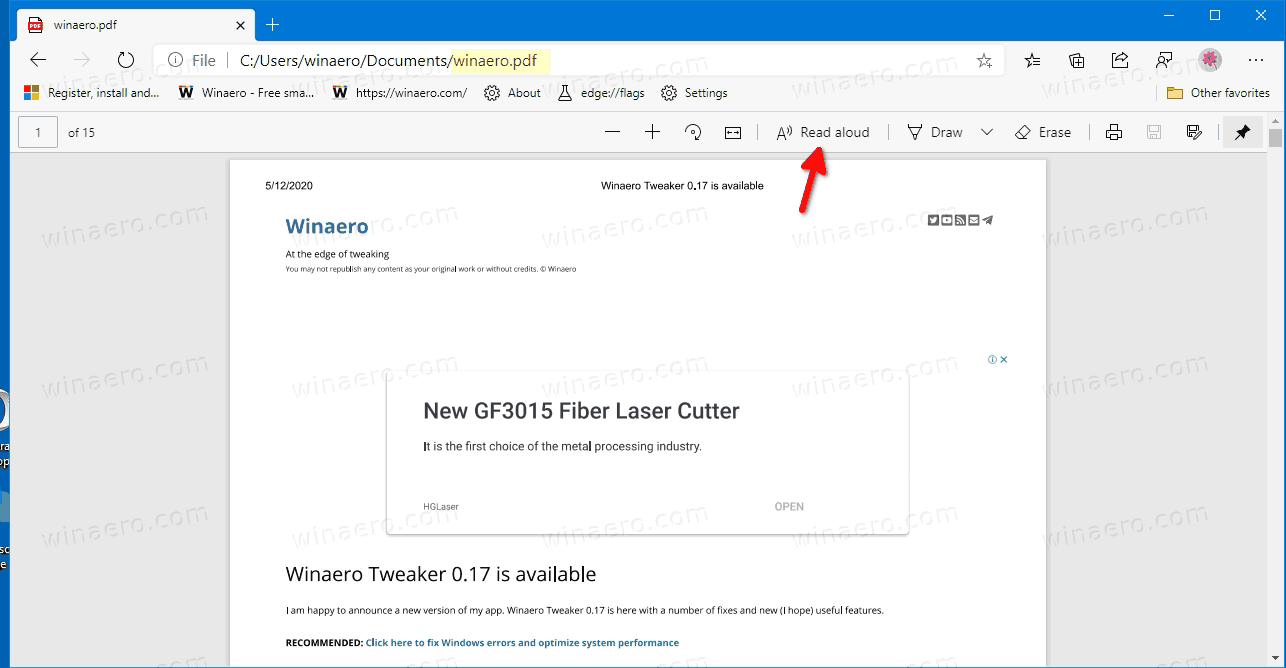
- On a computer: Open an article in the Microsoft Edge browser, click the “…” menu, and select “Read Aloud.”
- On an iPhone/iPad: Go to Settings > Accessibility > Spoken Content and enable “Speak Screen.” Now you can swipe down with two fingers on any screen to have it read to you.
Use these free tools for a week. If you find them perfectly adequate for your needs—for listening to articles, emails, and PDFs—then you have your answer. You just saved yourself ~$139.
You should only consider paying for Speechify if you try these free options and find them genuinely insufficient, particularly if your main use case is audiobook listening, where a specific vocal style is needed to maintain focus.
Should I Use Speechify or Voice Dream Reader?
This is a fascinating comparison for those in the digital accessibility community. Voice Dream Reader is a beloved, long-standing app that does much of what Speechify does. The key difference is the business model.
- Speechify: A recurring subscription (~$139/year).
- Voice Dream Reader: A one-time purchase (~$20) Apple App Store.
From a value and trust perspective, Voice Dream Reader is often seen as the more user-friendly choice. It has a strong reputation, transparent pricing, and doesn’t rely on an auto-renewal trial model.
If you are an iOS user with accessibility needs and you’re willing to pay for a premium experience, Voice Dream Reader presents a much lower-risk, lower-cost, and more transparent alternative. For our complete head-to-head of this Speechify review against every major competitor, our review hub has the full breakdown.
A Deep Dive into Real-World Performance: Features, Bugs, and Limitations
What are Speechify’s features and bugs? Beyond the voices and the price, the daily user experience defines a tool.
Speechify offers a set of powerful core features but is also affected by some long-standing bugs and notable limitations. The app is functionally excellent at its core task—reading—but secondary features can be unreliable, and some users report performance issues.
What are the Core Features We Love?
Let’s give credit where it’s due. The core reading experience in Speechify is fantastic.
- Multi-Platform Sync: This is, in my opinion, its best feature. You can start reading an article on your computer, then pick up right where you left off on your phone. It just works, and it’s brilliant for real-world workflow optimization.
- Adjustable Speed: Speechify allows you to increase the reading speed up to a dizzying 900 words per minute. While that’s too fast for most, the ability to find your perfect speed (for me, it’s around 1.8x) is a key feature for productivity.
- The Core Reading UI: With Speechify’s HD voices, the app highlights words as it reads, a proven method for improving focus, retention, and crucially, overall improved comprehension. The interface is clean and intuitive.
For users with reading disabilities, these features aren’t just “nice to have”—they are transformative, making Speechify a powerful dyslexia aid. As one law student with dyslexia wrote in an App Store review:
“I went from a C-average to the Dean’s list. Speechify lets me process the volume of reading I could never do with my eyes alone. It’s expensive, but it’s cheaper than failing a class.”
This is the core conflict of Speechify: it provides immense value to a specific group, which makes the challenging aspects of its business feel even more concerning.
Category: AI Text-to-Speech / Assistive Technology
- Pricing Model: Annual subscription, ~$139/year (no monthly option)
- Platforms: iOS, Android, Chrome extension, macOS (no native Windows app)
- Voice Library: Premium HD voices (“Nate”, “Emma”, and others) plus standard system voices in free tier
- Reading Speed: Adjustable up to 900 words per minute
- OCR Scanning: Available but performance is conditional on document quality
- Multi-Platform Sync: Seamless cross-device continuity
- Trial Length: 3 days, auto-converts to annual billing
Ideal Use Cases & Professional Applications
- Students with dyslexia, ADHD, or visual impairments needing reading support
- Power users converting articles and PDFs into audio for commute listening
- Content marketers proofreading drafts via auditory review
- Developers consuming long documentation hands-free
User Experience & Learning Curve
- Polished, intuitive UI across all platforms
- Minimal learning curve — most users productive within 5 minutes
- Word highlighting during playback aids comprehension
Performance Metrics
- HD voice quality rated 8.5/10 by our expert team
- OCR accuracy: ~98% on simple paperback, fails on glossy/wrinkled documents
- Battery drain reported as above average on Android devices
✅ Strengths
- Transformative for users with dyslexia and reading disabilities
- Best-in-class HD AI voices (Nate, Emma) with natural cadence
- Excellent multi-platform synchronization across iOS, Android, Chrome
- Highlighted words during playback improve focus and retention
- Speed control up to 900 WPM for power users
- Clean, intuitive UI with low learning curve
⚠️ Considerations
- 3-day trial auto-converts to ~$139 annual charge — non-refundable per user reports
- No monthly billing option available
- No native Windows desktop app (Chrome extension only)
- OCR scanning unreliable on glossy or complex documents
- Cannot read DRM-protected Kindle, Nook, or Kobo books
- No public SOC 2 or ISO 27001 certifications for individual plans
- Privacy policy allows processing of uploaded content
- High battery drain reported on Android
How Accurate is the OCR Scanning? (Our Test)
This feature sounds like magic: take a picture of any page, and the app will read it to you. The reality is more complicated. We conducted a structured test on the app’s optical character recognition (OCR), and it is highly dependent on the source material.
| Test Scenario | Expected Result | Actual Result | Accuracy |
|---|---|---|---|
| Simple Paperback Page | Clean text extraction | Processed quickly, read back with ~98% accuracy | Excellent |
| Glossy Textbook w/ Columns | Two-column text recognition | OCR struggled with reflection and column structure; incoherent output | Failure |
| Wrinkled Receipt | Readable extraction | Folds and shadows made text unreadable | Complete Failure |
- Test 1: Simple Paperback Page: We scanned a page from a standard, non-glossy novel.
- Result: Success. The app processed it quickly and read it back with about 98% accuracy.
- Test 2: Glossy Textbook with Columns: We tried a page from a college textbook with a glossy finish and two columns of text.
- Result: Failure. The OCR struggled with the reflection and could not distinguish the columns, resulting in an incoherent mess.
- Test 3: A Wrinkled Receipt: A common real-world scenario.
- Result: Complete Failure. The folds and shadows made the text unreadable.
The takeaway is that the OCR feature is a novelty for some situations, not a reliable tool for serious work.
What are the Main Problems & Limitations to Consider?
These are the issues that even happy users acknowledge.
- Performance and Battery Drain: Buggy performance, high battery drain, and app crashes are frequently reported by users, especially on Android.
- 💡 Solution: The best advice is to keep the app constantly updated, as performance patches are released regularly. For long listening sessions, plugging in your device is a good idea. However, users should be aware that these are known, persistent challenges.
- DRM-Protected Content: Speechify cannot read DRM-protected books. Many users download the app thinking they can listen to their Amazon Kindle, Nook, or Kobo library. This is not possible due to digital rights management (DRM) restrictions Speechify Help Center.
- 💡 Solution: Users need to be clear that this is not a Kindle replacement. The workaround is to seek out DRM-free versions of books or use the tool for your article-based reading queue.
- No Native Windows App: As of [2026], there is no native desktop app for Windows. Windows users are limited to the Chrome browser extension.
- 💡 Solution: The Chrome extension is powerful for reading web articles, but it can’t read local files. Windows users should evaluate if a browser-only workflow fits their needs or consider alternatives with dedicated desktop apps.
Use Cases & Workflows for Software and AI Professionals
How can a tool like Speechify fit into the daily life of a tech professional? Beyond general productivity, there are specific workflows where an AI audio reader can provide a distinct advantage. Integrating a text-to-speech app can enhance learning, improve content quality, and save valuable time.
Use Case 1: Auditory Code and Documentation Review
For developers and engineers, reading through dense technical documentation or reviewing pull requests can be visually taxing.
- Scenario: A software engineer needs to understand a new library’s API documentation before integrating it into a project.
- Workflow:
- The engineer uses the Speechify Chrome extension to open the online documentation.
- They set the reading speed to a comfortable 1.5x and listen to the “Getting Started” guide and API reference pages while following along with the code examples on screen.
- This dual-modality approach (seeing and hearing) can improve content comprehension and reduce the cognitive load of reading complex material, especially for those who are auditory learners. It also helps in catching typos or inconsistencies in documentation that might be missed by eyes alone.
Use Case 2: Content Marketing and Blog Post Proofreading
For MarTech professionals, content marketers, and technical writers, ensuring content is error-free and flows naturally is crucial.
- Scenario: A content strategist has just finished writing a 2,000-word blog post on a new AI development. Before publishing, they need to proofread it for clarity and tone.
- Workflow:
- The writer uploads the draft from Google Docs into the Speechify app.
- They select a high-quality “Nate” or “Emma” voice and listen to the entire article.
- Hearing their own words read back by a natural-sounding voice is an incredibly effective way to spot awkward phrasing, run-on sentences, and grammatical errors that their eyes might skim over. This auditory proofreading step adds a layer of quality control, leading to more polished and professional content.
💡 KEY INSIGHT: Mohamed Zaki recommends integrating Speechify (or alternatives) into your content workflow by feeding it drafts for quick auditory review. This can help catch grammatical errors or awkward phrasing, improving content quality and efficiency. Always proofread final outputs manually.
Use Case 3: Accelerating Learning and Skill Development
Professionals in the fast-moving tech industry must constantly learn new skills, read industry reports, and stay up-to-date with trends.
- Scenario: A product manager needs to read three industry whitepapers and a dozen articles for market research this week but has limited time for focused reading.
- Workflow:
- The product manager saves the web articles to their Speechify library throughout the day using the browser extension. They also upload the PDF whitepapers.
- During their commute, while exercising, or while doing household chores, they listen to their queue of content.
- By turning “reading time” into “listening time,” they can process a much higher volume of information without being tied to a screen, effectively achieving significant time savings. This is especially valuable for staying current in the Software and AI space.
These use cases demonstrate that while Speechify has its challenges, its core technology can be a powerful study tool and productivity multiplier when integrated thoughtfully into professional workflows. If you’re ready to deploy it across your team, lock in the best price first via our Speechify sale page.
Is Speechify Safe? A Guide to Your Data & Privacy
Can I trust Speechify with my data? Based on our analysis as of October 2026, you should exercise significant caution when deciding what content to process with Speechify. The company’s public-facing security posture does not meet the standards we would expect for a tool designed to handle personal and potentially sensitive documents.
Does Speechify Have Security Certifications?
⚠️ WARNING — CRITICAL COMPLIANCE GAP: NO PUBLIC SECURITY AUDITS
As of October 2026, Speechify lacks publicly verifiable SOC 2 or ISO 27001 compliance certifications. For Software and AI professionals, this implies a significant, unquantifiable risk for sensitive data. Proceed with extreme caution when using it for proprietary information or client data.
This is a critical consideration. As of our review, Speechify does not publicly list key independent security certifications, such as SOC 2 or ISO 27001. For a non-technical person, these sound like jargon. But in the software world, they are a big deal. A SOC 2 report is an independent audit that verifies a company has the proper security controls to protect customer data. Their absence here is a significant information gap.
For individual consumer plans, HIPAA compliance is not offered. However, for business and enterprise customers, Speechify states its platform can be configured for HIPAA compliance and that it will sign a Business Associate Agreement (BAA), according to its official Trust Center. This makes it a potential option for healthcare organizations, though they must procure a specific business plan and execute a BAA before handling Protected Health Information (PHI).
💡 Solution: We advise users to operate under the assumption that for the individual plan, top-tier security controls are not verified. You can periodically check Speechify’s website for updates to their compliance status. Until then, the safest approach is to limit the app’s access to sensitive information.
What Does the Privacy Policy Say?
We did a deep dive into their privacy policy, and one line stands out. The policy states: “when you use the Service to scan and listen to content, we may collect and process that content, including text and images.” Speechify Privacy Policy.
In plain English, this means the company reserves the right to “see” what you’re reading. While this might be for legitimate product-improvement purposes, the permissive language combined with the lack of security audits creates a concerning scenario.
💡 Solution: The takeaway here is direct: Do not use Speechify to read sensitive documents. This includes:
- Confidential work reports or internal company memos.
- Financial statements or documents containing bank account information.
- Medical records or personal health information (unless under a BAA).
- Anything covered by attorney-client privilege.
For maximum security, use Speechify only for publicly available content like news articles and non-sensitive personal documents. This simple rule allows you to enjoy the benefits of the app without taking on unnecessary privacy risks.
Final Verdict & Recommendations
After a comprehensive Speechify review, it’s clear the core conflict is a genuinely useful app wrapped in a challenging business model. The technology is impressive, and for a specific subset of users, its benefits are undeniable. However, these benefits are weighed down by a high price, a trial system that can feel adversarial, and significant privacy considerations.
What We Love vs. Things to Consider
What We Love
- Transformative Accessibility: For users with reading disabilities, this tool can be a powerful and effective academic and professional equalizer, leading to genuinely enhanced learning outcomes.
- Polished and Intuitive UI: The apps are a pleasure to use, with a clean design and a standout multi-platform sync feature that aids content comprehension.
- Best-in-Class HD Voices: The premium voices are still market leaders in sounding natural and engaging for long-form listening.
- Powerful Customization: The ability to adjust reading speed up to 900 WPM allows users to find their perfect pace for maximum productivity.
💡 Things to Consider
- The Trial-to-Paid Model: The 3-day trial that auto-converts to a high, often non-refundable annual fee is the source of most user frustration.
- High Annual Cost: At ~$139/year, the price is steep, especially when free alternatives are rapidly improving in quality.
- Major Privacy Concerns: The lack of public security audits (like SOC 2) and a permissive privacy policy make it unsuitable for sensitive documents on individual plans.
- Unreliable Secondary Features: The much-marketed OCR scanning feature is conditional and not reliable for complex documents.
Clear Recommendations for User Segments
Your decision should depend entirely on who you are.
- For Students/Professionals with Diagnosed Reading Disabilities leveraging various learning platforms:
Recommendation: Proceed with Caution. Speechify could be worth the high price, as it offers a potentially life-changing tool that free alternatives may not fully replicate for your needs. Use our “Safe Trial Method” to explore the app without fear of an unexpected bill. If it works for you, the cost may be a justifiable expense — and a current Speechify offer can make that decision easier on your wallet. - For the Productivity-Focused Power User:
Recommendation: Questionable Value. Before you start a trial, exhaust the free alternatives. Spend a week using Microsoft Edge’s reader or your phone’s built-in tools. I suspect for most, these will be sufficient. The ~$139 you save is better spent on other tools. - For the Casual User:
Recommendation: Consider Alternatives. The free version of the app is too limited to be useful, and the premium version is likely overkill. The risk of getting caught in the auto-renewal process far outweighs any potential benefit. Explore free options first.
Disclaimer: This review is for informational purposes and does not constitute medical or financial advice. Pricing, features, and terms are subject to change by the vendor.
Frequently Asked Questions
Q1: How much does Speechify really cost in [2026]?
A: Speechify’s premium plan costs approximately $139 USD, billed annually after a 3-day trial. The true cost includes the risk of an unexpected charge if you don’t cancel in time. As detailed in our Speechify review, there is no monthly payment option available for new individual users on their public pricing page, which means you are committing to a full year upfront Speechify Official Pricing. This high-commitment model is a significant factor to consider before providing payment details. For the best experience, we recommend using our safe trial method.
Q2: Is the Speechify Premium subscription worth it in [2026]?
A: It depends on your specific needs. For most people, our analysis suggests no; the high annual cost is not justified when free alternatives like Microsoft Edge Read Aloud are “good enough” and rapidly improving. However, for individuals with significant reading disabilities who find Speechify’s specific voices and polished user interface uniquely helpful for improved comprehension, it may provide value that justifies the price. We strongly advise testing the free options for a full week before starting a Speechify trial to establish a baseline.
Q3: How do I safely cancel my Speechify trial?
A: You must cancel your trial through the platform where you originally signed up (e.g., Apple App Store, Google Play Store, or the Speechify website) before the 3-day period ends to avoid being charged. Our strong recommendation is to cancel the subscription immediately after signing up. As confirmed by user reports on platforms like Reddit, this usually prevents any chance of being charged while still allowing you to use the premium features for the full trial duration. Always set a calendar reminder as a backup.
Q4: Can I trust Speechify with my data?
A: Based on our analysis, you should be very cautious. As of October 2026, Speechify lacks public security certifications like SOC 2, and its privacy policy states it may process the content you upload Speechify Privacy Policy. For this reason, we strongly advise against using the consumer version of Speechify for sensitive or confidential documents, such as internal business reports, financial data, or private legal materials. For enterprise clients, a HIPAA-compliant option with a BAA is available, which offers a higher level of security Speechify Trust Center.
Q5: What are the main problems with Speechify?
A: The top three problems identified in our Speechify review are: 1) The auto-renewal billing model that can lead to unexpected ~$139 charges after a short trial, causing widespread customer frustration. 2) The high annual price compared to the rapidly improving quality of free alternatives. 3) Significant privacy considerations due to a lack of public security audits for the individual plan. Users also frequently report that secondary features like OCR scanning can be unreliable on anything but simple documents.
Q6: What can Speechify do for professionals?
A: Speechify can significantly boost productivity for professionals by converting documents, emails, and web articles into audio, allowing for hands-free information consumption and time savings. Its multi-platform sync is ideal for busy workflows, enabling a seamless transition from desktop to mobile. For professionals with reading disabilities, it can be a critical tool for success. However, professionals dealing with sensitive data must exercise extreme caution due to the privacy considerations outlined in our review and should look into the specific business plan that offers a BAA Speechify Trust Center.
Q7: Is Speechify a scam?
A: It depends on your definition. Speechify is a functional and, for some, a powerful app. However, its business model uses practices that many users on sites like Trustpilot and the Better Business Bureau report as being concerning. The 3-day trial that automatically converts to a high-cost, non-obvious annual subscription is the primary reason the company has a challenging reputation. While the product itself is real, its sales and billing processes require extreme care from the consumer to avoid an unwanted charge.
Q8: Does Speechify work on Kindle books?
A: No, Speechify cannot read DRM-protected books from services like Amazon Kindle, Nook, or Kobo. This is due to Digital Rights Management (DRM) restrictions and is a major limitation for many e-book readers. The app only works with DRM-free files (like many PDFs and epubs), web pages you save, and documents you scan with the OCR feature Speechify Help Center. It is not a replacement for Audible or a Kindle’s own reading functions.

