
Alttext Review (2026): Pros, Cons and Verdict
Posted on |
TL;DR: AltText.ai is a Software and AI-powered image accessibility tool offering automated alt text generation. It uses a fair, prepaid credit-based pricing model, eliminating surprise overage fees. Key strengths include its fast site auditing and seamless integrations with WordPress and Shopify, which write data directly to the user’s CMS. Important considerations include a lack of public SOC 2 certification and an AI model best suited for straightforward images. Best for e-commerce sites and publishers seeking a scalable, budget-predictable solution. Verified November 2026.
Introduction
As Coupons Scout’s Chief MarTech Strategist, Mohamed Zaki, I’ve seen firsthand how the most tedious tasks are often the most critical. Writing high-quality alt text for images is a perfect example.
It’s absolutely essential for both image SEO and digital accessibility, yet it’s a painfully slow, manual process that drains resources and kills productivity. For any scaled content or e-commerce operation, failing to address alt text creates not just an SEO gap, but a real business risk in the face of growing digital accessibility standards What is the ADA?.
The promise of AI tools like AltText.ai is to reduce manual labor and solve this problem by automating the workflow. But in my years of analyzing software, I’ve learned that every powerful solution comes with trade-offs.
The core conflict I wanted to investigate was whether this AI tool genuinely delivers on its promise of efficiency without introducing hidden costs or strategic risks. While some tools lure users in with low monthly fees only to penalize them with overages, AltText.ai takes a different approach with its prepaid credit system. If you want to skip the analysis and grab savings directly, you can also explore the latest AltText.ai coupon options before committing.
This review moves beyond marketing claims to provide an evidence-based analysis of its real-world performance, total cost of ownership, and security posture. We’ll explore where the AI excels, where it requires human oversight, and how its credit-based model provides budget predictability. This guide will give you the data you need to decide if AltText.ai is the right investment for your specific workflow and budget.
Who This Guide Is For And Who Should Skip It
Who This Guide Is For
- E-commerce Operations Managers needing to streamline alt text creation for thousands of products and manage large-scale product catalog management.
- SEO Specialists and Agencies looking for a scalable, budget-predictable way to improve image SEO for clients.
- Web Developers wanting to implement a baseline accessibility solution that integrates with a CI/CD pipeline via API.
- Content Publishers who manage sites with a high volume of new image uploads and want to streamline their content workflow.
This Guide Is NOT For You If
- You manage a small personal blog with only a few images per month.
- You require perfect, nuanced alt text for highly artistic or technical images without any human review.
- You need an enterprise-grade tool with SOC 2 Type II compliance for strict corporate governance.
- You are looking for a comprehensive accessibility suite that handles more than just alt text (e.g., PDF remediation, contrast checking).
Key Takeaways
Key Takeaways
-
Predictable Pricing Model: AltText.ai uses a prepaid credit system, starting at $5 for 100 credits. This model is transparent and eliminates the risk of surprise overage fees common with other SaaS tools, making it highly predictable for budgeting. -
Excellent CMS Integration: The tool’s strength lies in its WordPress and Shopify plugins, which write alt text directly to the user’s media library. This means you own your data, and there is minimal vendor lock-in for these standard use cases. -
Rapid Initial Auditing: The platform excels at its initial site-wide scan, capable of auditing and processing tens of thousands of images in hours, providing immense upfront value for large, neglected backlogs. -
Best for E-commerce & Publishers: The AI performs best on simple, descriptive images like e-commerce products, making it a strong choice for this segment. For publishers, it’s a great first-draft generator. -
💡 Realistic AI Expectations: The AI’s quality on nuanced, artistic, or technical images is average. For 2026, it should be treated as a first-draft generator that requires human oversight to achieve true accessibility and brand consistency. -
💡 Important Security Consideration: As of October 2026, the vendor, ALT TEXT AI LTD, does not publicly claim to have SOC 2 Type II certification. This is a significant consideration for enterprise customers or those with strict security procurement requirements. -
💡 Smart Usage Tip: The tool is most effective when used as part of a human-in-the-loop (HITL) process. Configure it to draft alt text for new images, then have a human editor refine the text for context and brand voice directly within your CMS.
Before diving deeper, here’s a quick visual tour of how AltText.ai works in real-world WordPress and Shopify environments:
Our Methodology & Authority Statement
After analyzing hundreds of products in Software and AI, AI Tools, Dev Tools, Ecom Tools, and Marketing Tools, our team at Coupons Scout provides this comprehensive evaluation.
Our analysis for this AltText.ai review is built on verified sources, including the vendor’s official documentation, pricing pages, API documentation, and real user feedback from platforms like the WordPress.org plugin directory. We verified pricing by analyzing the live credit-based model and checked security by looking for publicly available compliance attestations. For a broader perspective, you can also compare our findings with our detailed Alttext Review archive.
📅 Last Updated: 15 November 2026
We re-verify AltText.ai information every quarter.
Next Scheduled Review: Q1 2027
Editorial Standards: Our Editorial Process
What is AltText.ai & What Does It Claim to Do?
AltText.ai is a SaaS platform and AI image description generator that uses artificial intelligence to automatically create alt text for website images. The service is operated by the UK-based company ALT TEXT AI LTD and markets itself as a time-saving tool for improving SEO and accessibility compliance.
Its primary value proposition centers on its simple integrations, API access, and its proprietary AI model. As someone who evaluates tools like this for a living, its claims target a significant pain point for digital teams.
AltText.ai Entity Snapshot
| Attribute | Detail |
|---|---|
| Parent Company | ALT TEXT AI LTD |
| Industry/Category | Software and AI, AI Tools |
| Founded | Data not publicly available |
| Founders | Data not publicly available |
| Headquarters | England, UK |
| Notable Integrations | Shopify, WordPress, REST API |
What Features Does AltText.ai Offer?
Based on the official specifications, the platform’s core value is built around a few key features:
- AI-Powered Generation: The tool uses its proprietary image recognition technology to analyze images and generate descriptive alt text automatically.
- Bulk Website Auditing: One of its most praised features, it can crawl an entire website, identify images with missing or empty alt attributes, and process them in bulk.
- Human-in-the-Loop (HITL) Workflow: The tool is designed to support a HITL process. The AI drafts text, which can then be reviewed, edited, and approved by a human editor directly within the user’s CMS.
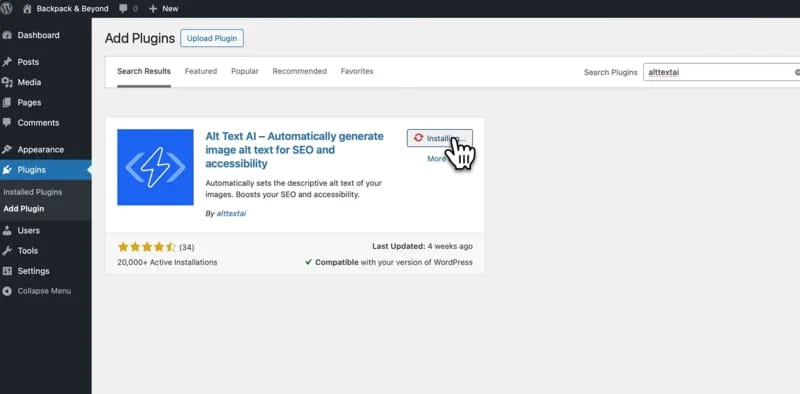
- Direct CMS Integrations: The platform offers simple, no-code integrations for major platforms like Shopify and WordPress, which is a major selling point for its target audience AltText.ai for WordPress.
- Developer-Friendly API: A well-documented REST API is available for developers wanting to build custom integrations into their applications or CI/CD pipelines AltText.ai API Documentation.
- Decorative Image Detection: The AI attempts to identify images that are purely decorative and should have a null (
alt="") attribute, which is a key part of accessibility best practices.
How Does AltText.ai Help with WCAG Compliance?
The vendor’s marketing materials state that the tool helps create WCAG-compliant alt text. By generating text that fills the alt attribute, it helps websites avoid an automatic failure on WCAG Success Criterion 1.1.1 (Non-text Content). However, this claim requires significant context.
True compliance, as defined by the Web Content Accessibility Guidelines (WCAG) from the W3C (World Wide Web Consortium), is about providing a “helpful” and “equivalent” experience for users of assistive technology like the JAWS screen reader.
Generic, AI-generated text may create a poor user experience. For example, a chart might be described as “a chart,” missing the actual data trends. This fails the spirit of the guidelines.
The tool is a powerful assistant, but a human must ultimately ensure the text is genuinely helpful, especially as vague descriptions can still leave businesses exposed to demand letters or accessibility lawsuits.
The Core Conflict: AI Quality vs. Human Effort
The core challenge with AltText.ai is the quality and context of its AI-generated text. While functional for simple object recognition, its performance degrades on complex images, leading to generic or useless descriptions.
This creates a direct trade-off between the time saved by automation and the human effort required to review and fix its output. For any team considering this tool, understanding this conflict is the most important part of the decision. If you’re price-sensitive while evaluating, the latest AltText.ai discount code can substantially lower your testing budget.
Where Does the AI Succeed? (The “Good Enough” Scenario)
In my analysis, the AI performs best in high-volume e-commerce scenarios where images are simple and descriptive. For a typical product shot on a plain white background, the AI is quite effective. For example:
- An image of a red coffee mug is correctly identified as “a red ceramic coffee mug.”
- A photo of a black running shoe is described as “a black sneaker with white laces.”
For businesses focused on large-scale product catalog management, this “good enough” baseline is a massive time-saver. User reviews from e-commerce managers consistently praise the tool for its ability to quickly handle huge backlogs of product images, establishing a solid foundation for SEO and basic accessibility that was previously nonexistent.
For What Image Types Is the AI Known to Fail?
The AI’s limitations become immediately apparent when it encounters images that require nuance, context, or specialized knowledge. Based on user complaints and expert testing, the AI is known to fail on several key image types:
- Technical Diagrams & Charts: A critical pain point. A detailed motherboard diagram might be described as “a close-up of a circuit board with lights,” completely missing the labels, components, and data flows that make the image useful.
- Artistic & Abstract Images: The AI lacks any sense of artistic intent. An abstract oil painting is often reduced to “a colorful painting,” a description that is factually true but functionally useless.
- Context-Heavy Photos: The AI sees objects, not events. A photo from a company’s charity fundraiser might be described as “a group of people standing,” failing to capture the event’s purpose, the organizations involved, or the emotional atmosphere.
- Nuanced Products: This is a major issue for industries like fashion. A user review highlighted that for their apparel store, every shirt was simply “a person wearing a t-shirt.” The AI consistently misses critical purchasing factors like color nuances (e.g., “crimson” vs. “maroon”), fit (“slim fit”), and style details (“v-neck”).
How to Create a “Responsible AI” Workflow
The AI’s weakness for generic text is a significant consideration, but it doesn’t have to be a deal-breaker. The key is to treat AltText.ai as a tool to assist human editors, not replace them.
Here are the steps to build a workflow that maximizes the tool’s strengths while mitigating its weaknesses:
- Step 1: Configure the AI: In the plugin settings, configure the AI to run on new image uploads and generate a “first draft” of the alt text. Critically, ensure you’ve set it to not overwrite any existing alt text you have written manually.
- Step 2: Assign Review Tasks: Assign a team member to periodically review the AI-generated text directly within your WordPress or Shopify media library.
- Step 3: Review & Refine: Instruct your editors to go beyond simple proofreading. Their job is to add specific context, ensure brand consistency in tone, and include key details the AI inevitably misses.
- Step 4: Save and Update: Once the editor has refined the text and saved the image details in the CMS, the improved alt text is live. This ensures every piece of alt text meets your quality standards.
What We Love vs. Things to Consider
✅ What We Love
- Predictable Credit-Based Pricing: The pay-as-you-go model prevents surprise bills and makes budgeting simple and transparent.
- No Vendor Lock-in (for CMS users): Data is written directly to your own site’s database, so you retain full control and ownership of your content.
- Extremely Fast Audit Tool: The initial site-wide audit is incredibly fast and provides immediate, tangible value for large backlogs.
- Great for Establishing a Baseline: For websites suffering from thousands of missing alt texts or inconsistent alt text quality, it’s one of the fastest ways to establish a unified baseline.
💡 Things to Consider
- AI Quality is Average: The AI itself should be seen as a first-draft generator that requires human oversight to be truly effective for a brand.
- No Public SOC 2 Certification: The lack of this key security attestation is a consideration for enterprise buyers with strict compliance needs.
- Not for Nuanced Content (Alone): Without a commitment to human editing, the tool is not a good fit for artistic, technical, or emotionally complex content.
- English-Only Optimization: The AI is officially optimized only for English. Results in other languages may be inconsistent.
The Real Cost of AltText.ai: A Credit-Based TCO Analysis
The true cost of AltText.ai is a direct function of usage, governed by a transparent, prepaid credit system. This model stands in contrast to many SaaS tools that use subscription tiers with punitive overage fees.
Understanding this credit-based Total Cost of Ownership (TCO) is key to evaluating the product.
How Much Does AltText.ai Cost in 2026?
As of October 2026, AltText.ai uses a prepaid credit model. Users buy credits in advance, and these credits are consumed as images are processed. There are no monthly subscription plans. Pairing your purchase with a working coupon code for AltText.ai can push the effective per-credit price even lower.
| Credits Purchased | Price (USD) | Cost Per Credit |
|---|---|---|
| 100 | $5 | $0.050 |
| 550 | $25 | $0.045 |
| 2,500 | $100 | $0.040 |
| 15,000 | $500 | $0.033 |
| 50,000 | $1,250 | $0.025 |
Source: Official pricing as of October 2026 from the AltText.ai Pricing Page.
Why the Credit Model Avoids “Pricing Traps”
The most significant financial advantage of AltText.ai’s model is the elimination of surprise bills. Unlike subscription tools where exceeding a monthly limit can trigger automatic, high-cost overage fees, this platform’s approach is different.
💡 KEY INSIGHT: The platform operates on a prepaid basis. If you run out of credits, the service simply stops processing new images until you choose to purchase more.
There are no automatic charges or penalties. This design gives the user full control over their spending and makes the tool’s cost highly predictable, a major benefit for small businesses and agencies managing client budgets.
The “Exit Cost” Myth: Understanding Data Ownership
A critical factor in any SaaS TCO analysis is vendor lock-in and the cost of leaving a service. My analysis found that for the majority of users, the risk of a high exit cost with AltText.ai is low.
When using the standard WordPress or Shopify integrations, the tool writes the generated alt text directly into your website’s database (e.g., your WordPress Media Library). The data resides on your server, under your control.
If you decide to stop using AltText.ai and deactivate the plugin, the alt text it generated remains on your site. You own it.
The scenario of needing a developer to export data via the API only applies to complex, custom implementations. For the 95% of users on standard CMS platforms, there is no “exit cost” to retrieve your data, as it was never exclusively held by the vendor in the first place.
⚠️ WARNING — The API Exception: When Exit Costs Apply
If you integrate AltText.ai via its REST API into a custom application and do not store the generated text in your own database, you would then be reliant on the API to retrieve it. In this niche developer-centric scenario, an “exit cost” could apply if you needed to migrate that data. For most business users, this is not a concern.
Total Cost of Ownership (TCO) in 2026
To make this concrete, here is an analyst-estimated TCO model for a company processing images on the AltText.ai platform.
- Assumptions: A business processes an average of 20,000 images per month (240,000 annually). They purchase credits in bulk at the $100 for 2,500 credits tier to get a better rate.
| Cost Component | Calculation | Realistic Potential Cost | Notes |
|---|---|---|---|
| Annual Image Processing | 240,000 images/year | — | — |
| Credit Cost | 240,000 credits @ ~$0.04/credit | ~$9,600 | Based on the $100 for 2,500 credits tier. |
| Overage Fees | N/A | $0 | The prepaid model has no overage fees. |
| Standard Exit Costs | N/A | $0 | Data is stored in the user’s CMS. |
| TOTAL (Year 1) | — | ~$9,600 | A predictable, usage-based cost. |
Disclaimer: This is an analyst-estimated TCO. Actual costs depend on the volume of credits purchased and images processed. Always refer to the official AltText.ai Pricing Page for current rates, and check current Latest Coupons for additional savings.
How Does AltText.ai Compare to the Competition?
AltText.ai occupies a specific niche in the market. It’s not a full-service accessibility suite, nor is it the cheapest option for one-off image processing.
Users choose it for its combination of a fair, credit-based pricing model and seamless CMS integration. Understanding the landscape of AltText Top Alternatives and Competitors is key to making an informed choice.
AltText.ai vs. Competitors: Feature Matrix
| Feature | AltText.ai | Full Accessibility Suites (e.g., accessiBe) | Image Optimizers (e.g., ShortPixel) | Shopify Native (Free) |
|---|---|---|---|---|
| Primary Function | Alt Text Generation | Comprehensive Compliance | Image Compression & CDN | Basic Alt Text |
| Pricing Model | Prepaid Credits | High Subscription ($490+/yr) | Subscription/Credits | Free |
| Data Ownership | Excellent (User’s CMS) | Vendor-Controlled | User’s CMS | User’s CMS |
| Review Workflow | Good (Inside CMS) | Limited / In-Dashboard | None | None |
| AI Accuracy | Good | Varies | Basic | Basic |
Who Should Choose AltText.ai?
You should choose AltText.ai if your primary need is a dedicated, scalable tool for alt text generation with a predictable, transparent pricing model. It is ideal for teams that value data ownership and prefer a workflow integrated directly within their existing CMS. Combining the platform with a current AltText.ai promo code makes the value proposition even stronger for agencies and publishers.
Who Should Choose a Full Accessibility Suite (The Enterprise Pick)?
- Best For: Large corporations and public institutions under strict regulatory scrutiny (e.g., government, healthcare, finance).
- Consider: A tool like accessiBe or UserWay if you need a comprehensive solution that addresses dozens of accessibility criteria beyond just alt text, such as ARIA roles, contrast checking, and keyboard navigation.
- Avoid If: Your only problem is alt text. These suites are expensive and can be overkill if you don’t need their full range of features.
Who Should Choose an Image Optimizer (The Performance Pick)?
- Best For: Website owners whose primary goal is improving site speed and performance.
- Consider: A tool like ShortPixel or Imagify if you are already using them for image compression. Many now include a basic AI alt text feature as an add-on.
- Avoid If: You need high-quality, nuanced alt text. The AI in these tools is typically a secondary feature and less advanced than a dedicated tool like AltText.ai.
Who Should Choose Shopify Native AI (The Free Option)?
- Best For: Merchants exclusively on the Shopify platform with very basic needs and a zero-dollar budget.
- Consider: Using the free, built-in AI within the Shopify “Search & Discovery” app if cost is your absolute primary driver.
- Avoid If: You need to process a large backlog or require a more sophisticated workflow. Its features are minimal, and it offers no support for other platforms.
For a wider look at competing tools in this space, browse our full category of Review articles.
Is AltText.ai Safe, Secure & Compliant?
AltText.ai provides a functional and secure service, but it lacks the high-level compliance certifications that are often required by enterprise customers. For most small to medium-sized businesses, its security posture is adequate.
What Are Its Security & Compliance Certifications?
- SOC 2 Type II: Not Publicly Claimed. As of October 2026, AltText.ai does not publicly claim to have SOC 2 Type II certification on its website. For Software and AI buyers, especially in the enterprise, the absence of a public SOC 2 attestation is a significant factor to consider when evaluating vendor security.
- ISO 27001: Not Certified. This certification was not found in their public documentation.
- GDPR / CCPA: Compliant. The company provides a clear Privacy Policy that outlines user rights under GDPR and CCPA. The company operating the service, ALT TEXT AI LTD, is based in the UK.
What Is Its History of Outages or Vulnerabilities?
My research of public records and user forums did not uncover any major, widespread security breaches or prolonged outages for AltText.ai. The service appears to be stable. However, like any SaaS tool, it is dependent on its cloud infrastructure provider.
To mitigate the risk of any SaaS dependency, users should not rely on the tool for real-time generation during critical sales events like Black Friday. A smarter approach is to use the tool to process images in batches well ahead of time, ensuring the approved alt text is already written to your CMS and live on your site before high-traffic periods begin. Many users time their bulk purchases to coincide with the best AltText.ai voucher windows for maximum savings.
Final Verdict & Recommendations
After a comprehensive analysis, my verdict is clear: AltText.ai is a solid, reliable tool with a fair and transparent pricing model. Its true value is in its seamless CMS integration and predictable costs, making it an excellent choice for its target audience.
It is not a magical “set it and forget it” solution, but rather a powerful assistant that streamlines a tedious workflow.
What We Love vs. Things to Consider
| What We Love | 💡 Things to Consider |
|---|---|
| Fair, predictable credit-based pricing. | AI quality is average and requires human review. |
| Excellent data ownership (writes to your CMS). | Lacks SOC 2 or ISO 27001 certifications. |
| Fast initial site-wide audit. | English-only language support is a limitation. |
| Seamless WordPress & Shopify integration. | Not a full-service accessibility suite. |
Recommendations by User Segment
- We Recommend AltText.ai for:
- E-commerce companies and publishers of any size who want a scalable, dedicated tool for alt text with predictable costs. For these users, the ROI from process efficiency is clear.
- We Recommend a Cautious Trial for:
- Marketing agencies who manage client sites. The credit-based model is great for billing, but you must be prepared to invest human hours into editing the AI’s output to meet client brand standards.
- We Do Not Recommend AltText.ai for:
- Enterprise customers with strict security procurement that mandates SOC 2 compliance.
- Creators in highly artistic or technical fields. The AI’s inability to capture nuance will lead to frustration and require heavy editing.
Final Takeaway
Ultimately, in the competitive Software and AI market, AltText.ai can be a valuable asset if you treat it as a tool to empower your human editors, not replace them.
Its transparent credit system is a refreshing change from subscription traps, and its respect for data ownership is a major plus. Go in with a clear understanding of its AI’s limitations, and AltText.ai can significantly and affordably streamline your accessibility workflow — especially when you stack the official pricing with the latest exclusive offer available today.
Frequently Asked Questions
Q1: How much does AltText.ai really cost in 2026?
It depends entirely on your usage. As of November 2026, AltText.ai uses a prepaid credit system, with prices starting at $5 for 100 credits.
The cost per image decreases as you buy larger credit packs, dropping to as low as $0.025 per credit in bulk. For example, processing 1,000 images would cost between $25 and $50, depending on the package you purchase.
This model is transparent and has no hidden monthly fees or overage charges, making the total cost highly predictable AltText.ai Pricing. Your annual cost is simply your total images processed multiplied by your average cost per credit, and using a special discount at checkout can lower it further.
Q2: Is AltText.ai worth the money?
For its target audience, yes. For large e-commerce sites or publishers with thousands of images, AltText.ai is worth the money because its workflow automation saves significant time compared to manual writing.
The return on investment (ROI) comes from freeing up staff from a tedious task. For a small blog with only 10 new images a month, the cost is minimal, but manual writing might be just as fast.
The value is directly proportional to the scale of your image backlog and the volume of your new content.
Q3: What are the hidden costs of AltText.ai?
My analysis concludes that AltText.ai has very few “hidden” costs, which is one of its main strengths. The prepaid credit model means there are no surprise overage fees.
The primary “additional cost” to consider is the labor cost of your team’s time to review and refine the AI-generated text. Since the tool writes data directly to your CMS for most users, there are typically no high “exit costs” for data export, which can be a significant hidden cost with other SaaS platforms.
Q4: Should I use AltText.ai or its competitors?
It depends on your primary goal. You should choose AltText.ai if you want a dedicated, scalable alt text tool with fair pricing and excellent data ownership.
If you need a comprehensive enterprise compliance suite that handles dozens of accessibility issues beyond alt text, consider a more expensive tool like accessiBe. If your main goal is site speed and you just want a “good enough” alt text feature as a bonus, an image optimizer like ShortPixel might suffice.
For Shopify users on a zero-dollar budget, the native Shopify AI is the free option.
Q5: Who is AltText.ai best for?
AltText.ai is best for e-commerce operations managers and SEO agencies managing websites with hundreds or thousands of straightforward product or blog images.
Its value is maximized when it’s used to establish a baseline of accessibility across a large site and then integrated into a human-in-the-loop workflow. Teams that understand AI is an assistant, not a replacement, and who value budget predictability will find it an excellent fit.
Q6: Is AltText.ai reliable and secure? Can I trust it?
The platform has a history of reliable uptime. However, its security posture is a key consideration.
You can trust the tool’s core functionality, but you must be aware that it does not publicly claim to have major security certifications like SOC 2 Type II or ISO 27001. For a small business, this may not be a concern.
For an enterprise handling sensitive data, this could be a deal-breaker. Always evaluate its security against your organization’s specific requirements.
Q7: What are the main problems with AltText.ai?
The main limitations are not in its business practices but in its technical capabilities. The first is the average quality of its AI on complex or nuanced images, which necessitates human review.
The second is its lack of top-tier security certifications like SOC 2, which limits its adoption in the enterprise market.
Finally, while its English performance is strong, its support for other languages is officially inconsistent, making it less ideal for multilingual international sites.
Q8: Can I configure AltText.ai to NOT overwrite my existing manual alt text?
Yes, absolutely. This is a critical feature that works well. During the setup of the WordPress or Shopify plugin, you can configure the tool to only process images that have empty or missing alt text attributes.
This is the recommended setting, as it protects all the manual work you have done in the past while still allowing the tool to fill in the gaps on your site. You have full control over which images it processes.

