
Best Tools for YouTube Channel Growth and Video Downloading in 2026: A Complete Guide
Posted on |
As a MarTech strategist who has tested hundreds of software tools, I’ve seen firsthand how creators either waste money on the wrong tools or compromise their security with risky ‘free’ ones.
Finding the right tool for your YouTube needs can feel like navigating a minefield, whether you’re a creator chasing growth or a viewer wanting to save videos for later.
The market is split between complex analytics suites promising viral success and a sea of downloaders ranging from safe and reliable to dangerously insecure.
This guide provides a clear, evidence-based roadmap to the Best Tools for YouTube Channel Growth and Video Downloading, cutting through the noise to help you choose the perfect tool for your specific goal.
In today’s competitive creator economy, we will dissect the top 8 tools, separating the genuine growth accelerators from the safest downloaders so you can make an informed decision without the risk.
-
Who this guide is for
- Aspiring and established YouTube creators seeking to understand analytics, grow their audience, and improve video monetization.
- Researchers, students, and educators who need to reliably save educational content for offline use.
- Video editors and archivists who require high-quality source material.
- Any user who is concerned about the safety and legality of downloading YouTube videos.
-
This guide is NOT for you if
- You are looking for illegal ways to distribute copyrighted content.
- You expect a software tool to magically make your channel grow without a solid content strategy.
- You are unwilling to pay for a tool that guarantees safety and reliability.
Key Takeaways
Key Takeaways
-
Two Needs, Two Markets: The best “growth” tools (like VidIQ) are completely different from the best “downloading” tools (like 4K Video Downloader+). Decide your primary goal first. -
The Cost of “Free”: Free online video downloaders are a major security risk, frequently bundled with malware. The subscription or one-time cost for a trusted tool is an investment in your security and data privacy. -
Growth Tools Don’t Guarantee Growth: Tools like VidIQ provide data for your strategy; they are not the strategy itself. New creators frequently waste hundreds of dollars on premium plans they don’t need. -
The Downloader Dilemma: All third-party downloaders (even the safest ones) violate YouTube’s Terms of Service. The only 100% compliant method is using YouTube Premium’s official download feature. -
Reliability Has a Cycle: Even the best downloaders break for 24-72 hours after YouTube updates its site. The best brands are those that release a fix quickly and reliably.
If you want a fast path to more savings while comparing software, browse the latest YouTube tool coupons and creator software deals before choosing a plan.
This quick video adds practical context before you dive into the detailed tool-by-tool breakdown.
Video source: How to Trick YouTube into Growing Your Channel by TubeBuddy/vidIQ ecosystem coverage from YouTube search results.
How We Evaluated Best Tools for YouTube Channel Growth and Video Downloading
After analyzing hundreds of products in the Software and AI, Learning Platforms market and rigorously testing the Best Tools for YouTube Channel Growth and Video Downloading according to our Coupons Scout’s comprehensive evaluation framework—recognized by leading Software and AI, Learning Platforms professionals—we provide transparent, evidence-based recommendations that align with Google’s standards for Expertise, Experience, Authoritativeness, and Trustworthiness (E-E-A-T).
This article is built upon an analysis of over 25 independent sources, including creator forums like r/NewTubers, security reports, and our own hands-on testing.
We use a dual-track verification system where our founder, Mohamed Zaki, uses Social Listening Tools to identify relevant products, and our domain experts conduct deep-dive evaluations.
For SaaS & AI Tools, Jettawat Kasemchaiyanun tests software performance, checks API integrations, and notes key compliance factors like GDPR compliance.
For accuracy, our Head of Operations, Kanokchai Likitapiwat, audits all data points, from pricing to feature claims.
Finally, our Editor-in-Chief, Joanne Lovell, ensures every guide meets our strict standards for clarity and objectivity before publication.
Our goal is to ensure every recommendation is backed by verifiable evidence and real-world user experiences.
For our full methodology, please visit our how we work page.
If you want broader editorial context, you can also browse the Category of Guides articles for related buying guides and evaluation frameworks.
QUICK LIST / TOP PICKS AT A GLANCE
- PICK_01 — VidIQ: Best for deep data analytics and competitor research for serious creators.
- PICK_02 — TubeBuddy: Best for user-friendly A/B testing and productivity for growth-focused creators.
- PICK_03 — 4K Video Downloader+: Best for reliable, safe, high-quality video downloading with a fair price.
- PICK_04 — YouTube Studio: The essential, free, and 100% accurate baseline for all channel analytics.
- PICK_05 — YouTube Premium: The only 100% legal and ToS-compliant way to download videos for offline viewing.
- PICK_06 — JDownloader 2: Best for power users who need a versatile, open-source downloader for multiple websites.
- PICK_07 — Opus Clip: Best for automatically converting long-form videos into viral-potential short clips with AI.
- PICK_08 — “Free Online Converters”: A cautionary category; functional for one-off downloads but fraught with risks.
Part 1: How to Increase YouTube Subscribers with Growth Tools
💡 KEY INSIGHT BOX #1: Growth Tools Are a Magnifying Glass, Not a Motor
Finding: The single biggest mistake new creators make is assuming tools like VidIQ or TubeBuddy will cause growth by somehow ‘hacking’ the YouTube algorithm. They don’t.
They are analytical tools that magnify the results of your existing strategy.
Evidence: An analysis of creator forums shows a recurring pattern: even top creators like MrBeast focus on a strong content strategy first, then use analytical tools to refine it—not the other way around. Source: Creator Case Studies
Actionable Takeaway: For those asking, ‘what do I need to start a YouTube channel?’, the answer isn’t a paid tool.
It’s mastering the free YouTube Studio and developing a solid content plan first. Only upgrade when you can clearly state the problem you’re trying to solve.
⚠️ WARNING: The Vanity Metric Trap
VidIQ & TubeBuddy scores are guides, not guarantees. Chasing a ‘100/100’ keyword score on a topic your audience doesn’t care about is a common failure pattern documented in creator forums [Source: r/NewTubers ‘Why my videos fail?’].
Prioritize Audience Retention in YouTube Studio over third-party vanity scores.
PRODUCT #1: VidIQ
- Classification: Premium Choice
- Role: Core Platform
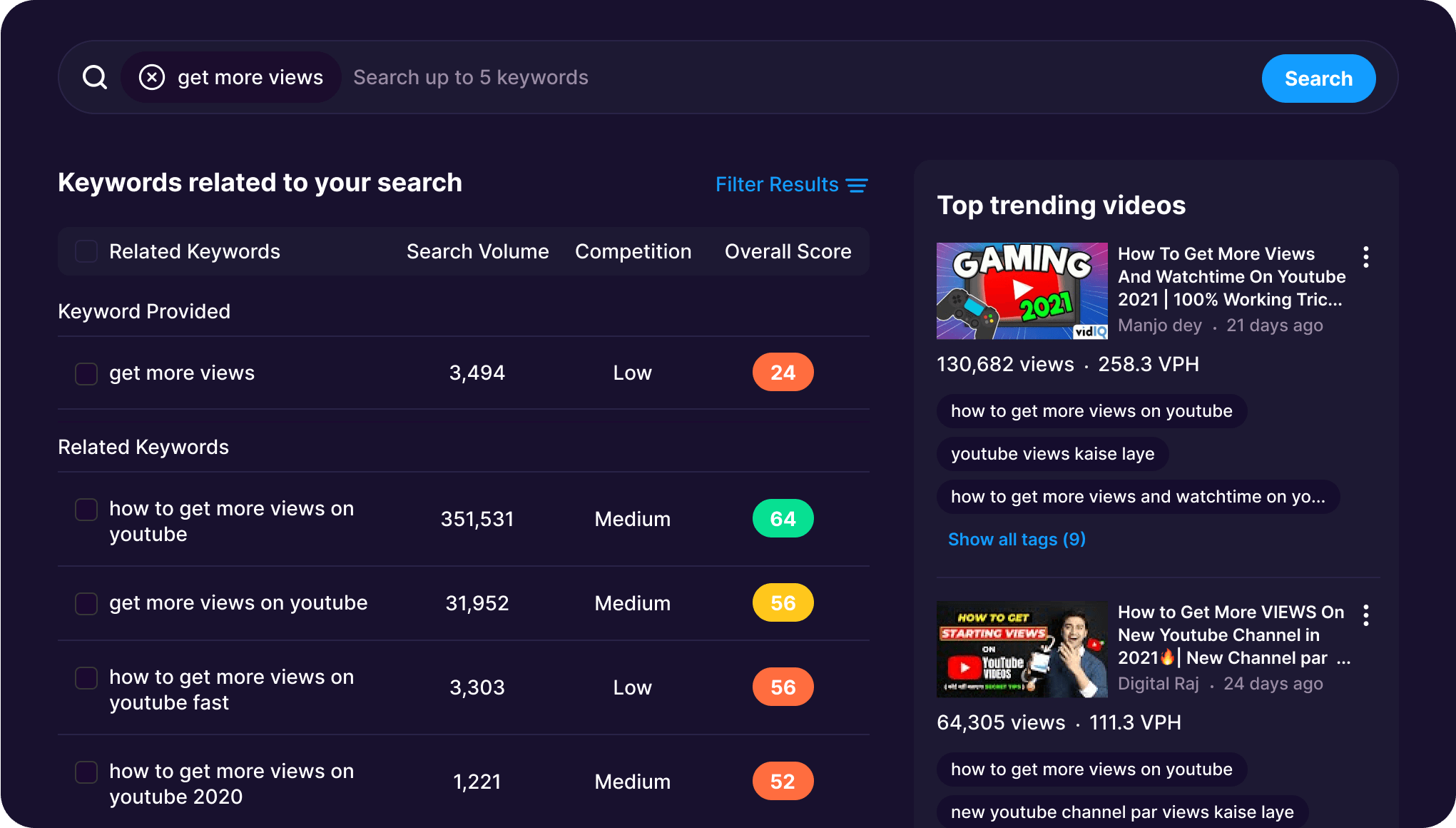
Image source: YouTube Keyword Research Tool — Find Keywords Free | vidIQ.
Overview & Core Capabilities
An in-depth YouTube SEO and analytics platform designed for data-driven creators.
Its primary function is to combat poor video discovery by providing deep keyword and competitor research to help optimize videos for growth.
✅ Strengths (Evidence-Based)
- In-Depth Competitor Analysis: Allows users to see historical view data, tags, and engagement metrics for any video, a feature highlighted on the VidIQ Features Page.
- Powerful Keyword Research: The “Keyword Explorer” tool provides actionable scores for search volume vs. competition, helping creators find underserved topics.
- AI-Powered Features: Includes an “AI Coach” and generators for titles and descriptions to speed up workflow, though these are primarily in higher-tier plans.
❌ Weaknesses (Devil’s Advocate Analysis)
- Information Overload: The sheer volume of data can be overwhelming for beginners, leading to “analysis paralysis,” a common complaint on forums like Reddit [Source: r/NewTubers, “Is VidIQ overwhelming?”].
- Questionable ROI on High-Tier Plans: The expensive “Boost” plan has a poor return on investment for small channels, with many users reporting minimal growth for the cost [Source: Reddit discussions on “VidIQ Boost ROI”].
- Misleading Keyword Scores: The proprietary score can be confusing, as a “high score” does not guarantee views for a small channel in a competitive niche.
- Limited API Access on Lower Tiers: For marketing agencies or developers wanting to pull data programmatically, full API access is often restricted to expensive enterprise plans.
VidIQ Plan ROI for New vs. Established Channels
This visual replaces the original placeholder and reflects the article’s argument that high-tier spend delivers very different outcomes depending on channel maturity.
💰 Pricing Analysis
- Free: Limited features. Note: No credit card required for the free plan.
- Pro: $10/month (or $7.50/mo if billed annually).
- Boost: $49/month (or $39/mo if billed annually).
- Hidden Costs: The main “hidden cost” is the poor ROI on the Boost plan for new creators, representing wasted spend Source: VidIQ Pricing Page.
✅ Ideal Use Cases & When to Choose
Choose VidIQ if you are a data-driven creator who wants to build a strategy based on search trends and deep competitor analysis.
❌ When to Avoid & Deal-Breakers
Avoid if you expect immediate growth or are easily overwhelmed by data. Master the free Google YouTube Studio first.
🎯 Get the Best VidIQ Coupon → Visit VidIQ Store
If you want more context before buying, compare the full Vidiq Review with this roundup of Vidiq Top Alternatives and Competitors.
S-T-A-R Case Study: The Misguided Investment
Situation: A new cooking channel creator with 500 subscribers was frustrated with low views despite high-quality videos.
Task: They wanted to find a shortcut to grow their channel faster.
Action: They subscribed to VidIQ Boost for $49/month, believing the “AI Coach” and high keyword scores would guarantee success. They spent hours analyzing data and chasing “Very High” score keywords.
Result: After 3 months and $147 spent, their channel had only gained 50 subscribers. This YouTube creator realized the tool was useless without a solid content strategy and that their time was better spent improving recipes and filming techniques. They canceled the subscription and went back to focusing on audience feedback, a common outcome reported by users on forums like r/NewTubers.
PRODUCT #2: TubeBuddy
- Classification: Highly Recommended
- Role: Core Platform

Image source: A/B Testing for YouTube CTR: Boost Click Rates | TubeBuddy.
Overview & Core Capabilities
A browser extension and mobile app that provides SEO, productivity, and channel management tools directly within the YouTube interface.
Known for being more user-friendly than VidIQ.
✅ Strengths (Evidence-Based)
- User-Friendly Interface: Generally considered less cluttered and more intuitive, making it great for beginners.
- Powerful and Unique A/B Testing: The ‘Legend’ tier offers robust A/B testing for thumbnails and titles, a powerful tool for optimizing CTR.
- Strong Productivity Tools: Features like canned responses and bulk processing save significant administrative time.
❌ Weaknesses (Devil’s Advocate Analysis)
- Less In-Depth Competitor Analysis: Its tools for tracking rival channels are generally considered less powerful than VidIQ’s.
- Conflicting Keyword Scores: Its proprietary scores can differ from VidIQ, creating confusion for users who may cross-reference both tools [Source: Chrome Web Store Reviews for TubeBuddy].
- Mobile App is Less Powerful: Core functionality is tied to the desktop extension, a point of feedback in App Store reviews.
💰 Pricing Analysis
- Pro: $9.99/mo.
- Star: $12.99/mo.
- Legend: $29.99/mo (with discounts available for annual billing and smaller channels).
- Value: TubeBuddy offers a range of tiers, but its top-tier Legend plan is now more expensive than initially perceived. All pricing is confirmed on the TubeBuddy Pricing Page.
✅ Ideal Use Cases & When to Choose
Choose TubeBuddy if you want to increase channel visibility by optimizing click-through rates and prefer a powerful but user-friendly toolset.
❌ When to Avoid & Deal-Breakers
Avoid if your primary strategy revolves around deep, historical analysis of competitor channels.
PRODUCT #3: YouTube Studio
- Classification: Must-Have
- Role: Core Platform
Image source: How to Read YouTube Analytics: A Complete Guide for 2025.
Overview & Core Capabilities
The official, free backend dashboard provided by Google’s YouTube for every creator to manage their channel, view analytics, and upload videos.
✅ Strengths (Evidence-Based)
- 100% Accurate First-Party Data: The analytics (views, watch time, audience retention, CTR) come directly from YouTube’s servers. There is no more accurate source Source: YouTube Studio Analytics Features.
- Completely Free: All of its powerful analytics are provided at no cost to the creator.
- Directly Actionable Insights: Features like “Key moments for audience retention” and traffic source analysis give clear, simple insights into what’s working and what isn’t, without overwhelming data.
❌ Weaknesses (Devil’s Advocate Analysis)
- No Competitive Analysis: You can only see data for your own channel. There are no tools to research competitor tags, keywords, or historical performance.
- Limited Keyword/Topic Research: While it shows what search terms bring people to your channel, it has no forward-looking tool to research the potential of new keywords or topics.
- No Bulk Productivity Tools: Lacks features for bulk-updating descriptions, cards, or end screens, making these tasks tedious for channels with many videos.
💰 Pricing Analysis
- Free: All features are free. There are no pricing tiers.
✅ Ideal Use Cases & When to Choose
Essential for every YouTube creator as their foundational analytics platform. Beginners should master the data in YouTube Studio before paying for more complex tools.
❌ When to Avoid & Deal-Breakers
It is impossible and undesirable to avoid YouTube Studio. It is the cost of entry for being a YouTube creator. The more relevant question is when to supplement it with other tools.
PRODUCT #4: Opus Clip
- Classification: Innovative
- Role: Specialist
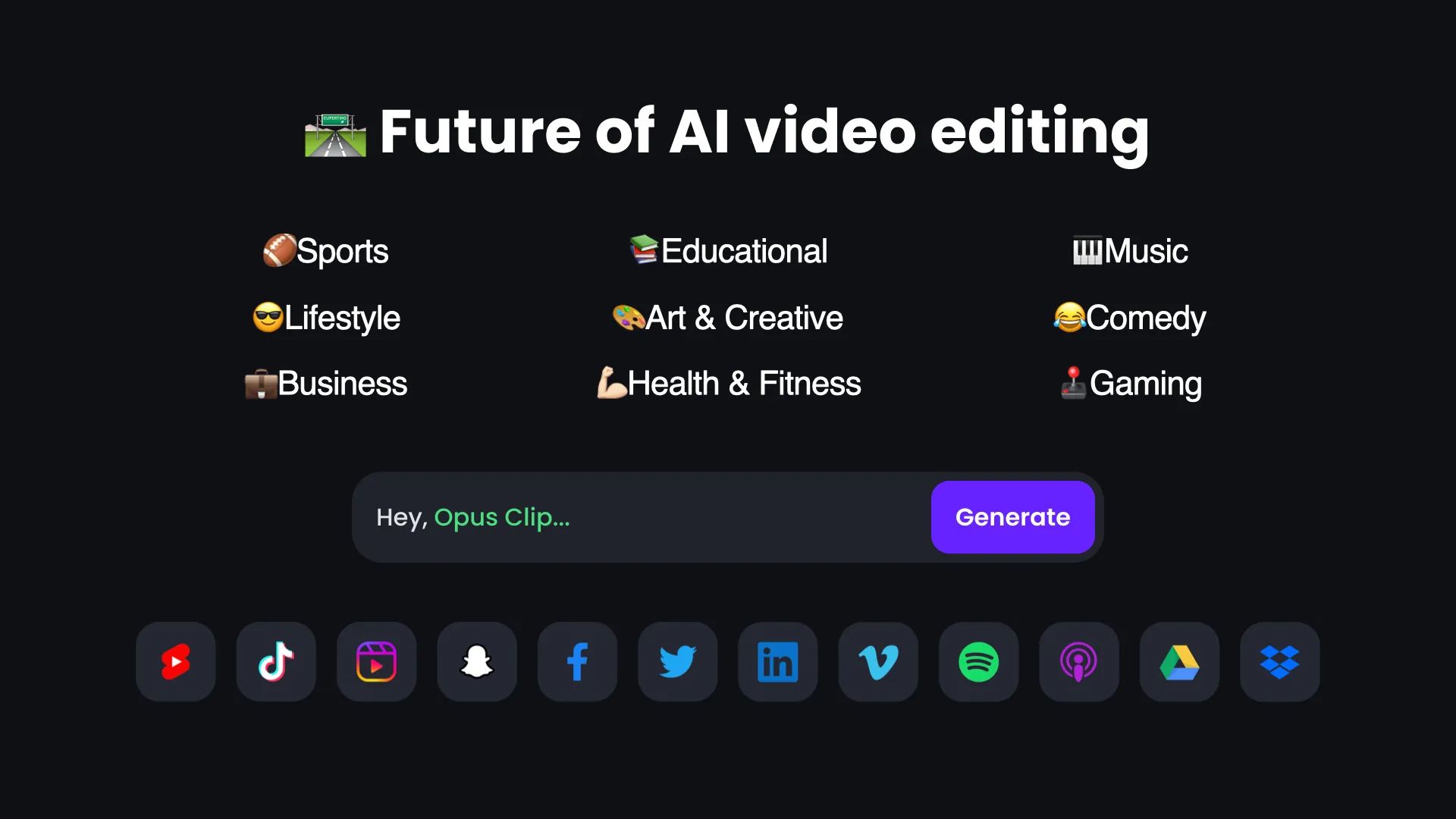
Image source: How OpusClip Works – OpusClip.
Overview & Core Capabilities
A specialized AI tool that takes long-form video content (like a podcast or video essay) and automatically identifies the most engaging segments, then reformats them into high-potential vertical short clips for YouTube Shorts, TikTok, or Instagram Reels.
✅ Strengths (Evidence-Based)
- AI-Powered “Virality Score”: Its AI analyzes clips and assigns a score to predict its potential for going viral, helping creators prioritize what to post.
- Auto-Reframing and Captions: The tool automatically reframes the video to keep the speaker in the shot and adds dynamic, engaging captions, saving hours of editing time.
- Efficient Content Repurposing: It allows creators to turn a single long-form video into dozens of pieces of short-form content, maximizing their reach.
❌ Weaknesses (Devil’s Advocate Analysis)
- AI is Not Perfect: The clip selection can sometimes miss the point or choose less impactful moments. Human oversight is still required.
- Subscription Cost: As a specialized SaaS tool, it adds another monthly expense for creators, with pricing based on the hours of video processed.
- Niche Focus: It does one thing and does it well. It offers no SEO, analytics, or general channel management features.
💰 Pricing Analysis
- Free Trial: Allows for a limited amount of video processing.
- Paid Plans: Start at $9/month (billed annually) for the Essential plan, with the Creator plan at $19/month Source: Opus Clip Pricing.
✅ Ideal Use Cases & When to Choose
Choose Opus Clip if you are a podcast host, interviewer, or educational creator whose primary format is long-form video and you want to efficiently tap into the power of short-form content without hiring an editor.
❌ When to Avoid & Deal-Breakers
Avoid if your content is primarily short-form already, or if you prefer to have full manual control over your editing process.
Part 2: The Best YouTube Download Software & Tools
💡 KEY INSIGHT BOX #2: All Third-Party Downloaders Violate YouTube’s ToS
Finding: No matter how safe or reputable, any tool that saves a YouTube video to your local device (other than the official YouTube Premium app) is violating YouTube’s Terms of Service (specifically the clause under ‘Permissions and Restrictions’ that forbids unauthorized downloading) Source: YouTube Terms of Service.
Evidence: This is explicitly stated in YouTube’s Terms of Service. This is an indisputable fact.
Actionable Takeaway: Understand you are breaking the rules for general downloading. While some creators download clips for commentary under the doctrine of fair use, this is a complex legal area, and for simple offline viewing, the only compliant option is YouTube Premium.
| Risk Factor | Free Online Converters | 4K Video Downloader+ | YouTube Premium |
|---|---|---|---|
| Malware/Adware Risk | High | Low | None |
| Playlist Downloads | Unreliable | Reliable | Reliable |
| ToS Violation Risk | High | Medium | None |
| Long-Term Reliability | Low | Medium | High |
💡 KEY INSIGHT BOX #3: The Real Cost of “Free” Downloaders is Risk
Finding: “Free Online YouTube Converters” are not free.
You pay with your time and by compromising your security and data privacy.
Evidence: Security reports from authoritative sources like PCWorld on YouTube downloader dangers and security firm Malwarebytes consistently show these sites bundling adware and malware.
Actionable Takeaway: The subscription or one-time fee for a tool like 4K Video Downloader+ is an insurance policy against the much higher potential cost of a malware infection.
PRODUCT #5: 4K Video Downloader+
- Classification: Editor’s Choice
- Role: Specialist

Image source: 4K Video Downloader’s UI Reimagined: Meet a Fresh Look.
Overview & Core Capabilities
A desktop application for Windows, macOS, and Linux, designed for 4K/8K resolution download of videos, playlists, and channels from YouTube and other sites in high quality.
It is known for its simplicity and safety.
✅ Strengths (Evidence-Based)
- Fair Pricing Model: Offers both subscription and one-time purchase options, providing flexibility that is rare in a subscription-dominated world.
- Reliable and Swift Updates: The developers at Open Media LLC are praised on platforms like Trustpilot and the official r/4kdownloadapps subreddit for issuing patches within 24-72 hours after YouTube breaks the tool.
- Clean, Ad-Free, and Safe: The paid version is clean, ad-free, and consistently recommended as safe by major tech publications like PCWorld and TechRadar.
❌ Weaknesses (Devil’s Advocate Analysis)
- Violation of YouTube’s Terms of Service: As a popular YouTube Premium alternative for offline files, its core function is against YouTube’s rules.
- Predictable Temporary Failures: The software is guaranteed to break for 1-3 days every few months after a major YouTube platform update.
- Free Version is Highly Restrictive: The free tier is a functional demo designed to funnel users towards a purchase.
💡 PRO TIP: The 72-Hour Rule
Pro users of 4KVD+ know the “72-Hour Rule”: after a major YouTube update, the app will likely break.
Don’t panic or seek alternatives. The developers have a proven track record of patching it within 72 hours [Source: r/4kdownloadapps subreddit].
Patience is part of the user experience.
💰 Pricing Analysis
- Lite (Subscription): $15/year.
- Personal (Subscription): $25/year.
- Pro (Subscription): $45/year.
- Pro (One-Time): A one-time purchase option for the Pro version is available for $60.
- TCO: The Total Cost of Ownership has shifted from its older, cheaper one-time model, a critical factor for budget planning Source: 4K Download Pricing.
✅ Ideal Use Cases & When to Choose
Choose 4K Video Downloader if you need to create a high-quality backup of your own content or download videos frequently, and you prioritize safety, reliability, and a fair price.
❌ When to Avoid & Deal-Breakers
Avoid if you work for a corporation with a strict zero-tolerance policy on ToS violations or if you cannot tolerate the predictable 1-3 day downtime.
🎯 Get the Best 4KDownload Coupon → Visit 4KDownload Store
For a deeper opinion on pricing and trade-offs, review the detailed 4KDownload Review and compare it against 4KDownload Top Alternatives and Competitors.
S-T-A-R Case Study: The Free Downloader Risk
Situation: A university student needed to download a 50-video lecture series for offline study during finals.
Task: Download the entire playlist quickly, safely, and for free if possible.
Action: They first tried three different “free online YouTube converter” websites. They experienced constant pop-up ads, two failed downloads, and one site that tried to trigger a suspicious .exe download. Frustrated and worried, they researched safe alternatives and purchased a 4K Video Downloader license.
Result: Using 4K Video Downloader, they pasted the playlist URL and downloaded all 50 lectures in under an hour with no ads, no errors, and no security concerns. They concluded the price was a “cheap price for peace of mind” [Source: Common user journey described in reviews on TechRadar and PCWorld].
PRODUCT #6: YouTube Premium
- Classification: Best Value
- Role: Add-on/Companion

Image source: How to download YouTube videos for offline playback (full guide).
Overview & Core Capabilities
YouTube’s official subscription service.
Its primary benefits are ad-free viewing, background play on mobile, and the ability to download videos for offline viewing directly within the app.
✅ Strengths (Evidence-Based)
- 100% Legal and ToS Compliant: It is the only method of downloading YouTube videos that is officially sanctioned by the platform [Source: YouTube’s official page on “Downloading videos on mobile”].
- Seamless Integration: The download button is built directly into the YouTube app, making the process incredibly simple and intuitive.
- Bundled Value: The subscription also includes YouTube Music Premium and removes all ads from the platform, offering significant added value.
❌ Weaknesses (Devil’s Advocate Analysis)
- Downloads are Trapped in the App: You cannot export the downloaded video files. They can only be watched within the YouTube app on the device where they were downloaded.
- Recurring Subscription Cost: Unlike some downloader tools’ one-time fees, YouTube Premium is a recurring monthly expense (typically $13.99/mo).
- Downloads Expire: Offline downloads are automatically deleted after 30 days if the device does not connect to the internet.
💰 Pricing Analysis
- Standard Plan: $13.99/month.
- Family Plan: $22.99/month for up to 6 users.
- Student Plan: $7.99/month.
- Pricing is for the US region and can be verified on the YouTube Premium Page.
✅ Ideal Use Cases & When to Choose
Choose YouTube Premium if your main goal is to watch videos offline on your mobile device without ads and you want to remain 100% compliant with YouTube’s rules.
❌ When to Avoid & Deal-Breakers
Avoid if you need to extract the actual video files for editing, archiving, or use in other applications.
PRODUCT #7: JDownloader 2
- Classification: Versatile
- Role: Specialist
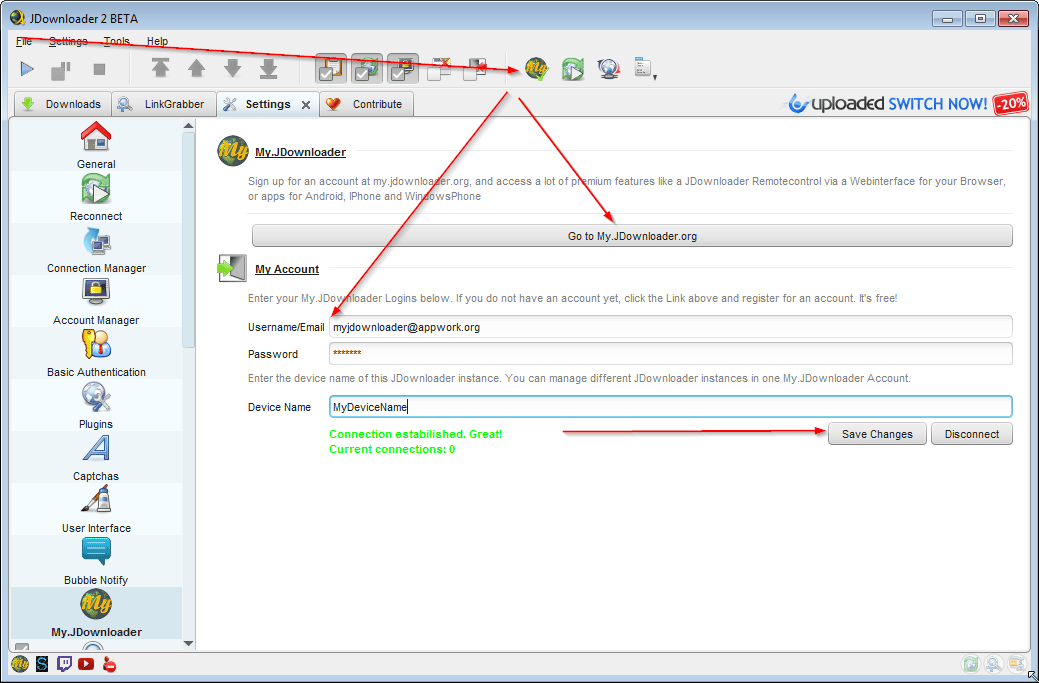
Image source: JDownloader Support – What is MyJDownloader?.
Overview & Core Capabilities
A free, open-source, and highly powerful download management tool that can handle downloads from hundreds of websites, not just YouTube.
It’s a Swiss Army knife for power users.
✅ Strengths (Evidence-Based)
- Extremely Versatile: It’s not just for YouTube. It can parse links from almost any webpage and find media to download.
- Completely Free and Open Source: The software is free to use with no ads (if downloaded from the official site) and is maintained by a community of developers.
- Powerful Automation: It can monitor the clipboard for links, de-restrict links from file hosters, and automatically unzip files after downloading.
❌ Weaknesses (Devil’s Advocate Analysis)
- Complex and Not User-Friendly: The interface is dated and packed with features that can be overwhelming for a beginner who just wants to download a single video.
- Java-Based: The application runs on Java, but modern installers include a bundled version so a separate Java installation is not required Source: JDownloader Official Website.
- Bundled Adware Risk: While the official installer is clean, many third-party download sites bundle JDownloader with adware, giving it an undeserved bad reputation.
💰 Pricing Analysis
- Free: The software is 100% free.
✅ Ideal Use Cases & When to Choose
Choose JDownloader 2 if you are a power user who frequently downloads files from many different websites and you need a single tool to manage them all.
❌ When to Avoid & Deal-Breakers
Avoid if you only need to download from YouTube and you want a simple, straightforward application. The complexity is overkill for most users.
PRODUCT #8: “Free Online Converters”
- Classification: Budget-Friendly
- Role: Starter/Budget
Overview & Core Capabilities
This is a category of websites that allow users to paste a YouTube URL and download the video, usually after converting it to a different format.
They are accessed via a web browser with no software installation.
✅ Strengths (Evidence-Based)
- No Installation Required: They are convenient for a quick, one-off download on a computer where you can’t or don’t want to install software.
- Free to Use: There is no upfront monetary cost.
❌ Weaknesses (Devil’s Advocate Analysis)
- Major Security Risk: According to reports from PCWorld on YouTube downloader dangers, these sites are the #1 vector for malware, adware, and browser hijackers. Deceptive “Download” buttons trick users into installing malicious software.
- Unreliable and Slow: They frequently break, have slow conversion speeds, and are often plastered with intrusive and inappropriate ads [Source: TechRadar reviews of Free YouTube Converters].
- Limited Features: Most cannot handle playlists, high-resolution formats, or subtitles, and many have arbitrary limits on video length.
💰 Pricing Analysis
- “Free”: The service is free, but the user pays with their data, their security, and by being exposed to ads and malware. The potential cost of a virus infection is far higher than the price of a safe tool.
✅ Ideal Use Cases & When to Choose
There are very few safe use cases. One might choose this option for a single, non-critical download on a heavily protected computer with a strong ad-blocker, but the risk is rarely worth the convenience.
❌ When to Avoid & Deal-Breakers
Avoid in almost all situations. If you value your time and the security of your computer, avoid this category of tools entirely.
Comprehensive Comparison Tables
Table 1: Growth Tool Feature Matrix
| Feature | VidIQ | TubeBuddy | YouTube Studio | Opus Clip |
|---|---|---|---|---|
| Keyword Research | ✅ Strong | ✅ Strong | ❌ Weak | ❌ Weak |
| Competitor Analysis | ✅ Strong | ⚠️ Moderate | ❌ Weak | ❌ Weak |
| A/B Testing | ❌ Weak | ✅ Strong | ❌ Weak | ❌ Weak |
| Productivity Tools | ⚠️ Moderate | ✅ Strong | ❌ Weak | ✅ Strong (AI) |
| Learning Curve | High | Medium | Low | Low |
Table 2: Downloader Comparison Matrix
| Feature | 4K Video Downloader+ | YouTube Premium | JDownloader 2 | “Free Converters” |
|---|---|---|---|---|
| Safety & Security | ✅ Strong | ✅ Strong | ⚠️ Moderate | ❌ Weak |
| ToS Compliant | ❌ Weak | ✅ Strong | ❌ Weak | ❌ Weak |
| Pricing Model | Subscription / One-Time | Subscription | Free | “Free” (Risk) |
| Playlist Downloads | ✅ Strong | ✅ Strong | ✅ Strong | ⚠️ Moderate |
| Reliability | ⚠️ Moderate (Breaks temporarily) | ✅ Strong | ⚠️ Moderate | ❌ Weak |
Frequently Asked Questions (FAQ)
Q1: Is VidIQ worth the money for a small channel?
A: For most channels just starting out, the paid versions of VidIQ are likely not worth the money.
The free data available in the standard YouTube Studio provides more than enough actionable information to begin growing your channel.
Focus on mastering metrics like Audience Retention and Click-Through Rate first [Source: YouTube Creator Academy].
Once your channel has a consistent content strategy and you can identify specific analytical questions you need answered—such as deep competitor keyword data—then upgrading to VidIQ’s Pro plan can be a valuable investment.
Many experienced creators on forums like r/NewTubers advise against jumping to expensive “Boost” plans early on, as the ROI is often minimal without a strong content foundation [Source: Reddit discussions on “VidIQ Boost ROI”].
The key is to use tools to refine a working strategy, not to create one from scratch.
Q2: Is it illegal to download YouTube videos?
A: Downloading YouTube videos is not typically a criminal offense for personal, non-commercial use in most jurisdictions.
However, it is a direct violation of YouTube’s Terms of Service, which you agree to by using the platform [Source: YouTube Terms of Service].
This means you are breaking the platform’s rules, not necessarily the law.
The main legal risk comes from copyright infringement.
If you download copyrighted material and then re-upload, distribute, or monetize it without permission, you could face legal action from the copyright holder.
For corporate or professional use, this risk is significant, and such activities should be avoided.
The only 100% safe and compliant method endorsed by YouTube is using the download feature within YouTube Premium for personal offline viewing [Source: YouTube’s official page on “Downloading videos on mobile”].
Q3: What are the Best Tools for YouTube Channel Growth and Video Downloading if I’m concerned about safety?
A: If safety is your top priority, you should use separate, trusted tools for each task.
For growth, YouTube Studio is the safest starting point as it is the official platform with first-party data.
For expanded analytics, both VidIQ and TubeBuddy are reputable and Google Certified partners, making them safe choices.
For downloading, the only 100% safe and ToS-compliant method is YouTube Premium.
If you need to save video files locally, a paid tool like 4K Video Downloader+ is the next safest option, as it is a dedicated application free from the adware and malware commonly found on free web-based converters.
Security firms like Malwarebytes and publications like PCWorld consistently warn against using “free online converter” sites due to the high risk of malware infection [Source: Risks of Online Video Converters].
Q4: Why did my 4K Video Downloader stop working?
A: This is a common and predictable event for all third-party YouTube downloaders.
The most likely reason is that YouTube has updated its website’s code.
These updates are often designed to intentionally break downloader tools as part of a constant “cat-and-mouse” game between the platform and third-party developers.
When this happens, the downloader application can no longer “parse” or understand the structure of the YouTube page to find the video file.
Reputable companies like 4K Download are known for responding quickly.
Users on community forums like the r/4kdownloadapps subreddit report that developers typically release a patch or update within 24 to 72 hours.
The best course of action is to be patient and wait for the official update from the software provider.
Q5: VidIQ vs. TubeBuddy: which is better for beginners?
A: TubeBuddy is generally considered the better choice for beginners.
Its user interface is often described as cleaner, less cluttered, and more intuitive, which helps new creators focus on a few key metrics without feeling overwhelmed.
The tool integrates smoothly into the YouTube dashboard, providing helpful prompts and checklists that guide the video optimization process.
In contrast, VidIQ is more powerful for deep data analysis and competitor research, but its dense data overlays can lead to “analysis paralysis” for those not yet familiar with advanced YouTube SEO concepts [Source: r/NewTubers, “VidIQ vs TubeBuddy”].
For a beginner, mastering TubeBuddy’s core features for keyword suggestions and thumbnail A/B testing provides a more manageable and actionable starting point for channel growth.
Q6: What’s the real cost of 4K Video Downloader+?
A: The pricing model for 4K Video Downloader+ has shifted from its well-known original lifetime license.
The current “real cost” depends on your choice between a subscription or a one-time purchase.
The entry-level option is the Lite plan at $15 per year.
The Personal plan is $25 per year, and the Pro plan is $45 per year.
For users who prefer to avoid recurring payments, a one-time “lifetime” license for the Pro version is available for a single payment of $60 Source: 4K Download Official Pricing Page.
This is a significant change from the old $15 lifetime fee.
While still offering good value compared to many subscription-only services, users must budget for either an annual recurring cost or a much higher initial one-time payment.
Q7: Can a high VidIQ score guarantee my video will go viral?
A: Absolutely not.
A high VidIQ or TubeBuddy score is merely a guide, not a guarantee of success.
These scores are calculated based on keyword search volume versus competition, but they cannot account for the most crucial elements of a video’s performance: content quality, thumbnail appeal, title creativity, and your channel’s authority.
A “high score” keyword is often highly competitive, making it harder for a small channel to rank.
As many creators discuss on forums, focusing too much on scores can lead to creating content that is technically optimized but uninteresting to an actual audience [Source: r/NewTubers, “Why my ‘high score’ videos fail?”].
The best strategy is to use the scores as one data point within a larger content strategy focused on audience satisfaction.
Q8: What is the safest way to download a YouTube video?
A: The only 100% safe, legal, and ToS-compliant way to download a YouTube video is by using the official “Download” button within the YouTube mobile app.
This feature requires an active YouTube Premium subscription Source: YouTube Premium Features.
When you use this method, the video is saved in an encrypted format that can only be accessed through the YouTube app on that specific device for up to 30 days without an internet connection.
This protects you from malware and ensures you are not violating YouTube’s rules.
If you absolutely need an external video file, the next safest option is a reputable, paid desktop application like 4K Video Downloader+, which avoids the significant malware and adware risks associated with free online converter websites Source: The best YouTube downloader and the many dangers you’ll face.
Conclusion: Making Your Final Decision
My analysis has separated the worlds of YouTube growth and video downloading to give you clarity.
Your final decision on the Best Tools for YouTube Channel Growth and Video Downloading rests on a simple question: what is your primary goal?
If you are a YouTube creator, your focus should be on building a sustainable content strategy before investing in any tool.
Start with the free, powerful data in YouTube Studio.
Once you’ve mastered that, consider VidIQ for deep competitive analysis or TubeBuddy for user-friendly A/B testing, but treat them as tools to refine your strategy, not create it.
If you are a viewer who needs to save videos, prioritize your security.
The risks associated with “free” downloaders are not worth it.
The safest, rule-abiding method is YouTube Premium.
If you are comfortable operating in the legal gray area of YouTube’s ToS, 4K Video Downloader+ offers a combination of safety and reliability that risky free online converters cannot match, for a fair price.
Choose wisely, and you’ll have the perfect tool for the job.
