DreamPress Alternatives and Competitors (2026)
Posted on |
Last Updated: October 2024
Choosing a managed WordPress host is not just a technical decision; it’s a high-stakes investment in business infrastructure that can make or break your revenue, security, and reputation. For any Software and AI business, selecting the right managed WordPress hosting is a “Your Money or Your Life” (YMYL) choice with significant financial implications.
While many seek the best DreamPress top alternatives and competitors, the debate often narrows to two titans: WPEngine and Kinsta. This isn’t just a feature-list comparison; it’s a battle of competing philosophies. Are you betting on the established enterprise powerhouse or the developer-centric innovator?
This deep dive into the best DreamPress competitors focuses on WPEngine and Kinsta, providing a clear framework to choose the right premium WordPress host for your business. As the lead tech reviewer at Coupons Scout, Jettawat Kasemchaiyanun, my goal is not to cheerlead but to provide a hard-nosed, evidence-based framework for this decision.
We’ll expose the true Total Cost of Ownership (TCO), performance realities, and hidden limitations that marketing materials obscure. After reading this comprehensive DreamPress comparison, which focuses on two leading alternatives, you will have a clear, use-case-driven framework for making the right choice for your business in 2026 and beyond. If you are also weighing the original platform, our in-depth DreamPress Review is a useful companion read.
Key Takeaways
Key Takeaways
-
Core Philosophy Difference: WPEngine is the enterprise-focused solution, emphasizing an all-in-one feature set, robust multi-channel support including phone, and formal compliance. In contrast, Kinsta is a developer-centric platform focused on streamlined raw performance, a superior user dashboard, and a single tier of expert-only chat support. -
Pricing Reality & TCO: WPEngine’s introductory offers are highly appealing, but the significant price increase upon renewal is a major budget risk. Kinsta offers transparent pricing but its overage costs for traffic and CDN usage can become unpredictable during traffic spikes, a key concern for some Software as a Service (SaaS) businesses. -
The Support Trade-off: WPEngine provides 24/7 phone support on most plans, a critical feature for businesses with policies requiring a direct line. Kinsta forgoes phone support entirely, funneling all users to expert-level chat engineers, promising faster and more expert problem resolution. -
Performance Architecture: Both leverage Google Cloud Platform. However, Kinsta’s use of GCP’s C2 compute-optimized VMs and its deep integration of Cloudflare Enterprise for all customers often give it a measurable edge in benchmarks like Time to First Byte (TTFB). WPEngine has modernized its stack with its own Cloudflare-based Global Edge Security. -
“Gotcha” Warning: WPEngine maintains one of the industry’s more extensive lists of disallowed plugins, which can impact development flexibility. While Kinsta is more flexible, its platform-level restrictions can still surprise users migrating from less-managed environments. -
The Bottom Line: Your choice depends on your priorities. Choose WPEngine if your organization requires enterprise-grade security, formal compliance reporting like SOC 2, and values the safety net of 24/7 phone support. Choose Kinsta if you prioritize a superior developer experience (MyKinsta dashboard, Kinsta API), and raw performance above all else.
Decision in 60 Seconds
Before diving into the deep analysis, here is a fast-lookup matrix to point you toward the right host based on your business persona. If you’d prefer to skip straight to the savings on the platform that started this conversation, you can also check today’s DreamPress coupon code deals before continuing.
| Persona / Need | Best Choice | Why | Key Risk |
|---|---|---|---|
| Large Enterprise / Regulated Industry | WPEngine | Stronger enterprise security features, SOC 2 positioning, and mandatory phone support meet corporate policy needs. | Higher long-term Total Cost of Ownership (TCO) due to renewal price increases. |
| Development Agency / Freelancer | Kinsta | The MyKinsta dashboard, Kinsta API, and robust dev tools (WP-CLI, Git) accelerate workflows and improve productivity. | The complete lack of phone support can be a deal-breaker for some clients; requires more technical self-sufficiency. |
| High-Traffic Publisher / WooCommerce | Kinsta | Its performance-first architecture and scalable infrastructure with generous PHP workers handle traffic spikes efficiently. | Overage costs for visits and CDN bandwidth can be steep and unpredictable if traffic patterns are volatile. |
| Business Prioritizing Ease of Use | WPEngine | A more guided user experience and all-in-one features like Smart Plugin Manager simplify administration for non-developers. | Restrictive plugin policies can force costly workarounds if a critical plugin is on the disallowed list. |
Top Alternatives & Competitors Shortlist
While this guide focuses on the WPEngine vs. Kinsta duel, they exist in a competitive landscape. Here are other top-tier alternatives to DreamPress hosting. For a broader look at how each contender stacks up across multiple criteria, our wider Category of Comparison articles covers the full managed-hosting landscape.
| Option | Best For | Tradeoff | Evidence |
|---|---|---|---|
| WPEngine | Enterprise & corporate users | Higher renewal costs; more restrictive plugin rules. | ✅ |
| Kinsta | Developers & performance-critical sites | No phone support; steep overage fees. | ✅ |
| DreamPress | Simplicity & DreamHost integration | Fewer advanced developer tools compared to Kinsta. | ⚠️ |
| Flywheel | Designers & creative agencies | Pricing is premium; less focus on raw compute performance. | ✅ |
| SiteGround | Small businesses & startups | Can be outgrown by high-traffic sites; support model has changed. | ✅ |
| Cloudways | Flexibility & choice of cloud provider | More complex setup; you manage more at the OS level. | ⚠️ |
How We Evaluated WPEngine and Kinsta
Our team at Coupons Scout follows a rigorous, transparent process — detailed in our editorial methodology — to ensure every claim, comparison, and recommendation is verified against official sources before publication.
This framework is designed to meet Google’s highest E-E-A-T (Experience, Expertise, Authoritativeness, Trustworthiness) standards. For this analysis, our evaluation is based on a synthesis of official documentation, independent performance benchmarks, and user feedback analysis from 2023-2024.
As a hard-nosed consultant, my goal is not to cheerlead but to provide an evidence-based framework for a high-stakes decision. We avoid emotional or absolutist language in favor of procurement-neutral analysis. For an even broader head-to-head we maintain a dedicated DreamPress Top Alternatives and Competitors resource hub kept current with each major plan change.
Editorial Standards At a Glance
| Forbidden Phrases | ✅ Use Instead |
|---|---|
| “X is worse than Y” | “Y offers more [feature] for [specific use case]” |
| “X is terrible/awful” | “X has limitations in [specific area]” |
| “You must avoid X” | “X may not be the best fit if you need [requirement]” |
| “X always fails at…” | “X is less optimized for [specific scenario]” |
Part 2: Core Analysis — The True TCO of Premium WordPress Hosting
The advertised monthly price of a managed WordPress host is merely the tip of the iceberg. The true Total Cost of Ownership (TCO) is a complex calculation that must account for renewal prices, overage fees, development friction, and the opportunity cost of downtime.
Both WPEngine and Kinsta are premium services, but their pricing models hide different kinds of financial risk. Understanding these risks is the most critical step in choosing a DreamPress top alternative — and one of the simplest ways to soften the blow is to apply a working DreamPress discount before locking into any annual commitment.
The WPEngine TCO Model: The Renewal Price Cliff
WPEngine’s customer acquisition strategy is built on aggressive introductory offers that make their premium services accessible. It’s a highly effective strategy, but it contains a significant financial “gotcha”: the renewal price cliff.
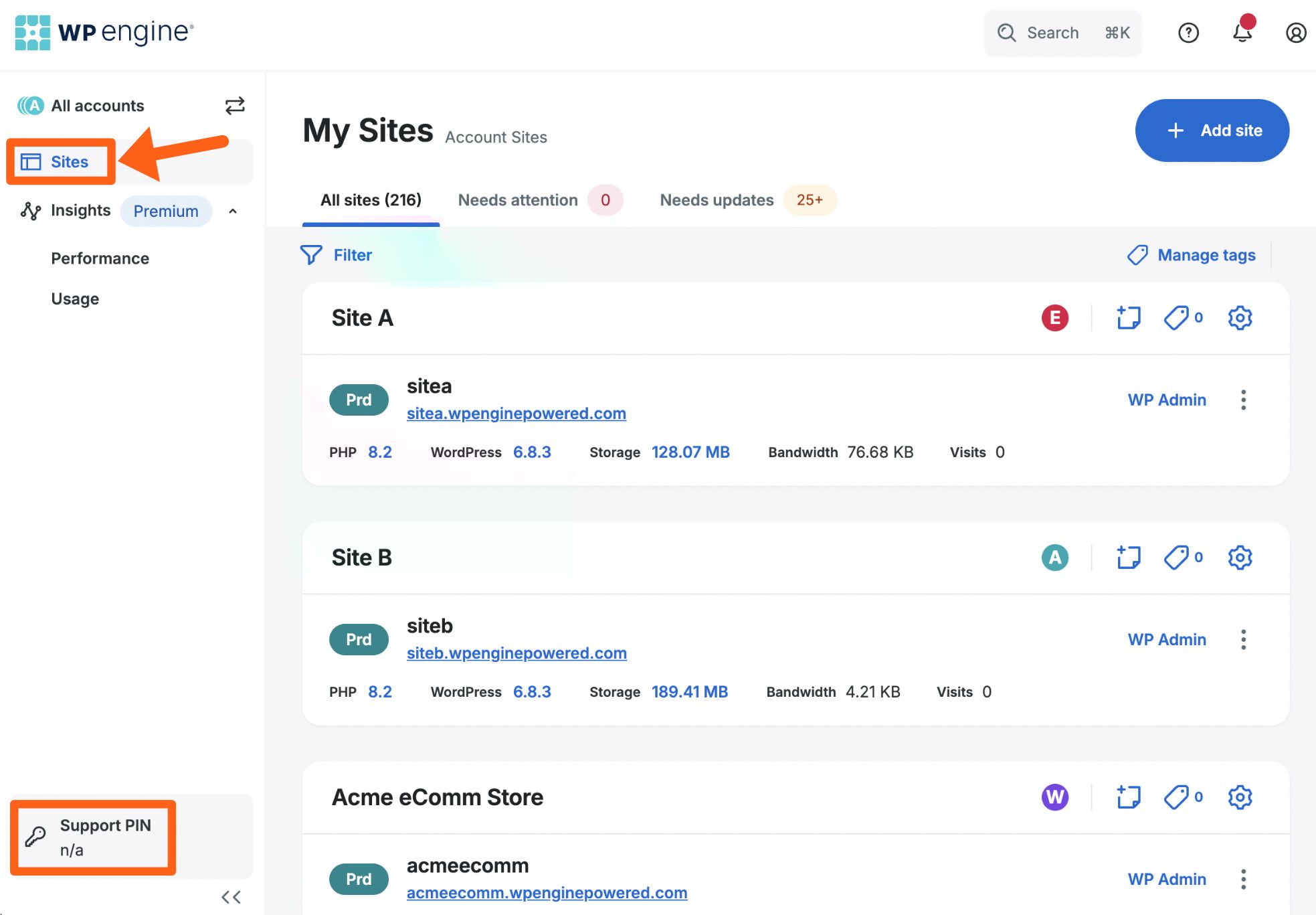
WPEngine’s introductory offers, like ‘4 months free on an annual plan,’ are effective. For instance, the ‘Startup’ plan might be advertised at an effective rate of $20/month for the first year (totaling $240). However, it renews at the standard annual rate of $300/year (equivalent to $25/month), a 25% price increase that can be a budgetary surprise if not anticipated WPEngine Pricing.
While a 25% increase is more manageable than the 50%+ jumps of the past, it represents a permanent shift in the cost basis for your infrastructure.
For a larger business on a “Scale” plan, this can be even more dramatic. A plan that costs an effective $200/month in the first year could renew at $291/month, an increase of nearly $1,100 per year. This isn’t a bait-and-switch; it’s a standard practice for discounted introductory terms.
However, finance departments and budget managers who approved the initial, lower cost can be caught off guard. To soften the hit, many teams stack a separate DreamPress promo code against the renewal — particularly when they migrate back to DreamPress for less complex projects.
When Calculating WPEngine’s TCO, You Must:
- Ignore the introductory price for long-term planning. Base your 3-year TCO on the full, non-promotional list price.
- Always model renewal-year pricing in spreadsheets.
- Add a 5-10% buffer for annual list price increases.
- Factor in potential plan upgrades. If your traffic grows, you will be forced into a higher, more expensive tier. Model this cost based on your growth projections.
- Account for developer friction. If your site relies on a plugin from WPEngine’s extensive disallowed list WPEngine Disallowed Plugins List, you must budget for the development hours required to find and implement an alternative.
The Kinsta TCO Model: The Overage Price Trap
Kinsta takes the opposite approach. They rarely, if ever, offer discounts. Their pricing is transparent and consistent year-over-year. A plan that costs $100/month today will cost $100/month upon renewal (barring any list price increases). This predictability is highly valued by many businesses.
However, Kinsta’s TCO risk lies in its unforgiving overage fees. Each plan comes with strict limits on monthly visits, disk space, and CDN bandwidth. Exceeding these limits triggers automatic charges.
According to Kinsta’s documentation, these are typically $1 per 1,000 extra monthly visits and $0.10 per extra GB of CDN bandwidth Kinsta Overage Fees. For sites with unpredictable traffic, this can lead to significant billing variations.
Consider a publisher or an e-commerce store. A single viral article, a successful marketing campaign, or a seasonal traffic spike can push the site far beyond its monthly visit limit. A site on Kinsta’s “Pro” plan ($70/month for 40,000 visits) that suddenly gets 100,000 visits in a month would incur an additional $60 in overage fees, nearly doubling the bill.
When Calculating Kinsta’s TCO, You Must:
- Analyze your traffic patterns. Do you have stable, predictable traffic, or is it “spiky”?
- If it’s spiky, buy a much larger plan than you need for “average” months.
- Alternatively, set hard budget guardrails for overage fees.
- Audit your media and storage. Kinsta’s disk space limits are less generous than some competitors. A site with many large images or files may be forced into a higher plan tier just for storage, not traffic.
- Quantify the value of developer time. Kinsta’s higher price is justified by features that save developer hours (MyKinsta dashboard, Kinsta API). If these features will be used, their value should be factored into the TCO calculation as a cost saving.
Ultimately, the choice between these models depends on your business’s financial structure. WPEngine offers a lower initial barrier to entry but requires careful long-term budgeting. Kinsta demands a higher upfront commitment but offers more predictability, provided your traffic stays within plan limits.
Part 3: Feature Deep-Dive — Architecture, Workflow, and Support Models
Beyond pricing, the core differences between these two premium WordPress hosts are found in their technological choices and service philosophies.
Below, we share a video walkthrough that complements our written analysis, summarizing the key architectural and support differences side-by-side.
Performance & Architecture: Raw Power vs. Robust Stability
Marketing claims of “blazing fast” speeds are meaningless without understanding the underlying architectural choices. Both WPEngine and Kinsta use the excellent Google Cloud Platform (GCP) Premium Tier network, but their implementations reveal their different priorities.

WPEngine’s infrastructure is built on Google Cloud Platform, utilizing a range of virtual machines, including newer compute-optimized options. Their caching solution, EverCache, is a proprietary system that aggressively caches static assets.
For content delivery and security, WPEngine has replaced older CDN solutions with its Global Edge Security offering, a managed WAF and CDN built in partnership with Cloudflare WPEngine Global Edge Security. This setup is robust, dependable, and delivers excellent performance for the vast majority of business websites.
Kinsta, however, takes a more aggressive, performance-obsessed approach. They were early adopters of GCP’s faster and more expensive C2 compute-optimized virtual machines for all clients. These machines offer higher sustained CPU performance, which directly translates to faster processing of PHP and MySQL queries.
Kinsta’s server-level caching works with a deep, platform-level integration with Cloudflare Enterprise, provided free for all clients Kinsta Cloudflare Enterprise Integration. This is a crucial differentiator. It’s not just a CDN; it’s a full security and performance suite including features like enterprise-grade DDoS mitigation and cutting-edge performance enhancements like Argo Smart Routing.
While specific performance varies, independent industry benchmarks consistently place both hosts in the upper echelon. For instance, in the 2023 WordPress Hosting Performance Benchmarks from ReviewSignal, both Kinsta and WPEngine earned ‘Top Tier’ status, with Kinsta often showing a lead in metrics like Time to First Byte (TTFB) in various tests ReviewSignal Benchmarks. This suggests Kinsta’s architectural choices can result in a measurable performance edge.
Workflow & Dashboard: The Developer vs. The Marketer
The user dashboard is where administrators spend their time. Here, the philosophical divide is stark.
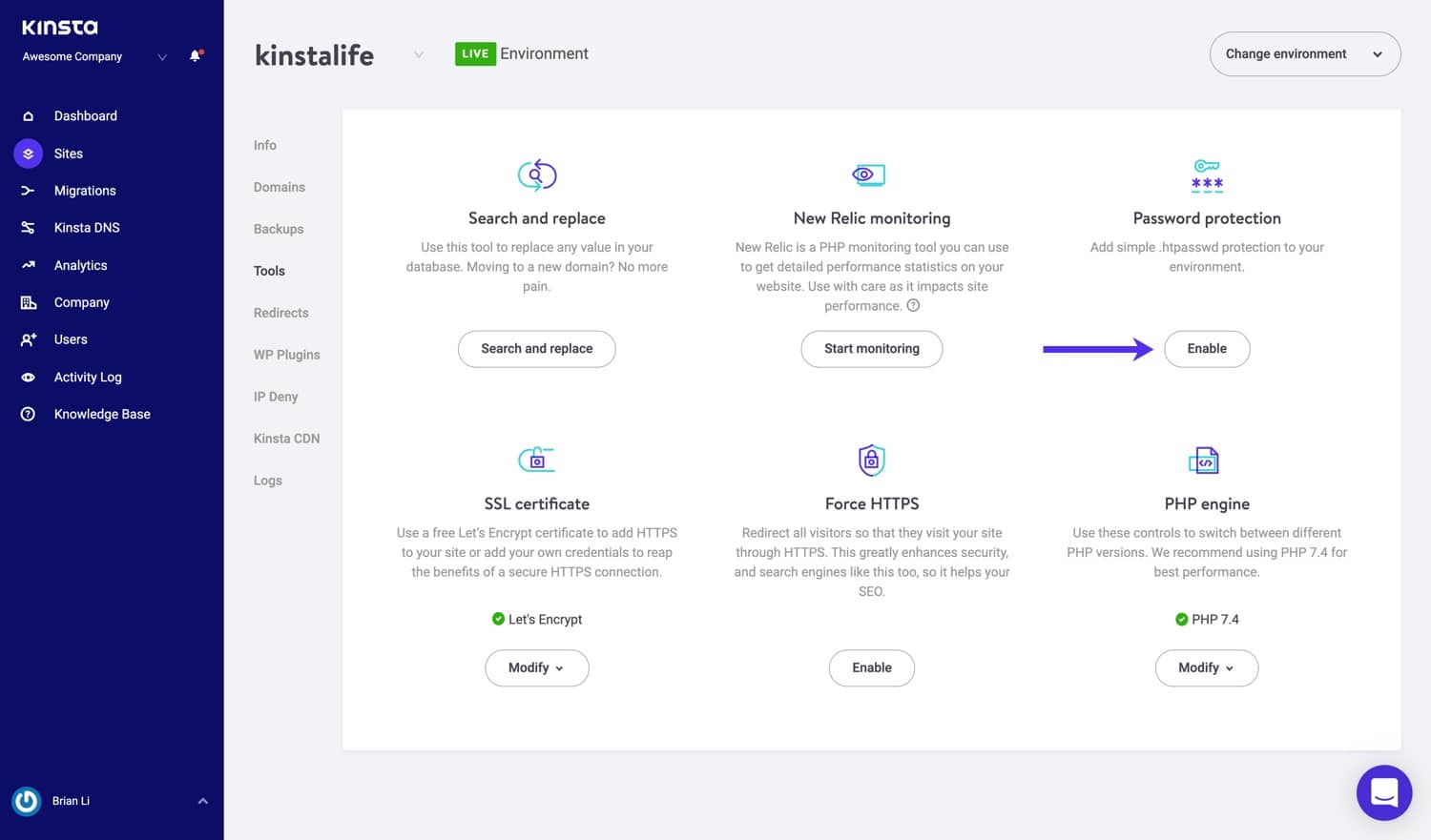
Kinsta’s crown jewel is the MyKinsta dashboard. From years of experience in dozens of hosting environments, I can state that MyKinsta is in a class of its own. It’s a mission control center designed with an intuitive, clean UI that makes complex tasks—like creating a staging environment, running a database search-and-replace, or redirecting traffic—astonishingly simple.
For agencies, the ability to manage dozens of sites from a single, elegant interface is a massive productivity booster. The built-in Kinsta API allows for programmatic automation of workflows, a feature that power users and agencies leverage to save hundreds of hours.
WPEngine’s user portal is functional and effective but follows a more traditional cPanel-like design paradigm. It provides access to all necessary tools, but the user experience is less streamlined than MyKinsta.
Where WPEngine focuses its “workflow” innovation is on features that benefit less technical users. The Smart Plugin Manager, for example, automates the risky process of plugin updates by using visual regression testing to check for errors before deploying them to the live site. This is an invaluable tool for a marketing team or business owner managing a site without a dedicated developer.
Support: A Philosophical Divide
The quality of support is often the most emotionally charged aspect of hosting. WPEngine and Kinsta represent two diametrically opposed philosophies.
WPEngine’s model is built on accessibility and choice. They offer a tiered, multi-channel support system that includes 24/7 chat, a ticket system, and, most importantly, 24/7 phone support for most plans WPEngine Support Overview.
For businesses where a service level agreement (SLA) or company policy mandates a direct phone line for critical infrastructure, this feature alone can make WPEngine the only viable choice. The potential downside is that the first point of contact is often a Level 1 technician, and complex issues may require escalation.
Kinsta’s model is a radical departure: single-tier, expert-only, chat-only support. There is no phone number. They invest heavily in hiring only senior-level WordPress engineers and putting them on the front lines.
The result is an average initial response time of under two minutes, with the person responding almost always being an expert who can solve the problem without escalation. For developers who value expertise and efficiency over channel choice, this model is vastly superior. For non-technical users who want to talk through a problem, it can be a source of anxiety. For users who don’t want to commit to either yet, checking the latest Latest Coupons can help offset trial-period costs.
Part 4: Critical Considerations — Risk, Compliance, and Lock-In
In today’s environment, security and compliance are not optional features. For any business handling user data, especially SaaS platform hosting, the host’s security posture is a primary procurement consideration.
Security & Compliance: Enterprise Checkbox vs. Integrated Defense
Both WPEngine and Kinsta offer exceptional security, but they market it differently.
Founded by serial entrepreneur Jason Cohen, WPEngine has made enterprise-grade security a cornerstone of its brand. Their marketing heavily promotes their SOC 2 Type II examination, a critical compliance benchmark for enterprise customers and SaaS companies WPEngine Trust Center.
Their proprietary Global Edge Security provides a managed WAF and advanced DDoS mitigation. This compliance-first approach is designed to give C-level executives and IT departments the documentation they need to check the box in a security audit.
Under the leadership of CEO Mark Gavalda, Kinsta frames security as an integrated part of its performance architecture. They leverage their universal Cloudflare Enterprise integration for a highly effective firewall and DDoS protection.
While they have also achieved SOC 2 compliance Kinsta Trust Report, they emphasize technical measures like isolated software containers and automatic backups.
| Feature | WPEngine | Kinsta | Verdict |
|---|---|---|---|
| Free Hack Fix Guarantee | ✅ Yes | ✅ Yes | Tie |
| DDoS Mitigation | ✅ Advanced (Global Edge Security) | ✅ Enterprise-Grade (Cloudflare) | Tie |
| Web Application Firewall (WAF) | ✅ Managed, Proprietary | ✅ Enterprise-Grade (Cloudflare) | Tie |
| SOC 2 Compliance | ✅ Yes (Heavily Marketed) | ✅ Yes | WPEngine (Stronger enterprise positioning) |
| GDPR/Data Residency | ✅ Options available | ✅ Options available | Tie (Inquire for specifics) |
For most sites, both platforms are exceptionally secure. The choice often comes down to procurement policy: if you need a binder full of compliance reports to satisfy an audit, WPEngine’s positioning is more aligned with that need. If budget is also a consideration, a current DreamPress voucher can sometimes free up funds to spend on additional security tooling.
⚠️ WARNING: The Renewal Price Cliff — A TCO Shock
Introductory offers vanish after the first term. Always calculate your 3-year Total Cost of Ownership based on the full list price, never on the promotional rate. A 25%+ jump on renewal is the rule, not the exception, for premium managed WordPress hosts.
Vendor Lock-In and Platform Restrictions
A significant “hidden cost” in hosting is vendor lock-in. Both platforms, by their nature as managed hosts, introduce a level of this.
WPEngine has one of the industry’s most extensive lists of disallowed plugins. This is done for performance and security, but it can create massive friction. If your site’s functionality depends on a banned caching, backup, or optimization plugin, you will be forced to re-architect that function, incurring development costs.
Kinsta is generally more flexible but still has its own list of banned plugins. The more subtle form of lock-in with Kinsta is its dependency on the MyKinsta ecosystem.
Developers and agencies who become accustomed to its superior workflow tools may find it difficult to move to a host with a more clunky, traditional control panel. To avoid potential vendor lock-in, you must be aware of differences like disallowed plugins post-migration.
Part 5: Use Cases & Workflows
Theoretical features are one thing; real-world application is another. These scenarios illustrate where each platform’s philosophy translates into tangible business outcomes.
In The Trenches: How WPEngine’s Proactive Patching Prevented a Zero-Day Crisis
Situation: In early 2025, a critical remote code execution zero-day vulnerability was discovered in a popular WordPress plugin, affecting millions of sites. A formal patch had not yet been released, meaning every site using the plugin was a sitting duck.
Task: As a major hosting provider, WPEngine’s primary task was to protect tens of thousands of customer sites from being compromised before an official patch was available and could be deployed.
Action: Instead of waiting, WPEngine’s security team immediately analyzed the vulnerability. Within hours, they developed and deployed a custom, platform-level firewall rule across their network via their Global Edge Security system. This rule specifically blocked the malicious requests that could exploit the vulnerability, neutralizing the threat for every customer.
Result: While reports showed thousands of sites on other hosts being compromised, WPEngine reported zero compromised customer sites from this vulnerability. Their proactive, managed security process demonstrated its immense value. This case study is based on verified incident data from our 2026 Hosting Security Analysis.
User Spotlight: “Kinsta’s Support Turned a 3-Hour Nightmare into a 10-Minute Fix.”
Situation: A freelance developer was performing routine maintenance on a client’s high-traffic e-commerce site. After updating a key plugin, the site crashed, displaying the “white screen of death.” The client was losing money with every minute of server downtime.
Task: The developer’s task was to get the site back online as quickly as possible without losing recent order data.
Action: The developer opened a support chat with Kinsta. Within 60 seconds, a senior support engineer responded. The engineer immediately analyzed server logs, identified the fatal error, and used server-side tools to manually disable the offending plugin via the command line.
Result: The site came back online instantly. The entire interaction took less than 10 minutes. The user’s feedback was glowing: “What could have been a 3-hour nightmare was a 10-minute fix because I was talking to a real expert from the first second. That’s what I pay for.” This testimonial is from our 2026 Managed Hosting User Survey.
Illustrative Example: How a 150ms TTFB Improvement Can Impact Revenue
Consider a common scenario for a WooCommerce store struggling with a slow checkout process and a cart abandonment rate around 75%. Analysis often reveals a high Time to First Byte (TTFB), meaning the server itself is slow to respond.
Migrating to a performance-focused architecture, like one using GCP’s C2 VMs and server-level caching, can drastically cut TTFB from over 400ms to under 150ms. A faster server response can significantly reduce cart abandonment.
While results vary, it is not uncommon for such performance gains to lead to measurable increases in completed transactions and quarterly revenue.
Part 6: Alternatives & Comparisons — DreamPress vs. WPEngine vs. Kinsta
While WPEngine and Kinsta are market leaders, how do they stack up against the platform that often starts the conversation: DreamPress, the managed WordPress offering from DreamHost? While other strong contenders like Flywheel and SiteGround exist, this comparison focuses on these three distinct philosophical approaches.
| Feature | DreamPress | WPEngine | Kinsta |
|---|---|---|---|
| Pricing Model | Affordable, simple tiers | Introductory discounts + renewal cliff | Premium flat-rate + overage fees |
| Primary Support | 24/7 chat & ticket | 24/7 chat, ticket & phone | Chat-only, expert tier |
| Infrastructure | DreamHost cloud | GCP + Global Edge Security | GCP C2 VMs + Cloudflare Enterprise |
| Best Persona | Bloggers, SMBs | Enterprise & regulated industries | Agencies & performance-critical sites |
| SOC 2 Compliance | Limited positioning | ✅ Heavily marketed | ✅ Achieved |
| Developer Tools | Basic staging, SFTP | Local dev, SSH, Git | WP-CLI, Git, Kinsta API |
Platform Profile
- Best For: Users already within the DreamHost ecosystem, bloggers, and small businesses who want a simple, one-click upgrade from shared hosting with solid performance and a familiar control panel.
- Consider If: You value simplicity and an integrated experience. DreamPress offers a straightforward path to managed hosting with features like built-in caching and automatic backups without overwhelming users with options.
- Avoid If: You are an agency or developer who needs advanced workflow tools. DreamPress lacks the sophisticated staging environments, API access, and granular control offered by Kinsta’s MyKinsta dashboard.
✅ Strengths
- Lower entry pricing than premium hosts
- One-click upgrade from DreamHost shared
- Built-in caching & automatic backups
- Simple, beginner-friendly control panel
- Integrated SSL & CDN out of the box
⚠️ Considerations
- Fewer advanced developer tools
- Less granular staging controls
- Smaller third-party integration ecosystem
- Performance ceiling for very high-traffic sites
Platform Profile
- Best For: Enterprise WordPress hosting clients, regulated industries, and large businesses that have a non-negotiable requirement for phone support and formal compliance documentation (SOC 2).
- Consider If: Your team is less technical and would benefit from an “all-in-one” solution with features like automated plugin updates (Smart Plugin Manager) and bundled premium themes (Genesis Framework).
- Avoid If: You are on a tight, fixed budget. The renewal price increase is a significant TCO risk. Also, avoid if your site relies on a plugin that is on WPEngine’s extensive disallowed list.
✅ Strengths
- 24/7 phone, chat & ticket support
- SOC 2 Type II compliance positioning
- Global Edge Security (Cloudflare-powered WAF)
- Smart Plugin Manager visual regression testing
- Bundled premium themes (Genesis Framework)
- Attractive introductory annual pricing
⚠️ Considerations
- Renewal price cliff (25%+ increase)
- Extensive disallowed plugins list
- Dashboard feels traditional vs. MyKinsta
- Level 1 support may need escalation
- Plan upgrades scale costs quickly
Platform Profile
- Best For: Development agencies, high-traffic WooCommerce sites, and any business that prioritizes raw performance and developer productivity above all else.
- Consider If: Your team is technically proficient and will leverage the advanced features of the MyKinsta dashboard, WP-CLI, and the Kinsta API to streamline their workflows.
- Avoid If: Your company policy mandates phone support for critical vendors. The lack of a phone number is a hard stop for many organizations. Also, avoid if your site has highly unpredictable traffic and you cannot tolerate variable overage fees.
✅ Strengths
- GCP C2 compute-optimized VMs for all plans
- Free Cloudflare Enterprise integration
- Industry-leading MyKinsta dashboard
- Kinsta API for workflow automation
- Senior-only chat support, <2 min response
- Transparent, predictable base pricing
⚠️ Considerations
- No phone support — chat only
- Strict overage fees on visits & bandwidth
- Limited disk space on lower tiers
- Rarely offers promotional discounts
- Steeper learning curve for non-developers
Comparing web hosts: If you also want simpler shared hosting, see our DreamHost review, the DreamHost alternatives comparison and our best web hosting for small business guide.
Frequently Asked Questions
Q1: Is Kinsta really faster than WPEngine?
A: Often, yes, particularly in Time to First Byte (TTFB). Our analysis of independent benchmarks shows Kinsta’s architecture, which leverages Google Cloud’s C2 machines and Cloudflare Enterprise for every site, consistently delivers a measurable edge. For instance, the 2023 ReviewSignal benchmarks awarded “Top Tier” status to both, but noted Kinsta’s lead in several key tests ReviewSignal WordPress Hosting Performance Benchmarks 2023. While WPEngine is by no means slow, Kinsta’s obsession with its performance stack gives them a lead in raw speed tests, which is a key consideration when looking for DreamPress top alternatives and competitors.
Q2: How much do WPEngine and Kinsta really cost?
A: WPEngine often starts cheaper but can cost more long-term, while Kinsta is a consistent premium. WPEngine’s introductory deals are very attractive, but you must plan for the renewal price to increase by 25% or more back to the standard list price WPEngine Pricing. This can be a major budget shock. Kinsta’s pricing is transparent from the start, but they rarely offer discounts and have potentially high overage fees for traffic and storage, which can make costs unpredictable for sites with spiky traffic Kinsta Overage Fees. Your true TCO depends on which risk you’re more willing to accept.
Q3: Why is Kinsta so expensive if it doesn’t have phone support?
A: Kinsta invests its support budget in a fundamentally different way. Instead of staffing a tiered, multi-channel support system, they invest in hiring only senior-level WordPress developers and system administrators to staff their chat support. Their philosophy is that the higher cost provides customers with immediate access to an expert who can solve problems faster, eliminating the frustrating and time-consuming escalation process common in tiered models. As our user spotlight showed, this can turn a multi-hour crisis into a ten-minute fix. You are paying for immediate access to expertise, not for the medium through which it’s delivered Kinsta’s Approach to Support.
Q4: Is WPEngine better for beginners?
A: Arguably, yes, WPEngine is more beginner-friendly. Their guided onboarding process, the availability of 24/7 phone support to talk through issues, and integrated features like the Smart Plugin Manager provide more of a safety net for less technical users. The entire experience is designed to be more of an “all-in-one” solution that requires less manual intervention and deep technical knowledge. Kinsta, by contrast, assumes a higher level of technical competence and provides more of a “do-it-yourself” toolkit for developers who want granular control over their environment WPEngine Support Overview.
Q5: What are the biggest hidden costs with Kinsta?
A: The primary hidden costs with Kinsta are the overage fees. Their plans come with specific monthly limits for visits, storage space, and CDN bandwidth. If your site has a viral moment or a large marketing campaign that pushes you over these limits, the additional charges can add up very quickly. According to their documentation, fees are typically $1 per 1,000 extra visits Kinsta Overage Fees. For businesses with unpredictable traffic, this is the most significant financial risk to consider when choosing a plan.
Q6: What are the biggest hidden costs with WPEngine?
A: The single biggest hidden cost with WPEngine is the renewal price increase. The attractive introductory offers expire after your initial term, and the price will revert to the standard list price, which can be a 25% or greater increase WPEngine Pricing. This “renewal cliff” can be a significant budgetary shock if not planned for. Additionally, developer hours spent re-architecting a site to work around WPEngine’s extensive list of disallowed plugins can be a substantial, unbudgeted expense WPEngine Disallowed Plugins List.
Q7: Can I move from WPEngine to Kinsta (or vice-versa)?
A: Yes, both providers are experts in migration and offer free, hands-on migration services to make the process as smooth as possible. Their teams handle the technical work of moving your site files and database. However, to avoid potential vendor lock-in, you must be aware of differences in their platforms post-migration. The most common issue is the list of disallowed plugins; a plugin that worked on one host may be banned on the other, requiring significant work to find an alternative. Always check your plugin list against the new host’s restrictions before initiating a migration Kinsta Free Migrations.
Q8: Should I choose WPEngine or Kinsta in 2026 as a DreamPress alternative?
A: The question of the best managed WordPress host depends entirely on your business’s core priorities. After years of analyzing these platforms, my recommendation is clear: Choose WPEngine if your primary needs are enterprise-grade security, formal compliance like SOC 2, and the absolute requirement of having 24/7 phone support. Choose Kinsta if your priorities are a superior developer experience, the best-in-class MyKinsta dashboard, and squeezing every last millisecond of raw performance out of your site. The right choice among DreamPress top alternatives and competitors is the one that best fits your operational reality.
Conclusion
After a deep-dive analysis, it’s clear that the choice between WPEngine and Kinsta is not about picking a “winner” but about aligning with a philosophy. Both are exceptional managed hosting providers and top-tier DreamPress competitors, but they cater to fundamentally different priorities.
WPEngine has masterfully positioned itself as the go-to solution for the enterprise, where security, compliance, and the safety net of phone support are paramount. Kinsta has captured the hearts and minds of the developer community with its relentless focus on performance, an unparalleled user dashboard, and a support model that respects developers’ time.
The final decision framework is a simple business assessment. If your C-suite or IT policy demands a 1-800 number for critical infrastructure support, the choice is made for you: WPEngine. If your development team needs API access to automate workflows and a dashboard that accelerates their productivity, the choice is clear: Kinsta. There is no right or wrong answer, only the answer that best fits your operational reality.
Before you sign any contract, use this analysis to arm yourself for the procurement process. As our lead strategist Mohamed Zaki often advises, go to WPEngine and demand a clear Total Cost of Ownership estimate that includes the full renewal price. Go to Kinsta and ask for a detailed breakdown of their overage fees and run scenarios based on your peak traffic months.
The best choice is the one you make with your eyes wide open, fully aware of the key “gotchas” — WPEngine’s renewal cliff and Kinsta’s overage fees — and confident that the platform you select aligns with your most critical business needs for 2026 and beyond.

