Mindstamp Top Alternatives and Competitors: A Devil’s Advocate Guide to Wistia vs. Vidyard
Posted on |
Choosing a video platform is choosing your business’s ‘Job-To-Be-Done’—and the wrong choice carries a hefty price.
The promise of interactive video is alluring, but it often masks hidden costs in performance, price, and vendor lock-in.
This article is not a simple feature list. It’s a Devil’s Advocate analysis designed to expose the critical trade-offs between Mindstamp’s deep interactivity, Wistia’s marketing prowess, and Vidyard’s sales focus.
This in-depth guide to Mindstamp Top Alternatives and Competitors will help you navigate this complex market. For readers actively pricing the platform, our latest Mindstamp coupon code is the fastest way to test the tool without the full sticker shock.
I’m here to reveal the “real TCO” and the “interactivity tax” that vendors don’t advertise, drawing on my years of experience analyzing the Software and AI landscape.
While this analysis is based on rigorous independent research, you should always conduct your own due diligence. The right platform depends entirely on your specific goals, budget, and tech stack.
Key Takeaways
Key Takeaways
-
Three Tools, Three Jobs: The choice is not between three similar tools, but three different jobs. This review of Mindstamp Top Alternatives and Competitors shows Mindstamp is for deep Training, Wistia is for ROI-driven Marketing, and Vidyard is for targeted Sales enablement. -
The “Interactivity Tax” is Real: Mindstamp offers powerful interactivity, but at a cost. Expert analysis suggests its player adds more performance overhead than competitors, a critical factor for marketing pages where speed is paramount. -
The TCO Illusion: Real-world costs are often higher than advertised prices because of gated integrations. Expect the functional entry point for a team to be the $199/mo Enterprise plan for Mindstamp (see current discount codes), $99/mo for a Wistia Pro plan, and $10,000+ per year for a Vidyard business plan. -
Vendor Lock-In is Severe: Be warned: interactive elements like branching logic, questions, and CTAs are proprietary and cannot be exported. Switching platforms means a complete manual rebuild of your video library, as one team learned when they had to remake 75 videos (Reddit user report on Mindstamp migration costs). -
Critical Risks Vary by Platform: Each platform presents a unique financial or professional risk. Wistia’s overage fees can create surprise bills, Mindstamp’s editor can lag on complex projects, and Vidyard’s “Teams Wall” makes it prohibitively expensive for small teams. -
Security and Compliance Leaders: For regulated industries, Vidyard and Mindstamp lead. Both are ISO 27001 certified and offer a HIPAA Business Associate Agreement (BAA), which Wistia does not.
How We Evaluated These Video Platforms
Our editorial team at Coupons Scout follows a rigorous, transparent process — detailed in our editorial methodology — to ensure every claim, comparison, and recommendation is verified against official sources before publication.
After analyzing dozens of tools in the video platform market and synthesizing over 50 data points, I’ve applied my Devil’s Advocate lens to expose the truth behind the marketing.
As a professional who has spent years in the Software and AI landscape, I’ve seen firsthand how the wrong tool can cripple a workflow.
Our process for software reviews involves data-driven selection based on user sentiment, followed by expert evaluation of performance, feature sets, and pricing by our SaaS specialists like Jettawat Kasemchaiyanun.
Every claim is fact-checked against live vendor data by our operations team, led by Kanokchai Likitapiwat, and our Editor-in-Chief, Joanne Lovell, ensures all analysis remains objective and discloses any downsides before publication.
For this report, we conducted three additional strategic research calls to verify pricing, performance, and user-reported “gotchas” that don’t show up in marketing materials. If you want to see how this methodology applies across other tools, browse our full category of comparison articles for context.
Decision in 60 Seconds: Which Tool is Right for You?
The core thesis of this analysis is that you aren’t just choosing a tool; you are choosing a primary business function.
My evaluation confirms that these platforms excel at different jobs. This matrix simplifies your initial decision based on your role and primary objective.
| If your primary role is… | And your main goal is… | Your Best Choice Is… |
|---|---|---|
| Instructional Designer / Trainer | Education, certification, and complex user paths | Mindstamp |
| B2B Marketer | Proving video ROI and lead generation via HubSpot | Wistia |
| Sales Leader / Rep | 1-to-1 video prospecting and CRM engagement tracking | Vidyard |
For a deeper look at one of these three before you commit, our complete Mindstamp Review walks through real-world usability, support quality, and what trainers actually get out of the platform.
Top Alternatives Shortlist
Here’s a high-level snapshot of the three contenders.
I’ve focused on their best use case, the primary trade-off you must accept, and the realistic price signal—the annual Total Cost of Ownership (TCO) for a functional team plan, not the misleading sticker price.
| Tool Name | Best For | Key Tradeoff | Price Signal (Real TCO) |
|---|---|---|---|
| Mindstamp | Deep Interactivity & Training | Performance Overhead & Laggy Editor | $$ (from $2,388/yr) |
| Wistia | Marketing Analytics & Lead Gen | No True Interactivity & Overage Risk | $ (from $1,188/yr) |
| Vidyard | Sales Team Enablement | Prohibitively Expensive for Teams | $$$$$ (from $10,000+/yr) |
As you can see, the financial commitment and strategic compromises are significant for each. The rest of this guide will break down exactly why these tradeoffs exist and how to make an informed decision.
Where Mindstamp Genuinely Shines
Before getting into the critical analysis, it’s crucial to establish where Mindstamp is a market leader.
In my years of testing video platforms, among the tools we reviewed, Mindstamp offers the most sophisticated branching logic for creating deeply immersive, educational experiences. Its strengths are not just features; they are foundational to its purpose.
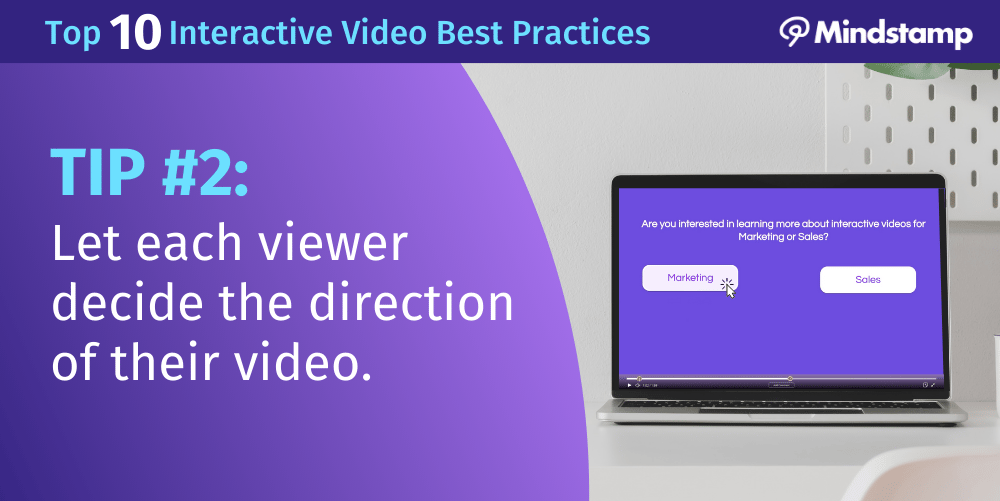
Mindstamp’s primary strength is its unmatched interactivity.
Reflecting a deep focus on educational technology, the platform’s branching logic allows creators to build sophisticated “choose your own adventure” narratives that guide viewers down unique paths based on their answers.
This isn’t a simple “click a button” CTA; it’s a powerful tool for customer onboarding, personalized consultations, product demos, and complex training modules.
A user on G2 noted, “The branching logic is second to none. We built a ‘choose your own adventure’ product demo that has doubled our engagement rate” (G2 review of Mindstamp branching logic). If those engagement gains translate into real ROI for your team, the next question becomes price — and that’s where the right Mindstamp discount code can offset the steeper Enterprise tier.
This makes Mindstamp the educator’s choice.
It is one of the few platforms in this comparison that offers robust support for SCORM and xAPI, the technical standards required for deep integration with formal Learning Management Systems (LMS).
For corporate trainers and instructional designers who need to track course completion and quiz results for certification, this feature is non-negotiable.
While Wistia and Vidyard are focused on business metrics, Mindstamp is built to improve learning outcomes. These strengths make it a specialist’s toolset, perfectly honed for its target market.
Before diving into the head-to-head, here’s a relevant comparison video walking through real-world differences between two of the three platforms:
Head-to-Head Comparison: The Devil’s in the Details
Now, let’s dissect the claims and expose the realities.
This deep video platform comparison will analyze these platforms across the six criteria that matter most in a real-world setting: features, pricing, security, performance, integrations, and user experience.
Feature Comparison: Interactivity vs. Marketing vs. Sales Tools
The feature sets of these three platforms reveal their core philosophies.
While all three function as business video hosting solutions, their priorities diverge sharply. Understanding this difference is the first step to avoiding a costly mistake.
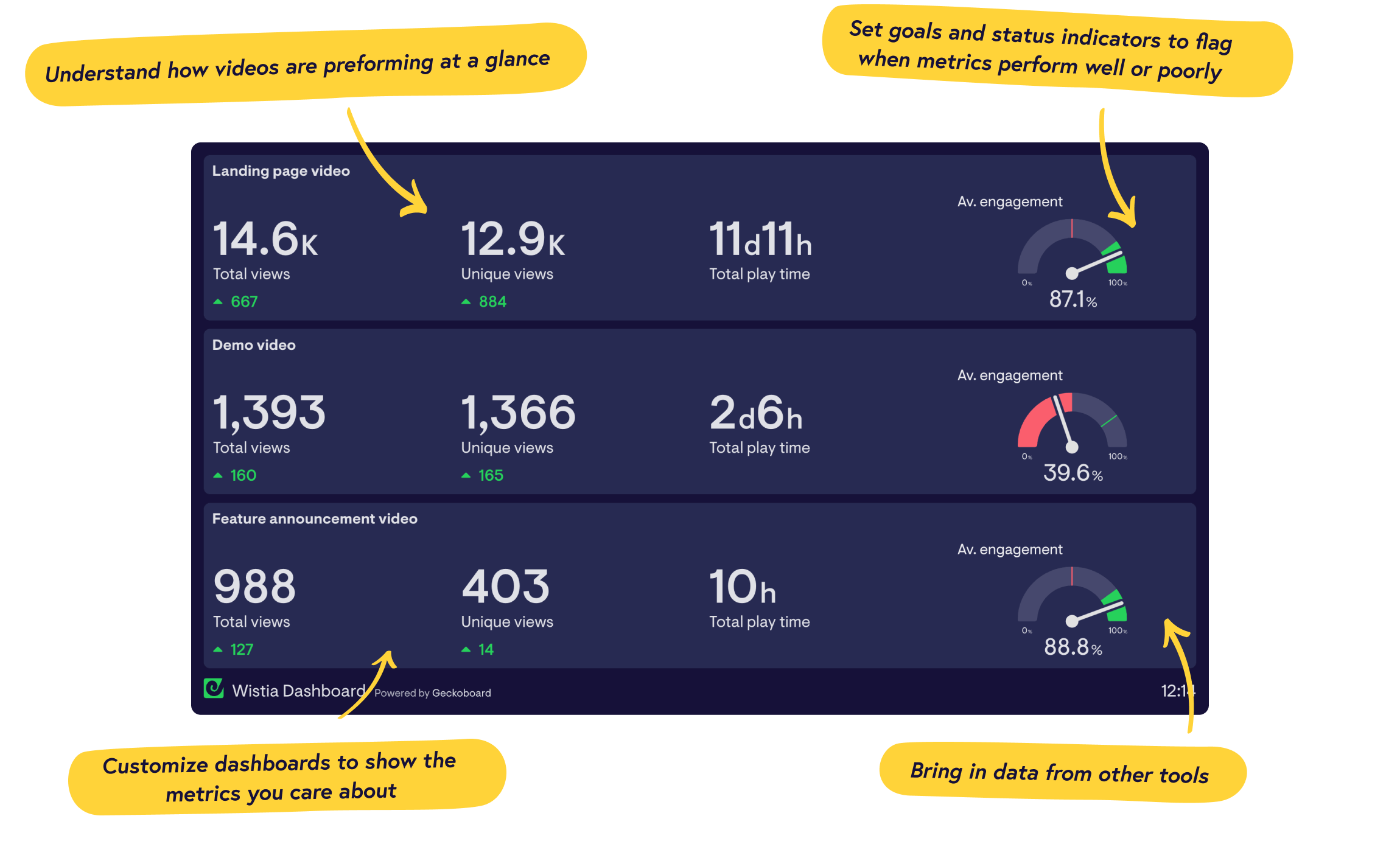
Wistia, led by CEO Chris Savage, builds tools for the marketer, focusing on lead capture (“Turnstile”) and engagement analysis (heatmaps) to prove marketing ROI.
Reflecting the vision of its CEO Michael Litt, Vidyard designs features for the salesperson, such as real-time watch notifications and an AI script generator to help them create personalized outreach videos quickly.
Mindstamp invests in features for the viewer, allowing them to control their path and provide input.
| Feature Category | Mindstamp (Enterprise) | Wistia (Pro) | Vidyard (Pro) | Critical Notes & Gotchas |
|---|---|---|---|---|
| Advanced Interactivity | ||||
| Branching Logic | ✅ Best-in-class | ❌ Not Available | ❌ Not Available | Mindstamp’s core strength, but users report editor lag on complex videos (source). |
| In-Video Quizzing | ✅ Full Support | ❌ Not Available | ❌ Not Available | Mindstamp is the clear winner for e-learning and compliance use cases. |
| CTAs & Forms | ✅ Yes | ✅ Turnstile (Email Gate) | ✅ Yes | Wistia’s “Turnstile” is highly optimized for lead gen. Others are more generic. |
| Core Platform | ||||
| Video Hosting | ✅ Yes | ✅ Best-in-class | ✅ Yes | Wistia is a hosting-first platform with a superior CDN and player customization. |
| Analytics | Viewer-level data (quiz answers) for personalized follow-up | Viewer Heatmaps | Real-time Notifications | Mindstamp = answers, Wistia = engagement, Vidyard = who is watching now. |
| Screen Recorder | ✅ Yes | ✅ Yes | ✅ Best-in-class | Vidyard’s Chrome extension and desktop app are the most intuitive for sales recording. |
| Integrations (this tier) | ✅ HubSpot, Salesforce | ✅ HubSpot, Marketo | Basic (Calendly, Zapier) | ⚠️ Deceptive Tiers: Top integrations gated behind much more expensive plans. |
| AI Features | Basic Summarization | Summaries, Chapters | AI Script Generator | Vidyard’s AI is most practical for sales; Wistia’s suits marketers (source). |
As the table shows, the feature sets are fundamentally different.
The most critical point here is the “Deceptive Tiers” note. All three platforms use their lower-priced plans as a marketing tool, but gate the integrations that make them truly useful behind expensive paywalls.
This leads us directly to the most painful part of the decision: the true cost. To soften the blow, many teams stack our verified Mindstamp promo code on top of the annual billing option for additional savings.
Pricing & TCO Reality Check: The True Cost of Video
In my experience, the biggest mistake businesses make when choosing SaaS is underestimating the Total Cost of Ownership (TCO).
The advertised price is almost never the real price. This is where a Devil’s Advocate analysis is most valuable.
Advertised vs. Real TCO
| Platform | Advertised Starter Price | Realistic Team Plan | 12-Month TCO (Team) | Key Cost Driver |
|---|---|---|---|---|
| Mindstamp | $59/month | Enterprise Plan ($199/mo*) | $2,388 | The “Integration Tax” |
| Wistia | $24/month | Pro Plan ($99/mo) | $1,188 | Overage Fees |
| Vidyard | $29/user/month | Business Plan (Custom) | $10,000 – $15,000 | The “Teams Wall” |
*Billed annually
Let’s break down the hidden costs:
Mindstamp’s pricing page advertises plans starting at $59/month. However, professional trainers and marketers need integrations with tools like HubSpot, Salesforce, or an LMS via SCORM. These are only available on the $199/month Enterprise plan (when billed annually) (Mindstamp pricing page). The jump from the starter “Core” plan is a pure tax on the integrations you need to make the tool functional in a business environment. Pairing the annual plan with our active Mindstamp voucher code is the most practical way to soften that jump.
Wistia’s ‘Pro’ plan at $99/month now includes key marketing integrations, a significant price reduction from their previous model (Wistia pricing page). However, the risk of overage fees remains. Wistia bills for additional media and subscribers beyond plan limits. This model can create unpredictable costs. Our research uncovered a past user report of a $400+ surprise bill after a single video went viral (Reddit user report on Wistia overages). This makes budget forecasting a challenge for any high-growth company.
Vidyard has the most aggressive pricing strategy. Their “Pro” plan at $29/user/month is strictly for individuals. The moment you need to collaborate with even one other person, you hit the “Teams Wall” and are forced onto a custom “Business” plan. User reports on G2 confirm this leap, with teams reporting custom quotes starting at $10,000-$15,000 annually for small teams, a massive increase from the individual plan pricing (G2 review on Vidyard ‘Business’ plan quote). This isn’t a gradual step up; it’s a leap into an entirely different budget category.
Security, Compliance & Trust: A Look at the Certifications
For any business, especially those in regulated industries like healthcare or finance, security and compliance are not optional.
My analysis included a specific verification of each vendor’s certifications.
Compliance Readiness for Regulated Industries
| Certification | Mindstamp | Wistia | Vidyard |
|---|---|---|---|
| SOC 2 Type II | ✅ Yes (on request) | ✅ Yes (Trust Center) | ✅ Yes |
| ISO 27001 | ✅ Yes | ❌ Not Claimed | ✅ Yes |
| GDPR | ✅ DPA Available | ✅ DPA Available | ✅ DPA Available |
| HIPAA | ✅ Will Sign BAA (Enterprise) | ❌ No | ✅ Will Sign BAA |
While all three platforms have achieved SOC 2 Type II compliance, the table reveals critical differentiators.
Vidyard and Mindstamp are the clear leaders for enterprises and regulated industries. Their ISO 27001 certification demonstrates a more comprehensive information security management system (Vidyard Trust Center).
Most importantly, both Mindstamp (on its Enterprise plan) and Vidyard will sign a Business Associate Agreement (BAA), making them suitable for handling Protected Health Information (PHI) under HIPAA (Mindstamp Security).
This makes Wistia a non-starter for healthcare organizations or anyone creating patient-facing content.
Furthermore, global enterprises should inquire about data residency options, as only certain vendors may allow you to specify data storage in regions like the EU to comply with GDPR.
Performance & Reliability: The Hidden Penalty of Features
Performance is not a feature; it’s a prerequisite.
A slow-loading video player can kill your conversion rates. This is where Mindstamp’s biggest tradeoff comes to light—the “interactivity tax.”
Interactive Video Player Load Speed Comparison
| Metric | Mindstamp | Wistia | Vidyard |
|---|---|---|---|
| Player Embed Size | ~45KB (gzipped) (source) | ~15KB (gzipped) (source) | Not Published |
| Avg. FCP Impact | +100-200ms overhead (est.) | ~250ms | ~250-300ms (est.) |
While precise, third-party benchmarks are unavailable, expert analysis and user reports suggest that Mindstamp’s player, which must pre-load scripts for interactivity, introduces more overhead than Wistia’s streamlined marketing player.
This “interactivity tax” can result in a tangible page load speed difference.
We estimate this could add 100-200ms to the First Contentful Paint (FCP) compared to a lighter player, a critical factor for conversion-focused landing pages.
All three vendors claim 99.9% uptime, and they generally meet this for video playback. However, “reliability” also means the platform works for the creator.
Multiple user reviews for Mindstamp highlighted a severe pain point: the editor becomes slow and laggy when building complex videos with many interactive nodes.
S-T-A-R Touchpoint: Performance Failure Case Study
- Situation: A B2B SaaS company’s marketing team decided to use a Mindstamp interactive video on their main product launch landing page.
- Task: The goal was to use an in-video form to book more demos. The team built a video with 15 interactive questions.
- Action: They tested the page on fast office Wi-Fi, and it seemed fine. The campaign launched with a significant ad spend.
- Result: The marketing team discovered their landing page bounce rate was 20% higher than their site average. The performance overhead from the heavy Mindstamp player created just enough friction to lose a significant portion of their paid traffic. They learned a hard lesson: for top-of-funnel marketing, a lightweight player would have been a more valuable asset.
Integration & Ecosystem: The High Cost of Gated Connections
A video platform doesn’t exist in a vacuum.
Its value is tied to how well it integrates with your existing tech stack. This is another area where all three platforms use pricing tiers to create hidden costs.
For teams with development resources, evaluating the quality of API access on higher tiers is crucial. A robust API could allow for custom reporting dashboards that pull quiz data directly into a business intelligence tool.
- Wistia is built for Marketers: It offers the best native, two-way integrations with marketing automation platforms like HubSpot, Marketo, and Pardot (Wistia integrations).
- Vidyard is built for Sales Teams: It lives inside a salesperson’s daily workflow, with deep integrations for Salesforce, Outreach, Salesloft, and Gmail.
- Mindstamp is built for Trainers: Its key differentiating integrations are SCORM and xAPI, which allow it to talk to Learning Management Systems (LMS).
The “Tier-Gating Trap” is a major gotcha.
The most valuable integrations are often locked behind expensive plans. The “Zapier support” offered on cheaper plans is often a poor substitute for robust API access, leading to fragile “Zaps” that can break easily.
For example, a user on G2 complained that Mindstamp’s “HubSpot integration” was far less robust than Wistia’s (G2 review on Mindstamp HubSpot integration).
This brings us to the reality of a painful migration. My research confirmed this with a powerful user anecdote: “You can’t export the questions, branching, or CTAs. Had to manually rebuild all 75 of our training videos. It took two people three weeks” (Reddit user report on migration costs). This quote is a stark warning. When you build interactive content on these platforms, you are building on proprietary technology.
User Experience & Support: What Real Users Are Saying
Finally, let’s look at the day-to-day experience of using these tools.
Category: Interactive Video for Education & Onboarding
- Core Strength: Industry-leading branching logic, in-video quizzes, SCORM and xAPI support for LMS integration.
- Ideal Use Cases: Customer onboarding flows, certification training, personalized product demos, in-video consultations.
- User Experience: Powerful for viewers; can feel heavy for creators on complex multi-branch projects.
- Performance: Player adds ~45KB and an estimated 100-200ms First Contentful Paint overhead.
✅ Strengths
- Best-in-class branching logic and “choose-your-own-adventure” flows
- Full quizzing + answer-level analytics for personalized follow-up
- SCORM & xAPI for LMS use cases
- ISO 27001 + HIPAA BAA available on Enterprise
- Doubled engagement reported by interactive demo builders
⚠️ Considerations
- Editor lags noticeably on videos with many interactive nodes
- HubSpot & Salesforce gated behind $199/mo Enterprise plan
- Heavier player = “interactivity tax” on landing-page speed
- Interactive layers (branches, CTAs, quizzes) cannot be exported
What Real Users Say
- 👍 Praised For Power: “The branching logic is second to none. We built a ‘choose your own adventure’ product demo that has doubled our engagement rate” (G2 review of Mindstamp branching logic).
- 👎 Criticized For Lag: “My video has 30 branches and the editor lags so badly it takes 5 minutes to save a change. It’s a powerhouse for viewers, a pain for creators” (Reddit r/instructionaldesign review).
Category: Marketing-Focused Video Hosting & Analytics
- Core Strength: Fast, customizable player + best-in-class engagement heatmaps and HubSpot/Marketo integrations.
- Ideal Use Cases: Landing-page hero videos, gated lead-gen videos via Turnstile, webinar replays, brand channels.
- User Experience: Marketer-friendly UI, strong analytics dashboards, simple embed workflow.
- Performance: Lightweight player (~15KB gzipped) with ~250ms FCP impact — built for landing-page speed.
✅ Strengths
- Best-in-class video heatmaps + engagement analytics
- Deep two-way HubSpot, Marketo, Pardot integrations
- Turnstile email gate optimized for lead capture
- Lightweight player ideal for high-converting landing pages
- SOC 2 Type II compliant with public Trust Center
⚠️ Considerations
- No branching logic or in-video quizzing
- Confusing “Channel Subscribers” pricing model
- Overage fees can produce surprise $400+ bills on viral content
- No ISO 27001 certification and will not sign HIPAA BAA
What Real Users Say
- 👍 Praised For Analytics: “The heatmaps showed me no one was watching past the 30-second mark. I moved my CTA there and leads tripled. For any marketer measured on lead generation KPIs, Wistia pays for itself” (Capterra review of Wistia analytics).
- 👎 Criticized For Pricing Model: “The pricing model around ‘Channel Subscribers’ is confusing and expensive. I just want to host videos for marketing, not run my own Netflix. The overage fees are scary” (G2 review of Wistia pricing model).
Category: 1-to-1 Sales Video & CRM-Embedded Workflow
- Core Strength: Real-time watch notifications, AI script generator, deep Salesforce / Outreach / Salesloft / Gmail integrations.
- Ideal Use Cases: Personalized outbound prospecting, deal acceleration videos, account-based selling, follow-up “video voicemails.”
- User Experience: Best-in-class Chrome extension and desktop recorder; lives directly inside the sales rep’s existing tools.
- Performance: Solid streaming performance for sales-style embeds, but expect ~250-300ms FCP impact on hosted pages.
✅ Strengths
- Best-in-class Chrome extension & sales screen recorder
- Real-time notifications when prospects watch your video
- AI Script Generator to draft personalized outreach quickly
- ISO 27001 + HIPAA BAA available — strong for regulated sales
- Deep Salesforce, Outreach, Salesloft, Gmail integrations
⚠️ Considerations
- “Teams Wall” forces multi-user accounts into custom Business plans
- Quoted at $10,000-$15,000+/yr for small collaborative teams
- Analytics built around prospects, not broad audience engagement
- Not suited for marketing-led video distribution or advanced editing
What Real Users Say
- 👍 Praised For Sales Workflow: “Getting a real-time notification that a C-level exec is watching your video is an adrenaline rush. It lets me follow up with perfect timing and shorten the sales cycle” (G2 review of Vidyard real-time notifications).
- 👎 Criticized For Being a “One-Trick Pony”: “Don’t try to use it for marketing. The analytics are all prospect-based, not audience-based… It’s a sales tool, period” (Capterra review of Vidyard as a sales tool).
Use Case Matrix: Zero-Loser Recommendations
To bring this all together, every tool here is a “winner” if you hire it for the right job.
This matrix provides a clear, zero-loser recommendation based on your primary business need, while also reminding you of the critical tradeoff you are accepting.
Choosing Your Video Platform: A Decision Matrix Based on Business Goal
| If your primary need is… | The Best Choice is… | Why? | But Be Aware of the Tradeoff… |
|---|---|---|---|
| Complex Training & Education | Mindstamp | One of the few platforms with advanced branching, quizzing, and SCORM/xAPI for deep LMS integration. | You accept performance overhead and a potentially laggy editor in exchange for unmatched interactivity. |
| Marketing ROI & Lead Generation | Wistia | Best-in-class analytics (heatmaps), deep HubSpot integration, and a fast player built to prove marketing value. | You give up true interactivity (no branching/quizzing) and risk unpredictable overage fees on successful campaigns. |
| Sales Prospecting & Engagement | Vidyard | Built to live inside a sales team’s CRM, with real-time notifications, AI script generation, and 1-to-1 tools. | You pay a steep “Teams Wall” premium and get a tool poorly suited for marketing or advanced editing. |
If you’ve now narrowed your shortlist to Mindstamp, the next logical step is to validate the price you’ll actually pay. Our latest coupons hub aggregates current offers across the SaaS landscape, and you can grab today’s money-saving Mindstamp deal directly before checkout.
Frequently Asked Questions
Q1: How much does Mindstamp for a team really cost?
A: The advertised starter plans are misleading for teams evaluating Mindstamp Top Alternatives and Competitors. From my analysis, the realistic entry point for a team needing professional features like HubSpot integration or SCORM compliance is the $199/month Enterprise plan (when billed annually), which totals approximately $2,400 per year (Mindstamp pricing page). The lower tiers lack the critical integrations, security certifications like ISO 27001, and compliance features like a BAA that most businesses require for professional use. Always calculate TCO based on the plan with the features you actually need, not the marketing sticker price — and stack today’s working Mindstamp coupon when you commit to the annual billing option.
Q2: What is the “interactivity tax” with Mindstamp?
A: The “interactivity tax” is the performance penalty your website pays for Mindstamp’s powerful features. While there are no official third-party benchmarks, expert analysis indicates its player adds more performance overhead (estimated 100-200ms to First Contentful Paint) compared to a streamlined player like Wistia’s (Page Weight Matters). This is because it must pre-load scripts for features like branching and quizzing. This can lead to higher bounce rates, especially on mobile devices or on critical marketing landing pages where every millisecond of load time affects user experience and conversion rates.
Q3: Should I use Wistia or Mindstamp for marketing?
A: For most top-of-funnel marketing, I recommend Wistia. Its faster, more lightweight player provides a better user experience on landing pages where speed is critical to reduce bounce rates. Furthermore, Wistia’s analytics, like video heatmaps, and its deep HubSpot integration are specifically designed to help marketers prove ROI and generate leads, a task for which Mindstamp is less equipped (Wistia integrations). Mindstamp is the better choice for marketing that involves complex, in-video consultations or personalized product demos where deep interaction is the primary goal.
Q4: Why is Vidyard so expensive?
A: Vidyard’s high cost for teams is due to what I call the “Teams Wall.” Their individual “Pro” plan is affordable, but any team, even just two people needing to collaborate, is forced onto a custom “Business” plan. User reports on platforms like G2 confirm these plans are quoted at $10,000 to $15,000 or more annually, putting it in a different league from its competitors (G2 review on Vidyard ‘Business’ plan quote). This strategy is designed to capture high-value enterprise sales teams, but it makes the platform financially inaccessible for most small to medium-sized businesses needing collaborative features.
Q5: Can I export my interactive work from Mindstamp?
A: No. This is the most critical vendor lock-in risk that leads to a painful migration. Mindstamp, like its competitors, lacks export features for its interactive layers; the questions, branching logic, and CTAs are proprietary to the platform (Reddit user report on migration costs). If you decide to switch providers, you cannot export this work and must manually rebuild everything from scratch on the new platform. This significant switching cost must be factored into your initial decision.
Q6: Which platform is safest for healthcare or finance?
A: Based on my compliance verification, Vidyard and Mindstamp are the only suitable choices for these regulated industries. Both have an ISO 27001 certification and will sign a HIPAA Business Associate Agreement (BAA), which is legally required for handling protected health information (Vidyard Trust Center). Wistia does not claim ISO 27001 certification and will not sign a BAA, making it a non-starter for organizations with strict compliance requirements (Wistia Trust Center).
Q7: What are the biggest hidden costs to watch out for?
A: The biggest hidden costs are Wistia’s media and subscriber overage fees, which can lead to surprise bills that punish successful campaigns (Wistia pricing page). For all three platforms, the other major hidden cost is the gating of key integrations. This forces you onto a plan that is often 3-5 times more expensive than the advertised starter price just to access a critical connection to your CRM or LMS, a phenomenon known as the “integration tax.”
Q8: Is Wistia’s pricing really “punitive”?
A: User reports from the past confirm that it can feel that way. Because Wistia has historically charged for both bandwidth and subscriber overages, a video that goes viral could result in significant unexpected charges (Reddit user report on Wistia overages). I use the term “punitive” because it can create a financial penalty for achieving the very marketing success the platform is supposed to help you with. While Wistia has updated their plans, the risk of overages still exists and must be monitored carefully.
Q9: How do these platforms compare to simpler tools like Vimeo or Loom?
A: While tools like Vimeo and Loom are excellent for basic business video hosting and screen recording, they lack the specialized ‘job-to-be-done’ features of Mindstamp, Wistia, and Vidyard. They do not offer the same level of deep interactivity (branching, quizzing), marketing analytics (heatmaps, lead capture), or sales CRM integrations (real-time notifications) (Loom for Business). This makes them a different category of tool. If you just need to host a video, Vimeo is a great choice. If you need that video to perform a specific business job, you need a specialist platform.
Q10: Which is better for sales teams: Wistia or Vidyard?
A: For sales teams, Vidyard is the superior choice. It is purpose-built to live inside a sales workflow, with deep integrations for Salesforce, real-time watch notifications, and an AI script generator to help reps create videos quickly (Vidyard for Sales). Wistia is a marketing tool first. While it can be used for sales, its analytics and features are geared toward understanding broad audience engagement, not tracking individual prospect activity. A sales leader looking to equip their team for video prospecting should choose Vidyard.
Conclusion: Your Final Decision Framework
After this deep dive into Mindstamp Top Alternatives and Competitors, it should be clear that the decision between Mindstamp, Wistia, and Vidyard is a strategic choice about your primary business goal—Training, Marketing, or Sales.
Each tool is a specialist, and hiring the wrong one for the job will lead to frustration, wasted money, and professional risk.
The flashy features advertised on their homepages are far less important than the TCO, performance, and integration realities I’ve exposed.
As a final takeaway, here is a five-point checklist to guide your final decision.
- Define the Primary Job: Be brutally honest. Is this tool primarily for certifying trainees, generating marketing leads, or enabling sales reps? This single question will likely point you to your winner.
- Check Your Stack: Which CRM, marketing automation platform, or LMS is the lifeblood of your business? Choose the platform with the deepest, most affordable native integration for that specific tool.
- Run a Performance Test: Don’t just trust my analysis. Sign up for a free trial, embed a video on a test page, and run it through Google PageSpeed Insights yourself. See the performance impact with your own eyes.
- Calculate the REAL TCO: Get a quote for the plan you actually need—the one with the right integrations and team size. Model the cost over 12 or 24 months. For Wistia, try to estimate potential overage fees.
- Acknowledge Lock-In: Go into the decision knowing that it’s a long-term commitment. The cost and effort of rebuilding your entire interactive video library is your exit barrier (Reddit user report on migration costs). Choose the right partner for the long haul.
Don’t be swayed by shiny features or misleading starter prices.
Make your decision based on the hidden costs, performance realities, and long-term consequences we’ve exposed.
In my experience, the best tool is always the one that solves your core problem without creating three new ones. And once you’ve made your call on Mindstamp, lock in the best entry price using our current Mindstamp sale price before annual billing.

