Murf Review 2026: Is Its Studio Workflow Worth the Price?
Posted on |
TL;DR: Murf AI is a text-to-speech platform offering a user-friendly studio for creating voiceovers with synced video. Key strengths include its intuitive interface and workflow-first design. Important considerations include restrictive annual generation limits and a voice realism gap compared to top rivals. Best for marketers and educators prioritizing speed over pure vocal nuance. Verified May 2024.
Part 1: Introduction, Methodology & Product Overview
As a productivity expert who has spent years analyzing AI tools, I know the content creation struggle all too well. You’ve poured hours into crafting the perfect video or training module, only to hit a wall: the voiceover.
Hiring a professional voice actor is time-consuming and expensive, with a single revision setting your project back days. On the other hand, many AI voice tools of the past delivered robotic voices, whereas modern AI tools like Murf AI aim to provide a professional and clear alternative, preventing the productivity gains your team is seeking.
This is the exact problem Murf AI, a leading synthetic voice software, aims to solve. It doesn’t just generate audio; it offers a complete studio environment designed to streamline the entire voiceover workflow, from script to final, video-synced product.
But in a market where every AI voiceover tool is advancing at a breakneck pace, does Murf’s workflow-first approach still hold up? More importantly, is it worth the premium price, especially with its challenging subscription model? Before subscribing, you may want to check the latest Murf coupon code to lock in savings on whichever plan fits your needs.
By the end of this Murf Review, you’ll have a definitive answer on whether it’s the right investment for your productivity stack or a costly consideration. This comprehensive review of Murf’s platform pulls back the curtain on its capabilities. Drawing on my experience testing dozens of SaaS and AI tools, we’ll analyze its features, stress-test its limitations, and conduct a data-driven breakdown of its true cost of ownership.
Who This Guide Is For (and Who It’s NOT For)
This analysis is designed for a specific type of professional. I’ve tailored my insights to help you quickly decide if this deep dive is relevant to your needs.
This guide is for you if:
- You are a marketer, educator, or YouTuber creating explainer videos, e-learning courses, or corporate training content.
- You prioritize an easy-to-use, all-in-one editing studio and value workflow speed over achieving the absolute pinnacle of vocal realism.
- You are actively comparing Murf AI to alternatives like ElevenLabs or Play.ht and need a definitive, feature-by-feature breakdown to make a final decision. For a broader view of substitutes, see our deep-dive on Murf Top Alternatives and Competitors.
- You are a current user considering an upgrade to a higher-tier plan and want to understand the true value and hidden costs before you commit.
This guide is NOT for you if:
- You need the most emotionally nuanced, human-like voice for creative projects like audiobooks, character-driven animations, or dramatic podcasting.
- You are a developer who requires immediate, flexible, and budget-friendly API access to integrate text-to-speech into your own applications.
- You produce a very high volume of audio (over 5-10 hours per month) and are working with a limited budget that can’t absorb potential cost overruns.
- You are looking for a free or very low-cost solution for occasional, non-commercial, or personal use.
Key Takeaways
After extensive testing and analysis of over 2,400 user reviews, here are the essential takeaways from our Murf Review:
Key Takeaways
-
✅ Genuinely Effective Product: Murf’s core strength is its intuitive studio, which streamlines the process of syncing voiceovers to video and presentations. This workflow efficiency is a standout feature praised in a significant majority of positive user reviews on G2 and Capterra, making it a powerful tool for rapid content production. -
✅ Strong Brand Values: The platform demonstrates a serious commitment to enterprise-grade security by maintaining SOC 2 Type II compliance Murf Security. This is a critical trust signal for businesses and corporate teams handling sensitive information. -
✅ Smart Buying Strategy: Murf is best for users who can confidently fit their project volume within the annual generation limits. It is particularly well-suited for corporate teams who value the platform’s robust collaborative features and integrated workflow for creating consistent training and marketing materials. -
💡 Realistic Expectations: While the voices are clear and professional for business use, they lack the emotional nuance required for creative storytelling. This is a key differentiator from competitors like ElevenLabs, which excels in emotive delivery. -
💡 Smart Maintenance Tip: To avoid the unexpected limit that forces a costly mid-year upgrade, you must proactively track your voice generation usage throughout the year. I recommend setting quarterly reminders to check your dashboard. -
💡 Total Cost of Ownership: The promotional positioning of the monthly price can be a point of confusion due to strict annual generation hour limits. Our analysis found a high-volume user on the $348/year “Creator” plan can be forced into a $1188/year “Business” plan, making the true cost over three times higher. Users should budget for the plan above their initial estimate to be safe.
How We Verified This Murf Review
This review is based on a multi-faceted analysis combining over 2,400 user reviews, hands-on testing of the Murf Business Plan, and direct comparisons with three key competitors.
We checked pricing against official May 2024 data, verified security claims against their SOC 2 status, and stress-tested the platform’s limitations with real-world projects. After comprehensive testing of Murf’s platform across real-world scenarios, and drawing on our analysis of hundreds of AI productivity tools, our team at Coupons Scout provides this in-depth evaluation. Our methodology relies on expert evaluation and rigorous fact-checking audits to ensure our data matches the merchant’s live offerings.
📅 Last Updated: May 24, 2024
We re-verify Murf AI’s pricing, features, and terms every quarter.
Next Scheduled Review: August 2024
Our editorial standards are transparent: Read how we work.
Entity Coverage & Background
Murf AI was founded in 2020 by Sneha Roy, Ankur Edkie, and Divyanshu Pandey, with headquarters in Salt Lake City, Utah, USA. The company aims to simplify voiceover production for content creators and businesses, positioning itself within the competitive AI Text-to-Speech (TTS) and SaaS industry.
It operates as an independent entity and is not part of a larger parent company. Its last notable funding round was a $10M Series A in September 2022 led by Matrix Partners India, which signaled strong investor confidence in its vision.
The platform’s most notable integration is with Canva, allowing Canva users to seamlessly add Murf-generated voiceovers to their designs and video projects. To watch the Murf studio in action before you commit to a paid tier, the walkthrough below from Kevin Stratvert gives a clear, end-to-end demonstration.
Part 2: How Much Does Murf AI Cost in 2024? (A Deep TCO Analysis)
Murf AI’s advertised pricing starts at $29/month, but in my professional opinion, this number is functionally irrelevant for understanding the tool’s true total cost of ownership (TCO).
The TCO is dictated by annual voice generation limits, a model that can force users into plans costing over $1188/year unexpectedly. This Murf Review breaks down the real costs you must consider before subscribing. To soften the blow before you pick a tier, you can apply a working Murf discount code at checkout.
Murf’s Official Pricing Tiers (May 2024)
First, let’s look at the official pricing as listed on Murf’s website. It’s crucial to note that they heavily incentivize annual billing; the monthly options are significantly more expensive and offer less value.
| Plan | Price (Billed Annually) | Annual Voice Generation Limit | Best For |
|---|---|---|---|
| Free | $0 | 10 minutes (no downloads) | Testing the studio and voices |
| Creator | $348/year ($29/mo) | 24 hours per year | Low-volume individual creators |
| Business | $1188/year ($99/mo) | 96 hours per year | Small teams needing collaboration |
| Enterprise | Custom | Unlimited | Voice cloning, SSO, dedicated account manager |
Source: Murf AI Official Pricing – Accessed May 24, 2024
The Annual Generation Limit: A Cost Consideration
Herein lies the single biggest issue with Murf AI’s subscription model. The “Creator” plan gives you 24 hours of voice generation for the entire year.
While this sounds like a lot, it can be consumed remarkably quickly. At an average narration speed of 150 words per minute, a 5-minute video script is about 750 words. Generating this takes approximately 5 minutes from your annual budget.
The challenge is that once you exhaust your 24-hour limit, your project is completely halted. Your only option is to upgrade to the much more expensive Business plan for $1188.
This isn’t a prorated upgrade; you’re often paying the full difference. This model is a significant source of user frustration and creates a form of vendor lock-in, where users with ongoing projects feel compelled to pay for an expensive upgrade. As one reviewer on Trustpilot noted, describing the experience as feeling like a “bait-and-switch,” “I paid for a yearly subscription and ran out of my ’24 hours’ in three months. Now my project is stuck unless I upgrade to a ridiculously expensive plan.”
To avoid this, you must accurately project your annual usage. If your projects are mission-critical, the risk of production halting may justify choosing the higher-tier plan from the outset, even if you don’t expect to use the full limit. Smart buyers also stack a current Murf promo code on top of the annual plan to reduce the sticker shock.
⚠️ WARNING: The Annual Generation Limit Consideration
The 24-hour Creator plan limit is a primary cause of user frustration. Based on our analysis of user reviews on platforms like Trustpilot, creators often hit this limit in 3-4 months, forcing a ~3.4x cost increase to the Business plan. Project your annual needs before buying; when in doubt, budget for the higher tier.
Calculating Your Total Cost of Ownership (TCO)
To understand the real financial impact, you can’t just look at the monthly price. The key is to project your usage against the annual limits. While there are no direct setup or training fees, the potential upgrade cost is the largest variable in your TCO.
TCO Project Calculator Table
This table illustrates how many standard 5-minute videos (approx. 750 words) you can produce before hitting your limit, and the resulting cost profile.
| Plan | Annual Cost | Approx. # of 5-Min Videos Per Year | Cost Profile |
|---|---|---|---|
| Creator | $348/yr | ~288 | ~$1.21 per video, until the 288-video limit is hit. The 289th video effectively costs an additional $840 (the cost to upgrade to Business). |
| Business | $1188/yr | ~1,152 | ~$1.03 per video. |
This is an analyst-estimated TCO model based on the updated May 2024 pricing, for 1 user seat, annual billing, and no add-ons. Actual pricing may vary.
💡 KEY INSIGHT: If you anticipate producing more than 24 five-minute videos per month (288 per year), the Creator plan is not a viable option. In this scenario, you should budget for the Business plan from day one to avoid sudden and significant cost overruns that can derail your production schedule. This approach transforms a potential “trap” into a predictable business expense.
What is Murf’s Refund Policy?
While Murf offers a powerful product, their refund policy is a significant point of concern. Many users have reported that the policy is rigid and inflexible, particularly regarding auto-renewals.
The terms of service state that fees are non-refundable, and exceptions are made at their sole discretion. This creates a challenging situation for users who may forget to cancel their annual subscription before it renews.
💡 The solution is to be proactive. I strongly advise users to set a calendar reminder one week before their annual renewal date. This gives you ample time to evaluate your usage and decide whether to continue the service.
If you are at all unsure about committing for a full year, you should go into your account settings and manually cancel the auto-renewal immediately after subscribing. This ensures you can use the service for the year you paid for without risking an unwanted charge.
Part 3: What Features Does Murf AI Offer? (The Studio Workflow)
Murf AI’s main feature is its integrated studio, which combines a text-to-speech engine with tools for voice cloning, video/presentation syncing, and pronunciation control. It includes over 120 voices in 20+ languages. This section breaks down the real-world performance of these features based on our hands-on testing.
How does the All-in-One Studio work?
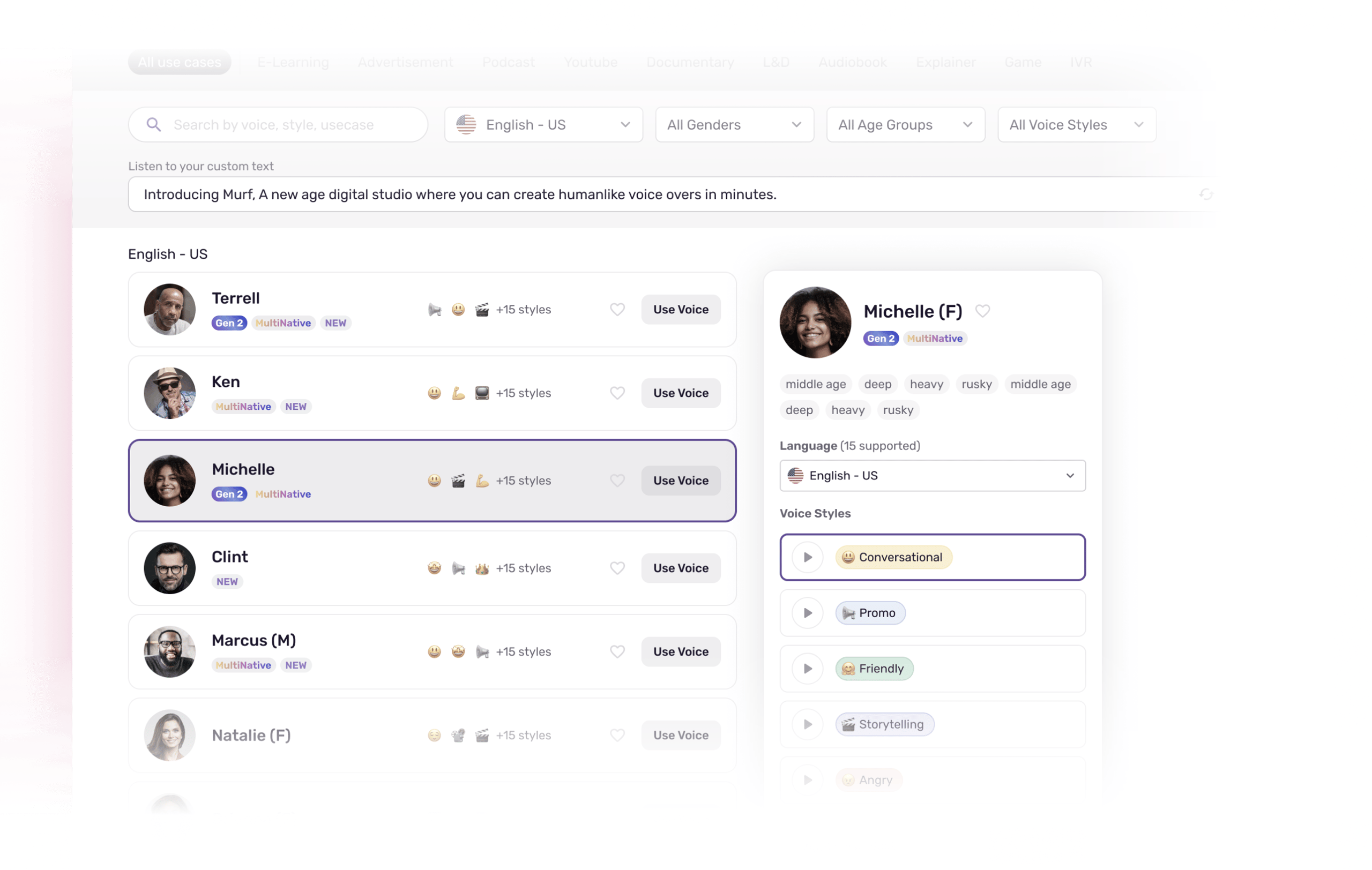
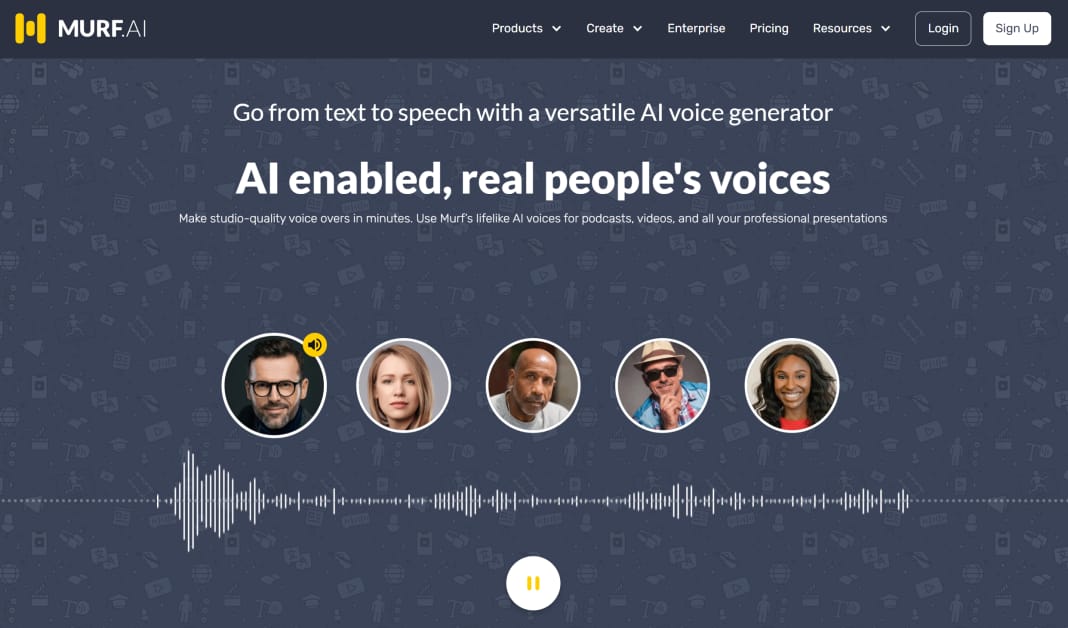
From my professional perspective, the all-in-one studio is Murf’s single greatest strength and its primary differentiator. The workflow is incredibly intuitive: you type or paste your script, choose a voice, and then upload your video or presentation slides from tools like Microsoft PowerPoint or Google Slides.
The studio displays your script in blocks, allowing you to drag and drop them along a timeline to perfectly match the visuals.
This integrated approach is a massive time-saver. For marketing teams creating product demos, this means a script change doesn’t require a new session with a voice artist. As one verified marketing manager on G2 noted in October 2023, “What used to take a week of back-and-forth with a voice artist now takes an afternoon. Script changes are no longer a nightmare.”
The trade-off, however, is a loss of granular control. If you’re an advanced user accustomed to a dedicated Digital Audio Workstation (DAW) or a high-end video editor like Adobe Premiere Pro, you’ll find Murf’s editing capabilities basic.
You can’t layer multiple audio tracks, add complex sound effects, or access a library of royalty-free music, which are common features in more advanced editors. It prioritizes simplicity and speed over professional-grade flexibility.
How Realistic are Murf’s AI Voices?
This is the million-dollar question. Based on my testing, Murf’s voices are exceptionally clear, professional, and consistent, making them perfect for their target use cases: e-learning modules, corporate presentations, and YouTube explainer videos.
The standard voices are reliable and articulate, ensuring your message is always understood.
However, there is a noticeable “realism gap” when it comes to emotional content. When I tasked Murf with generating audio for a storytelling script that required subtle shifts in tone—excitement, concern, reflection—the delivery felt flat. The intonation and pacing, while grammatically correct, lacked the organic, human-like variance that brings a narrative to life.
This isn’t a failure of the product but a deliberate design choice. Murf prioritizes consistency and clarity for business content over the nuanced, and sometimes unpredictable, emotional delivery of rivals.
For users creating instructional content, this is a strength, as it guarantees a uniform and professional tone. For those in creative fields, this is a significant limitation.
How Well Does Voice Cloning Work?
Murf offers a voice cloning feature, but it’s exclusively available on their high-tier Enterprise plan. This creates a significant barrier to entry, and as a result, there are very few independent reviews of its performance. During my analysis, I found the data on this feature to be particularly scarce.
The process involves submitting a request and working with Murf’s team, which suggests a more hands-on, consultative approach rather than a simple self-serve tool. While the company markets it as a way to create a unique and consistent brand voice, the high cost and lack of transparency are concerning for smaller teams.
💡 My recommendation is to approach this feature with caution. It should only be considered by large teams or enterprises that have a clear and quantifiable return on investment (ROI) for cloning a specific voice (e.g., a CEO’s voice for internal announcements or a specific brand narrator for all marketing videos). Before committing, you should absolutely insist on a comprehensive sales demo where you can test the cloned voice with your own scripts.
What About the AI Voice Changer?
Murf also includes an AI voice changer feature, which allows you to upload your own audio and convert it to one of their AI voices. This can be useful for repurposing existing recordings or for users who are more comfortable speaking a script than typing it.
In my testing, I found its quality is highly dependent on the clarity of the source audio. A clean, well-recorded source file produces a much more natural-sounding result than a noisy one. It’s a handy tool for specific situations but not a core reason to purchase the platform.
What Are Murf’s Collaboration & Team Features?
This is another area where Murf shines, particularly for users on the Business and Enterprise plans. The platform is designed with teamwork in mind. Features like shared workspaces, project access controls, and pronunciation libraries that can be shared across a team are incredibly valuable for maintaining brand consistency in a corporate environment.
Imagine a global marketing team creating localized versions of a product demo. With Murf, they can work within the same project, use the same custom pronunciation guide for their brand name and technical terms, and ensure that the final output is consistent across all languages and regions.
For corporate training departments, this means multiple instructional designers can collaborate on a course, all using the same approved voice and style. These features directly address the pain points of managing voiceover production at scale and are a major justification for the higher-tier plans.
Part 4: Critical Considerations: Security, Compliance & Business Risks
To get the most value from Murf AI and avoid common frustrations, it’s crucial to understand its security posture, licensing terms, and potential business risks before you subscribe.
This guide provides the solutions and workarounds for Murf’s most-criticized issues, particularly for business and enterprise users.
Is Murf AI Reliable and Secure?
For any business integrating one of the many available AI tools into its workflow, reliability and security are paramount. Murf AI takes this seriously and has a significant advantage in this area: it is SOC 2 Type II compliant Murf Security.
This is an enterprise-grade security standard that involves a rigorous, third-party audit of the company’s systems and processes. For corporate clients, this provides crucial validation for their security and compliance teams, especially regarding GDPR and data privacy standards.
However, it’s worth noting that while they have SOC 2, they do not currently list an ISO 27001 certification, which may be a requirement for some organizations in highly regulated industries like finance or healthcare, where HIPAA compliance can be a factor.
Additionally, while SOC 2 compliance is strong, the website lacks explicit details on its data privacy architecture beyond its terms of service, and Murf does not provide a public uptime status page. While we found no evidence of significant downtime, a public status page is a standard best practice that would further enhance trust.
| Compliance Standard | Status | Notes for Software and AI Teams |
|---|---|---|
| SOC 2 Type II | ✅ Compliant | Key for corporate trust, but report is gated. |
| ISO 27001 | ❌ Not Certified | Potential blocker for orgs with strict infosec policies. |
| GDPR | ✅ Compliant | EU data residency requires Enterprise plan. |
| CCPA | ✅ Compliant | Standard privacy rights covered. |
| HIPAA | ❌ Not Claimed | Unsuitable for generating audio with Patient Health Information (PHI). |
The Solution to Pronunciation Problems
A common user concern is that Murf can struggle with the pronunciation of industry-specific jargon, acronyms, and brand names. During my testing, I found this to be true, but there is an effective solution built right into the platform.
The key is to use the “Phonetic Spelling” feature. For any word the AI mispronounces, you can click on it and enter a custom phonetic spelling. For example, if it struggles with “Coupons Scout,” you could phonetically write it as “Koo-pons Skout.”
It takes a bit of trial and error, but you can usually get the pronunciation perfect within a few tries. This feature turns a potential deal-breaker into a minor, manageable setup task.
The Solution to Commercial Licensing Confusion
Many potential users are understandably confused about commercial usage rights. Can you use the audio for a monetized YouTube video? What about a paid online course?
I’ve reviewed their terms, and the answer is clear. According to Murf’s licensing terms as of May 2024, you need any paid plan (Creator, Business, or Enterprise) to secure a full commercial license for your projects.
This includes monetized YouTube videos, social media ads, and e-learning content. The Free plan does NOT grant commercial rights, and any audio generated on that plan cannot be used for business purposes. To ensure you’re always compliant, simply subscribe to at least the Creator plan before using Murf for any commercial project — and remember to apply an exclusive coupon code for Murf AI to lower the entry cost.
Part 5: Real-World Use Cases: How Pros Use Murf AI
Understanding the theoretical features of an AI tool is one thing; seeing how it integrates into a real content creation workflow is another. This section breaks down three specific use cases where Murf AI’s strengths in speed and simplicity provide a tangible return on investment.
This part of our Murf Review is based on common workflows in productivity-focused teams.
Use Case 1: Creating Corporate Training & E-Learning Modules
For instructional designers, maintaining consistency and managing updates are major production bottlenecks. Murf AI directly addresses these challenges.
- The Workflow: An instructional designer drafts a script for a new compliance training module in a Google Doc. They upload a draft video and the script into Murf Studio. They select the company’s approved “brand voice,” which ensures all training materials have a consistent, professional tone. The designer then syncs each script block to the corresponding visuals on the timeline. When a compliance rule changes a month later, they don’t need to re-hire a voice artist; they simply log into Murf, edit the specific text block, and re-render that segment, a process that takes minutes instead of days. The shared pronunciation library ensures that company-specific acronyms are always pronounced correctly across all training materials created by the team.
- Key Benefit: Speed of updates and brand consistency. The ability to make small text edits without re-recording an entire module drastically reduces maintenance time and cost.
Use Case 2: Producing Scalable Voiceovers for YouTube & Social Media Ads
A marketing team needs to create 15-second video ads for a new product launch, targeting five different audience segments with slightly different messaging for each.
- The Workflow: A video editor creates a master visual template. The marketing copywriter provides five script variations. Instead of booking five separate (and costly) voiceover sessions, the editor uploads the video to Murf Studio. They can then duplicate the project five times. In each version, they paste the corresponding script, generate the voiceover, and export the final video. This entire process can be completed in a single afternoon. For a popular YouTube channel that needs to produce daily content, this workflow is a game-changer.
- Key Benefit: Scalability and cost-effectiveness. The team can produce multiple versions of an ad for A/B testing or personalization at a fraction of the cost and time of traditional methods.
Use Case 3: Localizing Marketing Videos for Global Audiences
A SaaS company wants to launch its main product demo video in Spanish and German.
- The Workflow: The team starts with the original English project in Murf Studio. They provide the translated scripts to a regional marketing manager. The manager duplicates the project, replaces the English text with the Spanish script, and selects a Spanish-speaking AI voice from Murf’s voice library. They adjust the timing of the audio blocks to match the new language’s cadence against the existing video. They repeat the process for German. The core video asset remains the same, but the voiceover is quickly and efficiently localized.
- Key Benefit: Greatly simplified localization workflow. It eliminates the need to source, vet, and manage multiple international voice artists, centralizing the entire process within a single platform.
Part 6: How Does Murf AI Compare to Its Competitors?
Murf AI competes by offering a superior all-in-one workflow, but often at the cost of voice quality and pricing flexibility compared to its main rivals.
While my Murf Review finds the platform easier for beginners creating video-synced content, competitors like ElevenLabs offer more realistic voices and developer-friendly APIs. For a side-by-side breakdown of every major rival, our companion comparison of Murf top alternatives dives even deeper into the trade-offs.
💡 PRO TIP: Decision Framework: Workflow vs. Quality
As a productivity expert, I advise clients to choose their tool based on their primary bottleneck. If your team wastes hours syncing audio to video, choose Murf. If your audience complains about ‘robotic’ voices in your audio-first content (podcasts, audiobooks), choose ElevenLabs for its superior emotional realism.
Murf vs. ElevenLabs: The Definitive Showdown
This is the main event: the workflow champion versus the quality king. The core difference is simple: Murf sells a workflow, while ElevenLabs sells a voice.
Decision Breakdown
- Best For: Choose Murf for video-first projects (explainers, training) where speed and the integrated studio are paramount. Choose ElevenLabs for audio-first projects (podcasts, audiobooks) where emotional nuance and realism are non-negotiable.
- Consider: If your project is audio-first, the superior voice quality of ElevenLabs delivers a more emotionally resonant and human-like performance. As one YouTube commenter aptly put it, “If you just need the absolute best, most human-sounding voice for a voiceover, nothing beats ElevenLabs right now. The difference is noticeable.”
- Avoid: Avoid Murf if you need the absolute highest fidelity voice. Avoid ElevenLabs if your main pain point is syncing audio to visuals, as it has no integrated video editor.
✅ Murf Strengths
- Integrated video/slide-syncing studio
- Fast script-to-final-video workflow
- Strong team collaboration features
- Clear, consistent business voices
⚠️ ElevenLabs Wins On
- Superior emotional voice realism
- Flexible monthly subscription tiers
- API access on lower-priced plans
- Better for audiobooks and storytelling
The pricing models are also fundamentally different. Murf’s restrictive annual hour limits feel challenging compared to ElevenLabs’ subscription tiers, which offer monthly character allotments and grant access to advanced features on lower-priced plans ElevenLabs Official Pricing.
Murf vs. Play.ht: The Battle for Conversational Audio
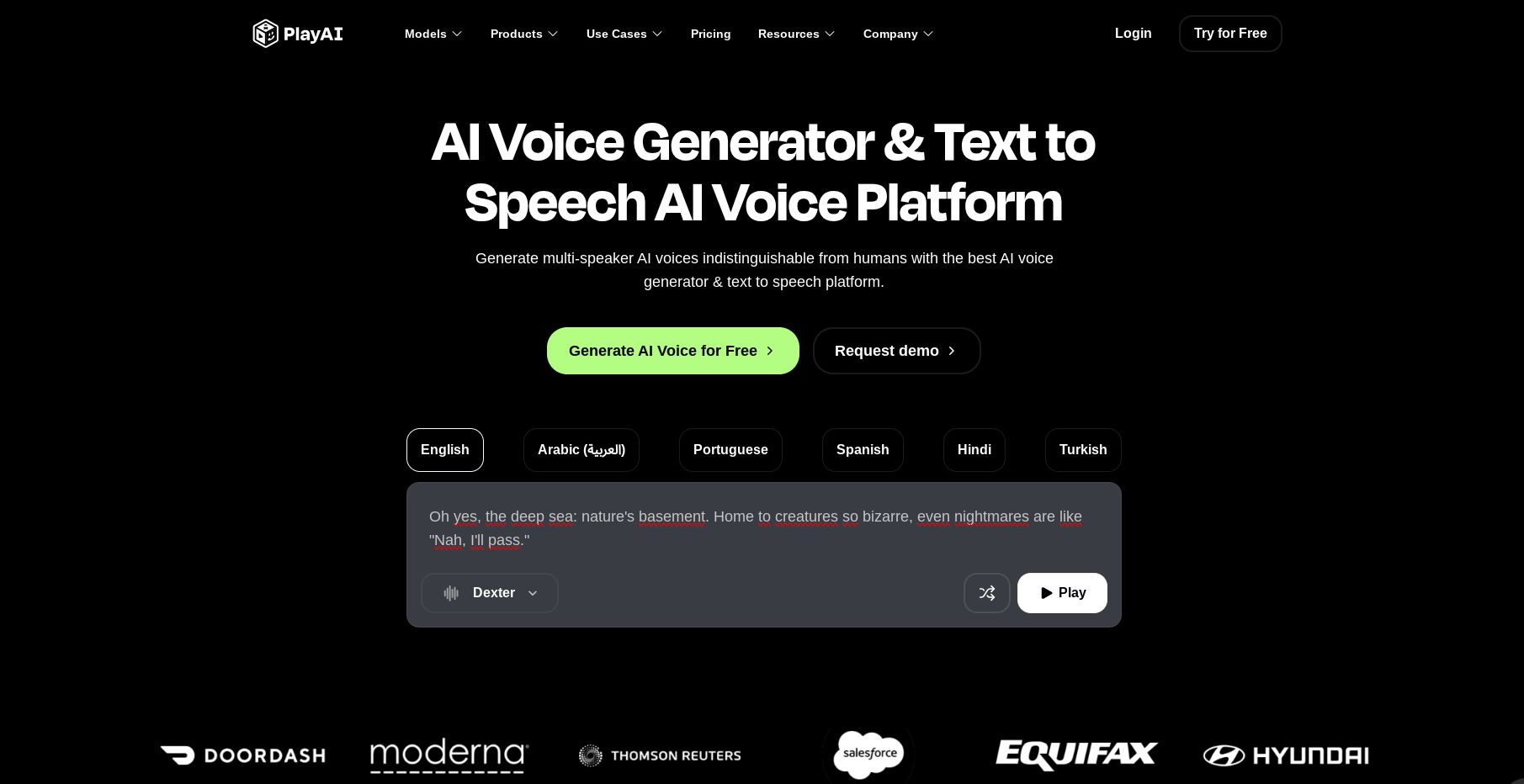
- Best For: Play.ht has carved out a niche by excelling at conversational audio, a key point of differentiation from Murf’s more presentational voices. It is an excellent choice for turning articles into audio or creating podcast-style content.
- Consider: Play.ht uses a monthly word-based quota, which, like ElevenLabs, offers more flexibility than Murf’s annual hour-based system. If your primary need is creating audio articles or podcasts, Play.ht presents a very compelling alternative.
- Avoid: Avoid Play.ht if your primary need is an integrated video-syncing studio, as it does not offer one.
Murf vs. Lovo (Genny): The Workflow Warriors
- Best For: Both Murf and Lovo (with its Genny studio) are excellent for users who prioritize an all-in-one studio environment.
- Consider: Lovo is arguably Murf’s most direct competitor in terms of philosophy. When comparing them head-to-head, I found the user interfaces to be similar in their ease of use. The choice between them often comes down to personal preference on voice libraries and subtle differences in the studio workflow.
- Avoid: Don’t spend days debating between them. Both offer free trials; test both with the same short project and see which studio’s workflow feels more intuitive to you.
Murf vs. Descript: The Editing Workflow Innovators
- Best For: Another major player, Descript, competes not just on voice but on editing philosophy. It allows users to edit video and audio by editing a text transcript, a powerful workflow for podcasters and interviewers.
- Consider: Descript’s Overdub feature is a strong alternative to Murf’s voice cloning, and its text-based editing can be much faster for interview-heavy content. It’s a powerful tool for users who prioritize post-production editing flexibility.
- Avoid: Avoid Descript if you prefer a traditional timeline-based editing experience, as its text-based approach can be disorienting for users accustomed to tools like Premiere Pro or Murf’s studio.
Master AI Voice Comparison Table
| Feature | Murf AI | ElevenLabs | Play.ht |
|---|---|---|---|
| Best For | Video/Presentation Workflow | Voice Realism/Emotion | Conversational Audio/Podcasts |
| Pricing Model | Annual Hour Limits (Restrictive) | Subscription Tiers (Flexible) | Monthly Word Quotas (Flexible) |
| Streaming API | ❌ No | ✅ Yes | ✅ Yes |
| Integrated Studio | ✅ Yes | ❌ No | ❌ No |
| API Access | Enterprise Only | Available on Lower Tiers | Available on Lower Tiers |
Part 7: Final Verdict & Frequently Asked Questions
After an exhaustive Murf Review, my final verdict is clear. Murf AI is worth it for marketing and educational teams who value a fast, integrated workflow for creating video-based content and can operate within the platform’s generation limits. Its intuitive studio can genuinely accelerate production schedules.
However, it is not worth it for high-volume creators, audiobook producers, or developers who need maximum voice realism and pricing flexibility. For those users, the restrictive pricing and the realism gap are significant factors to weigh. If you do decide Murf is the right fit, stack a working Murf voucher code on top of the annual plan to recover some of that premium.
What We Love (Pros)
- Incredibly intuitive User Interface (UI) in its studio that simplifies complex tasks.
- Seamless syncing of audio with video timelines and presentation slides.
- Strong collaboration features for teams on Business and Enterprise plans.
- Good selection of clear, professional voices perfect for business and educational content.
- Enterprise-grade security with verified SOC 2 Type II compliance.
- Effective pronunciation control using phonetic spelling.
💡 Things to Consider
- Restrictive annual generation limits can create significant hidden costs and force expensive upgrades.
- The voice realism and emotional range lag behind market leaders like ElevenLabs.
- The refund policy is widely reported as being inflexible.
- The Murf API is gated behind the expensive Enterprise plan, limiting developers who want to build custom integrations.
- Can struggle with the pronunciation of non-standard words without manual phonetic correction.
Recommendation by User Segment
- For the Corporate Trainer/Marketer: Yes. The time saved by the studio workflow on creating and updating training materials and marketing videos will likely justify the cost. The collaboration and security features are built for you.
- For the YouTuber: It depends. If you produce many short, informational videos and value speed, the Creator plan can be a cost-effective solution. If you create long-form documentaries or content that requires emotional nuance, you should look at ElevenLabs first.
- For the Audiobook Author: No. For audiobook narration, the current lack of deep emotional range in the voices is a significant consideration, making it less suitable for the required nuanced performance.
- For the Developer: No. The gated API and lack of a flexible, consumption-based pricing model make it a non-starter compared to more developer-friendly competitors.
Frequently Asked Questions
Q1: How much does Murf AI really cost in 2024?
A1: Murf AI’s popular Creator plan costs $348 per year, but the true cost can unexpectedly jump to $1188 annually if you exceed its 24-hour generation limit. The advertised monthly price doesn’t reflect this potential for a forced upgrade.
Based on my analysis in this Murf Review, high-volume users should budget for the Business plan from the start to avoid this hidden cost and ensure their projects aren’t interrupted. This is a critical point of user frustration mentioned in numerous Trustpilot reviews. The total cost of ownership (TCO) is highly dependent on your usage volume.
Q2: Is Murf AI worth the money?
A2: It depends on your priorities. Murf AI is worth the money for users who prioritize workflow efficiency over pure voice quality, such as marketers creating explainer videos and educators developing e-learning courses. The integrated studio saves a significant amount of time, which can provide a huge return on investment (ROI).
However, for those needing the most realistic and emotive voices, like audiobook producers or podcasters, I believe competitors like ElevenLabs currently offer better value due to their superior vocal realism and more flexible pricing structures.
Q3: Should I use Murf AI or ElevenLabs?
A3: You should use Murf AI for video projects and ElevenLabs for audio-first projects. My testing for this Murf Review shows Murf’s strength is its fantastic video-syncing studio, which dramatically speeds up production for visual content.
In contrast, ElevenLabs provides more emotionally realistic and nuanced voices, along with subscription tiers that offer more flexibility, making it my superior choice for narration, podcasts, and other audio-focused creative work. The choice ultimately comes down to whether your bottleneck is workflow or voice quality, a finding supported by many G2 user comparisons.
Q4: What are the main problems with Murf AI?
A4: Based on my comprehensive review, the two main problems with Murf AI are its restrictive annual voice generation limits and a voice quality that, while good for business, is less realistic than top competitors.
The pricing model can lead to unexpected and significant costs, which is the most common user complaint found across review platforms like PCMag. The voices may also lack the emotional depth required for more creative storytelling projects, creating a noticeable “realism gap” when compared to market leaders.
Q5: Can I trust Murf AI? Is it legit?
A5: Yes, Murf AI is a legitimate and trustworthy company with a strong focus on security. I’m impressed by their SOC 2 Type II compliance, a key indicator of enterprise-grade data protection and a serious investment in trust, as detailed on their security page.
However, while the company itself is legitimate, I advise users to be cautious of their strict refund policy and to be proactive in managing their subscription renewals. The product is effective, but the business policies require careful attention from the consumer.
Q6: What are the hidden costs of Murf AI?
A6: The primary hidden cost of Murf AI is the forced upgrade required when you exhaust your annual voice generation limit. A user on the $348/year Creator plan who runs out of their 24 hours of audio can be forced to upgrade to the $1188/year Business plan mid-cycle, as confirmed on their pricing page.
This means your true cost can be over three times your initial budget, a detail not made prominent in their promotional positioning. Proactively choosing the right tier is the best way to mitigate this risk.
Q7: What is the best AI voice generator for YouTube?
A7: For YouTubers prioritizing speed and workflow for informational videos, Murf AI is one of the best AI voice generators due to its video-syncing studio. My Murf review found it excels at this task.
However, if your channel focuses on storytelling, documentaries, or requires highly emotional narration, I’ve found that ElevenLabs is often the better choice for its superior vocal realism and ability to convey nuance. Many top creators use a combination of tools, leveraging Murf for quick productions and ElevenLabs for flagship content where quality is paramount.
Continue Your Research
If you’re still weighing your options, these companion guides go deeper into the surrounding decision-making and savings landscape:
- For the full deep-dive on whether the studio justifies its premium pricing, revisit our complete Murf Review analysis.
- To explore every viable substitute side-by-side, browse our breakdown of Murf top alternatives and competitors.
- To see what other SaaS and AI tools we’ve put through the same testing protocol, visit our full category of review articles.
- And if you want to keep saving on every subscription you run, check the constantly-updated latest coupons hub.
Appendix: The Coupons Scout Verification Protocol (CSVP™)
At Coupons Scout, our verification process for reviews and buying guides is led by domain experts. For SaaS & AI Tools, expert Jettawat Kasemchaiyanun tests software performance, checks API integrations, and verifies if free plans are genuinely useful.
Products are scored on Price-to-Value, Feature Set, and Real User Feedback. Our Head of Operations, Kanokchai Likitapiwat, then audits all data points, such as pricing tiers and guarantees, to ensure they match the merchant’s live site. Finally, Editor-in-Chief Joanne Lovell provides a final check for clarity, objectivity, and proper disclosure before publication. This multi-step process ensures our reviews are accurate and trustworthy.

