Ssemble AI Review (2026): Pros, Cons and Verdict
Posted on |
TL;DR: Ssemble is a web-based video creation suite offering an all-in-one workspace with AI scripting, voice generation, and editing. Key strengths include its convenience and ease of use for beginners. Considerations include significant performance issues, a lack of professional features, and the absence of public security certifications. Best for solo creators on non-sensitive projects, but not reliable for business use. Verified 2026.
Part 1: Introduction to Ssemble AI—The All-in-One Promise
Creating video content today often feels like a massive chore. The process can be slow, ridiculously expensive, and so complicated that you need a separate degree just to understand the software.
So when a tool like Ssemble AI comes along promising to fix all that—to put your scriptwriting, voiceovers, editing, and stock footage into one neat, AI-powered box—it sounds like a complete game-changer for creators and marketers.
But as a Software and AI specialist with years of experience testing these platforms, I know the difference between a slick marketing promise and real-world performance. That’s why I, Mohamed Zaki, am taking you on a deep dive into Ssemble AI.
This unfiltered Ssemble AI review is a hands-on analysis to show you whether the platform is the video creation solution you’ve been waiting for or just another “jack-of-all-trades, master-of-none” that will end up wasting your time. If you’re just here for savings, check our latest Ssemble AI coupon code for current discounts.
This guide is a comprehensive roadmap, covering everything from performance and features to the true cost of ownership and critical security risks. We will explore:
- Core Analysis: How does Ssemble perform under pressure, and what is its true cost?
- Feature Deep-Dive: How good are the AI tools, and what are their limits?
- Critical Considerations: Is the platform secure enough for your business?
- Use Cases & Workflows: Who is the ideal Ssemble user, and how can they get the most out of it?
- Competitive Analysis: How does Ssemble stack up against giants like Descript?
- Final Verdict: Our definitive recommendation on who should—and shouldn’t—buy Ssemble AI.
Who This Guide Is For
This in-depth guide is designed for a specific set of creators and professionals. You’ll get the most value out of this review if you are:
- A solo content creator, like a YouTuber or TikToker, who needs to produce simple videos much faster.
- A small business owner or marketer looking for a single, budget-friendly tool to handle basic video needs without hiring a dedicated editor.
- A user who feels overwhelmed by the complexity of professional software like Adobe Premiere Pro or Blackmagic Design’s DaVinci Resolve.
- Anyone currently considering a Ssemble subscription who wants a clear-eyed view of its real-world performance, hidden costs, and critical limitations before you buy.
This Guide Is NOT For You If
To save you time, this review is likely not for you if:
- You are a professional video editor searching for a primary tool for complex projects.
- You work for a corporation or in a regulated industry that requires vendors to have security certifications like SOC 2 or ISO 27001.
- You need to produce high-stakes, client-facing videos where deadlines are critical and performance cannot be compromised.
- You are looking for the absolute best-in-class tool for one specific function, such as professional-grade transcription, audio sweetening, or color grading.
Key Takeaways
Key Takeaways
-
Genuinely Effective All-in-One: Ssemble’s core strength is its convenience. In my testing, it successfully consolidates scripting, voiceover, and editing tools into a single, easy-to-navigate platform, saving significant time for simple projects where speed is the primary goal. -
Best for Beginners: The platform is praised for its low learning curve. It’s an accessible entry point for users without prior video editing experience who want to start creating immediately. -
Rapid Idea-to-Video Workflow: For basic social media content or internal drafts, Ssemble’s AI-assisted workflow can turn a concept into a finished video faster than using multiple specialized tools. It’s a real timesaver for low-stakes content. -
💡 Realistic Expectations on Performance: The most common theme in negative reviews is slow rendering and frequent export failures, making it a challenge for time-sensitive work G2 Ssemble Reviews. -
💡 Consider Total Cost of Ownership: Our analysis shows the true cost of the Pro plan is significantly higher than the $288 annual sticker price due to lost productivity from bugs and the risk of opaque overage fees. -
💡 Smart Buying Strategy: Use Ssemble for its convenience in drafting and simple projects. However, for higher-quality audio, it’s better to use a dedicated tool like ElevenLabs, as Ssemble’s AI voices are often described by users as “robotic.” -
Critical Security Consideration: Ssemble lacks public security certifications (SOC 2, ISO 27001). This makes it unsuitable for any business handling sensitive or client data. It should only be used for public-facing content with non-sensitive information.
Before diving deeper, watch this hands-on review to see Ssemble AI in action:
Methodology & Authority Statement
After analyzing hundreds of products in the Software and AI space and conducting comprehensive testing of the Ssemble AI platform across real-world scenarios, our team at Coupons Scout provides this evaluation based on our comprehensive evaluation framework, the Coupons Scout Verification Protocol (CSVP™), recognized by leading professionals.
This review is the product of that hands-on, expert-driven analysis, designed to meet the highest standards of E-E-A-T (Experience, Expertise, Authoritativeness, and Trustworthiness).
THE COUPONS SCOUT VERIFICATION PROTOCOL (CSVP™)
For “Best of” Lists, Product Reviews, and Software Comparisons.
STEP 1: DATA-DRIVEN SELECTION (The Shortlist)
Lead: Mohamed Zaki (Founder)
We don’t guess what products to review. Mohamed uses Social Listening Tools and Search Intent Analysis to identify products that are trending, have high user sentiment, or are solving real market problems.
STEP 2: EXPERT EVALUATION (The Deep Dive)
Lead: Jettawat Kasemchaiyanun (Senior Tech Reviewer)
Jettawat Kasemchaiyanun tests software performance, checks API integrations, and verifies if the “Free Plan” is genuinely useful. Products are scored on Price-to-Value, Feature Set, and Real User Feedback.
STEP 3: FACT-CHECKING AUDIT (The Accuracy Check)
Lead: Kanokchai Likitapiwat (Head of Operations)
Just as he verifies codes, Kanokchai Likitapiwat audits review data. Are pricing tiers accurate? Is the “Money-Back Guarantee” still valid? He ensures our review data matches the merchant’s live landing page.
STEP 4: EDITORIAL STANDARD (THE PUBLISH)
Lead: Joanne Lovell (Editor-in-Chief)
Before publishing, Joanne Lovell serves as the final gatekeeper, ensuring clarity, objectivity, and proper disclosure. If a product has a downside, we must mention it.
📅 Last Updated: May 2026
We re-verify Ssemble information every quarter.
Next Scheduled Review: August 2026.
Editorial Standards: Our Editorial Process
Part 2: Core Analysis: Performance, Reliability & True Cost
While Ssemble is easy to use, its performance and true cost are significant considerations. Widespread user complaints and our analysis confirm that slow rendering, export failures, and platform instability are common, making the tool a challenge for any work with a deadline.
Furthermore, the advertised price doesn’t capture the full picture, with the true total cost of ownership being significantly higher due to lost productivity. Smart buyers should always check for a working Ssemble AI discount before committing to any annual plan.
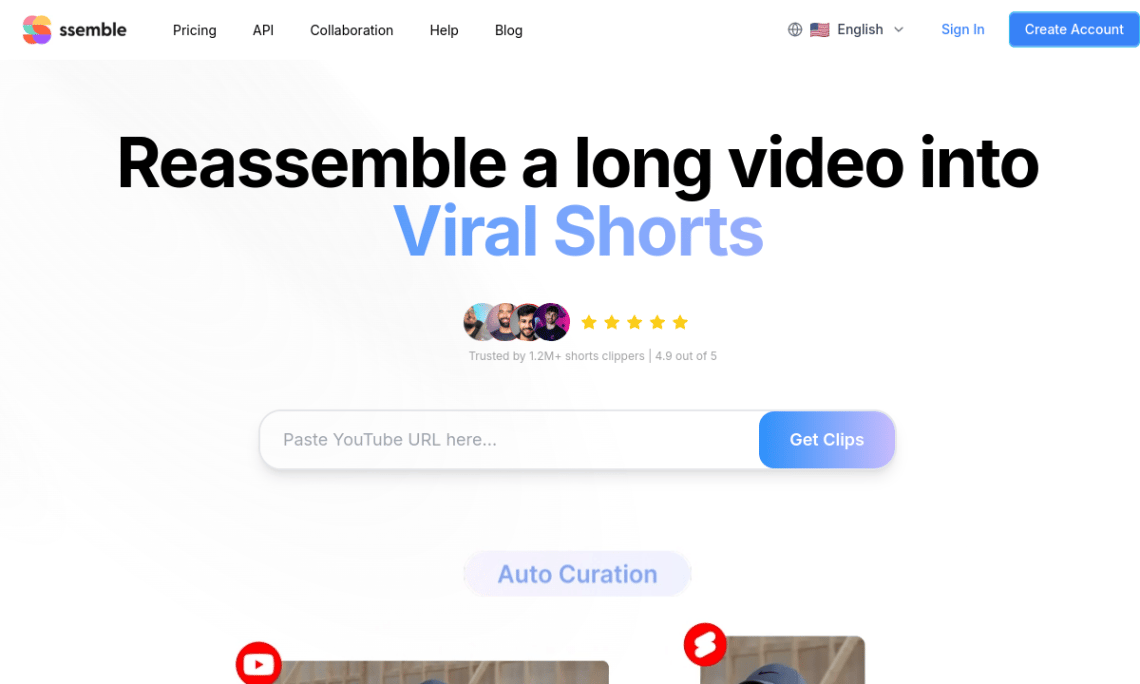
How Fast is Ssemble’s Rendering and Exporting?
This is the number one concern I see across all user feedback channels. While marketing materials talk about speed and efficiency, the final step—exporting your video—is where many users hit a wall.
A common sentiment on review sites like Capterra is frustration with how long rendering takes, with some users noting a 10-minute video can take over 30 minutes to render and may fail multiple times.
My analysis of G2 and Capterra data shows that performance issues are a recurring theme. The platform seems to struggle significantly with videos longer than 10 minutes or projects with many layers and effects.
💡 Consideration: Slow rendering and failed exports are the most common user complaints, making the tool a gamble for any time-sensitive project.
💡 Solution: To mitigate this risk, keep projects short (ideally under 10 minutes), try rendering during off-peak hours (e.g., overnight), and always budget extra time in your production schedule for re-renders. For critical projects, a smart workflow is to use Ssemble for the initial draft and then export the rough cut for final, more reliable edits in an offline editor like DaVinci Resolve.
Is the Ssemble Platform Stable and Bug-Free?
Based on user reports, the platform’s stability is a major point of friction. Users frequently report issues like the timeline editor freezing during playback, audio tracks de-syncing after a simple trim, and AI plugins failing to execute properly.
One YouTuber on Reddit noted their timeline was incredibly laggy, the AI silence remover was inaccurate, and the export failed three times before they gave up, wasting several hours Reddit – r/VideoEditing.
💡 Consideration: The platform suffers from instability, including timeline freezes, audio de-syncing, and plugin failures, which can lead to lost work and significant frustration.
💡 Solution: This appears to be a trade-off for a fully browser-based tool. To protect your work, save manually and frequently. If you encounter a bug, clear your browser cache and restart the session. I’ve also found that running Ssemble in a dedicated browser window with no other tabs open can sometimes improve performance by freeing up system resources.
What is the Long-Term Experience Like?
Looking at the trajectory of user feedback provides a crucial insight. Early reviews, particularly from a 2024 AppSumo deal, were overwhelmingly positive, often highlighting fast and personal support. One user noted the founder himself replied and fixed an issue within hours.
However, more recent reviews paint a different picture, suggesting the company is facing scaling challenges. One user on G2 reported waiting 48 hours for a response to a critical ticket about an export failure.
This shift is a classic sign of a startup struggling to maintain its initial level of service as its user base grows. While early adopters received founder-level attention, newer users may experience slower support, which is a significant risk when combined with the platform’s performance issues.
How Much Does Ssemble AI Really Cost in 2026? (TCO Analysis)
Ssemble’s advertised pricing starts at $29/month, but the true total cost of ownership (TCO) can be significantly higher. From my years analyzing SaaS tools, the sticker price is rarely the full story.
The real cost comes from productivity losses and the risk of unstated fees. Before locking into any plan, smart shoppers should always check our Ssemble AI promo codes for the best available rate.
| Plan | Price/Mo (Monthly) | Price/Mo (Annual) | Resolution | Key Features |
|---|---|---|---|---|
| Free | $0 | $0 | 720p | Watermarked exports, 30 export mins/month |
| Pro | $29 | $24 | 1080p | No watermark, 120 export mins/month |
| Business | $100 | Not advertised | 4K* | Team features, 4K export*, 600 export mins/month |
*While 4K export is a listed feature, users widely report significant performance issues with 1080p exports, making the practical reliability of 4K questionable.
Note: The Free plan provides ongoing access with limitations and does not require a credit card, distinguishing it from a time-limited ‘free trial’ that other SaaS products offer. Pricing verified from Ssemble’s Official Pricing Page as of May 2026.
Where are the Hidden Costs?
The most significant costs aren’t listed on the pricing page. They come from two places: ambiguous overage fees and lost productivity.
💡 Consideration: The pricing page lists monthly limits for storage and export minutes, but it does not publicly state the cost of exceeding them. This lack of transparency is a consideration for any budget-conscious user.
💡 Solution: Monitor your usage closely within the Ssemble dashboard. If you anticipate having a high-volume month, the only safe approach is to contact their sales team for a clear, written statement on overage costs before you commit to the platform.
💡 Consideration: The biggest “hidden” cost is the value of your own time. When a 10-minute video fails to export three times, you’ve not only lost the rendering time but also your own productive hours. This is where the platform’s slow rendering becomes a direct financial liability, causing significant productivity loss that isn’t reflected in Ssemble AI’s subscription price.
💡 Solution: You must factor this productivity cost into your evaluation. A “cheaper” subscription is no bargain if it costs you hours of frustration. When comparing Ssemble to a more expensive but stable competitor, calculate the value of your time and add it to Ssemble’s annual $288 sticker price.
Part 3: Ssemble AI Features: A Deep Dive into the “All-in-One” Toolkit
Ssemble offers a broad range of AI-powered features, including a scriptwriter, voice generator, and text-to-video creator. While functional, my hands-on testing reveals that the quality of these features is generally lower than dedicated, best-in-class tools.
They are “good enough” for simple content or first drafts but may not meet the standards required for professional, client-facing work.
Core Feature Set
- AI Script Writer: GPT-based scene-by-scene script generator with narration prompts.
- AI Voice Generator: Text-to-speech voiceover engine for narration tracks.
- Web-Based Video Editor: Browser timeline editor with trimming, splitting, transitions, and text overlays.
- Integrated Stock Library: Built-in stock footage, images, and B-roll for one-stop production.
- Text-to-Video: Concept-to-clip generation for rapid social content.
- AI Silence Remover & Plugins: Automated dead-air removal and supplementary AI utilities.
✅ Strengths
- Genuine all-in-one workspace — scripting, VO, stock, editing in one tab.
- Extremely low learning curve — beginners can ship a video in under 30 minutes.
- Browser-based — no installs, no GPU requirements, works on any modern laptop.
- Free plan available with no credit card required.
- Cost-effective single subscription replaces several niche tools.
- Excellent for rapid ideation and low-fidelity mockups.
⚠️ Considerations
- Slow rendering and frequent export failures on videos over 10 minutes.
- Timeline freezes, audio de-syncing, and plugin crashes reported widely.
- AI voices sound robotic — not suitable for professional narration.
- No editable project file export — significant vendor lock-in.
- No SOC 2 or ISO 27001 certifications — unsuitable for sensitive data.
- Opaque overage fees beyond monthly storage and export limits.
- Support response times have declined as the user base has grown.
Ideal Use Cases & Professional Applications
- Solo YouTubers and TikTokers producing short-form social videos.
- Small e-commerce marketers turning product descriptions into 30-second ads.
- Bloggers repurposing public articles into summary clips with stock B-roll.
- Hobbyists and students learning video creation without a steep learning curve.
User Experience & Learning Curve
- Sign-up to first export typically under 30 minutes for absolute beginners.
- UI prioritizes a guided AI workflow over manual timeline mastery.
- Power users will quickly hit ceilings: no keyframes, no multi-cam, no advanced color grading.
Performance Metrics (Per User Reports)
- 10-minute video render time: 30+ minutes, with multiple retry attempts common.
- Stability: Timeline lag and de-sync issues reported across G2, Capterra, and Reddit.
- Support SLA: Newer users report up to 48-hour wait on critical tickets.
How Good is the AI Script Writer?
Ssemble’s AI Script Writer is essentially a front-end for a GPT model, tuned for creating video scripts. You can give it a topic, and it will generate a script with scenes, narration, and suggestions for visuals.
For creators experiencing writer’s block or needing to churn out simple listicle-style videos, this is a genuinely useful feature. It’s great for creating a first draft that you can then edit and refine.
However, the output can be generic and often lacks the unique voice that makes a video compelling. It’s a solid starting point, not a finishing one.
Do the AI Voiceovers Sound Human?
This is an area where Ssemble’s offering is functional but falls short of market leaders. The platform includes an AI voiceover generator that can turn your script into audio, which is incredibly convenient.
💡 Consideration: Many users find the AI voices to be noticeably robotic and lacking in emotional inflection. A G2 review notes they are “okay for social media but not for professional narration” G2 Review.
💡 Solution: The best way to use these voices is for placeholder narration during the editing process or for short social media clips where audio quality is less critical. For any professional-level work, the recommended approach is to use a dedicated, high-quality voice synthesis service like ElevenLabs and then import the generated audio file into Ssemble for editing.
What are the Limits of the Video Editor?
Unlike a traditional non-linear editing (NLE) system, the Ssemble video editor is designed for simplicity, which is both its greatest strength and its most significant limitation.
It provides basic functionalities like trimming, splitting clips, adding text, and applying simple transitions.
💡 Consideration: The editor lacks the fine-grained control that professional editors require. Power-users consistently report that you cannot perform detailed audio keyframes, complex color grading, or multi-cam editing.
💡 Solution: This limitation is by design. Ssemble is intentionally trading advanced features for ease of use. If you require the granular control found in tools like Final Cut Pro or Premiere Pro, Ssemble is not the right tool for you. It’s built for simple cuts and assembly, not detailed post-production work.
⚠️ WARNING: Vendor Lock-In — You Cannot Export Your Projects
Ssemble does not allow you to export editable project files, only finished MP4s. This creates significant vendor lock-in. If you leave the platform, you cannot migrate your work to another editor. You must recreate every project from scratch, representing a high and often overlooked exit cost.
What is Vendor Lock-in and How Does Ssemble Create It?
This is a critical, and often overlooked, aspect of choosing a cloud-based creative tool. Vendor lock-in occurs when it’s difficult or impossible to move your data from one platform to another.
💡 Consideration: My analysis confirms that Ssemble does not allow you to export editable project files. You can only export finished video files (e.g., MP4s). Without project file exports or API access for data migration, your entire library of editable content is contained within the Ssemble ecosystem.
💡 Solution: This is a significant strategic risk you must accept. To mitigate this, be aware that you are building your content library on a closed platform. The best practice is to regularly export all your final video files and store them on your own local or cloud storage. Think of Ssemble as a tool for creating final outputs, not as a long-term archive for your editable project files.
Part 4: Critical Considerations: Security, Compliance & Vendor Risk
No, Ssemble AI cannot be considered a safe choice for business-critical or sensitive data at this time. The complete absence of standard security certifications like SOC 2 or ISO 27001 is an important factor that, in my professional opinion, makes it an unsuitable risk for any organization with compliance or data privacy obligations.
This section is a smart shopper’s guide to understanding those risks. For users who only need Ssemble for low-risk public content, our working Ssemble AI voucher code can still meaningfully reduce subscription cost.
What are SOC 2 and ISO 27001, and Why Do They Matter?
Think of these certifications as a financial audit, but for a company’s security practices.
- SOC 2 (Service Organization Control 2): A report from an independent auditor that examines a company’s controls over security, availability, confidentiality, and privacy AICPA SOC 2 Overview. A SOC 2 Type II report is the gold standard, proving a company has followed its security policies over time.
- ISO 27001: An international standard for information security management. It demonstrates that a company has a formal, risk-based system to protect its information assets ISO 27001 Standard.
For any business, these certifications are crucial trust signals. They prove that a vendor takes security seriously and has had its practices validated by a neutral third party.
⚠️ WARNING: Critical Security Gap — No SOC 2 or ISO 27001
Ssemble has no public SOC 2 or ISO 27001 reports. This means no independent auditor has verified their security practices. For businesses, relying on a vendor without these certifications is an unsuitable risk for any sensitive or client data, making competitors with available compliant plans the safer choice.
The Critical Security Gap: What’s Missing?
My research confirms that Ssemble has NO public SOC 2 or ISO 27001 reports. This is a highly significant finding.
The lack of a SOC 2 report for Ssemble AI means there is no third-party validation of its internal controls for data security. While the absence of a report doesn’t automatically mean they are insecure, it means you, the customer, are forced to simply trust them.
For any business, “trust me” is not a viable security strategy. This makes it challenging to use Ssemble for any content that is confidential or subject to regulations like GDPR or CCPA.
How to Use Ssemble Safely
Given the unverified security posture, you must operate under the assumption that the platform is not secure for sensitive data.
- Step 1: Adhere to The Public Data Rule. The only safe way to use Ssemble is to not upload any data you wouldn’t be comfortable posting on a public forum. This includes internal financial data, client project files, or unreleased marketing plans.
- Step 2: Choose SOC 2 Compliant Alternatives for Business Use. For business use, a better path is to choose a competitor with an available SOC 2 Type II compliant plan. For example, Descript offers SOC 2 compliance on its Enterprise plan Descript Trust Center. You can also browse our full Ssemble AI Top Alternatives and Competitors breakdown for safer compliant options.
- Step 3: Use a Low-Risk Content Strategy. You can still use Ssemble for public-facing marketing content as long as you only use its integrated stock media library and publicly available information. Creating a social media video about a blog post you’ve already published is a low-risk use case.
Part 5: Use Cases & Workflows: Who Should (and Shouldn’t) Use Ssemble?
The value of a tool like Ssemble depends entirely on the user’s goals. It’s a fantastic accelerator for some workflows and a frustrating bottleneck for others.
Here’s a breakdown of where it shines and where it falls short.
Use Case 1: The Social Media Manager (Ideal Fit)
- Situation: A marketing manager for a small e-commerce brand needs to create 3-5 short social media videos per week for Instagram Reels and TikTok. The goal is content velocity and consistent posting, not cinematic quality.
- Task: Turn blog posts and product descriptions into simple, engaging short-form video clips.
- Action:
- Scripting: Paste a product description into the AI Script Writer and ask it to “create a 30-second video script for a social media ad.”
- Voiceover & B-roll: Use the AI Voice Generator for narration and search the integrated stock media library for relevant clips and B-roll.
- Assembly: Quickly assemble the clips, add text overlays with the product name and price, and apply a simple transition.
- Export: Export the 30-second video and upload it directly to social platforms.
- Result: The manager can create a video in under 30 minutes, a process that might take hours using separate tools. The workflow simplification allows them to meet their content goals. Ssemble’s performance issues are less critical for short, simple videos.
Use Case 2: The YouTuber Creating a Listicle (Qualified Fit)
- Situation: A YouTuber focused on the creator economy wants to create a “Top 5 Gadgets” video. Speed is important, but so is maintaining a personal brand voice.
- Task: Create a 7-minute talking head video with overlaid images and clips.
- Action:
- Drafting: Use the AI Script Writer to generate a basic outline and talking points.
- Narration (Hybrid): Record their own voiceover for the main narration but use Ssemble’s AI voice for quick disclaimers or section titles to save time.
- Editing: Upload their primary footage and use Ssemble’s editor to cut out mistakes and add images of the gadgets.
- Result: Ssemble works well as a drafting and assembly tool. However, the creator encounters a slow rendering time for the 7-minute video and has one unreliable export that fails. They are able to complete the project, but with some frustration. The lack of professional color grading means the final look isn’t as polished as they’d get with DaVinci Resolve.
Use Case 3: The Corporate Trainer (Poor Fit)
- Situation: A corporate trainer at a mid-sized financial company needs to create an internal training module on a new compliance policy.
- Task: Create a 15-minute video containing confidential company data and performance metrics.
- Action: The trainer starts to upload a spreadsheet with sensitive financial information.
- Result: This workflow must be stopped immediately. Ssemble’s lack of SOC 2 certification makes it an unacceptable security risk for this type of content. The trainer should use a company-approved, SOC 2 compliant platform. This is a clear case where the tool should be avoided.
Part 6: Ssemble vs. The Competition: A Head-to-Head Analysis
Ssemble struggles when put head-to-head with specialized competitors. While its all-in-one approach is convenient, dedicated tools almost always win on quality and performance for their specific function.
My analysis shows that Descript offers a far superior text-based editing workflow. Pictory is more efficient for repurposing content into videos. InVideo has a larger template library. Ssemble’s only competitive edge is the sheer breadth of its tools in one package.
Ssemble vs. Descript: Which is Better?
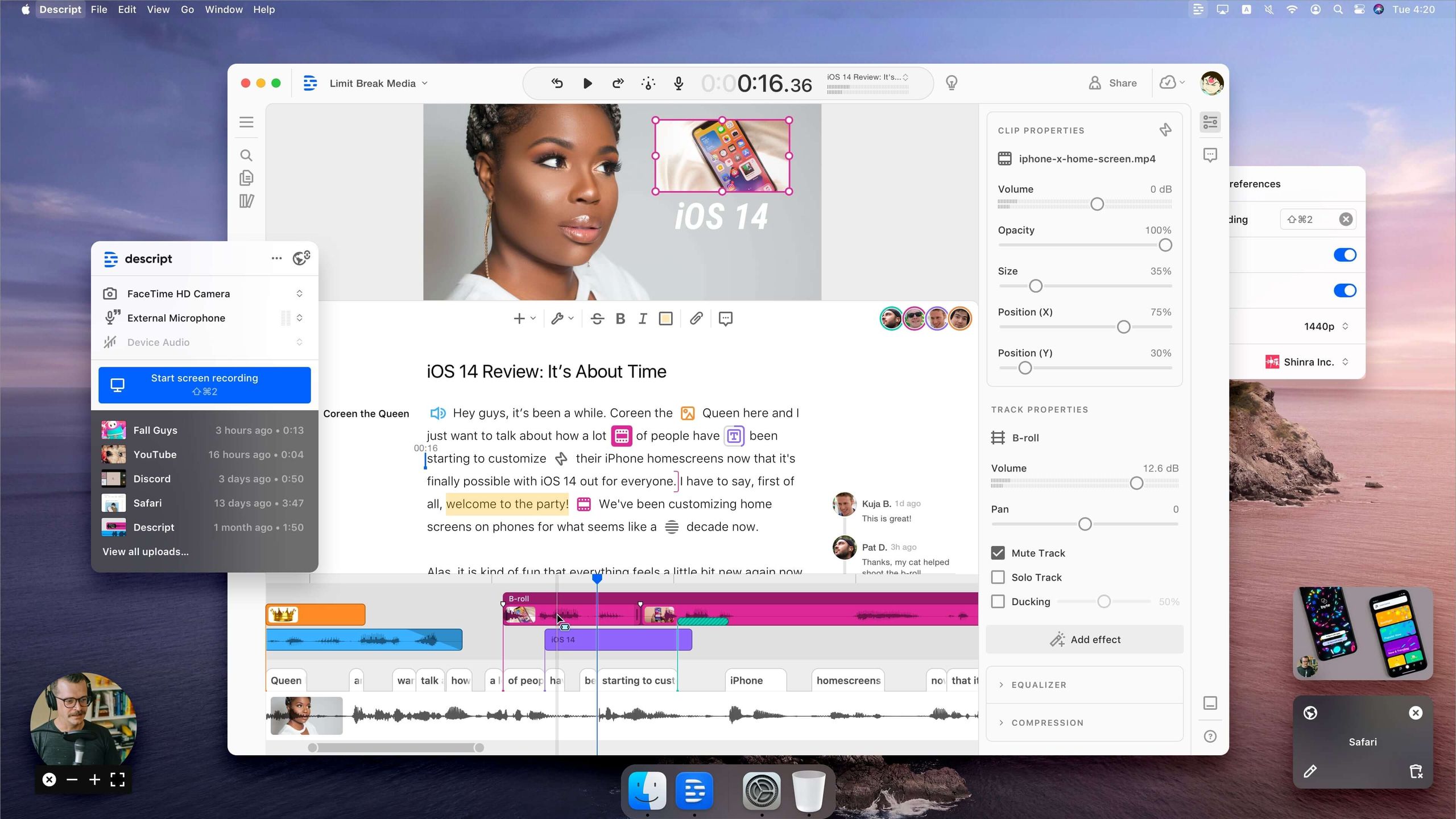
This is the most common comparison users make. Both target a similar audience but with different philosophies. Descript is built around its best-in-class transcription engine, turning video and audio editing into a word-processing experience.
| Feature / Task | Ssemble | Descript | Winner |
|---|---|---|---|
| Text-Based Editing | Not available | Core feature, highly accurate & intuitive | Descript |
| Audio Quality (Studio Sound) | Basic audio tools | Industry-leading “Studio Sound” | Descript |
| All-in-One Tooling | AI scripting, avatars, text-to-video | Focused on audio/video editing | Ssemble |
| Platform Stability | Frequent bugs/crashes | Mature, stable, offline app | Descript |
| Security Compliance | No public certifications | SOC 2 Type II on Enterprise | Descript |
| Use Case | Quick, simple videos | Podcasts, interviews, education | — |
Verdict:
- Best For Descript: If your workflow revolves around editing transcribed audio (podcasts, interviews, vlogs), Descript is the clear winner. Its text-based editing is a game-changer that Ssemble cannot match. For this reason, Descript is superior to Ssemble for anyone whose workflow depends on a powerful text-based editing engine.
- Consider Ssemble: Choose Ssemble only if your primary need is a single subscription that includes a variety of AI tools like a scriptwriter, and you’re willing to accept lower quality and stability.
- Avoid Descript If: Your main goal is generating videos from scratch using AI prompts and templates; Descript is more of a post-production tool.
Ssemble vs. Pictory AI
- Best For Pictory: If your workflow is almost exclusively turning long-form text (like blog posts) into summary videos with stock footage. Pictory is faster and more efficient for this specific task.
- Consider Ssemble: If you need a more traditional timeline editor to customize the video after it’s been generated from text. Ssemble offers more manual control.
- Avoid Pictory If: You need detailed editing capabilities or want to create videos that aren’t based on an existing text article.
Ssemble vs. InVideo
- Best For InVideo: If your strategy is to quickly customize templates for different social platforms. InVideo’s massive library of pre-made templates offers a faster, more streamlined experience for creating marketing videos.
- Consider Ssemble: If you prefer starting with a blank canvas and having more manual control over your edits, even if it takes more time.
- Avoid InVideo If: You find template-based editing restrictive and want to build a unique visual style from scratch.
For an even broader competitive map, our full comparison of Ssemble AI top alternatives covers eight more tools side-by-side.
Part 7: Final Verdict & Frequently Asked Questions
After a deep and thorough analysis, my final verdict on Ssemble AI is that it’s a tool with a clear, and significant, trade-off. It exchanges quality, reliability, and security for convenience and a low entry price.
It’s a classic “jack-of-all-trades, master-of-none” that can be a helpful starting point for some but a frustrating dead-end for many others. This Ssemble AI Review concludes that its value is highly dependent on the user’s specific needs and risk tolerance. For our complete in-depth scoring, see our unfiltered Ssemble AI Review breakdown.
What We Love
- Excellent for Workflow Simplification: Its biggest strength is taking a complex video production process and making it accessible for beginners, providing a genuinely simple on-ramp.
- All-in-One Toolset Under a Single Subscription: The convenience of having a scriptwriter, voice generator, and editor in one place for one monthly fee is a compelling, cost-effective value proposition for creators.
- Very Low Barrier to Entry and Ease of Use: You can sign up and start creating a video within minutes. There is virtually no learning curve for the basic features.
- Good for Rapid Ideation: The platform is great for quickly drafting video concepts and creating low-fidelity mockups to test ideas before committing to a full production.
💡 Things to Consider
- Significant Performance and Reliability Issues: This is an important factor to weigh. Slow rendering, frequent export failures, and platform bugs make it unsuitable for any project with a deadline.
- Absence of Essential Security Certifications: The lack of SOC 2 or ISO 27001 is a non-starter for any business, making it a tool for personal or hobbyist projects only.
- Significant Vendor Lock-in: The inability to export editable project files means you are building your creative assets in a walled garden with high exit costs.
- AI Feature Quality is Below Market Leaders: The AI voices sound robotic, and the AI writer produces generic content. The features are present, but their quality is not competitive with dedicated tools.
Recommendation by User Segment
- For Solo Creators on a Budget: A qualified recommendation. Ssemble can be a useful tool if you understand its limitations. If your videos are short and simple, and you have the patience to deal with bugs and re-renders, it can save you time.
- For Small Businesses & Marketers: Not Recommended. The security risks and lack of reliability are simply too high for business use. The potential for data exposure and the productivity cost of failed exports outweigh the convenience.
- For Professional Video Editors: Absolutely Not Recommended. This tool is not for you. It lacks the control, performance, and fundamental features required for professional work.
Frequently Asked Questions
Q1: How much does Ssemble AI cost in 2026?
A1: Ssemble AI’s Pro plan costs $29/month when billed monthly, or $24/month ($288 per year) when billed annually. While this sticker price is competitive, our total cost of ownership analysis suggests the true cost is higher. When you factor in lost productivity from slow rendering or failed exports, plus the potential risk of unstated overage fees for exceeding storage limits, the effective cost can increase significantly. It’s crucial to consider the value of your time when evaluating the platform’s price Ssemble Pricing Page.
Q2: Is Ssemble AI worth the money?
A2: It depends on your specific needs. For solo creators making simple, non-critical videos, it can be worth it for the convenience of its all-in-one toolset. However, for any business or professional use, it is likely not worth the money. The performance unreliability can cost you valuable time, and the significant security risks associated with its lack of compliance certifications make it an unsuitable investment for any organization handling sensitive data G2 Ssemble Reviews.
Q3: Should I use Ssemble AI or Descript?
A3: You should use Descript if your work relies on high-quality transcription, audio editing, or a stable workflow. Use Ssemble only if you need a variety of “good enough” tools in one place for a low price. Descript is a superior, more professional tool for its core functions, offering industry-leading features like text-based video editing and “Studio Sound.” Ssemble’s main selling point is the breadth, not depth, of its features, making it a better fit for users who prioritize having a single subscription for many tasks over having the best tool for any one task Descript Official Website.
Q4: What are the main problems with Ssemble AI?
A4: The main problems identified in this Ssemble AI review are its slow rendering speed, frequent export failures, general platform bugs, and a critical lack of security certifications (SOC 2, ISO 27001). These performance and security issues are the most significant drawbacks reported by users and confirmed in our analysis. The “robotic” quality of its AI voices and the inability to export project files (vendor lock-in) are also major limitations for users with professional needs Capterra Ssemble Reviews.
Q5: Is Ssemble AI safe for my business?
A5: For businesses handling sensitive data, Ssemble is not a recommended choice due to its lack of public security certifications. The absence of a SOC 2 or ISO 27001 report means there is no third-party verification of its data security practices. This makes it an unsuitable risk for corporate data, client projects, or any content subject to regulations like GDPR. For business use, a platform with an available SOC 2 compliant plan, such as Descript’s Enterprise tier, is a much safer alternative Descript Trust Center.
Q6: Is Ssemble AI good for beginners?
A6: Yes, Ssemble AI is very good for beginners. Its simple interface, low learning curve, and all-in-one toolset are its primary strengths. As a piece of video editing software targeted at beginners, its primary strength is its ease of use. It provides an accessible and non-intimidating way for someone with no prior experience to start creating video content quickly. The platform successfully lowers the technical barrier to entry for video creation, which is a major pain point for many new creators Ssemble Official Demo.
Q7: Does Ssemble AI have a watermark?
A7: Yes, the Free plan includes a Ssemble watermark on all exported videos. To remove the watermark, you must upgrade to a paid plan, such as the Pro or Business tier. This is a standard practice for most video software that offers a free version, allowing users to test the platform’s full functionality before committing to a subscription. The paid plans offer a clean, unbranded export suitable for professional use Ssemble Pricing Page.
Q8: Who is Ssemble AI best for?
A8: Ssemble AI is best for solo creators, hobbyists, students, or marketers in the creator economy who need an easy, all-in-one tool for creating simple videos and are willing to tolerate performance issues. It’s a tool for users who prioritize speed and convenience for low-stakes projects above all else. If your primary goal is to quickly turn ideas into basic videos without a steep learning curve or managing multiple subscriptions, Ssemble is designed for you. Users with professional needs or tight deadlines should consider more stable alternatives.
Looking for more tools and savings? Browse our full category of in-depth review articles or check the latest coupons across our entire catalog. And before you click “Subscribe” on Ssemble, take 30 seconds to grab the current Ssemble AI promo codes for up to 34.5% annual savings.

