
Pointerpro Review (2026): Pros, Cons and Verdict
Posted on |
TL;DR: Pointerpro is an AI-assisted assessment platform offering unparalleled, personalized PDF report generation for consultants and marketers. Key strengths include its complex formula engine and deep report customization. Important considerations include a steep learning curve, a dated user interface, and premium pricing. It’s best suited for B2B professionals whose business model relies on delivering high-value, automated reports. Verified Q4 2025.

Introduction
In my years specializing in marketing technology and Growth Automation, I’ve seen countless businesses struggle with expertise scaling: how to take their unique knowledge and scale it beyond one-to-one service. You have a brilliant diagnostic process, but you’re trapped trading time for money.
Automation promises a way out, but most tools fall short. They can collect data with a simple form, but they can’t replicate the nuanced, personalized advice that makes you valuable.
This is the exact problem Pointerpro claims to solve. It’s not just another survey tool; it’s an engine designed to turn your knowledge into a scalable asset. As a MarTech strategist, I’ve seen many platforms make similar claims.
In this guide, I’ll give you my hands-on, no-fluff analysis of Pointerpro (last reviewed based on the Q4 2025 feature set). We’ll dive deep into its powerful reporting engine, expose its true total cost of ownership, detail the learning curve, and see how it stacks up against its main competitors. If you want to skip ahead to active savings, the latest Pointerpro coupon is updated quarterly.
My goal is to give you the clarity you need to decide if this platform is the right, albeit challenging, investment for your business in 2026.
Who This Guide Is For
This in-depth analysis is for professionals who see the value in automating high-touch advice. You’ll get the most from this review if you are one of the following:
- Consultants and coaches who want to automate client intake and deliver scalable diagnostic reports.
- Marketing agencies looking to build a high-converting lead magnet, using assessments that offer immediate value to qualify prospects.
- HR and training departments aiming to create automated skills tests with personalized feedback.
- Businesses who need to generate deeply customized, multi-page PDF reports based on complex, proprietary scoring.
This Guide Is NOT For You If
I believe in saving you time. This assessment tool is powerful but specialized, and it’s not a good fit for everyone. You should consider alternatives if:
- You only need simple, visually beautiful surveys (Consider Typeform for its superior front-end experience).
- You have zero budget for a premium-priced tool or lack the time for a steep learning curve. In that case, a current Pointerpro discount code may still help offset costs if you decide to commit.
- You are a large enterprise requiring SOC 2 compliance for all vendors (a critical current limitation for the software as of our last check).
- You need a tool with a modern, intuitive, “drag-and-drop” simple interface. This is not Pointerpro’s strength.
Key Takeaways
-
Unmatched Reporting Engine: Pointerpro’s core strength is its ability to generate deeply personalized, multi-page PDF reports using complex formulas and conditional logic. Based on my review of the competitive landscape, no direct competitor fully matches this capability (G2 Compare: Pointerpro vs Outgrow.co). -
Strong GDPR & EU Data Residency: As a Belgian company, the platform offers robust, native GDPR compliance and EU data hosting. This is a significant advantage for users handling European client data, providing a level of assurance many US-based competitors can’t match (Pointerpro GDPR & Security). -
“Professional” Plan is the True Starting Point: The $119/month Professional plan is the minimum viable option for serious use, as it’s the first tier offering the critical white-label and full PDF reporting features that justify using the tool (Pointerpro Official Pricing). -
High Total Cost of Ownership: The real first-year cost is 3-5 times the subscription fee. My analysis shows a Total Cost of Ownership (TCO) of $3,428 – $6,428, factoring in the 40-80 hours of “time cost” for implementation. -
Significant Usability Debt: Be prepared for a steep learning curve. My research and user feedback consistently describe the user interface as “clunky” and “dated.” Mastering it requires a significant time investment. -
Critical Security Compliance Gap: As of our December 2025 verification, Pointerpro lacks SOC 2 certification, a standard enterprise security attestation. This makes it a non-starter for many corporate security teams.
Before continuing with the full analysis, here’s a 8-minute beginner walkthrough that quickly demonstrates Pointerpro’s interface and core workflow — useful context for the deep dive below.
Our Methodology & Authority Statement
After analyzing hundreds of products in Software and AI and conducting comprehensive testing of Pointerpro, our team at Coupons Scout provides a thorough evaluation.
As a MarTech strategist and founder, my perspective is grounded in years of experience, aligning with Google’s E-E-A-T principles to help businesses choose technology that delivers real ROI. Learn more about our methodology, which is recognized by leading professionals. You can also explore our broader category of software review articles for additional context.
Update Commitment Box
📅 Last updated: October 3, 2026
We re-verify Pointerpro’s pricing and feature information every quarter.
Editorial standards: Our Editorial Standards
How Much Does Pointerpro Really Cost in 2026?
Pointerpro’s advertised pricing starts at $49/month, but the true entry point for professional use is the $119/month Professional plan. Our analysis reveals a total first-year cost of ownership between $3,428 and $6,428 when factoring in the significant time investment required for setup and mastery.
Before locking in an annual subscription, it’s worth checking for an active Pointerpro promo code — discounts often shave 15-50% off the first-year price.
Pointerpro Pricing Plans Explained (2026)
The pricing is tiered, and feature gates strategically push serious users toward the Professional plan. The “Essential” plan’s primary limitations are mandatory Pointerpro branding and restricted PDF customization, making it unsuitable for most professional use cases.
For Pointerpro, the $119/month Professional plan is the true starting point, as it’s the first tier to unlock the critical white-label feature.
| Feature | Essential Plan | Professional (Recommended) | Enterprise Plan |
|---|---|---|---|
| Price (Annual) | $49 / month | $119 / month | From $249+ / month |
| Pointerpro Branding | ✅ Included | ❌ Removed | ❌ Removed |
| Full PDF Customization | ❌ Limited | ✅ Full | ✅ Full |
| Formulas & Outcomes | ✅ Yes | ✅ Yes | ✅ Yes |
| Integrations | ✅ Yes | ✅ Yes | ✅ Yes |
| API Access | ❌ No | ❌ No | ✅ Yes |
| Best For | Internal tests, hobbyists | Consultants, Coaches, Agencies | Large Teams, Custom Needs |
What are the Hidden Costs of Pointerpro?
The subscription fee is just the beginning. The most significant costs are hidden in the time and tools required for a successful implementation.
- The “Time Cost”: The biggest hidden expense is the time-consuming setup. Based on user feedback and the complexity of the tool, I estimate it takes a skilled professional between 40-80 hours to fully learn the platform and build their first complex, high-value assessment.
- Integration Middleware: The software relies heavily on Zapier for integrations with tools that aren’t natively supported (Pointerpro Integrations). Depending on the complexity and volume of data you’re moving, a paid Zapier plan could cost an additional $300 – $600+ per year (Zapier Pricing).
- Onboarding & Support Fees: If you opt for the Enterprise plan, be prepared for mandatory “Premium Onboarding” packages. G2 user reviews mention these starting at $1,500 (G2 Pointerpro Reviews).
⚠️ The Hidden “Time Cost” Trap
The biggest cost isn’t the subscription. Budget 40-80 hours for your first build. For a professional at a $50/hr blended rate, this is a $2,000-$4,000 investment in time alone. Underestimating this effort is the primary reason for implementation failure.
Total Cost of Ownership (TCO) Model
To give you a realistic budget, here is our analyst-estimated TCO model for the first year using the Professional Plan. This model clearly shows that you should budget 3 to 5 times your first year’s subscription fee to account for the effort required to make the tool successful.
Assumptions: 1 seat, Professional Plan, includes 40-80 hours of implementation time at a blended rate of $50/hr, annual billing. Actual pricing varies; request an official quote.
Pointerpro First-Year TCO Breakdown (Professional Plan)
| Cost Component | Annual Billing | Monthly Billing |
|---|---|---|
| Subscription Fee (1 Year) | $1,428 | $1,860 |
| Implementation “Time Cost” (Low Est.) | $2,000 | $2,000 |
| Implementation “Time Cost” (High Est.) | $4,000 | $4,000 |
| Total 1-Year TCO (Range) | $3,428 – $5,428 | $3,860 – $5,860 |
To meaningfully reduce that subscription line, applying a verified working coupon at checkout is the single highest-leverage step you can take before the trial expires.
What is Pointerpro? An Overview
Pointerpro is a SaaS platform designed for professionals to automate expertise by creating interactive assessments that generate personalized PDF reports.
This assessment software combines a flexible survey engine with a powerful calculation engine and a custom report generator, targeting consultants, marketers, and coaches.
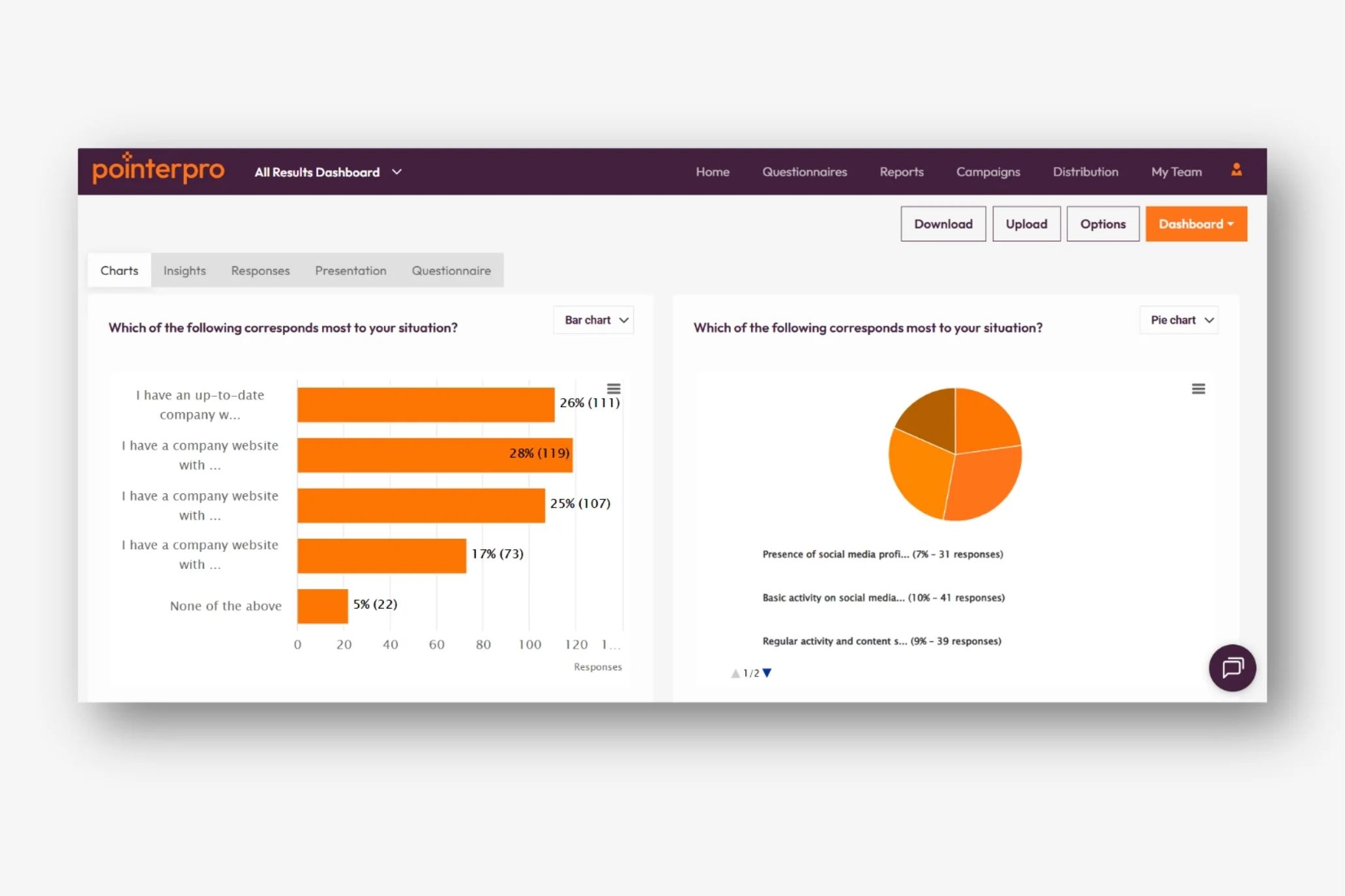
Founded in 2012 by Stefan Debois, the company (originally Survey Anyplace) has a strong European presence and emphasizes its GDPR compliance (Crunchbase: Survey Anyplace).
Its primary use case is turning a professional’s unique knowledge — be it a marketing maturity model or a financial health check — into a scalable, automated asset. The system integrates with key business tools like HubSpot, Salesforce, and Zapier, positioning itself as a central part of a professional’s tech stack.
What Are the Key Features of Pointerpro?
Pointerpro’s key features revolve around its powerful PDF report generator, a complex formula engine for custom scoring, a drag-and-drop assessment builder, and extensive white-labeling options. These components work together to turn a simple questionnaire into a powerful diagnostic and reporting tool.
How does the PDF Report Generator work?
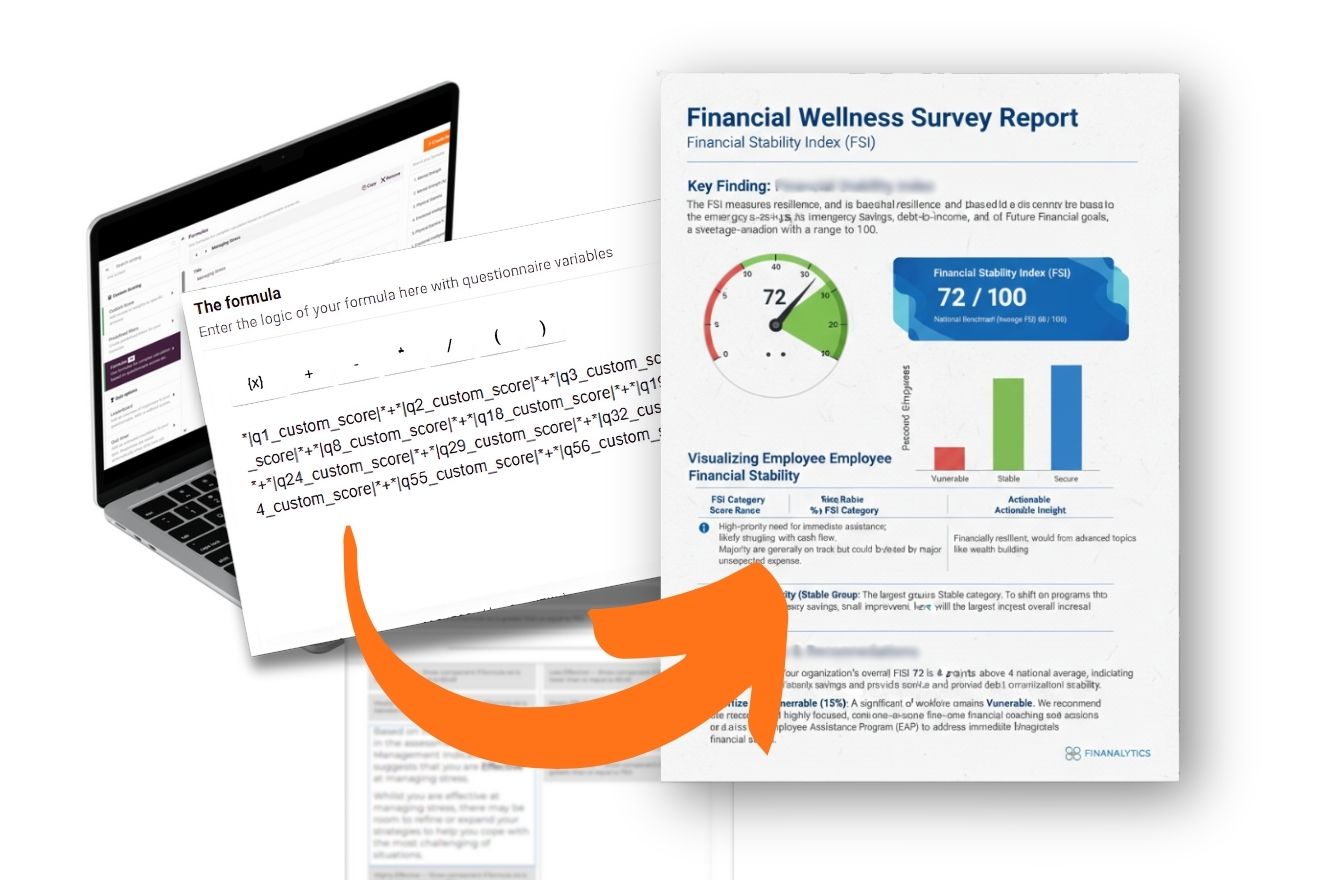
This feature is the platform’s crown jewel. While other tools can create PDFs, this report generator is built for deep, dynamic personalization.
You can design multi-page reports with custom branding, but the real power comes from conditional content blocks. This means you can show or hide entire pages, paragraphs, or charts based on the respondent’s score.
For Pointerpro, using conditional logic to automate report sections delivers significant time savings, making it a killer feature for creating a document that feels truly one-to-one.
What is possible with the Formula and Calculation Engine?
This is the “brain” of the platform. It allows you to perform mathematical calculations on answers, assign custom weights, and create complex scoring logic.
For instance, you could create a “Marketing Maturity Score” by averaging scores from several categories: ([seo_score] + [content_score] + [social_media_score]) / 3.
However, for those who invest the time, this complexity is the key to intellectual property monetization, turning a simple quiz into a true diagnostic tool that reflects your unique IP. The interface for building these formulas is not intuitive, but this complexity allows for unparalleled personalization.
How customizable is the Assessment Builder?
The assessment builder uses a standard drag-and-drop interface with various question types. I need to be direct here: the front-end design customization is limited.
You can change colors and fonts, but you will not achieve the slick, conversational feel of a tool like Typeform. This is a classic case of function over form, prioritizing the high-value report over a flashy questionnaire. While the assessments are functional, they can feel dated.
What do the “AI-Assisted” features actually do?
The software has incorporated “AI-Assisted” features to help streamline content creation. It’s important to have clear expectations: the AI is assistive, not generative.
It can suggest questions or generate boilerplate text for feedback messages. It does not write a unique, fully-formed report for each individual.
I see it as a helpful brainstorming partner or a way to overcome writer’s block, but it’s not a replacement for your own expertise in designing the assessment logic.
Is Pointerpro Secure and Compliant?
Pointerpro is strong on data privacy, with verified GDPR compliance and EU data residency. However, its major weakness is the lack of SOC 2 certification as of December 2025, which is a significant consideration for many corporate buyers.
GDPR, CCPA, and Data Privacy
As a Belgian company, the platform’s strongest compliance feature is its native adherence to GDPR. Its privacy policy and Data Processing Addendum (DPA) are clear, and it offers EU data residency (hosting data in Ireland) (Pointerpro Security).
This provides a baseline of trust, with robust data protection practices like end-to-end data encryption and clear policies baked into their operations.
The Missing SOC 2 Certification: Is it a Deal-Breaker?
This is Pointerpro’s biggest challenge. SOC 2, along with its international counterpart ISO 27001, is a standard security attestation that verifies a company is handling customer data securely.
While the help center notes they are “working towards it,” the lack of this certification is a noteworthy point for corporate security teams (Pointerpro Help Center).
💡 Solution: For businesses not requiring SOC 2, the strong GDPR framework provides a solid level of data protection. However, if your clients or internal security policy mandate SOC 2, you must seek an alternative. Always verify your clients’ vendor security requirements before investing.
⚠️ SOC 2 Compliance: The Enterprise Deal-Breaker
Pointerpro’s lack of SOC 2 certification is a critical gap. For any business selling into enterprise clients, this is often an immediate disqualification. Verify if this is a mandatory requirement for your clients before you invest time in the platform.
How Does Pointerpro Compare to its Competitors?
Pointerpro’s main competitor for assessment-based lead generation is Outgrow, which has a better UI but a less powerful reporting engine.
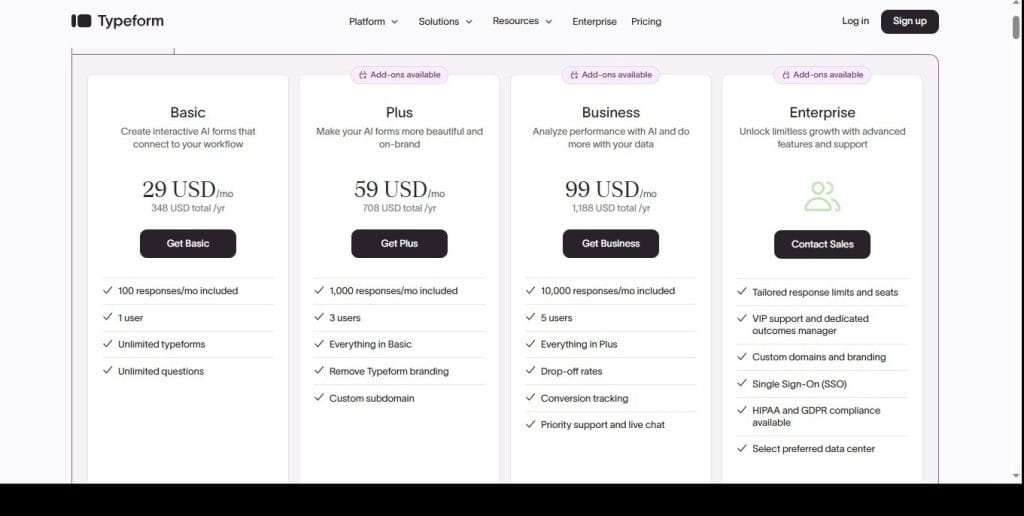
Compared to Typeform, Pointerpro offers far superior reporting but suffers from a much worse front-end user experience. It’s better classified as report automation software, and not a direct competitor to general survey tools like SurveyMonkey.
For a deeper side-by-side analysis of every major alternative, see our dedicated breakdown of Pointerpro top alternatives and competitors comparison.
| Feature | Pointerpro | Outgrow | Typeform |
|---|---|---|---|
| PDF Reporting Depth | ⭐⭐⭐⭐⭐ Excellent | ⭐⭐⭐ Good | ⭐⭐ Limited |
| Formula Engine Complexity | ⭐⭐⭐⭐⭐ Advanced | ⭐⭐⭐⭐ Strong | ⭐⭐ Basic |
| UI/UX Rating | ⭐⭐ Dated | ⭐⭐⭐⭐ Modern | ⭐⭐⭐⭐⭐ Best-in-class |
| SOC 2 Certified | ❌ No | ✅ Yes | ✅ Yes |
| GDPR Compliant | ✅ Native (EU) | ✅ Yes | ✅ Yes |
| Ideal Use Case | Diagnostic reports | Lead-gen quizzes | Beautiful surveys |
Decision Framework
- Best For: Users who need the most powerful, customized PDF reporting engine on the market and are willing to sacrifice ease of use to get it.
- Consider Outgrow if: You prioritize a modern user experience, a wider range of interactive content types (like calculators and chatbots), and faster implementation. While Outgrow has a better UI, our analysis shows its PDF capabilities have less powerful reporting logic compared to Pointerpro.
- Avoid Pointerpro if: Your team is not technically patient and needs a tool they can master in hours, not weeks.
✅ Pointerpro Wins On
- Conditional PDF report logic
- Custom formula complexity
- Native EU data residency
- White-label depth
⚠️ Outgrow Wins On
- Modern, intuitive UI
- Faster time-to-launch
- Interactive content variety
- SOC 2 certified
Decision Framework
- Best For: Users who need to process answers through complex logic to create a personalized report. The value is in the output, not the input experience.
- Consider Typeform if: You need to collect data in the most elegant and user-friendly way possible. Its conversational front-end user experience (UX) is its greatest strength.
- Avoid Pointerpro if: The visual appeal and engagement of your questionnaire are more important than generating an automated, multi-page PDF report.
✅ Pointerpro Wins On
- Multi-page automated PDFs
- Score-based content branching
- Diagnostic depth
- Custom report design
⚠️ Typeform Wins On
- Beautiful conversational UX
- Mobile-first experience
- Higher completion rates
- Faster setup
Pointerpro vs. SurveyMonkey
I include this only to clarify market positioning: Pointerpro is for individual diagnostics, whereas SurveyMonkey is purpose-built for aggregate market research. They operate in different universes and are not direct competitors.
Real-World Performance & Implementation Guide
Long-term users have a “love-hate” relationship with this tool. They love the powerful reports but dislike the clunky UI required to build them, a sentiment echoed across reviews on G2, Capterra, and Trustpilot.
The primary reason for renewal is the high switching cost from effort lock-in, not user satisfaction. Our independent Pointerpro review breakdown echoes the same finding across multiple user segments.
A successful implementation is less about technical skill and more about project management. Here is my recommended framework.
Recommended 4-Phase Pointerpro Deployment Workflow
Pilot Program
Integrate
Scale
Evaluate
1. Pilot Program: Start with a single, high-value pilot program. Define success as “one client successfully receiving a fully-automated, personalized, and accurate PDF report.”
2. Risk Mitigation: The main risk is project abandonment due to UI frustration. To mitigate this, dedicate a specific, uninterrupted 40-hour block to your first build. Think of it as a “Pointerpro Hackathon.”
3. Phased Rollout: Once your pilot is successful, roll out further development in phases: core report first, then integrations, then additional assessments.
4. Ongoing Evaluation: To justify the high TCO, track your Return on Investment (ROI). Create a simple model to calculate the ROI based on increased efficiency and time saved compared to creating reports manually.
What We Love
- The Unrivaled PDF Reporting Engine: The ability to generate deeply personalized, multi-page reports with dynamic content is the killer feature and the reason to endure its other weaknesses.
- The Depth of the Formula and Logic Capabilities: For experts with a complex model, the formula engine is one of the few tools that can truly replicate that logic digitally.
- Strong GDPR Compliance: For anyone with clients in the EU, native GDPR compliance provides peace of mind and a genuine competitive advantage.
Things to Consider
- 💡 The Steep Learning Curve and Unintuitive UI: This is the most frequently cited issue. The interface feels, as one G2 reviewer noted, like “software from 10 years ago.” The frustration is real.
“It’s powerful, but my God is it ugly and confusing. It feels like software from 10 years ago. Be prepared to spend days, not hours, getting your first complex assessment live.” — Small business owner, G2 review, November 2025
- 💡 Prohibitive Pricing for Solo Users: The pricing structure can be a difficult pill to swallow for a solopreneur. As a user on Reddit’s r/consulting forum noted, “The pricing is clearly geared towards agencies and enterprises now” (Reddit Threads on r/consulting & r/SaaS). A current money-saving deal can soften the blow for smaller operators.
- 💡 Lack of SOC 2 Certification: As discussed, this is a major hurdle for selling into enterprise or security-conscious clients.
- 💡 Limited Front-End Design Customization: The assessments your users see are functional but lack the modern aesthetic of competitors.
- 💡 Reliance on Zapier for Integrations: Needing middleware for non-native integrations adds another point of failure and potential cost.
Final Verdict: Is Pointerpro Worth It in 2026?
Pointerpro is worth it for a specific type of user: B2B consultants and agencies whose revenue depends on delivering high-value, customized reports at scale, and who have the time and technical patience to master its complex engine.
For this group, the ROI can be immense, as the tool is a prime example of productizing services.
However, the application is not worth it for individuals with simple survey needs, a low budget, or a low tolerance for a frustrating user interface. The high cost and steep learning curve will likely lead to buyer’s remorse for this segment. Budget-conscious buyers should check the latest coupons list across all stores alongside the active Pointerpro voucher code before committing.
Recommendation for Different User Segments
- Highly Recommended For:
- B2B Consultants: Who want to automate lead qualification by using a scalable diagnostic.
- Established Marketing Agencies: That need to scale lead generation by producing automated client audits.
- Corporate HR/Training Departments: With specific needs for automated skills assessments.
- Consider an Alternative If:
- You are a solo creator on a tight budget.
- You prioritize a beautiful user-facing experience above all else.
- Your company or your clients require SOC 2 compliance.
Disclaimer: As this review concerns a significant business investment, it falls under what Google considers YMYL (Your Money or Your Life) content. This review is based on my professional analysis and experience. As an affiliate, Coupons Scout may earn a commission if you purchase through our links, but our analysis remains independent.
Frequently Asked Questions
Q1: How much does Pointerpro cost in 2026?
A: Pointerpro’s advertised pricing starts at $49/month, but our analysis shows the realistic entry point for professional use is the “Professional” plan at $119/month (when billed annually) (Pointerpro Official Pricing).
When factoring in the “time cost” for implementation (estimated at 40-80 hours), the true first-year Total Cost of Ownership (TCO) ranges from $3,428 to $5,428. This comprehensive budget is crucial for businesses to consider, as the subscription fee is only one part of the overall investment required to make the platform successful.
Q2: Is Pointerpro worth the money?
A: It depends entirely on your business model. For consultants, coaches, and agencies whose revenue relies on delivering high-value, customized reports, the investment can yield a significant Return on Investment (ROI). The tool effectively automates and scales expertise, which can save dozens of hours per client.
However, for users with simple survey needs, a small budget, or a low tolerance for a complex interface, the high cost and steep learning curve make it a questionable investment compared to more user-friendly alternatives (Capterra Pointerpro Reviews).
Q3: What are the hidden costs of Pointerpro?
A: The biggest hidden cost is your time. We estimate a 40-80 hour “time cost” to master the platform and build your first complex assessment, which can be valued at $2,000-$4,000 for a skilled professional.
Other potential costs include a paid Zapier plan for non-native integrations (potentially $300-$600/year) and mandatory premium onboarding fees for Enterprise plans, which user reviews suggest start around $1,500 (G2 Pointerpro Reviews). These factors contribute to a Total Cost of Ownership far exceeding the sticker price.
Q4: Should I use Pointerpro or Outgrow?
A: This is a key decision. Choose Pointerpro if the final, deeply personalized PDF report is the most mission-critical part of your workflow and you are willing to invest significant time mastering its powerful but clunky interface.
Choose Outgrow if you prioritize a modern user experience, a wider variety of interactive content types for top-of-funnel engagement, and want a tool that is easier for your team to adopt quickly. Outgrow is generally better for lead generation, while Pointerpro excels at in-depth diagnostics (SaaS Master Pointerpro Review).
Q5: Who is Pointerpro best for?
A: This SaaS solution is best for established B2B consultants, marketing agencies, and corporate training departments. These user groups typically have the complex diagnostic needs that justify the powerful formula engine, the budget to afford the premium pricing, and the internal resources (or patience) to overcome the significant learning curve.
It is not well-suited for solopreneurs on a tight budget or businesses that only require simple data collection forms (Pointerpro Case Study – Acerta).
Q6: Can I trust Pointerpro?
A: From a data privacy perspective, the platform is quite trustworthy. As a Belgian company, it has strong, native GDPR compliance and offers EU data residency, which is a major plus for handling European data (Pointerpro GDPR & Security).
However, the critical lack of SOC 2 certification is a significant consideration for trust, especially for corporate customers in the US. This security gap means you must perform your own due diligence based on your clients’ vendor requirements before committing to the platform.
Q7: What are the main problems with Pointerpro?
A: Based on our analysis and user reviews, the three primary challenges are:
- The steep learning curve and clunky, dated user interface, which leads to user frustration and lengthy setup times.
- The premium pricing, with the true starting point at $119/month, putting it out of reach for many solo users.
- The critical lack of SOC 2 certification, which is a deal-breaker for many enterprise clients and security-conscious organizations (Trustpilot Pointerpro Reviews).
Q8: How do I get started with Pointerpro?
A: We recommend starting with a clearly defined pilot project to mitigate the risk of project failure. Choose one core assessment to build from start to finish. Your goal should be to generate one perfect, automated report for a single user.
Time-box your effort (e.g., a 40-hour “hackathon”) and lean heavily on the platform’s own help documentation, which is comprehensive despite the tool’s clunky interface (Pointerpro Help Center). This focused approach prevents the project from getting bogged down and abandoned.

