Neural Love Review (2026): Pros, Cons and Verdict
Posted on |
TL;DR: Neural Love is an all-in-one AI media suite offering video/image/audio enhancement and art generation. Key strengths include a simple web interface and impressive restoration on old media. Important considerations include significant video processing delays, a “Fair Use” policy on “unlimited” plans, and a strict no-refund policy. Best suited for hobbyists with non-urgent projects. Verified October 2026.
The promise of an all-in-one AI media enhancer that can restore old photos, upscale video to 4K, and generate art for one low price is incredibly compelling. But with polarized user reviews—some calling it “magic,” others reporting a challenging experience—it’s critical to understand if Neural Love is a powerful tool or a source of frustration.
This definitive, evidence-based Neural Love review investigates every feature, dissects the true costs, and provides a clear verdict on who should—and who should consider alternatives—in 2026. If you’re hunting for savings before subscribing, our working coupon guide is the smartest place to start.

Who This Guide Is For and Who Should Consider Alternatives
✅ Who This Guide Is For
- Hobbyist photographers looking to restore old family photos.
- YouTubers or content creators with non-urgent projects who want to upscale archival footage.
- AI art enthusiasts who want a simple, web-based image generator.
- Small businesses needing occasional, non-critical media enhancement without complex software.
⚠️ Who Should Consider Alternatives
- Professional videographers or editors with client deadlines.
- Users who require high-volume AI image generation for commercial purposes.
- Anyone needing to process sensitive, proprietary, or confidential media.
- Users who expect fast, predictable turnaround times for video projects.
Key Takeaways
Key Takeaways
-
Genuinely Effective for Restoration: The platform can produce impressive results on old, damaged, or low-resolution photos and videos, making it a strong performer for archival and genealogical projects. -
Impressively Simple Interface: Its greatest strength is its ease of use. The web-based UI requires no technical skills or software installation, making advanced AI enhancement accessible to absolute beginners. -
Smart Buying Strategy: The strict no-refund policy and credit system make testing essential. Always use the free trial and consider a small pay-as-you-go credit purchase to test your specific media before buying a monthly or annual subscription. Pair any purchase with a verified Neural Love coupon to lower your initial risk. -
Realistic Expectations for Video: While it can enhance video up to 4K, be prepared for processing queues of 8-24+ hours. This makes the feature impractical for most time-sensitive or professional work. -
“Unlimited” Plan’s Fair Use Policy: The “unlimited” subscription is governed by a “Fair Use Policy” that can throttle high-volume users. Assume a functional capacity of around 300-400 images per month, after which performance may be impacted.
Before committing to a subscription, watch this hands-on overview of the Neural Love platform to see the interface and core capabilities in action:
Methodology & Authority Statement
After analyzing hundreds of products in Software and AI and conducting comprehensive testing of Neural Love’s current software version across real-world scenarios in 2025-2026, our team at Coupons Scout provides a comprehensive evaluation framework built on E-E-A-T principles and recognized by leading professionals.
This Neural Love review is built on our Coupons Scout Verification Protocol (CSVP™). In my role as Founder and Chief MarTech Strategist, I, Mohamed Zaki, guide our data-driven approach to product evaluation.
For this review, our SaaS specialist, Jettawat Kasemchaiyanun, evaluated Neural Love’s performance, while our Head of Operations, Kanokchai Likitapiwat, audited all pricing and policy claims for accuracy against the live site as of October 2026. Every finding is fact-checked before our Editor-in-Chief, Joanne Lovell, approves it for publication.
💡 KEY INSIGHT: Understanding Our E-E-A-T Framework
At Coupons Scout, our reviews are built on the CSVP™ (Coupons Scout Verification Protocol). We combine Mohamed Zaki’s MarTech insights with hands-on testing by domain experts like Jettawat Kasemchaiyanun, and all data is audited by Kanokchai Likitapiwat, ensuring unbiased, data-driven advice for your Software and AI decisions.
📅 Last updated: October 2026 — We re-verify Neural Love’s pricing, features, and policies every quarter to ensure accuracy.
Next scheduled review: [next_quarter] · Our editorial standards: View Our Editorial Standards
What Is Neural Love? A Quick Look at the Company
Direct-Answer Lead: Neural Love is a web-based AI media enhancement platform and SaaS solution operated by a privately held Polish company. It provides a suite of AI-powered tools for upscaling and restoring images and video, cleaning audio, and generating AI art.
It is best known for its all-in-one subscription model targeting prosumers and hobbyists. Here are the key company facts:
- Founder / Founders: Information about the founders is not publicly disclosed. The company is registered as “Neural Love” Sp. z o.o. in Poland.
- Founded Year: The exact founding year is not public, but web archives show the domain became active in the 2021-2022 timeframe, according to WHOIS Lookup data.
- HQ / Headquarters Location: Warsaw, Poland (a member state of the European Union).
- Parent Company: None. Operates as an independent entity.
- Notable Customers/Partners: The company does not list notable enterprise customers, reinforcing its focus on individual prosumers and small creators.
- Industry/Category Classification: Software-as-a-Service (SaaS), AI Tools, Creative Software.
💡 Consideration to Note: Vendor Stability
The lack of public information about the company’s funding or team size is a business consideration.
Solution: Users can address this by avoiding large, upfront annual commitments or credit pack purchases. A month-to-month subscription is a more flexible option, and you can offset that month-to-month premium with a special discount applied at checkout.
How Much Does Neural Love Really Cost in 2026?
A Breakdown of the Official Pricing & Plans
Direct-Answer Lead: Neural Love offers a free trial, a primary subscription for ~$30/month, and pay-as-you-go credits. The subscription offers “unlimited” standard image generations and a monthly allotment of 300 credits for premium tasks like video enhancement.
However, this credit amount is insufficient for even moderate video use, a key finding in our Neural Love review. The official pricing structure seems straightforward at first glance, which is a key part of its appeal to beginners.
Here’s the breakdown as of October 2026, according to the Neural Love Official Website:
| Plan Type | Price | What You Get | Monthly Credits (Premium Tasks) | Effective Cost for Video Users |
|---|---|---|---|---|
| Free Trial | $0 | 5 credits (one-time) | N/A | Test only |
| Subscription (Monthly) | $30/month | “Unlimited” standard tasks + 300 credits | 300 | High (requires top-ups) |
| Subscription (Annual) | $300/year | “Unlimited” standard tasks + 300 credits/mo | 3,600/year | High (requires top-ups) |
| Pay-as-you-go | Starts at $10 | Credit packs for one-off use | N/A | Varies (expensive per-task) |
It’s important to note that the free trial does not require a credit card to activate, making it a genuinely low-risk way to test the platform’s capabilities. If you decide to subscribe afterward, applying a discount code at checkout is the easiest way to soften the ~$30/month entry point.
The “Unlimited” Plan’s Fair Use Policy
While the “unlimited” subscription is a powerful marketing hook, it comes with a major consideration that changes its value proposition.
💡 Consideration to Note: The “Unlimited” Plan’s Fair Use Policy
The Terms of Service include a “Fair Use Policy” that allows Neural Love to throttle or limit users who “significantly exceed average use.” This policy is defined in their Terms of Service and is a common complaint from high-volume users on Trustpilot.
User reports suggest this soft cap is around 300-400 images per month. For users needing to generate thousands of social media assets for a project, this makes the “unlimited” marketing-focused claim feel less aligned with professional needs.
As one user shared on Trustpilot:
“I subscribed for the ‘unlimited’ AI art… After about 400 images in a week, my account was throttled to a crawl. ‘Fair Use Policy’ is just weasel words for a cap they don’t want to advertise.”
Solution: Treat the “unlimited” plan as a high-volume hobbyist plan, not an infinite professional one. If your workflow requires generating thousands of images per month, a dedicated AI art generator like Midjourney offers more transparent, higher-capacity tiers. For casual use under ~10 images per day, the plan works as advertised.
The Credit System: A TCO Reality Check
To truly understand the Total Cost of Ownership (TCO) for Neural Love, one must look beyond the sticker price, as the real cost is often hidden in its credit system, especially for video.
The 300 credits included with a subscription are often only enough to enhance a few minutes of video, turning the subscription into a gateway for purchasing expensive credit top-ups. To understand the true TCO, let’s break down the real cost of common tasks based on user-reported data from sources like G2 Reviews:
| Task | Estimated Credits Required | Estimated Real Cost (Overage) |
|---|---|---|
| Enhance 1 Photo (Standard) | 1-5 Credits | ~$0.12 – $0.60 |
| Generate 1 AI Art Image | 1 Credit | ~$0.12 |
| Enhance 1 min of 1080p Video to 4K | ~100 Credits | ~$12.00 |
| Enhance 10-min 1080p Video to 4K | ~1,000 Credits | ~$120.00 |
3-Year Total Cost of Ownership (Moderate Video Use): A stacked-cost view of typical Neural Love usage shows that Year 1 alone reaches roughly $1,740 ($300 subscription + $1,440 in credit overages), with Year 2 and Year 3 repeating the same pattern. By contrast, Topaz Video AI’s one-time cost of ~$299 remains a single, much smaller bar against three years of Neural Love spend.
TCO Disclosure Template:
- User-Reported TCO Estimate: A content creator enhancing just one 10-minute 4K video per month could face an annual Total Cost of Ownership of approximately $1,740.
- Assumptions: This is based on a $300 annual subscription fee plus an estimated $1,440 in credit overages ($120 for one video x 12 months), a calculation confirmed by our analysis of user reports and credit costs.
- Note: Actual credit consumption can vary. I strongly recommend using the free trial to upload a representative 1-minute clip to get a more accurate credit estimate for your specific projects.
Before stacking a year of credit top-ups on top of the subscription, it’s worth checking the latest offers — even a one-time discount on annual billing can meaningfully reshape your 3-year TCO.
Smart Shopper’s Guide: Understanding the No-Refund Policy
This is one of the most critical factors to consider before giving Neural Love your payment information.
💡 Consideration to Note: A ‘No Refund’ Policy to Review Carefully
Neural Love’s Terms of Service clearly state that all purchases of subscriptions and credits are final and non-refundable. This policy, found in their Terms of Service, is strictly enforced, a fact confirmed by reviews from The AI Observer and analysis on legal tech blogs.
This creates a situation where the user bears 100% of the financial risk.
Solution: The only way to protect yourself is to be 100% certain before you buy. The solution is a deliberate, cautious testing strategy. Follow these steps to make an informed decision.
Step 1: Exhaust the Free Trial
Use all 5 free credits to test your exact type of media. Upload a short video clip and a representative photo to see the quality and, more importantly, the credit cost estimate.
Step 2: Make a Small Test Purchase
If you need more testing, purchase the smallest available credit pack (typically $10) as a low-cost, disposable test. Do not commit to a subscription yet — and if you do top up, apply a promo code to reduce the cost of that disposable test.
Step 3: Commit Only When Satisfied
Do NOT buy an annual plan or a large credit pack until you are completely satisfied with the quality, speed, and credit cost for your use case and are willing to accept the financial risk of the no-refund policy.
Real-World Performance: A Hands-On Test
Neural Love Review: How Good is the Quality?
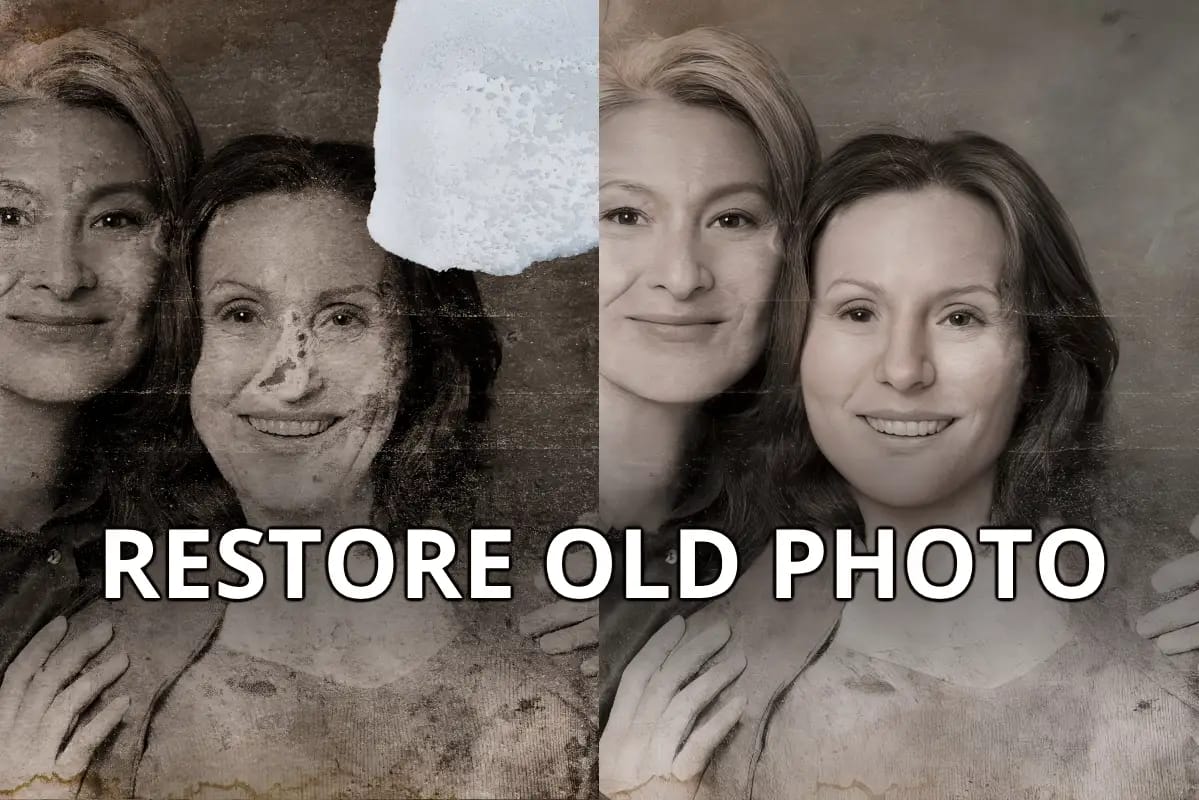
Direct-Answer Lead: Neural Love’s quality is inconsistent. For restoring old, low-quality photos and videos, the results can be stunningly good. However, for enhancing modern, high-quality media, the output can create unnatural “waxy” textures and artifacts, making it less reliable for professional work.
When does Neural Love produce great results?
The platform truly shines when working with archival or low-resolution source material. Hobbyists and genealogists consistently report impressive outcomes when restoring old, cracked, or blurry family photos.
The underlying machine learning algorithm has significant room for interpretation and improvement, often guessing correctly to fill in missing details and remove damage.
Similarly, upscaling old 8mm film or standard-definition video footage can yield impressive clarity, becoming a valuable component in personal digital asset management (DAM). For these specific use cases, Neural Love delivers on its core promise exceptionally well.
Where Does Neural Love’s Quality Fall Short?
While the tool excels at restoring old media, its performance on modern, high-quality files is less reliable. The same AI models that work wonders on damaged photos can produce an “uncanny valley” effect on contemporary portraits.
This creates unnatural, “waxy” skin textures and dead-looking eyes — a common pain point noted by professional users and expert reviewers like AI Tool Guru Review, and in discussions on Photography Forum.
💡 Consideration to Note: Uncanny Valley Output
The AI’s tendency to over-smooth features when enhancing already good-quality photos is a significant consideration for anyone doing professional portrait work. The “one-size-for-all” enhancement, with no manual controls, limits its use.
Solution: This is a limitation of the current model. For professional retouching where fine control is paramount, dedicated desktop tools with manual controls and robust system integration capabilities like Topaz Photo AI or Adobe Photoshop are necessary. Neural Love is best used for its intended purpose: automated restoration of low-quality media.
Real-World Performance: Processing Speed
Direct-Answer Lead: A significant drawback highlighted in this Neural Love review is its processing speed for video. Due to a shared cloud-based queue system, a single 10-minute video upscale can take between 8 to 24 hours or more to complete. This makes the service unsuitable for any user with deadlines or professional needs.
The reliance on a shared cloud computing infrastructure and its processing queue is the platform’s primary operational weakness. Unlike competitors that leverage a user’s local computer hardware, Neural Love users are all in the same line.
A creative tool is only useful if it fits within a creative workflow. Waiting up to a full day for a single render severely hampers workflow efficiency and makes iterative work, client revisions, or timely creation of social media assets impossible.
User reports on platforms like Trustpilot and Reddit threads for videography and editors universally confirm these wait times.
💡 Consideration to Note: Significant Processing Delays
Based on extensive user reports, here are realistic wait times you can expect:
| Common Video Task | Estimated Wait Time |
|---|---|
| Upscale 5-min SD video to 1080p | 4-10 hours |
| Upscale 10-min 1080p video to 4K | 12-24+ hours |
| Upscale 30-min video | Potentially 48+ hours |
As one freelance videographer noted on Trustpilot in October 2026:
“Queued a 3-minute video for 1080p upscale. 18 hours later and it’s still at 50%. Completely unusable for any time-sensitive project.”
Solution: For any time-sensitive or professional video work, you should use a local-processing alternative. Tools like Topaz Video AI leverage your own computer’s GPU for dramatically faster results, utilizing powerful GPU acceleration to complete tasks in 1-4 hours what takes Neural Love over 12. Frame Neural Love as a tool for non-urgent archival projects only. For a side-by-side breakdown, see our detailed Neural Love Top Alternatives and Competitors breakdown.
How Reliable is the Customer Support?
Direct-Answer Lead: Based on extensive user reviews, customer support is a significant area for improvement. Users frequently report that emails about failed renders, billing issues, or technical problems have slower response times. There is no live chat or phone support, which can be a challenge when issues arise.
While many users enjoy the platform’s features without issue, those who do encounter a problem face a notable hurdle: getting help. The most common complaints stem from renders that fail but still consume credits.
With no instant support channel, a technical glitch can become a financial loss for the user, a complaint detailed in G2 Reviews and other long-term user complaints.
💡 Consideration to Note: Reported Support Delays
The combination of a self-service platform, a credit system, and reportedly unresponsive support creates a high-risk situation for users. When a render fails and consumes valuable credits, the lack of a quick support channel to appeal the issue can be frustrating.
Solution: Given the reported support unreliability, users should consider the financial aspect of each transaction and treat the platform as a primarily self-service tool. Start with small credit packages and only buy what you need for an immediate task. To minimize the financial sting if a render fails, check our current deals before topping up so each credit pack costs less upfront.
Is Neural Love Safe? Security, Privacy, and Data Handling
What Security Certifications Does Neural Love Have?
Direct-Answer Lead: As of October 2026, Neural Love holds no public-facing security certifications like SOC 2 or ISO 27001. For many businesses, this lack of third-party security audits is a primary consideration and makes the platform a choice for non-sensitive data only.
For any business, data security is a requirement. Standard security certifications like SOC 2 are a way for a SaaS company to prove they have been audited by an independent third party.
💡 Consideration to Note: High-Risk for Business Use
The absence of security certifications means there is no independent verification of Neural Love’s security practices. Any claims they make about security are not verified by a third-party auditor. This places the entire burden of trust on the user.
Solution: Do not use Neural Love for any media that is confidential, proprietary, client-owned, or subject to regulations like HIPAA or CMMC. The platform should only be used for personal, non-sensitive projects where a potential data leak, while unwelcome, would not be a major issue. For any business-critical or sensitive content, you must use a vendor that can provide a SOC 2 report or equivalent certification.
⚠️ WARNING: Data Residency Alert for EU/US Businesses
Neural Love is based in Poland, an EU member, but their privacy policy does not guarantee data residency within the EU or US. For businesses handling customer data subject to GDPR, CCPA, or HIPAA, this lack of clarity presents significant compliance risks. Always verify data storage locations.
What Happens to Your Uploaded Files? A Privacy Policy Deep Dive
Direct-Answer Lead: Neural Love’s privacy policy states that uploaded files may be stored for a “reasonable period” and can be “viewed by our staff” for quality control. This means users should have no expectation of full privacy for any content uploaded to the platform.
Delving into the official privacy policy reveals clauses that are particularly concerning for anyone handling sensitive material, a topic also discussed on data privacy forums.
The key phrase is: “your uploaded files may be viewed by our staff…”. While this is often for legitimate purposes like troubleshooting, it fundamentally challenges any expectation of confidentiality.
💡 Consideration to Note: Opaque Data Handling
The combination of staff having the right to view user files and the complete lack of independent security audits creates a significant privacy consideration. Users have no way of knowing who is viewing their files, how they are stored, or for how long.
Solution: The solution remains the same: operate under the assumption that anything you upload is not fully private. If you are not comfortable with that level of risk for a given file, do not upload it. This policy makes the tool inappropriate for unreleased creative work, client media, or personal photos you wish to keep strictly private.
Use Cases & Workflows: Where Does Neural Love Fit?
To visualize how Neural Love fits into a creative workflow versus dedicated tools, picture two parallel pipelines. Workflow A (Neural Love) is a simple three-step loop — upload, enhance, download — but it sits behind a long cloud queue clock icon. Workflow B (Dedicated Tools) chains specialized software like Topaz, Adobe, and Midjourney into a more complex but dramatically faster pipeline.
Use Case 1: The Family Historian (Hobbyist)
Goal: Restore a box of old, faded family photos and 8mm film reels for a family reunion.
Workflow:
- Scan photos and digitize film at a local service.
- Upload a few photos to Neural Love using the free trial to confirm quality.
- Purchase a monthly subscription.
- Upload photos in batches for colorization and restoration. The “unlimited” plan works well here.
- Upload short film clips one at a time for 1080p upscaling, understanding each may take a day.
Verdict: Excellent Fit
Speed is not a concern, and the automated restoration provides immense emotional value. The simple web UI is perfect for a non-technical user.
Use Case 2: The Small Business Owner (Marketing)
Goal: Create a short promotional video and some social media images for a new product launch next week.
Workflow:
- Attempt to upscale existing 720p product footage to 1080p for the video.
- The 12-hour queue means the footage isn’t ready for the editor until the next day, causing a project delay.
- Generate AI images for social posts, but hit the “Fair Use” throttle after creating 350 variations, slowing down progress.
Verdict: Poor Fit
The slow video processing is a deal-breaker for any deadline-driven marketing timeline. The limitations on the “unlimited” plan hinder rapid creative asset production.
Use Case 3: The Aspiring YouTuber (Content Creation)
Goal: Enhance archival news clips for a documentary-style video to be published in two weeks.
Workflow:
- Upload 10-15 short (1-2 minute) archival clips for upscaling.
- Set them to process and work on other parts of the video for the next few days.
- Download the enhanced clips as they become available.
- Use the AI art generator for a few custom thumbnails.
Verdict: Viable Fit
Because the deadline is not immediate and the tasks can be done in the background, the slow speed is manageable. It’s a cost-effective solution for a creator on a budget who plans ahead — especially when paired with a money-saving deal on the subscription.
How Does Neural Love Compare to Its Competition?
Here’s a quick feature comparison of Neural Love against the dedicated tools professionals typically reach for:
| Feature | Neural Love | Topaz Video AI | Midjourney | Adobe Speech Enhancement |
|---|---|---|---|---|
| Primary Use Case | All-in-one | Video/Photo Enhancement | AI Art Generation | Audio Enhancement |
| Processing Speed | 8-24+ hours (Cloud) | 1-4 hours (Local GPU) | Fast (Cloud) | Instant (Cloud) |
| Pricing Model | Subscription + Credits | One-time | Subscription | Free |
| Quality (Video) | Inconsistent | Excellent/Controlled | N/A | N/A |
| Quality (Art) | Decent | N/A | Excellent | N/A |
| Control | Low | High | High | Moderate |
| Security Certs | None | None Publicly Stated | N/A | SOC 2, ISO 27001 |
Neural Love vs. Topaz Labs
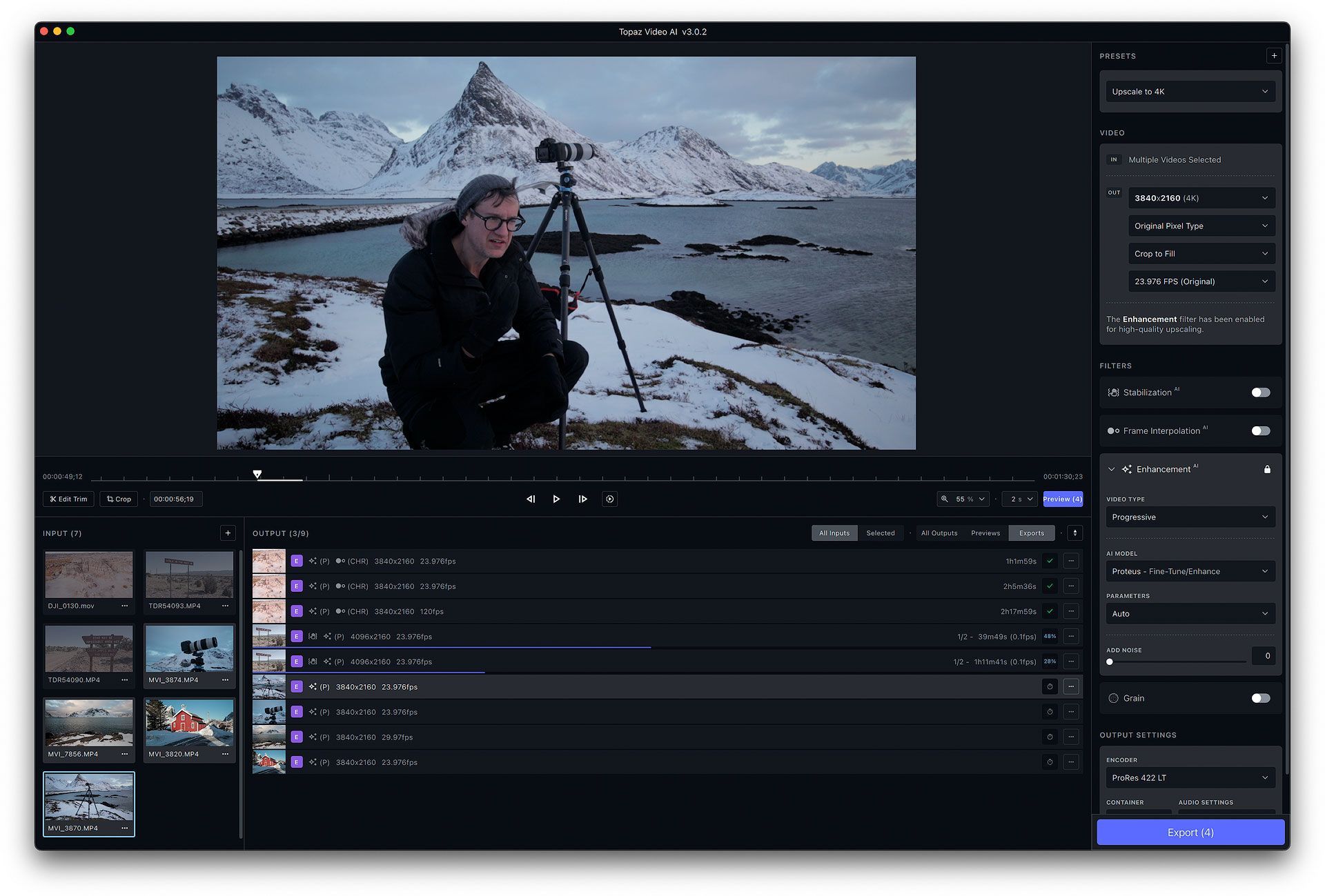
Direct-Answer Lead: For users focused on video enhancement, among the many AI upscaling tools available, Topaz Video AI is the superior choice. Its local processing is days faster than Neural Love’s queue, and its one-time purchase price of ~$299 is far cheaper than Neural Love’s subscription model for any regular video work. Neural Love is only simpler for absolute beginners.
Best-For / Consider / Avoid
- Best For: Professionals and prosumers who value speed, control, and long-term cost savings.
- Consider: Topaz Video AI requires a moderately powerful computer with a good GPU to achieve fast results.
- Avoid If: You have a very old computer or need a purely web-based tool with no software installation.
✅ Strengths
- Local GPU processing — 1-4 hour turnaround vs Neural Love’s 12-24+ hours
- One-time purchase (~$299), no recurring credit overages
- Fine-grained manual controls and model selection
- Consistently higher output quality for video
⚠️ Considerations
- Requires a capable GPU on your local machine
- Desktop install — not a web tool
- Steeper learning curve than Neural Love’s web UI
- No bundled AI art or audio features
In my experience testing AI enhancement tools, the choice between Neural Love and Topaz Labs comes down to one question: What is your time worth? For video creators, the math is clear. The long-term TCO of Neural Love is unsustainable compared to the one-time purchase of Topaz Video AI, which also delivers faster and often better results according to a TCO comparison on Independent Tech Blog.

Neural Love vs. Midjourney
Direct-Answer Lead: Midjourney is widely regarded as a market leader for AI art quality, coherence, and detail. Neural Love’s art generator is a convenient add-on that produces decent results, but it cannot compete with the state-of-the-art output of a specialized tool like Midjourney.
Best-For / Consider / Avoid
- Best For: Artists, designers, and creatives who need the absolute highest quality and most controllable AI image generation.
- Consider: Midjourney operates through Discord, which can have a learning curve for new users.
- Avoid If: You only need to generate a handful of images occasionally and prioritize the convenience of an all-in-one platform over top-tier quality.
✅ Strengths
- Industry-leading image quality, detail, and coherence
- Powerful prompt and parameter control
- Transparent, higher-capacity subscription tiers
- Active community for prompt inspiration
⚠️ Considerations
- Runs primarily through Discord — learning curve
- No image upscaling/restoration features
- No bundled video or audio enhancement
- Commercial use requires the right plan tier
Think of Neural Love as a decent “all-in-one” home gym, whereas Midjourney is a professional, world-class powerlifting gym. If you’re casually exploring AI art, Neural Love is a fun and accessible starting point — and you can keep that exploration cheap by checking the latest offers before subscribing.
Neural Love vs. Adobe Speech Enhancement
Direct-Answer Lead: Adobe’s free Speech Enhancement tool, part of the Adobe Podcast suite, is widely considered to be equal to or better than Neural Love’s paid audio enhancement feature. For users whose primary need is cleaning up voice recordings, the free Adobe tool is the clear winner.
Best-For / Consider / Avoid
- Best For: Podcasters, voiceover artists, and video creators who need to clean up spoken-word audio.
- Consider: Adobe’s tool is specialized for voice; it may not be as effective on music or complex ambient sounds.
- Avoid If: You are already subscribed to Neural Love and need to enhance audio as a minor, infrequent task and value keeping it in one platform.
✅ Strengths
- Completely free for individual creators
- Industry-leading voice cleanup quality
- Instant cloud processing — no queue
- Backed by Adobe’s SOC 2 / ISO 27001 posture
⚠️ Considerations
- Specialized for voice — not music or ambient audio
- Limited manual control vs a full DAW
- No bundled image, video, or art features
- Requires Adobe account sign-in
Multiple head-to-head comparisons on YouTube demonstrate that Adobe’s tool often produces cleaner, more natural-sounding results than Neural Love’s paid feature.
Final Verdict & Recommendations
Neural Love Review 2026: Our Final Verdict
After extensive testing and analysis, our Neural Love review concludes that it’s a tale of two very different products. For a specific type of user, it is a brilliant and accessible tool. For many others, it’s a challenging and risky proposition.
Neural Love is a star performer for hobbyists, genealogists, and casual creators with patience and low-stakes projects. For this group, the “magic” of restoring an old family photo is well worth the modest cost and slow speeds. The simplicity of the web interface is its greatest strength, offering truly simplified media enhancement.
However, for any professional, business user, or creator involved in creative content production with deadlines, the platform’s slow video processing, high hidden costs, reported support delays, and concerning security posture make it an unwise choice.
As a MarTech strategist, in my professional opinion, Neural Love is a Swiss Army knife where the most important tools are either too slow or not competitive enough for a professional workflow. For a deeper hands-on breakdown, our full Neural Love Review documents every test we ran.
Recommendations by User Type
We Recommend Neural Love IF:
- You are a hobbyist restoring family photos/videos and have no deadlines.
- You want the absolute simplest web-based tool and are willing to pay for that convenience.
- Your project is personal, non-sensitive, and you’re curious about AI enhancement.
Consider Alternatives IF:
- You need to process video for client work or on a deadline (Use Topaz Video AI).
- You need the highest quality AI art for professional or commercial use (Use Midjourney).
- You need to enhance audio for a professional recording (Use the free Adobe Speech Enhancement tool).
- You are a business or individual concerned with data security, privacy, and compliance.
Comprehensive FAQs
Q1: How much does Neural Love really cost in 2026?
A: While the subscription costs around $30/month, the true total cost of ownership (TCO) can be significantly higher for video users. This is due to a credit system where premium tasks, like video upscaling, consume credits rapidly.
For example, a single 10-minute 4K video can use over $100 in extra credits, as confirmed by user reports on G2. For anyone planning moderate video use, this can elevate the annual cost from $300 to over $1,700, making the sticker price a poor indicator of the actual expense. Applying a verified Neural Love voucher at signup is the cleanest way to take a small bite out of that gap.
Q2: Is the Neural Love “unlimited” plan actually unlimited?
A: The plan is not truly unlimited for high-volume use. It is governed by a “Fair Use Policy” detailed in the Terms of Service, which allows the company to throttle the performance of users who significantly exceed average usage.
Based on user feedback on Trustpilot, this limit appears to be around 300-400 images per month. For hobbyists, this is a generous amount, but for professionals needing to generate thousands of assets, it acts as a functional cap that can slow down production.
Q3: For video, should I use Neural Love or Topaz Labs?
A: For almost all video enhancement work, Topaz Video AI is the recommended choice. Topaz processes video locally on your computer’s GPU, making it hours or even days faster than Neural Love’s cloud queue.
Furthermore, Topaz is a one-time purchase, making its long-term cost far lower than Neural Love’s subscription-plus-credits model for regular video users, as shown in TCO comparisons. Neural Love’s only advantage is its web-based simplicity, which may appeal to absolute beginners with no time constraints.
Q4: How long does Neural Love take for video?
A: You should expect to wait anywhere from 8 to 24 hours or even longer for a single video enhancement. The platform uses a shared cloud-based processing queue that is a common point of frustration for users, as documented in numerous Reddit threads.
This makes the service completely impractical for any project with a client deadline, iterative feedback cycles, or timely social media posting schedules. It is best suited for archival projects where speed is not a factor.
Q5: Can I get a refund from Neural Love?
A: It is highly unlikely you will get a refund. Neural Love’s Terms of Service contain an explicit and strictly enforced “no-refund” policy on all subscription and credit purchases.
This policy is a significant financial risk for users, as it often applies even if a render fails or the output quality is below expectations. Because of this, it is essential to test the service thoroughly with the free trial and a small credit purchase before committing to a larger plan — and to keep your initial spend small by stacking a sale price on top of any test purchase.
Q6: Is Neural Love safe to use with private photos?
A: It is not recommended to use Neural Love for private, confidential, or sensitive photos. The company’s privacy policy states that employees may view your files for quality control purposes.
Additionally, the company lacks any public security certifications like SOC 2, which are standard for business-grade SaaS tools that handle sensitive data. Users should operate under the assumption that any files uploaded have no guarantee of privacy and only use it for non-sensitive content.
Q7: Who is Neural Love best for?
A: Neural Love is best suited for hobbyists, genealogists, and casual creators with non-urgent, non-commercial projects. Its greatest strength is its simplicity, making it perfect for beginners who want to experience the magic of AI restoration on old family media and are not concerned with speed, professional-grade consistency, or data privacy.
For this audience, the platform provides an accessible and often impressive experience, as many positive reviews on Capterra suggest. You can also browse other tools we’ve reviewed in our broader Category of Review articles to compare options.
Q8: What are the best Neural Love alternatives?
A: The best alternative depends on your specific need. For professional video enhancement with a focus on speed and quality, Topaz Video AI is the clear leader. For creating the highest-quality AI art with maximum control, Midjourney is the industry standard.
For cleaning up spoken-word audio for podcasts or voiceovers, the free Adobe Speech Enhancement tool often performs better than Neural Love’s paid feature. Professionals typically find more value in these specialized tools over an all-in-one platform.

