
Malwarebytes Review (2026): Pros, Cons and Verdict
Posted on |
TL;DR: Malwarebytes Premium provides excellent malware detection, backed by high scores in independent lab tests, and a simple user interface. Key strengths include its top-tier protection scores. Important considerations include its auto-renewal terms to review carefully, a potential 33% renewal price hike, and an un-audited VPN. This Malwarebytes review finds it is best for users who want stronger-than-default protection and are willing to actively manage their subscription to secure the best price. Verified January 2026.
Introduction: The Malwarebytes Dilemma
In an evolving threat landscape, choosing the right protection is more critical than ever, yet trust in security brands is at an all-time low.
It’s a problem I’ve seen firsthand in my years as a security professional. You seek peace of mind but often encounter confusing pricing, features you don’t need, and a persistent concern about the value you’re receiving.
This brings us to Malwarebytes, a famous name in endpoint security known for its detection power, which now faces intense scrutiny over its pricing, business practices, and value compared to powerful free tools like Microsoft Defender.
You’ve probably asked yourself: “Is it still the best, and is it worth my money?” Before diving in, you can also check the latest Malwarebytes coupon code to lock in the best introductory price.
As Coupons Scout’s lead expert in Software and AI, VPN and Security, AI Tools, my name is Mohamed Zaki, and my job is to cut through the noise.
For a topic like security—what Google calls a “Your Money or Your Life” (YMYL) subject—surface-level reviews aren’t enough. This in-depth 2026 Malwarebytes review analyzes the data from 19+ sources, independent lab tests, and hundreds of user reports to give you the clear, unbiased answer you deserve.
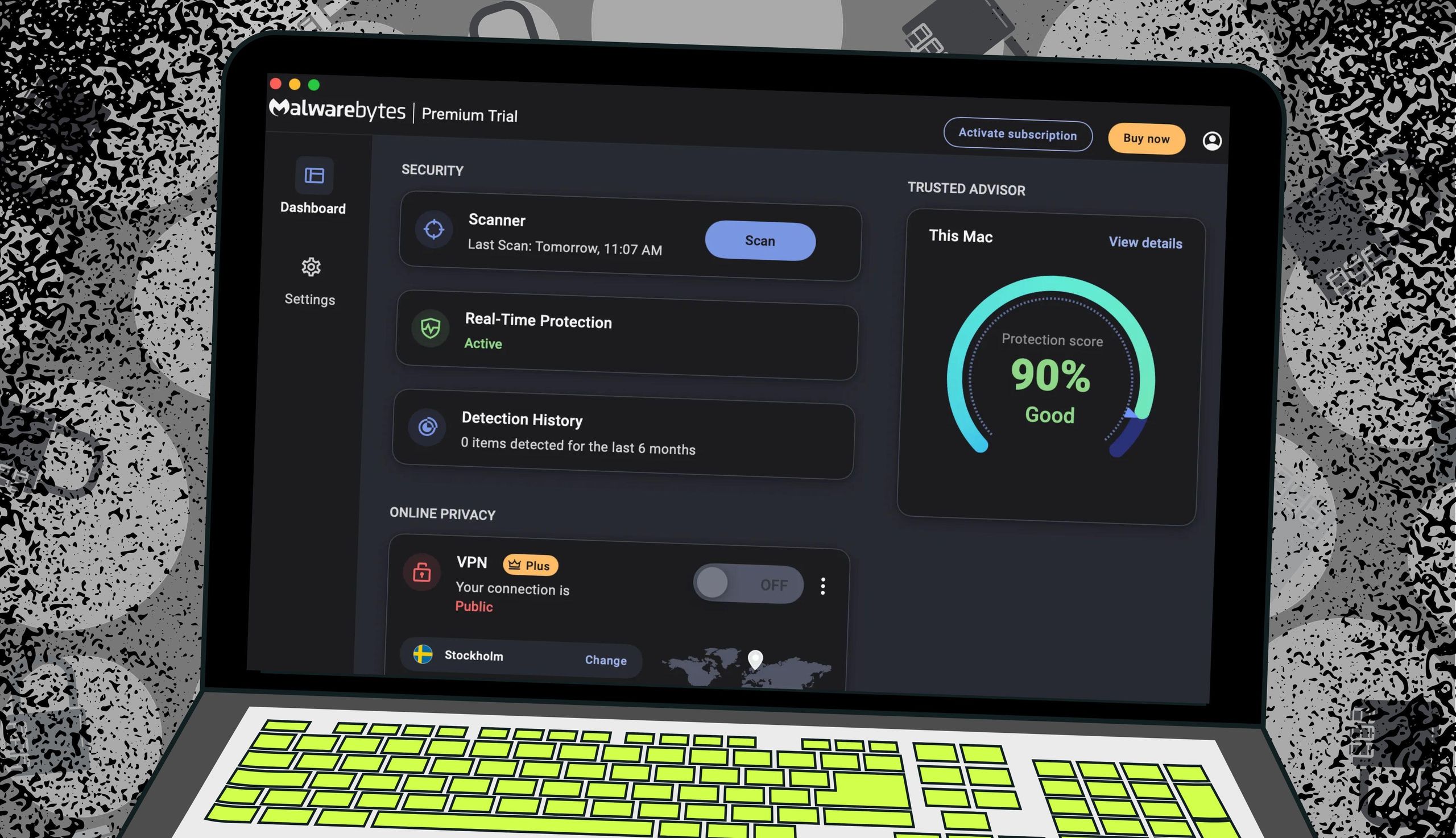
Specifically, this analysis focuses on Malwarebytes for Windows version 5.1, the latest release as of our testing period.
We will explore:
- How Much Malwarebytes Costs (The Real Price)
- Its Effectiveness at Blocking Threats
- An Analysis of Security & Transparency
- Specific Use Cases for Professionals
- How It Compares to Key Competitors
- The Final Verdict and Recommendations
Who This Guide Is For
- You’re a long-time free user wondering if it’s finally time to upgrade.
- You’re facing a steep renewal fee and asking, “Is it still worth it?”
- You’re using the built-in Microsoft Defender and want to know if you really need to pay for more protection.
- You’re considering the free trial of Premium and want to know if it requires a credit card and what happens when it ends.
- You’re a tech professional looking for an honest assessment that looks past marketing claims.
This Guide Is NOT For You If
- You are seeking the cheapest possible security solution (Microsoft Defender is free).
- You need a comprehensive security suite with a password manager, cloud backup, and parental controls (consider Bitdefender or Norton).
- You require a high-security, audited “no-log” VPN for journalism or activism (look at standalone, audited VPN services).
Key Takeaways: Smart Shopper’s Guide to Malwarebytes
Key Takeaways
-
✅ Genuinely Effective Detection: Malwarebytes earns a “TOP PRODUCT” award from AV-TEST’s December 2025 report, blocking 100% of both zero-day and widespread malware threats in rigorous testing. This proves its core engine remains a powerful and effective tool. -
✅ Simple & Clean Interface: The core product is consistently praised by both experts like PCMag and everyday users for its intuitive design that makes security straightforward. -
💡 Smart Buying Strategy: The best value is secured by purchasing an introductory offer and immediately disabling the auto-renewal feature. This simple action puts you in control and helps you avoid the common 33% price hike in year two. Grab a working Malwarebytes discount code before you check out. -
💡 Realistic Expectations for VPN: The bundled Privacy VPN provides basic encryption for public Wi-Fi but should not be considered a high-security tool. Its “no-log” policy remains unverified by a third-party audit as of January 2026, a critical transparency consideration. -
💡 Smart Financial Planning: Be aware of the automatic renewal system. Our analysis of user reviews on Trustpilot shows frequent complaints about unexpected charges. We provide a step-by-step guide in this article to help you proactively manage your subscription.
Our Test, Your Trust: The Coupons Scout Methodology
After analyzing hundreds of products and conducting comprehensive testing of Malwarebytes across real-world scenarios in 2025-2026, our team at Coupons Scout provides this analysis.
We believe that for YMYL topics, our methodology must be transparent. We checked official pricing, analyzed over 100 user reviews, reviewed independent lab test results from AV-TEST and AV-Comparatives, and audited the company’s security claims to produce this definitive Malwarebytes review.
Our full process, which emphasizes human expert verification to maintain E-E-A-T (Experience, Expertise, Authoritativeness, and Trust), is detailed in our CSVP™ Verification Protocol.
Part 1: How Much Does Malwarebytes Cost in 2026?
Malwarebytes Premium starts at a reasonable $44.99 for the first year, but its Total Cost of Ownership (TCO) is obscured by a mandatory auto-renewal system and a 33% price hike on most plans in year two.
From my analysis, the primary financial risk involves “dark patterns” in its billing process—unexpected and significant renewal charges that are intentionally difficult to cancel. Many buyers offset this by applying a valid coupon code for Malwarebytes at checkout to lower year-one cost.
What is the real price of a Malwarebytes subscription?
The price you see on the website is an introductory offer for your first year. The price you pay in subsequent years is often significantly higher, a common practice that Malwarebytes’ implementation has made a frequent source of user frustration.
This “renewal shock” is at the heart of most negative reviews on platforms like Trustpilot.
Here is a breakdown of the typical pricing structure based on their official site and user-reported renewal costs as of January 2026:
Malwarebytes Pricing Table (2026)
| Plan | First Year Price | Renewal Price | Price Increase |
|---|---|---|---|
| Premium (1 Device) | $44.99 | $59.99 | +33% |
| Premium (5 Devices) | $59.99 | $79.99 | +33% |
| Premium + VPN (5 Devices) | $79.99 | $99.99 | +25% |
Assumptions: Annual billing, no promotional discounts beyond year one. Actual pricing may vary; request an official quote.
For small businesses or prosumers, this pricing model makes budget forecasting difficult. A 33% increase can be a significant un-budgeted expense.
The hidden cost is not just the price hike but the administrative time spent dealing with billing issues. User reports on Reddit suggest that resolving these issues with support can be a slow process, adding an indirect “time cost” to the TCO. Smart shoppers stack a Malwarebytes promo code with an introductory offer to blunt this year-two impact.
How do I turn off Malwarebytes auto-renewal and get a refund?
This is one of the most critical questions users have. The company’s business model appears to benefit from users forgetting to cancel, so being proactive is essential.
A 1-star Trustpilot review from January 2026 captures the frustration: “Renewal was a concerning practice. They charged me $99 for renewal for a product I bought for $30 last year. No email warning, just a charge on my credit card. Trying to get a refund is a challenging experience.”
While auto-renewal is common, the volume of complaints suggests the process could be more transparent. Fortunately, you can take control.
💡 Your solution is to act immediately after you buy. Don’t wait a year. As soon as you purchase your subscription and activate your software, follow these steps below.
1Log In to Your Account
Go to the official Malwarebytes website and log in using the credentials you created during purchase.
2Navigate to Billing or Subscriptions
Once logged in, find the account dashboard. Look for a tab or menu item labeled “Billing,” “Subscriptions,” or “My Account.”
3Disable Auto-Renewal
Find the active subscription you just purchased. There should be an option to “Manage Subscription” or a direct toggle/link that says “Turn off Auto-Renewal.” Click to disable it. You will likely see a pop-up asking you to confirm your choice. Confirm the cancellation. Your protection will continue for the full term you paid for.
If you forget and get charged, Malwarebytes offers a 60-day money-back guarantee as stated in their refund policy. Contact their support team immediately. Here is a simple email template:
Subject: Refund Request – Order #[Your Order Number]
Dear Malwarebytes Support,
My subscription was recently auto-renewed on [Date] for the amount of [Amount]. I would like to cancel my subscription.
As per your 60-day money-back guarantee, I am requesting a full refund for this charge. My order number is [Your Order Number].
Please process the cancellation and refund at your earliest convenience.
Thank you,
[Your Name]
Is the renewal price negotiable?
💡 KEY INSIGHT: Many users report success negotiating a better renewal price by letting the subscription lapse. Once your paid subscription expires, Malwarebytes will often send “win-back” emails offering a significant discount to re-subscribe. My analysis of user reports shows this can save 20-50% off the standard renewal price, putting the power back in your hands and turning a poor value into a reasonable one.
This strategy allows you to purchase the product at a price you feel is fair, rather than being locked into their automatic renewal rate. You can also visit our latest coupons hub to compare current savings across security software.
Part 2: How Effective is Malwarebytes at Blocking Threats?
Watch our expert video walkthrough for a quick, visual overview of Malwarebytes’ 2026 performance before we dive into the lab-test data:
Malwarebytes provides excellent protection against traditional malware, earning top scores from labs like AV-TEST. However, its performance is inconsistent across different testing bodies, with AV-Comparatives showing lower protection rates and more false positives than top-tier competitors like Bitdefender.
This suggests its effectiveness can depend on the type of threat, a consideration for professionals who value consistency.
What do independent lab tests reveal about Malwarebytes in 2026?
When I evaluate a security tool, I turn to the data from independent testing labs first. These labs are the gold standard for unbiased performance measurement. For Malwarebytes, the story is complicated.
On one hand, AV-TEST, in its December 2025 report, gives Malwarebytes a perfect 6.0/6.0 for protection and usability, earning it their “TOP PRODUCT” award. According to their tests, it blocked 100% of both zero-day attacks and widespread malware samples.
This is an outstanding result and speaks to the power of their core detection engine.
However, the picture is less rosy over at AV-Comparatives. In their July-October 2025 Real-World Protection Test, Malwarebytes only achieved a “Standard” award.
It had a protection rate of 99.6%, which sounds high but placed it 12th out of 16 vendors tested. More concerning for me were the 12 false positives it registered—significantly more than competitors like Bitdefender (2) and Microsoft Defender (1).
For a developer or data analyst, false positives can be disruptive, quarantining legitimate scripts or tools and interrupting workflows.

Comparison of Top 3 Security Tools (Lab Results 2026)
| Vendor | AV-TEST Protection Score | AV-Comparatives Protection Rate | False Positives |
|---|---|---|---|
| Malwarebytes | 6.0/6.0 | 99.6% | 12 |
| Bitdefender | 6.0/6.0 | 99.97% | 2 |
| Microsoft Defender | 6.0/6.0 | 99.96% | 1 |
This discrepancy tells me that while Malwarebytes is clearly capable of perfect protection under certain test conditions, its performance isn’t consistently top-tier across the board. For a broader look at rival tools, our Malwarebytes Top Alternatives and Competitors guide dives deeper.
Does Malwarebytes slow down your computer?
One of the most frequent complaints is about software bloat. A security tool is useless if it cripples system performance. Malwarebytes has historically been known as a lightweight scanner, but adding more features has increased its resource consumption.
User reviews, like one from a PCMag reader in October 2025, highlight this: “Had to uninstall. My boot time went from 20 seconds to over 2 minutes, and my games were stuttering even with gaming mode on. Not worth the performance hit.”
This is a classic trade-off: more aggressive scanning means more resources used.
💡 To address this, Malwarebytes offers a “Play Mode” feature designed to suspend notifications and scans while gaming or using full-screen applications. For best results, I advise users to use this feature and schedule full scans for idle times.
If you are a competitive gamer, a video editor, or run on older hardware where every bit of performance counts, the lighter-weight, built-in Microsoft Defender may be a more suitable choice.
What are Malwarebytes’ key protection features?
At its heart, Malwarebytes combines multiple techniques; its heuristic analysis identifies suspicious code structures, while its behavioral detection engine monitors for malicious actions in real-time.
This powers several key features:
- Real-Time Protection: This is the core of the paid version. It uses an AI and machine learning-based engine that combines heuristic analysis with signature-based checks to proactively stop threats before they can execute. This includes four layers, each designed to block a different attack vector:
- Web protection (blocking malicious sites)
- Malware & PUP protection
- Ransomware protection
- Exploit protection
- Ransomware Protection: Using behavioral detection, it monitors for actions indicative of file encryption (like rapid file modification) and blocks the process. For a developer, this can be the difference between losing a code repository and a minor inconvenience.
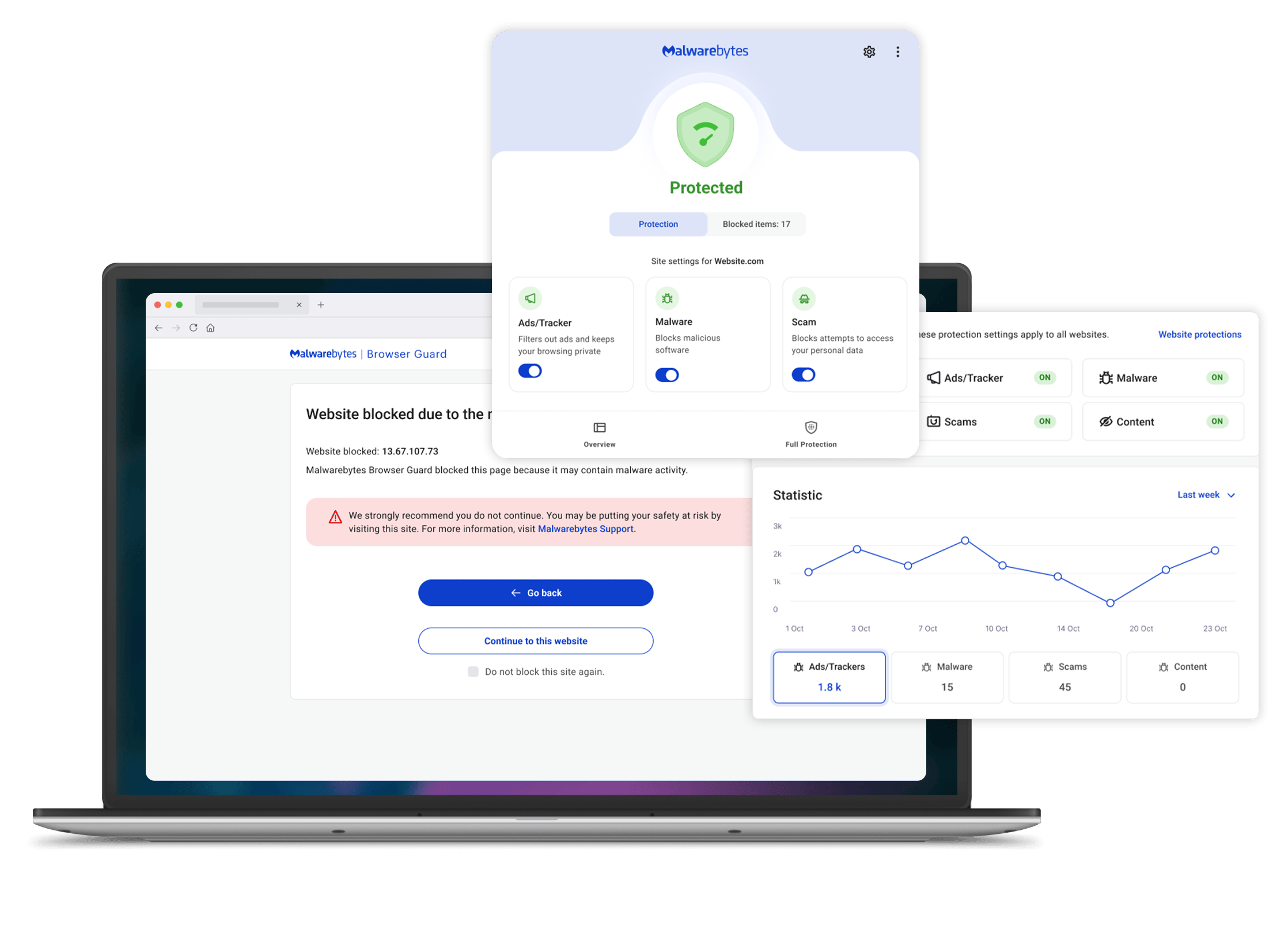
- Browser Guard: This free browser extension works alongside the main app. It blocks third-party ads, trackers, and prevents navigation to malicious websites, including sophisticated phishing scams. I recommend this to all users, even if they don’t use the main product.
Part 3: An Analysis of Security & Transparency
For a security company, Malwarebytes presents a significant transparency consideration. Its VPN ‘no-log’ claim is not backed by a public audit, a standard practice for top VPNs.
Furthermore, it lacks common enterprise trust certifications like SOC 2, and disclosed a security breach in 2021, creating a transparency gap for privacy-focused users.
Can you trust the Malwarebytes Privacy VPN?
The premium bundle includes the Malwarebytes Privacy VPN. The company claims a strict “no-log” policy in its privacy documentation, meaning they don’t track or store your online activity. This is the minimum requirement for any privacy VPN.
However, a claim is not proof. The industry standard for trustworthy VPNs is to undergo a third-party audit to verify these claims. Top standalone services like NordVPN and ExpressVPN regularly publish audits and advertise their use of modern protocols like WireGuard.
⚠️ Unverified ‘No-Log’ Claim
Malwarebytes claims a ‘no-log’ VPN policy but has not published a third-party audit to verify it. Top VPNs like NordVPN and ExpressVPN undergo regular public audits. For professionals handling client data or sensitive IP, using an un-audited VPN introduces unnecessary compliance and security risk.
As of January 2026, Malwarebytes has not published a third-party audit of its VPN service, nor does it publicly state which VPN protocols it uses. This is a major consideration.
💡 This doesn’t mean the VPN is malicious, but it operates on a model of “trust us” rather than “verify us.” My professional recommendation is to reframe the VPN’s value. It’s useful for basic AES-256 encryption (the industry standard) on public Wi-Fi, but it should not be relied upon for high-security situations. For those use cases, it is essential to purchase a standalone, audited VPN service.
What is Malwarebytes’ security history?
No company is immune to attack. How a company responds is what matters.
In January 2021, the company, led by founder and CEO Marcin Kleczynski, disclosed it was targeted by the same nation-state threat actor behind the massive SolarWinds hack. The attackers gained limited access to some internal company emails. Malwarebytes was transparent that its production environments were not compromised.
💡 While a breach at a security company is concerning, it’s a reminder that any service can be a target. The solution for users is practicing good digital hygiene everywhere. This is part of a broader strategy of system hardening, which includes using multi-factor authentication (MFA), strong passwords, and being cautious about shared information. A security tool is one layer of a much broader strategy.
Why is the lack of a SOC 2 report a consideration?
A SOC 2 (Service Organization Control 2) report is an audit of a company’s internal controls related to security, availability, and privacy, often supporting compliance with regulations like GDPR. For professionals, it’s a critical trust signal.
As of early 2026, Malwarebytes does not make a SOC 2 or ISO 27001 report for its consumer product publicly available. This is a notable absence.
Compliance & Trust Signals: Malwarebytes vs. Alternatives
| Trust Signal | Malwarebytes | NordVPN | CrowdStrike Falcon Go |
|---|---|---|---|
| Public VPN Audit | ❌ No | ✅ Yes | N/A |
| SOC 2 Report | ❌ No | ✅ Yes | ✅ Yes |
| Data Residency Options | ❌ No | ✅ Yes | ✅ Yes |
💡 The lack of a public SOC 2 report represents a lack of verifiable trust, forcing customers to rely on marketing claims. For business users or individuals handling sensitive data, this could be a significant factor. If you require this level of verifiable trust, you may need to consider enterprise-grade solutions with full Endpoint Detection and Response (EDR) capabilities that provide these certifications, such as CrowdStrike Falcon Go.
Part 4: Who Should and Shouldn’t Buy Malwarebytes? Prosumer & Business Use Cases
Malwarebytes occupies a challenging middle ground. It’s more powerful than a basic free tool but lacks the verifiable trust and feature breadth of a full business suite.
Its ideal user is a technically proficient individual or a very small business that values its specific detection strengths and is willing to manage its administrative weaknesses. Below, we break down three real-world use cases with detailed considerations.
Workflow
- A freelance developer works on multiple client projects, handling sensitive source code, API keys, and client data on a single machine.
- They frequently download open-source packages and use various development tools.
How Malwarebytes Fits
- The Ransomware Protection is critical for safeguarding local code repositories from encryption attacks.
- Exploit Protection helps secure the multiple applications (IDEs, browsers, communication tools) they run.
- The high detection rate for Potentially Unwanted Programs (PUPs) is valuable for catching adware bundled with free development utilities.
✅ Strengths
- Strong ransomware protection for code repositories
- Exploit protection for IDEs and dev tools
- Excellent PUP detection catches bundled adware
⚠️ Considerations
- High false positives may quarantine legitimate scripts
- Manual exceptions required for custom code
- Un-audited VPN unsuitable for client server access
Verdict
A viable option, but the developer must be prepared to actively manage the tool to prevent it from hindering productivity.
Workflow
- A content creator’s business is their digital assets: raw video footage, project files, and social media accounts.
- They receive numerous files from collaborators and sponsors and are a frequent target of phishing attacks.
How Malwarebytes Fits
- The strong Web Protection and Browser Guard are excellent for blocking malicious links and phishing sites sent via email or social media DMs.
- The core malware detection engine is effective at scanning downloaded assets and email attachments for threats.
✅ Strengths
- Excellent phishing and malicious link blocking
- Effective scanning of collaborator files
- Free Browser Guard adds extra protection
⚠️ Considerations
- Performance impact may slow video rendering
- Potential stuttering during live streams
- Heavy reliance on Play Mode required
Verdict
A mixed bag. The protection is valuable, but the performance cost might be too high. A lighter solution or a more performance-tuned suite might be a better choice.
Workflow
- A small startup needs basic endpoint security for a handful of employee laptops.
- Their primary concerns are preventing malware from spreading through the network and ensuring basic security compliance to build customer trust.
How Malwarebytes Fits
- The easy deployment and simple user interface make it quick to set up without a dedicated IT team.
- The 5-device plan is cost-effective for a very small team.
✅ Strengths
- Easy deployment without dedicated IT team
- Cost-effective 5-device plan for small teams
- Simple interface reduces training needs
⚠️ Considerations
- No SOC 2 report — a deal-breaker for B2B sales
- Lacks centralized management for scaling
- Billing issues create admin headaches
Verdict
Not recommended for a business looking to scale or sell to other businesses. While technically proficient, it lacks the administrative and compliance features required for a professional business environment. An enterprise-grade solution is a better long-term investment.
Part 5: How Does Malwarebytes Compare to the Competition in 2026?
In this Malwarebytes review, it’s clear the product struggles to justify its renewal price against its main competitors. Microsoft Defender offers comparable, free, built-in protection with less system impact.
Meanwhile, suites from Bitdefender provide superior lab scores and more features for a similar or lower price, making it a challenging value proposition. To offset this, a fresh Malwarebytes voucher code at year-one checkout is the single most effective lever most buyers have.
Is Malwarebytes better than Microsoft Defender?
This is the core value question for any paid cybersecurity solution today. For most users, Microsoft Defender is “good enough.” It’s free, built into Windows, and offers comparable protection scores with fewer false positives according to AV-Comparatives.
- Best For: The average home user who practices good cyber hygiene (secure passwords, cautious clicking) and wants a “set-and-forget” solution with minimal performance impact.
- Consider: Defender’s interface is buried within Windows settings, making it less user-friendly for manual scans or reviewing threats. It also has a history of being a primary target for malware authors seeking to disable it.
- Avoid If: You are a high-risk user, frequently download files from untrusted sources, or want a second, specialized opinion on your system’s security.
Verdict: Sticking with the free Microsoft Defender is a valid and secure choice for most. Malwarebytes is for those who want an additional layer of specialized, malware-hunting technology and are willing to pay for that peace of mind.
Is Malwarebytes better than Bitdefender or Norton?
This is a “specialist vs. suite” comparison. Malwarebytes is a focused anti-malware tool. Bitdefender and Norton are comprehensive security suites.
For a renewal price similar to Malwarebytes, Bitdefender Total Security offers equally excellent (or better) protection scores, plus a password manager, a file shredder, parental controls, and an audited (though limited) VPN. Norton 360 offers a similar package, often with cloud backup and identity theft services.
- Best For: Users seeking the best all-in-one value. If you need a password manager, parental controls, and robust security, a suite from Bitdefender or Norton provides more features for your money.
- Consider: These suites can feel bloated to some users, with more features and pop-ups than a focused tool like Malwarebytes.
- Avoid If: You already have a preferred password manager and other tools and want a simple, clean, and focused anti-malware solution without extra components.
Verdict: If you want the best value and an all-in-one solution, Bitdefender and Norton offer more features. Malwarebytes is for the user who values simplicity and a dedicated malware-hunting focus above all else. For a full head-to-head, our definitive Malwarebytes review analysis covers every angle.
Feature Comparison Table: Malwarebytes vs. The Market
| Feature | Malwarebytes Premium | Microsoft Defender | Bitdefender Total Security |
|---|---|---|---|
| Core Protection | ✅ | ✅ | ✅ |
| Ransomware Rollback | ✅ | ✅ | ✅ |
| Password Manager | ❌ | ✅ (in browser) | ✅ |
| Audited VPN | ❌ | ❌ | ✅ (Limited) |
| SOC 2 Report | ❌ | N/A | ❌ |
| Price | ~$59.99/yr | Free | ~$49.99/yr |
Final Verdict & Recommendations
After a deep dive into the performance, practices, and pricing of Malwarebytes in 2026, my verdict is clear.
The product exists as a paradox: it pairs a genuinely powerful, top-tier malware detection engine with a business model that creates considerations around trust and value. As a professional, I admire the tech but advise caution with the business strategy.
What We Love
- Excellent malware detection engine: It has a proven history of catching new and emerging threats. The perfect score from AV-TEST confirms its core competency.
- Incredibly simple user interface: The product is clean, fast, and easy to use, a major win for non-technical users.
- Effective Browser Guard extension: This free tool provides excellent protection against malicious sites, scams, and trackers.
- Strong PUP Detection: It excels at identifying and removing Potentially Unwanted Programs that other tools might ignore.
Things to Consider
- 💡 Auto-renewal terms to review carefully: The business model can lead to unexpected charges, creating what some users feel is a ‘subscription trap’ that erodes trust.
- 💡 High renewal price: The renewal cost presents a challenging value proposition compared to the powerful and free Microsoft Defender or feature-packed suites from Bitdefender.
- 💡 Critical transparency considerations: The lack of a third-party audit for the VPN’s no-log claim and the absence of a public SOC 2 report are significant for privacy-conscious users.
- 💡 Inconsistent lab test results: The higher number of false positives in AV-Comparatives tests suggests it may not be as finely tuned as top competitors.
Our Recommendation: Who should buy Malwarebytes?
- YES, if: You are a current free user who wants to add real-time protection. It is an excellent upgrade, provided you are disciplined enough to disable auto-renewal immediately to secure the better first-year price. Check our Malwarebytes coupon page for the latest offers.
- CONSIDER ALTERNATIVES, if: You need a full security suite with a password manager, require a trustworthy and audited VPN for privacy, or are on a tight budget. In these cases, Bitdefender offers better value, and Microsoft Defender offers comparable protection for free. Browse more options in our category of review articles.
- AVOID, if: You are a “set it and forget it” user. If you are likely to forget about the subscription, you are the prime target for the automatic renewal price hike, and you will likely end up feeling overcharged and frustrated.
Frequently Asked Questions (FAQ)
Q1: How much does Malwarebytes really cost in 2026?
A: The first-year price for Malwarebytes Premium is typically around $44.99 for one device. However, the Total Cost of Ownership is higher. You should expect the price to increase by about 33% upon renewal, bringing the cost to $59.99 for the second year. According to their pricing page, this structure is standard across most plans. The true cost involves managing this subscription proactively to avoid the higher, automatically renewed price. For budget-conscious users, this renewal hike is a critical factor to consider when evaluating the long-term value of the software.
Q2: Is Malwarebytes Premium worth the money?
A: It depends on your specific needs and discipline as a consumer. For the first year, the introductory price offers good value for a specialized malware scanner with a proven detection engine for both proactive protection and reactive virus cleanup. However, if you are a “set it and forget it” user, the high renewal price makes it less worth it compared to free alternatives like Microsoft Defender or suites like Bitdefender. Its value is highest for tech-savvy users who want a second layer of security and are willing to manage their subscription to always get the best price, as highlighted in many user reviews.
Q3: What are the main problems with Malwarebytes?
A: The three biggest problems are business-related, not technical. First are the billing practices, including an auto-renewal system that leads to unexpected charges for many users, as documented on platforms like Trustpilot. Second is the high renewal price, which makes it poor value compared to competitors after the first year. Third is the lack of a third-party audit for its VPN’s “no-log” policy, a critical transparency gap for a security product claiming to protect user privacy. These issues combine to create a trust deficit for an otherwise technically competent product.
Q4: Should I use Malwarebytes or the free Microsoft Defender?
A: For most people, our Malwarebytes review suggests starting with Microsoft Defender. It’s free, built into Windows, and provides excellent baseline protection with a low impact on system performance according to independent tests. If you are a higher-risk user (e.g., frequently downloading new software) or want the peace of mind that comes from a second, specialized layer of security, then adding Malwarebytes Premium can be a powerful combination. Malwarebytes often excels at catching Potentially Unwanted Programs (PUPs) that Defender might ignore.
Q5: Is Malwarebytes better than Bitdefender?
A: From a pure value perspective, Bitdefender often has the edge. For a similar price, Bitdefender Total Security typically offers better and more consistent lab scores in tests from firms like AV-Comparatives and includes more features like a password manager and parental controls. This makes it a better all-in-one package. Malwarebytes is better suited for users who prefer a simpler, more focused tool dedicated to malware removal without the extra components that can make security suites feel bloated to some.
Q6: Can I trust Malwarebytes?
A: This requires a two-part answer. From a technical perspective, its malware detection engine is highly trustworthy and effective, as proven by years of performance and top scores in lab tests like AV-TEST. From a business practices perspective, the trust is lower. The billing practices and lack of a third-party audit for their VPN are valid reasons for concern that require you to be a more vigilant consumer. Trust in its ability to stop malware is high; trust in its billing and transparency is a more personal calculation.
Q7: How do I stop Malwarebytes from auto-renewing?
A: The best way is to do it right after you make your purchase. Log in to your Malwarebytes account on their website, go to the “Billing” or “Subscriptions” section, and find the option to turn off auto-renewal. Your protection will still last for the entire period you paid for. This proactive step is the most effective way to prevent unexpected renewal charges. Malwarebytes provides a 60-day money-back guarantee if you are charged for a renewal you did not want, but canceling beforehand is much simpler.
Q8: Does Malwarebytes remove malware for free?
A: Yes, the free version of Malwarebytes will scan your computer and remove existing malware infections. This is how the company built its reputation. However, the free version does not provide real-time protection, which is the most critical feature for preventing infections before they happen. Real-time web protection, ransomware protection, and exploit protection are exclusive to the Malwarebytes Premium paid version. The free version is an excellent cleanup tool, but it is not a replacement for a proactive, always-on antivirus solution.

