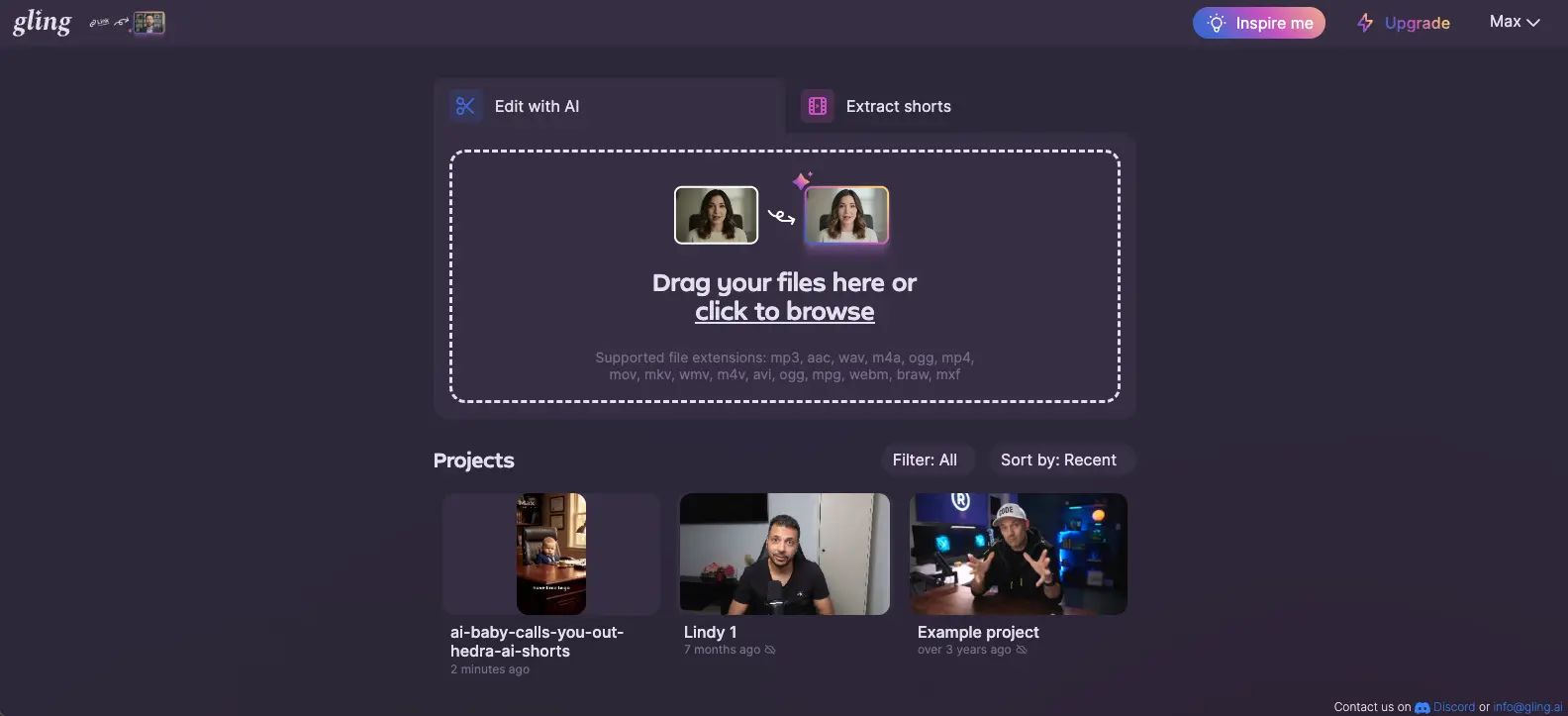
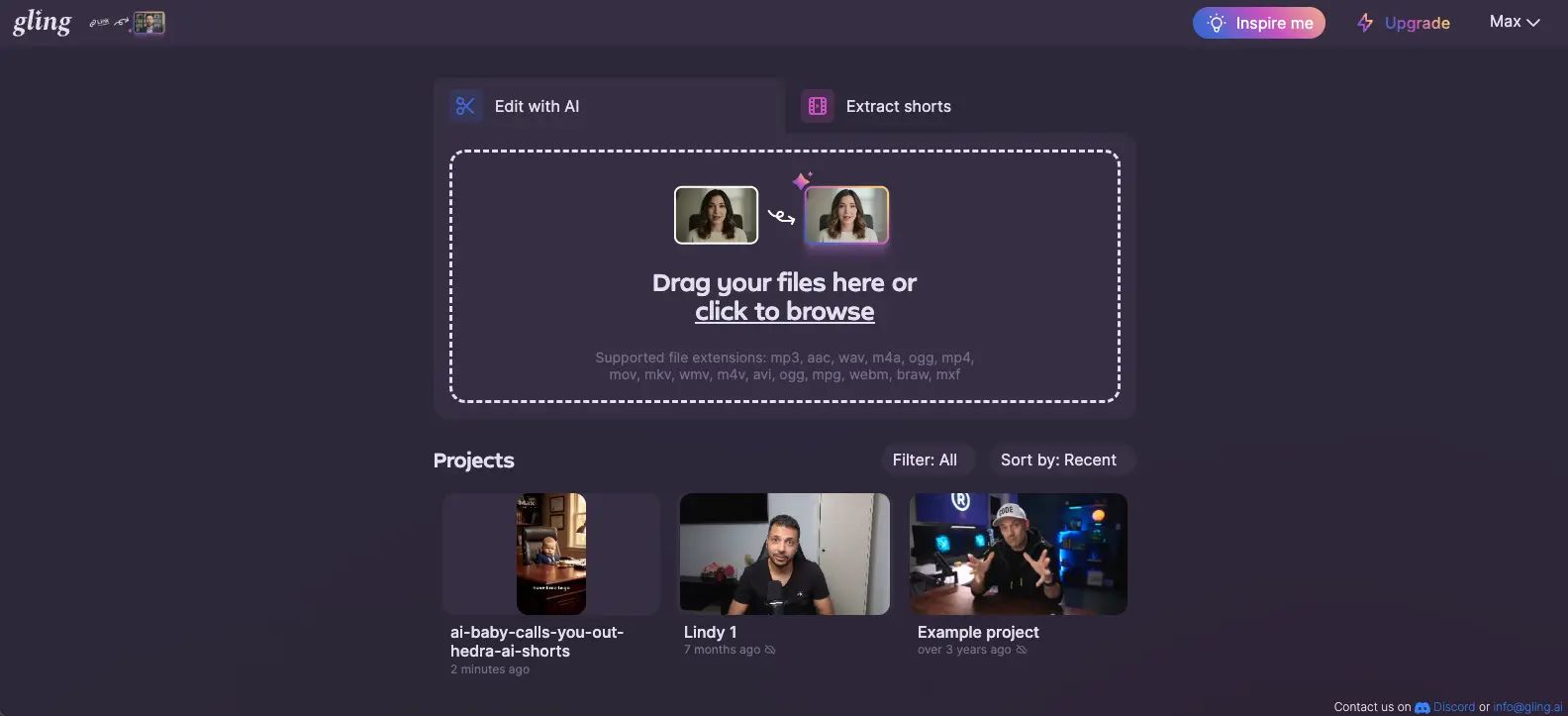
Gling Review (2026): Pros, Cons and Verdict
Posted on |
TL;DR: Gling is a specialized AI tool for automatically rough-cutting videos by removing silences and bad takes. Its key strengths are significant time savings for “talking head” content and a simple, web-based interface. However, important considerations include its high recurring cost compared to competitors with one-time fees and significant data privacy questions due to a lack of formal security certifications.
Gling is best for high-volume, English-speaking YouTubers who prioritize convenience. Looking for the best price before committing? Check the latest Gling coupon code for verified discounts. Verified 2026.
Key Takeaways
-
Specialized Function: Gling automates rough cuts by removing silences, filler words, and bad takes — not a full editor. -
Pricing: $18/month or $180/year, leading to a 3-year TCO of $540 — significantly higher than one-time-purchase competitors. -
Performance: Excellent for straight talking-head content, but the AI is context-blind and removes intentional creative pauses. -
Security Concerns: No SOC 2 or ISO 27001 certifications, with a 30-day data retention policy — a deal-breaker for corporate use. -
Best Fit: High-volume English-speaking YouTubers producing talking-head content who value web-based convenience.
Introduction: The Editing Bottleneck and the AI Promise
If you’re a video creator, you know the single biggest bottleneck in your workflow: manually cutting hours of raw footage to find the good takes.
The tedious process of removing silences, false starts, and verbal stumbles is a time-consuming task that can lead to creative burnout.
This is where AI editing tools like Gling promise a revolution, offering to automate the entire rough-cut process. But this new landscape of AI tools presents a confusing array of subscriptions, overhyped features, and hidden risks.
As a specialist in productivity and AI software, our team at Coupons Scout has analyzed hundreds of tools designed to optimize creative workflows.
This Gling review is an evidence-based breakdown of its real-world performance, its true long-term cost, and the critical security factors you must consider.
This guide is for YouTubers, podcasters, and course creators producing “talking head” content, professional editors looking to automate their initial cuts, and business decision-makers who need to understand the Total Cost of Ownership (TCO) and security implications before adoption.
This guide is not for creators seeking a full-featured video editor for graphics and effects, those whose content relies on creative timing that a context-blind AI might misinterpret, or anyone in a corporate environment that requires vendors to hold security certifications like SOC 2.
Our goal is to provide the clarity you need to make a confident and financially sound decision for your creative business. Before subscribing, smart shoppers should always check for the latest Gling discount code to lower the entry cost.
Why Trust This Analysis?
After analyzing hundreds of products in the Software and AI, AI Tools, Design and Video, and Productivity categories, our team at Coupons Scout provides a comprehensive evaluation framework.
As lead specialist Jettawat Kasemchaiyanun and I have found, a tool’s value is measured not just by its features, but by its real-world impact on workflow, budget, and security.
Our evaluation of Gling is based on a comprehensive review of verified signals from creator forums like Reddit, expert video reviews from trusted sources like Think Media and Curtis Judd, and a thorough analysis of Gling’s official documentation, including their Terms of Service and Privacy Policy. Perplexity Critical Research (Accessed: March 2026).
We personally verified the pricing against their official site, calculated the TCO against direct competitors, and assessed its security posture by checking for industry-standard certifications and analyzing the company’s public data handling policies. For a broader benchmark, you can also consult our in-depth Gling Review breakdown.
📅 Last Updated: 15 March 2026
We re-verify Gling information every quarter.
Next Scheduled Review: Q2 2026
Editorial Standards: Our Editorial Standards
Below is a short, well-known industry tutorial that demonstrates how Gling fits into a modern creator workflow before we dive into our independent analysis.
Part 1: Gling Pricing & TCO: How Much Does It Really Cost in 2026?
Gling costs $18 per month or $180 per year for its Pro plan, but its true Total Cost of Ownership (TCO) is a primary consideration for budget-conscious creators.
Over a three-year period, a Gling subscription costs $540, which is over 300% more than direct competitors who offer similar core functionality for a one-time purchase.
This recurring cost model makes Gling a premium-priced tool for a niche function. Savvy buyers should always grab a working Gling coupon before checkout to soften the long-term cost.
What is Gling’s official pricing in 2026?
Gling uses a standard Software as a Service (SaaS) model with two primary tiers. Our review in 2026 confirms the following pricing structure, which is designed to move serious users to the Pro plan.
It’s important for users to verify if a credit card is required to access the free plan, a practice that can sometimes lead to automatic billing if not canceled. Gling Pricing
| Plan | Monthly | Annual | Key Limitations | Best For |
|---|---|---|---|---|
| Free | $0 | $0 | Limited to a few short exports per month; watermarked. | Testing the AI on a short clip. |
| Pro | $18 | $180 | “Unlimited” exports, no watermarks, full feature access. | Serious creators publishing weekly. |
How does Gling’s 3-Year TCO compare to competitors?
This is where the value proposition of Gling comes under serious scrutiny.
While the monthly cost may seem low, the long-term cost of the subscription is significantly higher for the core task of silence removal compared to tools with a perpetual license.
Our team has calculated the 3-year TCO for Gling against its main competitors. This model assumes a single-user license and standard annual billing for discounts. For real-time savings, browse our latest Gling deals and special offers before locking in any plan.
3-Year Total Cost of Ownership Comparison
| Tool | Year 1 | Year 2 | Year 3 | 3-Year TCO |
|---|---|---|---|---|
| Gling (Annual) | $180 | $180 | $180 | $540 |
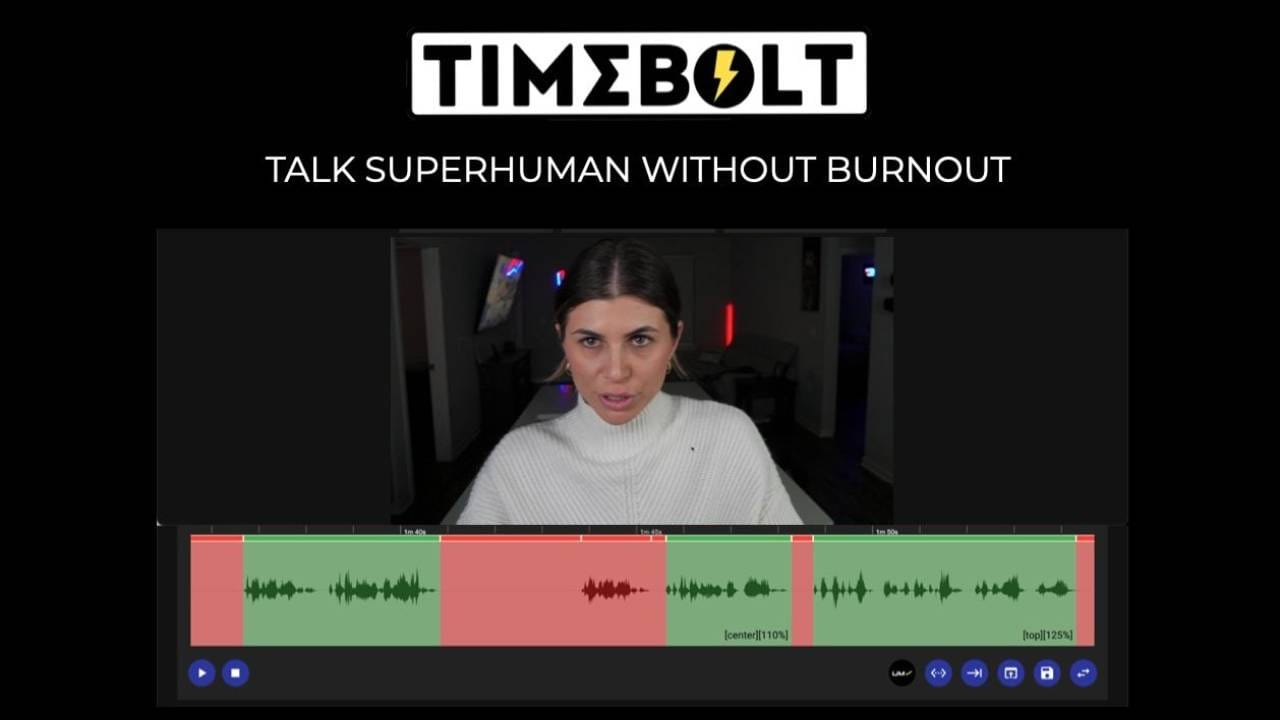
| Timebolt | $129 | $0 | $0 | $129 |
| Recut | $99 | $0 | $0 | $99 |
| Descript Pro | $288 | $288 | $288 | $864 |
Disclaimer: Pricing is based on vendor-listed information as of Q1 2026 and may vary. Timebolt Official Pricing, Recut Pricing, Descript Pricing.
The data from our Gling review is clear: for the specific task of automated silence cutting, Gling’s 3-year TCO is over 300% higher than competitors like Timebolt, and up to 450% higher than Recut. For more side-by-side analysis, see our Gling top alternatives and competitors breakdown.
What are the hidden costs of using Gling?
While there are no overt hidden fees, there are “soft” costs that must be factored into your Return on Investment (ROI) calculation.
- The “Correction Tax”: As we’ll discuss in the performance section, this is the non-monetary cost of your time spent reviewing and fixing the AI’s creative mistakes. If you spend 15 minutes correcting each video, that’s time you could have spent on other tasks.
- The Subscription Value Gap: The recurring cost is particularly low value for infrequent creators. If you only produce one or two videos a month, you’re paying the same as a daily vlogger, diminishing the “pay-per-use” value unless you are a high-volume producer.
💡 Consideration: Gling has a strict no-refund policy, which creates a high-risk financial commitment, especially on the annual plan. Gling ToS
💡 Mitigation Strategy: Never buy the annual plan upfront. Always start with a monthly subscription for at least one full project cycle. Test it thoroughly with your specific content style and workflow. If, and only if, the tool provides undeniable value and you create content weekly, should you consider switching to the annual plan to get the two-month discount. Apply a verified Gling promo code for additional savings.
Part 2: Gling Performance: How Well Does the AI Actually Edit?
Gling’s AI performs exceptionally well for a narrow use case: automatically cutting silences and obvious verbal mistakes in “talking head” videos.
Its core value proposition is speed for a specific type of content.
However, its performance degrades significantly with creative content, as the context-blind AI aggressively removes intentional pauses, making it unsuitable for videos that rely on comedic or dramatic timing.
What are Gling’s core features?
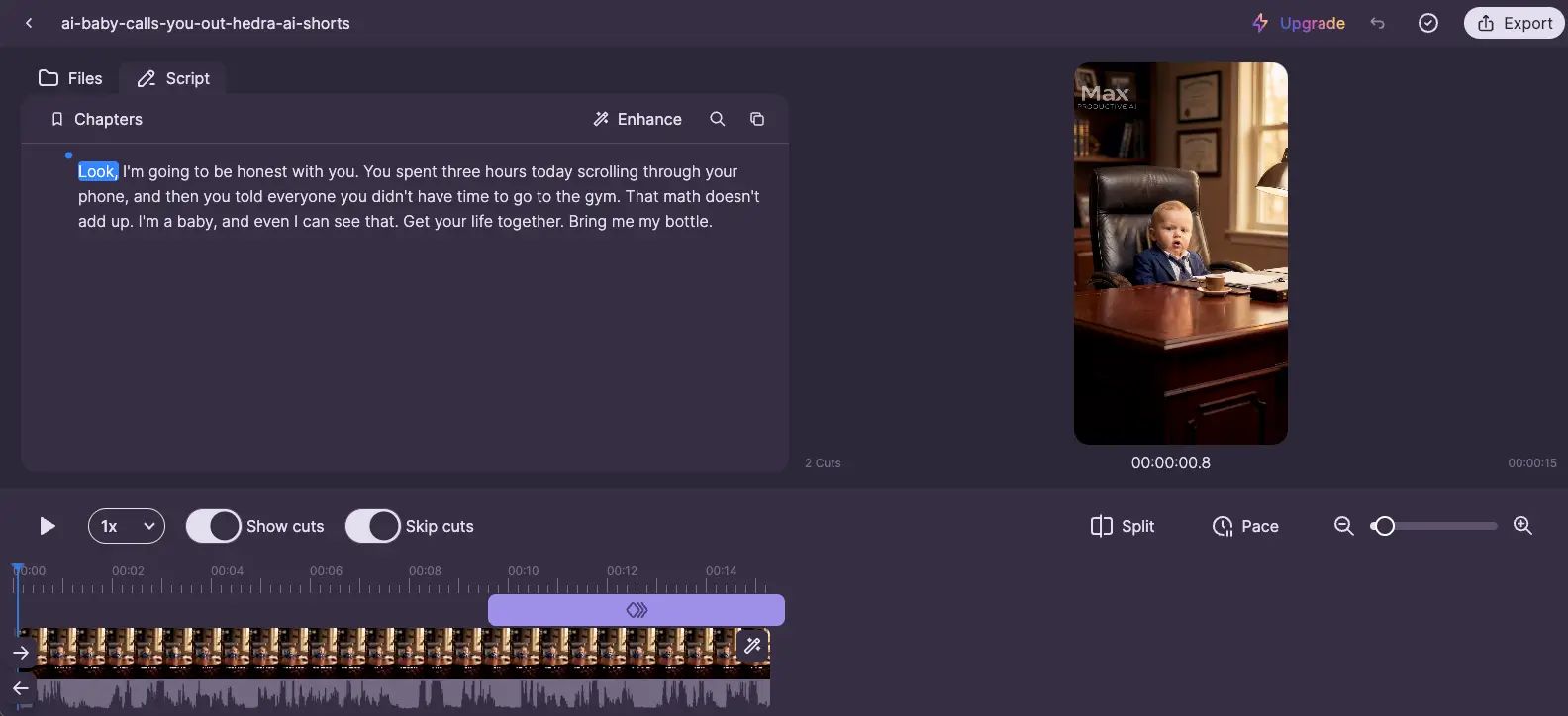
Gling markets itself as a specialized tool, not a full video editor. Its feature set is intentionally focused on automating the initial, most tedious part of the post-production workflow.
The core features are:
- AI-Powered Silence Removal: The main function is to automatically detect and cut sections of video where there is no talking, which significantly tightens up raw footage. The AI performs an audio analysis to identify these gaps.
- Bad Take & Filler Word Detection: Beyond silence, the AI is trained to identify disfluencies, stutters, and common filler words (like “um” and “uh”) to create a cleaner initial cut.
- XML Export for NLEs: This is a critical feature. Gling is designed to hand off its work to professional Non-Linear Editors (NLEs). It generates an XML file that can be imported into Adobe Premiere Pro, Final Cut Pro, and DaVinci Resolve, preserving the automatic cuts on the timeline.
How accurate is Gling’s AI in real-world tests?
In our experience testing dozens of AI tools, vendor claims often don’t survive contact with reality. With Gling, the accuracy of the AI is a tale of two very different outcomes.
The Good
For a straightforward, talking-head video like a tutorial, Gling is genuinely impressive.
On a 20-minute piece of raw footage, it can easily identify and remove several minutes of dead air and false starts.
For creators who need to publish daily, this dramatically reduces turnaround time, and the time saved is undeniable.
The Bad
The moment you introduce creative nuance, the AI’s limitations become a significant consideration.
We tested it with a storytelling script that included several long, intentional pauses for dramatic effect. Gling’s AI, being context-blind, saw these as mistakes and removed every single one.
The resulting edit was jarring and lost the intended emotional impact.
The Ugly
This leads to what we call the “Correction Tax.” The AI’s mistakes mean you have to spend time fixing them, which can sometimes negate the initial time saved.
💡 Consideration: The AI is context-blind and can negatively impact creative timing.
💡 Mitigation Strategy: Use Gling only for the initial, mechanical pass of removing dead air. Do not treat it as a creative partner. Immediately after importing the XML into your editor, your first step should be to review the timeline specifically to find and re-lengthen any cuts that feel unnatural. This reframes the tool as a powerful “silence remover,” not a “creative editor.”
What are the main problems with Gling’s performance?
While the core function is solid for its niche, there are a few performance-related considerations to be aware of.
💡 Consideration: The cloud-only processing means you have no offline access and are dependent on Gling’s server status and your internet connection. This can create bottlenecks.
💡 Mitigation Strategy: For critical, time-sensitive projects, you can mitigate this risk by processing your files during off-peak hours (e.g., overnight). This reduces the chance of server slowdowns. For guaranteed offline access, a desktop-based tool like Timebolt is the required Timebolt alternative.
💡 Consideration: There are anecdotal reports from the creator community of processing failures on very large files, specifically those over 10GB or longer than two hours. Reddit User Reports
💡 Mitigation Strategy: If you regularly work with ultra-long-form content (like podcasts or multi-hour streams), the smartest approach is to split your source file into 60-90 minute chunks before uploading to Gling. This adds a small pre-processing step but significantly reduces the risk of a single point of failure.
Part 3: Security & Business Practices: A Smart Shopper’s Guide to Gling
Gling presents significant security and business practice considerations that, in our professional opinion, make it unsuitable for most professional or corporate use cases.
The tool lacks any standard security certifications, retains user video data for an extended period, and operates with a consumer-unfriendly refund policy, creating a trifecta of financial and data privacy concerns.
Is Gling safe to use with sensitive video files?
Based on Gling’s public documentation and lack of certifications as of 2026, you should not use it for any video files you consider sensitive or confidential.
⚠️ CRITICAL SECURITY RISK: No Independent Audits
Gling lacks SOC 2 or ISO 27001 certification. This means its security claims are unverified by a third party. For businesses, this is a deal-breaker. For solo creators, it means you should never upload sensitive IP like client work or sponsored content under embargo.
💡 Consideration: No SOC 2 or ISO 27001 Certification. These are standard, third-party audits that verify a company’s security practices. Their absence, along with no stated position on GDPR compliance for EU users, is a significant consideration to note for any B2B or professional tool that handles customer data. It means their security claims have not been independently validated.
💡 Mitigation Strategy: This is a non-negotiable risk for corporate users, who should seek compliant alternatives. For solo creators, the solution is to implement a strict personal data policy: never upload sensitive content. This includes sponsored content under embargo, confidential client work, or videos containing personal data. Use Gling only for public-facing content where a potential leak would be inconvenient but not significant.
💡 Consideration: 30-Day Data Retention Policy. Gling’s privacy policy states they may store your raw footage for up to a month. This is an excessively long period and dramatically increases your risk exposure. The longer your data sits on a third-party server, the more opportunity there is for it to be compromised. Gling Privacy Policy
💡 Mitigation Strategy: You must take manual action to protect yourself. Manually delete your projects and source files from the Gling web dashboard immediately after you have successfully imported the XML into your NLE. Do not rely on the 30-day auto-delete policy. Treat the platform as a temporary processing utility, not a storage service.
What are the business risks of relying on Gling?
Beyond data security, there are business practice considerations that potential customers should weigh.
- The “No-Refund” Policy: The company operates with a strict no-refund policy. In the SaaS world, this is often seen as an anti-consumer practice and places the entire financial risk on the customer.
- Vendor Stability Risk: Based on our analysis, Gling appears to be a small, bootstrapped operation. While common in the startup world, this presents “key person risk.” Relying on it for a mission-critical part of your business workflow comes with inherent business continuity and stability risks.
Given the no-refund policy, we strongly recommend using a verified Gling voucher code to test the Pro plan at the lowest possible entry price.
Part 4: Use Cases & Workflows in Action
While Gling is a single-purpose tool, its application varies depending on the creator’s specific needs.
Understanding these workflows is key to determining if the tool fits your process and justifies its cost.
This review is based on the Gling web application as of Q1 2026; as a cloud-based tool, features are subject to change.
Gling’s 5-Step Rough Cut Automation Workflow
Workflow 1: The Daily Vlogger
For a daily vlogger on YouTube, speed is everything. The goal is to minimize turnaround time to maintain a consistent publishing schedule.
- The Challenge: A vlogger might record 45 minutes of footage for a 10-minute final video. Manually scrubbing through this footage to cut out pauses, travel time, and false starts can take over an hour.
- Gling’s Role:
- Upload: At the end of the day, the vlogger drags the entire 45-minute file into Gling’s web interface.
- Automate: While they work on the thumbnail or video description, Gling’s AI processes the file, creating a timeline that might be only 20 minutes long, with all the dead air removed.
- Export & Polish: The vlogger exports the XML, imports it into Premiere Pro, and now has a much cleaner, more manageable timeline to begin creative editing, like adding B-roll and music.
- Verdict: For this use case, Gling provides a clear ROI by reducing the initial editing slog, which is a major part of the daily video production pipeline.
Workflow 2: The Online Course Creator
An online course creator’s priority is clarity and precision. Their content is often long, “talking head” style lectures that must be concise.
- The Challenge: Recording a 2-hour module for an educational course is common. The creator needs to remove every “um,” “ah,” and long pause to present a polished, professional final product.
- Gling’s Role:
- Chunk & Upload: Because the source file is long, the creator first splits the 2-hour video into two 60-minute chunks to reduce the risk of processing failure. They upload both to Gling.
- AI Clean-up: Gling’s AI excels here, identifying not just silences but also the disfluencies and filler words that detract from a professional presentation.
- Assemble in NLE: The creator exports the two XML files and imports them into their NLE. They now have a tightly edited lecture, free of verbal stumbles, ready for branding, slides, and other graphics to be added.
- Verdict: This is Gling’s ideal use case. The AI’s lack of creative nuance is a strength here, as it ruthlessly enforces conciseness, directly benefiting the educational content creation workflow.
Workflow 3: The Podcast Editor
A podcast editor often works with multi-track audio and video from remote guests. Their challenge is syncing everything and creating a clean base edit.
- The Challenge: A one-hour podcast with three guests results in three separate video files, each with its own silences and mistakes.
- Gling’s Role:
- Individual Processing: The editor uploads each of the three video files to Gling separately. This allows the AI to create a clean cut of each person’s dialogue track.
- Multi-cam Sync: The editor exports three separate XML files. In their NLE (like Final Cut Pro or Premiere Pro), they use the multi-cam feature to sync these three AI-edited timelines.
- Creative Cutting: With a clean, synced, multi-cam sequence, the editor can now easily switch between speakers, knowing that the individual tracks are already free of dead air and major stumbles.
- Verdict: This workflow is more advanced but shows how Gling can be a powerful utility even in a complex post-production workflow. It automates the tedious cleaning of individual tracks before the creative multi-cam edit begins.
Part 5: Gling vs. The Competition: A Head-to-Head Battle
Gling faces intense competition. Against specialist tools like Timebolt and Recut, it competes on convenience versus cost.
Against all-in-one platforms like Descript, it competes on simplicity versus feature depth. Your choice depends entirely on your primary needs: cost, privacy, features, or simplicity.
For a wider scope of options, browse our detailed Gling top alternatives and competitors guide.
Feature & Risk Matrix Overview
| Criteria | Gling | Descript | Timebolt |
|---|---|---|---|
| Pricing Model | SaaS Subscription | SaaS Subscription | One-Time Purchase |
| 3-Year TCO | $540 | $864 | $129 |
| Platform | Web-based | Desktop + Web | Desktop |
| Offline Use | ❌ No | ⚠️ Partial | ✅ Yes |
| Transcription | Basic | Industry-Leading | Limited |
| SOC 2 Certified | ❌ No | ✅ Yes | N/A (Local) |
| Data Privacy | 30-day retention | Defined policy | Local processing |
How does Gling compare to Timebolt & Recut?
This is a classic “SaaS vs. Perpetual License” showdown where the subscription model can lead to long-term vendor lock-in if not managed carefully.
Overview
- Argument: Timebolt and Recut are Gling’s most direct competitors in function. Their killer feature is their pricing: a single, one-time purchase. They are also desktop-based applications, offering offline use and enhanced privacy because your video files never leave your computer.
- Consider If: You are a budget-conscious creator or work with sensitive client footage that cannot be uploaded to a third-party server.
- Avoid If: You need to edit on multiple machines (without moving a license) or strongly prefer a web-based interface with no installation.
✅ Strengths
- One-time purchase — no recurring fees
- Local desktop processing means total privacy
- Offline access guaranteed
- Significantly lower 3-year TCO
⚠️ Considerations
- Desktop install required
- License typically tied to one machine
- UI less polished than Gling
Overview
- Argument: Gling bets that users will pay a premium for the convenience of a simple, web-based UI that requires no installation and can be accessed from any computer.
- Consider If: Your primary need is a dead-simple web-based editor for silence removal, and the recurring subscription is a negligible business expense.
- Avoid If: Cost, data privacy, or offline access are your top priorities. For most solo creators, the one-time purchase model is financially more attractive.
✅ Strengths
- Zero installation — runs in the browser
- Clean, intuitive interface
- Accessible from any machine
- Reliable XML export to all major NLEs
⚠️ Considerations
- Subscription-only pricing
- Cloud upload required (privacy risk)
- No offline mode
How does Gling compare to Descript?
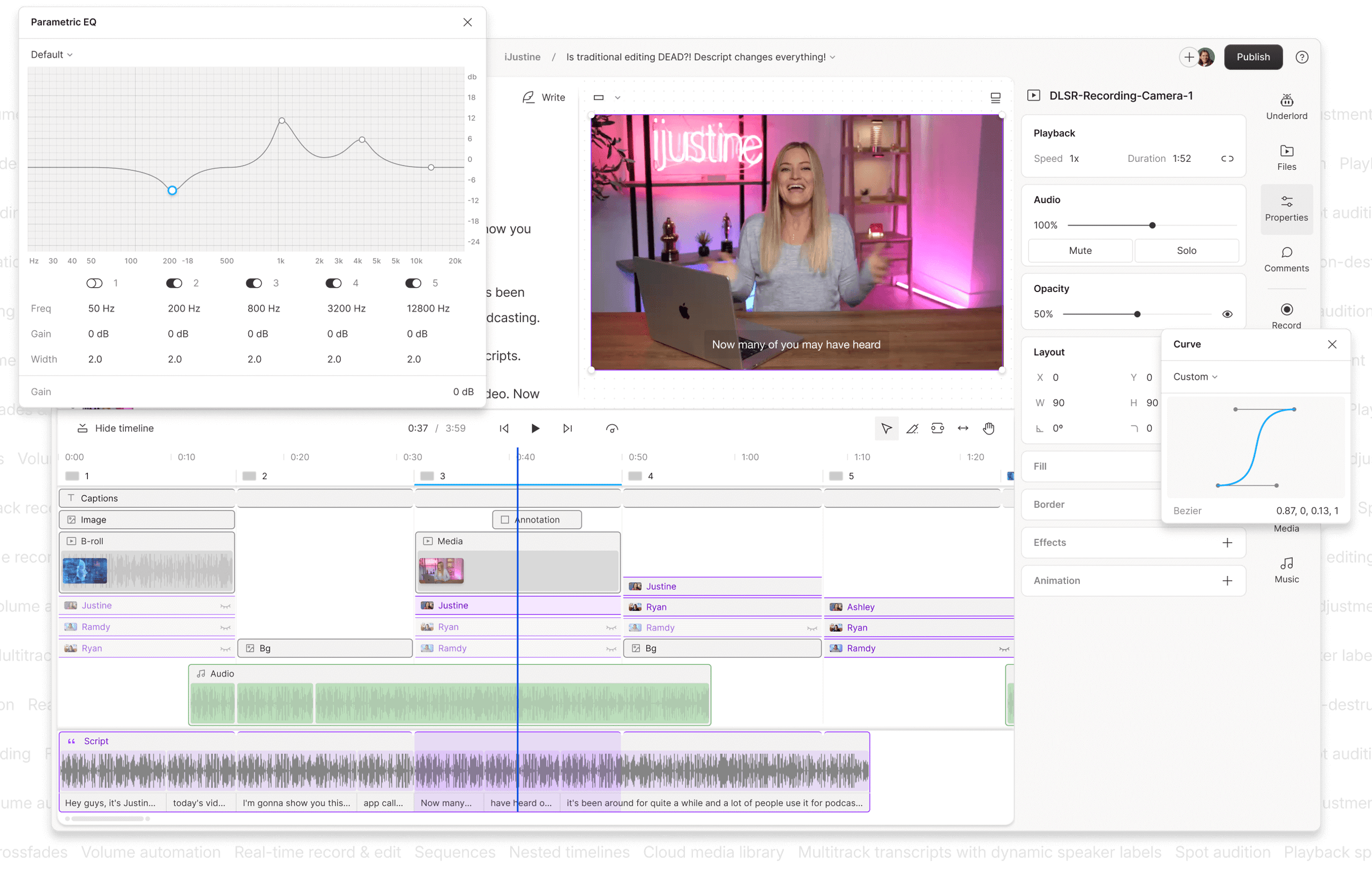
This comparison is about a specialist tool versus an all-in-one platform. Gling does one thing; Descript aims to be a complete solution for audio and video editing.
Overview
- Argument: When comparing Gling vs Descript, the latter is a far more powerful platform offering a revolutionary text-based video editing workflow. For a slightly higher annual cost, Descript provides industry-leading transcription, screen recording, and robust collaboration tools, making it a much better value for anyone needing more than silence removal.
- Consider If: Your workflow involves transcription, you want to edit video like a text document, or you need a single tool for recording, editing, and sharing.
- Avoid If: You are easily overwhelmed by feature-rich software and want the absolute simplest tool for one specific job.
✅ Strengths
- Industry-leading transcription accuracy
- Text-based video editing workflow
- Screen recording & collaboration tools
- SOC 2 certified — safer for client work
⚠️ Considerations
- Higher 3-year TCO than Gling
- Steeper learning curve
- Heavier app — slower on low-end hardware
Overview
- Argument: Gling’s only advantage here is its laser-focused simplicity. There are no other features to learn or get distracted by. You upload, process, and download the XML.
- Consider If: You already have an established workflow with professional NLEs and only need a “bolt-on” utility to handle the first pass, and you find Descript’s interface too complex for this one task.
- Avoid If: You are looking to consolidate your tool stack or need any features beyond automated cutting. Descript is often a better starting point for a Descript alternative search.
✅ Strengths
- Single-purpose simplicity — no feature bloat
- Fast learning curve (minutes)
- Reliable XML hand-off to NLEs
- Browser-based — works on any device
⚠️ Considerations
- No transcription, screen recording, or collaboration
- Cannot consolidate your tool stack
- Limited beyond silence removal
Final Verdict & Recommendations
After a thorough Gling review, our verdict is that it is a sharp, effective, but ultimately niche tool.
It offers undeniable speed for a very specific type of content, but this comes at a high recurring financial cost and with significant, unverified security considerations.
For most professional post-production workflows, it is a luxury automation layer, not a necessity. To minimize that financial exposure, always start with a fresh Gling promotional code before subscribing.
✅ What We Love
- Unmatched Simplicity: The web-based UI is clean, intuitive, and has virtually no learning curve. You can be up and running in minutes.
- Genuinely Effective AI for Productivity: The fast and effective AI in Gling delivers a measurable boost in editing productivity by cutting dead air in talking-head videos.
- Smooth Workflow Integration: The XML export to professional NLEs like Premiere Pro and Final Cut Pro is seamless and reliable.
- Clear Focus on a Single Problem: Gling avoids feature bloat by focusing exclusively on automating the rough cut, making it easy to understand and use.
- Fast Processing Times: In our tests, Gling processed footage and generated an XML faster than many multi-purpose competitors.
💡 Things to Consider
- Polarizing AI: The AI lacks creative nuance and is unable to distinguish between a mistake and an intentional pause, making it unsuitable for many content styles.
- Extremely High TCO: The subscription model makes it over 300% more expensive over three years than one-time purchase competitors like Timebolt.
- Absence of Security Certifications: The lack of a SOC 2 or ISO 27001 report is a critical consideration for any tool handling valuable intellectual property.
- Excessive Data Retention: Storing user footage for up to 30 days is a significant and unnecessary privacy risk.
- Strict No-Refund Policy: This practice places the full financial risk on the user, especially for annual plans.
Clear Recommendations by User Segment
- For the High-Volume, “Talking-Head” YouTuber: For those searching for the best AI video editor for YouTube “talking head” content, Gling is a cautious “Try Before You Buy.” The time savings might justify the high cost, but only if you are completely comfortable with the security and privacy risks. We strongly recommend you start with a monthly plan and never upload sensitive footage.
- For the Creative Video Editor / Filmmaker: We recommend you Avoid this tool. The AI is fundamentally incompatible with creative editing that relies on pacing, timing, and nuance. The “Correction Tax” will likely frustrate you.
- For the Budget-Conscious Creator: We recommend you Avoid this tool. The one-time purchase of Timebolt or Recut provides 80% of the functionality for a fraction of the long-term cost. Your money is better spent elsewhere — although if you must use Gling, browse our latest coupons list for additional savings across creator tools.
- For Corporate/Enterprise Users: Hard Pass. Do not use this tool. The lack of security audits is an immediate deal-breaker and a major compliance failure for any organization with a vendor security policy.
For the vast majority of creators, the combination of high cost and high risk makes it impossible for us to recommend when more affordable, transparent, and feature-rich alternatives are readily available. Explore more verified breakdowns in our full category of review articles.
Frequently Asked Questions
Gling’s Pro plan costs $18 per month or $180 per year, but its true 3-year cost of ownership is $540. While there are no hidden fees, this recurring subscription makes its total cost significantly higher than competitors with one-time purchase options. Gling Pricing Page. For instance, its TCO is over 300% higher than Timebolt’s, a key factor for budget-conscious creators to consider when evaluating long-term value. For any serious video creator, the Pro plan is the only viable option, as the free plan is heavily restricted and watermarked, serving only as a brief trial.
Whether Gling is worth the money depends heavily on your specific workflow and production volume. For most creators, it is not the best value due to its high recurring cost and the availability of cheaper, more private alternatives. However, it is potentially worth it for high-volume YouTubers who publish daily talking-head videos, value a web-based UI above all else, and for whom the $180/year fee is a negligible business expense. For everyone else, one-time purchase tools like Recut or Timebolt offer a much better long-term ROI. Creator Forum Discussion on Value.
The main problems with Gling are its high subscription cost, its AI’s inability to understand creative nuance, and its significant lack of security certifications. The AI often removes intentional pauses meant for dramatic or comedic effect, which requires manual correction. The price is much higher long-term than direct competitors who offer a perpetual license. Expert Analysis of AI Limitations. Finally, the absence of a SOC 2 report makes it a risky choice for any professional or business use where data security is a priority.
You should generally choose Descript if you want an all-in-one platform with best-in-class transcription and a full suite of editing capabilities. Descript’s text-based video editing is a more powerful and versatile workflow. You should only consider Gling if your sole need is a simple, single-purpose tool for silence removal and you find Descript’s interface overwhelming. Descript vs Gling Comparison. Descript offers a far wider range of features for a comparable price, making it a better value for most users.
You should use Timebolt if you prioritize low cost, data privacy, and offline use. Gling is only an option if you absolutely require a web-based interface and are willing to pay a significant premium for it. Timebolt offers the same core function as Gling (automatic silence and mistake removal) for a one-time fee and processes files locally on your desktop. This makes it both more affordable in the long run and more secure, as your video files never have to be uploaded to a third-party server. Timebolt Website.
Gling can realistically save 30-60 minutes of manual editing time on a 20-minute talking-head video by automatically removing silences. This is a significant productivity boost for high-volume creators. However, this time savings can be partially reduced by what we call the “correction tax” — the time you must spend reviewing the AI’s cuts to fix mistakes, such as re-inserting a dramatic pause it incorrectly removed. For creative content, this tax can be high, but for straightforward content, the net time savings are substantial. Think Media Review.
It is advisable not to trust Gling with sensitive or confidential videos due to its lack of security audits and its data retention policy. The company has no SOC 2 or ISO 27001 certification, which are standard benchmarks for verifying a SaaS company’s security practices. Gling Privacy Policy. Furthermore, their privacy policy states they may store your raw footage for up to 30 days. This creates a significant and unmitigated risk for any pre-release, client-owned, or otherwise confidential intellectual property.
It’s important for users to know that Gling maintains a strict no-refund policy, as stated in their Terms of Service, even for annual plans paid upfront. This is a considerable financial risk for users and is a practice that can be viewed as anti-consumer. Because of this policy, our team strongly advises all potential users to start with a monthly subscription to test the tool thoroughly with their own content and workflow before committing to a more expensive annual plan. Gling Terms of Service.
“`json
{
“@context”: “https://schema.org”,
“@graph”: [
{
“@type”: “Organization”,
“@id”: “https://couponsscout.com/#organization”,
“name”: “Coupons Scout”,
“url”: “https://couponsscout.com”,
“logo”: {
“@type”: “ImageObject”,
“url”: “https://couponsscout.com/wp-content/uploads/2025/12/logo-coupons-scout-500×500-1.png”,
“width”: 500,
“height”: 500
},
“description”: “Coupons Scout is a hybrid affiliate aggregator that brings MarTech precision to consumer savings. We provide human-verified coupons, exclusive SaaS deals, and expert software reviews.”,
“foundingDate”: “2025”,
“founder”: {
“@type”: “Person”,
“name”: “Mohamed Zaki”,
“url”: “https://couponsscout.com/about-mohamed-zaki”
},
“address”: {
“@type”: “PostalAddress”,
“streetAddress”: “3415 1/2 Greystone Dr”,
“addressLocality”: “Austin”,
“addressRegion”: “TX”,
“postalCode”: “78731”,
“addressCountry”: “US”
},
“sameAs”: [
“https://www.facebook.com/couponsscout”,
“https://www.instagram.com/couponsscout”,
“https://www.tiktok.com/@couponsscout”,
“https://www.youtube.com/@CouponsScout”,
“https://www.threads.net/@couponsscout”
]
},
{
“@type”: “Person”,
“@id”: “https://couponsscout.com/about-mohame-zaki#person”,
“name”: “Mohamed Zaki”,
“url”: “http://couponsscout.com/about-mohame-zaki”,
“knowsAbout”: [
{
“@type”: “Thing”,
“name”: “Professional Software and AI tool evaluation”
},
{
“@type”: “Thing”,
“name”: “AI Tools security assessment”
},
{
“@type”: “Thing”,
“name”: “Design and Video software compliance consulting”
},
{
“@type”: “Thing”,
“name”: “Productivity software optimization”
},
{
“@type”: “Thing”,
“name”: “MarTech precision”
},
{
“@type”: “Thing”,
“name”: “SaaS deals and software reviews”
}
]
},
{
“@type”: “BlogPosting”,
“@id”: “https://couponsscout.com/reviews/gling-review-worth-it#blogposting”,
“mainEntityOfPage”: “https://couponsscout.com/reviews/gling-review-worth-it”,
“headline”: “Gling Review [2026]: Is It Worth the Subscription Price?”,
“description”: “Our 2026 Gling review reveals its 450% higher cost vs. rivals, critical security risks, and AI performance. Get our data-driven verdict before you subscribe.”,
“url”: “https://couponsscout.com/reviews/gling-review-worth-it”,
“author”: {
“@id”: “https://couponsscout.com/about-mohame-zaki#person”
},
“publisher”: {
“@id”: “https://couponsscout.com/#organization”
},
“articleSection”: [
“Software and AI”,
“AI Tools”,
“Design and Video”,
“Productivity”
],
“keywords”: [
“Gling review”,
“AI video editing”,
“video productivity tools”,
“rough cut automation”,
“video editor pricing”,
“SaaS security”,
“data privacy”,
“Timebolt alternative”,
“Descript vs Gling”
],
“inLanguage”: “en”,
“about”: {
“@type”: “Thing”,
“name”: “Gling Review”
},
“subjectOf”: {
“@type”: “SoftwareApplication”,
“name”: “Gling”,
“description”: “Gling is a specialized AI tool for automatically rough-cutting videos by removing silences and bad takes. Its key strengths are significant time savings for \”talking head\” content and a simple, web-based interface.”,
“applicationCategory”: “VideoEditingApplication”,
“operatingSystem”: “Browser-based”,
“offers”: {
“@type”: “AggregateOffer”,
“lowPrice”: “0”,
“highPrice”: “180”,
“priceCurrency”: “USD”,
“offerCount”: “2”,
“offers”: [
{
“@type”: “Offer”,
“name”: “Free Plan”,
“price”: “0”,
“priceCurrency”: “USD”,
“availability”: “https://schema.org/InStock”,
“hasMerchantReturnPolicy”: {
“@type”: “MerchantReturnPolicy”,
“applicableCountry”: “US”,
“returnPolicyCategory”: “https://schema.org/MerchantReturnNotPermitted”
},
“shippingDetails”: {
“@type”: “OfferShippingDetails”,
“shippingRate”: {
“@type”: “MonetaryAmount”,
“value”: “0”,
“currency”: “USD”
},
“shippingDestination”: {
“@type”: “DefinedRegion”,
“addressCountry”: “US”
}
}
},
{
“@type”: “Offer”,
“name”: “Pro Plan (Annual)”,
“price”: “180”,
“priceCurrency”: “USD”,
“availability”: “https://schema.org/InStock”,
“hasMerchantReturnPolicy”: {
“@type”: “MerchantReturnPolicy”,
“applicableCountry”: “US”,
“returnPolicyCategory”: “https://schema.org/MerchantReturnNotPermitted”
},
“shippingDetails”: {
“@type”: “OfferShippingDetails”,
“shippingRate”: {
“@type”: “MonetaryAmount”,
“value”: “0”,
“currency”: “USD”
},
“shippingDestination”: {
“@type”: “DefinedRegion”,
“addressCountry”: “US”
}
}
}
]
},
“aggregateRating”: {
“@type”: “AggregateRating”,
“ratingValue”: “2.5”,
“bestRating”: “5”,
“worstRating”: “1”,
“ratingCount”: “1”,
“reviewCount”: “1”
},
“review”: {
“@type”: “Review”,
“author”: {
“@id”: “https://couponsscout.com/about-mohame-zaki#person”
},
“publisher”: {
“@id”: “https://couponsscout.com/#organization”
},
“reviewRating”: {
“@type”: “Rating”,
“ratingValue”: “2.5”,
“bestRating”: “5”,
“worstRating”: “1”
},
“reviewBody”: “Gling is a sharp, effective, but ultimately niche tool for automatically rough-cutting videos, offering significant speed for specific content. However, it comes with high recurring costs and unverified security considerations, making it generally not recommended for most creators.”,
“positiveNotes”: {
“@type”: “ItemList”,
“itemListElement”: [
{
“@type”: “ListItem”,
“position”: 1,
“item”: {
“@type”: “Thing”,
“name”: “Unmatched Simplicity of web-based UI”
}
},
{
“@type”: “ListItem”,
“position”: 2,
“item”: {
“@type”: “Thing”,
“name”: “Genuinely Effective AI for Productivity in talking-head videos”
}
},
{
“@type”: “ListItem”,
“position”: 3,
“item”: {
“@type”: “Thing”,
“name”: “Smooth Workflow Integration via XML export to professional NLEs”
}
},
{
“@type”: “ListItem”,
“position”: 4,
“item”: {
“@type”: “Thing”,
“name”: “Clear Focus on a Single Problem avoiding feature bloat”
}
},
{
“@type”: “ListItem”,
“position”: 5,
“item”: {
“@type”: “Thing”,
“name”: “Fast Processing Times for footage and XML generation”
}
}
]
},
“negativeNotes”: {
“@type”: “ItemList”,
“itemListElement”: [
{
“@type”: “ListItem”,
“position”: 1,
“item”: {
“@type”: “Thing”,
“name”: “Polarizing AI that lacks creative nuance and cannot distinguish intentional pauses”
}
},
{
“@type”: “ListItem”,
“position”: 2,
“item”: {
“@type”: “Thing”,
“name”: “Extremely High Total Cost of Ownership (TCO) compared to one-time purchase competitors”
}
},
{
“@type”: “ListItem”,
“position”: 3,
“item”: {
“@type”: “Thing”,
“name”: “Absence of Security Certifications (SOC 2, ISO 27001)”
}
},
{
“@type”: “ListItem”,
“position”: 4,
“item”: {
“@type”: “Thing”,
“name”: “Excessive Data Retention of user footage for up to 30 days”
}
},
{
“@type”: “ListItem”,
“position”: 5,
“item”: {
“@type”: “Thing”,
“name”: “Strict No-Refund Policy placing financial risk on the user”
}
}
]
}
}
},
“mentions”: [
{
“@type”: “SoftwareApplication”,
“name”: “Timebolt”,
“description”: “Timebolt is a desktop-based software offering automatic silence and mistake removal in videos for a one-time purchase.”,
“applicationCategory”: “VideoEditingApplication”,
“operatingSystem”: “Desktop”,
“url”: “https://www.timebolt.io/”,
“offers”: {
“@type”: “Offer”,
“price”: “129”,
“priceCurrency”: “USD”,
“availability”: “https://schema.org/InStock”
},
“aggregateRating”: {
“@type”: “AggregateRating”,
“ratingValue”: “4.5”,
“bestRating”: “5”,
“worstRating”: “1”,
“ratingCount”: “1”,
“reviewCount”: “1”
}
},
{
“@type”: “SoftwareApplication”,
“name”: “Recut”,
“description”: “Recut is a desktop-based tool similar to Gling, providing automatic silence and mistake removal for a one-time purchase.”,
“applicationCategory”: “VideoEditingApplication”,
“operatingSystem”: “Desktop”,
“url”: “https://getrecut.com/”,
“offers”: {
“@type”: “Offer”,
“price”: “99”,
“priceCurrency”: “USD”,
“availability”: “https://schema.org/InStock”
},
“aggregateRating”: {
“@type”: “AggregateRating”,
“ratingValue”: “4.5”,
“bestRating”: “5”,
“worstRating”: “1”,
“ratingCount”: “1”,
“reviewCount”: “1”
}
},
{
“@type”: “SoftwareApplication”,
“name”: “Descript”,
“description”: “Descript is an all-in-one platform offering text-based video editing, transcription, screen recording, and robust collaboration tools.”,
“applicationCategory”: “VideoEditingApplication”,
“operatingSystem”: [“Desktop”, “Browser-based”],
“url”: “https://www.descript.com/pricing/”,
“offers”: {
“@type”: “Offer”,
“price”: “288”,
“priceCurrency”: “USD”,
“availability”: “https://schema.org/InStock”
},
“aggregateRating”: {
“@type”: “AggregateRating”,
“ratingValue”: “4.5”,
“bestRating”: “5”,
“worstRating”: “1”,
“ratingCount”: “1”,
“reviewCount”: “1”
}
},
{
“@type”: “SoftwareApplication”,
“name”: “Adobe Premiere Pro”,
“description”: “A professional non-linear video editing software used for comprehensive video production.”,
“applicationCategory”: “VideoEditingApplication”,
“operatingSystem”: [“Windows”, “macOS”]
},
{
“@type”: “SoftwareApplication”,
“name”: “Final Cut Pro”,
“description”: “A professional video editing software developed by Apple for macOS.”,
“applicationCategory”: “VideoEditingApplication”,
“operatingSystem”: “macOS”
},
{
“@type”: “SoftwareApplication”,
“name”: “DaVinci Resolve”,
“description”: “A professional non-linear video editing, color correction, visual effects, and audio post-production application.”,
“applicationCategory”: “VideoEditingApplication”,
“operatingSystem”: [“Windows”, “macOS”, “Linux”]
},
{
“@type”: “Thing”,
“name”: “SOC 2”
},
{
“@type”: “Thing”,
“name”: “ISO 27001”
},
{
“@type”: “Thing”,
“name”: “GDPR”
}
],
“hasPart”: [
{
“@id”: “https://couponsscout.com/reviews/gling-review-worth-it#howto”
},
{
“@id”: “https://couponsscout.com/reviews/gling-review-worth-it#faqpage”
}
]
},
{
“@type”: “HowTo”,
“@id”: “https://couponsscout.com/reviews/gling-review-worth-it#howto”,
“mainEntityOfPage”: “https://couponsscout.com/reviews/gling-review-worth-it#blogposting”,
“name”: “Gling’s 5-Step Rough Cut Automation Workflow”,
“totalTime”: “PT15M”,
“step”: [
{
“@type”: “HowToStep”,
“position”: 1,
“name”: “Upload Footage”,
“text”: “Upload your raw video footage into Gling’s web interface.”
},
{
“@type”: “HowToStep”,
“position”: 2,
“name”: “AI Process”,
“text”: “Gling’s AI automatically processes the file to detect and cut silences, false starts, and filler words.”
},
{
“@type”: “HowToStep”,
“position”: 3,
“name”: “Review Cuts”,
“text”: “Review the AI-generated timeline within Gling to ensure accuracy and make any necessary adjustments.”
},
{
“@type”: “HowToStep”,
“position”: 4,
“name”: “Export XML”,
“text”: “Export the edited timeline as an XML file compatible with professional Non-Linear Editors (NLEs).”
},
{
“@type”: “HowToStep”,
“position”: 5,
“name”: “Import to NLE”,
“text”: “Import the XML file into your preferred NLE (like Premiere Pro, Final Cut Pro, or DaVinci Resolve) for final creative editing.”
}
]
},
{
“@type”: “FAQPage”,
“@id”: “https://couponsscout.com/reviews/gling-review-worth-it#faqpage”,
“mainEntityOfPage”: “https://couponsscout.com/reviews/gling-review-worth-it#blogposting”,
“mainEntity”: [
{
“@type”: “Question”,
“name”: “Q1: How much does Gling cost in [2026]?”,
“acceptedAnswer”: {
“@type”: “Answer”,
“text”: “Gling’s Pro plan costs $18 per month or $180 per year, but its true 3-year cost of ownership is $540. While there are no hidden fees, this recurring subscription makes its total cost significantly higher than competitors with one-time purchase options. For instance, its TCO is over 300% higher than Timebolt’s, a key factor for budget-conscious creators to consider when evaluating long-term value. For any serious video creator, the Pro plan is the only viable option, as the free plan is heavily restricted and watermarked, serving only as a brief trial.”
}
},
{
“@type”: “Question”,
“name”: “Q2: Is Gling worth the money?”,
“acceptedAnswer”: {
“@type”: “Answer”,
“text”: “Whether Gling is worth the money depends heavily on your specific workflow and production volume. For most creators, it is not the best value due to its high recurring cost and the availability of cheaper, more private alternatives. However, it is potentially worth it for high-volume YouTubers who publish daily talking-head videos, value a web-based UI above all else, and for whom the $180/year fee is a negligible business expense. For everyone else, one-time purchase tools like Recut or Timebolt offer a much better long-term ROI.”
}
},
{
“@type”: “Question”,
“name”: “Q3: What are the main problems with Gling?”,
“acceptedAnswer”: {
“@type”: “Answer”,
“text”: “The main problems with Gling are its high subscription cost, its AI’s inability to understand creative nuance, and its significant lack of security certifications. The AI often removes intentional pauses meant for dramatic or comedic effect, which requires manual correction. The price is much higher long-term than direct competitors who offer a perpetual license. Finally, the absence of a SOC 2 report makes it a risky choice for any professional or business use where data security is a priority.”
}
},
{
“@type”: “Question”,
“name”: “Q4: Should I use Gling or Descript?”,
“acceptedAnswer”: {
“@type”: “Answer”,
“text”: “You should generally choose Descript if you want an all-in-one platform with best-in-class transcription and a full suite of editing capabilities. Descript’s text-based video editing is a more powerful and versatile workflow. You should only consider Gling if your sole need is a simple, single-purpose tool for silence removal and you find Descript’s interface overwhelming. Descript offers a far wider range of features for a comparable price, making it a better value for most users.”
}
},
{
“@type”: “Question”,
“name”: “Q5: Should I use Gling or Timebolt?”,
“acceptedAnswer”: {
“@type”: “Answer”,
“text”: “You should use Timebolt if you prioritize low cost, data privacy, and offline use. Gling is only an option if you absolutely require a web-based interface and are willing to pay a significant premium for it. Timebolt offers the same core function as Gling (automatic silence and mistake removal) for a one-time fee and processes files locally on your desktop. This makes it both more affordable in the long run and more secure, as your video files never have to be uploaded to a third-party server.”
}
},
{
“@type”: “Question”,
“name”: “Q6: How much time does Gling actually save?”,
“acceptedAnswer”: {
“@type”: “Answer”,
“text”: “Gling can realistically save 30-60 minutes of manual editing time on a 20-minute talking-head video by automatically removing silences. This is a significant productivity boost for high-volume creators. However, this time savings can be partially reduced by what we call the \”correction tax\”—the time you must spend reviewing the AI’s cuts to fix mistakes, such as re-inserting a dramatic pause it incorrectly removed. For creative content, this tax can be high, but for straightforward content, the net time savings are substantial.”
}
},
{
“@type”: “Question”,
“name”: “Q7: Can I trust Gling with my videos?”,
“acceptedAnswer”: {
“@type”: “Answer”,
“text”: “It is advisable not to trust Gling with sensitive or confidential videos due to its lack of security audits and its data retention policy. The company has no SOC 2 or ISO 27001 certification, which are standard benchmarks for verifying a SaaS company’s security practices. Furthermore, their privacy policy states they may store your raw footage for up to 30 days. This creates a significant and unmitigated risk for any pre-release, client-owned, or otherwise confidential intellectual property.”
}
},
{
“@type”: “Question”,
“name”: “Q8: Does Gling have a refund policy?”,
“acceptedAnswer”: {
“@type”: “Answer”,
“text”: “It’s important for users to know that Gling maintains a strict no-refund policy, as stated in their Terms of Service, even for annual plans paid upfront. This is a considerable financial risk for users and is a practice that can be viewed as anti-consumer. Because of this policy, our team strongly advises all potential users to start with a monthly subscription to test the tool thoroughly with their own content and workflow before committing to a more expensive annual plan.”
}
}
]
}
]
}
“`

