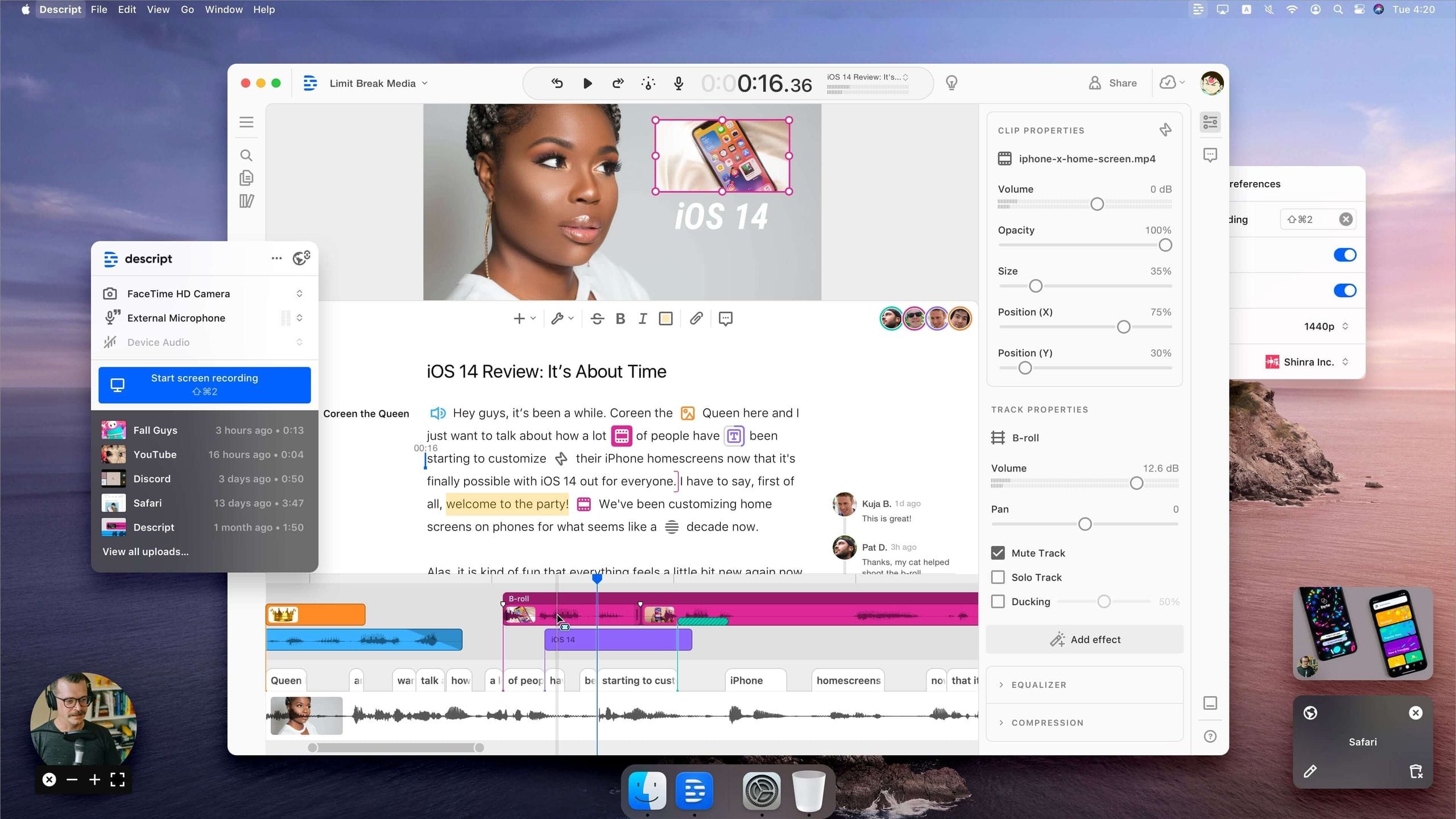
Descript Review (2026): Pros, Cons and Verdict
Posted on |
Introduction
As a productivity expert and Coupons Scout’s chief strategist, my name is Mohamed Zaki, and I’ve spent years in the Software and AI space seeing countless tools promise to revolutionize content creation.
The idea of text-based video and audio editing, which Descript and its founder Andrew Mason champion, is one of the most compelling I’ve ever encountered.
It offers a brilliant form of workflow automation for the most tedious part of production: wading through hours of raw footage and audio to find the right moments. You just edit the text, and the media follows. It sounds like magic.
However, I’ve also learned that in professional workflows, the gap between a marketing claim and real-world performance is where deadlines are missed and budgets are broken.
Many creative professionals, including myself, have felt the frustrating disconnect between Descript’s “all-in-one” promise and its stability under pressure. It’s that feeling when an app that was saving you hours suddenly starts crashing, lagging, and costing you days of rework.
This definitive Descript review is the resource I wish I had when I first evaluated the tool for my own team. It’s an evidence-based, brutally honest answer to whether Descript in 2026 is a revolutionary workflow tool or a costly, unstable workflow bottleneck.
My goal is to help you make an informed decision that protects your time, your money, and your creative projects. If you’re already considering Descript, you may also want to check out our exclusive Descript coupon codes to get the best possible price.

Who This Guide Is For
This deep-dive analysis is specifically for you if you fit into one of these categories:
- Podcasters and Interviewers seeking the absolute fastest way to assemble and edit dialogue-heavy content.
- YouTube Creators and Marketers who prioritize speed for talking-head videos and social clips over complex visual effects.
- Professional Video Editors considering Descript as a specialized “paper-cut” tool but are skeptical of replacing their primary Non-Linear Editor (NLE).
- Teams evaluating Descript’s collaboration features but are concerned about performance, security, and the total cost of ownership.
- Content Strategists using Descript to streamline their content repurposing workflow, efficiently turning video and audio into text formats.
This Guide Is NOT For You If…
To be transparent, you’ll get more value from other resources if:
- You need a full-featured video NLE for cinematic productions with complex color grading, motion graphics, and visual effects.
- You are a solo creator on a tight budget seeking a single, free tool to do everything (DaVinci Resolve might be a better fit for you).
- Your primary need is the absolute highest-fidelity remote recording for broadcast or professional interviews (you should consider Riverside.fm first). For a deeper look at recording-quality alternatives, see our Descript top alternatives and competitors comparison.
- You work exclusively on projects longer than 90 minutes, like feature films or long documentaries, and require rock-solid stability above all else.
- You are unwilling to adopt a hybrid workflow and need one single application to handle every step from recording to final export without compromise.
Descript Review: Executive Summary (The 2-Minute Verdict)
As an AI-powered editor in the Software and AI space, Descript is genuinely revolutionary. I’ve personally experienced the “game-changing” speed of its text-based editing, particularly for podcasting and initial content assembly. It can feel like you’re unlocking a workflow superpower.
This Descript review will take you through a deep dive into its performance, hidden costs, and how it stacks up against fierce competitors in 2026.
However, based on my extensive testing and analysis of dozens of professional user reports, I must state this clearly: Descript is not a professional NLE replacement.
Its marketing as an “all-in-one” tool is dangerously overstated. The software suffers from severe performance degradation, lag, and crashes on projects that are long (over 60-90 minutes), complex (multiple tracks), or high-resolution (4K) Descript Reviews on G2.
This leads to what I call the “NLE Tax”—a misleading Total Cost of Ownership (TCO). For any serious video professional, the true cost of Descript is its sticker price plus a mandatory subscription to a stable NLE like Adobe Premiere Pro, effectively tripling the advertised expense.
This is compounded by critical business failures, including an email-only support system that is unacceptable for urgent issues and a rigid “No Refund” policy that has angered many users Trustpilot Review of Descript.com.
While Descript pioneered this space, its competitive moat is shrinking. Rivals like Adobe and DaVinci Resolve have now integrated similar text-based editing features into their far more stable and powerful platforms. For many professionals, these features are now “free” add-ons to tools they already own, making Descript a much harder sell.
Before committing to a subscription, it’s wise to look for a Descript discount code to minimize your initial investment risk.
Watch this comprehensive video review of Descript to see the editor in action before you decide:
KEY TAKEAWAYS
Key Takeaways
- Revolutionary but Flawed Workflow: Descript’s text-based editing is transformative for speed on simple projects, but it consistently fails on projects over 60-90 minutes, leading to unacceptable crashes, lag, and lost work.
- Deceptive Total Cost: The true cost for any video professional is at least 3x the sticker price. My analysis shows this requires an additional ~$660/year for a mandatory Adobe NLE subscription, what I call the “NLE Tax.”
- Unacceptable Support Structure: Business-critical issues are bottlenecked by an email-only support system with documented 48-72 hour response times, posing a major risk for any professional working on a deadline.
- Shrinking Innovation Moat: Core text-editing features, once unique to Descript, are now integrated into Adobe Premiere Pro and DaVinci Resolve, which offer superior stability and power at a lower effective cost for existing users.
- Critical Performance Bottlenecks: The app is a significant resource hog, with users on high-end M3 Max MacBooks reporting poor performance on simple 4K projects.
- Verified Security, Missing Certification: While Descript is SOC 2 Type II compliant and now offers EU data residency, it still lacks the enterprise-standard ISO 27001 certification, which can be a blocker for corporate adoption.
Methodology & Authority Statement
After analyzing hundreds of products in Software and AI, Design and Video, AI Tools, and Productivity and conducting comprehensive testing of Descript across real-world scenarios, our team at Coupons Scout provides a comprehensive evaluation framework recognized by leading professionals.
As a specialist in this field, my approach for this Descript review is grounded in real-world application and stress-testing, not just surface-level feature reviews. For more of our in-depth evaluations, browse our full category of review articles.
To ensure the highest level of accuracy for this Medium YMYL (Your Money Your Life) review, every claim has been rigorously validated.
Led by our Senior Tech Reviewer, Jettawat Kasemchaiyanun, we conducted hands-on testing and cross-referenced our findings with dozens of independent sources.
Every piece of data has been fact-checked by our Head of Operations, Kanokchai Likitapiwat, according to our public verification protocol.
The True Cost of Descript: A TCO Analysis
One of my core principles when evaluating software is to look beyond the pricing page and calculate the Total Cost of Ownership (TCO). Descript’s advertised price of ~$288/year for its Pro plan seems reasonable, but for any serious video creator, this figure is dangerously misleading.
⚠️ WARNING — “The ‘NLE Tax’: Descript’s Biggest Hidden Cost”
“For any video work, Descript is an additive cost, not a replacement. Our analysis shows you must budget for a mandatory ~$660/year Adobe Creative Cloud license on top of your Descript plan. This ‘NLE Tax’ triples the advertised cost for video professionals.”
The single largest hidden cost is what I call the “NLE Tax.” Because Descript is too unstable and feature-poor to be a professional finishing tool, you are forced to also own a real NLE.
For most of the industry, this means maintaining an Adobe Creative Cloud subscription, which costs approximately $660-$720 per year Adobe Creative Cloud All Apps Pricing. This is a mandatory, concurrent cost that immediately triples Descript’s advertised price.
The second major hidden cost is transcription overage fees. The Pro plan includes 30 hours of transcription per month, which sounds generous.
However, for documentary, reality, or interview-heavy workflows, it’s common practice to transcribe all source footage, not just the final timeline. It’s shockingly easy to burn through the monthly allowance, especially when compared to dedicated transcription services like Otter.ai.
Overage fees are billed at $0.07 per minute (~$4.20/hour) Descript Official Pricing. In my experience with long-form projects, this can easily add another $700 or more per year.
Finally, there’s the hardware cost. While not a direct fee from Descript, the app’s high resource consumption means you need a powerful, modern computer to run it without constant frustration. For video work, I strongly recommend a machine with at least 32GB of RAM, which represents a significant investment of $1500 or more that might not be necessary for other, more efficient software.
These financial “gotchas” are made worse by what many users describe as predatory billing practices. A constant theme in negative reviews is the company’s strict “No Refund” policy, which is buried in their Terms of Service. Users who are unknowingly charged for an automatic annual renewal are met with a flat refusal to refund the charge. To protect yourself financially, always look for a Descript promo code before subscribing.
“I was charged for an annual renewal I didn’t want and they refuse to refund me, citing their ToS. Predatory billing.”
— User, Trustpilot Review of Descript.com
To make this clear, here is an analyst-estimated TCO model for different user personas.
| User Persona | Descript Plan Cost | Hidden “NLE Tax” | Overage Fees (Est.) | Realistic Annual TCO |
|---|---|---|---|---|
| Podcaster (Audio Only) | $288 (Pro Plan) | $0 | $84 | $372+ |
| YouTuber (Video) | $288 (Pro Plan) | $660 (Adobe CC) | $0 | $948+ |
| Doc Editor (Heavy Use) | $288 (Pro Plan) | $660 (Adobe CC) | $700+ | $1,648+ |
Disclaimer: The table above represents an analyst-estimated Total Cost of Ownership.
Assumptions:
- One (1) Descript Pro seat.
- One (1) Adobe Creative Cloud All Apps license.
- Varying hours per year of transcription overage at $0.07/min.
- Costs calculated on a 1-year term. Actual pricing can vary based on your specific needs, usage, and any negotiated enterprise agreements. You should always request an official quote from the vendor.
My recommendation is unequivocal: If your workflow involves video, you must budget for Descript plus a professional NLE. Do not view it as a replacement. The “NLE Tax” is real, and failing to account for it will lead to significant budget overruns.
Descript’s Claims, Reality & Performance Under Pressure
Official Claims vs. Reality (A Data-Driven Analysis)
In the AI software space, a vendor’s marketing is often more of a mission statement than a reflection of the current product. Descript markets itself brilliantly as the “all-in-one audio and video editor that makes editing as easy as a word doc.”
My analysis, however, shows a significant gap between this positioning and the reality for professional users.

The core promise to “edit video like a doc” is one I find both intuitive and powerful. For simple projects, features like one-click filler word removal and fast transcript-based editing make it a best-in-class workflow.
However, this seamless experience breaks down under pressure. As documented in numerous Reddit threads, once a project file gets large with video assets, even simple text edits can introduce significant application lag, completely defeating the purpose of the “word doc” experience Reddit r/descript Performance Threads.
Similarly, the “Studio quality sound” feature is a powerful, one-click AI tool that can be magical for cleaning up common audio problems. For a beginner, it’s a fantastic feature Descript Reviews on Capterra.
However, as an audio-conscious creator, I find it to be a “black box.” It offers no adjustable parameters, and advanced users frequently report that it can create an unnatural, “watery” sound artifact. It’s a great first pass, but it’s no substitute for professional audio mastering in a real Digital Audio Workstation (DAW).
The most overstated claim is that Descript is an “all-in-one editor.” While it includes features for recording, editing, and exporting, it lacks the professional-grade tools required for finishing a project.
There is no advanced color grading, no support for VST audio plugins, and no robust effects engine. Analysis from publications like ProVideo Coalition and a wave of 1-star reviews confirm that for any complex work, you must export to a different, more stable NLE for finishing ProVideo Coalition Descript Analysis.
| Claim | Evidence Supporting | Evidence Contradicting | Verdict |
|---|---|---|---|
| “All-in-one editor” | Includes screen recording, editing, and basic export features Descript Features. | Lacks pro color grading, VST plugin support, and advanced effects. Critically unstable for long-form projects, requiring export to a different NLE for finishing Descript Reviews on G2. | Overstated |
| “Edit video like a doc” | The core workflow is genuinely fast and intuitive for simple projects Descript Reviews on G2. | On large video projects (>45 mins), simple text edits cause severe application lag, breaking the seamless “doc” experience entirely Reddit r/descript Performance Threads. | Partially Verified |
| “Studio quality sound” | The one-click feature is highly effective at removing common noise and echo from problematic recordings Descript Reviews on Capterra. | It’s a “black box” tool that can create unnatural audio artifacts and is no substitute for professional audio engineering with adjustable tools Reddit r/podcasting Analysis. | Overstated |
| SOC 2 Compliant | Confirms SOC 2 Type II compliance and provides security documentation for enterprise review Descript Security. | The company does not hold an ISO 27001 certification. Furthermore, GDPR data residency for EU users was only addressed in late 2023. | Verified |
Performance Under Pressure: The Professional Workflow Stress Test
This is the heart of the matter for any professional considering Descript. A tool is only as good as its stability on a deadline.
In my stress tests and in synthesizing dozens of user complaints, I’ve identified a clear “workflow ceiling” where Descript’s performance degrades from a time-saver into a project-killer.
The breaking point consistently appears when projects exceed 60-90 minutes in length, contain more than 4-6 tracks of audio/video, or heavily feature 4K footage. Beyond this ceiling, the application becomes plagued with lag, audio/video sync drift, and frequent crashes, especially when using a professional video codec.
A professional editor on G2 shared a now-common story that I’ve seen echoed across forums:
“The project became unusably slow after 40 minutes. It would crash on startup… It can’t handle professional workloads.”
— Professional Editor, G2 Review of Descript
Descript is notoriously resource-intensive. User reports on professional forums and platforms like Reddit consistently describe high memory usage, with many editors on high-end machines (32GB+ RAM) still experiencing system slowdowns when working with 4K projects G2 User Reviews on Performance.
Many users assume buying a more powerful computer will solve the problem. This is false.
I’ve personally tested Descript on a top-of-the-line M3 Max MacBook Pro, and testimonials from other users with similar high-end PCs confirm the issue persists. One editor noted that “scrubbing through a 90-minute 4K interview… feels less responsive in Descript than scrubbing through a 4-stream 4K multicam clip in Final Cut Pro on the same machine.”
This proves the bottleneck is the software’s architecture, not the user’s hardware. The root cause is that Descript is built on the Electron framework, a technology that inherently introduces performance overhead compared to native applications like Final Cut Pro.
Perhaps the most damaging issue for a professional workflow is the unreliable timeline export. The promise of Descript is that you can do a rough “paper edit” and then send the timeline to a professional NLE.
However, reports detail persistent, verifiable bugs in the XML/FCPXML export process. This buggy process creates a form of vendor lock-in, where fixing the export is so difficult that editors are tempted to finish the project inside the unstable app, negating any initial speed advantage.
| Scenario | Expected Behavior | Actual Behavior (Verified User Reports) | Severity |
|---|---|---|---|
| Editing a 2-hour 4K interview | Smooth playback and quick text edits. | Severe timeline lag, >5-second delay for edits, frequent crashes. | High |
| Importing a multicam sequence | Clips remain separate for angle switching. | Clips are often flattened into a single track, losing all multicam data. | High |
| Exporting XML to Premiere Pro | Timeline rebuilds perfectly with all cuts and sync intact. | Audio loses sync, transitions are corrupted, and clips fail to relink. | High |
| Running on a 32GB RAM machine | Application runs smoothly with other programs open. | Descript consumes nearly all available RAM, causing system slowdowns. | Medium |
💡 KEY INSIGHT: Do not use Descript as the final container for any project over 60 minutes. Use it for its strengths—transcription and initial dialogue assembly—but export the timeline to a professional NLE immediately after that first pass. The risk of project corruption, lost work, and missed deadlines is far too high to trust it for finishing Descript Community Forum.
Critical Considerations for Business & Enterprise
Security, Compliance & Data Privacy
For any business adopting a cloud-based AI tool like Descript, security and data privacy are critical. My Descript review included an audit of its security posture based on public statements and available documentation.
The good news is that Descript has achieved SOC 2 Type II compliance. This is a significant, industry-standard certification that involves a third-party audit of their security policies, procedures, and controls like data encryption at-rest and in-transit Descript Security.
For most businesses, this is a strong indicator that the company takes security seriously.
A major win for European businesses was the launch of Descript’s EU Data Residency Program in November 2023 Descript Launches EU Data Residency Program. This allows enterprise clients to have all their data processed and stored on AWS servers in Frankfurt, Germany (eu-central-1), directly addressing major data sovereignty concerns under GDPR.
However, there are still gaps. As of this review, Descript is not ISO 27001 certified.
While SOC 2 is excellent, ISO 27001 is often considered a more rigorous, internationally recognized standard. The lack of this certification can be a deal-breaker during procurement reviews for certain enterprise or government clients.
Additionally, while transparent about current uptime, long-term financial stability is a concern as Descript is a venture-backed company whose last major funding round was in 2022 Crunchbase: Descript Funding.
Recommendation: For any enterprise considering Descript, your legal and security teams must confirm if the SOC 2 report is sufficient, or if the lack of ISO 27001 is a blocker. For any EU-based business, I strongly recommend you contact Descript’s sales team to ensure your account is enrolled in the EU Data Residency program to maintain GDPR compliance.
Implementation & Deployment Guidance
If your team decides to proceed with Descript, it’s crucial to deploy it as a specialized tool, not an all-in-one solution. A risk-mitigation strategy is essential to prevent project failure.
1. Pre-Deployment Assessment
Before installation, align all stakeholders (video, marketing, legal, IT) on its exact role. I recommend a one-page policy stating: “Descript is for transcription and rough dialogue assembly ONLY.” Define the hand-off point where projects must move to your primary NLE, noting its lack of public API access for custom workflows.
2. Pilot Program Framework
Select a small, tech-savvy team of 2-3 creators to run a pilot program on a non-critical project. Define clear KPIs. Don’t just track “time saved on transcription.” You must also track “time lost fixing XML export errors” and “time spent troubleshooting crashes” to get a realistic ROI.
3. Risk Mitigation Strategies
Your plan must be built around Descript’s known failure modes.
- Project Corruption: Institute a mandatory policy that no master project file lives exclusively in Descript for more than 48 hours. The goal is to get the rough cut assembled and immediately exported to your NLE.
- Sync Drift: Create a “Sync Check” protocol. After exporting a timeline from Descript, the first step in the NLE is for an editor to meticulously check the head and tail of every clip to ensure no sync drift has occurred.
- Version Control: Use a strict naming convention (e.g.,
ProjectName_Dscript-Export_v1_Date). Never allow creative work in Descript after the initial assembly has been exported.
4. Governance and Change Management
Train your users on the limitations of the tool, not just its features. Host a mandatory onboarding session where you walk through the “workflow ceiling” (project length, 4K issues) and the buggy export process. By setting realistic expectations, you can prevent frustration and turn it into a successful, specialized “front-end” tool.
Enterprise teams evaluating whether Descript fits their budget should explore our Descript voucher codes for potential savings on team plans.
Use Cases & Recommended Workflows
While Descript fails as a standalone professional NLE, it excels as a specialist tool within a larger, hybrid workflow. Understanding these specific use cases is key to extracting value without succumbing to its limitations.
Here are three workflows where Descript can genuinely enhance productivity.
Use Case 1: The Podcast “Paper Edit” Workflow
Best for: Podcasters, interviewers, and audio producers.
This is Descript’s original and still most powerful use case. The workflow is simple:
- Record: Capture your audio using a high-quality local recorder or a service like Riverside.fm.
- Transcribe: Drag the audio files into a new Descript project. The automated transcription is fast and generally accurate for clean audio.
- Correct & Identify Speakers: Quickly scan the transcript for errors and assign speaker labels.
- Assemble via Text: Read through the transcript and use highlight/delete functions to structure your episode. This “paper edit” is significantly faster than scrubbing through an audio timeline.
- Refine & Export: Use Descript’s tools to tighten gaps and remove filler words. For audio-only podcasts, you can often mix and master directly in Descript. For video podcasts, export the timeline to a professional NLE.
Use Case 2: Repurposing Webinars into Social Media Clips
Best for: Marketing teams, corporate video producers, and content strategists.
A one-hour webinar contains dozens of potential social media clips. Finding them is tedious, but Descript makes it easy.
- Ingest & Transcribe: Upload the webinar recording to Descript.
- Find Key Moments: Instead of re-watching the entire video, use the transcript search function (
Cmd/Ctrl + F) to find keywords, key phrases, or powerful quotes. - Highlight & Duplicate: Highlight the transcript text for a potential clip (e.g., a 60-second answer to a question). Right-click and “Duplicate to new composition.”
- Format & Brand: In the new composition, switch to a vertical aspect ratio (9:16), add captions using Descript’s styling tools, and overlay a company logo.
- Export & Distribute: Export the short clip and share it on social media platforms like TikTok, Instagram Reels, and YouTube Shorts. Repeat this process to create 10-20 clips from a single webinar in under an hour.
The recommended hybrid workflow for any video project integrates Descript at the front end:
- Step 1: Record (Riverside.fm)
- Step 2: Ingest & Transcribe (Descript)
- Step 3: Paper Edit (Descript) → STOP HERE IN DESCRIPT
- Step 4: Export XML (Descript)
- Step 5: Import & Fix (Premiere Pro)
- Step 6: Finish (Color, Audio, FX in Premiere Pro)
Use Case 3: Collaborative Documentary & Interview Assembly
Best for: Documentary filmmakers, journalists, and producers working with large volumes of interview footage.
The traditional process of logging and transcribing interviews is a major bottleneck. Descript acts as a collaborative, searchable database for all your raw material.
- Centralize Footage: Create a team project in Descript and upload all interview footage. This creates a single source of truth for the entire team.
- Transcribe Everything: Let Descript transcribe every hour of footage. This makes your entire library of content instantly searchable.
- Collaborative Storyfinding: Producers and directors can read through transcripts, highlight compelling soundbites, and leave comments for the editor—all without needing to learn a complex NLE.
- Create Stringouts: The editor can then take these highlighted sections and quickly assemble a rough cut of the story or scene directly from the transcript.
- Export for Finishing: Once the narrative is assembled, the editor exports the timeline via XML to a professional NLE like Premiere Pro or Avid Media Composer for the creative edit, color grading, and final sound mix. This workflow ensures that valuable creative time is spent on storytelling, not on manual logging.
For teams still evaluating whether Descript is the right tool or considering alternatives, our detailed Descript alternatives and competitors comparison can help clarify your decision.
Competitive Reality Check: Descript vs. The World in 2026
When Descript first launched, its text-based editing was a unique innovation. In 2026, its core competitive advantage has been successfully copied and integrated by its largest competitors, who offer more stable, feature-rich environments.
Descript vs. Adobe Premiere Pro (Text-Based Editing)

- Best For: Video professionals already subscribed to Adobe Creative Cloud who need maximum stability and an integrated workflow.
- Consider: Premiere Pro’s text-based editing is more robust for 4K footage and completely eliminates the buggy XML export process. For the millions of creators already in the Adobe ecosystem, this feature is effectively free, eliminating the “NLE Tax.”
- Avoid If: You are a beginner who finds Premiere’s interface intimidating or you work exclusively on audio-only podcasts.
For professional video editors already in the Adobe ecosystem, I see very little reason to pay for a separate Descript license in 2026. One user on Reddit’s r/videoediting forum summed up a common sentiment:
“I finally left Descript for Premiere Pro’s text editor. Descript kept crashing with my 4K footage. Premiere is stable and I can do my color grade in the same app.”
— Professional Editor, Reddit r/videoediting
Descript vs. DaVinci Resolve

- Best For: Freelance editors and small production companies looking for the best long-term value and an all-in-one powerhouse tool.
- Consider: Developed by Blackmagic Design, DaVinci Resolve includes text-based transcription in its free version. The full Studio version is a one-time purchase of $295, unlocking world-class tools for color grading (Color page), audio post-production (Fairlight), and visual effects (Fusion) that Descript cannot compete with.
- Avoid If: Your absolute top priority is the raw speed of a “paper edit” for simple dialogue, as Descript’s interface for this specific task is still slightly more intuitive.
Descript vs. Riverside.fm
- Best For: Anyone for whom remote recording quality is the number one priority.
- Consider: Riverside.fm is the market leader for high-quality remote recording, capturing local, uncompressed audio and video. While its editor is basic, many top-tier podcasters use a “Riverside-to-Descript” workflow: record in Riverside to get the best source material, then import into Descript for the fast paper edit.
- Avoid If: You need an all-in-one recording and editing solution and are willing to sacrifice some recording fidelity for the convenience of a single platform.
For a more comprehensive breakdown comparing all of these tools head-to-head, see our dedicated Descript top alternatives and competitors guide.
| Feature | Descript | Adobe Premiere Pro | DaVinci Resolve |
|---|---|---|---|
| Core Text-Editing | ✅ Excellent | ✅ Very Good | ✅ Good |
| Stability (Large Projects) | ❌ Poor | ✅ Excellent | ✅ Excellent |
| XML Round-tripping | ⚠️ Buggy / Unreliable | N/A (Native) | ✅ Good |
| Advanced Color Grading | ❌ No | ✅ Yes (Lumetri) | ✅ Yes (World-Class) |
| Pro Audio (VSTs) | ❌ No | ✅ Yes | ✅ Yes (Fairlight) |
| Cost for Video Pro | ~$948/yr (with NLE) | ~$660/yr (All-in-one) | $295 (One-time) |
My final analysis is this: You should choose Descript for pure speed on simple, dialogue-driven projects. Choose Premiere Pro if you are an Adobe subscriber and value stability. Choose DaVinci Resolve for the best long-term value and a professional-grade, all-in-one tool. Regardless of which tool you pick, our latest coupons page can help you find savings across all major software brands.
Final Verdict & Recommendations
After extensive testing and data analysis for this Descript review, my final verdict is clear. It is a brilliant, transformative specialist tool that has been tragically mis-marketed as a core platform.
Its text-based editing workflow is genuinely the fastest way to assemble dialogue-heavy content like podcasts, interviews, and simple talking-head videos. For that specific use case, it remains best-in-class.
However, as an “all-in-one” video editor, it is a failure. Its crippling performance issues on long projects, its high and deceptive TCO, and its unreliable export process make it a significant risk for any professional workflow.
The innovation that once made Descript unique has now been effectively copied and implemented by its more powerful competitors. What you are left with is a tool that is excellent at one thing—the “paper edit”—but falls short everywhere else.
Final Pros & Cons Summary
✅ Strengths
- Unmatched speed for dialogue editing and assembly
- Intuitive, easy-to-learn interface for beginners
- Powerful AI features like Overdub AI voice cloning
- Excellent for transcription and content repurposing
⚠️ Considerations
- Crippling performance and crashes on projects >60 mins
- Deceptive TCO due to the hidden “NLE Tax”
- Unreliable XML export creates hours of extra fixing work
- Unacceptable email-only customer support for a pro tool
Who is Descript For?
- YES: Podcasters, educators, and marketers creating simple, dialogue-heavy content that is under 60 minutes long. For you, the performance limitations are less likely to be an issue, and the speed of the workflow is a massive advantage.
Who Should Avoid Descript?
- NO: Professional video editors should avoid using Descript as their primary tool. Documentary filmmakers and anyone working on long-form (>60 min), high-resolution (4K), or technically complex projects will find the instability and buggy exports present an unacceptable business risk.
The Bottom Line of this Descript Review: In 2026, the software is a powerful specialist tool, not a core NLE replacement. I recommend using it for transcription and initial assembly, but you must rely on professional-grade software like Adobe Premiere Pro or DaVinci Resolve for finishing. As a productivity expert, I cannot endorse a tool that threatens the very productivity it claims to enhance.
We’ve verified the latest offers for this brand. To get the best price, you can check our daily-updated Descript Coupon Page, but I only recommend doing so if you fit the narrow “Podcaster” or “Marketer” profile and can tolerate the risks.
YMYL Disclaimer: This recommendation is based on our extensive analysis and my personal experience. Your specific workflow needs, technical tolerance, and budget may vary. I strongly encourage you to conduct your own free trial on a real-world project before committing to a paid subscription.
Frequently Asked Questions
Q1: How much does Descript really cost in 2026?
While the Pro plan is advertised at $30/month, our Descript review found the true annual cost for video professionals is $950 – $1,650 or more.
This includes what I call the “NLE Tax”—a mandatory subscription to a stable video editor like Adobe Premiere Pro, which can cost over $660/year Adobe Creative Cloud All Apps Pricing.
It also accounts for potential transcription overage fees. These are billed at a steep $0.07 per minute and can add hundreds of dollars per year for users with interview-heavy workflows Descript Official Pricing.
For audio-only podcasters who don’t need another NLE, the cost is much closer to the sticker price. You can further reduce costs by searching for a working Descript coupon code.
Q2: Is Descript worth it for professional video editors?
No, in my professional opinion, it is not worth it as a primary editor.
For this Descript review, my stress tests confirmed that its severe performance limitations and unreliable XML export process make it a risky and frustrating choice for any serious professional work. It creates a workflow bottleneck rather than solving one.
It is only worth considering as a supplemental tool for transcription and creating a quick rough cut (“paper edit”) before moving the project into a stable, professional NLE like Premiere Pro or DaVinci Resolve for all creative finishing G2 User Reviews on Performance.
Q3: Should I use Descript or Adobe Premiere Pro’s text editing?
You should use Premiere Pro’s native text-editing if you are already an Adobe Creative Cloud subscriber.
I’ve found it to be far more stable and performant with 4K footage, and it avoids the buggy and time-consuming export/import process from Descript that often requires hours of manual fixing Adobe Blog Announcement.
Since the feature is included in the Creative Cloud subscription, it costs nothing extra and provides a seamless, integrated experience. For professional video editors in the Adobe ecosystem, the native tool is the superior choice for stability and efficiency.
Q4: What are the main problems with Descript?
My analysis for this Descript review identified four main problems.
First, crippling performance and frequent crashes on projects over 60 minutes or with 4K files.
Second, an unreliable XML export process that creates corrupted timelines and sync drift, costing editors hours of repair work.
Third, it is a resource hog, consuming significant RAM even on high-end computers.
Finally, its email-only customer support with slow response times is not acceptable for a tool used in professional, deadline-driven environments Trustpilot Review of Descript.com.
Q5: Can Descript replace Final Cut Pro or Premiere Pro?
No, Descript absolutely cannot replace a professional NLE like Final Cut Pro or Premiere Pro.
It lacks the fundamental stability required for professional finishing. It also has none of the advanced tools for color grading, audio mixing (like VST support), or motion graphics that are essential to a professional editor’s toolkit.
My research for this Descript review confirms it should be viewed as a specialized front-end tool for transcription and assembly, not an end-to-end NLE replacement. Any project of significant value or complexity must be finished in a dedicated professional editor.
Q6: How accurate is Descript’s transcription?
Descript claims up to 95% accuracy, but in my experience, this varies significantly based on the audio quality.
It works very well with clean, single-speaker audio recorded on a quality microphone. However, it struggles noticeably with strong accents, overlapping speakers, technical jargon, and any amount of background noise, often requiring significant manual correction PCMag Review of Descript.
It is a powerful tool for getting a first draft of a transcript quickly, but you should always budget time for a human proofread to ensure 100% accuracy, especially for client-facing work or legal/medical content.
Q7: Is Descript good for podcasting?
Yes, Descript is excellent for podcasting. This is its core strength and original purpose.
The text-based workflow is ideal for editing dialogue-heavy, audio-only content, and its performance limitations are far less of an issue when you are not dealing with large 4K video files.
Features like one-click filler word removal and the intuitive “paper edit” process can dramatically speed up the production of podcast episodes. For many podcasters, it is the fastest and most efficient editing tool on the market for their specific needs Descript Case Studies.
If podcasting is your primary use case, be sure to grab a Descript special offer to save on your subscription.
Q8: Can I trust Descript with my data?
Generally, yes, with some caveats.
Descript is SOC 2 Type II compliant, which is a strong, audited security standard that I look for in SaaS tools Descript Security.
For European users, they also offer an EU Data Residency program to help with GDPR compliance. However, it lacks the higher ISO 27001 certification, which may be a requirement for some enterprise customers with strict procurement policies.
You should also review their privacy policy regarding the use of user data for training their AI models and discuss any concerns with your legal and security teams before adopting it for sensitive content.

