Prezi Top Alternatives and Competitors in 2026
Posted on |
Home › Comparisons › Prezi Alternatives and Competitors
By Mohamed Zaki · Researched and updated October 3, 2026 · Coupons Scout may earn a commission when you buy through links on this page, at no extra cost to you. Affiliate disclosure.
Looking for the Prezi top alternatives and competitors? Prezi is a strong pick when you want your audience to take part, but PopAI, Gamma, Canva and Beautiful.ai each shine in different ways. We compared all five on AI slide creation, editing and design, export and sharing, value and policies, using official pages checked in October 2026.
Quick Answer
Prezi is our top pick when you want your audience involved: live polls, quizzes and Q&A work inside the deck, and students join by QR code. Choose PopAI for slides built from documents, Gamma or Canva for design polish, and Beautiful.ai for auto-formatted team slides. Every tool here has a free option or trial.
Best for: Prezi suits teachers, trainers and presenters who want interactive sessions.
Key Takeaways
- The top Prezi alternatives in 2026 are PopAI, Gamma, Canva and Beautiful.ai.
- Prezi is the best pick here for interactive sessions, with live polls, quizzes and Q&A and a free Basic plan that includes 500 AI credits.
- As of October 2026, Prezi lists Standard at $7, Plus at $19 and Premium at $29 per month on its pricing page.
- PopAI Pro costs $99 per year on the App Store, Gamma Plus is $9 per month billed annually, and Beautiful.ai Pro is $14.50 per month billed annually.
- Canva Pro costs US$144 per year and adds Magic Design for presentations to a large template library.
Prezi Top Alternatives and Competitors at a Glance
| Tool | Best for | Free option | Paid entry price | Our score |
|---|---|---|---|---|
| Prezi | Interactive presentations | Free Basic plan (500 AI credits) | Standard $7/mo (Plus $19/mo) | 4.2/5 |
| PopAI | Slides from documents | 500 credits | Pro $12.00/mo (App Store) | 4.5/5 |
| Gamma | Polished, shareable decks | 400 credits at signup | Plus $9/mo billed annually | 4.4/5 |
| Canva | Design and templates | Free plan | Pro US$144/year | 4.4/5 |
| Beautiful.ai | Team consistency | 14-day trial (card) | Pro $14.50/mo billed annually | 4.2/5 |
From each official pricing page on October 2 and 3, 2026. Taxes and regional prices can change the total.
Winners by Category
- Best for interactive classroom sessions: Prezi (polls, quizzes and Q&A joined by QR code).
- Best for slides from documents: PopAI (PDF, Word and PowerPoint to slides, plus ChatPDF).
- Best for polished decks and simple websites: Gamma.
- Best for templates and brand design: Canva.
- Best for auto-formatted team slides: Beautiful.ai.
Why Look for a Prezi Alternative?
Do You Need Slides Built from Documents?
Prezi can import PDF and Word files, but if your work starts from long reports, PopAI is built for it: it turns PDFs, Word files and research into decks and chats with up to 20 documents at once.
Do You Want Design Polish or Templates?
Gamma and Canva put more weight on visual themes and template libraries. Gamma lists a Free plan with 400 credits and Plus at $9 per month billed annually, and Canva Pro costs US$144 per year.
Do You Prefer Auto-Formatted Slides?
Beautiful.ai formats every slide for you with Smart Slides, which suits teams that care about brand consistency. Pro is $14.50 per month billed annually, and its 14-day trial needs a credit card.
How We Compared the Prezi Alternatives
We read each company’s official pricing, feature, help and policy pages on October 2 and 3, 2026, and scored each tool on five points:
- AI slide creation: quality of drafts from prompts and documents.
- Editing and design: themes, layouts, templates and brand controls.
- Export and sharing: PowerPoint, PDF and other formats.
- Value: free plan, entry price and yearly cost.
- Policies: trials, refunds and cancellation.
Scores reflect this research, not a sponsorship, and no company reviewed this article. Where we earn a commission, it never changes the ranking.
How Much Do Prezi and Its Alternatives Cost Per Year?
Prezi’s pricing page shows per-month prices, so the yearly figure below multiplies the listed Standard price by twelve. Confirm the billing term at checkout.
| Tool | Plan | Yearly cost |
|---|---|---|
| Prezi | Standard ($7/mo, listed) | $84.00 ($7 x 12) |
| PopAI | Pro (App Store, yearly) | $99.00 |
| Gamma | Plus, billed annually | $108.00 |
| Canva | Pro | US$144.00 |
| Beautiful.ai | Pro, billed annually | $174.00 ($14.50 x 12) |
Calculated from the prices shown on the official pages on October 2 and 3, 2026. Taxes and regional prices can change the total.
1. Prezi: Best for Interactive, Audience-Engaging Presentations
Best for: teachers, trainers and presenters who want interactive, audience-engaging presentations · Starting price: Free Basic; Standard $7/mo, Plus $19/mo, Premium $29/mo · Our score: 4.2/5
Prezi is a presentation platform built around live, interactive sessions. Bring slides from PowerPoint, Google Slides, Canva, PDF or Word, or describe your topic in a sentence and Prezi’s AI builds a draft you can edit. You can then add live polls, quizzes and Q&A, share one link or QR code so people join from a phone with nothing to install, and present inside Zoom and other video call tools. Prezi also lists SCORM export to an LMS with completion data.
Prezi’s Basic plan is free (up to five presentations in the online editor, per its help center) and includes 500 AI credits. The pricing page lists Standard at $7, Plus at $19 and Premium at $29 per month; Plus and Premium add unlimited AI presentation generation, and Plus adds the desktop app with offline access and PDF export. Paid plans start with a 14-day free trial, and eligible teachers and students can get EDU Plus at up to 80% off. Check the billing term before you buy, and see Prezi coupons.
✅ What We Like
- Live polls, quizzes and Q&A inside the deck
- Imports PowerPoint, Google Slides, Canva, PDF and Word
- Free Basic plan with 500 AI credits
- Joins by QR code, nothing to install
💡 Things to Consider
- Pricing page shows per-month prices without a clear billing term in text
- Free Basic is limited to five presentations
- Refund terms are not spelled out on the public billing page
2. PopAI: Best All-in-One for Slides and Documents
Best for: students and professionals who build slides from documents and research · Starting price: Free (500 credits); Pro $12.00/mo on the App Store · Our score: 4.5/5
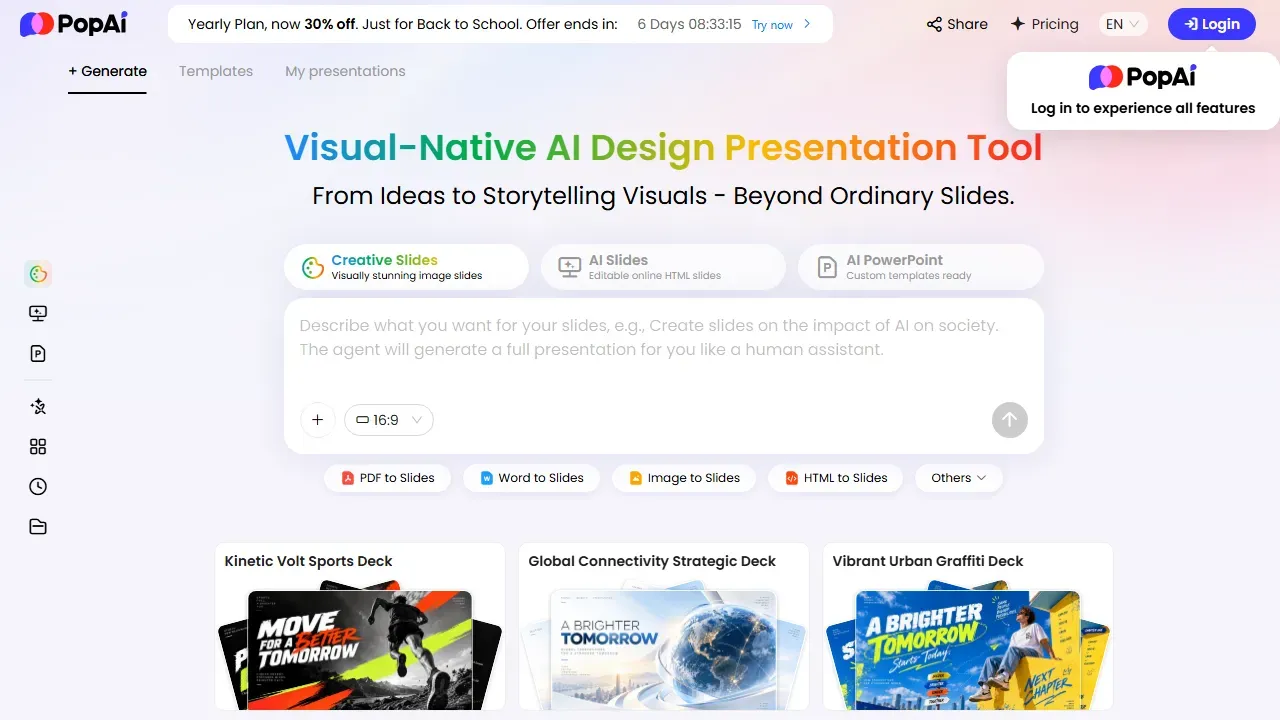
PopAI is an all-in-one AI workspace: it builds slide decks from a prompt or from PDF, Word, PowerPoint, image or HTML files, chats with up to 20 documents at once (5,000 pages in total), and adds AI writing, chat and images with models from OpenAI, Anthropic, Google, xAI and DeepSeek.
Plans run on shared credits: Free (500 total), Plus (10,000 a month), Pro (50,000 a month) and Unlimited. On Apple’s App Store, Pro is $12.00 per month or $99.00 per year. Paid plans export PPTX and PDF without a watermark. Read our full PopAI review.
✅ What We Like
- Slides from PDF, Word, PowerPoint or a prompt
- ChatPDF across 20 documents at once
- Writing, chat and images included
- Web, Chrome, iOS and Android
💡 Things to Consider
- Web prices shown only after sign-in
- Refunds limited to EEA/UK (14 days)
3. Gamma: Best for Polished Decks and Web Pages
Best for: people who want polished decks, documents and simple websites from one prompt · Starting price: Free (400 credits); Plus $9/mo billed annually · Our score: 4.4/5
Gamma generates presentations, documents, websites, social posts and graphics from a prompt, an outline or an existing document, with one-click theme swapping and an AI agent for edits. It imports PDF and PPTX and exports to PDF, PPTX, PNG and Google Slides. Gamma says more than 100 million people use it.
The Free plan gives 400 credits at signup (they do not refill). Paid plans billed annually cost $9 per month for Plus (1,000 credits) and $18 per month for Pro (4,000 credits). Refunds are possible only within 3 days of subscribing and under a credit-usage limit.
✅ What We Like
- Beautiful one-click themes
- Exports to PPTX, PDF and Google Slides
- Also builds docs and websites
💡 Things to Consider
- Free credits do not refill
- Short 3-day refund window
4. Canva: Best for Templates and Design
Best for: designers and teams who want templates, stock assets and AI in one design tool · Starting price: Free plan; Pro US$144/year · Our score: 4.4/5
Canva’s Magic Design for Presentations drafts a full deck from a description, and Canva AI adds Magic Charts, Magic Insights and Canva Code for interactive elements. You get millions of templates and stock elements, and you can export decks as PowerPoint. Canva says it has 220M+ monthly active users.
Canva Free includes a limited number of AI uses, while Canva Pro costs US$144 per year for one person with about 10 times more AI. Most Canva subscriptions are not refundable, though Canva reviews every request.
✅ What We Like
- Huge template and stock library
- Free plan with AI uses
- Desktop and mobile apps
💡 Things to Consider
- AI presentation drafts need design editing
- Subscriptions usually non-refundable
5. Beautiful.ai: Best for Auto-Formatted Team Slides
Best for: teams that want consistent, auto-formatted slides · Starting price: Pro $14.50/mo billed annually ($45 billed monthly) · Our score: 4.2/5
Beautiful.ai is built around Smart Slides: over 300 layouts that format themselves as you add content, plus unlimited AI content generation, AI images, writing help and translation. It imports and exports PowerPoint and PDF, and adds brand controls and slide analytics for teams.
Pro costs $14.50 per month billed annually, or $45 billed monthly for one-off projects. A 14-day free trial of Pro or Team requires a credit card. Annual plans may get a partial refund only within 24 hours of purchase or renewal.
✅ What We Like
- Smart Slides auto-format every layout
- Brand controls and slide analytics
- PowerPoint import and export
💡 Things to Consider
- No general free plan
- Trial needs a credit card
How to Choose Between Prezi and Its Alternatives
Who Will Be in the Room?
If your audience should vote, answer quizzes and ask questions, Prezi’s live polls, quizzes and Q&A are the clearest advantage. For one-way decks, any of the other tools works well.
Where Do Your Slides Start?
Start from an existing PowerPoint, Google Slides or Canva file and Prezi keeps your slides as they are while adding interaction. Start from a document and PopAI is the faster route; start from a prompt and Prezi, Gamma and Canva all draft decks.
Which Plan Is Cheapest to Start?
Prezi’s Standard plan is the lowest-priced entry plan here at $84 a year if you pay the listed $7 monthly price for twelve months, followed by PopAI Pro at $99 on the App Store and Gamma Plus at $108 billed annually. Confirm the billing term before you buy.
Can You Save with a Coupon?
Yes. Check Prezi coupons and PopAI coupons before you upgrade, and click Get Code so the discount is applied.
Final Thoughts
For most presenters who want the audience involved, Prezi is the best fit on this list: you can import what you have, add live polls, quizzes and Q&A, and share one link or QR code, starting on a free Basic plan. If your slides start from documents, try PopAI; for design polish choose Gamma or Canva; for auto-formatted team slides, choose Beautiful.ai.
Frequently Asked Questions
What are the best Prezi alternatives?
The top Prezi alternatives in 2026 are PopAI (slides from documents), Gamma (polished decks), Canva (templates and design) and Beautiful.ai (auto-formatted team slides).
Is there a free alternative to Prezi?
Yes. PopAI offers 500 free credits, Gamma gives 400 credits at signup, and Canva has a free plan with limited AI uses. Prezi itself has a free Basic plan with 500 AI credits.
Which Prezi alternative is cheapest?
Among the paid entry plans we compared, PopAI Pro is $99 per year on the App Store and Gamma Plus is $108 per year billed annually, against Prezi Standard at $7 per month as listed on its pricing page. Taxes and regional prices can change totals.
Which tool is best for classroom polls and quizzes?
Prezi is the one in this comparison built around live audience participation, with polls, quizzes and Q&A inside the presentation and a QR code for students. The other tools lean toward creating and designing slides.
Can I bring my existing slides into these tools?
Yes in most cases. Prezi imports PowerPoint, Google Slides, Canva, PDF and Word files; PopAI turns PDF, Word, PowerPoint, image and HTML files into slides; Gamma imports PDF and PPTX; Beautiful.ai has PowerPoint import.
Are there Prezi promo codes?
Yes. Our Prezi coupon page lists current promo codes and offers. Click Get Code on the page so the discount is applied at checkout.
About the author: Mohamed Zaki, Founder & Chief MarTech Strategist, Coupons Scout. Mohamed Zaki is the founder of Coupons Scout and leads how the team finds deals and researches the software behind them. He focuses on marketing technology, automation tools and ways to pay less for them.
Editorial note: this article is based on research of official product pages, help centers and policies, last checked October 3, 2026. Scores are our editorial opinion. Coupons Scout may earn a commission from some links, which never changes our rankings.
Sources
Official pages we used for this article, checked October 3, 2026. Prices and plans can change, so confirm on the official site before you buy.

