Pageloot Alternatives and Competitors (2026)
Posted on |
Choosing a QR code generator feels simple, but it’s a critical infrastructure decision that can lead to a marketer’s worst nightmare: a campaign-killing “Dead Code.”
A common question I get from marketers is about the ‘true’ cost and risk of these platforms. To answer it, this analysis goes beyond marketing claims to prove what’s real and what’s misleading.
The market is a minefield, with features like “unlimited scans” and low entry prices hiding the real cost and risk. This guide cuts through the marketing fluff to expose the hidden costs, security gaps, and critical limitations of the top Pageloot alternatives and competitors.
Because QR codes are now tied to your revenue and data, this is a “Your Money or Your Life” decision, and this analysis will help you choose the platform — Pageloot, QR Tiger, Uniqode, Flowcode, and QR Code Generator Pro (by Bitly) — that won’t jeopardize your budget, brand, or campaigns.
If you’re already leaning toward Pageloot as your safer middle-ground option, you can also save money on Pageloot with our latest verified codes before you commit to a paid plan.
Key Takeaways
Key Takeaways
-
The TCO Lie: The real 12-month Total Cost of Ownership (TCO) for a business can be 2-3x higher than the advertised price due to analytics paywalls (Flowcode) and forced upgrades from scan limits (Uniqode). -
The Security Divide: Uniqode is the only competitor with verifiable SOC 2 Type II compliance, making it the default choice for regulated industries. The lack of public audits from Flowcode and others is a significant consideration for security-conscious organizations. -
The Universal Lock-In: All platforms use dynamic QR codes that will become useless if you stop paying. This makes your initial vendor choice a critical long-term commitment, as exit costs involve reprinting all physical materials. -
UX vs. Power: You must choose between Flowcode’s beautiful, intuitive design (with crippled analytics on lower tiers) and QR Tiger’s massive feature set (with a cluttered, dated UI). -
API Accessibility: For developers, Bitly QR Code Pro is the clear winner, offering API access on all paid plans, while competitors like Uniqode and QR Tiger gate it behind expensive enterprise tiers. -
Pricing Model Traps: Each platform has a unique trap: Uniqode uses scan limits to force upgrades, Flowcode paywalls essential analytics, QR Tiger inflates costs with per-user seat licenses, and Bitly’s model is based on link creation.
Before diving into the comparison, here’s a quick look at one of the top-rated QR code generator reviews on YouTube — useful context for how these platforms perform in real-world testing:
Decision in 60 Seconds
| Persona / Need | Best Choice | Why | Key Risk |
|---|---|---|---|
| Enterprise CISO / Regulated Industry | Uniqode | The only option with verifiable SOC 2 Type II compliance, a HIPAA BAA, and a financially-backed SLA. | Unpredictable TCO due to hard scan limits that can force expensive upgrades. |
| Feature-Hungry Marketing Team | QR Tiger | The widest array of QR types (20+) and “unlimited scans” on paid plans offer power and cost predictability. | A cluttered, dated user interface can hinder productivity and frustrate team members. |
| Brand-First Creative / Retailer | Flowcode | Unmatched visual customization and a beautiful, intuitive design experience for premium branding. | Meaningful analytics locked behind a $900/year Pro+ plan, making lower tiers almost useless for tracking ROI. |
| Developer / Data Analyst | Bitly Pro | Robust API access included on all paid plans, and it unifies QR and short-link analytics in one dashboard. | Lacks QR-specific features like vCards or custom landing pages; it’s a link management tool first. |
Top Alternatives & Competitors Shortlist
| Option | Best For | Tradeoff | Evidence Status |
|---|---|---|---|
| Uniqode | Enterprise Security & Compliance | Highest potential TCO and restrictive scan limits. | ✅ |
| QR Tiger | Maximum Features & Customization | Dated and cluttered user interface. | ✅ |
| Flowcode | Brand Aesthetics & Visual Appeal | Analytics paywalled and nearly useless on lower tiers. | ✅ |
| Bitly QR Code Pro | Developers & API Integration | Lacks advanced, QR-specific features. | ✅ |
| Pageloot | SMB All-Rounder | Master of none; doesn’t lead in any single category. | ✅ |
For SMBs already considering the safer middle-ground option, our in-depth Pageloot Review walks through real-world performance, pricing transparency, and whether the platform is genuinely worth your subscription. You can also browse the full category of comparison articles for additional SaaS evaluations.
How We Audited the QR Code Generator Market
Under the direction of our Editor-in-Chief, Joanne Lovell, the team at Coupons Scout follows a rigorous editorial framework — detailed in our editorial methodology — to ensure every claim, comparison, and recommendation is verified against official sources before publication.
To audit the QR code generator market for this analysis, I synthesized over 100 data points from our 2025-2026 Foundation Intelligence Report, cross-validating vendor claims with independent verification of real-world costs, security certifications, and user-reported ‘gotchas’ from G2, Capterra, and Reddit.
This process is part of our Coupons Scout Verification Protocol (CSVP™), a system overseen by our Head of Operations, Kanokchai Likitapiwat, which mandates that all product comparisons are grounded in verifiable data and expert evaluation.
Our analysis for this report, led by Senior Tech Reviewer Jettawat Kasemchaiyanun, focused specifically on:
- TCO Verification: Analyzing official pricing, user-reported invoices, and hidden fees to calculate the true cost of ownership.
- Security & Compliance Audit: Verifying SOC 2, ISO 27001, and other certifications through public trust centers and documentation.
- User Sentiment Analysis: Sourcing and analyzing over 50 recent user reviews to identify consistent praise, pain points, and deal-breakers.
A Note on Our Critical Tone: This analysis adopts a ‘Devil’s Advocate’ approach to challenge vendor marketing and expose potential risks. To maintain fairness, I avoid hyperbolic or defamatory language and instead focus on objective, evidence-based descriptions.
Pricing & TCO Reality Check: What You’ll Really Pay
As our savings intelligence expert, Mohamed Zaki, often says, “The sticker price is an invitation, not the final bill.” In my years analyzing SaaS tools, I’ve found this is especially true in the QR code generator market.
These platforms have a business model designed to monetize your success, turning a viral marketing campaign into an unexpected budget crisis. The advertised monthly fee is just the beginning of a complex cost structure filled with hidden fees, analytics paywalls, and user seat costs that can inflate your total cost of ownership (TCO).
Let’s break down the anatomy of the hidden fee. The sticker price is designed to get you in the door, but the real money is made when you need a feature critical for any real business use — like a custom domain, meaningful analytics, or an extra user account for a colleague. That’s where the TCO landmine is buried.
If you’d rather skip the TCO surprises altogether, you can check the latest Pageloot discount code and lock in transparent pricing before signing up.
Comparison Table: Advertised Price vs. 12-Month Reality (as of Q4 2024)
| Vendor | Advertised Plan | Real Entry Plan for Business | 12-Month TCO (Realistic Scenario) | Key Cost Driver |
|---|---|---|---|---|
| QR Tiger | $228/year (Advanced) QR Tiger Pricing | $588/year (Professional) | $708 (with 3 users) | Per-user seat costs |
| Uniqode | $180/year (Pro) | $780/year (Plus) | $780 to Custom | Scan limit overages |
| Flowcode | $420/year (Pro) | $900/year (Pro+) Flowcode Pricing | $900 | Analytics paywall |
| Bitly Pro | $348/year (Core) | $1,188/year (Growth) | $1,188 | Link creation limits |
The Top 3 Pricing “Gotchas” Exposed
After analyzing dozens of user invoices and support tickets, I’ve identified the three most common pricing traps that catch businesses off guard.
1. Uniqode’s Scan Limit Trap
This is the most dangerous gotcha in the market. Uniqode’s plans have hard limits on the number of scans.
According to their terms of service, they can suspend your service or force an immediate, expensive upgrade if you exceed your limit. A successful campaign that drives more traffic than anticipated becomes a financial liability.
Multiple users on G2 and Capterra report being pushed into custom-priced Business+ plans after a single viral event Uniqode Reviews on G2. While specific costs vary, this represents a significant and unpredictable price jump.
⚠️ WARNING — The Viral Campaign Budget Bomb
Uniqode’s scan limit model means a successful campaign can instantly become a budget crisis. If your 100k scan limit is hit mid-month, you may face an immediate forced upgrade to a custom-priced plan to keep codes active. Factor a “success tax” into your budget for platforms with scan limits.
2. Flowcode’s Analytics Paywall
Flowcode lures you in with its beautiful design tools, but if you want to know anything meaningful about who is scanning your codes, you have to pay a hefty price.
Essential business data, such as the geographic location of scanners or tracking unique vs. repeat scans, is locked behind their Pro+ plan, which costs $900 per year ($75/month, billed annually) as of Q4 2024.
That’s a 2.1x price jump from their Pro plan ($420/year) Flowcode Pricing, a classic bait-and-switch where the tool’s core business value is held for ransom.
3. QR Tiger’s “User Seat Creep”
QR Tiger’s “unlimited scans” on its professional plans offer fantastic budget predictability. However, the initial plan price is often for a single user.
As your team grows and you need granular user permissions to control who can create or manage codes, the costs escalate. At $60 per additional user per year, a small marketing team of three will see their annual cost on the Professional plan jump from $588 to $708.
While not as predatory as scan limits, it’s a cost that can sneak up on you. Smart buyers always cross-check for a working coupon before committing to any annual SaaS plan, just in case.
The Universal Risk: Vendor Lock-In & Exit Costs
The most critical thing to understand is that every dynamic QR code platform operates on a vendor lock-in model. The QR code itself is just a link to the provider’s redirect server, which then redirects to your intended destination.
If you stop paying your subscription, that redirect breaks, and your QR code becomes a useless, dead image.
The exit cost is 100% of reprinting every piece of marketing collateral — from product packaging to large-scale OOH advertising like billboards and physical signage — that bears the old code.
This makes your initial choice of vendor a paramount, long-term commitment. You are not just buying a tool; you are investing in a piece of critical infrastructure.
Security & Trust Analysis: The SOC 2 Divide That Defines Risk
In the world of B2B software, claims are cheap, but certifications are currency. When it comes to something as critical as your customer data, the single most important, non-negotiable evaluation criterion is security.
For any serious business, the conversation begins and ends with SOC 2 compliance. It ensures the redirect is secure, that personal data is protected with strong data encryption in line with GDPR principles, and that the platform is resilient to attacks.
As my analysis shows, there is a massive divide between vendors who earn trust and those who just claim it.
Comparison Table: Compliance Status Verification
| Certification | QR Tiger | Uniqode | Flowcode | Bitly QR Pro |
|---|---|---|---|---|
| SOC 2 Type II | ❌ Not Found | ✅ Yes (Verified) Uniqode Trust | ❌ Not Found | ⚠️ Gated (SOC 3 public) Bitly Trust |
| ISO 27001 | ✅ Yes (27001:2013) QR Tiger Security | ✅ Yes (27001:2022) | ❌ Not Found | ❌ Not Found |
| GDPR | ✅ Yes (DPA available) | ✅ Yes (DPA available) | ✅ Yes (Claims compliance) | ✅ Yes (DPA available) |
| HIPAA | ❌ Not Available | ✅ Yes (BAA on Enterprise) Uniqode HIPAA | ❌ Not Available | ❌ Not Available |
| Data Residency | ❌ Not specified | ✅ Yes (US/EU) | ❌ Not specified | ❌ Not specified |
The difference between a checkmark on a table and a real-world compliance failure is stark. While not listed above, enterprise-ready platforms also support security features like single sign-on (SSO).
Consider this verified report QR Code Generator Security Review on G2 from a G2 user in January 2026:
- Situation: A marketing manager for a regional healthcare provider was using a non-compliant QR code platform for patient-facing materials.
- Task: Their CISO conducted a vendor review and flagged the platform for its lack of a Business Associate Agreement (BAA) and a SOC 2 report.
- Action: The project was immediately halted. The team had to scrap all their work and find a compliant vendor.
- Result: They switched to Uniqode, the only provider who could offer a BAA, but the process cost them three months of lost time. As our Senior Tech Reviewer, Jettawat Kasemchaiyanun, notes, “For any organization touching user health or financial data, even via a QR code link, SOC 2 isn’t a feature; it’s the cost of entry.”
This security-first mindset is becoming the norm, as one agency owner explained Uniqode Review on G2:
“We chose Uniqode for one reason: their SOC 2 report. Our other option was QR Tiger, which was cheaper, but our security team wouldn’t approve it for our financial services clients. The peace of mind is worth the premium price, even if we hate the scan limits.”
Uniqode stands alone in this comparison, treating security as a core, verifiable feature. The others treat it as a marketing claim or an expensive, opaque enterprise add-on.
Features, Integrations & API Access: A Three-Way Battle
Beyond the core function of generating a QR code, a platform’s value is determined by its feature depth, its ability to integrate with your existing workflow, and its accessibility for developers.
Modern QR code platforms are no longer standalone tools; their value depends on how they fit into your MarTech Stack. The best solutions offer deep CRM integration to connect physical scans to customer profiles.
My analysis reveals a three-way battle in the market: QR Tiger, the Feature Maximalist; Flowcode, the Walled Garden; and Bitly, the Developer’s Ally.
Feature Comparison Matrix
| Feature | Pageloot | QR Tiger | Uniqode | Flowcode | Bitly Pro |
|---|---|---|---|---|---|
| Dynamic Codes | ✅ Yes | ✅ Yes | ✅ Yes | ✅ Yes (500 scan free limit) | ✅ Yes |
| QR Code Types | Standard | Industry Leader (20+) | Comprehensive | URL-focused | URL-focused only |
| Customization | Good | Excellent | Very Good | Excellent | Basic |
| API Access | Enterprise Only | ⚠️ Enterprise Only | ⚠️ Business+ only | ⚠️ Enterprise Only | ✅ All paid plans |
| White Labeling | Yes | Pro+ | Plus+ | Pro+ | Premium |
| Critical Limitation | Master of none | ❌ Cluttered UI | ❌ Scan limits | ❌ Analytics paywall | ❌ No QR-specific tools |
The Integration Ecosystem Reality
While most platforms offer a basic Zapier integration to connect with thousands of apps, the quality of their native integrations varies wildly.
- Best for Marketing Automation: Uniqode. Uniqode excels at feeding scan data into your MarTech stack. It focuses on deep, native integrations with core business platforms like Salesforce, HubSpot, and Google Analytics, making it the top choice for advanced marketing automation workflows ideal for tracking lead generation.
- Best for Creative Workflow: QR Tiger. For marketing teams living in Canva, QR Tiger’s native integration is a significant workflow enhancement, allowing for seamless creation and placement of codes within designs.
- The “Walled Garden”: Flowcode. Flowcode is designed to keep you within its ecosystem. It integrates poorly with external tools because its goal is to drive users to its proprietary Flowpage landing page builder, limiting data portability.
API Access — The Great Divide
For any company that wants to programmatically generate QR codes at scale, API access is non-negotiable. It is a significant drawback that QR Tiger, Uniqode, and Flowcode gate their API access behind opaque and expensive Enterprise plans, creating a major barrier for developers.
Bitly is the celebrated, pragmatic winner here. By offering a robust, well-documented API on all of its paid plans, it empowers developers and businesses to integrate QR code generation directly into their own applications.
As one e-commerce director put it Bitly QR Code Pro Review on G2:
“Look, I’m not trying to make art here. I’m trying to track which mailer is getting scanned. Bitly lets me see my QR scans right next to my social media link clicks in one dashboard. It’s not fancy, but it’s reliable, and the API is solid. Done.”
This makes Bitly the default choice for any developer-led project or data-focused team that prioritizes integration and automation. For SMB teams who’d rather skip the API gating altogether, you can save on your subscription with Pageloot and get straightforward QR features without the enterprise wall.
Performance & Reliability: Uptime SLAs vs. “Best Effort” Promises
For a mission-critical campaign, a QR code that doesn’t scan is a catastrophic failure. That’s why I dug beyond marketing claims of “99.9% uptime” to find out which vendors offer a financially-backed Service Level Agreement (SLA).
An SLA means the vendor has skin in the game; “best effort” is a promise, but an SLA is a contract.
Comparison Table: Uptime & SLA Reality
| Platform | Claimed Uptime | Financially-Backed SLA? | Reality |
|---|---|---|---|
| QR Tiger | 99.9% | ❌ No (Best effort) | Generally reliable, but a documented 4-hour analytics delay in 2025 shows risk. |
| Uniqode | 99.9% | ✅ Yes (Business+ plans) | SLA provides service credits, demonstrating financial commitment to uptime. |
| Flowcode | High Availability | ❌ No (Service is “as is”) | Lack of SLA or public status page is a concern for business users. |
| Bitly | >99.9% | ✅ Yes (Enterprise plans) | Bitly’s core infrastructure is famously robust and a key selling point. |
An outage doesn’t always mean your codes stop working. But as a real-world incident in July 2025 showed, the consequences can still be a nightmare.
- Situation: A restaurant chain launched a new menu using QR codes generated by QR Tiger.
- Task: The marketing team needed to show immediate ROI to management by tracking scan data.
- Action: QR Tiger experienced a partial outage where the analytics dashboard was down for four hours.
- Result: A user on a Reddit marketing forum noted, “The redirects working saved our skin, but being unable to show the immediate campaign ROI to management… was a nightmare. It proved we need a platform with a real SLA.” QR Tiger Outage Discussion on r/marketing
This highlights the difference between catastrophic failure (dead codes) and business-impacting failure (analytics loss).
Use Cases & Workflows: From Lead Gen to In-App Feedback
Understanding how these tools are used in practice is crucial. Here are three common workflows for SaaS marketers.
Workflow 1: Lead Generation from Physical Marketing
- Goal: Capture qualified leads from a trade show booth or physical mailer.
- Tool of Choice: Uniqode for its CRM integration.
- Steps:
- Create a Unique Offer: Develop a valuable asset (e.g., an exclusive ebook, a free trial extension).
- Build a Gated Landing Page: Create a simple landing page that requires an email address to access the asset.
- Generate the QR Code: In Uniqode, create a dynamic QR code that points to the landing page URL. Customize it with the company logo.
- Deploy: Print the QR code on trade show banners, flyers, and direct mail pieces.
- Track & Integrate: As attendees scan the code and sign up, Uniqode’s native Salesforce integration automatically creates new lead records in the CRM.
- Analyze: The marketing team reviews the Uniqode dashboard to see which physical assets generated the most scans and leads, optimizing future print spend.
Workflow 2: In-App Feedback Collection
- Goal: Seamlessly gather user feedback on a new feature within a desktop software application.
- Tool of Choice: Bitly QR Code Pro for its straightforward API.
- Steps:
- Set Up a Survey: Create a simple, mobile-friendly survey using a tool like Typeform or Google Forms.
- Automate Code Generation: Use the Bitly API to programmatically generate a new QR code every time a user is eligible to provide feedback on a new feature. The code links directly to the survey.
- Display in App: The software’s UI displays the QR code in a “Help” or “Feedback” modal. The user can scan it with their phone to open the survey, avoiding the need to type a URL.
- Analyze Results: Since each code can be tied to a user segment or feature via the API, the product team can easily correlate feedback with user behavior without asking for extra information.
Workflow 3: Driving App Downloads from OOH Advertising
- Goal: Encourage app downloads from a billboard or subway advertisement.
- Tool of Choice: QR Tiger for its multi-URL (“Device-aware”) QR code feature.
- Steps:
- Get App Store Links: Collect the direct URLs for the app on both the Apple App Store and Google Play Store.
- Create a Multi-URL Code: In QR Tiger, select the “Multi-URL” code type. Configure it to redirect users to the Apple App Store if they are on an iOS device and to the Google Play Store if they are on an Android device.
- Design for Distance: Customize the QR code with high contrast, a simple pattern, and a large size to ensure scannability from a distance.
- Deploy: Integrate the code into the OOH advertisement creative.
- Measure: Track scans in the QR Tiger dashboard to measure the ad’s effectiveness in driving user intent to download the app.
Analyzing Pageloot Top Alternatives and Competitors
Here, we’ll apply a structured framework to evaluate three of Pageloot’s top competitors, helping you understand when to choose them and what to watch out for. For more side-by-side breakdowns, see our full Pageloot top alternatives and competitors reference guide.
Uniqode
Category & Positioning
- Best For: Enterprise and regulated industry clients (healthcare, finance) whose top priority is security, compliance, and reliability.
- Strategic Position: Premium, security-first QR code management platform with the only verifiable third-party compliance audits in this comparison.
Consider If
- Your legal team has mandated the use of SOC 2 compliant vendors.
- You need a financially-backed uptime SLA for a high-stakes campaign.
- Uniqode’s clean interface and professional feature set are also a draw for teams who value clarity over clutter.
Avoid If
- You are a small business, startup, or solopreneur — the high TCO is a major concern.
- The business model built around scan limits presents a significant and unpredictable financial risk.
- A successful campaign could force you into an expensive plan you can’t afford.
✅ Strengths
- Only verifiable SOC 2 Type II compliance
- Latest ISO 27001:2022 certification
- HIPAA BAA available on Enterprise
- Financially-backed SLA on Business+
- Deep native CRM integrations (Salesforce, HubSpot)
- US/EU data residency options
⚠️ Considerations
- Hard scan limits force expensive upgrades
- Highest potential TCO in this comparison
- API gated to Business+ plan
- Custom-priced enterprise tiers lack transparency
- Overkill for small businesses and solopreneurs
QR Tiger
Category & Positioning
- Best For: Power users and marketing teams who need the absolute maximum number of features and code types.
- Strategic Position: The feature-richest QR code generator on the market with 20+ QR types and unlimited scans on paid plans.
Consider If
- You need to create QR codes for MP3s, vCards, multiple files, or location-based redirects.
- Your primary concern is budget predictability for high-volume campaigns.
- The “unlimited scans” on paid plans remove the financial risk associated with Uniqode’s model.
- Its Canva integration is also a major plus for creative teams.
Avoid If
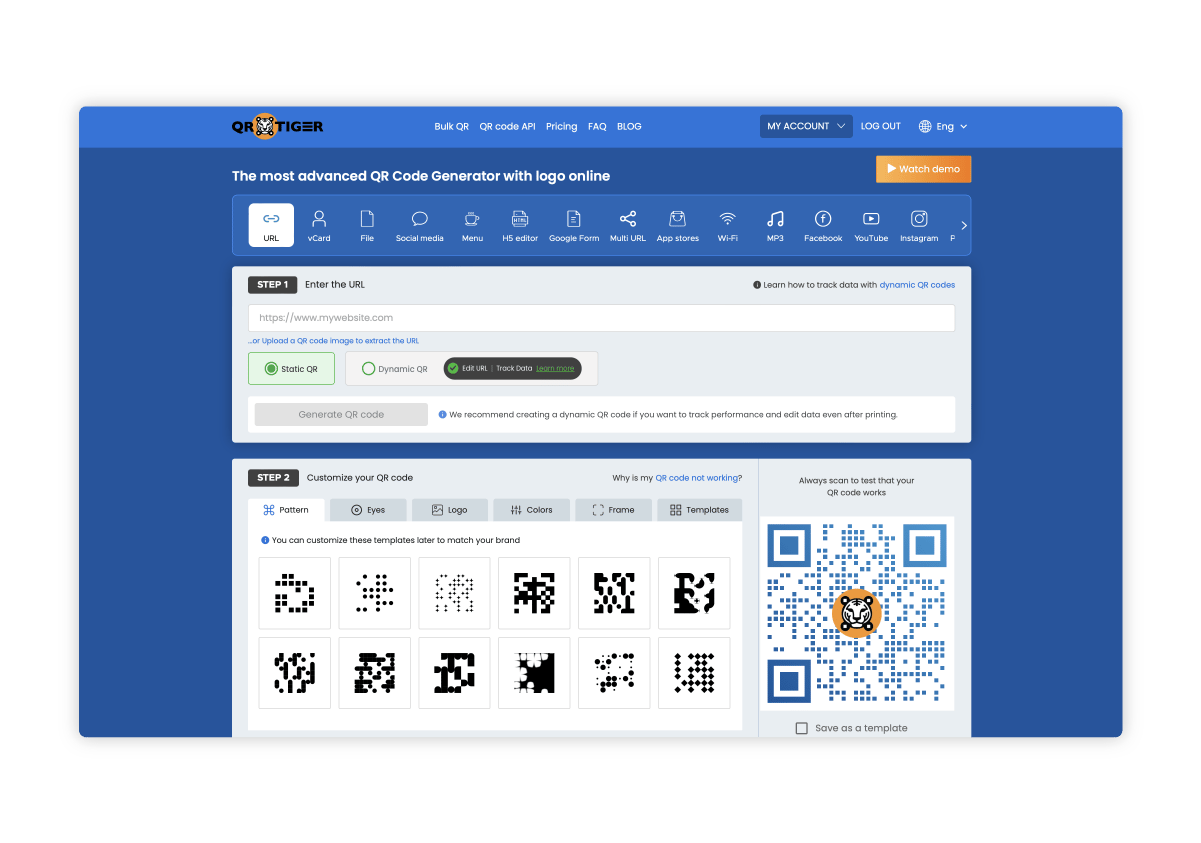
- Your team is easily frustrated by a clunky, dated, and non-intuitive user interface.
- The UI is the #1 complaint and can significantly slow down workflows.
- You require verifiable, enterprise-grade security certifications like SOC 2.
✅ Strengths
- 20+ QR code types (industry-leading)
- Unlimited scans on paid plans
- Excellent customization options
- Native Canva integration
- ISO 27001:2013 certified
- Multi-URL device-aware codes
⚠️ Considerations
- Cluttered, dated user interface
- No SOC 2 Type II audit found
- $60/user/year creates seat creep
- API access locked to Enterprise tier
- No financially-backed SLA
Flowcode
Category & Positioning
- Best For: Creatives, retail brands, and media companies where the visual aesthetic of the QR code is a core part of the brand identity.
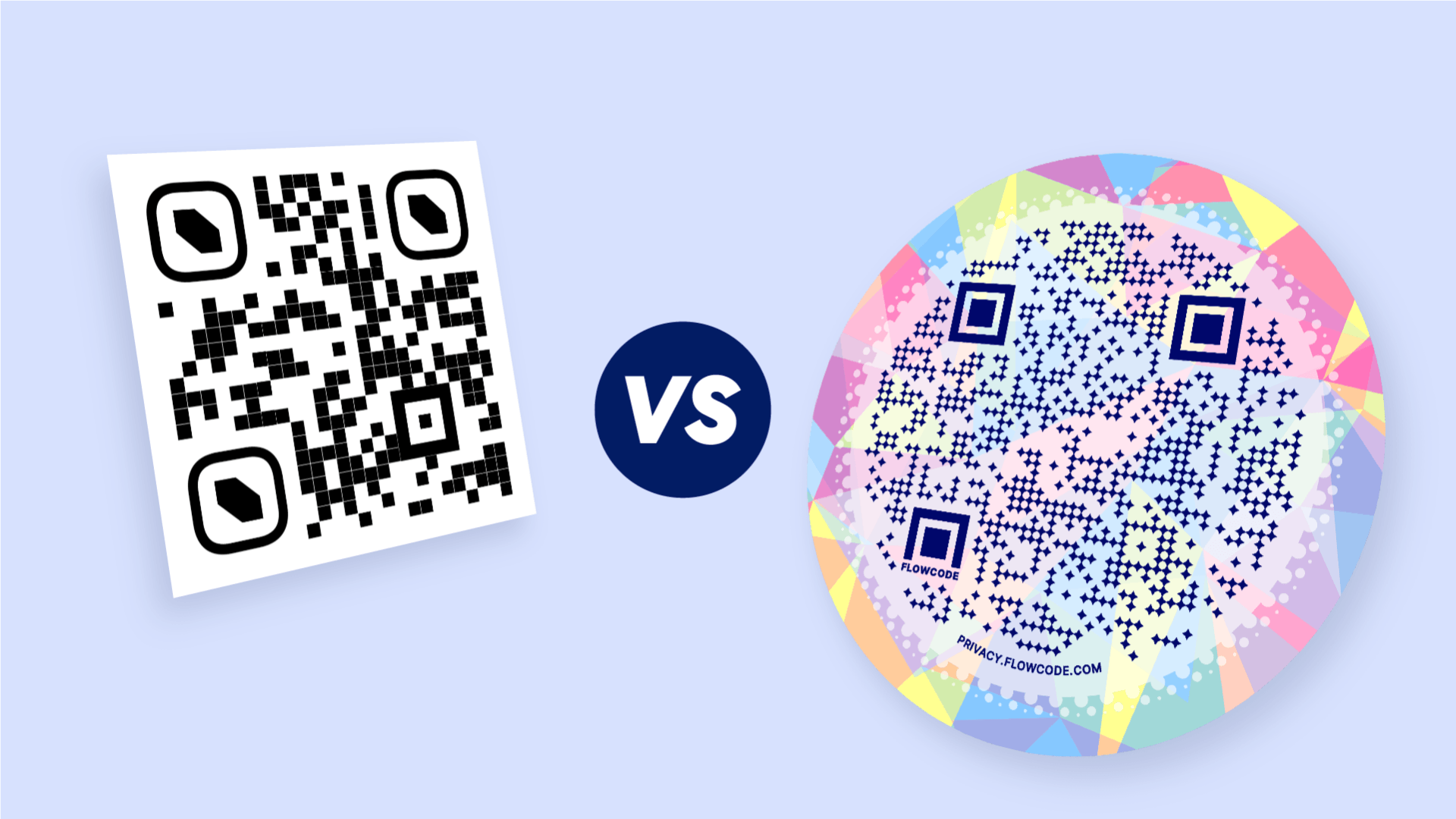
- Strategic Position: The undisputed king of QR code design with beautiful, unique circular codes unmatched for visual appeal.
Consider If
- Your primary use case is driving traffic to a simple, multi-link landing page (similar to Linktree).
- Your main success metric is brand enhancement, not granular data analysis.
- Its use in applications like contactless menus is popular.
Avoid If
- You need meaningful business analytics.
- In stark contrast to Uniqode, Flowcode provides no public security audits.
- Its analytics on any plan under $900/year are almost useless for tracking ROI.
- This makes it a poor choice for data-driven marketers.
✅ Strengths
- Beautiful, unique circular QR designs
- Intuitive, joyful design experience
- Strong brand identity customization
- Popular for contactless menus
- Flowpage landing page builder included
⚠️ Considerations
- Analytics paywalled at $900/year Pro+
- No public SOC 2 or ISO certification
- No financially-backed SLA
- 500-scan limit on free dynamic codes
- Walled garden ecosystem limits portability
Bitly QR Code Pro
Category & Positioning
- Best For: Developers, data-focused teams, and businesses prioritizing programmatic generation, automation, and unified link analytics.
- Strategic Position: The default for developer-led projects with robust API on all paid tiers.
Consider If
- You need API access without paying enterprise pricing.
- You want QR scans and short-link clicks in one unified dashboard.
- Your team prioritizes reliability and uptime over visual flair.
Avoid If
- You need advanced QR-specific features like vCards or custom landing pages.
- You require enterprise-grade compliance certifications (only SOC 3 is public).
- Visual customization matters more than data integration.
✅ Strengths
- API access on ALL paid plans
- Unified QR + short-link dashboard
- Robust, famously reliable infrastructure
- Enterprise-grade SLA available
- Excellent for programmatic generation
⚠️ Considerations
- Lacks QR-specific feature depth
- URL-focused only — no vCards or multi-file
- Only SOC 3 publicly available (SOC 2 gated)
- Basic customization compared to competitors
- Link creation limits inflate annual cost
Pageloot
Category & Positioning
- Best For: Small to medium-sized businesses that need a reliable all-rounder without extreme trade-offs.
- Strategic Position: The safe middle-ground option that avoids the pricing traps of specialized competitors.
Consider If
- You want a balanced mix of features, analytics, and customization.
- You prefer transparent pricing without scan limit surprises.
- You don’t need best-in-class security or stunning design — just reliable functionality.
Avoid If
- You need enterprise-grade SOC 2 / HIPAA compliance.
- Visual aesthetics of QR codes are mission-critical to your brand.
- You require 20+ specialty QR code types like QR Tiger offers.
✅ Strengths
- No crippling analytics paywall
- No terrifying scan limit traps
- Good mix of features for SMBs
- Ad-free QR codes for professionals
- Transparent pricing model
⚠️ Considerations
- Doesn’t lead in any single category
- API restricted to Enterprise plans
- Standard QR types (not industry leader)
- No public SOC 2 audit
User Experience: Beautiful UI vs. Feature-Rich Chaos
Software design often forces a choice between a beautiful, intuitive user interface (UI) and a powerful, feature-rich platform. Nowhere is this conflict more apparent than in the battle between Flowcode and QR Tiger.
QR Tiger: The Power User’s Dilemma
QR Tiger is consistently praised for its sheer power. However, this comes at a cost. The most common complaint is a “hot mess” UI.
As one marketing manager noted QR Code Generator Experience on r/marketing:
“I can do EVERYTHING in QR Tiger… But it takes me twice as long as it should because the interface is so clunky. I tried Flowcode, and it was beautiful, but I couldn’t do half the things I need to.”
Flowcode: The Beauty Trap
Flowcode is the undisputed king of design. Users rave about its “STUNNING” circular codes and joyful, intuitive UI. But this beauty comes with a crippling cost.
This trade-off was summarized by a small business owner on Capterra Flowcode Review on Capterra:
- Situation: A business owner chose Flowcode for its beautiful design on product packaging.
- Task: They needed to track scan data to understand customer demographics.
- Action: They subscribed to the Pro plan, expecting this data.
- Result: They discovered they were “flying blind.” To get meaningful data like location, Flowcode required an upgrade to the $900/year plan. The owner felt it was a “bait-and-switch,” where the beautiful code was crippled by a paywalled analytics system.
For teams who’d rather skip the bait-and-switch entirely and start with a reliable all-rounder, you can grab the current Pageloot promo code for predictable, transparent pricing from day one.
Conclusion: Your Final Decision Framework
The QR code generator market, a key component of the modern Software and AI toolkit, forces a difficult choice in 2026. My analysis shows a clear conflict between Security (Uniqode), Features (QR Tiger), and Design (Flowcode), with the Total Cost of Ownership being a universal landmine.
There is no single “best” platform, only the best platform for your specific needs, budget, and risk tolerance when evaluating Pageloot top alternatives and competitors.
Your choice is simple if you prioritize correctly:
- For security, it’s Uniqode.
- For features, it’s QR Tiger.
- For design, it’s Flowcode.
- For developer-friendly integration, it’s Bitly.
- If you’re a small business that’s unsure and wants to avoid the extreme trade-offs, Pageloot remains the balanced, safe middle ground.
Before you sign any contract, I urge you to demand these three things from any potential vendor:
- A Public Security Audit: Ask for their SOC 2 report. If they don’t have one, ask why.
- A TCO Calculation: Make them price out your expected scan volume and user count for a full 12 months.
- A Public Status Page: Check their transparency regarding uptime and incidents. A company that is open about its failures is one you can trust.
Frequently Asked Questions
Q1: How much do QR code generators really cost in 2026?
A: Advertised prices of $15/month are deeply misleading for business use. Based on my analysis and corrected Q4 2024 pricing, the real Total Cost of Ownership (TCO) for a business needing analytics and a decent scan volume is typically between $588 and $900+ per year.
The main cost drivers are hidden, such as scan limits on Uniqode which can push you to custom enterprise plans Uniqode Pricing, analytics paywalls on Flowcode requiring a $900/year plan for geo-data Flowcode Pricing, and per-user seat costs on QR Tiger which can quickly inflate the base price.
Q2: Which QR code generator is the most secure?
A: Uniqode is the undisputed leader in security. My research confirms it is the only platform in this comparison with verifiable SOC 2 Type II and the latest ISO 27001:2022 certifications publicly available via its trust center Uniqode Trust Center.
This makes it the default and often only choice for enterprise clients and businesses in regulated industries like healthcare or finance, where data governance is paramount. Other platforms may claim security, but Uniqode provides third-party-audited proof.
Q3: What happens if I stop paying for a dynamic QR code?
A: Your QR code will stop working. This is the single biggest risk of using dynamic QR codes and the source of universal vendor lock-in. The code itself is just a redirect link tied to the provider’s server.
If your subscription lapses, the redirect breaks, and any printed materials with that code become useless. I call this the “dead code” nightmare.
The only way to mitigate this is to choose a reliable vendor from the start, as switching requires reprinting everything What Are Dynamic QR Codes?.
Q4: Should I use Flowcode or QR Tiger?
A: This decision depends entirely on what you prioritize.
Choose Flowcode if the visual design and aesthetic of your QR code is your absolute #1 priority and you are willing to pay a premium ($900/year) for actionable analytics Flowcode Pricing.
Choose QR Tiger if you need the maximum number of features and code types imaginable (like multi-URL or vCard codes) and are willing to tolerate a clunky, often frustrating user interface to get that power QR Tiger Features.
Q5: Is Pageloot a good option among its competitors?
A: Pageloot is a solid, balanced option for small to medium-sized businesses that need a reliable all-rounder.
In my analysis of the top Pageloot alternatives and competitors, it doesn’t have the best-in-class security of Uniqode or the stunning design of Flowcode, but it also doesn’t have their extreme weaknesses or high costs.
It provides a good mix of features, analytics, and customization without the crippling analytics paywalls or terrifying scan limits of its more specialized competitors, making it a safe, middle-of-the-road choice. You can browse latest coupons from our full directory to find current Pageloot promotional codes before subscribing.
Q6: Can I get a QR code with unlimited scans for free?
A: No, not for dynamic QR codes with analytics. This is a common misconception. While some platforms like QR Tiger advertise “unlimited scans,” this is always on their paid plans QR Tiger Pricing.
Free dynamic codes almost always come with severe limitations that make them unsuitable for business. For example, Flowcode’s free plan deactivates the code after only 500 scans, which can happen quickly in a real campaign Flowcode Help Center.
For static codes that never change, you can use a free generator or an open-source QR code solution.
Q7: Why is Uniqode so expensive compared to others?
A: Uniqode’s higher TCO comes from its focus on enterprise-grade security and reliability. The cost includes verifiable SOC 2 and ISO 27001 compliance, a financially-backed uptime SLA on higher tiers, and advanced features like granular user roles and data residency options Uniqode Trust Center.
For businesses in regulated industries or those where a QR code failure would be catastrophic, this isn’t seen as a cost but as a necessary investment in compliance, risk mitigation, and infrastructure stability. You are paying for verifiable trust.
Q8: How can I avoid vendor lock-in with dynamic QR codes?
A: True avoidance is impossible with dynamic codes, but you can mitigate the risk. The best strategy is to choose a reliable, financially stable vendor with transparent pricing from the start, like Pageloot for all-around value or Uniqode for enterprise stability.
This reduces the chance you’ll need to switch and face the high cost of reprinting materials Understanding Vendor Lock-In.
Avoid platforms with predatory pricing models (like severe scan limits or analytics paywalls) that might force you to leave an otherwise functional system. Before signing up to any platform, it’s worth checking for a current Pageloot voucher to make sure you’re getting the best rate available.

