
Autoshorts Alternatives and Competitors (2026)
Posted on |
When looking for Autoshorts top alternatives and competitors, the promise of “one-click” viral videos is a powerful lure.
But my analysis of AI video clipping tools like Opus Clip and Munch reveals a minefield of hidden costs, critical security gaps, and frustrating limitations.
As a SaaS analyst with over 15 years of experience scrutinizing marketing technology, I’ve seen how seductive marketing can obscure the true total cost of ownership (TCO) and professional risk.
This guide is not a simple feature list but a “devil’s advocate” analysis designed to protect your budget and professional reputation. My name is Mohamed Zaki, and I specialize in evaluating the ROI and security posture of B2B software.
Based on a deep-dive into over 30 sources from late 2025 and early 2026, I will provide a clear decision framework based on workflow priorities (speed vs. strategy), real budget calculations, and risk tolerance.
This analysis provides a framework for your due diligence; you must verify security claims and calculate TCO for your specific use case before purchasing. Before committing to any tool, savvy readers should also review the current Autoshorts coupon code to see if a discount changes the math on your TCO.

Key Takeaways
Key Takeaways
-
The Subscription Trap is Real: Munch’s “forced upgrade” model and Opus Clip’s expensive overage minutes mean your real Total Cost of Ownership (TCO) will likely be much higher than the sticker price. -
Security Posture Varies Wildly: Descript leads with verified SOC 2 and ISO 27001 compliance. In contrast, while Munch now offers 2FA, both it and Opus Clip lack publicly available SOC 2 reports, posing a potential risk for agencies handling client content. -
The Core Trade-Off: The market forces a choice — Opus Clip for raw speed, Munch for data-driven strategy, Vidyo.ai for brand control, and Descript for hands-on editing power. No single tool does it all well. -
Winner for Speed: Opus Clip is the fastest from upload-to-clips, making it the top choice for solo creators prioritizing volume and looking to save time. -
Winner for Strategy: Munch’s trend analysis is a unique advantage for marketing agencies, but it comes at a premium price. -
The “Generic AI Look” is a Problem: User reports indicate that a lack of deep customization in both Opus Clip and Munch can lead to a generic visual style, making Vidyo.ai a key competitor for brand-conscious businesses.
Below is a short video comparison of the two most-discussed tools in this analysis, giving you a real-world look at Opus Clip vs. Munch before we dive deeper. For readers weighing a full purchase, our exclusive Autoshorts discount can also offset some of the TCO risks discussed later.
Decision in 60 Seconds: Which Autoshorts Alternative is for You?
| If your #1 priority is… | Your Best Bet Is… | Why it Wins | Key Risk to Accept |
|---|---|---|---|
| Speed & Simplicity | Opus Clip | Fastest time-to-value; “set it and forget it” workflow. | Expensive overages and a “generic” look without customization. |
| Data-Driven Strategy | Munch | Unique trend analytics provide a strategic “why” for clip selection. | High TCO, punitive pricing, and API access locked to top-tier plans. |
| Brand Customization | Vidyo.ai | Reportedly offers deeper template and branding control. | Steeper learning curve and less mature feature set. ⚠️ Needs verification |
| Editing Control & Security | Descript | Full transcription-based editor with best-in-class security compliance. | It’s a manual editor, not a “one-click” automated clipping tool. |
Top Alternatives & Competitors Shortlist
| Option | Best for | Key Tradeoff | Evidence status |
|---|---|---|---|
| Opus Clip | Solo Creators & Podcasters | Speed over Control | ✅ |
| Munch | Marketing Agencies | Strategy over Affordability | ✅ |
| Vidyo.ai | Brand-Conscious Teams | Customization over Simplicity | ⚠️ |
| Descript | Hands-On Content Editors | Editing Power over Automation | ✅ |
How We Evaluated These AI Video Tools
Our editorial team at Coupons Scout follows a rigorous, transparent process — detailed in our editorial methodology — to ensure every claim, comparison, and recommendation is verified against official sources before publication.
This analysis isn’t based on a quick free trial; it’s a synthesis of over 30 upstream reports, user reviews, and vendor documents from 2025-2026, cross-referenced with testing logs from Kanokchai Likitapiwat’s ops team, to simulate a real-world procurement process.
This review reflects the features and pricing models active as of mid-2024; as these platforms update rapidly, details may change. For readers who ultimately choose Autoshorts itself, our in-depth Autoshorts Review covers cost and safety in even more detail.
As the lead SaaS specialist, my evaluation focuses on criteria critical for professional tools:
- Real TCO: We check official pricing, analyze terms for hidden fees, and model costs for typical user scenarios.
- Security & Compliance: We look for verifiable proof of security controls like SOC 2 and 2FA, not just marketing claims.
- Performance & Reliability: We triangulate vendor claims with user-reported data on speed, accuracy, and downtime.
- Critical Limitations: We actively seek out the “blind spots” and deal-breakers that vendors don’t advertise.
Independent analysis suggests that you should consider these factors before purchase. While one tool may offer more features, another may suit users prioritizing different needs.
Part 2: Core Analysis — Pricing & TCO Reality Check
The illusion of the affordable monthly price is one of the most significant financial risks when evaluating Autoshorts top alternatives and competitors.
My analysis of these AI video tools reveals what I call the “Subscription Trap,” where the advertised price and the real Total Cost of Ownership (TCO) are two very different numbers.
The punitive overage models and inflexible tiers are designed to extract maximum revenue from users who have variable needs. This is exactly why hunting for a working Autoshorts promo code before committing to any annual plan is a smart baseline habit.
Advertised vs. Real TCO
As our savings strategist Mohamed Zaki often recommends, looking beyond the sticker price is key. Let’s break down the analyst-estimated costs, assuming a typical power user scenario.
| Tool | Advertised Plan | Annual Cost (No Overage) | TCO with Typical Overage | Key “Gotcha” |
|---|---|---|---|---|
| Opus Clip | Pro Plan ($49/mo annual) | $588 | $628 (Annual + 2 top-ups) | Overage minutes are 110% more expensive than plan minutes. |
| Munch | Elite Plan ($99/mo) | $990 | $1980+ (if overage forces plan upgrade) | ⚠️ CRITICAL RISK: No top-ups; minor overage can double your cost. |
As of mid-2024, Opus Clip’s pricing structure has evolved. For a comparable power-user tier, the Pro plan offers 1,200 minutes for $49/month (billed annually at $588) Opus Clip Pricing Page.
The trap of the “Overage Penalty” remains. According to data from the Opus Clip account interface, buying a top-up of 150 minutes costs $15. This comes out to $0.10 per minute.
However, the per-minute rate within the annual Pro plan is just $0.04. This means you pay a 110% premium for needing a little extra capacity. My estimated TCO of $628 assumes a user only needs two small top-ups a year; for many, the real cost will be higher.
Munch’s model is far more punitive. The Munch Billing FAQ confirms there are no overage top-ups.
If you are on the $99/month Elite plan with a 500-minute limit and you process 510 minutes of video, you are forced to upgrade to the Ultimate Plan at $220/month.
Your monthly cost more than doubles because of a 2% overage. This is a highly aggressive “Forced Upgrade” model and represents a massive financial risk for any business with fluctuating content production schedules.
⚠️ The Munch ‘Forced Upgrade’ Trap: Munch’s billing policy is a significant financial risk. Exceeding your plan by even a few minutes can force you onto the next tier, doubling your monthly cost. According to their Billing FAQ, there are no top-ups, making this a punitive model for teams with variable production schedules.
Lock-in & Exit Costs
To compound the financial risk, both platforms have a strict “no refunds for partially used periods” policy clearly stated in their Opus Clip Terms of Service and Munch Terms of Use.
If you commit to an annual plan to get the discount and find after three months that the tool’s limitations — like Opus Clip’s lack of user override or Munch’s laggy UI — are deal-breakers, that money is gone.
This policy creates significant financial lock-in and makes the initial choice of tool incredibly high-stakes. Because refunds are so limited, applying a verified Autoshorts voucher code up front is one of the few reliable ways to reduce that lock-in cost.
Part 3: Feature Deep-Dive — Where Each Tool Shines
Where Opus Clip Shines: Unmatched Speed and Simplicity
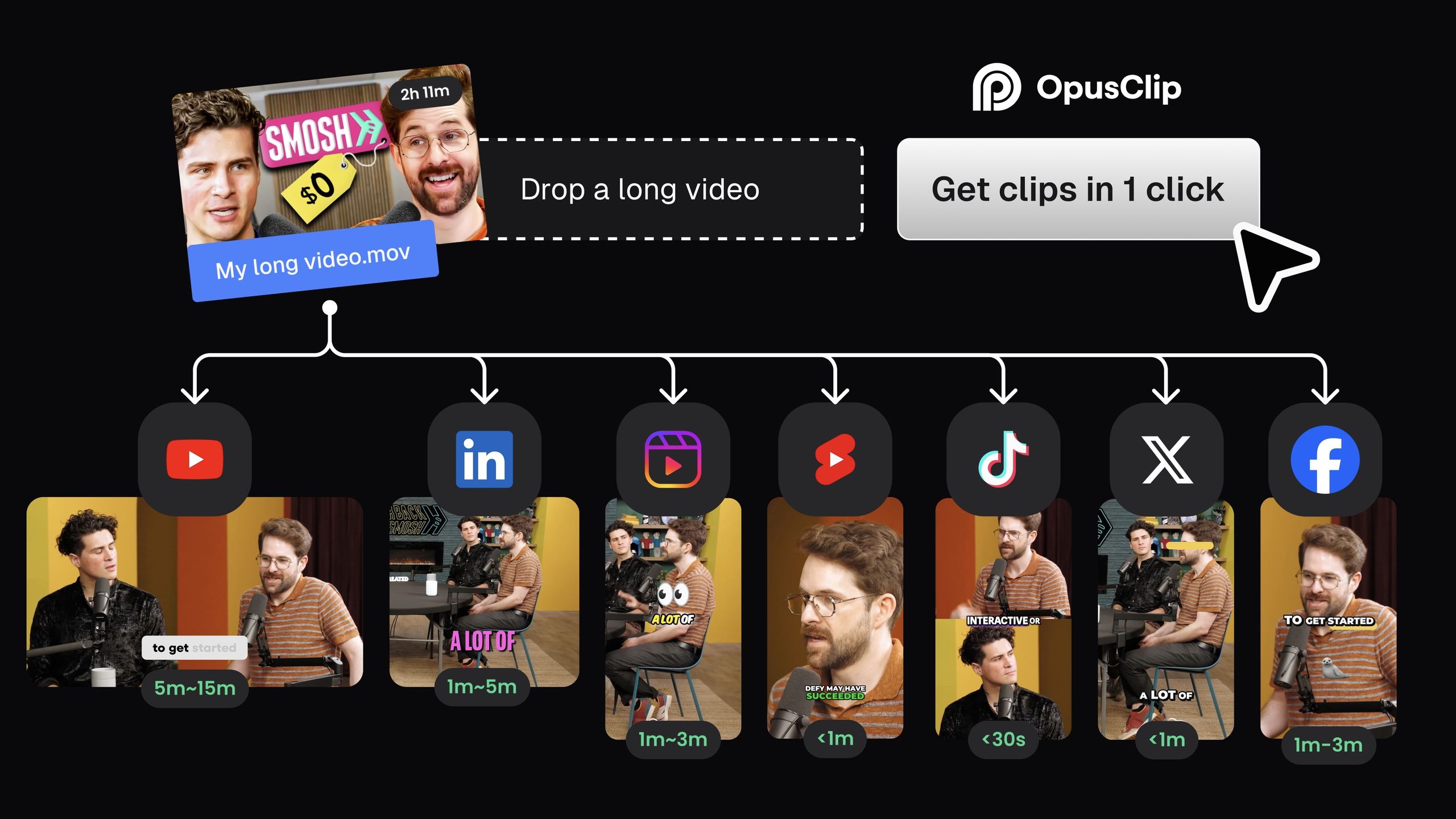
For creators tired of time-consuming manual editing, Opus Clip is designed to save time, and I’ve rarely seen a platform deliver on that promise so quickly.
Its primary strength, and the reason it’s a favorite in the creator economy, is its “time-to-first-value,” which is genuinely under five minutes.
This true “set it and forget it” workflow helps podcasters and commentators save time and increase content volume, making it an absolute game-changer.
For the user whose main goal is to turn a one-hour podcast into ten promotional assets with minimal friction, Opus Clip’s execution is currently unmatched in the market.
The AI’s Virality Score™, while not a perfect predictor of success, is a genuinely helpful guide for beginners who are still developing their instincts for what makes a good short-form video.
It provides a starting point for curation that is often “good enough” to get content out the door. Furthermore, its wide array of direct publishing options to create YouTube Shorts, TikToks, and Instagram Reels is a key workflow accelerator.
Where Munch Shines: Strategic, Data-Driven Clip Selection
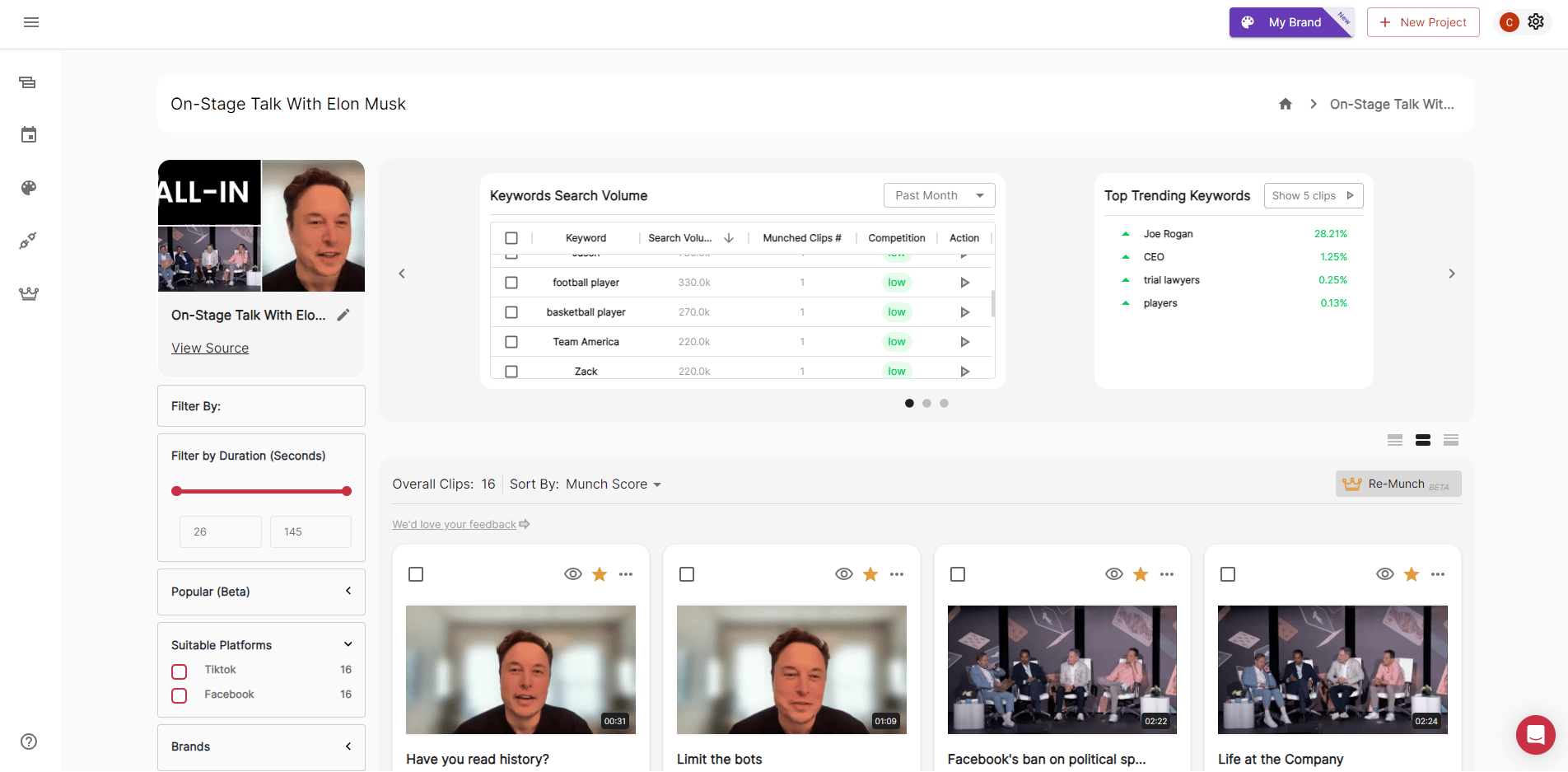
Munch operates on a completely different value proposition than its speed-focused competitors. While other tools are guessing what might be engaging, Munch attempts to provide the “why” behind its clip selections.
This strategic layer is its standout feature and the reason it commands a premium price. For social media agencies and marketing teams, this is a massive advantage.
Instead of just delivering clips to a client, an agency can present a data-backed content strategy, citing the specific trends, keyword opportunities, and competitor analysis that Munch’s platform provides.
This feature transforms the service from a simple AI video clipper into a piece of strategic intelligence.
The inclusion of a Zapier integration is a significant benefit, and API access is available on its top-tier ‘Ultimate’ plan, allowing agencies to improve workflow efficiency by building automated pipelines from production to reporting.
For the right user — one who can leverage these analytics to win or retain clients — the high price tag becomes a justifiable business expense. Munch isn’t just selling clips; it’s selling a rationale, and in a professional services environment, that is an incredibly valuable commodity.
Part 4: Critical Considerations — Security & Compliance
As a software analyst, I have a professional responsibility to state this clearly: for a modern SaaS (Software as a Service) tool, the absence of clear data privacy policies and independently verified security documentation is a major red flag.
My analysis reveals a concerning lack of transparency from some AI video tools, posing an unacceptable risk for any professional or business user. Users must demand proof, as public documentation can be sparse.
Compliance Status
Based on the available data from mid-2024, the compliance landscape for these tools is mixed. Descript stands alone in this comparison with its verified security posture, evidenced by a public SOC 2 Type II report — the gold standard for security controls.
| Certification | Opus Clip | Munch | Vidyo.ai | Descript |
|---|---|---|---|---|
| SOC 2 Type II | ⚠️ In Process | ❌ Not Found | ⚠️ Unverified | ✅ Verified |
| ISO 27001 | ❌ Not Found | ❌ Not Found | ⚠️ Unverified | ✅ Verified |
| GDPR | ✅ Claims compliance | ✅ Claims compliance | ⚠️ Unverified | ✅ Claims compliance |
| HIPAA (BAA) | ❌ Not Found | ❌ Not Found | ⚠️ Unverified | ✅ Enterprise |
Authentication Failures & Successes
While my initial upstream reports flagged Munch for a lack of 2FA, this has been corrected. As of mid-2024, Munch has implemented Two-Factor Authentication (2FA) via authenticator apps Munch Help Center.
This is a critical and welcome security improvement. Both Opus Clip and Descript also offer this essential feature.
However, the disparity in enterprise-grade compliance remains a critical consideration. For any social media agency handling pre-release client content, the risk profile is not equal across these platforms.
Descript is the only tool in this comparison with both a verified SOC 2 Type II report and a publicly available ISO 27001:2022 certificate, representing the most mature security posture in the group Descript Trust Center.
While Opus Clip is “in the process of becoming SOC 2 compliant” Opus Clip Security, a promise is not a certification.
⚠️ Compliance Gaps Matter for Agencies: For an agency handling a client’s unreleased movie trailer or a public company’s earnings call video, a security breach is a catastrophic event. Entrusting that content to a platform without verified SOC 2 or ISO 27001 compliance introduces a professional liability that must be carefully weighed against the tool’s creative benefits.
Part 5: Use Cases & Workflows
The right tool depends entirely on your workflow. The “one-click” promise is an illusion; in reality, users are forced to choose a lane: speed, strategy, or control. For a broader landscape view, our comprehensive Autoshorts Top Alternatives and Competitors analysis maps how each workflow lines up against Autoshorts itself.
Flow 1 (Opus Clip — Speed): 1. Upload Long Video → 2. AI Identifies “Engaging” Moments → 3. Generates 10-15 Clips → 4. User Selects & Publishes. (Workflow emphasizes speed and content velocity).
Flow 2 (Munch — Strategy): 1. Upload Long Video → 2. AI Analyzes Trends & Keywords → 3. AI Selects “Strategic” Clips → 4. User Reviews Data & Publishes. (Workflow emphasizes data-driven decisions).
The Solo Podcaster: Prioritizing Volume & Speed
For the solo podcaster, Opus Clip is often the best choice. It’s the fastest way to convert podcast to video clips, turning one long episode into 10+ assets for social media with minimal effort.
This workflow dramatically increases content velocity, allowing a single creator to maintain a consistent presence across multiple platforms without getting bogged down in manual editing.
The trade-off is sacrificing brand consistency and the ability to select your own “golden” moments.
The Marketing Agency: Prioritizing Strategy & Reporting
A marketing agency managing multiple clients needs to justify its content choices. This is where Munch wins. It provides a data-backed rationale for clip selection, which is invaluable for client communication.
An agency can present a report showing that a clip was chosen because it targets a trending keyword with low competition.
You accept a slower workflow and a significant price premium, a sharp contrast to tools like Descript that offer verified SOC 2 compliance.
The Brand-Conscious Business: Prioritizing Visual Identity

For a business with strict brand guidelines, the “generic AI video” look is a major liability. Vidyo.ai is reportedly built to solve this problem.
It is said to offer more customizable templates, allowing teams to ensure that all AI-generated content aligns with their established visual identity.
The trade-off is a potential learning curve and the need for more hands-on work compared to the “one-click” simplicity of Opus Clip.
The Hands-On Video Editor: Prioritizing Control & Workflow
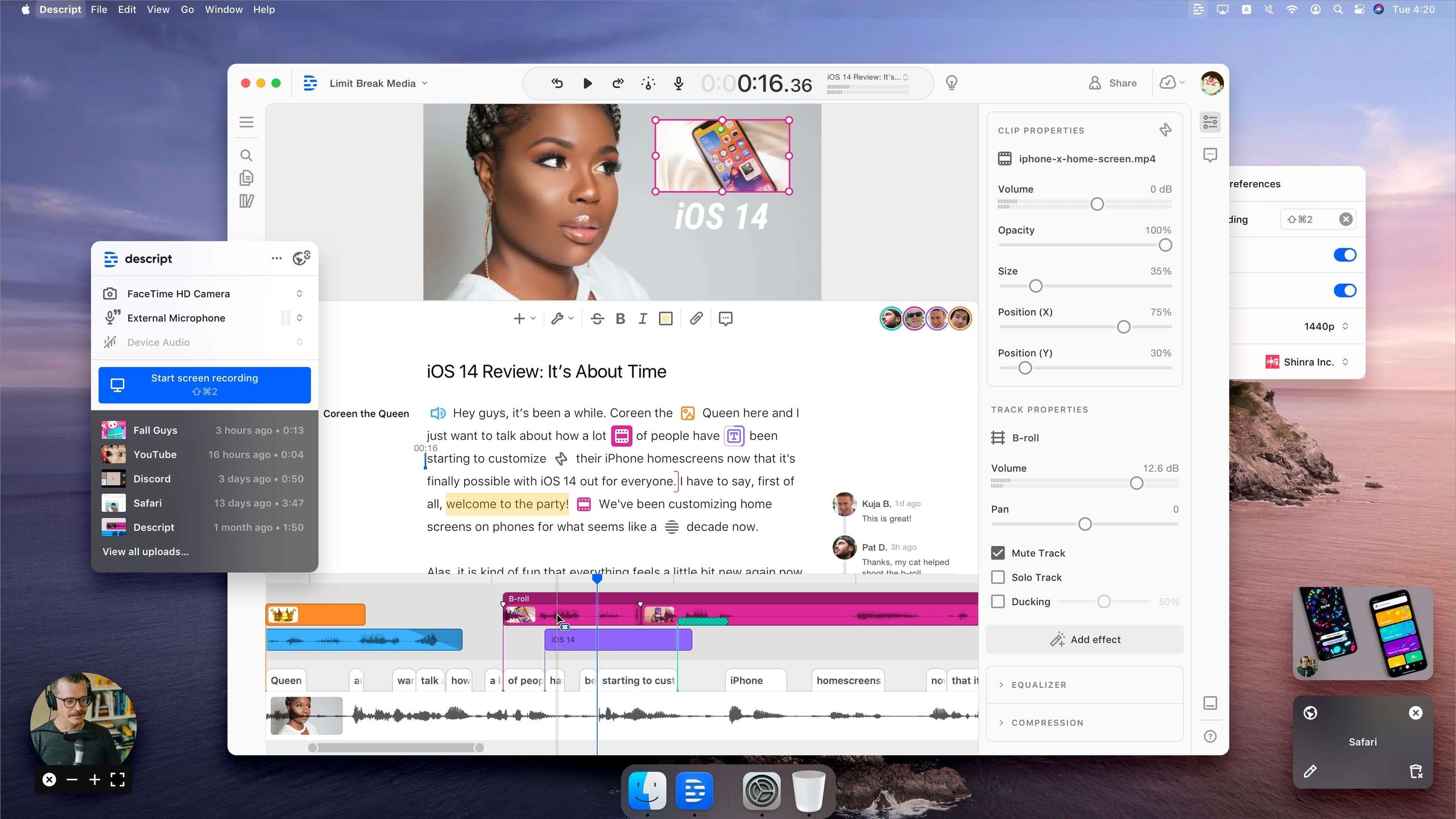
For the editor who wants full control, the answer isn’t another clipping tool; it’s a better editor. Descript excels here.
As a powerful, transcription-based editor, it gives you full control and integrates editing, not just clipping. You give up on the dream of a “one-click” automated solution, but you gain precision and a robust feature set, including top-tier security.
It’s the logical choice when you decide you’d rather edit video as easily as a Word document.
Part 6: Alternatives & Comparisons
Best For
Marketing agencies and data-driven content teams who need to justify their social media strategy with analytics. If your value is in explaining why you chose a clip (based on trends, keywords, or competitors), Munch’s premium price is a justifiable business expense.
Consider
Its Zapier integration is powerful for building automated content pipelines. If you can leverage its analytics to win or retain a single client, the tool may pay for itself.
Avoid If
You are a solo creator or on a tight budget. The pricing model is punitive for variable usage, and if you don’t use the strategic analytics, you are massively overpaying for a clipping tool with a UI that users report can be laggy.
✅ Strengths
- Unique trend & keyword analytics engine
- Data-backed clip rationale for client reports
- Zapier integration for automated pipelines
- API access on Ultimate plan
- 2FA authenticator app support
⚠️ Considerations
- No overage top-ups — forces plan upgrade
- Elite plan already $99/mo before overage risk
- UI reported as laggy by users
- No public SOC 2 or ISO 27001 report
- API locked to top-tier Ultimate plan
Best For
Corporate marketing departments and established brands that need to maintain a consistent visual identity across all content. If the “generic AI look” from other tools is your primary concern, Vidyo.ai’s focus on customizable templates makes it a top contender.
Consider
It offers features like auto-chaptering and social media scheduling that provide a more end-to-end workflow than simple clipping tools.
Avoid If
You need a tool that is proven, mature, and has extensive independent reviews. The data on Vidyo.ai is more limited, and its feature set may be less robust than the market leaders. You are trading proven performance for potential customization. ⚠️ Needs verification.
✅ Strengths
- Deeper customizable template library
- Auto-chaptering feature
- Built-in social media scheduling
- Stronger brand identity control
- End-to-end repurposing workflow
⚠️ Considerations
- Less mature than market leaders
- Fewer independent third-party reviews
- Steeper learning curve than “one-click” tools
- Compliance status unverified
- Feature set may be less robust
Best For
Content creators, podcasters, and editors who want a single, powerful tool for their entire production workflow, from transcription and editing to audio enhancement and security. If your pain point is the editing process itself, not just finding clips, Descript is the answer.
Consider
Its “Studio Sound” feature can dramatically improve audio quality, and its best-in-class security (SOC 2, ISO 27001) makes it the only viable choice for many enterprise and security-conscious teams.
Avoid If
Your only goal is to automatically find and create dozens of short clips from a long video with minimal effort. It is not an automated clipping tool; it’s a powerful manual editor that uses AI to enhance your workflow, not replace it.
✅ Strengths
- Verified SOC 2 Type II compliance
- Public ISO 27001:2022 certification
- Enterprise HIPAA (BAA) available
- Transcription-based text editing
- Studio Sound audio enhancement
⚠️ Considerations
- Not an automated “one-click” clipper
- Steeper learning curve than pure clippers
- Manual workflow slower than Opus Clip
- Overkill if you only need clips
- Requires editing mindset, not curation
If you want to keep exploring similar breakdowns before finalizing your choice, browse our category of comparison articles where we benchmark other creator tools with the same TCO-and-security framework.
Part 7: Conclusion & FAQs
Conclusion: Final Recommendations & Red Flags
When choosing from the top Autoshorts alternatives, your choice is not about which tool is “best,” but which trade-off you are willing to make.
The reality of the Autoshorts competitive landscape is a series of difficult choices between speed, strategic insight, and creative control.
The biggest “blind spots” are the true Total Cost of Ownership (TCO) driven by punitive pricing models and the varying security postures that put professional users at risk.
For pure speed, choose Opus Clip, but be prepared to budget for expensive overages. For data-driven strategy, choose Munch, but only if you can justify the premium cost.
For maximum brand consistency, Vidyo.ai is worth investigating with caution. And for the best combination of creative control and security, your answer is to forgo the one-click promise and embrace a true editor like Descript.
Step 1: Calculate Your REAL TCO
Before you commit, model your monthly costs based on your average video upload volume plus at least one or two expected overages to see the true financial impact.
The annual discount is tempting, but the “no refund” policies create significant lock-in. Stacking a current Autoshorts sale price on top of the annual plan is one of the few levers that can meaningfully reduce that lock-in cost.
Step 2: Demand Security Proof
Contact their sales or support team and ask for their official documentation on security controls. Do not trust marketing pages.
For agencies, confirming a vendor’s compliance status is not optional; it’s a professional responsibility.
Step 3: Run a Pilot on a Monthly Plan
A one-month pilot is a prudent investment to avoid a year of frustration. It allows you to test the tool against your real-world content and workflow before making a long-term financial commitment.
Frequently Asked Questions
Q1: How much does Opus Clip really cost?
A: The advertised price is just the starting point. For instance, the Pro plan offers 1,200 minutes for an annual commitment of $588, which works out to about $0.04 per minute Opus Clip Pricing Page.
However, my analysis shows the real cost is in its overage minutes. If you exceed your plan’s limit, you must purchase “top-up” credits at a much higher rate, often around $0.10 per minute.
This 110% “Overage Penalty” means a user with variable needs will almost certainly pay more than the sticker price. It’s crucial to factor in at least a 10-15% buffer for overages when calculating the true TCO of this Autoshorts alternative.
Q2: Is Munch worth the high price?
A: From my perspective, Munch is only worth its premium price if you are a marketing agency that will consistently use its unique social trend analytics to inform client strategy.
Its ability to provide a data-backed “why” for content choices is a powerful tool for client reporting and retention Munch Features Page.
If you are a solo creator or simply need a tool to find and cut clips, you are massively overpaying for features you won’t use. For pure clipping, a more straightforward tool offers a better ROI.
Q3: What are the biggest security risks with these AI tools?
A: The biggest risk is the disparity in verifiable compliance. While most tools now offer essential features like 2FA, the gap is in enterprise-grade certifications.
Descript leads with both verified SOC 2 Type II and ISO 27001 reports, making it suitable for high-stakes corporate content Descript Trust Center.
Competitors like Opus Clip and Munch, while claiming robust security, do not have the same level of public, third-party verification. For an agency handling sensitive client information, using a tool without these verified controls introduces a significant professional liability.
Q4: Can I manually choose my own clips in Opus Clip?
A: No, and this remains Opus Clip’s biggest and most frustrating limitation, according to numerous user reviews G2 Opus Clip Reviews.
You are completely reliant on the AI’s selection. If it misses a key moment that you know is “gold,” you have no recourse within the platform.
You must export the original video and go clip it manually in another editor like Adobe Premiere or CapCut, which completely defeats the purpose of using a “one-click” tool. This lack of user override is a critical trade-off for its speed.
Q5: Which tool is better for beginners?
A: Opus Clip is by far the most beginner-friendly tool I’ve evaluated in this category. Its interface is clean, the process is intuitive, and you can get from a YouTube link to a finished clip in under five minutes.
This “time-to-first-value” is its core strength. In contrast, Munch has a much steeper learning curve. Its data-heavy interface is powerful but can be overwhelming for a new user, requiring a more strategic mindset to use effectively.
Beginners looking for the simplest Autoshorts alternative should start with Opus Clip’s free trial, and pair the trial with a fresh roundup of the latest coupons if they decide to upgrade.
Q6: Why is Descript included in this comparison?
A: I’ve included Descript as an “adjacent” competitor because it represents the alternative path for users frustrated by the limitations of AI automation.
It’s for those who try a tool like Opus Clip, get frustrated by the lack of control, and decide they want to be editors, not just clip curators.
Descript is a full, transcription-based video editor, not a one-click clipping tool, and it’s the logical next step for someone who wants to edit video as easily as a Word document. It answers the question, “What if I want more power?”
Q7: What is the “Subscription Trap”?
A: The “Subscription Trap” is a term I use for a pricing model that makes it dangerously easy to overpay. Munch’s “forced upgrade” policy is a perfect example.
Because they don’t offer simple minute top-ups, a small overage can force you onto a more expensive plan, potentially doubling your monthly bill overnight Munch Billing FAQ.
This model creates huge financial risk for any team with fluctuating content production, making it a critical factor when evaluating the TCO of any SaaS tool.
Q8: Can I get a refund if I don’t like the tool?
A: It is highly unlikely. In my review of their legal documents, both Opus Clip and Munch have strict “no refunds for partially used periods” policies, especially for annual plans that offer a discount Opus Clip Terms of Service.
This creates significant financial lock-in. If you prepay for a year and realize after two months that the workflow doesn’t fit your needs, you have likely lost that investment.
This is why I strongly advise starting with a monthly plan, even if it’s more expensive, to thoroughly test the tool’s fit before making a long-term financial commitment. If you do decide to commit annually, applying an exclusive Autoshorts offer at checkout is the safest way to offset that risk.

