


I know you're probably here looking for a quick ZoomInfo promo code to slash the price of your subscription. I get it; as a MarTech strategist and founder of Coupons Scout, my goal is always to find the fastest way to save money. But with ZoomInfo, the savings game is played differently. Because it's a top-tier B2B enterprise platform, they don't use traditional "enter-at-checkout" coupon codes. Instead, significant discounts are unlocked through strategic negotiation, specific programs, and long-term commitments. Don't worry, you've come to the right place. In my experience analyzing hundreds of SaaS pricing models, there are always ways to reduce your cost. This guide will walk you through every verified method to get the best possible price on the platform. For other deals in this space, you can always explore our full list of Software and AI Deals.
How to Get Your Custom ZoomInfo Price
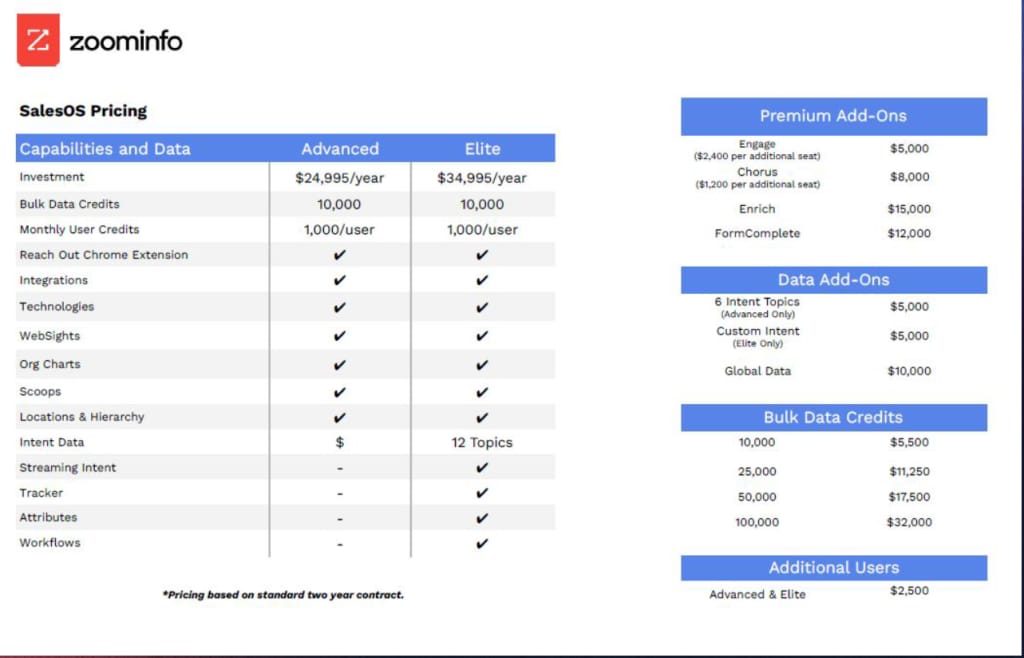
The first thing to understand about ZoomInfo is that all pricing is custom. You won't find a public pricing grid because the cost depends entirely on your specific needs: the number of users (seats), the features you require, the amount of data credits you'll use, and which of their platforms you need. Your final price is determined through a conversation with their sales team. Here's how to navigate that process to your advantage.
Step-by-Step: Getting a Custom Quote from Sales
Getting your personalized price is a straightforward process, but it requires engaging directly with the company. This is your first opportunity to set the stage for negotiation.
- Visit the Official Website: Navigate to the ZoomInfo Pricing Page. You'll notice it prompts you to "Get Pricing" rather than showing costs.
- Submit the Form: Click the "Get Pricing" button and fill out the contact form. Be prepared to provide your name, company email, phone number, company name, and employee count. This information helps them route you to the correct sales team.
- Initial Discovery Call: A sales representative will contact you. This call is crucial. Be ready to discuss your business goals, target market, current sales/marketing stack, and what problems you're trying to solve with the platform. The more clearly you can articulate your needs, the better they can tailor a package for you.
- Receive Your Custom Quote: Based on the discovery call, the sales team will build a custom package and provide you with a detailed quote for an annual subscription.
Automatic Discounts vs. Manual Codes (What to Expect)
Let's be crystal clear: you will not find a "promo code" field during checkout. Savings on the platform are built into the Custom Quote itself. Think of it less like couponing and more like a negotiation. The "discounts" come in the form of:
- A lower per-seat cost for larger teams.
- Reduced rates for multi-year contracts.
- Bundled pricing if you purchase multiple products (e.g., SalesOS and MarketingOS).
- Access to special programs like the startup or nonprofit discounts.
Your job is to know which levers to pull during the sales conversation, which we'll cover in the hacks section below.
How to Access Startup & Nonprofit Discounts
One of the most significant discounts available is for specific types of organizations. If you're a startup or a nonprofit, you must mention this early in the sales process. These aren't automatic; they are dedicated programs that require an application and verification. The sales representative you speak with will be your gateway to these programs, guiding you through the necessary steps to prove your eligibility and unlock these special rates.
Savings Hacks & Tips for ZoomInfo
Even without public promo codes, there are several powerful, verified strategies I've identified to lower your investment in this platform. These are the real "coupons" in the B2B software world. If you're comparing across categories, you might also want to browse our latest coupons updated daily across every store to see how software deals stack up against other verticals.
Startup Discounts: How to Apply and Qualify
ZoomInfo offers a highly competitive Startup Discount program to help early-stage companies grow. This is often the single best way to get a significant price reduction.
Eligibility Criteria (as of early 2024):
- Your company must have fewer than 20 employees.
- Your company must have raised less than $2 million in funding.
How to Apply: The process starts on the official ZoomInfo for Startups program page. You'll need to fill out an application form detailing your company information. It's a formal application process, so be prepared to provide evidence of your funding and employee count if requested. If you qualify, the discount is substantial and makes the platform much more accessible for new businesses.
Nonprofit Pricing: Securing Special Rates for Your Organization
Similar to the startup program, the retailer provides special Nonprofit Pricing. While the exact discount is not publicly listed and is determined on a case-by-case basis, it's a critical point of discussion for any eligible organization. To access it, you must inform your sales representative during the initial calls that you are a registered nonprofit (e.g., a 501(c)(3) in the United States). They will then provide the necessary steps for verification to build a quote with the appropriate discount applied.
Annual vs. Monthly Billing: The #1 Way to Reduce Your Cost
This is the most straightforward and universally available way to save. ZoomInfo's standard contract is an Annual Plan. They build their pricing and discounts around this annual commitment. While you might negotiate payment terms (e.g., quarterly payments), committing to a full year is the primary lever for securing a lower effective monthly rate. In my experience with SaaS, annual plans are typically 15-25% cheaper than hypothetical month-to-month options. When you get your quote, ask the sales rep to frame the value in terms of the savings over a non-annual plan to see the full benefit.
Ready to see how these strategies can impact your custom price? Get Started with a Custom ZoomInfo Quote Today →
Free Trial Strategy: Test Key Features Before You Commit
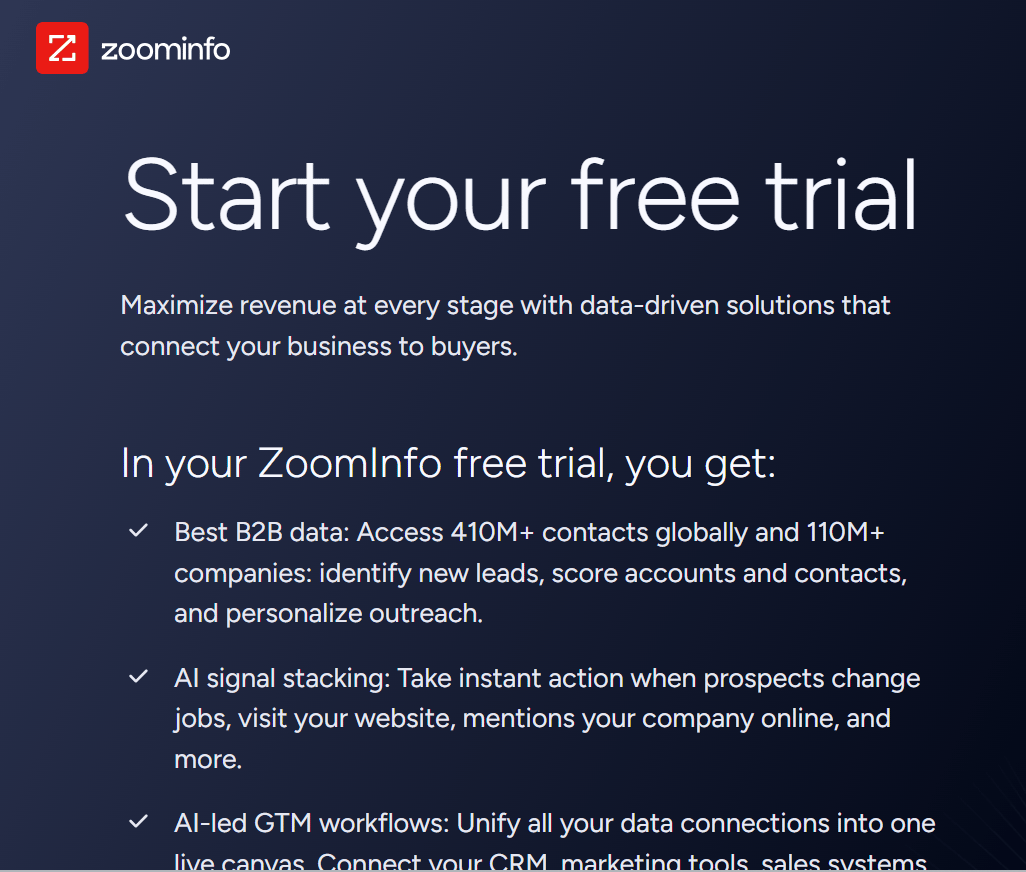
ZoomInfo offers a Free Trial that provides a limited but valuable look into its database and platform functionality. This is your chance to "try before you buy" and is a critical savings hack. Why? Because it prevents you from purchasing unnecessary features or committing to a tool that doesn't fit your workflow.
My professional recommendation: Before speaking with sales, use the free trial to identify the exact features that are most valuable to you. When you get on the call, you can speak confidently about needing access to these specific data points or this particular feature, which helps the sales rep create a more tailored, and potentially less expensive, package for you. Don't pay for what you won't use.
Bundle Deals: Combining SalesOS, MarketingOS, and TalentOS
The retailer isn't just one product; it's a suite of platforms including SalesOS, MarketingOS, and TalentOS. If your organization has needs across sales, marketing, and recruiting, bundling these services is a significant negotiation point. Purchasing them together in a single contract will almost always be more cost-effective than licensing each one separately. During your sales call, be sure to mention if other departments in your company could also benefit from the platform's data.
Cashback Stacking: Combine with Credit Card Rewards
While not a discount from the vendor itself, this is a savvy financial move. Once you've negotiated your best price, pay for the annual subscription using a business credit card that offers high cashback rates or rewards on software purchases. Cards like the American Express Business Gold or Chase Ink Business Preferred often have bonus categories for SaaS or general B2B spending. A 2-4% reward on a multi-thousand dollar subscription adds up to real money back in your pocket.
Why Trust Coupons Scout for ZoomInfo Codes?
You might be wondering why a coupon site is telling you there are no coupons. My mission since founding Coupons Scout has been to cut through the noise and tell you the truth about how to save money. For complex B2B platforms like this one, that means going beyond codes and verifying the real savings strategies that work. We do this through our rigorous verification protocol.
Our Verification Process: The CSVP™ Standard
At Coupons Scout, every piece of savings advice is vetted through our Coupons Scout Verification Protocol (CSVP™). For a brand like the one covered here, this falls under our "Track B: Reviews, Comparisons & Buying Guides" process. This isn't about testing codes in a cart. It's a deep-dive analysis into the brand's pricing structure and policies. We read the terms of service, sign up for free trials, engage with sales materials, and verify the existence and eligibility requirements of programs like the startup discount. This article was produced following our editorial methodology, with all pricing data cross-referenced against official sources. You can also see the full directory of stores we cover on Coupons Scout to understand the breadth of retailers we verify.
Meet the Team Behind Your Savings
As the founder of CouponsScout, I oversee our entire verification process. For technical products like ZoomInfo, I worked closely with Jettawat Kasemchaiyanun, our Software & AI specialist. He was responsible for testing the free trial functionality, verifying the startup discount partnerships by analyzing their official program pages, and calculating the true ROI of committing to an annual plan versus seeking monthly alternatives. His technical expertise and years of experience testing B2B data platforms ensure you're getting accurate, hands-on insights—not just marketing hype. Our Senior Verification Analyst, Kanokchai Likitapiwat, audits all our data against the live merchant site to ensure accuracy. And every article, including this one, goes through Joanne Lovell, our Editorial Director, who fact-checks every claim and ensures we maintain the highest editorial standards.
What To Do If Your ZoomInfo Code Doesn't Work?
It can be frustrating when you're trying to make a purchase and a discount doesn't apply. However, in the case of this platform, the issue isn't a "broken" code, but a misunderstanding of their sales model. Let's clarify what's happening.
Why Public Promo Codes Don't Exist for ZoomInfo
If you've found a website promising a "20% off promo code," it's almost certainly a fake or misleading clickbait. Enterprise-level SaaS platforms that rely on custom, high-value contracts do not use public codes for several reasons:
- Custom Pricing: There's no standard price to apply a percentage discount to.
- Sales-Led Model: They want to build a relationship with customers and understand their needs, which a self-serve checkout with a coupon code bypasses.
- Brand Value: Premium platforms avoid the "discount bin" perception that can come with constant couponing.
Any savings you get will be negotiated directly with their sales team and reflected in your final contract. If you're still hunting for a code-based deal, the up-to-date ZoomInfo store page on Coupons Scout is where we publish every new verified savings strategy as soon as our team confirms it.
Common Troubleshooting Steps for Platform Access
If you're having trouble accessing the platform, it's likely an issue with your account credentials, not a discount code. Here are the steps to take:
- Check Your Email: After signing up for a trial or becoming a customer, you should receive a welcome email with login instructions. Check your spam folder if you can't find it.
- Password Reset: Use the "Forgot Password" link on the login page if you're unsure of your password.
- Clear Browser Cache: Sometimes, old browser data can cause login issues. Clear your cache and cookies and try again.
Contacting ZoomInfo Support for Pricing Inquiries
If you have any questions about pricing, your custom quote, or eligibility for special programs, do not look for answers on third-party sites. The only source of truth is the vendor itself. You should contact the sales representative you've been speaking with. If you don't have a dedicated contact yet, use the main contact form on their website to get in touch with the correct department. They are the only ones who can provide you with an accurate quote and discuss potential discounts.
About ZoomInfo
ZoomInfo is a titan in the world of B2B data. It's a powerful intelligence platform designed to help sales, marketing, and recruiting professionals find and connect with their ideal customers and candidates more effectively.
What is ZoomInfo? A B2B Intelligence Platform Overview
Founded by Henry Schuck and headquartered in Vancouver, Washington, the company has become an essential tool for revenue teams worldwide. At its core, the platform provides a massive, constantly updated database of company and professional contact information. But it goes far beyond a simple contact list, offering deep insights into company structures, technologies used, purchasing intent signals, and more. This allows businesses to execute highly targeted go-to-market strategies with precision.
Products & Services: SalesOS, MarketingOS, & TalentOS
The retailer's offerings are structured into three main platforms tailored to different business functions:
- SalesOS: Helps sales teams identify target accounts, find direct-dial phone numbers and verified emails, and get alerts on buying signals.
- MarketingOS: Enables marketers to run targeted advertising campaigns, enrich their inbound leads, and create sophisticated audience segments.
- TalentOS: A-D platform for recruiters to find and engage with passive candidates, build talent pipelines, and get insights into talent pools.
These platforms can be purchased individually or as a bundle, and they integrate with popular CRM and marketing automation systems.
Pricing Tiers: Understanding the Custom Quote Model
As mentioned, the vendor operates on a Custom Quote model. There are no predefined public tiers like "Basic," "Pro," and "Enterprise." Instead, your tier is built for you. The final price is influenced by:
- The number of licenses (users).
- The specific platforms you choose (SalesOS, MarketingOS, etc.).
- The number of data credits (for exporting contacts or enriching records).
- The level of features and integrations required.
This model ensures you only pay for what your business truly needs, but it requires a direct sales conversation to determine the cost.
Cancellation & Refund Policy: What You Need to Know
This is a critical point for any business to understand before signing a contract. ZoomInfo has a strict Non-refundable policy. As stated directly in their ZoomInfo Terms of Service, "All payment obligations are non-cancelable and all amounts paid are non-refundable." This makes the Free Trial period incredibly important. You must use that trial to ensure the platform is a perfect fit for your needs before committing to a non-cancelable annual contract.
Free Trial Details: How to Get a Limited Look
The Free Trial is your risk-free way to evaluate the platform. It typically provides you with a limited number of credits to test out the core functionality. This allows you to:
- Look up a few key accounts or prospects to check data accuracy.
- Test the search filters and see how easy it is to build a target list.
- Experience the user interface and platform navigation.
You can usually sign up for a free trial directly from their website. It's the most important first step in your purchasing journey.
Frequently Asked Questions About ZoomInfo Discounts
Does ZoomInfo offer promo codes?
No, the vendor does not offer public promo codes. As an enterprise B2B platform with a custom pricing model, discounts are negotiated directly with their sales team and are built into your annual contract rather than applied via a code at checkout.
How can I get ZoomInfo for free?
You can get access to the platform for free through their limited Free Trial. This gives you a set number of credits to test their data and features. It's the best way to experience the platform's value before committing to a paid annual plan.
Are there student discounts for this store?
The vendor does not publicly advertise a specific student discount program. Their platform is geared towards B2B professionals. However, educational institutions or students with specific research needs can contact their sales team to inquire about potential academic access or pricing.
Does ZoomInfo have a startup discount?
Yes, the retailer has a dedicated startup program that offers significant discounts. To qualify, your company typically needs to have fewer than 20 employees and have raised under $2 million in funding. You can apply through the "ZoomInfo for Startups" page on their official website.
How much can I save with an annual plan?
The company primarily sells annual contracts, so the "savings" are built into this model. Committing to an annual plan is the main way to secure a lower effective monthly rate compared to hypothetical shorter-term options. The exact savings are part of your custom quote negotiation.
What is the refund policy?
ZoomInfo has a strict no-refund policy. Their official Terms of Service state that all payment obligations are non-cancelable and all amounts paid are non-refundable. This makes using the free trial to validate the platform for your needs absolutely essential before purchasing.
Can I cancel anytime?
Subscriptions are based on annual contracts that are non-cancelable during the term. You are obligated to pay for the entire term of the contract you sign. You can, of course, choose not to renew at the end of your contract period.
Is this store cheaper than Apollo.io?
Comparing pricing is complex as both have different models. Apollo.io offers public, self-serve tiers which can be cheaper for individuals or very small teams. The vendor here is generally positioned as a more premium, enterprise-grade solution with pricing that reflects its data depth and custom sales process.
Does the store offer nonprofit discounts?
Yes, the retailer provides special pricing for qualifying nonprofit organizations. You must bring up your nonprofit status during the sales process to be guided through their verification procedure. The final discount is determined on a case-by-case basis as part of your custom quote.
What's included in the free trial?
The free trial typically includes a limited number of credits that you can use to view contact and company profiles. It allows you to test the accuracy of their data, use the advanced search filters, and get a feel for the platform's user interface before committing.
Why can't I find a price online?
The company uses a custom pricing model because the cost depends on many factors like user count, feature sets, and data usage, which vary for every customer. A public price list wouldn't accurately reflect the tailored solution they build for each client's specific business needs.
Where can I find verified discounts?
Verified discounts are not found on coupon sites. They are secured through direct negotiation with the sales team. The most significant verified discounts come from their official startup and nonprofit programs, as well as committing to an annual or multi-year contract.
Conclusion
While the hunt for a simple ZoomInfo promo code might leave you empty-handed, that absolutely doesn't mean you have to pay the first price you're offered. The real savings come from understanding their B2B sales process and using the right strategies. By leveraging the Free Trial to pinpoint your needs, inquiring about the Startup Discount or Nonprofit Pricing if you're eligible, and committing to an Annual Plan, you can significantly influence your final price. The key is to treat the process as a negotiation, not a checkout. Armed with the insights from this guide, you're now prepared to have that conversation and secure the best possible deal for your business. Unlock Verified ZoomInfo Savings – Get Started Now → Discover more expert-vetted deals on our Software and AI deals page.
