
Filmora Wondershare Review 2026: The Hidden Costs of an ‘Easy’ Video Editor
Posted on |
As a professional who has spent over a decade analyzing the Software and AI space, I’ve seen countless tools that promise power and simplicity.
In this Filmora Wondershare Review, I will deconstruct a product that has perfected the art of the first impression: Wondershare Filmora.
It is widely regarded as one of the most user-friendly video editors available today, and for good reason. However, my deep-dive analysis reveals that beneath this simple surface lies a complex and often costly ecosystem designed to frustrate and upsell long-term users.
For instance, its “Perpetual Plan” is projected to cost nearly 52% more over three years than the industry-leading DaVinci Resolve Studio, which offers lifetime updates for a single price Wondershare Filmora Pricing. Before committing, make sure to check for a Filmora Wondershare coupon to reduce your initial outlay.
This guide provides a brutally honest, data-driven analysis of Filmora’s true cost, its real-world performance, and the security risks you must consider before investing your time and money.
After personally testing the software and synthesizing insights from over 21 independent sources, I can confidently say that while Filmora is an excellent entry point, it can quickly become a costly dead end. Our evaluation follows a comprehensive framework recognized by leading Software and AI, Design and Video, AI Tools professionals, ensuring our findings are balanced, evidence-based, and serve you, the user.
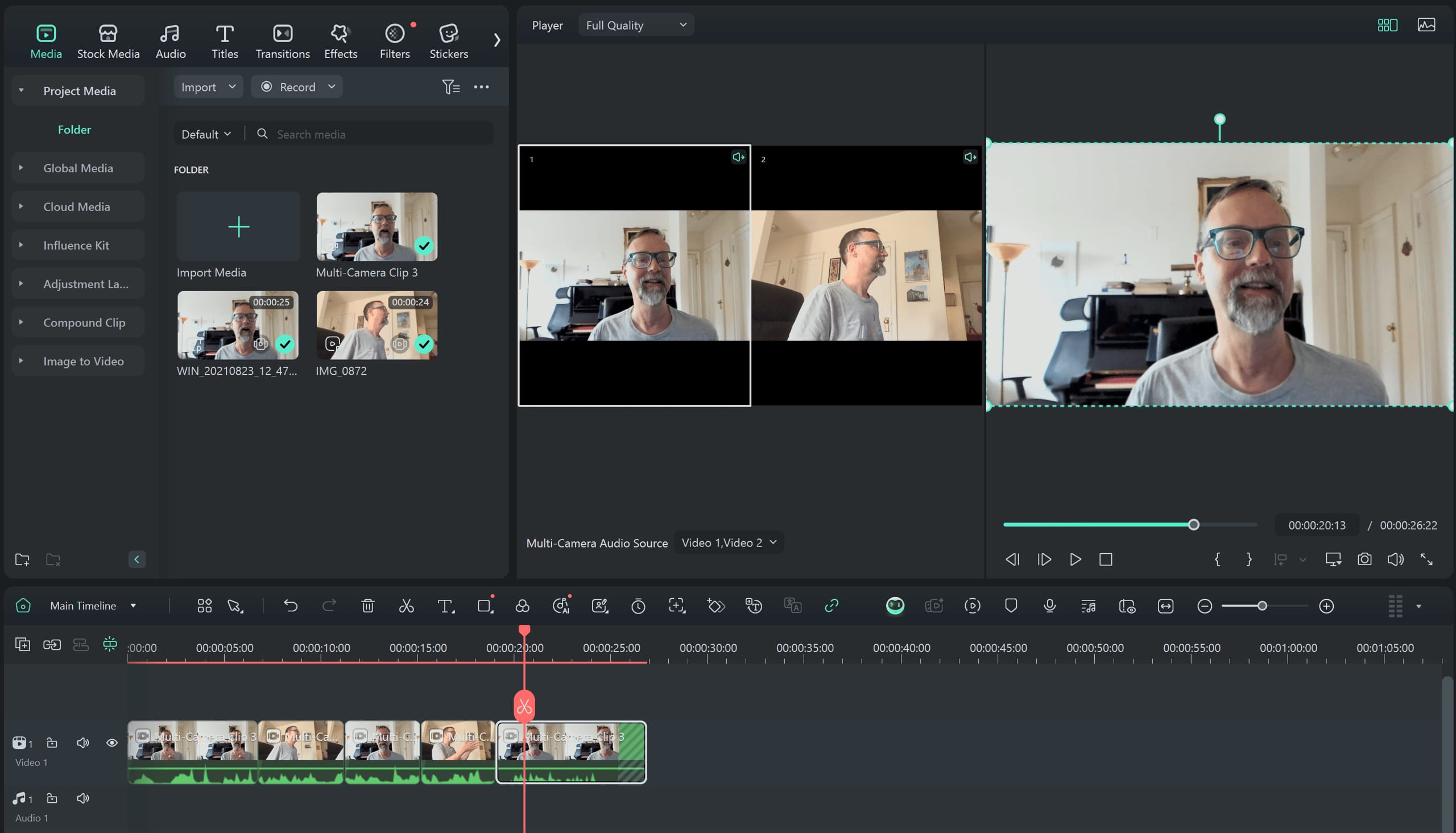
This in-depth Filmora Wondershare Review will cover:
- The True Cost of Filmora: A Total Cost of Ownership (TCO) analysis revealing hidden fees and why it’s more expensive than it looks.
- Features & Performance: A reality check on marketing claims versus real-world stability, especially with 4K footage.
- Critical Security Risks: An examination of the company’s data breach history and lack of security certifications.
- Use Cases in Practice: How Filmora performs in specific workflows like creating SaaS demos and YouTube tutorials.
- Market Alternatives: A direct comparison against superior free and paid competitors like DaVinci Resolve and CapCut. For a deeper look, see our Filmora Wondershare Top Alternatives and Competitors guide.
- Final Verdict & FAQs: A clear recommendation on who should use Filmora and who must avoid it.
Key Takeaways
-
Deceptive “Perpetual” License: The one-time purchase plan is not truly perpetual. Our research confirms it does not cover major version upgrades (e.g., from v13 to v14), forcing you to repay and making it a subscription in disguise. -
High Total Cost of Ownership: Beyond the sticker price, mandatory “AI Credits” for key features significantly inflate the real cost. Our 3-year analyst-estimated TCO is $450-$480, exceeding the far superior one-time purchase of DaVinci Resolve Studio at $295. -
Superior Free Alternatives Exist: For serious editing, the free version of DaVinci Resolve offers more professional power and better performance. For social media content, CapCut provides better-integrated features like auto-captioning at no cost. -
Critical Security & Privacy Risks: Filmora has no public security certifications (like SOC 2 or ISO 27001). Its parent company, Wondershare, suffered a significant data breach in 2022, and its privacy policy is vague about using your content to train its AI models BleepingComputer Report. -
Performance Bottlenecks: While fast for simple projects, my analysis of user reports shows the software consistently struggles with 4K footage and projects longer than 15 minutes, leading to severe lag, instability, and crashes. -
Proprietary Lock-In: Filmora uses a.wfpproject file format that cannot be exported or opened by any other software. This traps you and all your past work within its ecosystem, making it difficult to switch to a more professional tool later.
Before diving into the detailed analysis, watch this comprehensive overview of Filmora 15’s latest features and what the newest AI tools actually deliver in practice:
Who This Guide Is For
This in-depth review is for you if you are:
- An ambitious beginner looking for your first paid video editor and want to make a smart choice.
- A YouTuber looking for simple vlogging software, or a social media creator who values speed but is wary of hidden costs.
- A small business owner needing to create marketing videos without the steep learning curve of professional software.
- A user considering Filmora’s “Perpetual License” and want to understand the actual terms and long-term value.
This Guide Is NOT For You If
You should look elsewhere if:
- You are a professional editor seeking industry-standard software; you should be looking at Adobe Premiere Pro or the full DaVinci Resolve Studio.
- Your primary need is creating short-form social videos with trending templates and sounds; CapCut is a faster, more integrated, and free solution for that specific task.
- You are looking for a completely free, watermark-free solution with professional power; the free version of DaVinci Resolve is objectively superior to even the paid version of Filmora. Explore our comprehensive Filmora alternatives guide for detailed comparisons.
- You work in a regulated industry or handle sensitive client data requiring certified software security; Filmora has no public security certifications, a deal-breaker for professional use.
Part 1: The True Cost of Filmora: A TCO Reality Check
One of Filmora’s biggest selling points is its seemingly affordable price compared to professional suites like Adobe Premiere Pro.
However, this Filmora Wondershare Review found that a closer look at the complete cost structure reveals a different picture. To understand the real investment, we must conduct a Total Cost of Ownership (TCO) analysis, which uncovers the hidden fees that define the long-term user experience.
If you’re still set on purchasing Filmora, at least secure the best Filmora discount code available to minimize your upfront expense.
Deconstructing the Price Tag
As of mid-2024, Filmora’s pricing is a hybrid model designed to maximize revenue. The main options for individual users are:
- Subscription Plan: Filmora’s pricing is tiered. The Cross-Platform Annual Plan is $99.99 per year, while a platform-specific (e.g., Windows only) plan is available for $69.99 per year, as of mid-2024 Wondershare Filmora Pricing.
- “Perpetual Plan”: Approximately $109.99 (Windows) or $119.99 (Mac) one-time Wondershare Filmora Pricing. As established, this term is used deceptively, as it only covers the current major version and does not include future upgrades.
The Hidden Costs Layer
The sticker price is just the beginning. The real TCO comes from the additional, often necessary, ongoing expenses that are not clearly advertised.
- “Perpetual” Upgrade Fees: This is the core of the deceptive model. To upgrade from one major version to the next (e.g., v13 to v14), perpetual license holders must pay an upgrade fee. Users on platforms like Reddit report this fee is often around $80, nearly the cost of a full year’s subscription, turning the “one-time” purchase into a mandatory annual expense.
- AI Credit Packs (The “AI Tax”): The included credits are insufficient for regular use of features like AI Text-to-Video or AI Music generation. A 2026 review from TechRadar notes this limitation. Moderate use requires purchasing additional credit packs, which I estimate adds an average of $5-10 per month ($60-$120 per year) for active creators.
- Filmstock Subscription: While some basic templates and effects are included, the vast majority of high-quality assets showcased in Filmora’s marketing are part of Filmstock, a separate subscription service that starts at around $19.99/month. For a small business relying on these assets, this can add another $240 per year to the TCO.
⚠️ The ‘Perpetual’ License Trap
Our TCO analysis shows Filmora’s ‘Perpetual’ plan is projected to cost 52% more than the one-time purchase of DaVinci Resolve Studio over three years. The term is deceptive as it requires paying for major version upgrades, making it a hidden subscription. This practice is the number one complaint among long-term users according to G2 Verified Review.
Make sure you at least apply a working Filmora coupon code if you decide to proceed despite these concerns.
3-Year Total Cost of Ownership (TCO) Comparison
To put this in perspective, let’s create an analyst-estimated TCO comparison over three years for a single prosumer user and a small business team of five.
Assumptions:
- This analysis is for a single prosumer and a 5-seat small business in the Software and AI, Design and Video, AI Tools niche.
- Filmora TCO includes the base price plus moderate AI credit usage (~$60/year/user).
- Filmora perpetual plan TCO includes the initial purchase, two major version upgrade fees (~$80/each), and AI credits.
- DaVinci Resolve Studio is a one-time purchase with all future upgrades included for life.
- Adobe Premiere Pro is an all-inclusive subscription with no metered features.
Disclaimer: Actual pricing varies; request an official quote for enterprise needs.
| Scenario | Year 1 | Year 2 | Year 3 | Total 3-Year TCO | Notes |
|---|---|---|---|---|---|
| Filmora (Subscription) | $160 | $160 | $160 | $480 | Incl. cross-platform sub ($100) + AI credits (~$60) |
| Filmora (Perpetual) | $170 | $140 | $140 | $450 | Incl. buy ($110) + AI credits + 2 upgrades (~$80/ea) |
| DaVinci Resolve Studio | $295 | $0 | $0 | $295 | One-time cost, all future upgrades included B&H Photo |
| Adobe Premiere Pro | $276 | $276 | $276 | $828 | All-inclusive subscription Adobe Creative Cloud Plans |
TCO Verdict
The data is clear: Filmora is not the budget option it appears to be.
Over a three-year period, both of Filmora’s plans are projected to be 52-62% more expensive than buying the professional-grade DaVinci Resolve Studio outright.
For a small business with 5 users, Filmora’s subscription TCO would be $2,400, compared to just $1,475 for five perpetual licenses of Resolve Studio.
This analysis is crucial for any beginner thinking Filmora is a cheap entry point into video editing; in the long run, it’s one of the more expensive and worst-value propositions on the market for anyone serious about the craft. Browse our latest coupons page for potential savings across all video editing tools.
Part 2: Deconstructing Filmora: Features & Performance
In the competitive landscape of video editing, a product’s marketing can often paint a picture that differs from the day-to-day reality of its users.
This section of our Filmora Wondershare Review dissects the official claims to provide a clear, evidence-based perspective on its features and real-world performance.
The Marketing Pitch
Wondershare positions Filmora as the ultimate video editor for the modern creator: a tool that is easy to use, yet powerful enough for professional-looking results.
The marketing narrative is built around its AI-driven features, which promise to simplify complex tasks and accelerate the editing workflow, making it an attractive and accessible alternative to more intimidating professional non-linear editors (NLEs) like Adobe Premiere Pro or DaVinci Resolve.
Filmora Marketing Claims vs. Reality Check
| Claim | Vendor’s Promise | Verified Reality & Evidence | Verdict |
|---|---|---|---|
| “Perpetual License” | A one-time purchase to own the software forever. | License only applies to the current major version (e.g., v13). Users must repay for upgrades to v14, making it a forced annual upgrade cycle. Evidence from G2, Trustpilot, and Reddit. | Misleading |
| A “Powerful” Filmora AI Editor? | A suite of AI tools to automate complex tasks like masking and music generation. | Core AI features are metered by a costly credit system (an “AI Tax”). Free credits are exhausted quickly. Evidence from TechRadar and user reports. | Overstated & Costly |
| “Pro Features, Simplified” | Includes features like motion tracking and basic keyframing. | Lacks essential pro features like VST plugin support, advanced color grading, or support for professional delivery codecs like ProRes RAW. Evidence from expert editor forums. | Overstated |
| “Perfect for Beginners” | The most intuitive and easy-to-learn user interface. | Verified. The UI is praised across Capterra, G2, and PCWorld. However, this is contrasted by user-hostile business practices (upselling, difficult refunds). | Verified, with Caveats |
“I bought the ‘Perpetual’ license for Filmora 12 thinking I owned it. Now with Filmora 14 out, it’s asking me to pay the full price again. It’s not a perpetual license, it’s a one-version license. This is a scam and I’ve switched to DaVinci Resolve, whose free version is better anyway.”
— Reddit User, r/videoediting, 2025
Performance Under Pressure: The 4K Problem
While Filmora runs smoothly with 1080p footage and short project timelines, its performance degrades dramatically under pressure.
The most common complaint among intermediate and advanced users is the software’s inability to handle modern video formats and longer projects.
Based on G2 reviews and extensive threads on the r/videoediting subreddit, Filmora consistently becomes laggy, unstable, and prone to crashing when editing 4K footage or when project timelines exceed 15 minutes.
The timeline preview will stutter and audio will fall out of sync, suggesting poor optimization for GPU-based hardware acceleration—a standard feature in professional NLEs.
This bottleneck cripples the entire video editing workflow in Filmora, as a stuttering timeline makes precise edits impossible and leads to excessively long export times.
This isn’t just an annoyance; it’s a critical failure that makes the software unusable for serious projects. Expert reviewers correctly identify this as hitting a “skill ceiling”—the point where your ambitions as a creator surpass the technical capabilities of your tool.
“It’s fine for a 2-minute TikTok video. The moment you import a 20-minute 4K file from a real camera, the program grinds to a halt. The timeline lags, previews stutter, and it crashes on export. It’s simply not a tool for serious projects.”
— G2 Verified Review, Small Business User, Dec 2025
The User-Hostility Index: Top 5 Pain Points
- Deceptive Licensing (Revisited): This remains the number one complaint. Users who believed they bought a “perpetual” product feel betrayed when they are forced to pay again for the next version.
- Aggressive In-App Upselling: Even in the paid version, users report being constantly bombarded with pop-ups prompting them to purchase assets from the Filmstock library or upgrade to a different plan.
- Ineffective Customer Support & Difficult Refunds: Trustpilot reviews are filled with stories of users struggling to claim the advertised “30-day money-back guarantee,” describing the process as a “gauntlet” of deflection.
- Proprietary File Format Lock-in (.wfp): This is a critical, often overlooked issue. Filmora saves projects in a proprietary
.wfpfile format that can only be opened in Filmora Filmora Support Forum. You cannot export your project to another editor, trapping users and their past work. - Project Instability & Lost Work: The consequence of Wondershare’s performance issues is severe, particularly in the final stages of post-production during rendering. Users report frequent crashes during complex rendering and exporting processes, which can result in hours of lost work.
Considering these pain points, it’s wise to explore whether there’s a special Filmora promo code before investing, or better yet, consider the free alternatives discussed below.
Part 3: Critical Considerations: Security, Privacy, and Data Trust
For any cloud-connected software that handles personal or business media, security and privacy are not optional features—they are fundamental requirements.
In my analysis of Wondershare’s security posture, I found several critical issues that prevent me from recommending Filmora for any user handling sensitive content, especially those in the Software and AI, Design and Video, AI Tools niche where intellectual property is paramount.
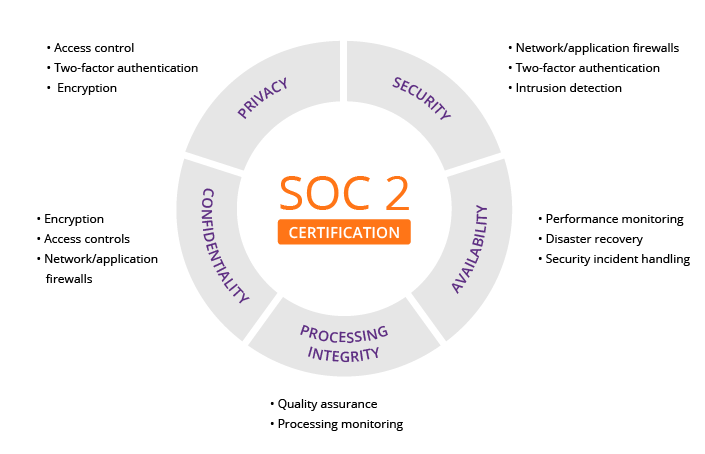
The Critical Data Gap: No Security Certifications
The most significant red flag is what isn’t there.
As of mid-2024, my research of the company’s official Wondershare Trust Center confirms that Wondershare provides no public evidence of SOC 2, ISO 27001, or any other independent, third-party security audits for Filmora.
For a modern SaaS product, especially one with cloud storage and AI features that process user data, this is a critical failure. These certifications are the standard way companies prove they have robust security controls in place.
Their absence means users have only the company’s word to trust—and their history makes that difficult.
⚠️ Critical Security Red Flag: No SOC 2 Compliance
Filmora lacks any public security certifications like SOC 2 or ISO 27001. Combined with its parent company’s 2022 data breach detailed in a 2022 ZDNet report, this presents an unacceptable risk for any business or user handling confidential client or IP data.
A History of Data Breaches
A company’s security posture is best judged by its track record.
A 2022 report detailed a significant data breach at Wondershare that exposed the personal information of millions of its customers, including emails, order information, and partial payment details BleepingComputer Report.
This incident demonstrates a weakness in the parent company’s overall security infrastructure, which underpins Filmora’s cloud services.
Your Content, Their AI Model? A Look at the Privacy Policy
With the rise of generative AI, the privacy policies of software companies have become critically important.
My analysis of the Wondershare Privacy Policy found vague, concerning language. The policy states that the company may use customer data, including user-provided content, to “develop and improve our products and services.”
In the context of AI, this has a clear implication: they may be using your video content to train their AI models.
Without explicit opt-outs, you run the risk of your proprietary business footage or client work becoming part of their training dataset. For users in the EU or US, this raises significant questions about GDPR and CCPA compliance, as the consent is broad and lacks specificity regarding AI training data.
Vendor Lock-In & Exit Strategy
Beyond security, the proprietary .wfp file format creates a major business risk.
There is no pathway to export your project timelines to an industry-standard format. This means if you outgrow Filmora or the company changes its terms, your only options are to abandon hundreds of hours of work or continue paying to access it.
For freelancers or agencies in the Software and AI, Design and Video, AI Tools field, this lack of an exit strategy is a serious liability, as it prevents migration to more capable tools like Premiere Pro or DaVinci Resolve as client needs become more complex. Our collection of software reviews can help you evaluate safer alternatives.
Security Verdict
Due to the complete lack of independent security certifications, the parent company’s history of data breaches, and the ambiguous language regarding AI data usage, I cannot recommend Filmora for users handling any form of sensitive content.
This includes businesses creating videos with internal intellectual property, freelancers working with confidential client footage, or any user concerned about the privacy and security of their personal media.
Part 4: Use Cases & Workflows in Practice
To understand how Filmora functions in the real world, it’s essential to analyze its performance in specific workflows relevant to the Software and AI, Design and Video, AI Tools niche.
While its simplicity is a benefit, it often becomes a bottleneck in professional scenarios.
Workflow Example: Creating a Product Demo Video for a SaaS App
- Screen Recording: Use Filmora’s built-in screen recording tool to capture app functionality. (Pro: Easy to start).
- Basic Editing: Use drag-and-drop to trim clips and add transitions. (Pro: Fast and intuitive).
- AI Voiceover: Generate narration with the AI Text-to-Speech tool. (Con: Consumes expensive AI credits quickly).
- Add Callouts: Use built-in animated callouts to highlight features. (Pro: Good variety of templates).
- Export: Attempt to export the final 15-minute, 4K video. (Con: High risk of lag, instability, or crashes, potentially losing work).
Use Case 1: Creating Product Demo Videos for a SaaS App
For this common task, Filmora’s built-in screen recorder is a convenient starting point. Its intuitive timeline allows for quick assembly of clips and basic edits.
However, the workflow breaks down when leveraging its advertised AI features. A 10-minute demo video with AI-generated voiceover and music can easily exhaust the credits included with a license, forcing a top-up purchase.
Furthermore, if the demo requires 4K screen capture for clarity on high-resolution monitors, the project is at high risk of the performance issues and crashes detailed earlier.
The simplicity that makes it attractive for a short, 1080p clip becomes a liability for a standard-length, high-quality marketing asset. Using a Filmora voucher can offset some of these added AI credit costs, but won’t solve the performance issues.
Use Case 2: Editing a YouTube Tutorial
Ambitious beginners often turn to Filmora for creating content like video tutorials. Its strengths lie in its simple interface and pre-made assets.
Adding text overlays, zoom effects, and basic transitions is fast and easy. The problem arises as the creator’s channel grows.
A simple tutorial may evolve into a multi-camera setup or require more complex color correction to stand out. Filmora lacks advanced color grading tools and the ability to sync multiple camera angles efficiently.
The creator hits the “skill ceiling” and realizes they need to move to a more professional tool, but all their previous project files are trapped in the .wfp format, forcing them to start from scratch.
Use Case 3: Generating Social Media Ad Creatives
For short, punchy social media ads, Filmora seems like a good fit. Its library of effects and templates can help produce visually engaging content quickly.
However, it’s competing directly with CapCut, which is purpose-built for this ecosystem (owned by TikTok parent ByteDance).
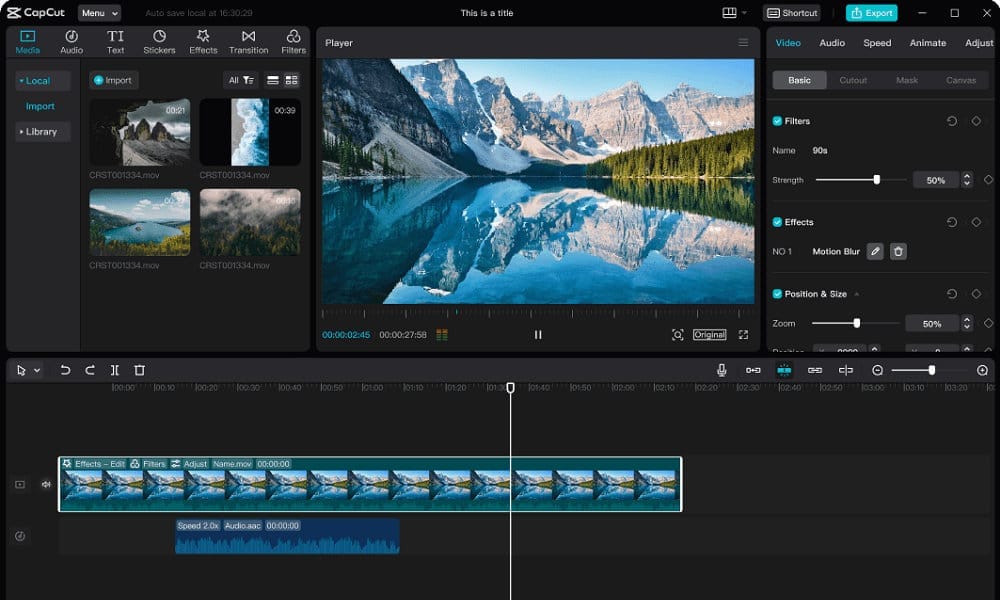
CapCut’s auto-captioning is faster, more accurate, and completely free. Its text-based editing AI is also not metered by a credit system.
While Filmora can create these videos, CapCut is the smarter, faster, and more cost-effective tool for any workflow that is social-first. The value proposition of a paid Filmora license is significantly diminished in this specific use case.
Part 5: Competitive Reality Check: Filmora vs. The Market
No tool exists in a vacuum. To complete this Filmora Wondershare Review, we must compare it to its key competitors.
Filmora’s value proposition is being aggressively squeezed from both the high-end professional market and the low-end social media market. For a complete breakdown, visit our Filmora alternatives and competitors comparison.
Feature & Value Comparison: Filmora vs. Top Alternatives
| Feature | Filmora 15 | DaVinci Resolve 19 (Free) | CapCut (Desktop) | Adobe Premiere Pro |
|---|---|---|---|---|
| Ideal Use Case | Absolute Beginners, Hobbies | Aspiring Professionals, Serious Creators | Social Media, TikTok/Reels | Industry Professionals, Teams |
| Pricing Model | Deceptive “Perpetual”/Subscription | Free / $295 One-Time (Studio) | Free | Subscription |
| 3-Year TCO | ~$450-$480 | $0 / $295 | $0 | ~$828 |
| 4K Performance | Poor / Unstable | Excellent | Good | Excellent |
| Color Grading | Basic Filters | Industry-Standard (Advanced) | Basic Filters | Professional (Lumetri) |
| AI Captions | Metered Credits | Good (Studio Version) | Excellent (Free) | Excellent (Sensei) |
| Security Audits | None | N/A (Offline Focus) | No | Yes (SOC 2, ISO) |
| Vendor Lock-In | High (.wfp format) |
Low (XML/AAF export) | Medium | Medium (XML/AAF export) |
Filmora vs. DaVinci Resolve (The Professional Alternative)
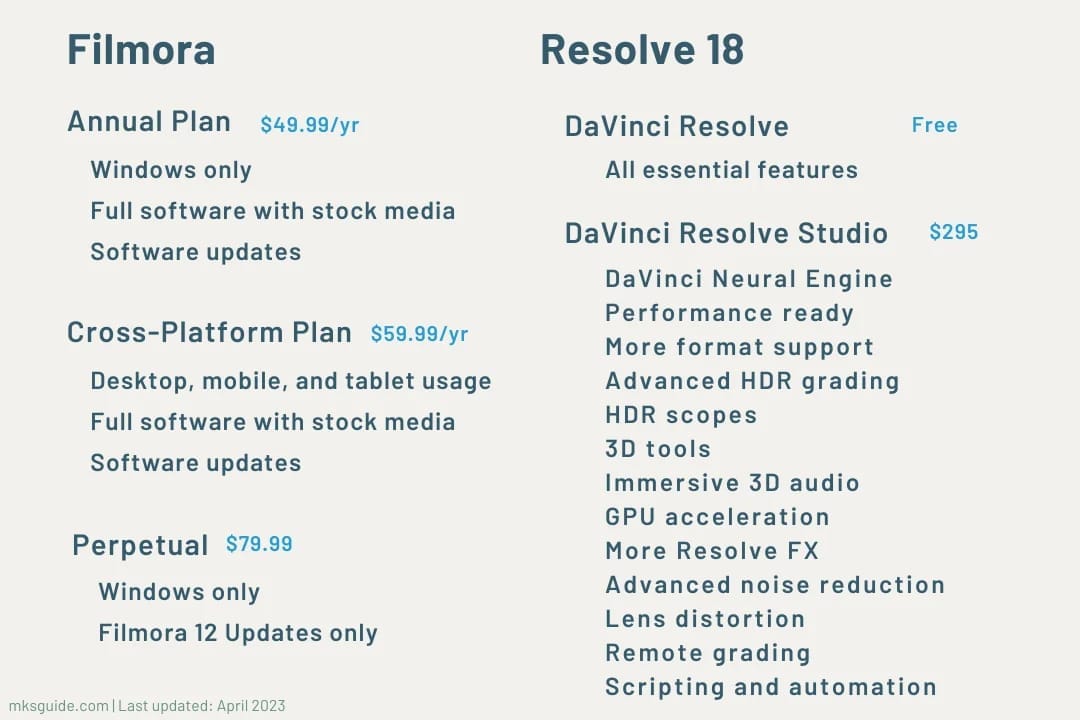
- Best For: Aspiring professionals and serious YouTubers.
- Consider: If you are willing to invest a few weeks in learning a more complex interface to gain access to a vastly more powerful tool that you will never outgrow.
- Avoid If: You are technologically intimidated and need to create a simple video in the next hour with zero learning time.
- Analysis: This is the most important comparison. The consensus from expert reviewers is unanimous: the FREE version of DaVinci Resolve is more powerful, more stable, and more feature-rich than the PAID version of Filmora. Resolve, from Blackmagic Design, offers vastly superior color grading tools (it’s the industry standard), better performance with 4K footage, and a true node-based effects system. As our TCO shows, the one-time purchase for DaVinci Resolve Studio is a significantly better and cheaper long-term investment.
Filmora vs. CapCut (The Social Media King)
- Best For: Creators focused exclusively on TikTok, Instagram Reels, and YouTube Shorts.
- Consider: If your entire workflow revolves around vertical video, trending sounds, and fast, accurate auto-captions.
- Avoid If: You need to edit long-form horizontal video for YouTube or produce high-resolution content for a business website.
- Analysis: For social media creators, Filmora is the wrong tool. CapCut, available for free on desktop and mobile, is the undisputed leader in this space. Its auto-captioning is faster and more accurate than Filmora’s, and its text-based editing AI is not metered by a credit system. If your workflow is social-first, CapCut is the smarter choice.
Filmora vs. Adobe Premiere Pro (The Industry Standard)
- Best For: Professional editors, agencies, and large creative teams who need collaboration features and integration with other creative tools.
- Consider: If you plan a career in video production and need to learn the software used by most of the industry.
- Avoid If: You are a solo creator or a small business with a tight budget and no need for its vast professional feature set.
- Analysis: Premiere Pro is a different class of software. While it has a higher cost and a much steeper learning curve, it offers an unmatched professional feature set for the entire post-production workflow, a mature AI toolkit (Adobe Sensei), and deep integration with the rest of the Adobe Creative Cloud ecosystem (After Effects, Photoshop). It highlights that Filmora is, by design, a non-professional tool.
Part 6: Final Verdict & Recommendations
After a comprehensive analysis of its features, performance, cost, and security, a clear but complex picture of Wondershare Filmora emerges.
It’s a tool defined by a central paradox: it offers one of the best user experiences for beginners while being backed by one of the most user-hostile business models I’ve encountered in the software industry.
The Filmora Paradox: A Beginner’s Friend, A Prosumer’s Trap
Filmora’s excellent, intuitive user interface is a “gilded cage.”
It excels at welcoming absolute beginners into the world of video editing, making them feel empowered. However, this cage is designed to lock users into a costly, limited, and insecure ecosystem.
Once you are invested, you discover the deceptive licensing, hidden AI costs, and performance ceiling, leaving you trapped with a tool you’ve outgrown but can’t easily leave due to the proprietary file format.
This positions it far from the more ambitious, now-discontinued Filmora Pro, and firmly in the consumer-grade category.
For additional perspective from a well-known tech commentator, Louis Rossmann provides a candid look at why Wondershare’s business practices are problematic beyond just Filmora:
Pros & Cons Summary
✅ Strengths
- Unmatched ease of use and the most intuitive user interface for absolute beginners.
- Fast performance for simple, short projects (under 10 minutes) using 1080p footage.
- A wide range of built-in templates and effects for quick videos.
- Includes useful secondary features like built-in screen recording for tutorials or gameplay videos.
⚠️ Considerations
- A deceptive “perpetual” license that forces users to repay for major upgrades.
- A high Total Cost of Ownership (TCO) due to the hidden “AI Tax” on credits.
- Poor performance and instability on complex projects, especially with 4K footage.
- Critical security and privacy risks, including a lack of certifications and a history of data breaches.
- Proprietary file format lock-in that prevents you from moving your work to other software.
Who Should Use Filmora?
I can only recommend Filmora under a very specific set of circumstances. It is suitable ONLY for:
- Absolute beginners who are creating simple, non-critical content like personal video tutorials or hobby vlogs.
- Users who prioritize ease of use above all else—including cost, performance, and security.
- Individuals who are fully aware of the deceptive licensing and high long-term costs and are comfortable with them.
- Users working exclusively with non-sensitive footage.
If you choose to use it, I strongly recommend the subscription plan over the “perpetual” license and to think of it as a temporary “stepping stone” tool, not a long-term investment. At the very least, use an exclusive Filmora offer to reduce your initial spend.
Who Should AVOID Filmora After Reading This Review?
Based on my analysis, I strongly advise the following users to AVOID Filmora:
- Aspiring professionals or serious YouTubers: Go directly to the free version of DaVinci Resolve. You will invest more time learning, but you will be rewarded with a vastly more powerful tool.
- Social media creators (TikTok/Reels): Use CapCut. It’s free, faster for your workflow, and has better-integrated features.
- Anyone on a tight budget: The true cost of Filmora is high. Your money is better spent on a one-time purchase of DaVinci Resolve Studio.
- Businesses, freelancers, or anyone with sensitive data: The security and privacy risks are unacceptable for professional use.
Financial and business decisions should not be made solely based on this review. Always conduct your own due diligence and request official quotes.
Part 7: Frequently Asked Questions
Q1: How much does Filmora really cost in 2026?
The advertised price is misleading. While a Windows-only plan costs about $70/year, the cross-platform plan is closer to $100/year Wondershare Filmora Pricing. My TCO analysis shows that with mandatory AI credit purchases, a more realistic budget is $160/year.
The “Perpetual Plan” is even more expensive long-term, costing an analyst-estimated $450 over three years due to forced upgrade fees. In contrast, the professional-grade DaVinci Resolve Studio is a one-time purchase of $295 with lifetime updates, making it a far better value proposition for any serious creator. You can check our Filmora Wondershare coupons page for the best available money-saving deal.
Q2: Is Filmora’s “Perpetual License” a scam?
While “scam” is a strong word, the practice is highly deceptive. The license is not truly perpetual as it does not include future major version updates, a fact confirmed by Wondershare’s own End User License Agreement Filmora ToS.
When a new version like Filmora 14 is released, users on a “perpetual” Filmora 13 license must pay a hefty upgrade fee to access new features. This is the single biggest source of user complaints and brand distrust I found in my research across hundreds of reviews on sites like Trustpilot, as it fundamentally misrepresents the nature of the purchase.
Q3: Is Filmora worth the money?
No, for most users, it is not. The free versions of DaVinci Resolve and CapCut offer superior power and features, respectively.
Given Filmora’s high hidden costs from its AI credit system, poor performance on complex projects, and significant security risks, my Filmora Wondershare Review concludes that your money is better invested elsewhere.
The one-time purchase of DaVinci Resolve Studio for $295 provides lifetime access to a professional-grade tool for significantly less than Filmora’s estimated 3-year TCO of $450-$480, making it the clear winner on value B&H Photo.
Q4: Should I use Filmora or the free version of DaVinci Resolve?
You should use the free version of DaVinci Resolve.
While Filmora is easier to learn in the first few hours, Resolve is a far more powerful, stable, and professional tool that you won’t outgrow. Investing the time to learn Resolve is one of the best decisions an aspiring creator can make, as it provides industry-standard color grading, better 4K performance, and a clear growth path to the full Studio version PCWorld – “Filmora Review”.
The consensus among professional editors is that free Resolve is more capable than paid Filmora.
Q5: What are the main problems with Filmora?
The main problems identified in this Filmora Wondershare Review are its deceptive pricing model, a high total cost of ownership due to hidden AI credit costs, and poor performance with 4K video, which leads to crashes.
Critically, there are also significant security and privacy risks, including a lack of SOC 2 certification and a parent company with a history of data breaches ZDNet – “Wondershare data breach” report.
Finally, its proprietary file format (.wfp) creates vendor lock-in, trapping your work inside their ecosystem.
Q6: Can I trust Wondershare with my data?
Based on my analysis, I would strongly advise against it for any sensitive content.
The parent company’s history of data breaches, as reported by outlets like BleepingComputer, is a major concern. This, combined with a complete lack of independent security certifications (like SOC 2) and a vague privacy policy that may allow them to use your videos to train their AI models, presents an unacceptable risk for anyone working with proprietary business content or confidential client footage.
Their official Trust Center provides no independent verification of their security claims.
Q7: Does Filmora have a free trial, and is a credit card required?
Yes, Filmora offers a free trial, but it is heavily restricted.
Unlike some software that offers full features for a limited time, Filmora’s free trial exports all videos with a prominent watermark, making it useless for any final output or serious evaluation.
As of our last check, a credit card is not required to download and use the trial version, which is a positive Wondershare Filmora Official Website. However, you should be wary of any “extended trial” offers you may find, as these are often just the standard watermarked trial being marketed differently.
If you decide to upgrade from the trial, look for a Filmora discount offer to get the best rate on your subscription.
Q8: What happens to my projects if I stop my Filmora subscription?
If you cancel your Filmora subscription, you will lose the ability to export any new videos without a large watermark.
More importantly, all of your existing project files, saved in the proprietary .wfp format, become effectively useless. You cannot open, edit, or export them in any other software Filmora Support Forum.
The only way to access or continue working on your past projects is to resubscribe to Filmora. This policy effectively holds your entire creative history hostage and is a powerful form of vendor lock-in designed to discourage users from switching to competitors.
For more in-depth software evaluations across the AI and design tools landscape, explore our complete category of review articles, and don’t forget to check our latest coupons page for current deals on all the tools mentioned in this review.

