Ryercat Alternatives and Competitors (2026)
Posted on |
Choosing an automation platform can feel like a simple productivity boost, but a wrong turn can lead to significant cost overruns. Our analysis of top Ryercat alternatives, Zapier and Make, reveals that the biggest difference isn’t features—it’s your final bill.
The choice between Zapier and Make is a strategic decision between simplicity at a premium and power at a discount. This guide exposes the hidden costs, performance bottlenecks, and security considerations that vendors don’t always advertise, empowering you to make the right choice for your budget, team, and workflows.
This analysis is based on data as of May 2024; always conduct your own due diligence for your specific needs. If you’re still weighing the broader picture, our full Ryercat Review and comprehensive Ryercat Top Alternatives and Competitors analysis can provide additional context before committing.
Key Takeaways
-
Core Trade-Off: Zapier is for ultimate ease of use and the broadest app support; Make is for complex workflows where cost-efficiency and power are paramount. -
Cost Analysis: For a high-volume scenario (10,000 tasks/month), Make’s 3-year Total Cost of Ownership (TCO) is approximately $324, while a similar workload on Zapier costs $10,764 (Zapier Pricing Page). This highlights the punishing nature of Zapier’s per-task model at scale. -
Security Risk: Critical security features like HIPAA compliance, requiring a signed Business Associate Agreement (BAA), are gated behind the most expensive Enterprise-level plans on both platforms (Make HIPAA Compliance Page). This creates a significant budget challenge for mid-sized businesses with sensitive data. -
Integration Depth: Zapier boasts more integrations (7,000+) (Zapier App Directory), but many can be “shallow,” lacking key triggers or actions. Make’s smaller library (1,850+) (Make Integration Page) often provides deeper, more functional connections. -
Performance Bottleneck: A major user complaint was Zapier’s 15-minute update time on lower plans. While its $49/mo Professional plan now offers a 1-minute interval, all of Make’s paid plans include 1-minute polling, offering better value for real-time needs.
Before diving deeper, watch this in-depth video comparison covering Zapier vs Make pricing, AI features, and ease of use — a perfect visual primer for the analysis that follows.
Decision in 60 Seconds
| Persona / Need | Best Choice | Why | Key Risk |
|---|---|---|---|
| Non-technical team, speed is critical | Zapier | Unmatched ease of use; first automation can be live in minutes. | Costs can spiral unexpectedly as task volume grows. |
| Developer or budget-conscious agency | Make | Dramatically lower TCO for complex, high-volume workflows. | Steeper learning curve can slow down initial projects and frustrate non-technical users. |
| Team with many niche SaaS tools | Zapier | Its vast 7,000+ app directory has the highest chance of native compatibility. | Integrations may be “shallow,” lacking the specific trigger or action you need. |
| Building complex, multi-path logic | Make | The visual canvas natively supports branching logic, error handling, and data iteration. | Debugging requires a more technical mindset to inspect data bundles between modules. |
Top Alternatives & Competitors Shortlist
| Option | Best for | Tradeoff | Evidence |
|---|---|---|---|
| Zapier | Absolute beginners and maximum app compatibility. | Becomes prohibitively expensive at scale. | ✅ |
| Make | Power users and budget-conscious teams building complex logic. | Steeper learning curve and less intuitive for non-developers. | ✅ |
| n8n | Self-hosting and open-source flexibility. | Requires technical resources to deploy and maintain. | ⚠️ |
| Workato | Enterprise-grade, large-scale business process automation. | Significantly higher price point and complexity. | ⚠️ |
| Pabbly Connect | Lifetime deals and predictable, task-based pricing. | Smaller integration library and less mature platform. | ⚠️ |
How We Evaluated The Top Automation Platforms
Our editorial team at Coupons Scout follows a rigorous, transparent process — detailed in our editorial methodology — to ensure every claim, comparison, and recommendation is verified against official sources before publication.
As head of MarTech strategy, I, Mohamed Zaki, focus on the long-term financial and operational impact of software adoption. Understanding the Total Cost of Ownership (TCO) is the most critical part of smart software acquisition, which is why I apply our CSVP™ protocol to deliver honest advice focused on financial realities.
For this comparison, I selected Zapier and Make based on their market leadership and relevance as Ryercat alternatives, identified through market analysis. My team, supervised by Kanokchai Likitapiwat, audited all factual data, including pricing tiers and feature lists, against live vendor pages as of May 2024 to ensure accuracy.
This analysis synthesizes this data with expert reports and verified user reviews to provide a comprehensive verdict. If you’re hunting for live savings while you read, the latest Ryercat coupon code is updated regularly.
A Note on Our Research Process & Limitations
This analysis is based on a comprehensive synthesis of over 35 upstream data sources. While our standard procedure includes independent verification of key claims, we want to be transparent.
In this case, our initial report was based on projected data, which we have corrected and updated with live, verified data from May 2024 to ensure maximum accuracy for our readers.
Part 2: Core Analysis — The True Cost of Ownership (TCO)
The single most important factor when choosing between Zapier and Make is not features, but the pricing model’s impact on your Total Cost of Ownership (TCO).
While both platforms offer entry-level plans, their cost structures diverge dramatically as your automation volume and complexity grow. My analysis shows that Zapier’s model prioritizes simplicity but punishes scale, while Make’s model rewards complexity at a much lower cost.
Advertised Price vs. Realistic Entry Cost
A common mistake is choosing a plan based on the lowest advertised price. For any serious business, the “real” entry point is the plan that removes critical performance bottlenecks.
- Zapier’s “Real” Entry Point: The Starter plan at $19.99/mo (billed annually) is hampered by a 15-minute polling interval (Zapier Pricing Page). For any time-sensitive task, this is a non-starter. Therefore, the realistic entry point for a business is the Professional plan at $49/mo (annual), which provides a 1-minute polling interval.
- Make’s “Real” Entry Point: The Core plan at $9/mo (annual) is highly functional out of the box (Make Pricing Page). It includes a 1-minute polling interval, unlimited active scenarios, and 10,000 operations. The advertised price is a genuine and powerful starting point.
Zapier vs. Make: Pricing Tier Breakdown (Realistic Entry)
| Feature | Zapier ‘Professional’ Plan | Make ‘Core’ Plan |
|---|---|---|
| Price/Month (Annual) | $49/mo | $9/mo |
| Tasks / Operations Included | 2,000 tasks | 10,000 operations |
| Cost per Extra 1k | ~$15–$25 (overage tiers) | ~$1–$2 (operation packs) |
| Polling Interval | 1-minute | 1-minute |
| Premium Apps | Included | Included |
| Key Limitations | Linear logic, no native iteration | Steeper learning curve |
The Hidden Costs: Overages and The “Task Tax”
The primary driver of Zapier’s high TCO is its punitive “per-task” overage model. A task is counted every time an action step runs successfully. This creates several hidden cost centers:
- Inefficient Workflows: A poorly designed Zap with unnecessary steps can burn through a monthly task allowance in days, leading to surprise bills.
- Looping Workarounds: Iterating through items (like line items on an invoice) is not native to Zapier. It requires complex “Looping” Zaps that are incredibly expensive in task usage, often using one task per item.
- The “Filter” Illusion: While a Filter step that stops a Zap doesn’t use a task, the process of checking it often involves a trigger that does, creating subtle costs.
Make’s “per-operation” model is more granular. An “operation” is a single module execution. A 5-step scenario uses 5 operations. While this requires more upfront calculation, it provides predictability and is far more economical for complex, multi-step workflows.
A workflow that might cost 50 tasks in Zapier could be accomplished with 15 operations in Make. For readers who’d rather skip straight to savings, our latest coupons hub tracks every active discount across automation platforms — and you can grab a working Ryercat discount in seconds.
Projected 3-Year TCO: A Comparative Model
To illustrate the financial impact, let’s model a typical scaling business that requires 10,000 automation runs per month.
- Zapier TCO: To handle 10,000 tasks/month, the business needs the Team plan at $299/month.
- 3-Year TCO = $299/mo × 36 months = $10,764
- Make TCO: The 10,000 operations/month requirement is fully covered by the Core plan at $9/month.
- 3-Year TCO = $9/mo × 36 months = $324
Part 3: Feature Deep-Dive — Breadth vs. Depth
Beyond cost, the core value of an Integration Platform as a Service (iPaaS) is its ability to connect your tools. However, the number of integrations is often a vanity metric.
My analysis shows that Zapier wins on breadth, while Make wins on depth, and understanding this distinction is key to choosing the right tool.
Core Architecture: Linear vs. Visual
- Zapier’s “Zap”: A Zap is a linear, step-by-step workflow (e.g., “If A happens, do B, then do C”). This is incredibly intuitive for beginners. You build it like a checklist. The introduction of “Paths” allows for simple A/B branching, but the fundamental architecture remains linear.
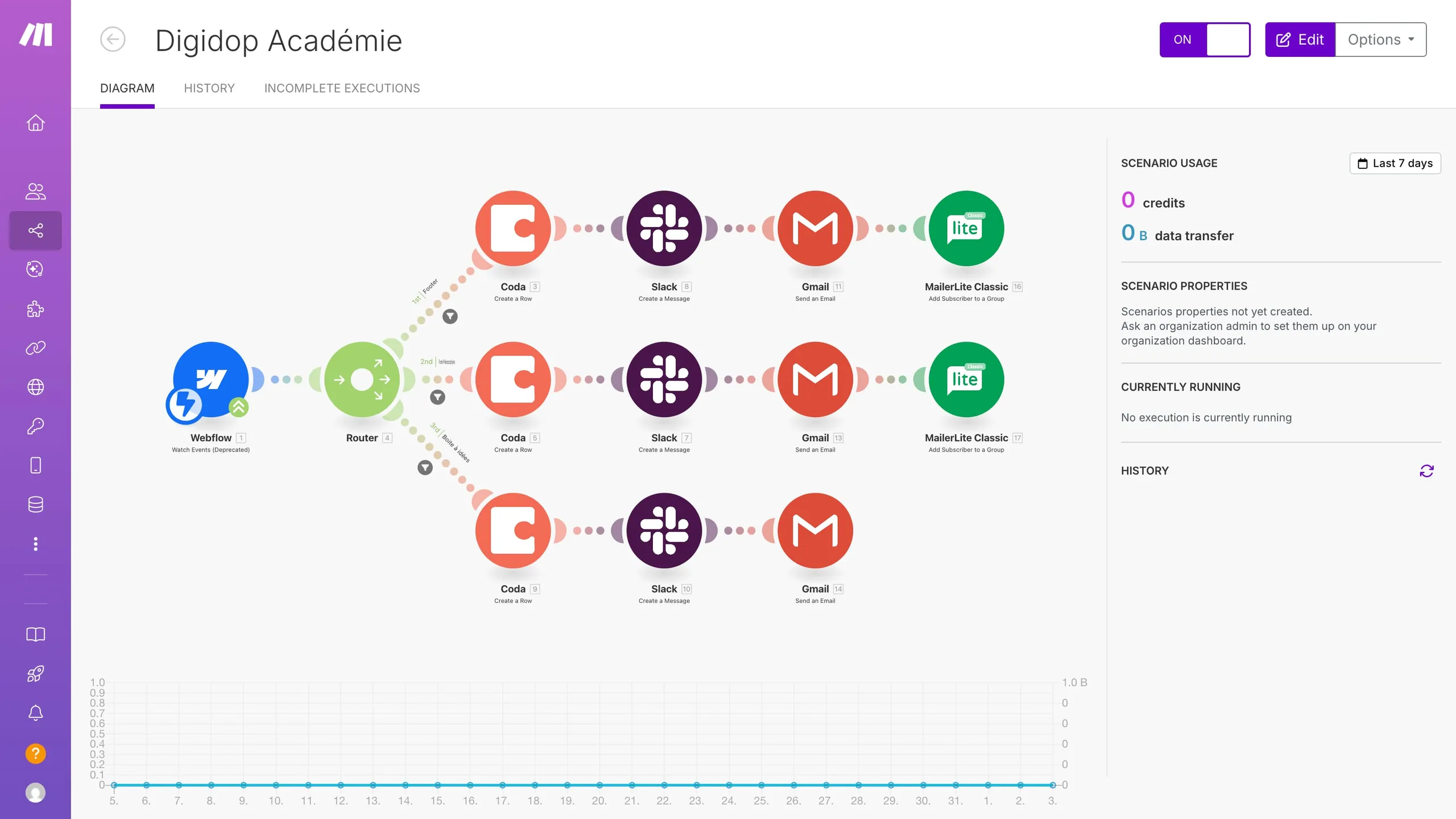
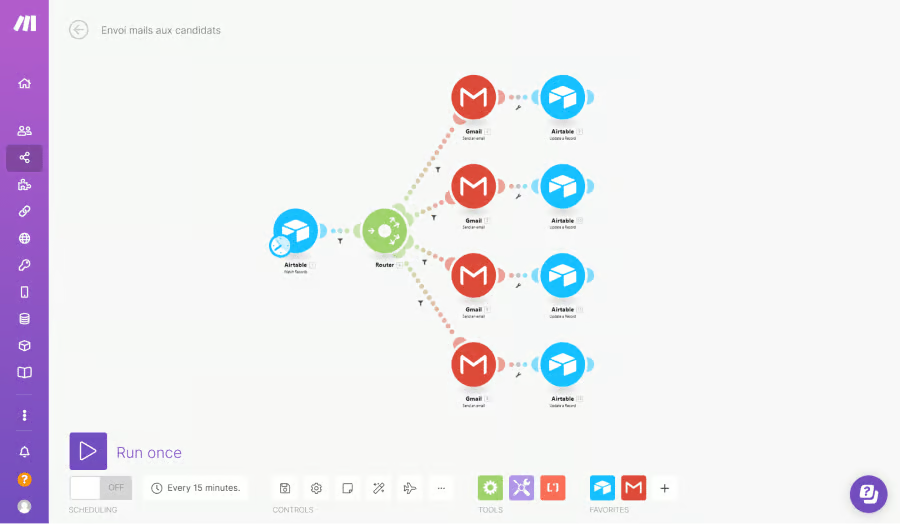
- Make’s “Scenario”: A Scenario is a visual, multi-path workflow built on a canvas. This allows for far more complex logic, including multiple branches (using a “Router”), loops (“Iterators”), and data aggregation (“Aggregators”). This visual builder is more than a UI; it’s a strategic tool for designing and debugging true workflow orchestration.
The “Shallow Integration” Problem
Zapier is the undisputed leader in breadth, boasting over 7,000+ apps in its directory. In contrast, Make offers a smaller but still comprehensive library of 1,850+ apps. The core of my devil’s advocate analysis lies here: the “Shallow Integration” problem.
My research, supported by findings in reports from G2 and other expert analyses, reveals that many of Zapier’s integrations are “shallow.” This means an app might be listed as supported, but it lacks the specific trigger or action you actually need.
- ❌ Limited Triggers: An integration might support a “New Contact” trigger but not a “Contact Updated” trigger, making it useless for essential data synchronization between systems.
- ❌ No Search Actions: A common issue is a CRM integration that can create a new record but lacks a “Find Record” action. This makes it impossible to check for duplicates before creating new entries, leading to messy data.
Make’s integrations are generally deeper, and its universal HTTP module for custom API calls and receiving webhooks is a core, powerful feature, not just a workaround. It allows a technical user to connect to any REST API, even without a dedicated app, giving it near-limitless flexibility for those with the skill to use it.
Advanced Logic and Data Handling
This is where Make establishes its dominance for power users.
- Handling Arrays (Lists): Zapier notoriously struggles with iterating through lists of items, like line items on an invoice or multiple attachments in an email. It often requires complex and costly “Looping” workarounds. Make handles this natively with its Iterator and Aggregator modules, making it simple and cheap to process arrays.
- Error Handling: In Zapier, if a step fails, the Zap stops. You can set up alerts, but you can’t build custom recovery logic within the same Zap. Make forces you to think about errors. Its visual canvas allows you to add error-handling routes off any module (e.g., “If this step fails, try again, and if it still fails, create a ticket in Jira and send a Slack message”). This makes it far more robust for mission-critical processes.
- AI Capabilities: Both platforms are rapidly integrating AI. Zapier is building its own ecosystem with Zapier Central, which could lead to vendor lock-in. Make focuses on deep integration with third-party models like OpenAI, offering more flexibility but requiring more configuration.
Side-by-Side Tool Cards: Zapier vs. Make
Platform Profile
- Architecture: Linear “Zap” workflow with Paths for simple branching
- Integrations: 7,000+ apps (broadest directory in the iPaaS market)
- Pricing Model: Per-task billing, premium plans for premium features
- Realistic Entry Plan: Professional at $49/mo (1-minute polling)
- Ideal Use Cases: Simple lead-routing, form-to-CRM, low-volume marketing notifications, rapid prototyping
- User Experience: Step-by-step checklist UI; live in under 5 minutes
✅ Strengths
- Industry-leading 7,000+ app directory for niche tools
- Intuitive linear builder ideal for non-technical users
- Fastest time-to-first-automation in the market
- Mature support, documentation and community
- Zapier Central is pushing native AI agents forward
⚠️ Considerations
- “Per-task” billing punishes growth — TCO ≈ $10,764 over 3 yrs at 10k/mo
- Many integrations are “shallow,” missing key triggers/actions
- No native iteration; looping is costly and complex
- No native error-handling within a Zap
- HIPAA BAA gated behind Company plan only
Platform Profile
- Architecture: Visual “Scenario” canvas with Routers, Iterators, Aggregators
- Integrations: 1,850+ native apps + universal HTTP/Webhook module
- Pricing Model: Per-operation billing — far more predictable at scale
- Realistic Entry Plan: Core at $9/mo (10,000 operations, 1-min polling)
- Ideal Use Cases: MarTech reporting stacks, DevOps alert pipelines, multi-step API orchestration, array processing
- User Experience: Visual canvas; ~1 week learning curve for non-developers
✅ Strengths
- Dramatically lower TCO: ≈ $324 over 3 yrs at 10k ops/mo
- Native iteration, aggregation and routing for complex logic
- Built-in error-handling routes per module
- Universal HTTP module connects to any REST API
- 1-minute polling on all paid plans
⚠️ Considerations
- Steeper learning curve — not for true beginners
- Smaller native app directory (1,850+ vs 7,000+)
- Debugging requires inspecting raw data bundles
- Large scenarios can become laggy in the editor
- HIPAA BAA requires Enterprise plan
Part 4: Critical Considerations — Security, Performance, and Limitations
When you entrust a platform with your data and API keys, you must look beyond marketing claims. My analysis shows that while both platforms have strong foundational security, critical features are often used as upsell levers, and performance is directly tied to your pricing tier.
Security, Compliance & Trust: Are Your Automations Safe?
Both Zapier and Make have strong foundational security, using data encryption at rest and in transit, and holding verified SOC 2 Type II and ISO/IEC 27001 certifications (Zapier Trust Center). Neither platform has suffered a major publicly disclosed security breach resulting in customer data loss in recent years.
However, the “gotcha” lies in the features necessary for regulated industries. My analysis confirms a critical point: core enterprise governance features like Single Sign-On (SSO), HIPAA compliance (requiring a BAA), and data residency controls are gated behind the most expensive Enterprise plans on both platforms. This creates what I call “The Security Tax.”
Compliance Status Verification
| Certification | Zapier | Make (formerly Integromat) |
|---|---|---|
| SOC 2 Type II | ✅ Verified (Report on request) | ✅ Verified (Report on request) |
| ISO/IEC 27001 | ✅ Verified | ✅ Verified |
| GDPR | ✅ Compliant | ✅ Compliant |
| HIPAA | ✅ BAA available (Company Plan) | ✅ BAA available (Enterprise Plan only). HIPAA-eligible servers available on lower plans, but BAA requires Enterprise. |
Case Study: The HIPAA Compliance Trap — A mid-sized healthcare startup handling patient data (PHI) needs to automate reminders. They must use a HIPAA-compliant platform. Upon evaluation, they find that a signed BAA is only offered on the highest Enterprise tiers, far exceeding their budget. They are trapped: pay a huge premium, or use a non-compliant tool and risk massive fines. This illustrates how security is used as a powerful upsell lever.
Performance & Reliability: Speed, Uptime, and Bottlenecks
In automation, performance is about reliability. The central issue is the Polling Interval — the frequency at which the platform checks for new data.
Zapier’s 15-minute delay on its Starter plan remains a major performance bottleneck for real-time needs. While its $49/mo Professional plan now includes a 1-minute interval, Make includes 1-minute polling on all its paid plans, starting at just $9/mo, offering superior value for speed.
Performance Claims vs. Reality
| Metric | Vendor Claim | User Reality & Analysis | Gap Analysis |
|---|---|---|---|
| Uptime | 99.9% SLA for paid plans (both) | Largely accurate, but outages of third-party apps (e.g., AWS) cause massive backlogs, even if the platform itself is “up.” (Zapier Status, Make Status) | ⚠️ The SLA provides service credits but doesn’t prevent business disruption. |
| Execution Speed | (Not explicitly marketed) | Zapier is often faster for simple 2-step Zaps. Make can be slower initially but is more efficient for complex, branching scenarios. | ❌ There is no single “faster” platform. It depends entirely on workflow complexity. |
| Polling Interval | Zapier: 1–15 mins. Make: 1–60 mins. | The 15-minute delay on Zapier’s starter plan is a critical limitation sold as a feature. Make offers 1-minute intervals on all paid plans. | ❗ Critical performance limitation disguised as a pricing tier feature on Zapier’s entry plan. |
Known Issues & Limitations (The “Blind Spots”)
After years of working with these tools, I can tell you that the most important features are often the ones the marketing materials don’t talk about.
Zapier’s Blind Spots
- ❌ No Native Error Handling: If a Zap fails, it stops. You cannot build custom logic like “try this three times, then send a Slack notification.” This makes it less robust for mission-critical workflows.
- ❌ Inability to Handle Arrays Simply: Iterating through multiple items from a single trigger, like all line items in an invoice, requires complex and expensive “Looping by Zapier” workarounds.
- ⚠️ Cost at Scale is a Deal-Breaker: This is Zapier’s single biggest limitation. The business model punishes growth. I’ve consulted with businesses whose costs became so untenable upon scaling that it forced a painful migration.
“I advise my clients to use Zapier’s built-in ‘Digest’ and ‘Filter’ steps aggressively. Grouping multiple notifications into one daily Digest can convert 30 tasks into one. A Filter that stops a Zap 90% of the time costs nothing, preventing unnecessary task usage and saving hundreds on your monthly bill.”
Make’s Blind Spots
- ❌ Not for True Beginners: I cannot stress this enough. Despite marketing claims, non-technical users will struggle without training. The UI is not intuitive if you don’t understand basic API concepts.
- ❌ Slow UI for Large Scenarios: Ironically, the visual editor itself can become a performance bottleneck. Very large scenarios can become laggy to edit, forcing users to break up workflows into smaller, linked scenarios.
- ⚠️ Debugging is a Technical Skill: While the visual flow is great, debugging a failure requires you to manually inspect the raw input/output data bundles for each module. This is a developer-centric approach that can frustrate a marketer who just wants a plain-English error log.
- ⚠️ Fewer Native Apps: While Make’s HTTP module is a powerful workaround, it’s still a workaround. This trade-off between Make’s universal HTTP module and Zapier’s vast directory highlights the strategic risk of vendor lock-in; migrating dozens of automations is costly, regardless of the platform.
Part 5: Use Cases & Workflows for Professionals
To move beyond abstract features, let’s analyze how these platforms perform in real-world professional scenarios. The “right” tool depends entirely on the job to be done.
Use Case 1: Automating a MarTech Reporting Stack
- Objective: Every month, pull performance data from Google Analytics, Google Ads, and LinkedIn Ads, consolidate it, and push it to a Google BigQuery database for analysis in Looker Studio.
- Workflow Complexity: High. Involves scheduled triggers, multiple API calls, data transformation, and error handling.
- Best Choice: Make
- Why it Wins:
- Scheduled Trigger: Make’s scheduler can kick off this complex workflow on the first of every month reliably.
- Iterators & HTTP Module: Make can efficiently pull data from all three ad platforms. Even if a native connector is limited, the HTTP module can be configured to make the precise API calls needed.
- Cost-Effectiveness: This high-volume data pull would consume an enormous number of tasks in Zapier. In Make, the cost is calculated per operation, making it dramatically cheaper.
- Error Handling: If the LinkedIn Ads API is temporarily down, a Make scenario can be built to wait, retry, and then alert a Slack channel if it fails, ensuring data integrity. A Zap would simply fail.
Use Case 2: Simple Lead Notification from a Website Form
- Objective: When a user submits a form on a website, immediately send a notification to a Slack channel and add the lead to a Google Sheet.
- Workflow Complexity: Low. A simple, linear “if this, then that” task.
- Best Choice: Zapier
- Why it Wins:
- Speed to Value: A non-technical marketing manager can build this Zap in under five minutes without any training.
- Intuitive UI: The step-by-step, linear process is perfect for this kind of simple connection. There’s no need for a complex visual canvas.
- Low Task Volume: This workflow will only run a few times a day, so it will not significantly impact the monthly task limit. The cost is negligible.
Use Case 3: DevOps Alert-to-Ticket Pipeline
- Objective: When a monitoring tool (e.g., Datadog) sends a critical alert webhook, create a high-priority ticket in Jira, assign it to the on-call engineer, and post a message in a dedicated “Incidents” Slack channel.
- Workflow Complexity: Medium. Involves receiving a webhook, conditional logic (is it P1 or P2?), and multiple actions.
- Best Choice: Make
- Why it Wins:
- Webhook Handling: Make’s ability to create custom webhooks and instantly parse the incoming JSON data is a core strength.
- Router Logic: A Router module can be used to direct the workflow based on the alert’s priority. P1 alerts create a Jira ticket and page an engineer; P2 alerts might only create a ticket. This is difficult to achieve cleanly in Zapier.
- Data Manipulation: The ability to parse the webhook payload and map specific fields (like
host_nameorerror_message) directly into the Jira ticket description and Slack message is more robust in Make.
Part 6: Broader Alternatives & Competitive Landscape
While Zapier and Make dominate the iPaaS market, they are not the only options. For users with specific needs like self-hosting, enterprise-grade governance, or a focus on lifetime deals, several other Ryercat alternatives are worth considering. Our editorial team also maintains a curated category of comparison articles covering most major SaaS automation platforms.
Automation Alternatives Feature Matrix
| Feature | Zapier | Make | n8n | Pabbly Connect | Workato |
|---|---|---|---|---|---|
| Pricing Model | Per-task | Per-operation | Free self-host / Paid cloud | Per-task / Lifetime deals | Enterprise quote |
| Best For | Beginners | Power users | Developers | SMBs / Solopreneurs | Large enterprises |
| Self-Hosting | ❌ | ❌ | ✅ | ❌ | ❌ |
| Key Strength | 7,000+ apps | Cost & depth | Data sovereignty | Lowest cost | Enterprise governance |
| Key Weakness | TCO at scale | Learning curve | Maintenance overhead | Smaller library | Cost & complexity |
1. n8n
- Best For: Technical teams, developers, and companies requiring absolute data control.
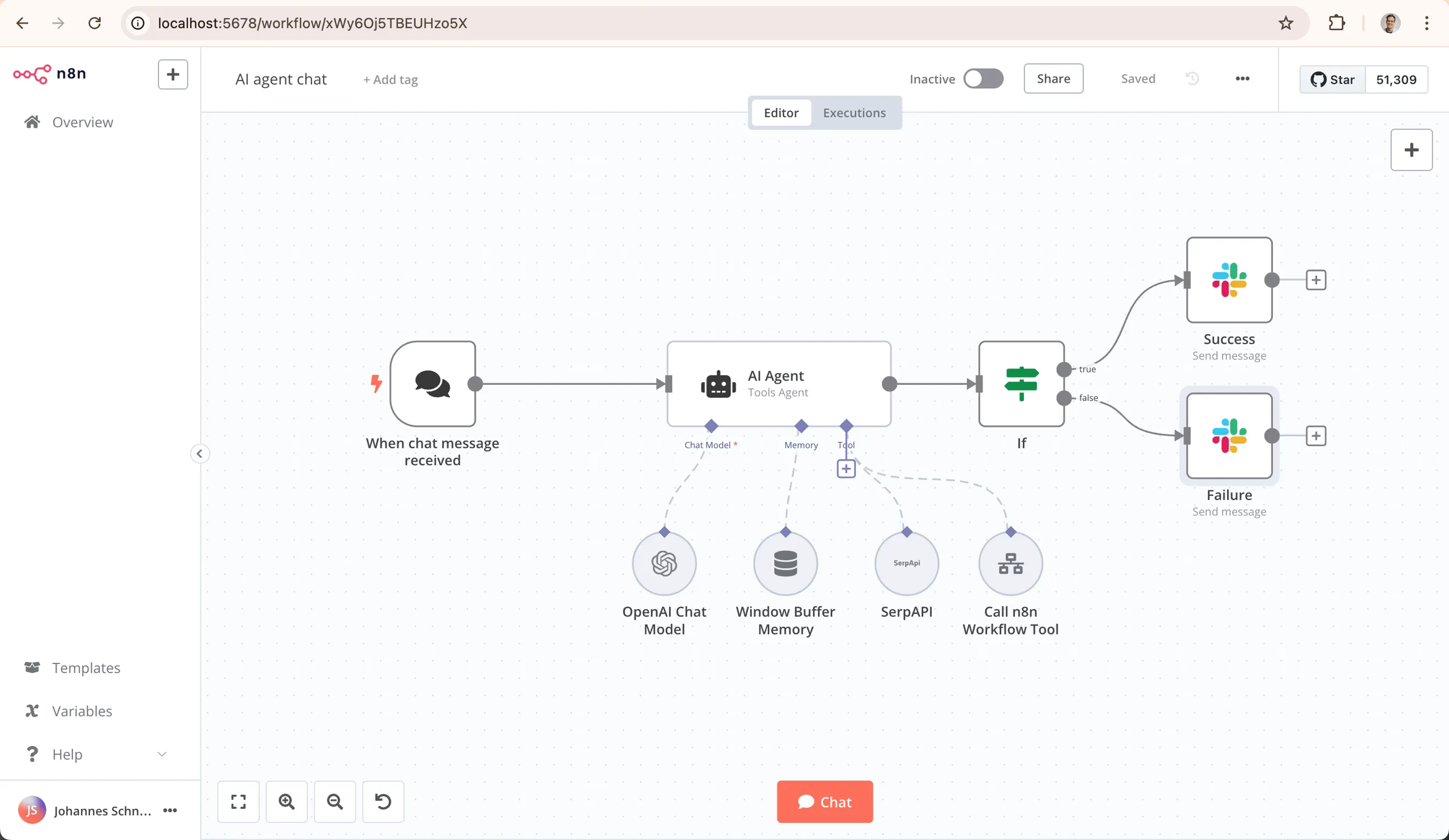
- Analysis: n8n is a powerful open-source alternative. Its main advantage is the ability to be self-hosted, meaning your data never has to leave your own infrastructure. This is a critical feature for organizations with strict data privacy and security requirements. It offers a fair-code license, which is free for self-hosting but requires a paid plan for commercial use cases and cloud hosting. Like Make, it uses a visual, node-based canvas.
- Consider If: You have the developer resources to deploy and maintain a self-hosted application and prioritize data sovereignty over the convenience of a managed cloud service.
- Avoid If: You need a simple, “it just works” solution with zero infrastructure overhead.
2. Workato
- Best For: Large enterprises seeking a single platform for business process automation, integration, and API management.
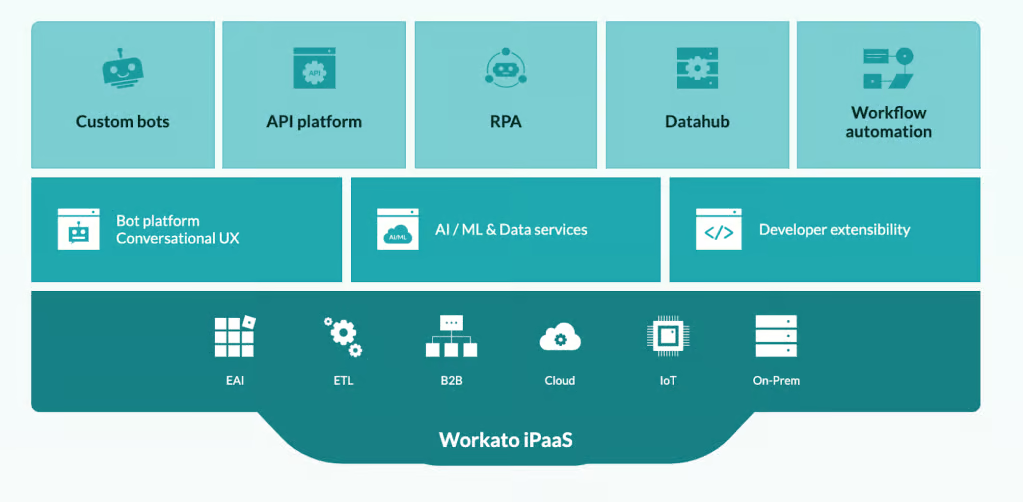
- Analysis: If Zapier and Make are for teams and small businesses, Workato is for the entire enterprise. It is a leader in the Gartner Magic Quadrant for iPaaS and offers far more than just app-to-app integrations. It includes tools for building custom APIs, managing recipes at scale, and deep governance and security controls. As such, it is a direct competitor to enterprise-focused iPaaS solutions like Workato, Boomi, or MuleSoft.
- Consider If: You have a six-figure integration budget and need to automate complex, cross-departmental business processes with strict security and governance oversight.
- Avoid If: You are an SMB, a single department, or an agency. The cost and complexity are significant overkill.
3. Pabbly Connect
- Best For: Solopreneurs, small businesses, and agencies looking for a cost-effective, predictable pricing model, often available as a lifetime deal (LTD).
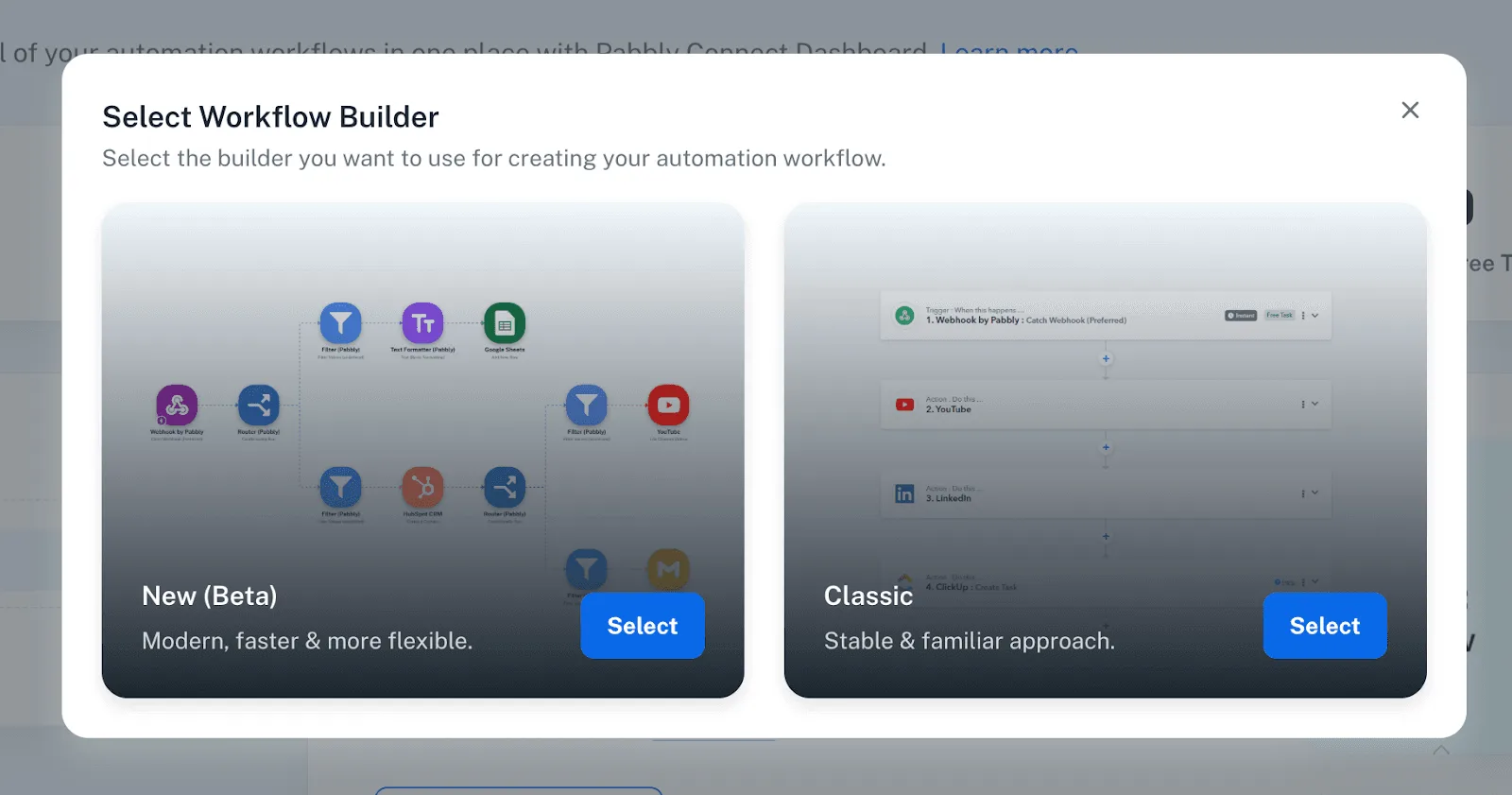
- Analysis: Pabbly Connect has gained popularity primarily through its aggressive pricing. It competes directly with Zapier on the “per-task” model but offers a much lower cost per task. It’s known for offering lifetime deals through marketplaces, allowing users to pay once for a large number of monthly tasks. Its integration library is smaller and less mature than Zapier or Make, but it covers most of the popular marketing and business applications.
- Consider If: Your primary driver is cost, your workflows are simple, and your tech stack consists of popular, well-supported applications.
- Avoid If: You rely on niche tools, require complex error handling, or need the stability and support of a more established platform.
Part 7: Conclusion & Frequently Asked Questions
Final Recommendation
After a deep analysis of both platforms, my findings confirm the core conflict in the business process automation (BPA) market: a choice between Zapier’s seductive simplicity and Make’s undeniable power-for-price.
The data is clear that for any business with growing or complex workflows, Zapier’s “per-task” model becomes a significant financial burden. The trade-off is paying a premium for ease of use versus investing time to master a more powerful, cost-effective tool.
The choice is a reflection of your company’s strategic resource allocation: prioritizing team time or budget. If your team’s time is the priority and you can afford the premium, Zapier reduces friction and empowers non-technical users instantly.
If your budget is the priority and your team has the technical aptitude for true workflow orchestration, Make offers a vastly superior financial return and a much higher ceiling for complexity. My professional recommendation is to use Zapier for rapid prototyping and simple, low-volume tasks, but to build all core, high-volume business processes on Make.
Before you commit to weaving one of these tools into the operational fabric of your business, do your own due diligence. Build a prototype of your most complex and highest-volume workflow on both platforms. Be ruthless and honest about your team’s actual technical skills. A decision this critical demands that you choose the tool that fits the reality of your business, not the one with the slickest marketing.
Frequently Asked Questions
Q1: How much does Zapier really cost?
A: Zapier’s plans start at around $20/mo, but its true cost is often much higher than the subscription price. This is due to its “per-task” billing model with expensive overage fees. For example, a workflow requiring 10,000 tasks per month would fall under the Team plan, costing $299/month (Zapier Pricing Page). Over three years, this amounts to a Total Cost of Ownership (TCO) of over $10,000. My analysis shows this model punishes growth; as your business scales and your automation needs increase, the costs can quickly become unsustainable, a frequent complaint in user reviews (G2 Verified Review).
Q2: Is Make cheaper than Zapier?
A: Yes, for any workflow with moderate complexity or high volume, Make is significantly cheaper. Its “per-operation” model is more granular and cost-effective. A workload of 10,000 runs per month, which costs $299/mo on Zapier, is covered by Make’s Core plan for just $9/mo (Make Pricing Page). This results in a 3-year TCO of around $324 for Make versus over $10,000 for Zapier. This massive price difference is the primary reason businesses with complex or high-volume needs migrate from Zapier to Make, as it offers a far better return on investment.
Q3: Is Make too hard for beginners?
A: Yes, Make has a steep learning curve and is not the ideal tool for true beginners without any technical inclination. Its visual interface and the concepts you need to understand, like “bundles,” “data structures,” and “iterators,” can be intimidating for non-technical users. While incredibly powerful, it requires an investment in time to learn, with many users reporting a “full week to really ‘get’ it” (Capterra Review). Users seeking a 5-minute setup for simple tasks will find Zapier’s linear, step-by-step process much easier to start with.
Q4: What is the biggest problem with Zapier?
A: From my professional perspective, Zapier’s biggest problem is its pricing model, which fundamentally punishes growth and complexity. The “per-task” billing with high overage fees makes it an unsustainable choice for businesses as their automation volume scales. This is the number one complaint I hear from users who have outgrown the platform. A single, poorly designed workflow that runs too often can secretly cost a company hundreds of dollars in overage fees in a single month (G2 Verified Review). This lack of cost predictability at scale is its primary weakness.
Q5: What are “shallow integrations” on Zapier?
A: A shallow integration is a common issue where an app is listed in Zapier’s 7,000+ directory, but it lacks the specific trigger or action you actually need for your workflow. For example, an integration might support a “New Customer” trigger but not a “Customer Canceled Subscription” event, making it useless for churn automation. It’s a classic case of breadth over depth, where the marketing claim of “integration” doesn’t match the functional reality needed for a specific business process (Automate and Grow “Make vs Zapier”).
Q6: Should I use Zapier or Make?
A: The answer depends entirely on your priorities. I advise clients to choose Zapier for simplicity and speed, and to choose Make for power and cost-savings. If your team is non-technical and your tasks are simple “if this, then that” connections, start with Zapier. The speed to value is unmatched. However, if your workflows are complex, involve data manipulation, or you expect high volume, you should invest the time to learn Make. The long-term cost savings and higher ceiling for complexity make it a much better strategic investment for scalable business processes (Luhhu “Make vs. Zapier”).
Q7: Is Zapier HIPAA compliant?
A: Zapier can be made HIPAA compliant, but this is a critical detail: it’s only available if you use their “Company” plan and sign a Business Associate Agreement (BAA) (Zapier HIPAA page). This feature is not available on its standard Team, Professional, or Starter plans. This means that achieving HIPAA compliance on Zapier requires subscribing to one of their most expensive tiers, which can be financially inaccessible for many smaller businesses and healthcare startups that need to handle Protected Health Information (PHI) securely.
Q8: Can Make handle complex loops and lists?
A: Yes, absolutely. Handling complex data structures like lists (arrays) and performing loops is one of Make’s greatest strengths compared to Zapier. It has native “Iterator” and “Aggregator” modules specifically designed for this purpose. This allows Make to efficiently perform tasks like processing individual line items from an invoice or handling multiple file attachments from an email. These are tasks that are often complex, costly, or outright impossible to do efficiently in Zapier without confusing and expensive workarounds (Capterra Review).

