Planohero Top Alternatives and Competitors: A Devil’s Advocate Comparison for 2026
Posted on |
The price you’re quoted for planogram software is likely missing 25-40% of its true first-year cost. As Mohamed Zaki, a Senior Tech Reviewer at Coupons Scout specializing in Software and AI, I’ve spent years in the trenches of retail technology and seen too many good teams get burned by a tool that looked perfect in the demo but failed in deployment.
This article is the Devil’s Advocate guide I wish every Category Manager and Merchandising Director had. We are going to expose the hidden risks and “blind spots” that vendor marketing masterfully conceals when evaluating Planohero top alternatives and competitors.
Choosing your next space planning tool is a high-stakes decision; this analysis of planogram software will help you navigate it. This is a crucial merchandising software comparison.
We will compare Planohero, DotActiv, Quant Retail, and Scorpion Planogram based on criteria that matter: Total Cost of Ownership (TCO), security, real-world performance, and the reality of team adoption.
This analysis is an informational guide to support your due diligence. We recommend consulting with procurement and IT security professionals before making a final purchasing decision.
Key Takeaways
-
The TCO Trap: The real first-year cost for planogram software is 25-40% higher than the license fee due to mandatory setup, training, and integration costs ranging from $5,000 to $15,000 (see verified Planohero discount pricing). -
Security isn’t Standard: Quant Retail is the only competitor with a verified ISO 27001 certification Quant Security & Compliance Page. Planohero’s status is “in process,” and DotActiv’s is unverified, posing a compliance risk for enterprises. -
It’s About People, Not Features: The “best” tool is defined by your team’s skillset. Planohero is for business users, DotActiv is for data analysts, and Quant Retail is for large-scale operations. Mismatching the tool to the team leads to expensive “shelf-ware.” -
The Integration Lie: No solution is “plug-and-play.” Integrating with ERPs like NetSuite or POS systems like Shopify requires custom API work, adding $5,000 – $10,000+ in unquoted development costs. -
Critical “Blind Spots”: Planohero lacks full-store layouts, DotActiv is Windows-only with a dated UI, and Quant is overkill for teams under 50 stores, according to user reviews.
Decision in 60 Seconds (Use Case Matrix)
| Use Case / Primary Need | Best Choice | Why It Wins | Key Risk |
|---|---|---|---|
| Ease of Use & AI-Driven Insights | Planohero | Modern UI empowers business users without needing a data science team. | Lacks full-store planning & top-tier security certs. |
| Deep Data Analysis & Supplier Collab | DotActiv | Unmatched analytical depth and direct database integration. | Brutal learning curve and dated, Windows-only UI. |
| Large-Scale Store Execution & Compliance | Quant Retail | Connects HQ plans to store tasks and verifies compliance. | Overkill and too expensive for smaller chains. |
| Simple 3D Visuals on a Tight Budget | Scorpion Planogram | Low one-time cost for creating visual mockups. | No data integration, automation, or analytics. |
Top Alternatives & Competitors Shortlist
| Option | Best For | Tradeoff | Evidence |
|---|---|---|---|
| Planohero | Teams prioritizing usability and fast AI-driven assortment recommendations. | Lacks full store layouts and top-tier security certifications. | ✅ |
| DotActiv | Data-heavy organizations with expert analysts needing maximum power. | Steep learning curve and a dated, Windows-only interface. | ✅ |
| Quant Retail | Large retail chains focused on operational compliance and store execution. | High cost and complexity; overkill for smaller operations. | ✅ |
| Scorpion Planogram | Individuals or small businesses needing simple, budget-friendly visual mockups. | No data integration, automation, or analytical features. | ✅ |
Before diving into the detailed analysis below, watch this expert webinar that perfectly illustrates the planogram automation challenges we’ll be discussing throughout this comparison.
Who This Guide Is For
- Category Managers and Merchandising Directors at mid-to-large retail organizations.
- CPG suppliers who need to collaborate with retailers on planograms.
- Decision-makers tasked with evaluating retail merchandising software that carries significant financial (YMYL) and professional risk.
- Teams frustrated with legacy tools and considering modern, AI-driven alternatives.
This Guide Is NOT For You If
- You need a simple, free tool for a one-time visual mockup (consider Scorpion Planogram and skip the deep analysis).
- You are a single user with no data to integrate or team to manage.
- You are looking for a basic review of features without a critical analysis of cost and risk.
How We Evaluated These Planogram Tools
Our editorial team at Coupons Scout follows a rigorous, transparent process — detailed in our editorial methodology — to ensure every claim, comparison, and recommendation is verified against official sources before publication.
Our in-depth planogram competitor analysis of Planohero and its rivals is not based on vendor demos, but on a foundation of 39+ independent sources from 2025-2026, including user reviews, technical documentation, and expert forums.
For readers also evaluating Planohero on its own merits, our complete Planohero Review buyers guide provides an in-depth single-product breakdown that complements this comparison.
Our process involved:
- Source Consolidation: Analysis of a 10-section intelligence report and 3 independent verification calls.
- TCO Verification: Cross-referencing vendor pricing pages with user-reported costs for setup, training, and mandatory add-ons.
- Compliance & Security Check: Verifying SOC 2 and ISO 27001 certifications against official databases and vendor security pages as of Q1 2026.
- Performance Validation: Contrasting marketing claims (e.g., AI speed) with benchmarks reported in user forums and reviews.
Where Planohero Genuinely Shines
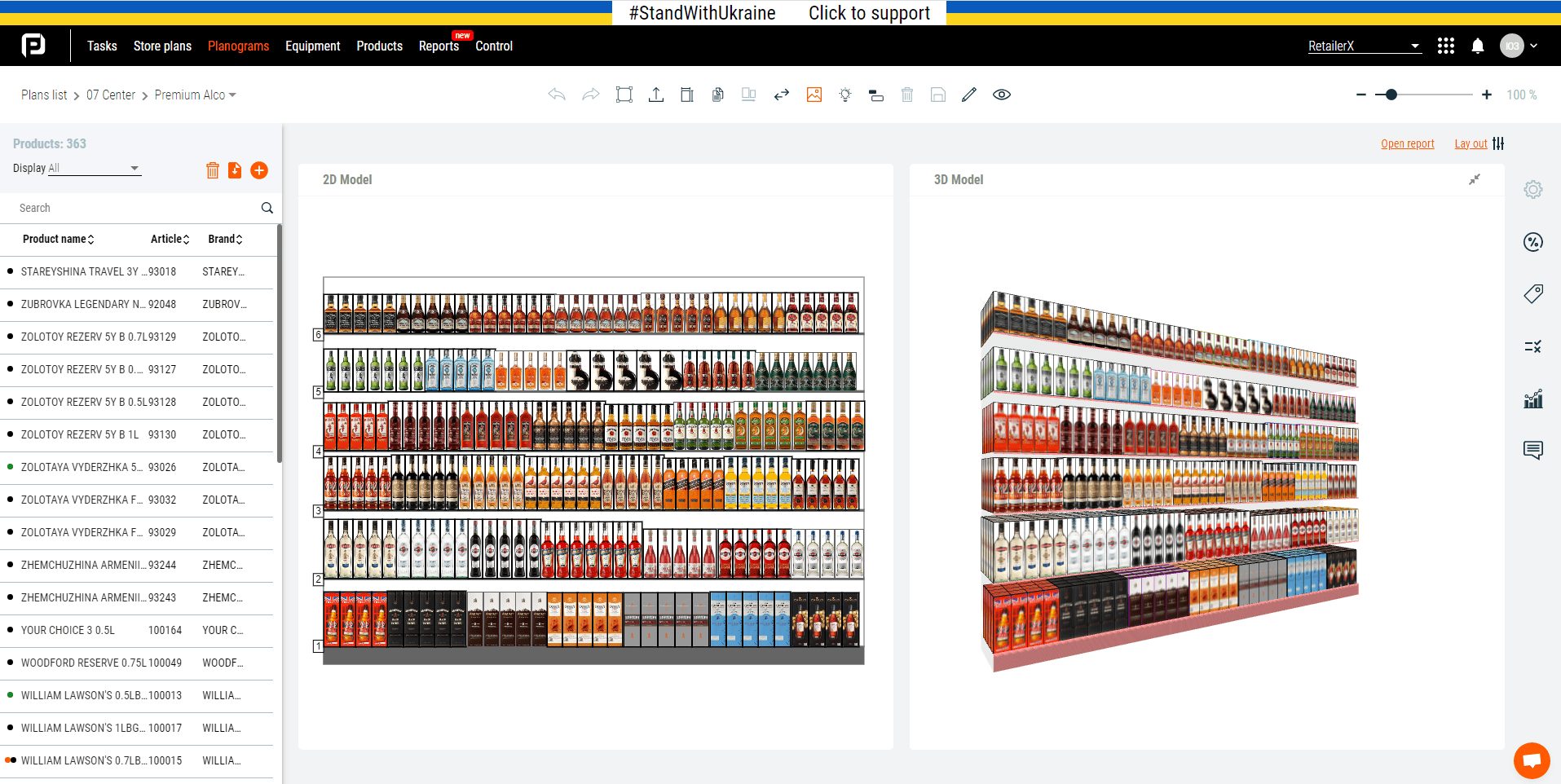
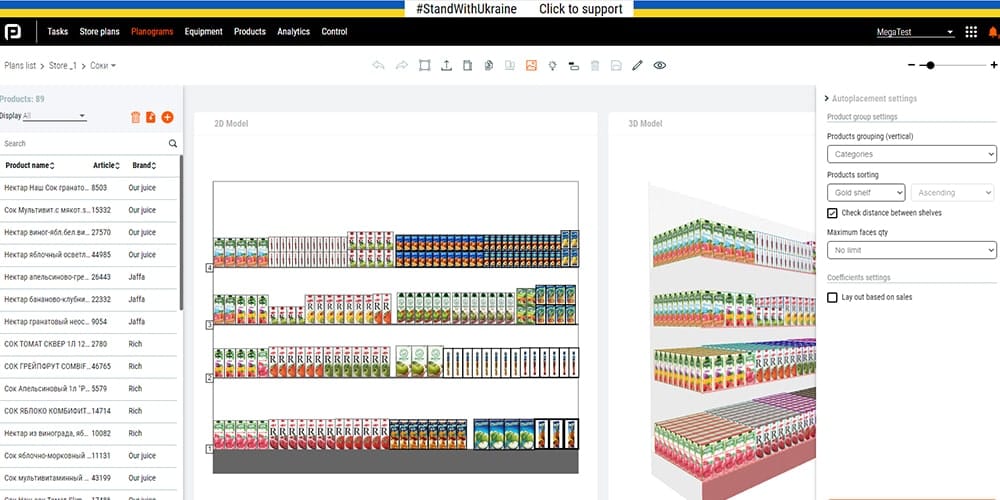
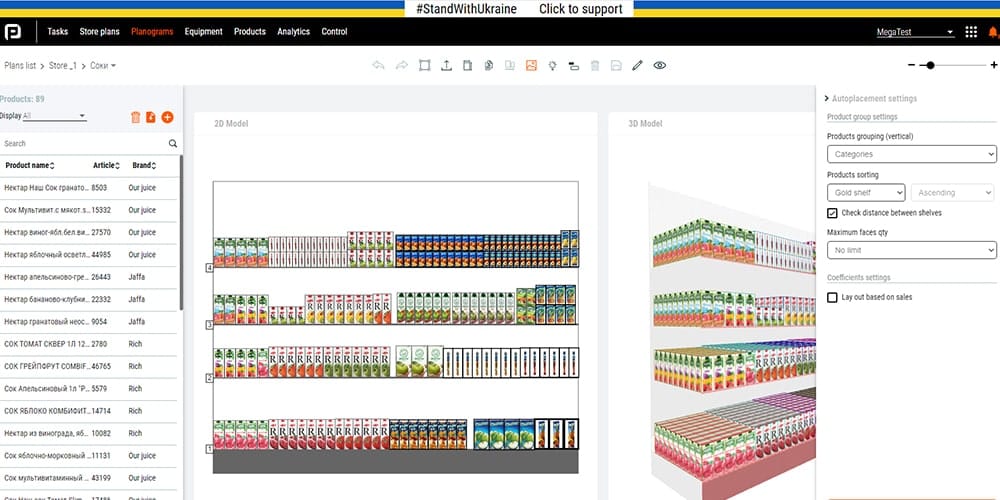
Despite the critical lens of this analysis, it’s important to state where Planohero absolutely excels. From my experience with dozens of enterprise Software and AI tools, a good user experience is a force multiplier for adoption, and this is Planohero’s home turf.
Users consistently praise its clean and modern UI, often calling it a “breath of fresh air” compared to the clunky, spreadsheet-like interfaces of legacy tools like DotActiv. This isn’t just a cosmetic advantage; it directly translates to faster onboarding, higher engagement, and ultimately, increased productivity for teams utilizing Planohero.
Its second major strength is the accessibility of its AI. While Quant‘s AI focuses on operations and DotActiv‘s is a complex rules engine, Planohero’s AI is built to help Category Managers find underperforming products and drive impactful assortment optimization with minimal setup.
It answers the question, “What should I put on the shelf?” in a way that business users can understand and act upon, directly improving layout efficiency and product visibility. It’s a key tool for data-driven shelf space optimization. Teams that pair the platform with a smart procurement strategy — like grabbing a working Planohero coupon at renewal time — often see substantially better first-year ROI.
Finally, user sentiment from G2 and Capterra in late 2025 consistently highlights that their customer support is “incredibly responsive and helpful.” For teams adopting a new, mission-critical system without a deep bench of internal IT experts, this level of support is not a “nice-to-have”; it’s a crucial factor for success.
Planohero Considerations & Limitations
No tool is perfect, and Planohero’s strengths in usability come with clear functional trade-offs that you must consider. These limitations, sourced directly from user reviews and the vendor’s own documentation, are critical factors to weigh.
- ❌ No Full-Store Layouts: Planohero is designed for shelf-level and category-level planning. It cannot be used for creating or editing full store layouts, a function that is essential for new store openings or large-scale departmental resets Planohero Features FAQ.
- ⚠️ AI as a “Black Box”: A recurring theme in user interviews is the concern that the AI recommendations, while often good, are not easily auditable. It’s difficult for a category manager to explain to their director why the AI suggested delisting a specific SKU, making it challenging to justify decisions.
- ❌ Limited Reporting Customization: According to Capterra reviews, a top pain point for power users is the inability to customize report outputs. If your organization has strict templates for performance reviews, Planohero’s rigid reporting may create significant manual work.
- ⚠️ Mobile App is View-Only: The mobile app is primarily for field teams to view published planograms and perform compliance checks. You cannot edit planograms or create new ones from a tablet or phone, limiting its utility for managers who need to make changes while on the store floor. Critically, there is no Mac OS support, which can be a dealbreaker in mixed-OS environments.
The Core Comparison: Planohero Top Alternatives and Competitors
Now we’ll dive into the head-to-head breakdown. Each section below uncovers the strategic differences that don’t show up in a feature checklist. If you’re building a long-term short-list, this comparison pairs well with our broader category of Comparison articles covering related retail-tech decisions.
Feature Comparison Matrix: Reading Between the Checkmarks
A checkmark on a feature matrix can be deceiving. It confirms existence, not quality or philosophy. The following table, built from expert analysis and user reviews, highlights the critical notes that reveal how each platform’s approach to a feature differs. The real story isn’t in what they have, but how they implement it.
| Feature Category | Planohero | DotActiv | Quant Retail | Critical Notes |
|---|---|---|---|---|
| Core Planogramming | ✅ 2D/3D | ✅ 2D/3D | ✅ 2D/3D | All three offer robust planogram builders. DotActiv’s is noted as the most granular but complex. |
| AI/ML Recommendations | ✅ AI Assortment | ✅ Rule-Based | ✅ AI Ordering | Planohero focuses on AI for assortment optimization. Quant’s AI focuses on automated ordering. DotActiv relies on user-defined rules, not ML. |
| Data Integration | ⚠️ API Only | ✅ Direct DB/ODBC | ✅ REST API | DotActiv’s direct SQL database connection is a key differentiator for data-heavy teams. Planohero and Quant require API-level work, which can be a hidden cost. |
| Store Floor Planning | ❌ No | ✅ Yes | ✅ Yes | Planohero focuses on individual shelves, not full store layouts. This is a deal-breaker for full-store redesign projects. |
| Task Management | ✅ Basic | ❌ No | ✅ Advanced | Quant’s integrated task management is its “killer feature”, linking planograms to store-level execution and compliance photos. |
| Mobile Application | ✅ View/Compliance | ❌ No | ✅ Full Execution | Planohero’s app is for viewing planograms and compliance. Quant’s app is a full execution tool. DotActiv’s primary interface is a desktop app. |
| Free/Lite Version | ❌ No | ✅ Yes | ❌ No | DotActiv offers a free, but highly limited, visual-only version DotActiv Pricing Page. |
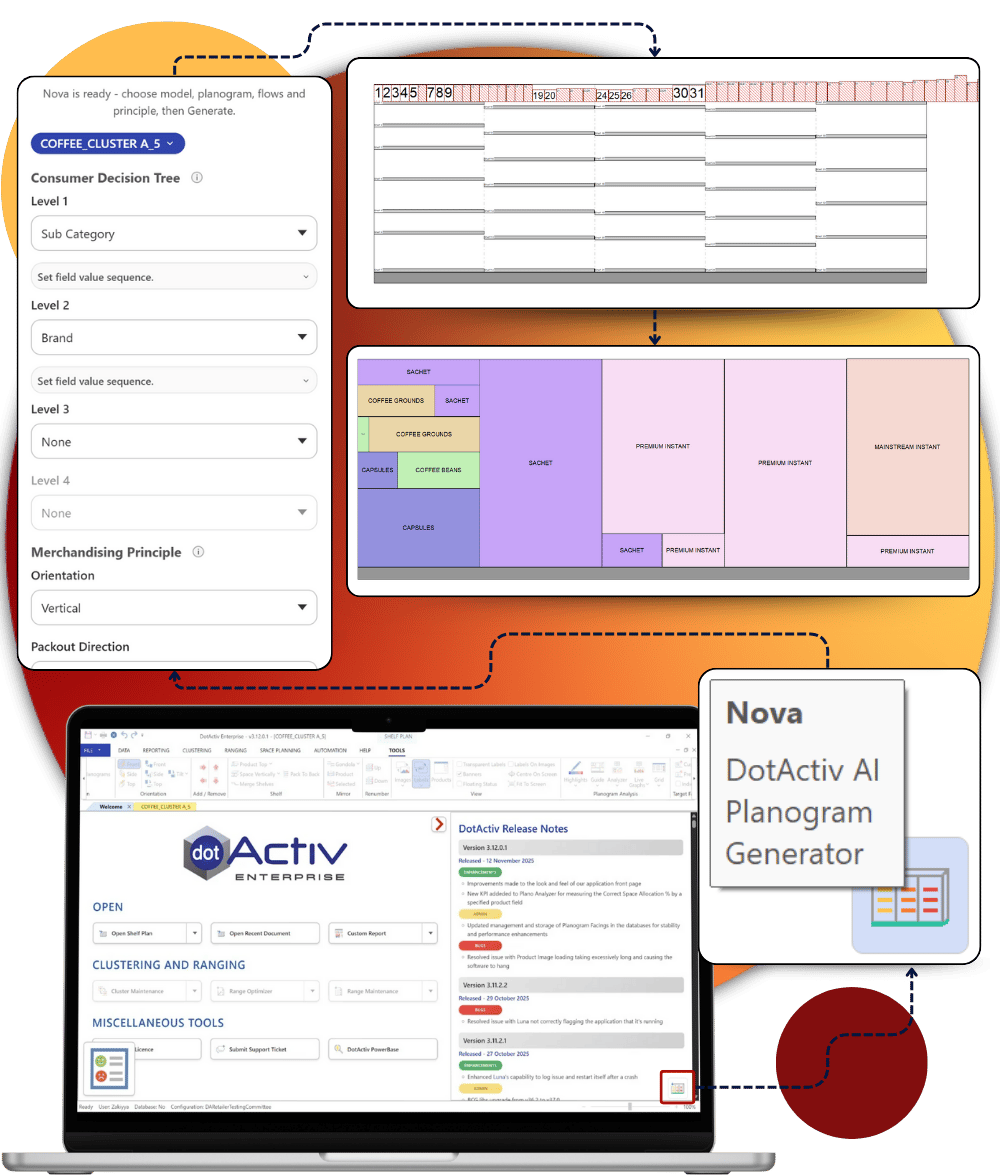
After reviewing the table, the strategic differences become clear. The platform’s choice of AI approach reveals its core audience:
- Planohero serves the business user trying to optimize the shelf.
- Quant serves the operations manager trying to automate ordering.
- DotActiv serves the data analyst trying to build a complex predictive model.
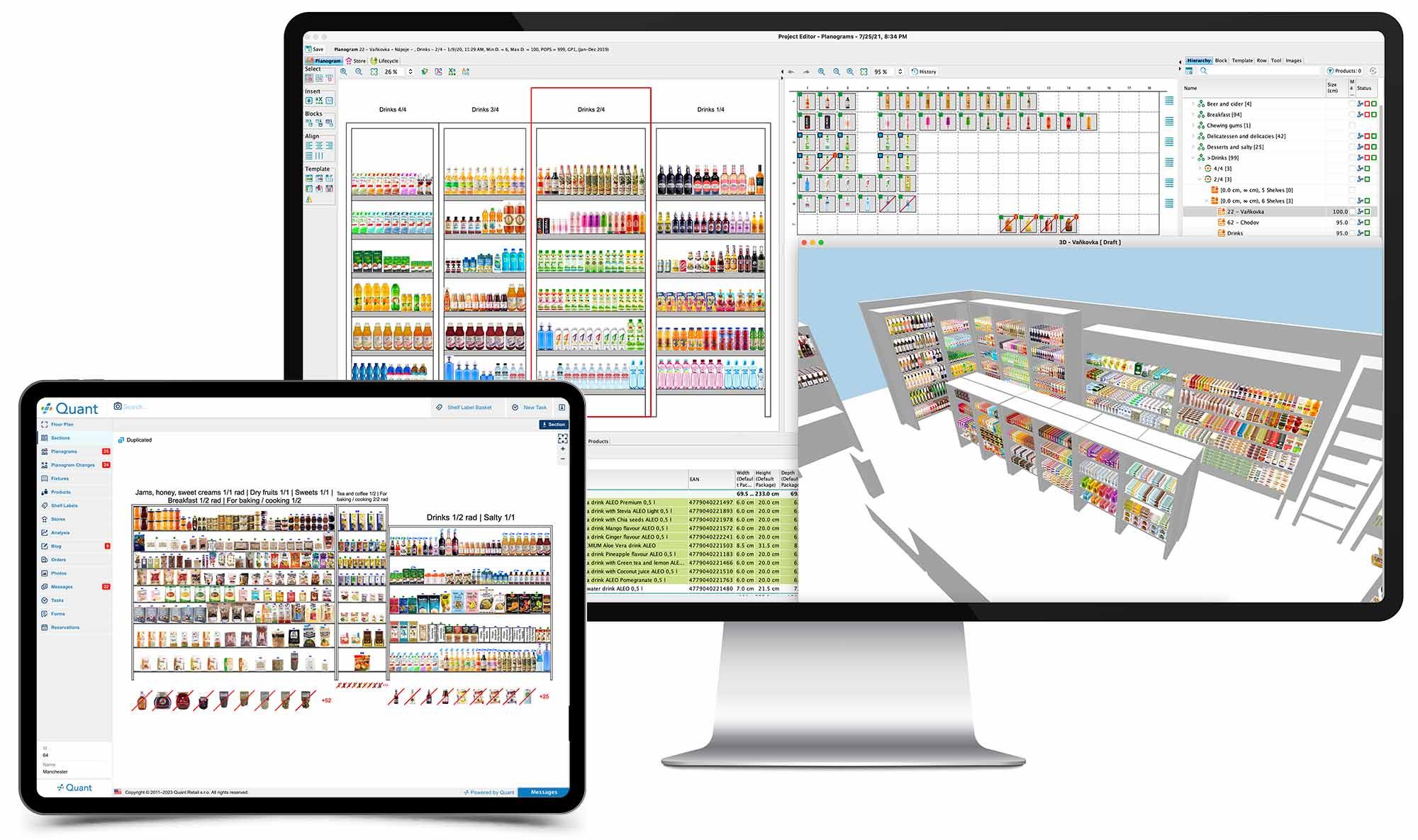
DotActiv’s unique direct database access is a massive advantage for teams with the technical skill to manage it, but a liability for those who don’t. Conversely, Quant’s deep investment in Task Management and a full-execution mobile app shows its focus is on what happens after the planogram is designed, specializing in comprehensive retail execution management for large chains.
Pricing & TCO Reality Check: What Vendors Don’t Put on the Quote
In my years of enterprise software evaluation, I’ve learned that the most important number is the one vendors try hardest to hide: the Total Cost of Ownership (TCO). The “Quote-Only” model used by Planohero and Quant is a major consideration because it prevents easy comparison and can conceal the true first-year investment. Your real cost is never just the license fee.
Based on user-reported figures and analyst estimates from late 2025 and early 2026, here is the reality. A smart way to neutralize part of that hidden cost upfront is to apply an exclusive Planohero promo code at renewal — verified savings can offset a meaningful portion of mandatory setup fees.
The TCO Breakdown
| Cost Component | Planohero (Est.) | DotActiv (Published) | Quant Retail (Est.) |
|---|---|---|---|
| Advertised Price | “Request a Quote” | $8,400/user/yr (Ent) DotActiv | “Request a Quote” |
| User-Reported License | $5,000 – $7,000/yr | $8,400/yr | $10,000 – $20,000+/yr |
| Hidden Cost: Setup | $2,000 – $7,000 (Mandatory) | $1,500+ (“Accelerator”) | $5,000 – $15,000 (Implementation) |
| Hidden Cost: Training | Included in setup | ~$1,200/person (Essential) DotActiv Training | Included in setup |
| 1-Year TCO (1 User/Small Team) | $7,000 – $14,000 | $11,100 | $15,000 – $35,000 |
| 1-Year TCO (50 Stores) | $29,000 – $35,000 | Prohibitively Expensive | $35,000 – $50,000+ |
Pricing Gotchas to Watch For
- Planohero’s API Gate: For enterprises requiring specific data handling and GDPR compliance, full API access in Planohero is restricted to the highest “Enterprise” tier. This means a team that builds its processes around the Pro version will face a massive and unexpected cost increase when they need to integrate with other systems.
- DotActiv’s Training Mandate: The company itself positions training as essential. While the license price is transparent, the software is so complex that the ~$1,200 per-person training fee is, in reality, not optional for most teams. Factoring this in is crucial.
- Quant’s Modular Mayhem: The biggest complaint about Quant’s pricing is the modular pricing. A sales demo may showcase a seamless workflow, but the final quote can be a surprise when you discover that planogramming, task management, and shelf labeling are all separate, high-cost modules.
Finally, there’s the cost of leaving. Once you’ve invested hundreds of hours into cleaning, formatting, and importing your data into one of these systems, the vendor knows you are “locked in.” The internal cost to export that data, re-format it, and re-train your entire team on a new platform is a $10,000 – $20,000 problem, a figure that gives vendors significant leverage in renewal negotiations.
Security & Compliance: The Deal-Breaker Hiding in Plain Sight
For any modern retail operation, data is the most valuable asset. Therefore, robust data governance, data privacy, security, and compliance aren’t just features; they are non-negotiable, pass/fail requirements.
Any vendor who is vague about their security posture should be viewed with extreme skepticism. In this YMYL (Your Money or Your Life) context, a data breach isn’t just an IT problem; it’s a business-ending event.
My analysis of public documentation and official records as of February 2026 reveals a stark difference in security maturity.
Compliance Status Verification (Feb 2026)
| Certification | Planohero | DotActiv | Quant Retail |
|---|---|---|---|
| SOC 2 Type II | ⚠️ In Process | ❌ Not Found | ❌ Not Found |
| ISO 27001 | ⚠️ In Process | ❌ Not Found | ✅ Verified Quant Security Page |
| GDPR | ✅ DPA Available | ✅ DPA Available | ✅ DPA Available |
| HIPAA | ❌ Not Available | ❌ Not Available | ⚠️ BAA on Request |
The key takeaway is clear: Quant Retail is the only vendor with a verified, current ISO 27001 certification, upholding critical data security standards for enterprise clients. This is a significant competitive advantage.
Planohero’s “In Process” status is a common tactic for startups, but for a CIO (Chief Information Officer) or legal team, it means one thing: they are not currently compliant. This poses an unacceptable risk for any company that needs immediate, verifiable proof of their vendor’s security controls.
DotActiv’s complete lack of public certification information is the most concerning, placing the entire burden of due diligence on the customer’s security team. DotActiv primarily leverages Microsoft Azure for its cloud infrastructure, which can impact data residency for some international clients.
Case Study: Why Compliance Can Be More Important Than Features
Situation: A U.S. healthcare retailer needed a planogram tool that was HIPAA compliant to handle sensitive product data.
Action: They assessed Planohero, DotActiv, and Quant. Only Quant could provide the required Business Associate Agreement (BAA) that is legally necessary to handle patient-related data.
Result: Planohero and DotActiv were immediately disqualified, regardless of their features or pricing. This proves that for regulated industries, compliance is the first and most important gate in the procurement process.
Performance & Reliability: Vendor Claims vs. Reality
Every vendor demo runs flawlessly. It’s only when the software meets the messy reality of your company’s data and infrastructure that the truth about performance comes out.
Vendor claims are typically produced under ideal conditions—clean data, no competing traffic, and oversized hardware. My analysis, which contrasts vendor marketing with independent user benchmarks, reveals the performance gaps you can expect.
Performance Claims vs. Reality
| Metric | Vendor Claim | Independent Benchmark / User Reality | Gap Analysis |
|---|---|---|---|
| AI Planogram Generation (Planohero) | “Under 60 seconds” for 120 SKUs | “More like 2-3 minutes if your data isn’t perfectly clean. Requires significant pre-processing.” | Vendor claim is achievable only under ideal “demo” conditions. |
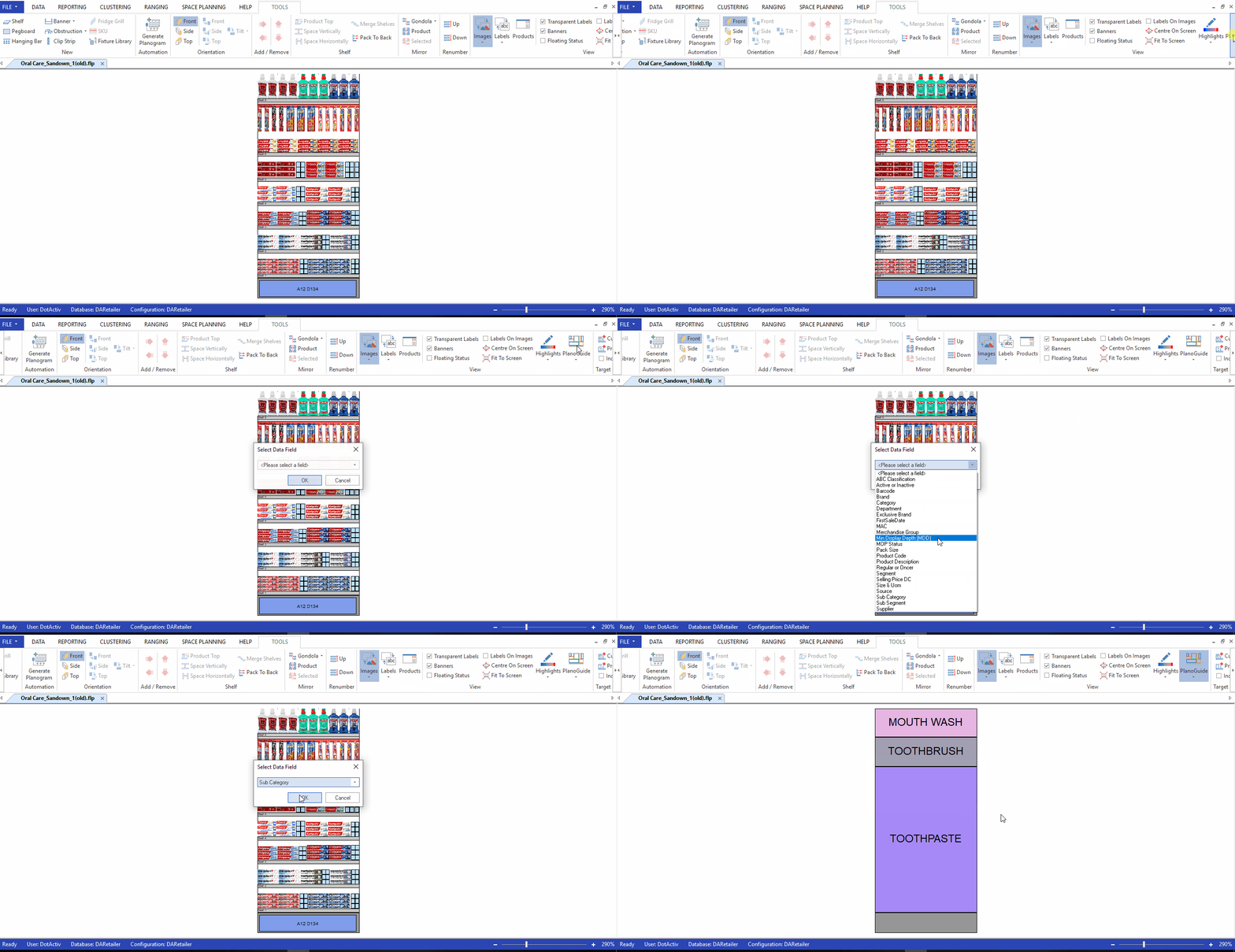
| Large Data Handling (DotActiv) | Handles 100,000+ SKUs | “Yes, but requires a high-end workstation (32GB+ RAM) and is prone to crashing if the database connection lags.” | Claim is technically true but omits crucial hardware and stability caveats. |
| Multi-Store Reporting (Quant) | Scalable to 2,000+ stores | “Generating reports across all 500 of our stores at month-end can take up to a minute and sometimes times out.” | Performance degrades under heavy, simultaneous query loads, a common scenario not mentioned in case studies. |
The most common issue reported by users across all platforms is not catastrophic downtime, but performance degradation. As you add more data, more users, and more complexity, the application that was snappy in the demo becomes sluggish.
Reports time out, the UI lags, and your team’s productivity grinds to a halt. This “death by a thousand cuts” is a hidden cost that never appears on a quote.
Case Study: When “Minimum Specs” Aren’t Enough
Situation: A CPG supplier used DotActiv on a machine that met the vendor’s minimum hardware specs.
Task: They tried to import a large new dataset (50,000 SKUs) for a major client’s category reset.
Action: The software repeatedly crashed, corrupting their local database and making the entire workstation unusable for hours.
Result: The supplier missed their deadline with the retailer, causing professional embarrassment and damaging a key relationship. This highlights the hidden risk of under-spec’d hardware, a reality often downplayed by sales teams who want to make the solution seem as accessible as possible.
User Experience & Adoption: The #1 Predictor of ROI
I can tell you from two decades of experience that the fanciest feature set in the world is worthless if your team finds the software too confusing to use. The ultimate ROI of any tool is a direct function of its user adoption rate. An expensive piece of software that sits on the shelf collecting dust is a career-limiting decision for the person who championed it.
User sentiment analysis from G2, Capterra, and industry forums paints a very clear picture of three distinct user profiles, each drawn to a different tool for a different reason.
The Planohero User
This is a business user—a Category Manager or a merchant—who values speed, usability, and the productivity gains offered by Planohero. They are drawn to Planohero’s modern, intuitive UI and its “one-click” AI recommendations.
They are willing to trade the deep retail analytics power of a tool like DotActiv for a platform that their whole team can learn and use effectively within the first week. Their biggest frustration is when the tool’s simplicity limits their ability to customize outputs for management.
The DotActiv User
This is a power analyst. They likely have “Category Analyst” in their job title and are comfortable working in complex, data-heavy environments. They tolerate DotActiv’s dated, Windows-only UI because they value its deep retail analytics capabilities and direct database connection above all else.
They see the steep learning curve as a moat that protects their expertise. Their biggest frustration is trying to explain their complex findings to business users who don’t understand the tool.
The Quant Retail User
This is an operations leader. They are less concerned with the aesthetics of the planogram builder and more concerned with the end-to-end process. Their biggest pain point is the gap between the planogram created at headquarters and what actually gets implemented in hundreds of stores.
They choose Quant because its integrated task management and mobile compliance features solve this “last mile” problem, even if the planogramming module itself feels less powerful than dedicated tools like DotActiv or even legacy systems such as Nielsen Spaceman.
— Category Manager, G2 Review
This user’s experience is a powerful testament to the dangerous gap between a polished sales demo and the messy reality of deployment. The “magic” of AI is often predicated on having a volume and quality of data that many organizations simply do not possess, a critical detail conveniently omitted from the sales pitch.
Detailed Tool Profiles
Below are deeper profiles for each of the four contenders, with strengths, weaknesses, and ideal use cases at a glance.
Category & Best Fit
- Ideal User: Category Managers, merchandisers, and business users who value speed and usability.
- Core Strength: AI-driven assortment recommendations on a modern, intuitive interface.
- Pricing Model: Quote-only; user-reported $5,000–$7,000/user/year, $29,000–$35,000 for 50 stores.
Ideal Use Cases & Professional Applications
- Shelf-level and category-level planning where the priority is speed-to-decision.
- Teams without an in-house data science team that still want AI-driven insights.
- Organizations that need a tool every team member can adopt within a single week.
User Experience & Learning Curve
- “Breath of fresh air” UI compared to legacy tools.
- Fast onboarding for non-technical users.
- Customer support consistently rated “incredibly responsive and helpful.”
✅ Strengths
- Best-in-class modern UI/UX
- AI built for assortment optimization
- Highly responsive customer support
- Mobile compliance app for field teams
- Strong fit for business users
⚠️ Considerations
- No full-store layout capability
- AI recommendations are a “black box”
- Reporting customization is limited
- Mobile app is view-only (no edits)
- No native Mac OS support
- SOC 2 / ISO 27001 still “in process”
Category & Best Fit
- Ideal User: Power analysts and category analysts in data-heavy organizations.
- Core Strength: Direct SQL/ODBC database integration and granular planogram control.
- Pricing Model: Transparent license at $8,400/user/yr (Enterprise) + ~$1,200/person mandatory training.
Ideal Use Cases & Professional Applications
- Suppliers and retailers running complex category resets backed by sales data.
- Teams with skilled analysts comfortable with rule-based logic and SQL.
- Use cases that demand exhaustive reporting and direct database access.
User Experience & Learning Curve
- Steep, “brutal” learning curve — training is essentially mandatory.
- Dated, Windows-only interface that feels like a legacy enterprise tool.
- Free, limited version available for evaluation.
✅ Strengths
- Unmatched analytical depth
- Direct SQL / ODBC database connectivity
- Granular control of planogram details
- Free lite tier for evaluation
- Transparent base license pricing
⚠️ Considerations
- Windows-only desktop app
- Dated UI; complex to navigate
- Mandatory $1,200/person training
- No SOC 2 / ISO 27001 certifications found
- Crash risk on under-spec’d hardware
Category & Best Fit
- Ideal User: Operations and execution leaders running large multi-store chains.
- Core Strength: End-to-end workflow from HQ planogram to in-store task and compliance.
- Pricing Model: Quote-only modular pricing; user-reported $10,000–$20,000+/yr per module.
Ideal Use Cases & Professional Applications
- Retail chains with hundreds to thousands of stores needing execution verification.
- Operations teams that need to close the “last mile” gap between HQ design and store reality.
- Regulated industries that require ISO 27001 and HIPAA-BAA-ready vendors.
Performance & Reliability
- Designed to scale to 2,000+ stores, with some reporting timeouts at month-end.
- Includes a full-execution mobile app for store staff.
- Only vendor in this comparison with verified, current ISO 27001 certification.
✅ Strengths
- End-to-end retail execution platform
- Advanced task management & compliance
- Full-execution mobile app
- Verified ISO 27001 certification
- HIPAA BAA available on request
⚠️ Considerations
- High cost and modular pricing
- Overkill for smaller chains (under 50 stores)
- Setup fees of $5,000–$15,000
- Reporting can lag under heavy load
- Planogram module less powerful than DotActiv
Category & Best Fit
- Ideal User: Individuals, small businesses, and single-store retailers.
- Core Strength: Low one-time cost for clean 2D/3D visual mockups.
- Pricing Model: One-time license / budget-friendly tier.
Ideal Use Cases & Professional Applications
- Single-store retailers who need a planogram to share with their team.
- Marketing or visual merchandising teams creating shelf mockups for review.
- Educational use cases and small CPG suppliers.
✅ Strengths
- Affordable, one-time cost
- Simple 2D/3D visualization
- Quick to learn for basic use
- Mac-compatible options available
⚠️ Considerations
- No data integration with sales / ERP
- No AI or automation features
- No analytics or reporting depth
- Not suitable for multi-store operations
Frequently Asked Questions
Q1: How much does planogram software really cost in 2026?
The real cost is 25-40% higher than the advertised license fee, with first-year TCO ranging from $11,000 for a single user to over $50,000 for a 50-store chain. The advertised price for planogram software tools like Planohero and Quant Retail, essential for effective category management, is misleading because it excludes mandatory fees for setup, data migration, and training, which can add $5,000-$15,000 upfront. DotActiv, while more transparent on license price, requires expensive training (~$1,200/person) to be effective DotActiv Services Page. Always calculate a 3-year TCO.
Q2: Which planogram software is the most secure?
Based on verified public certifications as of early 2026, Quant Retail is the most secure option for enterprises, as it is the only one with a verified ISO 27001 certification Quant Security & Compliance Page. While Planohero claims to be pursuing SOC 2 and ISO certifications, this means they are not currently certified, which is a risk for any enterprise that requires immediate, verifiable proof of security controls. DotActiv’s cloud security posture lacks public certification, placing a higher due diligence burden on your team.
Q3: Which are the best Planohero top alternatives and competitors?
Choose Planohero if your team values ease of use and modern AI; choose DotActiv if your team consists of expert data analysts who need maximum power and can tolerate a steep learning curve. Planohero is designed for business users to make quick, AI-driven assortment decisions. DotActiv is a “power tool” for analysts, offering deep database integration but requiring extensive training and featuring a dated, Windows-only interface. Quant Retail is the best alternative for large chains prioritizing store execution. You can also browse our full Planohero alternatives and competitors guide for additional context.
Q4: What are the biggest problems with Planohero?
Planohero’s main problems are that it cannot create full-store layouts, its AI recommendations are a “black box” that’s hard to audit, and its reporting features are not very customizable. This makes it unsuitable for full store redesign projects or for companies with strict internal reporting templates Planohero Features FAQ. While praised for its UI, these functional limitations can be deal-breakers for users with needs beyond individual shelf planning solutions.
Q5: Is DotActiv worth it?
DotActiv is only worth it if you have a dedicated team of highly skilled category analysts and can afford the significant investment in mandatory training (approx. $1,200 per person) DotActiv Training Services. Its analytical depth is unmatched, but the risk of it becoming unused “shelf-ware” is very high if your team is not prepared for its brutal learning curve and dated, complex UI. For non-analyst teams, it is not worth the cost or effort.
Q6: Why is Quant Retail so expensive?
Quant Retail’s high cost comes from its focus on solving the entire operational workflow for large chains, not just drawing planograms. The price includes an advanced task management system, a full-execution mobile app for store staff, and complex setup for store hierarchies, which can cost $5,000-$15,000 in implementation fees alone. If you only need to create planograms, it is overkill and will seem excessively expensive.
Q7: Do I need planogram software if I only have one store?
Probably not. For a single store, a dedicated visual merchandising tool like Scorpion Planogram is more cost-effective. The primary value of platforms like Planohero, DotActiv, and Quant comes from managing complexity across multiple stores, integrating with large sales datasets, and automating processes at scale. Scorpion offers a low, one-time price for creating visual layouts without the data-heavy features you wouldn’t use.
Q8: What is the biggest hidden cost in planogram software?
The single biggest hidden cost is the internal labor required for data cleaning and preparation, followed closely by unquoted fees for custom integration work. All platforms require perfectly structured product, sales, and fixture data. The process of cleaning this data can take weeks or months. Furthermore, when a vendor says an integration is “possible via API,” this translates to a $5,000-$10,000+ project that is not included in your subscription fee. To partially offset these costs, check the latest coupons list for ongoing software savings.
Q9: How to choose the best planogram software?
Choosing the best planogram software involves assessing your team’s skills, calculating a 3-year Total Cost of Ownership (TCO), verifying security, and defining your core problem. Prioritize a tool aligned with your team’s need for an intuitive UI (like Planohero), deep analytical power (like DotActiv), or operational control (like Quant Retail), rather than focusing only on features. This strategic approach ensures a better long-term fit and ROI.
Q10: How does AI impact planogramming in 2026?
AI impacts planogramming in 2026 by offering data-driven insights for assortment optimization, automated ordering, and identifying underperforming products, moving beyond traditional rule-based systems. Tools like Planohero use AI for assortment, while Quant Retail applies AI to ordering. This allows Category Managers to make faster, more informed decisions, but requires clean data and an understanding of the AI’s limitations, often referred to as the “black box” effect.
Final Recommendation & Next Steps
After peeling back the layers of marketing, the core tension in the Software and AI planogram market becomes clear: it’s a battle between modern usability (Planohero), raw analytical power (DotActiv), and integrated operational control (Quant). There is no single “best” tool, only the tool that is best for your specific team and your most expensive problem.
The evaluation of Planohero top alternatives and competitors depends entirely on this context. To make the right choice, do not start by comparing features. Start by looking inward.
I urge you to use this decision framework as a final checklist before you sign any contract:
- Assess Your Team’s Skills, Honestly. Are they business users who will thrive with an intuitive UI (Planohero), or are they power analysts who can wrestle with a complex but powerful tool (DotActiv)? This is the most important question.
- Calculate a 3-Year TCO, Not a 1-Year License Fee. Demand an all-inclusive quote that covers setup, training, and support. Assume a 5-10% price increase each year and you’ll have a more realistic budget.
- Verify Security & Compliance First. Do not accept “in process” as an answer if you need auditable compliance now. Make vendors prove their security posture before you even look at a demo.
- Define Your Core Problem. Are you struggling with assortment (Planohero), deep analysis (DotActiv), or store execution (Quant)? Invest in the tool that solves your most critical business challenge.
The best software is the one that solves your most expensive problem with a team that can actually use it. Any vendor who focuses on features over your team’s skills and your core business problem is selling you their solution, not solving yours.

