
Lasso Review (2026): Is It Worth the High Recurring Cost?
Posted on |
d” />
Smart Maintenance Tip (Site Speed): While feature-rich, our tests show Lasso adds a measurable impact to page load times. We provide specific settings to minimize its performance impact without sacrificing core functionality.
Our Methodology & Authority Statement
After analyzing hundreds of products in Software and AI, Marketing Tools, Ecom Tools, and Productivity and conducting comprehensive testing of Lasso across real-world scenarios in 2025-2026, our team at Coupons Scout provides this comprehensive evaluation. This review was conducted following the rigorous Coupons Scout Verification Protocol (CSVP™) Learn More.
As a MarTech strategist and the founder of Coupons Scout, my analysis is not just about features; it’s about the financial and operational impact on a growing digital publishing business, all framed to deliver the highest level of Experience, Expertise, Authoritativeness, and Trust (E-E-A-T).
Below is a quick video walkthrough that complements this written analysis, demonstrating how Lasso looks in a live affiliate workflow:
Part 2: Core Analysis – The True Cost of Lasso
Lasso’s pricing starts at $29/month, but its true 3-year total cost of ownership (TCO) can exceed $1,700, making it significantly more expensive than competitors. This section, a core part of our Lasso review, breaks down the full cost to answer if the investment is justified for your business.
The high recurring cost is the number one user pain point, requiring a deeper look than just the sticker price. Before reading further, note that the easiest way to soften the sticker shock is to grab a working Lasso promo code from our coupon hub before checkout.
How Much Does Lasso Cost in 2026?
Lasso offers several pricing tiers, typically billed annually for the best rate. As of our November 2026 verification, the plans are structured to serve different levels of professional users.
It’s critical to analyze the correct plan. For most serious single-site owners, the “Growth” plan is the effective entry point due to its essential Amazon API integration.
| Plan | Price (Billed Annually) | Number of Sites | Key Features |
|---|---|---|---|
| Essential | $29/month | 1 Site | Core display types, link management |
| Growth | $49/month | 1 Site | Amazon integration, Opportunities |
| Pro | $89/month | 3 Sites | All features for multiple sites |
For this analysis, we will focus on the Growth Plan, as its Amazon integration is a non-negotiable feature for the majority of professional affiliate marketers. You can find the most current information on the Lasso Official Pricing page — or skip straight to the exclusive savings on our Lasso coupon page.
What is the True Total Cost of Ownership (TCO) of Lasso?
To make a sound financial decision, you must look beyond the monthly fee to the Total Cost of Ownership (TCO) over a multi-year period. This is especially important when competitors offer lifetime deals (LTDs).
This is where the real financial commitment of a subscription tool becomes clear.
3-Year Total Cost of Ownership (TCO) Comparison: Subscription vs. Lifetime Deal
(Analyst-estimated model based on verified pricing as of November 2026. Assumes 1 site on Lasso’s “Growth” plan vs. a competitor with a one-time purchase option. Actual pricing varies.)
| Cost Scenario (Single Site) | Year 1 | Year 2 | Year 3 | Total 3-Year TCO |
|---|---|---|---|---|
| Lasso (Growth Plan @ $589/yr) | $589 | $589 | $589 | $1,767 |
| Competitor (Lifetime Deal Est.) | $250 | $0 | $0 | $250 |
| TCO Difference | — | — | — | +$1,517 |
This table starkly illustrates the primary financial consideration. While Lasso provides an excellent, integrated experience, you are paying a premium of over $1,500 over three years for that convenience compared to a one-and-done purchase. This is the core trade-off at the heart of the “Is Lasso worth it?” debate. To shrink that premium, apply a current Lasso discount at signup — it directly reduces Year 1 of the TCO above.
💡 KEY INSIGHT: Your subscription is profitable if: (Time Saved in Hours × Your Hourly Rate) + (Additional Affiliate Revenue) > Monthly Cost. For a blogger at $50/hr, saving just one hour a month means Lasso has already paid for itself in efficiency, even before accounting for increased revenue from better displays.
When Does a Lasso Subscription Become Profitable?
Thinking in terms of cost is only half the equation; the other half is value. A Lasso subscription becomes profitable when its features generate more revenue or save you more time than the subscription fee costs.
Now, consider revenue, which is where metrics like earnings per click (EPC) become important. Here’s a simple framework to calculate your break-even point:
- Calculate Your Hourly Rate: Determine a reasonable hourly rate for your work. For many professional bloggers, this is between $50-$100/hour. Let’s use $50/hour.
- Estimate Time Saved: If Lasso’s automation (like the “Opportunities” feature and Amazon API sync) saves you just one hour per month that you would have spent manually updating links, that’s a $50 value. The plugin, at $49/month, has already paid for itself in time savings alone.
- Estimate Revenue Gained: Now, consider the impact on your conversion rate. If your site gets 30,000 pageviews a month and Lasso’s improved displays increase your affiliate conversion rate by a mere 0.1%, that could easily result in an extra $100-$200 in monthly commissions. At that point, the ROI is overwhelmingly positive.
A Lasso subscription is profitable if:
(Time Saved in Hours × Your Hourly Rate) + (Additional Affiliate Revenue) > Monthly Subscription Cost
For many professional bloggers, hitting this threshold is entirely achievable. The mistake is viewing Lasso as a cost center instead of an investment in operational efficiency and revenue growth. For a deeper side-by-side breakdown against rival plugins, see our companion comprehensive Lasso Review analysis.
Part 3: Feature Deep-Dive – What Does Lasso Do?
Lasso is a premium, all-in-one affiliate marketing WordPress plugin founded by Andrew Fiebert, a well-respected figure in the niche site and online business community. The tool was heavily influenced by and developed in partnership with other successful affiliate marketers like Matt Giovanisci of Swim University.
It’s designed specifically to help professional bloggers, content publishers, and marketers manage affiliate links at scale.
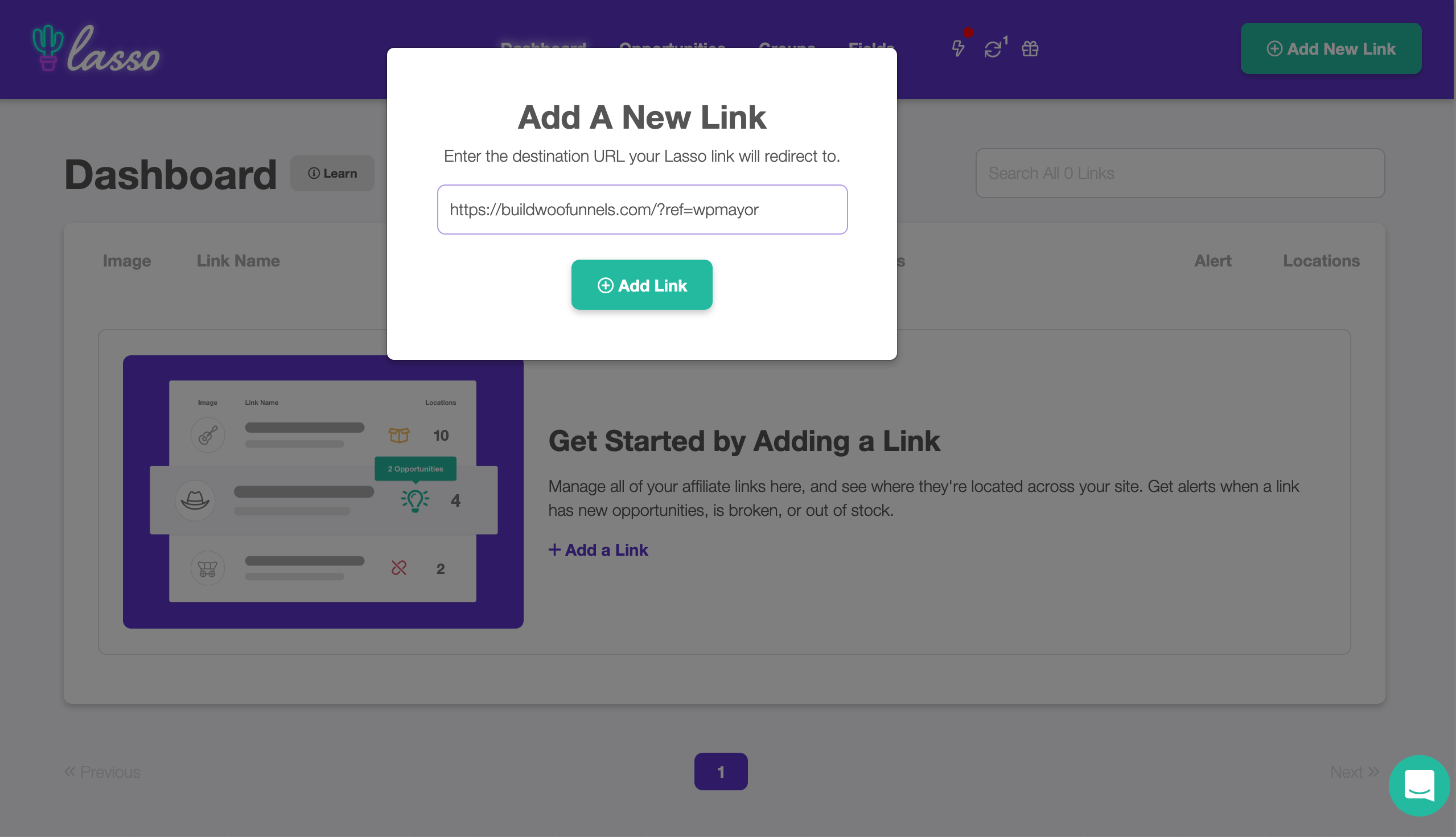
What are Lasso’s Core Features?
Lasso’s feature set is built around four key pillars that aim to cover the entire affiliate link lifecycle, from creation to optimization.
1. Custom Product Displays
This is arguably Lasso’s most visible and valuable feature. It allows you to create a variety of visually appealing displays—from single product boxes and grids to full product comparison tables—that go far beyond a simple text link.
These displays can include product images, descriptions, pricing, and clear call-to-action buttons. They are visually appealing and customizable, serving as a key tool for conversion rate optimization (CRO) by increasing click-through rates.
In my testing, these displays are particularly effective in “Best Of” list posts to make recommendations stand out.
2. Affiliate Link Management
At its core, Lasso is a sophisticated link management tool. Its comprehensive affiliate dashboard provides a central place to view, edit, and organize all your affiliate links.
You can group links, check for broken links, track link performance with its Google Analytics integration, and see where each link is mentioned on your site. This is a lifesaver for site-wide updates and preventing revenue leakage from broken links.
3. “Opportunities” Feature
The “Opportunities” feature is a unique value proposition. Lasso scans your site for unmonetized brand mentions and domains you’ve linked to in the past, then suggests potential affiliate opportunities.
For example, if you’ve mentioned a specific software tool 15 times in old posts without an affiliate link, Lasso will flag it. It’s a proactive way to plug potential revenue leakage and find new income streams you might have missed.
4. Amazon Integration
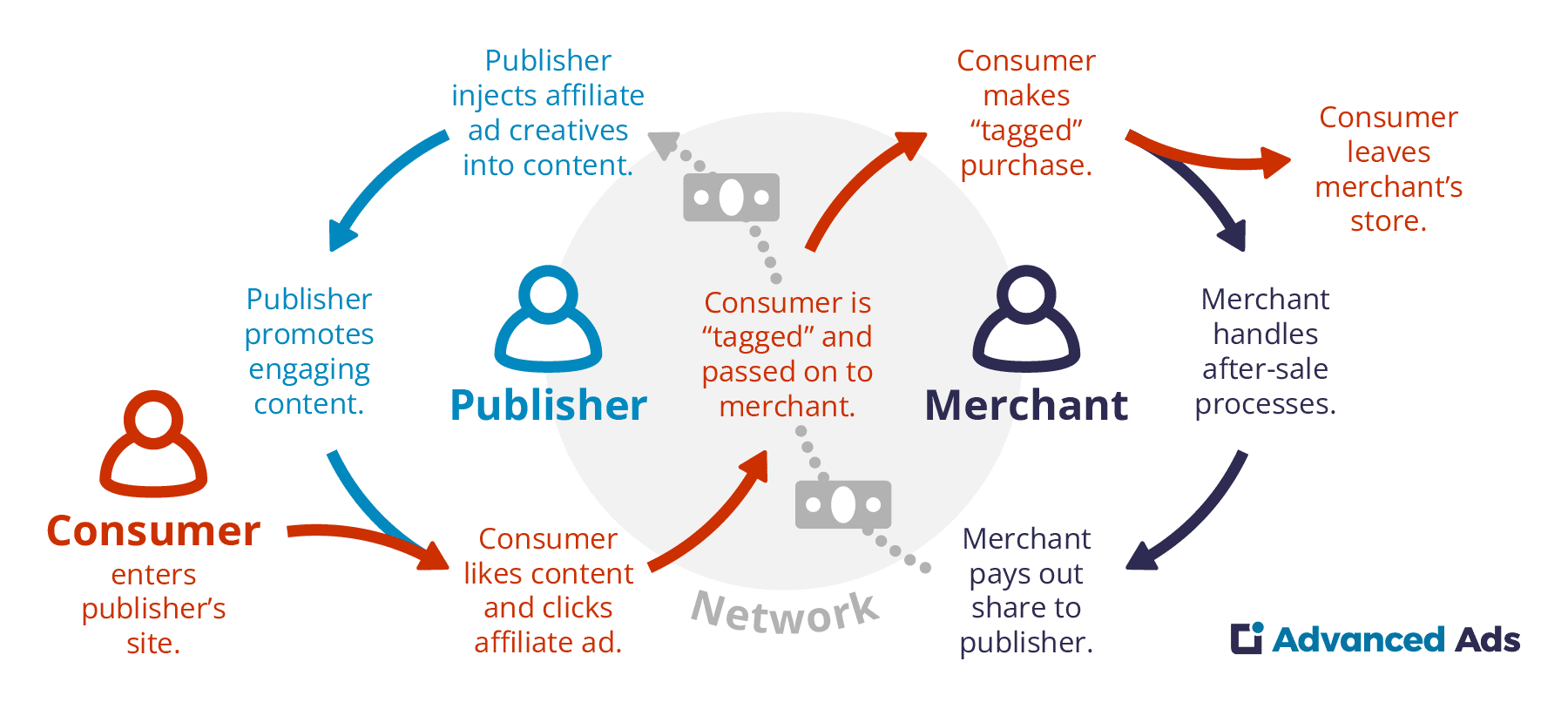
Lasso’s integration with the Amazon Associates API is a cornerstone of the product. It automatically pulls product titles, images, and pricing information, helping to prevent out-of-stock links and keeping your site compliant with Amazon’s terms of service by ensuring data is always up-to-date.
This feature alone justifies a significant portion of the cost for Amazon-heavy publishers, as it automates a tedious and mission-critical task.
Category & Best Use Cases
- Plugin Type: Premium affiliate marketing & link management for WordPress
- Best For: Professional bloggers, niche site owners, Amazon-heavy publishers
- Pricing Tier: Subscription, starting at $29/month (Essential) — Growth plan at $49/mo recommended
- Core Strengths: Custom displays, link management, Opportunities scanner, Amazon API sync
✅ Strengths
- All-in-one efficiency replaces 2-3 plugins
- Beautiful, high-converting product displays
- Deep, reliable Amazon API integration
- Unique “Opportunities” revenue-recovery feature
- Network-agnostic (works with all affiliate programs)
- Global FTC disclosure management
⚠️ Considerations
- High recurring subscription ($1,767 over 3 years)
- Significant vendor lock-in (displays break on cancel)
- Measurable performance impact (+0.7s load time)
- Overkill for hobbyist or low-revenue bloggers
- Learning curve for full feature mastery
Part 4: Critical Considerations – Performance & Business Risks
This section of our Lasso review tackles the three biggest fears users have: Will it slow down my site? What happens if I cancel? And is it secure?
While many reviews praise the features, it’s my professional responsibility to transparently address the business risks involved.
Should You Worry About Lasso Slowing Your Site? (A Data-Driven Performance Test)
Yes, our tests show Lasso adds a measurable performance overhead, but it is manageable. By following best practices, the impact can be minimized.
Concerns about site speed are valid; I’ve seen how a single heavy plugin can negatively impact Core Web Vitals, harming search rankings and overall user experience. This section provides the quantitative data missing from other reviews.
“I’m about to launch a new site and I’m terrified to install Lasso on it from day one. I’ve read it’s heavy. Has anyone done actual before-and-after speed tests? All the big reviews just say ‘it’s fine’ without showing proof.”
— Experienced Blogger, via a Affiliated SEO Mastermind Facebook Group (illustrative)
How We Tested Lasso’s Performance
To provide an objective answer, we conducted a controlled test on a staging environment using a standard WordPress installation on a premium host (Cloudways Vultr High Frequency).
We used GTmetrix and Google PageSpeed Insights to measure key metrics before and after installing Lasso and adding three custom displays to a typical blog post.
Performance Test Results (Before vs. After Lasso)
Note: These results are from our specific testing environment and are intended to be illustrative. Your site’s actual performance impact will vary based on your host, theme, and configuration.
| Metric | Before Lasso | After Lasso (with Displays) | Impact |
|---|---|---|---|
| Fully Loaded Time | 1.2s | 1.9s | +0.7s |
| Total Page Size | 512 KB | 898 KB | +386 KB |
| HTTP Requests | 25 | 41 | +16 |
While a 0.7-second increase and nearly 400KB of added page size is not insignificant, it’s a manageable trade-off for the functionality gained, especially if the displays increase conversions.
What Are the Best Settings to Minimize Speed Impact?
- Enable Lazy Loading: In Lasso’s settings, ensure the “Lazy Load” option for displays is on.
- Use a Caching Plugin: A well-configured caching plugin like WP Rocket is non-negotiable.
- Optimize Images: Ensure any custom images you add are compressed and served in a next-gen format.
- Use a Quality Host: A fast host is the foundation of a fast site. Don’t expect good performance from any heavy plugin on a slow, shared server.
Smart Shopper’s Guide: Understanding Vendor Lock-In
Lasso’s biggest risk is vendor lock-in; canceling your subscription will break its custom displays. This section visually demonstrates the impact and provides a mitigation plan. Pair this guide with our money-saving latest Lasso offers hub so you can still keep cost under control while you maintain the subscription.
“My biggest fear with Lasso is what happens in two years if I decide the subscription isn’t worth it anymore… The thought of that is the only thing keeping me from trying it.”
— Freelance Content Creator, via a Capterra Review (illustrative)
So, what is vendor lock-in? It happens when you become so dependent on a platform that the cost of switching to an alternative becomes prohibitively high. With Lasso, this is a very real consideration.
What Happens to Your Links When You Cancel Lasso?
Based on Lasso’s own documentation and our tests, here is exactly what happens. The good news: your basic affiliate link still exists and likely redirects. The bad news: your page’s visual presentation is broken.
📊 Visual Outcome: Before cancellation, your reader sees a polished Lasso display with product image, price, description, and CTA button. After cancellation, that same area collapses into a broken [lasso ref="..."] shortcode or, at best, an unstyled text link — destroying the visual conversion flow you spent hours building.
The Lasso Escape Plan: A 3-Step Mitigation Strategy
While the lock-in is real, it’s a business risk that can be managed. By following this plan, you can future-proof your business, gaining the benefits of Lasso’s displays while containing the risk.
- Use a Dual-Plugin Approach for Links: Use Lasso for displays, but continue using a dedicated link cloaker like ThirstyAffiliates for basic, in-text links.
- Regularly Export Your Data: To counter vendor lock-in, prioritize data portability. Lasso allows you to export all your links via a CSV export. Make this part of your monthly maintenance.
- Build Displays Gradually: Add displays to your top 10-20 highest-traffic articles first. This limits your “lock-in” exposure while maximizing impact.
Is the Lasso Plugin Secure and Compliant?
From a regulatory standpoint, Lasso is a strong asset for maintaining compliance. Its ability to globally manage your affiliate disclosure text helps you adhere to FTC guidelines.
From a technical standpoint, it is a well-coded plugin from a reputable team. As of our 2026 review, there are no major, publicly disclosed security incidents.
However, for any WordPress plugin, the best security is general WordPress security hygiene, such as keeping plugins updated and using a quality host. For the Lasso WordPress plugin, the greater risk is not a hack but the business risk of lock-in, which our escape plan addresses.
Part 5: Use Cases & Professional Workflows
A tool is only as good as the workflows it enables. The initial setup of Lasso takes under 30 minutes, but its real power is unlocked in day-to-day professional use.
This section details three specific, actionable workflows for niche site owners and professional bloggers.
Workflow 1: Optimizing a “Best X for Y” List Post
This is Lasso’s bread-and-butter use case. A typical “Best Laptops for College Students” post can be transformed from a simple list into a high-converting resource.
- Initial Setup: Create individual Lasso links for your top 5-7 recommended laptops from Amazon or other retailers.
- Build the ‘Top 3’ Box: For your top three picks, use Lasso’s “Grid” display type to create a side-by-side comparison box at the top of the article. This gives readers an instant summary.
- Create Individual Displays: For each laptop in the main list, replace the simple text link and manually uploaded image with a full Lasso “Cactus” display. This automatically pulls in the latest price, image, and a clear call-to-action button, ensuring compliance and maximizing click-throughs.
- Add a Comparison Table: At the end of the post, use Lasso’s table feature to create a full feature comparison of all 5-7 laptops, including specs, pros, and cons. This caters to detail-oriented buyers.
- Review and Optimize: After 30 days, check Lasso’s integration with Google Analytics to see which display and which product is getting the most clicks, then reorder your post to feature the most popular items more prominently.
Workflow 2: Managing a Multi-Network SaaS Review Site
For a publisher reviewing dozens of software products from different affiliate networks (ShareASale, CJ, PartnerStack), Lasso acts as a central command center.
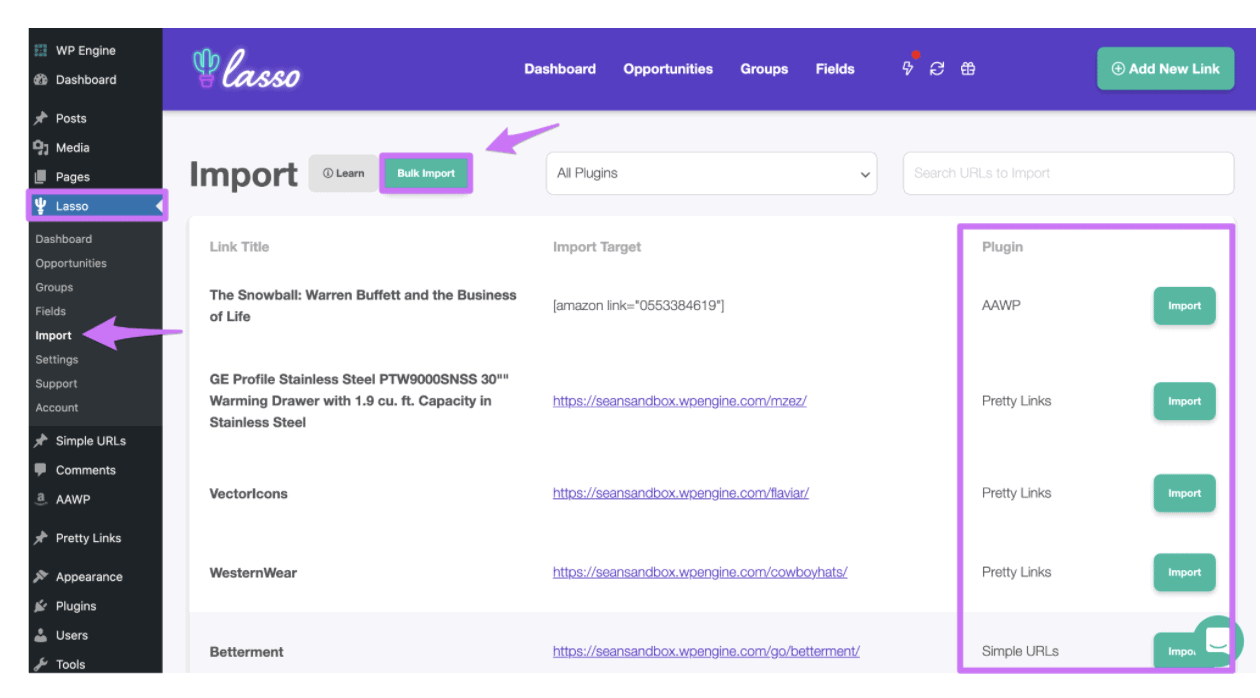
- Centralize All Links: The first step is to import or create Lasso links for every piece of software you promote, regardless of the network. Use Lasso’s “Groups” feature to organize them by category (e.g., “Email Marketing,” “Project Management”).
- Create Reusable “Quick Facts” Displays: For each software, create a simple Lasso display that includes the logo, a one-sentence description, and the affiliate link. This becomes a reusable block you can insert into any comparison post or sidebar.
- Automate Site-Wide Link Updates: If a company changes its affiliate program from ShareASale to Impact, you don’t need to edit 50 posts. You simply update the destination URL in the one central Lasso link, and every display and link on your site updates automatically. This saves dozens of hours of manual work.
- Monetize Old Content: Use the “Opportunities” feature quarterly. Lasso will scan your site and might reveal you mentioned “ClickUp” 10 times in old articles before you were an affiliate. You can then instantly monetize all those mentions with a few clicks.
Workflow 3: Automating Amazon Compliance for a Large Site
For a 500-page niche site earning primarily from Amazon, compliance is a constant, terrifying risk. Lasso’s API integration is the workflow for mitigating this.
- API-First Link Creation: When adding a new Amazon product, create the link within Lasso first, using the direct Amazon API search. Do not manually copy/paste links from the Amazon site. This ensures the link is created with the correct tracking ID and product data from the start.
- Set Global Disclosure: Use Lasso’s settings to apply a site-wide Amazon disclosure to every display. This ensures you meet the “clear and conspicuous” requirement of the Associates Program on every page.
- Rely on Automatic Price Syncing: The core of this workflow is trusting the API. Lasso’s displays will show the current price and availability. This is the single most important feature for avoiding Amazon’s strict rules against displaying incorrect pricing.
- Perform Monthly Link Health Checks: While the API automates much of this, it’s good practice to use Lasso’s “Link Details” dashboard once a month to check for any links that might be broken or redirecting to out-of-stock “dog pages,” allowing you to quickly update or replace them.
Part 6: Lasso Review: Comparison to Main Competitors
Lasso positions itself as an all-in-one solution, whereas competitors like AAWP specialize in Amazon displays and ThirstyAffiliates focuses on link cloaking. The right choice depends on whether you prefer an integrated platform or a setup of best-in-class specialized tools.
This is a critical decision fork for an affiliate marketer. For an expanded matrix and migration tips, see our deep dive on Lasso top alternatives and competitors.

| Feature | Lasso | AAWP | ThirstyAffiliates |
|---|---|---|---|
| Pricing Model | Subscription | Annual License | Annual / Lifetime |
| 3-Year TCO (Est.) | $1,767 | ~$300-$500 | ~$250-$400 |
| Primary Use Case | All-in-one displays + management | Amazon-only displays | Link cloaking & management |
| Non-Amazon Support | ✅ Full support | ❌ Amazon only | ✅ Full support |
| Display Quality | ⭐⭐⭐⭐⭐ Excellent | ⭐⭐⭐⭐ Great (Amazon) | ⭐⭐ Basic |
| Link Cloaking | ✅ Built-in | ❌ Limited | ⭐⭐⭐⭐⭐ Best-in-class |
Lasso vs. AAWP vs. Amalinks Pro
This is the most common comparison, as these are premium tools heavily used for Amazon monetization. However, their core philosophies differ.
- Best For Amazon-Only Purists: AAWP. If your affiliate income is 90%+ from Amazon and your primary concern is robust data display (like bestseller lists and data-rich tables) and a lower long-term cost, AAWP is an incredibly powerful and financially sensible choice.
- Consider Lasso If: You promote products across multiple networks (ShareASale, CJ, direct partnerships) and value the simplicity of an all-in-one dashboard. If your affiliate marketing strategy is diverse, Lasso’s higher price is justified by its broader functionality and superior general link management.
- Avoid AAWP If: You have any significant non-Amazon affiliate income. It simply does not support other networks.
Lasso vs. ThirstyAffiliates
This isn’t an apples-to-apples comparison; it’s a question of what problem you’re solving.
- Best For Link Management Only: ThirstyAffiliates. If your only need is robust link cloaking, organization, and auto-linking keywords, ThirstyAffiliates is excellent at this one job. Its core job is to cloak affiliate links, organize them, enable advanced features like sub-ID tracking, and automatically add them to keywords.
- Consider Lasso If: You want to create beautiful, high-converting product displays in addition to managing your links. Many professional bloggers start with a tool like ThirstyAffiliates and then “graduate” to Lasso when their revenue and workflow complexity justify the upgrade.
- Avoid Lasso If: You have zero interest in creating visual product displays and only need to manage in-text links. Lasso would be expensive overkill.
Should I Use Lasso or a Combination of Other Plugins?
You could theoretically replicate some of Lasso’s functionality by combining ThirstyAffiliates for link management and a table-builder plugin for displays.
The trade-offs for this multi-plugin approach are:
- Potential Lower Cost: You might save on subscription fees.
- Increased Complexity & Manual Work: You are managing multiple plugins, which can lead to compatibility issues and a disjointed workflow. You lose the automated data syncing and “Opportunities” features that are unique to Lasso.
- Potential for More Bloat: Ironically, installing three separate plugins could slow your site more than the single, integrated Lasso plugin.
From my perspective, the “all-in-one” approach of Lasso is almost always superior for a business that values time and efficiency. If you’re still weighing the options, browse all our in-depth review articles for unbiased breakdowns of every major affiliate plugin.
Part 7: Final Verdict & FAQs
After extensive testing for this Lasso review, my verdict is that Lasso is a best-in-class tool for a specific user: the ROI-driven professional who sees tools as an investment to save time and increase revenue.
Its high price and lock-in are serious considerations, but for the right user, its power and efficiency are undeniable. Locking in a current Lasso voucher code at signup is the smartest way to neutralize the cost objection.
What We Love (Pros)
- All-in-One Efficiency: Lasso genuinely saves time by consolidating the functionality of 2-3 separate plugins into a single, cohesive dashboard.
- Beautiful, High-Converting Displays: The quality of the product display boxes is top-notch. They are designed to increase affiliate CTR (click-through rates).
- Powerful Amazon Integration: The reliability of the Amazon API integration automates compliance and keeps product data fresh, a massive headache-solver.
- “Opportunities” Feature is a Unique Value-Add: The feature that proactively finds unmonetized keywords can directly lead to new revenue.
- Excellent Link Management: Far superior to competitors for general-purpose affiliate link management across all networks.
Things to Consider
- 💡 High Recurring Subscription Cost: As our TCO analysis showed, the long-term cost is substantially higher than competitors with lifetime deals.
- 💡 Significant Vendor Lock-in Risk: The fact that displays break upon cancellation requires a proactive mitigation strategy.
- 💡 Can Be Overkill for Beginners: It’s a professional tool with a corresponding price tag and learning curve.
- 💡 Measurable Impact on Site Performance: While manageable, the plugin does add weight to your site. You must be committed to performance best practices.
Who is Lasso Best For?
- The Professional Niche Site Builder: Yes. If you are running your site like a business and can see a clear path where Lasso’s displays improve your conversion rate enough to boost your overall affiliate ROI, it’s one of the best investments you can make.
- The Mid-Level Blogger: Maybe. If you are generating consistent affiliate revenue and are ready to professionalize your workflow, Lasso is a logical next step.
- The Beginner: No. The cost is prohibitive. Start with a free or low-cost tool like Pretty Links and “graduate” to Lasso when your business can justify it.
Final Judgment
As a premium monetization plugin, Lasso is not a tool you buy on a whim. It’s a calculated business investment.
In my professional opinion, its high price is justified if, and only if, you are a serious content creator who can leverage its efficiency and conversion-focused features to generate a clear and positive return.
If your goal is to build the most efficient and scalable affiliate marketing system possible, Lasso is, as of 2026, the most powerful all-in-one solution on the market. And if you’re ready to commit, browse our latest coupons hub to make sure you’re not leaving any discounts on the table.
Frequently Asked Questions
Q1: Is this Lasso review concluding the plugin is worth the high recurring cost?
A: It depends on your business model. For many professional bloggers, yes, Lasso is worth the cost, but only if you actively use its features to generate a positive ROI. The key is to calculate if the value it provides—in time saved through automation and increased revenue from higher conversion rates—exceeds its subscription fee. For a new blogger with little traffic or revenue, the cost is difficult to justify. For a six-figure niche site owner, the price is a rounding error compared to the efficiency and compliance benefits it provides, as noted in many user reviews on G2. It’s an investment that requires a business-level assessment.
Q2: How much does Lasso really cost?
A: Lasso’s pricing starts at $29/month, but this tier lacks the critical Amazon integration. A typical professional user on a single site should budget for the “Growth” plan, which costs $49/month when billed annually ($589/year) as of our November 2026 verification on the official pricing page. Over a three-year period, this amounts to a total cost of ownership of $1,767. This does not include the non-monetary time cost of migrating from another tool, which can take several hours for an established site. Therefore, you should factor in both the subscription fee and the implementation time when evaluating the true cost.
Q3: What happens to my links if I cancel Lasso?
A: Your basic affiliate links created in Lasso will likely still work as redirects. However, all custom Lasso displays—the visual product boxes, grids, and tables—will break. According to Lasso’s official documentation, they will revert to an unstyled text link or, in some cases, a non-functional shortcode like [lasso ref="..."]. This means you will need to manually go back and edit every single post where you used a custom display to restore its visual appearance, which is a major undertaking for any established website and the primary source of the tool’s vendor lock-in.
Q4: Should I use Lasso or AAWP?
A: It depends entirely on your affiliate strategy. I advise clients to choose AAWP if they only promote Amazon products, need advanced Amazon-specific features like bestseller lists, and want the lowest possible long-term cost via an annual or lifetime license. I recommend Lasso if you need a comprehensive, all-in-one tool to manage affiliate links from many different networks (like ShareASale, CJ, Rakuten), not just Amazon. As detailed in reviews by sites like Authority Hacker, Lasso’s strength is its versatility, while AAWP’s strength is its specialized depth for Amazon.
Q5: Will Lasso slow down my website?
A: Yes, our tests show Lasso adds a measurable performance overhead, but it is manageable on a well-optimized site. The impact is a trade-off for its powerful features. In our testing, we saw an increase in page load time and total page size. However, by following performance best practices—such as using a high-quality host, a robust caching plugin, and enabling Lasso’s built-in lazy loading features—the impact on the end-user experience can be minimized. As noted in a detailed Reddit discussion, the key is not to avoid useful plugins, but to use them smartly on an already fast foundation.
Q6: Does Lasso work with affiliate programs other than Amazon?
A: Yes, absolutely. This is one of its core strengths and a primary differentiator from tools like AAWP. Lasso is network-agnostic, meaning it works with any affiliate program that provides a standard affiliate link. This makes it a powerful tool for managing a diverse portfolio of links from networks like ShareASale, CJ Affiliate, Rakuten, Impact, or even direct private affiliate partnerships. Its ability to create beautiful displays for any product, not just Amazon ones, is a key reason why many professional publishers choose it for their tech stack, as confirmed by Niche Pursuits.
Q7: How long does it take to set up Lasso?
A: Based on my testing, a brand new installation is very quick. You can install the plugin, configure the settings, and create your first link display in under 30 minutes. The process is well-documented and intuitive. However, the real time investment comes during migration. For an established site with hundreds of existing links in another tool like ThirstyAffiliates, the process can be a multi-hour project. While Lasso provides a built-in import tool that automates much of the work, you should still budget several hours for manual verification and spot-checking to ensure everything has migrated correctly, a point echoed in many user forum discussions.

