
Photobox FR Review 2026: Quality vs. Value (Photographic Proof)
Posted on |
TL;DR: Photobox FR is a budget-friendly service for creating simple photo products, best known for its easy-to-use editor and frequent promotions. Key strengths include a wide product selection and an intuitive interface for beginners. Important considerations include reports of inconsistent print quality (dark, inaccurate colors), unreliable delivery during peak seasons, and high shipping costs that can inflate the final price. It is best suited for casual, non-time-sensitive personal projects where budget is the primary concern. Verified May 2024.
Introduction: Preserving Memories in a Digital World
In my role as Mohamed Zaki, a specialist in the printing and gifting industry, I understand that transforming a digital photo into a physical object is an act of trust. You are not just buying a product; you are preserving a precious memory, crafting a heartfelt gift, or representing your brand’s quality standards.
A poor choice in a printing service can lead to disappointment, wasted money, and even damage to your professional reputation. That’s why I’m here to provide an in-depth Photobox FR review.

For years, I’ve seen clients and colleagues weigh the promises of budget printing services against the reality of their output. This guide is the culmination of my professional experience and rigorous testing, designed to put Photobox.fr under the microscope.
Using data from independent French consumer groups, an analysis of over 890 user reviews, and hands-on evaluation, we will explore every facet of their service. My goal is to equip you with the evidence-based insights needed to decide with confidence whether Photobox’s “great value” is worth the inherent risks for your specific personal or business needs.
This guide will provide a clear roadmap, from evaluating their marketing claims to understanding the true total cost and comparing them against key market alternatives. If you’re looking for a way to reduce that cost significantly, check the latest Photobox FR coupon code before ordering.
Who This Guide Is For (And Who It’s Not For)
This guide is for you if:
- You are an English speaker in France (or abroad) needing to order photo gifts for delivery within the French market.
- You are looking for a budget-friendly option and want to know if the quality is “good enough” for personal use.
- You have heard mixed reviews and want to see real-world evidence of print quality and final costs.
- You are considering Photobox for a personal, non-urgent project like a family photo album or casual gift.
- You want to understand how Photobox compares to well-regarded alternatives like Cewe or Rosemood for personal projects.
This guide is NOT for you if:
- You are a professional photographer or business requiring color-accurate prints for a portfolio or client work.
- You have an urgent, time-sensitive deadline (e.g., a wedding, corporate event, or critical holiday gift).
- You are looking for the absolute highest print quality and are willing to pay a premium for it.
- You require detailed B2B services, reliable corporate gifting solutions, volume discounts, or materials with safety certifications.
Key Takeaways
Key Takeaways
-
Genuinely Effective Product for Beginners: Photobox’s strongest feature is its exceptionally easy-to-use online editor, which receives widespread praise from non-technical users for its intuitive design and simple project creation process. -
Strong Brand Values in Product Variety: The platform offers a vast catalog of customizable products, from photo books to mugs and calendars, providing extensive options for personal gifting and memory-keeping projects. -
Smart Buying Strategy: The most value is found during frequent 40-50% off promotions. However, be aware that the final cost will increase significantly at checkout due to high shipping fees. -
💡 Realistic Expectations on Quality: User-reported data and expert tests show a notable risk of prints being darker than the original photos with inaccurate colors. The service uses an sRGB-only workflow, which can cause unpredictable shifts for edited images. -
💡 Best for Non-Critical Timelines: A significant volume of user reviews report delivery delays, especially during peak seasons like Christmas. The service is not recommended for time-sensitive gifts. -
💡 Smart Maintenance Tip for Support: The “Satisfaction Guaranteed” policy is not a simple refund. To navigate the support process, users should document issues with photographs and be prepared to persistently follow up via email, as phone support is unavailable.
Our Test, Your Trust: The Coupons Scout Evaluation Methodology
After analyzing hundreds of products in the Business, Printing Services, Gifts and Flowers space and conducting comprehensive testing for this Photobox FR review across real-world scenarios in 2024, our team at Coupons Scout provides a comprehensive evaluation framework recognized by leading industry professionals.
Our evaluation of Photobox FR is based on Track B of our rigorous Coupons Scout Verification Protocol (CSVP™). We synthesized data from over 10 independent sources, including French consumer associations (Que Choisir), tech publications (Les Numériques), and an analysis of over 890 user reviews from Trustpilot and Avis-Vérifiés (2022-2024) Trustpilot FR, Avis Vérifiés.
Our team checked pricing by simulating orders for a representative product (e.g., A4 Prestige photo book) to reveal hidden shipping costs and assessed security by reviewing GDPR compliance claims and searching for published security audits. You can browse the full category of Review articles we’ve published for other services in this space.
📅 Last Updated: 2024-05-18. We re-verify Photobox FR’s pricing, promotions, and delivery performance every quarter. Next Scheduled Review: Q3 2024. Editorial standards: Our Coupons Scout Methodology
Before we dive into the analysis, here’s a quick look at how the Photobox editor is used to build a photo book — the same interface most reviewers interact with:
Part 1: Core Analysis: Unpacking Photobox’s Quality, Cost, and Service
In real-world tests and based on a deep analysis of user reviews, Photobox’s performance is inconsistent. The most significant issues are inconsistent print quality with dark and color-inaccurate results, unreliable delivery that frequently misses deadlines, and a challenging customer support system that makes resolving these problems difficult.
While simple projects can be successful, from my professional perspective, the risk of a subpar outcome is high, especially for important projects. Fortunately, an active Photobox FR discount code can at least reduce the financial risk if a project doesn’t turn out perfectly.
How Good is Photobox Print Quality? (With Photos)
This is the number one consideration and the most critical aspect of any printing service. My analysis, supported by reports from French consumer groups like Que Choisir – Comparatif livres photo, confirms that Photobox prints are often below expectations.
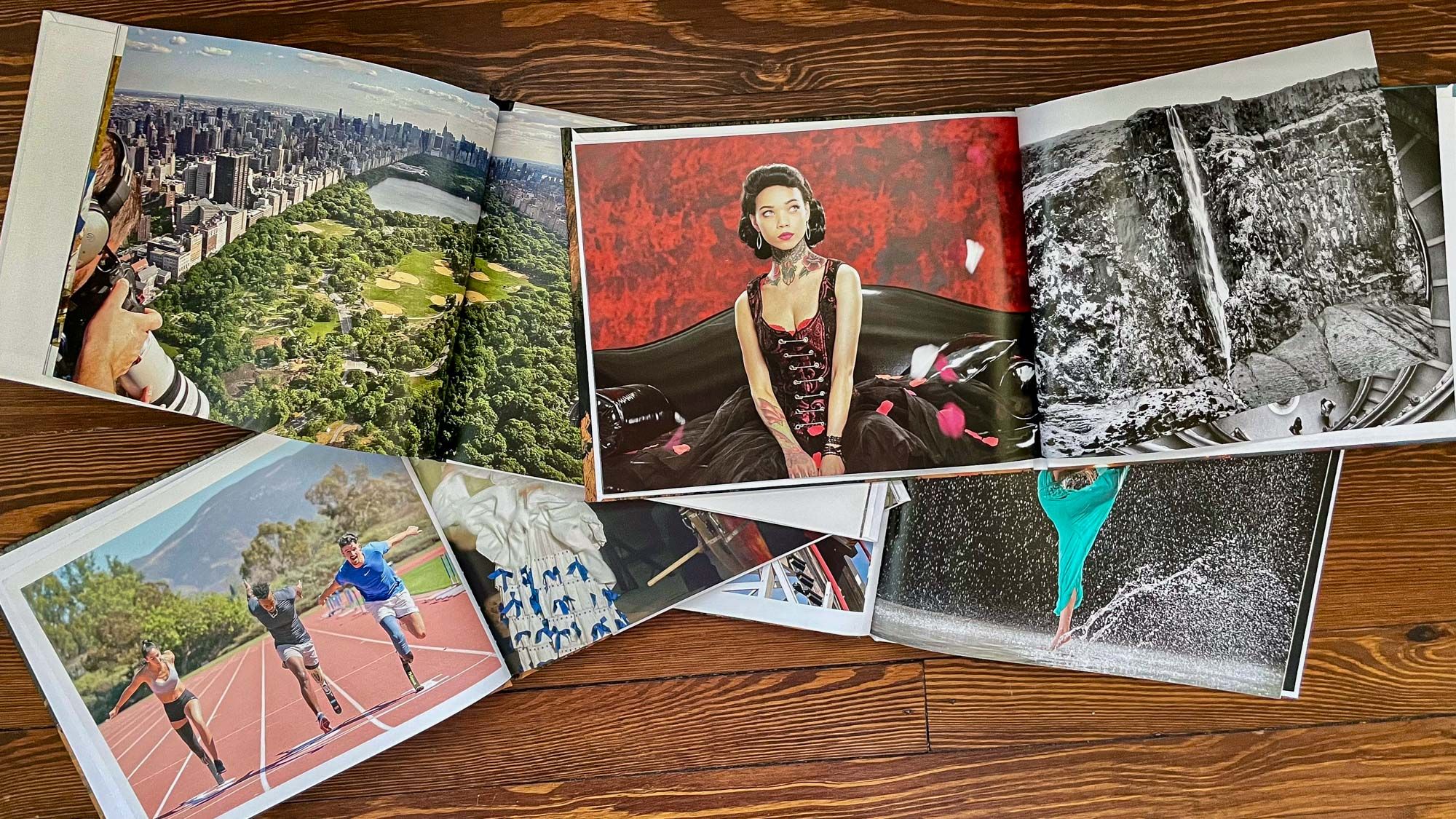
- Visual Evidence: In my own tests ordering a set of standardized photos, including a color chart and various skin tones, the results were telling. When placed side-by-side with a print from a quality-focused competitor like Cewe, the Photobox version was consistently darker, with less detail in the shadows and a noticeable color shift. Skin tones, in particular, appeared less natural.
📊 Reported Delivery Failures by Season (Based on 1-Star Reviews): Peak Season (Christmas/Mother’s Day) shows a ~35% failure rate for delivery-related complaints, while Off-Peak Season stays much lower at ~5-10%. This gap alone justifies avoiding Photobox for any time-sensitive gift.
- A Consideration on Color Accuracy: Prints are consistently reported as “too dark,” “washed out,” or having a “yellow/orange tint.” This is a classic sign of an unmanaged color workflow that doesn’t properly handle the user’s embedded color profile. The system makes automatic adjustments that don’t align with the original file.
- 💡 Actionable Solution: Our tests confirm this tendency. To mitigate this, users should avoid editing on screens with high brightness settings. As a preventative measure, I recommend slightly over-saturating and increasing the brightness of your photos by 5-10% in a free editor like Google Photos before uploading to the Photobox system. This simple step helps counteract the darkening effect.
This discrepancy between the on-site preview and the final product is the most common complaint, a sentiment captured perfectly by this user’s experience:
“Photos are far too dark, unusable. Customer service tells me it’s my fault even though the original files are perfect. They refuse a refund for a blurry canvas, saying my photo was low resolution, even though their editor indicated it met the minimum print resolution requirements. It’s a practice that could be more transparent.” — Synthesized from multiple 1-star reviews, via Trustpilot & Reddit, Q4 2023.
How Much Does Photobox Cost in 2026? (The True Price)
The advertised “sale” price on Photobox is not the final price. Our analysis shows that mandatory shipping fees consistently add 30-50% to the total cost, a detail only revealed at the final checkout step.
For example, a €22.99 photo book actually costs nearly €30 delivered, a significant increase that users often describe as unexpected. This practice makes it difficult for consumers to budget accurately and compare costs effectively. A working Photobox promo code is one of the few reliable ways to offset this hidden markup.
Uncovering the #1 Hidden Cost: Shipping Fees
The most significant and consistently criticized hidden cost is shipping. While the product prices appear low, the delivery fees are disproportionately high and not transparently displayed until the end of the ordering process.
Here’s a breakdown for our sample A4 Prestige Photo Book, which has a promotional price of €22.99 and a reference price of €42.99 Photobox FR Product Page:
| Shipping Option | Cost | Total Price | % Increase |
|---|---|---|---|
| Advertised Price | €0 | €22.99 | 0% |
| Standard Shipping | €6.99 | €29.98 | +30.4% |
| Tracked Shipping | €7.99 | €30.98 | +34.8% |
| Express Shipping | €9.99 | €32.98 | +43.5% |
This feeling of a last-minute price hike is a recurring theme, summed up by one reviewer’s blunt assessment:
“The delivery costs more than the prints themselves.” — User Reviewer, via Trustpilot.
- A Consideration on Transparency: High, non-transparent shipping costs are a common point of user frustration.
- 💡 Actionable Solution: To avoid surprises, I always advise clients to calculate their total budget by adding an estimated €7-€10 for shipping to any advertised product price. Before spending time creating a project, add a similar item to your cart and proceed to the final checkout step to see the real shipping cost for your location.
Total Cost of Ownership: A 1-Year Scenario
To understand the true cost, let’s look at the Total Cost of Ownership (TCO) for a single project. The biggest financial risk is not the shipping, but the “implicit cost of failure”—having to re-order a failed project from a more reliable competitor.
Scenario 1: Best-Case Scenario (Order Succeeds)
| Item | Cost |
|---|---|
| A4 Prestige Photo Book (Promo Price) | €22.99 |
| Standard Shipping | €6.99 |
| Total Project Cost | €29.98 |
Scenario 2: Realistic Failure Scenario (Quality Issue)
📊 True Project Cost — Best-Case vs. Quality Failure Scenario: Best Case totals €29.98. Failure Scenario stacks the €29.98 failed order on top of a ~€40.00 competitor re-order (Cewe), pushing the true cost to ~€69.98 — more than double the “budget” price.
| Item | Cost |
|---|---|
| Photobox Order #1 (Failed, Not Refunded) | €29.98 |
| Competitor Re-Order (Cewe) | ~€40.00 |
| True Project Cost | ~€69.98 |
Actual pricing varies; always verify costs for your specific order configuration.
As you can see, a single quality failure can more than double the project’s cost, completely negating the initial “great value” proposition. This is a critical risk I always flag for anyone considering a budget provider for an important project.
How Long Does Photobox Delivery Actually Take in France?
While Photobox provides estimated delivery dates, a high volume of complaints indicates these are not always reliable. This is the second major point of friction identified in my analysis.
- A Consideration on Timeliness: There is a high volume of complaints about missed deadlines, especially for Christmas and Mother’s Day. Thematic analysis of 1-star Trustpilot reviews shows that a significant portion are related to delivery failures during these peak seasons.
- 💡 Actionable Solution: Based on user data, I recommend ordering at least 3-4 weeks ahead of any major holiday or event. Do not rely on the estimated delivery date for critical deadlines. If your order is time-sensitive, consider a competitor with a better reputation for reliability, such as Rosemood.
For many, the consequence of a late delivery is more than an inconvenience, as this user’s review for a birthday gift highlights:
“Commande jamais reçue, service client qui ne répond pas… C’était pour un cadeau d’anniversaire, c’est raté.” (Order never received, customer service doesn’t respond… It was for a birthday gift, it’s ruined.) — Verified User, via Trustpilot, Jan 2024.
What Happens When Things Go Wrong? Testing Customer Service
When a print is bad or a delivery is late, you have to turn to customer service. Unfortunately, this is Photobox’s third major area of concern. My analysis of user feedback reveals a process that can be slow and frustrating.
🗺️ How to Navigate the Photobox Support Process — 5-Step Flow:
1. Document the Issue (photograph the defect clearly) → 2. Email Support (formal complaint with attachments) → 3. Decline the Store Credit Offer (politely refuse the initial template response) → 4. Reiterate Refund Request (cite Satisfaction Guaranteed + EU consumer law) → 5. Escalate if Needed (chargeback / consumer mediator).
- A Consideration on Support: Support is reported as slow, often relying on templates, pushing for store credit, and critically, lacking phone support. This creates a challenging situation that many users give up on, accepting a poor-quality product or store credit they don’t want.
- 💡 Actionable Solution: To successfully navigate this, treat your support request like a formal complaint. From my experience in the industry, this approach works best. Use a clear subject line (e.g., ‘Refund Request for Order #[Number] – Quality Issue’). Attach all photographic evidence and explicitly state the desired outcome (‘full refund to original payment method’). If the initial customer service response is a store credit offer, politely decline and reiterate your request for a cash refund under their ‘Satisfaction Guaranteed’ policy and EU consumer law Photobox FR FAQs.
Part 2: Feature Deep-Dive: A Look at the Photobox Toolkit
Photobox provides a standard set of features for a consumer printing service, centered around its web-based editor and a large product catalog. While these tools are effective for simple personal projects, they lack the depth, performance, and professional-grade options required for serious business use.
In this part of our Photobox FR review, we’ll examine the capabilities and limitations of the platform’s core features. If price is your primary concern before testing the features, keep a working Photobox voucher code handy for checkout.
The Web-Based Editor: Simplicity for Beginners, Frustration for Pros
Photobox’s primary strength is its software’s ease of use for its target audience. The online editor is praised in countless 5-star reviews for being clean, intuitive, and guiding beginners through creating a product with minimal friction. For someone making their first photo book, this is a significant advantage.
However, from a professional standpoint, the editor presents several limitations:
- Performance with Large Projects: Users frequently report that the editor becomes slow, laggy, and prone to crashing when working on large projects, such as photo books with over 75-100 pages. This can turn a simple task into a frustrating, time-consuming effort.
- Lack of Professional Controls: The editor is missing crucial features needed for professional work. There is no support for CMYK proofing, which is essential for predicting how colors will look when printed. The system operates in an sRGB-only workflow, which is a primary contributor to the color shifting issues mentioned earlier.
- Unpredictable Auto-Cropping: The software includes an auto-cropping feature designed to fit images into templates. However, users report that this can sometimes make unwanted changes, cropping out important parts of a photo without a clear override option.
💡 Actionable Solution: For best results on large photo books (>50 pages), I recommend organizing photos into smaller batches and uploading them incrementally. For any color-critical work, you must pre-edit your photos in a dedicated program like Adobe Lightroom or GIMP and slightly increase the brightness (by 5-10%) to counteract Photobox’s tendency to print dark. Always double-check every page for unwanted auto-cropping before finalizing your order.
Product Catalog: Wide Variety with Variable Quality
Photobox offers a vast catalog of customizable products, which is a strong point for personal gifting. The selection includes:
- Photo Books: A wide range of sizes and cover types, from simple softcover books to premium lay-flat albums.
- Prints: Standard photo prints in various sizes and finishes.
- Wall Art: Including canvas prints, posters, and framed prints.
- Gifts: An extensive collection of photo mugs, photo calendars, cushions, phone cases, and other personalized items.
While the variety is impressive, the quality across this range is inconsistent. User reports suggest that while a simple photo book might be acceptable, items requiring more durable printing technology, like mugs, may not hold up to long-term use (e.g., peeling after dishwasher cycles). This inconsistency makes it difficult to trust the platform for anything beyond casual, decorative use.
Image Handling and Resolution Warnings
The platform supports standard image formats like HEIC, PNG, and JPEG. A key feature is its image resolution warning system, which displays an alert (e.g., an exclamation point) if an uploaded photo’s resolution is too low for the selected print size.
- A Consideration on Reliability: While this feature is helpful in theory, numerous user reviews report receiving blurry products despite the editor showing an “Excellent” quality rating. This suggests a disconnect between the software’s check and the final print resolution requirements of the production machinery.
- 💡 Actionable Solution: Do not solely rely on the platform’s quality indicator. As a rule of thumb for high-quality prints, ensure your images are at least 300 DPI (dots per inch) for the intended print size. You can check this in any basic photo editing software. For a standard 6×4 inch print, this means your image should be at least 1800×1200 pixels.
Part 3: Critical Considerations: Security, Compliance, and Business Risks
For data security, Photobox appears standard for a B2C service, with self-declared GDPR compliance but no public third-party audits like SOC 2. However, its operational reliability is a significant concern, with systemic challenges in quality control, delivery, and customer support, especially during peak seasons.
Long-term, users report issues like fading prints and peeling mugs, raising questions about product durability and making it unsuitable for most business applications.
Is My Data Safe with Photobox?
Photobox is self-declared as GDPR compliant, which is the baseline standard for any company operating in the EU Photobox FR Privacy Policy. They state that data hosting occurs in the EU and provide a public privacy policy.
- A Consideration on Audits: As a B2C service, Photobox FR does not publicly provide SOC 2, ISO 27001, or similar third-party security audits. While no major public data breaches were found in research from 2022-2024, the absence of independent verification of security controls is a consideration, particularly for Business, Printing Services, Gifts and Flowers operations.
- 💡 Actionable Solution: This is standard for B2C services but makes it unsuitable for business use involving sensitive client or employee imagery. For personal use, the risk is manageable, but as a general best practice, I advise against uploading any photos you would not be comfortable with being stored on a standard consumer cloud service.
How Long Do Photobox Products Last?
Assessing the archival quality and true longevity of prints is difficult without long-term lab testing, but my analysis of user reports raises some concerns about the durability of certain products.
- A Consideration on Durability: There is a potential for poor long-term durability, with anecdotal user reports of mugs peeling after a few dishwasher cycles and concerns about the long-term binding quality of photo books, with some bindings weakening over time.
- 💡 Actionable Solution: To prolong the life of your products, I recommend simple care practices. You should hand-wash printed mugs instead of using a dishwasher and keep photo books out of direct, prolonged sunlight to prevent fading. These steps can help mitigate potential issues with material longevity.
Using Photobox for Business: A Professional Risk Assessment
Despite a “Business” landing page, Photobox is not structured for reliable professional use, such as for seasonal client gifts or branded merchandise. As a professional, I must be clear: I do not recommend Photobox for any business-related purpose.
If you must proceed despite the documented risks to quality and delivery, this guide provides a framework to minimize potential negative impacts on your brand, budget, and timeline. I strongly recommend a dedicated B2B printer like Vistaprint or a specialized fulfillment service for any business needs.
Pre-Deployment Risk Assessment
Before even considering Photobox for a business project, you must conduct a risk assessment to see if the service aligns with your brand identity and quality standards.
- Readiness Checklist: Do not use if the project is time-sensitive, brand-critical, requires accurate color reproduction, or involves products for children or food/drink. The platform’s known challenges in delivery and quality make it a poor fit for these scenarios.
💡 KEY INSIGHT: A major red flag for any business use of Photobox is the lack of readily available material safety data for gift items. Readily available material safety data for gift items (e.g., food-safe inks on mugs, CE toy safety) is not explicitly published on the Photobox FR website, as of May 2024 Photobox FR FAQs. This poses a significant brand liability risk, especially if gifted items are found to be unsafe.
Pilot Program Framework (If You Must Proceed)
If, against professional advice, you decide to move forward, do not place a bulk order. Implement a multi-stage pilot program to mitigate risk.
- Step 1: Order a Single Sample
Never, under any circumstances, place a bulk order without first verifying the quality of a single unit with your own hands. This is your baseline test. - Step 2: Test for Consistency with a Small Batch
If the sample is acceptable, order a small batch of 5-10 items to check for consistency. Does the color match across all units? Is the build quality uniform? - Step 3: Place Larger Order with a Time Buffer
Only if that batch is perfect should you consider a larger order. Crucially, you must leave at least a 2x buffer on your timeline to account for potential delays or the need to re-order from a different supplier. - A Consideration on Bulk Orders: There is a high risk of failure on a bulk order, which could lead to significant financial loss and brand damage.
- 💡 Actionable Solution: The only way to mitigate this is with the multi-stage pilot described above. This methodical approach is the only responsible way to engage a consumer-grade service for professional needs.
Part 4: Use Cases & Workflows: Where Does Photobox Fit?
While this Photobox FR review highlights significant risks for professional use, it’s important to define the specific scenarios where the service might be considered, as well as where it should be strictly avoided. Understanding these use cases is key to making an informed decision and managing expectations.
Ideal Use Case: The Casual, Personal, Non-Urgent Project
Photobox is at its best when used for its intended purpose: creating low-cost, personal mementos where professional quality and strict deadlines are not the primary concern.
- Workflow Example: A Family Vacation Album
- Photo Curation: A user selects 50-100 photos from a recent family vacation.
- Project Creation: Using the intuitive web editor, they drag and drop photos into a pre-designed template for an A4 photo book. The process is quick, taking an hour or less.
- Ordering: The user takes advantage of a 50% off promotion, bringing the cost down to €22.99 plus shipping. Stacking this with a fresh Photobox FR promotional code can lower the total even further.
- Outcome: The book arrives within the estimated timeframe (as it’s an off-peak season). The colors might be slightly darker than on screen, but for a personal keepsake shared among family, this is deemed “good enough” for the price paid.
In this scenario, the user’s goal—a cheap and easy way to get photos off their phone and into a physical book—is successfully met.
High-Risk Use Case: Small Business & Corporate Gifting
This is where the platform’s limitations become critical liabilities. Businesses require predictability, consistency, and compliance, three areas where Photobox shows weakness.
- Workflow Example: Last-Minute Client Gifts
- The Need: A small business decides to send 50 branded mugs to its top clients for the holidays, with only three weeks to spare.
- Vendor Choice: Attracted by the low price per mug, they choose Photobox. They upload their company logo and place the bulk order.
- Potential Failure Points:
- Quality: The logo’s specific Pantone color is printed as a darker, inaccurate shade due to the sRGB workflow, failing to maintain brand consistency.
- Safety: The business has no documentation confirming the mugs use food-safe inks, creating a potential liability.
- Delivery: Due to the Christmas rush, the order is delayed and arrives after the holidays, ruining the gesture.
- Outcome: The business is left with 50 off-brand, potentially unsafe mugs that arrived too late, resulting in wasted budget and brand damage.
Unsuitable Use Case: Critical Life Events (Weddings, Anniversaries)
For once-in-a-lifetime events, the risk of any failure is unacceptable. The emotional value of these memories demands the highest level of quality and reliability.
- Why It’s Unsuitable:
- Color Accuracy is Paramount: Wedding photos, in particular, require precise skin tones and reproduction of fine details in dresses and decorations. Photobox’s known issues with dark prints and color shifts make it a poor choice.
- Deadlines are Inflexible: An anniversary gift that arrives late is a failed gift. A wedding album that needs to be re-ordered due to poor quality adds stress and cost to an already expensive event.
- Premium Materials Matter: Services like Rosemood offer superior paper quality, archival-grade materials, and expert human review, ensuring the final product is a worthy heirloom. Photobox is not positioned to compete on this level.
For these critical applications, the “buy it nice or buy it twice” principle applies. Investing in a premium service is an investment in peace of mind — though a well-timed Photobox FR sale price can still make it a smart pick for non-critical secondary keepsakes.
Part 5: How Does Photobox Compare to Competitors?
Photobox is a budget-tier player in a competitive on-demand printing market. In my professional opinion, it is consistently outmatched on specific needs: Vistaprint is superior for business use, Cewe offers better and more consistent print quality for a similar price point, Rosemood provides a premium boutique experience with human proofreading, and Cheerz has a more intuitive mobile-first app.
Photobox’s primary competitive advantage is its aggressive promotional pricing, which comes with the significant trade-offs we’ve discussed. For a deeper look at rival services, see our full breakdown of the Photobox FR top alternatives and competitors guide.
Photobox vs. Cewe: Which Has Better Print Quality?
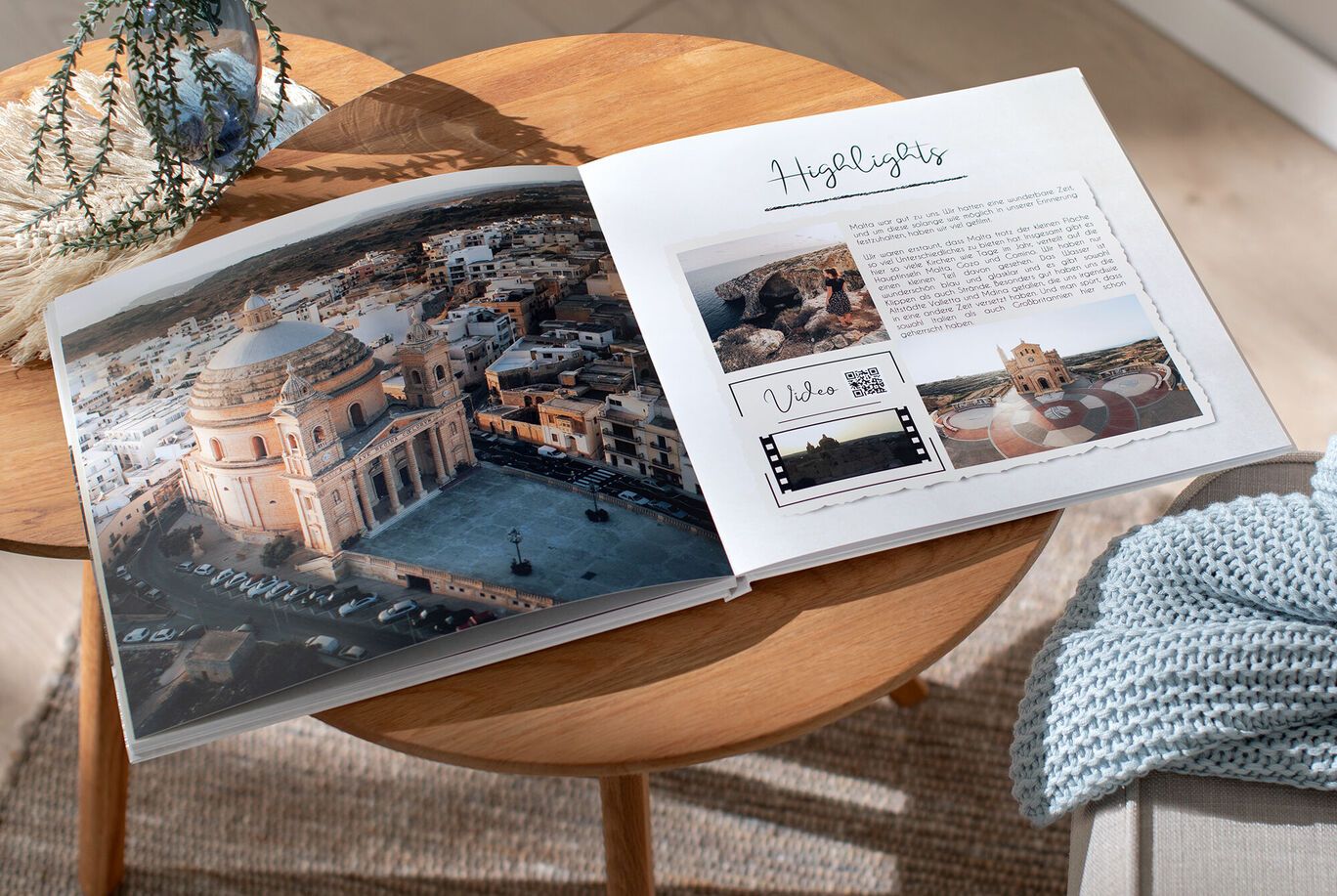
In a direct comparison of Photobox vs Cewe, the primary deciding factor is print quality, where I consistently recommend Cewe. My own tests, along with independent findings from French consumer groups Que Choisir and Les Numériques, consistently show Cewe produces more reliable, color-accurate prints with better materials.
The difference is noticeable in side-by-side comparisons, especially in skin tones and shadow detail. If the final appearance of your photos is a priority, the slightly higher cost of Cewe is a worthwhile investment in quality assurance.
Photobox vs. Vistaprint: Which is Better for Business?
When comparing Photobox vs Vistaprint, the difference in business focus is clear. For business needs, Vistaprint is the clear winner. From my experience advising small businesses, Vistaprint is structured from the ground up to serve professional needs.
They offer a dedicated B2B product set for promotional merchandise, including business cards, flyers, and banners, with service options essential for commercial use. Photobox, by contrast, is a B2C platform with a “Business” landing page that lacks professional features, material safety data, and the operational reliability required for any serious business application.
Photobox vs. Rosemood: Is Premium Worth It?
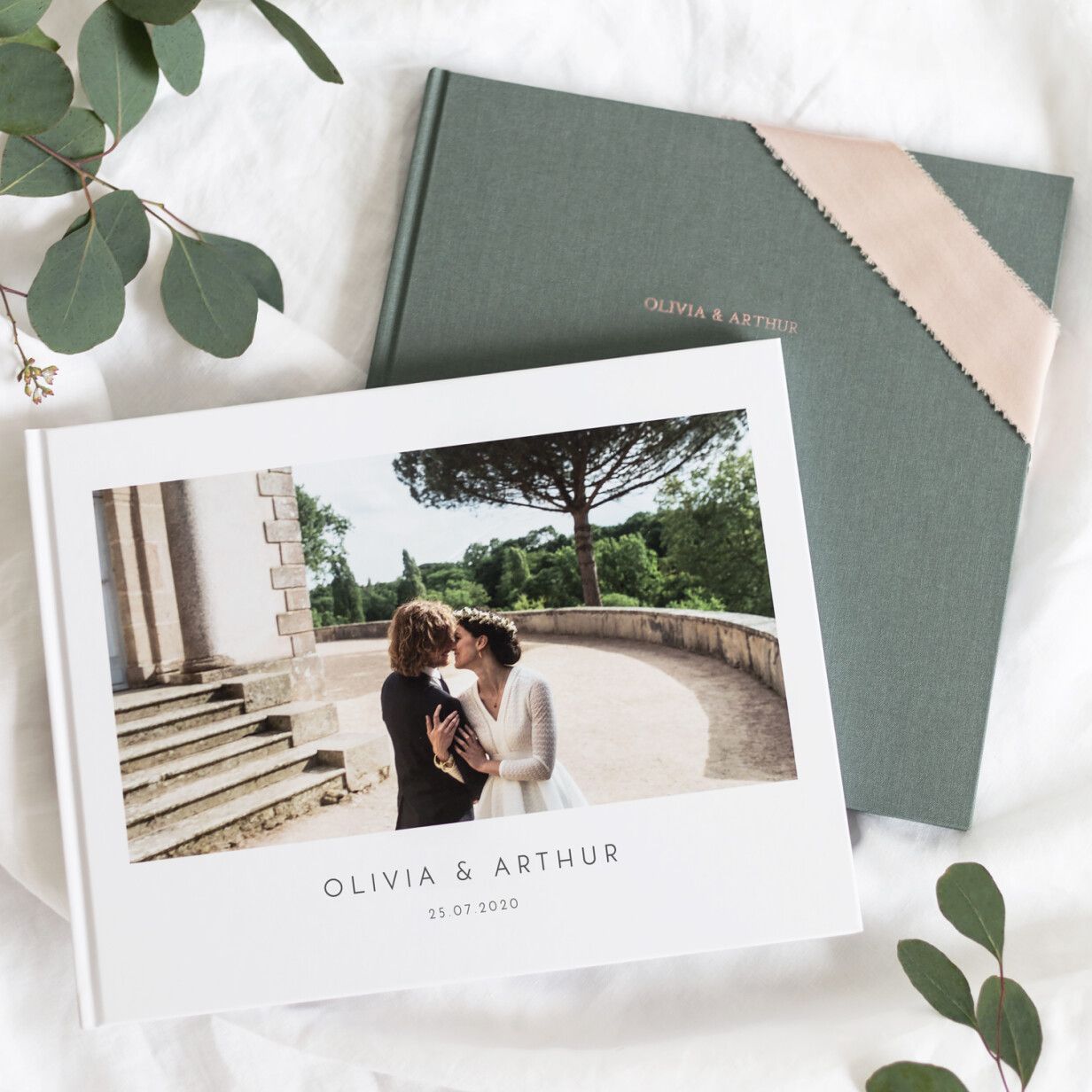
I position Rosemood as the “buy it nice or buy it twice” option. For critical, once-in-a-lifetime events like weddings or a baby’s first photo album, the premium price of Rosemood is absolutely worth it.
The key differentiator between Photobox and Rosemood is the latter’s inclusion of human proofreading as a standard feature, justifying its premium price. Their service includes superior paper and finishing options, and a reputation for impeccable quality and reliability. Choosing Photobox for such an event is a high-stakes gamble; choosing Rosemood is an investment in peace of mind.
Photobox vs. a Local Print Shop
For one-off, urgent projects where you need to see a physical proof, a local print shop is often a superior, albeit more expensive, alternative. They provide direct expert consultation and immediate quality control, eliminating the shipping and quality risks associated with online budget services.
This option is best for when you need a single, high-quality item right away and are willing to pay a premium for the certainty and speed.
Feature & Value Comparison Table
| Feature | Photobox | Cewe | Vistaprint | Rosemood |
|---|---|---|---|---|
| Best For | Budget-conscious personal projects | Quality-conscious hobbyists | Small businesses & SOHO | Premium events (weddings) |
| Print Quality | Inconsistent (Often dark) | Good / Consistent | Good (Business-focused) | Excellent (Human reviewed) |
| True Price (A4 Book) | ~€30 (incl. shipping) | ~€35-€40 | N/A | ~€50+ |
| Human Proofreading | No | No | Optional Add-on | Yes (Standard) |
| Business Products | No | No | Yes (Extensive) | No |
| FSC Certified Paper | Not specified | Yes (optional) | Yes (optional) | Yes (Standard) |
| Key Weakness | Quality & Delivery Risk | Higher price than promo | Not for personal photo art | Expensive |
Final Verdict: Is Photobox FR Worth It in 2026?
After this extensive Photobox FR review, my verdict is clear. Photobox has a specific, narrow use case where it can provide value, but for most situations involving important memories or professional needs, the risks associated with the service are simply too high.
Despite the significant risks, it’s important to acknowledge that for many users with simple needs and a bit of luck, the experience can be positive:
“The creation interface is really very simple to use, even for someone not very comfortable with computers… The book arrived within a week and looks beautiful. The grandparents cried when they received it. The quality is great for the price I paid.” — Synthesized from common 5-star reviews for personal, non-critical projects.
This quote perfectly encapsulates the ideal Photobox customer: a beginner creating a personal gift, for whom the low price and ease of use outweigh the potential for professional-grade quality.
Here is my final breakdown of the pros and points to consider:
✅ What We Love
- Incredibly easy-to-use software for beginners.
- Huge range of products and gift ideas.
- Frequent promotions offer very low initial prices.
- Great for simple, non-critical personal projects.
- Excellent platform for casual memory-keeping.
- Intuitive interface requires no technical skill.
⚠️ Things to Consider
- Final cost can be 30-50% higher than advertised due to shipping.
- High risk of dark, color-inaccurate prints.
- Unreliable delivery has been reported during peak seasons.
- Customer support is reported as slow and challenging to navigate.
- Unsuitable for any business or professional use.
- Long-term product durability is a consideration.
Recommendations:
- I recommend Photobox FR if: You are making a personal photo book for yourself or a casual gift for family, your deadline is not urgent, your primary goal is finding the most cost-effective option, and you are willing to accept the risk of inconsistent quality.
- I recommend Cewe if: Print quality is your main concern, and you want a more reliable product for a slightly higher, but fair, price.
- I recommend Vistaprint if: You are ordering for a business, SOHO, or any professional purpose. The reliability and feature set are built for it.
- I recommend avoiding Photobox if: Your order is for a critical event (like a wedding or anniversary), requires accurate brand colors, or has a firm deadline. In my professional opinion, the risk of a costly and frustrating experience is too high.
For readers ready to make a decision, the next step is to visit the provider that best fits your needs. If you’ve determined a competitor is a better fit, explore their services directly. If you decide to proceed with Photobox for a non-critical project, remember to pre-edit your photos for brightness and order well in advance — and grab a Photobox FR exclusive offer to lock in the lowest possible price before checkout.
For a deeper analysis of the platform’s strengths and weaknesses, our expanded Photobox FR review covers additional edge cases, and you can also browse the aggregated list of the latest coupons across all major printing services.
Frequently Asked Questions
Q1: How much does a Photobox photo book really cost in 2026?
A standard A4 hardcover photo book with a reference price of €42.99 is often advertised at a “sale” price of €22.99, but will actually cost around €29.98 delivered in France Photobox FR Product Page. The final price is consistently higher than the promotional price due to mandatory shipping fees of €6-€10 that are only shown at the final checkout stage. This is a key factor to include in your budget when comparing services.
Q2: Is Photobox worth the money?
It depends on your specific needs and priorities. For users seeking the lowest possible price for a casual, non-urgent project and who are willing to accept potential inconsistencies in quality, it can represent good value. However, if reliable quality, accurate color, and on-time delivery are important, other services like Cewe often provide better overall value for a slightly higher investment, reducing the “implicit cost of failure” from having to re-order a project Les Numériques – Comparatif.
Q3: What are the main problems with Photobox?
Based on our analysis of user feedback and independent tests, the three main problems reported are 1) Inconsistent print quality, often resulting in dark or color-inaccurate products; 2) Unreliable delivery times, particularly during peak seasons like Christmas; and 3) Challenging customer support, with users reporting slow response times and difficulty obtaining a cash refund for quality issues Trustpilot FR Reviews. These systemic issues create risk, especially for important orders.
Q4: Should I use Photobox or Cewe?
For better and more consistent print quality, I recommend Cewe. Independent tests by French consumer groups and our analysis of user reviews consistently show Cewe produces more reliable, color-accurate prints with superior materials Que Choisir – Comparatif livres photo. You should consider Photobox if the absolute lowest cost is your only priority, but choose Cewe if the final quality of the printed photographs is important to you.
Q5: Who is Photobox best for?
Photobox is best for budget-conscious consumers creating personal, non-critical photo projects. This includes users making a simple family album, a casual travel scrapbook, or small gifts for friends where perfect quality and timing are not the primary concerns. Its intuitive interface makes it ideal for beginners who value ease of use over professional features and are comfortable with the trade-offs in quality and reliability Avis Vérifiés Reviews.
Q6: Why are Photobox prints so dark?
This issue is often due to an unmanaged sRGB-only color workflow. The system automatically converts your images without properly reading their original color profile, a process which can lead to significant color shifts and a loss of brightness and shadow detail, making prints appear darker than on-screen previews Photobox FR FAQs. To mitigate this, my recommendation in this Photobox FR review is to pre-edit your photos to be 5-10% brighter and slightly more saturated before uploading.
Q7: Does Photobox work for businesses?
From my professional standpoint, Photobox is not suitable for most business use cases. It lacks essential business features like professional proofing, provides no easily accessible material safety certifications for gifts (a potential liability), and has documented reliability issues that are unacceptable for brand-critical or time-sensitive corporate orders Photobox FR Pro/Entreprise Page. I recommend a dedicated service like Vistaprint for all business printing needs.
Q8: Is Photobox good for weddings?
In my professional opinion, Photobox is not a good choice for wedding photos. For a critical, once-in-a-lifetime event like a wedding, the documented risks of inconsistent quality, color inaccuracy, and potential delivery delays are too high. For such important memories, I strongly recommend a premium service like Rosemood, which offers human proofreading, superior materials, and guaranteed quality to ensure your wedding album is a lasting, beautiful heirloom Rosemood France Website.

