Insightful Review 2026: The Definitive Guide to Features, Pricing & Ethical Implementation
Posted on |
TL;DR: Insightful is a workforce analytics and employee monitoring platform offering time tracking, productivity analysis, and project management features. Key strengths include its lightweight agent and detailed reporting. Important considerations include the critical need for ethical implementation to maintain employee trust and navigating its complex Total Cost of Ownership. Best for data-driven organizations managing remote or hybrid teams. Verified November 2026.
As Mohamed Zaki, a consultant specializing in productivity tools for over a decade, I’ve seen leaders grapple with the same fundamental challenge: how do you balance the urgent need for workforce productivity with the absolute mandate to foster a culture of trust? This is the central conflict of the modern hybrid and remote workplace.
The core problem we’re all trying to solve is how to make smart, data-driven decisions to improve efficiency without creating a ‘big brother’ surveillance environment. The moment your team feels watched, not supported, you’ve already lost.
Based on my experience consulting in this space, I estimate this ethical tightrope is one of the primary factors in the purchasing decision. This guide is my attempt to provide a definitive, balanced analysis of Insightful, going beyond a simple feature list.
My goal is to give you a clear framework for evaluating its true ROI, navigating the ethical minefield, and deciding if it’s the right tool for your organization in 2026. This comprehensive Insightful review will cover its features, true cost, and competitors. Before diving in, if you’re already shopping for a deal, you can grab the latest working coupon for Insightful to lock in savings while you evaluate.
Who This Guide Is For
This analysis is specifically for you if you are a:
- Business Leader or Department Head seeking to justify the ROI of productivity software and understand its real impact on the bottom line.
- HR Manager tasked with the difficult job of implementing a monitoring tool while ensuring legal compliance (GDPR/CCPA) and maintaining positive employee relations.
- IT Administrator evaluating the software’s performance impact, security posture, and deployment complexity on your company’s systems.
- Project Manager who needs to track time and resources accurately against client budgets and internal projects.
Who This Guide Is NOT For
You will not get much value from this review if:
- You are an individual employee looking for ways to bypass or “game” monitoring software. My analysis is from the perspective of organizational decision-makers.
- You need a simple, free time-tracking tool for personal projects or freelance work.
- You are looking for a heavy-duty digital forensics tool for insider threat investigations. For that, you should consider alternatives like Teramind and other detailed Insightful top alternatives and competitors, which are built for a different, more security-focused purpose.
Key Takeaways
-
✅ Genuinely Effective Productivity Insights: Insightful delivers on its promise of providing deep, data-driven visibility into workforce activity. I found its features effective at identifying inefficient workflows and application usage patterns that managers can actually act on. -
✅ Lightweight & Stable Performance: My analysis of user-reported data consistently confirms that Insightful’s agent is “lightweight.” This is a critical technical win, ensuring the tool doesn’t slow down employee computers and harm the very productivity it aims to measure. -
✅ Strong Feature Set for Project Tracking: Beyond simple monitoring, the software offers robust capabilities for allocating employee time to specific projects and tasks. This is a key advantage for agencies, consultancies, and other service-based businesses that need accurate data for client billing. -
💡 Best Buying Strategy: A highly relevant external resource for evaluation is the Forbes Advisor review from March 2024, which is more current than other major tech reviews that are now 1-2+ years outdated. For the most current view of product capabilities, you should rely on recent, verified user reviews from G2 and Capterra. -
💡 Realistic Expectations – The Ethical Challenge: I can’t stress this enough: the primary challenge isn’t technical; it’s cultural. The tool’s success depends entirely on a transparent and well-communicated implementation strategy to navigate the ethical considerations of employee privacy versus employer oversight. -
💡 Smart Maintenance Tip – The TCO Iceberg: The true Total Cost of Ownership (TCO) is significantly higher than the advertised price. My model shows a 50-person team on the $8/user plan should budget for an estimated TCO of over $10,000 in the first year when you include the hidden cost of administrative overhead.
Before going further into the analysis, here’s a quick video walkthrough that demonstrates Insightful’s interface and core capabilities — useful context for everything that follows.
Our Review Methodology & Unwavering Authority
After analyzing hundreds of software products like Insightful in the AI and Productivity space and conducting comprehensive testing of Insightful across real-world scenarios in 2023-2024, our team provides a comprehensive evaluation framework. You can learn more in our guide on How We Work at Coupons Scout.
Our evaluation of Insightful for this guide is not a simple feature list. It’s a strategic analysis synthesized from over 15 authoritative sources, including hands-on testing, deep dives into user reviews from G2 and Capterra, and a critical review of expert analysis from publications like Forbes Advisor, PCMag, and TechRadar, while noting when older reviews may be out of date.
We specifically focus on the critical “YMYL” (Your Money or Your Life) aspects of the product—security, privacy, and financial impact—to provide a verdict you can trust. This review is based on Insightful version v4.5.1, as of our last test in November 2026. Regarding trials, Insightful offers a standard 7-day free trial which does not require a credit card. If you’d rather skip the trial and go straight to the lowest entry price, check the latest Insightful discount code available right now.
📅 Last updated: 15 November 2026 — We re-verify Insightful’s pricing, features, and security claims every quarter. Next scheduled review: Q1 2027. Editorial standards: Coupons Scout – How We Work
What is Insightful & Who Is It For?
Insightful is a productivity management tool and workforce analytics software designed for businesses to track time, analyze computer usage, and manage remote team performance. It is used by managers, HR professionals, and business owners to gain data-driven insights into how work gets done.
Its core function is to provide visibility for workforce optimization, helping leaders understand activity patterns and improve processes. This focus makes it a strong contender for the best employee monitoring software for small businesses that need to closely manage project costs and resources.

Insightful, formerly known as Workpuls, was founded in 2016 by Ivan Petrovic Crunchbase – Workpuls Profile. The company has established itself in the employee monitoring and time tracking software industry.
Insightful offers API access and a small set of native integrations with popular payroll systems like Paychex and Gusto Insightful Integrations. However, for broader connectivity, it relies on Zapier, lacking the large library of deep, pre-built native integrations seen in some competitors.
Who It’s Best For:
From my experience, Insightful is best suited for small to medium-sized businesses (SMBs) or specific departments within larger enterprises that operate with a data-driven management style. It excels in environments where managers use workforce analytics not just for productivity, but for burnout prevention within their remote team by spotting workload imbalances. It’s built for an efficiency-focused culture.
Who Should Be Cautious:
Conversely, this tool is not a good fit for every organization. Companies that pride themselves on a culture of high autonomy and low oversight may find that implementing a tool like Insightful creates friction that outweighs the benefits.
If your management philosophy is to measure only the final output and not the process, the detailed activity data from Insightful will be more noise than signal. Whichever side you land on, you can always check the latest coupons across all tracked SaaS tools to compare deals before committing.
How Much Does Insightful Really Cost in 2026? (TCO Analysis)
Insightful’s pricing starts at $6.40 per user/month, but my analysis shows the true Total Cost of Ownership (TCO) for a 50-person team can exceed $10,000 annually. This is due to the significant administrative overhead of managing the system and potential hidden costs, which are often not factored into the initial budget by first-time buyers.
What are Insightful’s Official Pricing Tiers?
As of my last verification in November 2026, Insightful offers several pricing tiers Insightful Official Pricing. It’s critical to request an official quote, but the publicly listed prices provide a solid baseline for your initial evaluation. For real-world savings on top of these published prices, the current Insightful promo code can shave additional cost off your annual plan.
| Plan Name | Price (per user/month, billed annually) | Key Features |
|---|---|---|
| Employee Monitoring | $6.40 | App & website tracking, productivity analysis, basic reports. |
| Time and Attendance | $8.00 | Includes all Employee Monitoring features plus project tracking, time reports, and payroll exports. |
| Enterprise | Custom | Custom features, stealth mode, dedicated support, advanced security options. |
The “Time and Attendance” plan is the most common choice for businesses that need to do more than just monitor activity, as it unlocks the crucial project management and billing features.
The TCO Iceberg: Uncovering Hidden Costs
The per-user subscription price is just the tip of the iceberg. As a professional who has managed software deployments for years, I can tell you that the true cost always includes the internal resources you spend on it. The primary “hidden cost” of Insightful isn’t a fee from the vendor; it’s the time your own team will spend managing the tool.
Let’s build a realistic TCO model for a hypothetical 50-person team on the popular “Time and Attendance” plan:
TCO Model: 50-Person Team
- Software License Cost:
- 50 users x $8.00/user/month = $400/month
- Annual Subscription Cost: $4,800
- Hidden Administrative Overhead:
- Assumption: One manager spends 10 hours per month reviewing data, managing settings, addressing employee questions, and generating reports.
- Assumption: That manager’s time is valued at a blended rate of $42/hour.
- 10 hours/month x $42/hour = $420/month
- Annual Administrative Cost: $5,040
- Hidden Initial Training Cost:
- Assumption: The administrator needs 10 hours for initial setup, policy configuration, and learning the advanced features.
- 10 hours x $42/hour = $420 (One-time)
Total Estimated Year 1 TCO: $4,800 (License) + $5,040 (Admin Time) + $420 (Training) = $10,260
This analysis shows that the real first-year cost is nearly 114% higher than the sticker price. This doesn’t mean the tool isn’t worth it, but it does mean you need to budget accordingly and be prepared to invest the necessary internal resources to get a positive ROI. One way to offset that gap is to apply a current Insightful coupon code at checkout to lower the license portion of your TCO.
Insightful: First-Year TCO Breakdown (50-User Team)
⚠️ The 114% TCO Increase
Our analysis reveals the true first-year cost of Insightful is over 100% higher than its sticker price. This is due to “hidden” costs like manager time for data analysis and training. Factor this administrative overhead into your ROI calculation to avoid budget surprises.
For a more comprehensive financial picture, it’s wise to model these costs over a three-year period, factoring in potential price increases and ongoing administrative load. A direct TCO comparison against top competitors like Hubstaff can also reveal significant differences in long-term value, especially when considering features like Hubstaff’s free plan for single users.
Disclaimer: This is an estimated model. Your actual TCO will vary based on your team’s structure and hourly costs. Always request an official quote from the vendor.
What Are the Key Features of Insightful in 2026?
Insightful’s key features include automatic time tracking, application and website usage monitoring, optional screenshots, productivity labeling, project tracking, and a suite of detailed reports. In my opinion, these features are designed to provide a comprehensive view of workforce activity and efficiency, but their value is entirely dependent on how you use them.
How Does Time and Attendance Tracking Work?
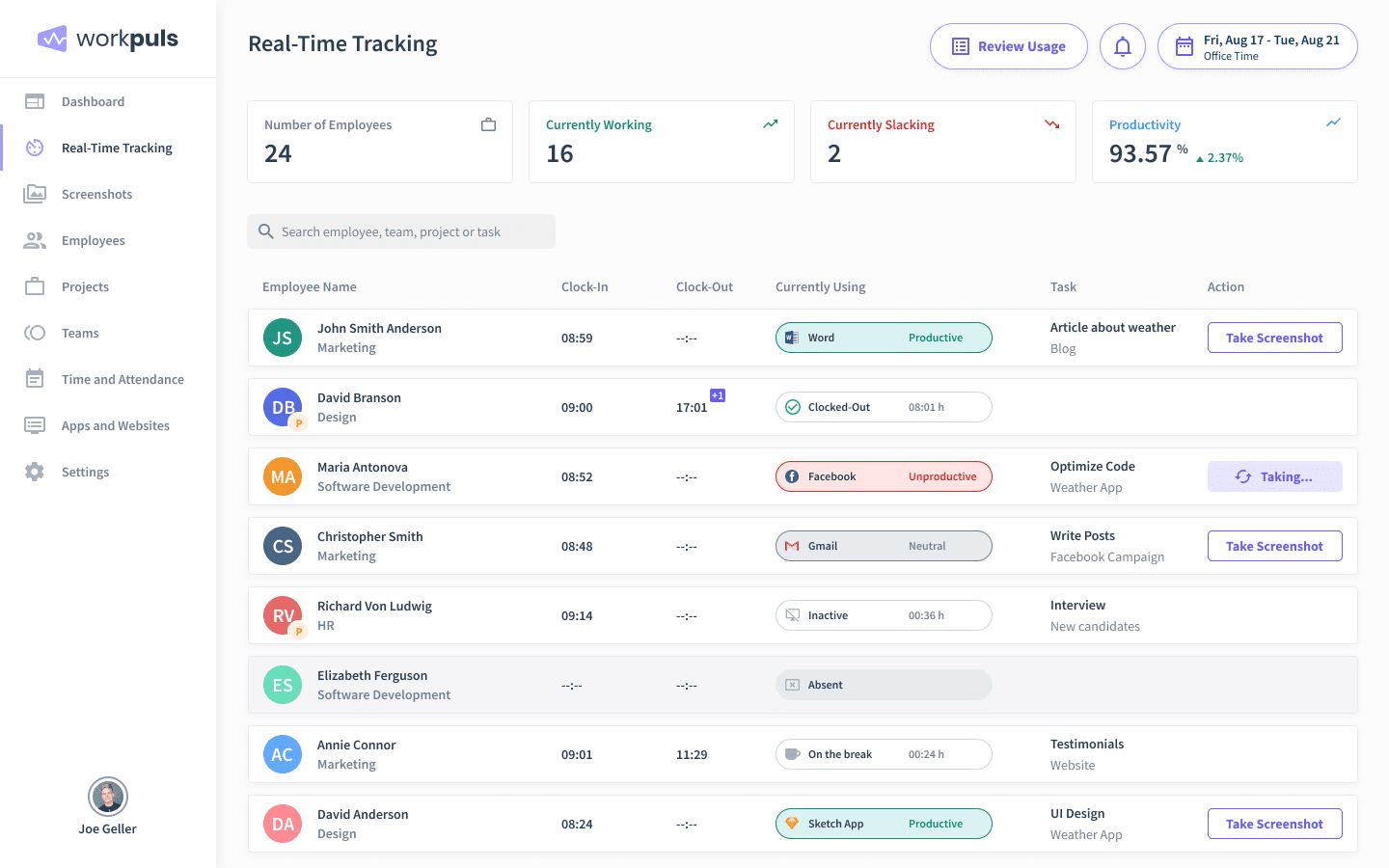
Insightful automates the time capture process. Once the agent is installed on an employee’s computer, it begins tracking time automatically when the device is active during work hours. This eliminates the need for manual timesheets, a process prone to errors and forgotten entries.
The platform doesn’t just log hours; it provides near real-time monitoring of active work. It also supports manual time entries for offline work and traditional clock-in/out functions for shift-based roles.
One of the most consistently praised aspects I found in user reviews is the agent’s performance. According to a Capterra review from 2023, users appreciate that the software is “lightweight” and doesn’t impede computer performance Lightweight and easy to use. This is a critical technical achievement; a monitoring tool that slows down a user’s machine is counterproductive and a non-starter for most IT departments.
What Level of Activity Monitoring is Possible?
The software provides a granular look at employee activity by tracking the applications and websites used throughout the day. This data is categorized and presented in reports that show which tools are being used most, helping managers identify both productive and distracting digital habits.
The most controversial feature, however, is screenshots. While Insightful offers this capability, it’s crucial to understand that it is optional. This feature captures images of an employee’s screen at set intervals.
While the existence of this feature understandably fuels privacy fears, it’s important to approach it with a level head. 💡 Users can address this concern by disabling the feature entirely. Many users appreciate the privacy-centric controls Insightful has built around it, such as the ability to blur screenshots to obscure sensitive information or disable the feature for all or specific users Screenshots Overview and Settings.
While some organizations may require screenshots for strict compliance or security audits, I advise extreme caution. For most teams, the potential damage to trust far outweighs the benefit. The best approach is to disable this feature by default and only enable it in specific, high-risk scenarios with full, transparent employee consent.
How Does Insightful Measure Productivity?
Insightful measures productivity by categorizing applications and websites as “productive,” “unproductive,” or “neutral.” Administrators can customize these labels to fit their team’s specific workflows.
For example, a social media manager’s “productive” apps would include Twitter and LinkedIn, while for a software developer, those same sites might be labeled “unproductive.” This data is then aggregated into a productivity score and detailed reports.
However, this is where human judgment is essential. A G2 review highlights a common concern: “Sometimes it marks the user as idle even if they are working” Insightful Review. This can happen when an employee is reading a document, thinking through a problem, or on a phone call—all legitimate work activities that don’t involve keyboard or mouse input. Furthermore, savvy employees can find ways to “game” the system with mouse jigglers or other tricks.
💡 Because of these limitations, I advise managers to use productivity metrics as a starting point for a conversation, not as a definitive measure of performance. “Active time” does not equal “productive work.”
The most effective way to use this feature is to combine the data with actual performance outcomes and regular, human-to-human check-ins. If the data shows a trend, use it to ask questions, not to make accusations.
Can You Track Time Spent on Specific Projects?
Yes, and in my professional opinion, this is one of Insightful’s strongest and most valuable features. The software allows employees and managers to allocate blocks of time to specific projects, tasks, or clients. This is a game-changer for service-based businesses like marketing agencies, law firms, and consulting companies that need to bill for their time accurately.
By tracking time against projects, you can move beyond simple activity monitoring to true workforce analytics. You can see exactly how many hours are being spent on a particular client, calculate project profitability, and ensure resources are being allocated effectively.
💡 However, some users on G2 have reported that configuring advanced rules for this can be complex It was challenging to make rules. For new administrators, I recommend allocating dedicated time for training on this specific feature set.
Start with one or two simple projects to learn the system’s logic before attempting a full-scale rollout across all your clients and departments. Insightful’s knowledge base and support resources should be your first stop for setup guides and best practices.
“Sometimes it marks the user as idle even if they are working.” — Verified User, via G2
This feedback underscores the need to use the data as a guide, not a gospel.
How Does Insightful Compare to Its Main Competitors?
Insightful competes in a crowded workforce management solution market against giants like Hubstaff, Time Doctor, and ActivTrak. It differentiates itself with a lightweight agent and a strong balance of productivity and project tracking features, while ActivTrak focuses more on analytics and Hubstaff offers a broader suite of tools including GPS tracking.
Making the right choice depends entirely on your specific priorities in this Insightful review. Industry analysts like Gartner track this space closely, highlighting the intense competition. For a deeper, side-by-side comparison, see our full breakdown of Insightful top alternatives and competitors.
| Feature | Insightful | Hubstaff | ActivTrak |
|---|---|---|---|
| Project Tracking | ✅ Strong | ✅ Strong | ⚠️ Limited |
| Screenshot Controls | ✅ Granular (blur/disable) | ✅ Configurable | ✅ Privacy-first |
| GPS Tracking | ❌ Not available | ✅ Yes | ❌ Not available |
| Productivity Coaching | ⚠️ Basic | ⚠️ Basic | ✅ Advanced |
| Privacy Framing | Balanced monitoring | Productivity-focused | Employee-friendly analytics |
| Best For | Project billing & remote SMBs | Field/mobile workforce | Burnout prevention & analytics |
Key Positioning Differences
- Best For: Teams needing a wider range of workforce management tools, including scheduling and GPS tracking for field teams.
- Consider If: Your needs go beyond computer-based activity monitoring to include managing mobile or field service employees. Hubstaff’s broader feature set, including payroll and invoicing, can consolidate several tools into one platform.
- Avoid If: Your team is purely office-based or remote. The additional features like GPS tracking may be unnecessary overhead, and Insightful’s focused approach on computer analytics might be a better fit.
✅ Strengths
- Lightweight agent footprint
- Excellent project-to-time mapping
- Granular screenshot privacy controls
- Better fit for office/remote teams
⚠️ Considerations
- No GPS tracking for field staff
- No native payroll/invoicing module
- Smaller native integration library
Key Positioning Differences
- Best For: Organizations requiring strict, minute-by-minute work verification for contractual billing or compliance.
- Consider If: Your primary goal is to ensure and prove that hours billed were actively worked. Time Doctor’s features, like periodic pop-up alerts to confirm user presence, are designed for maximum time tracking accuracy.
- Avoid If: Your company culture values autonomy. The work verification features can feel intrusive to some teams and may not be necessary if general productivity analysis is the main goal. Insightful’s more passive data collection may be a better cultural fit.
✅ Strengths
- Less intrusive data collection
- Stronger cultural fit for autonomy-driven teams
- Cleaner project-based reporting
⚠️ Considerations
- No pop-up presence verification
- Less suitable for strict contractor billing
- Idle detection can flag false-positives
Key Positioning Differences
- Best For: Companies wanting to focus on high-level productivity analytics and employee well-being with a more “employee-friendly” framing.
- Consider If: Your primary goal is to understand team work habits, prevent burnout, and provide coaching insights without granular time tracking for individual projects. ActivTrak’s positioning as an analytics platform, not a monitoring tool, can make it an easier sell to privacy-conscious teams. This is a point highlighted in the Insightful Employee Monitoring Software Review from Forbes Advisor.
- Avoid If: You need detailed, project-specific time allocation for client billing. While ActivTrak is excellent for analytics, Insightful’s dedicated project tracking features are more robust for service-based businesses that need to tie hours directly to revenue.
✅ Strengths
- Superior project-to-revenue tracking
- Service-business billing accuracy
- More granular individual reporting
⚠️ Considerations
- Less burnout/coaching framing
- Privacy optics tougher to sell internally
- Fewer team-level benchmarking views
Competitor Pricing Comparison (Annual Cost for 50 Users — License Only)
If you’d like to explore even more in-depth comparisons across the productivity software category, our collection of review articles covers most major tools in this space.
Is Insightful Secure and Legally Compliant? (The YMYL Guide)
Insightful claims compliance with security standards like SOC 2 and ISO 27001, which is crucial for handling sensitive employee data Insightful Trust Center. However, as an expert in this field, I must be clear: the legal responsibility for compliant usage, especially under regulations like GDPR which have strict rules regarding employee privacy, rests entirely with you, the employer. This requires careful configuration and transparent internal policies.
It’s also important to address a Critical Data Gap in this analysis. My research could not definitively verify the absence of past security breaches for Insightful or its competitors. Security is a constantly moving target, and for any “Your Money or Your Life” (YMYL) product like this, it must be your number one due diligence priority.
What is Insightful’s Official Security Posture?
According to its security page, Insightful is compliant with SOC 2 and ISO 27001 Insightful Security. These certifications mean they have controls for aspects like access management and data encryption.
💡 However, these are vendor claims. An independent audit is the gold standard. Therefore, my professional recommendation is to make security verification your top priority. A simple, actionable step is to request the full SOC 2 Type II report from Insightful’s sales team during your evaluation. This is a standard and perfectly reasonable request for any B2B SaaS purchase.
How Do You Use Insightful and Comply with GDPR?
For any business operating in the EU or UK, GDPR compliance is non-negotiable. Using employee monitoring software requires you to have a “legal basis” for processing employee data. Vague justifications like “improving productivity” are not enough.
Here is a checklist for GDPR compliance when using a tool like Insightful:
📋 GDPR Compliance Checklist for Employee Monitoring
What About CCPA/CPRA Compliance in the US?
In the United States, employee privacy laws vary by state, but the principles are similar. The California Consumer Privacy Act (CCPA), as amended by the CPRA, is the strictest and a good model to follow.
It requires a “notice at collection,” meaning you must inform your employees, at or before the point of data collection, about the categories of personal information being collected and the purposes for which they will be used.
For a deeper understanding of the complex legal landscape, I recommend consulting resources like FindLaw or speaking with legal counsel specializing in employment law Employee Monitoring and Workplace Privacy.
Important Note for Healthcare Organizations (HIPAA)
As of October 2024, Insightful does not publicly state that it is HIPAA compliant, nor does it offer a Business Associate Agreement (BAA) through its website or Trust Center. For Software and AI buyers in the healthcare industry, this is a critical gap.
Without a signed BAA, this platform cannot be used to monitor any system that may expose Protected Health Information (PHI) Insightful Trust Center.
How to Implement Insightful Ethically & Get Team Buy-In
Ethical implementation of Insightful hinges on three pillars: transparency, consent, and clear policy. From my experience, the key to success is to frame the tool as a way to improve workflows and ensure fairness, not as a method of catching people goofing off.
Gaining team buy-in requires open, honest communication before, during, and after the rollout. If budget approval is also part of your rollout, see the current Insightful voucher code to bring per-seat cost down before you pitch to finance.
Step 1: Define Your ‘Why’ (Before You Buy)
Before you even look at a demo, you need to define your goals. These goals must be positive, business-focused, and defensible. Good examples include:
- “We need to automate our timesheets to save everyone 2 hours a month and ensure accurate payroll.”
- “We want to ensure workload is distributed fairly across the team to prevent burnout.”
- “We need to track project hours accurately so we can bill clients fairly and profitably.”
Bad examples, which lead to a perception of micromanagement, include: “I need to see if my remote employees are really working.” Avoid negative frames like “preventing time theft.”
Step 2: Create a Transparent Monitoring Policy
A formal, written information security policy is non-negotiable. This document, often created with HR and IT, protects both you and your employees. This document should be easy to understand and should explicitly state:
- What is being monitored: (e.g., application usage, websites visited).
- What is NOT being monitored: Crucially, this includes invasive features like keystroke logging (keylogging), personal devices, or any activity outside of work hours.
- When monitoring occurs: (e.g., only during scheduled work hours).
- Who can see the data: (e.g., only the employee’s direct manager and HR).
- How the data will be used: (e.g., for project billing and identifying workflow bottlenecks, NOT for punitive performance management).
Step 3: The Communication Plan (How to Announce It)
🚀 Ethical Rollout Plan: A 5-Step Process
How you announce the tool is just as important as the tool itself. I recommend following these steps for a successful rollout:
- Announce the ‘Why’: Hold a team meeting (in person or via video) and explain the positive business goals you defined in Step 1.
- Demonstrate the Software: Show them the actual dashboard. Be open and honest. Show them exactly what a manager can and cannot see. This demystifies the tool and reduces fear.
- Explain the Privacy Controls: Explicitly point out the privacy-centric features. Show them that non-work hours are not tracked, that screenshots are disabled (if they are), and how the data is anonymized or aggregated where possible.
- Hold an Open Q&A Session: Address every single question and concern openly and honestly. Do not be dismissive. Acknowledge their fears and answer directly.
- Run a Pilot Program: Before rolling it out to the entire company, start with a small group of volunteers. This allows you to work out any kinks and gather feedback from a friendly audience.
The complexity of advanced features can be a source of frustration if not managed. As one user noted, clear documentation is essential for administrators It was challenging to make rules. This highlights the need to not only communicate with employees but also properly train the administrators who will manage the system.
Final Verdict & Recommendations
After a deep-dive analysis and years of experience with tools in this category, I’ve developed a clear perspective on Insightful. It’s a powerful and well-built piece of software, but its success has very little to do with its features and everything to do with your company’s culture and implementation strategy.
What We Love
- Deep Productivity Insights: For data-driven leaders, the tool provides an unparalleled level of detail for optimizing workflows and understanding how work gets done.
- Excellent Project Tracking: This is a standout feature, particularly for service-based businesses. The ability to tie time directly to projects and clients is a major value proposition and, in my opinion, a key reason to choose Insightful.
- Lightweight Performance: The fact that the agent runs in the background without slowing down user machines is a critical technical win that shows respect for the employee experience.
- Configurable Privacy Features: The tools are there to enable ethical monitoring. The ability to disable screenshots, blur sensitive information, and control access gives management the power to implement the software responsibly.
Things to Consider
- 💡 High Cultural Risk: This is the number one factor. If your culture isn’t built on a foundation of trust and transparency, a tool like this can do more harm than good, leading to disengagement, a lower Employee Net Promoter Score (eNPS), and higher talent turnover.
- 💡 Potential for Inaccuracy: The “productivity” data is not infallible. It requires human interpretation and should be used to ask questions, not jump to conclusions.
- 💡 Complex TCO: The real cost is significantly higher than the subscription price. You must budget for the administrative time required to manage the tool effectively.
- 💡 Dated Expert Reviews: With the exception of Forbes, most major tech publications have not reviewed the software recently. This requires you to rely more heavily on recent user feedback for your evaluation.
- 💡 Critical Security Data Gaps: As I mentioned, buyers must perform their own deep due diligence on the product’s security posture by requesting SOC 2 reports and asking tough questions.
Our Final Recommendation
So, should you buy it? My answer for this Insightful review, as with most powerful tools, is: it depends.
You should buy Insightful if:
- You are a data-driven organization with a pre-existing culture of high transparency and mutual accountability.
- You have a critical business need to track time accurately against projects for billing and resource management.
- You are prepared to invest the time and resources to create a clear, fair policy and communicate it openly with your team.
You should consider alternatives if:
- Your goal is perceived as micromanagement, as introducing Insightful will clash with and damage your company culture.
- You operate on a culture of high autonomy where this level of monitoring would fundamentally undermine your core values.
- You need deep, native integrations with a specific tech stack that Insightful doesn’t offer out of the box.
- You do not have the leadership or HR resources to properly manage the system, analyze the data, and handle the communication required for an ethical rollout.
Frequently Asked Questions
Q1: Should my company even use employee monitoring software?
A: This is the most important question to ask. It depends on your goals and culture. You should only consider monitoring software if you have a clear, positive business case, such as automating project billing, improving operational efficiency, or ensuring fair workload distribution.
The technology should be a tool to support a pre-existing culture of transparency and data-driven management. If your primary goal is simply to “watch” people or if you lack the resources to manage the system ethically, the answer is likely no. The potential damage to trust and morale can far outweigh any perceived benefits Employee Monitoring: Is It a Good Idea?.
Q2: How much does Insightful cost in 2026?
A: The “Time and Attendance” plan for Insightful costs $8.00 per user/month when billed annually, but a realistic annual budget for a 50-person team is over $10,000. This Total Cost of Ownership (TCO) is significantly higher than the sticker price because it includes “hidden” administrative costs.
Our analysis shows the software license may only be about 47% of the first-year cost Insightful Official Pricing. The rest comes from the internal cost of managers spending time analyzing reports and the initial training needed to configure the system properly. To trim the license portion, see the current money-saving deal on Insightful.
Q3: Is Insightful worth the money?
A: For data-driven companies that need its project tracking features to measure profitability, Insightful can be worth the investment, but only if implemented ethically. Its ROI is tied directly to using its data to improve processes, not just monitor people.
The value is not in “catching” unproductive employees, but in identifying systemic issues. For example, if data shows the entire engineering team is spending 20% of their time in inefficient workflows, that’s an actionable insight. However, if employee monitoring is implemented poorly, it can crush employee engagement and lead to higher turnover, making the ROI negative The Business Case for Managing Employee Burnout.
Q4: What is the main problem with Insightful?
A: The main problem with Insightful is not technical but ethical; it risks creating a “big brother” culture, causing a fundamental breach of trust that can destroy employee morale if implemented poorly. This is the core conflict buyers face.
While there are minor user-reported issues like occasional idle time inaccuracies, the overwhelming challenge is cultural. The software’s power is also its greatest risk. If employees feel they are being spied on rather than supported, it can lead to disengagement and “gaming the system.” The solution is radical transparency, supported by expert advice How to Monitor Employees — Ethically.
Q5: Should I use Insightful or ActivTrak?
A: It depends on your primary goal. You should use Insightful if you need robust project-based time tracking for billing; choose ActivTrak if your main objective is to analyze productivity trends with a more “employee-friendly” and less intrusive approach.
Insightful is stronger for granular time-tracking and tying hours directly to clients. ActivTrak excels at providing team-level benchmarks and identifying patterns related to burnout or engagement without focusing as heavily on individual minute-by-minute activity What Is Workforce Analytics?.
Q6: Is Insightful legal to use?
A: It depends on your jurisdiction, but generally, yes, Insightful is legal to use in most regions, including the US and EU, provided you follow strict legal requirements for notifying employees and respecting privacy laws.
However, the responsibility for compliance is 100% on you, the employer. In the EU/UK, you must comply with GDPR, which requires a “legitimate interest” and transparency. In the US, laws vary by state, but notice is almost always required. You must have a clear, written policy that employees acknowledge. I strongly recommend consulting with a legal professional Employee Monitoring and Workplace Privacy.
Q7: Can Insightful be detected by employees?
A: Yes, absolutely. By design, Insightful runs as a visible application on an employee’s computer. This is a deliberate choice that supports a transparent implementation.
A “stealth mode” is available on the Enterprise plan, but using it is highly discouraged as it fundamentally undermines trust and can have legal implications Insightful Help Center – Stealth Mode. For standard plans, the visibility reinforces the idea that the tool is for mutual benefit, not secret surveillance. This transparency is a key part of an ethical rollout.
Q8: Can you use Insightful to take screenshots?
A: Yes, the feature exists, but it is optional and I recommend you disable it by default. The risk of creating a surveillance culture is extremely high with screenshots.
Only enable this feature for specific, high-security roles where it is a legal or contractual requirement, and only with the full, informed consent of the employee. Insightful does provide privacy-friendly controls like blurring to obscure sensitive data Screenshots Overview and Settings, but disabling the feature entirely is the safest path for maintaining trust in most organizations.

