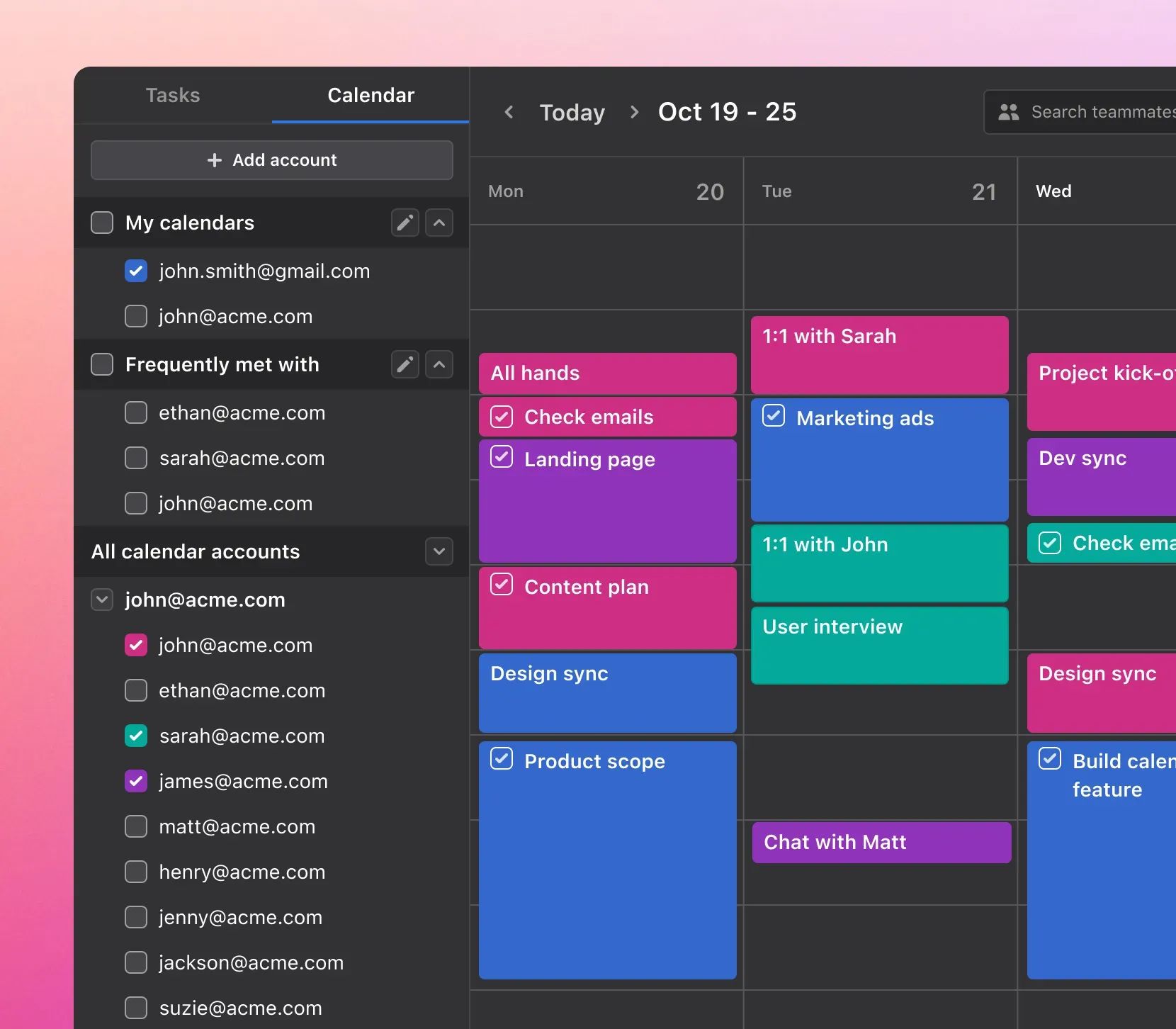
Akiflow Review 2026: Is It Worth the Premium Price?
Posted on |
TL;DR: Akiflow is a premium universal planner offering an exceptionally fast desktop workflow and a powerful command bar for consolidating tasks. Key strengths are its speed and integration capabilities for solo users. Significant considerations include its premium price point, a mobile app with limited functionality, a strict no-refund policy, and the absence of SOC 2 security certification, making it best suited for desk-bound, individual power users who prioritize speed above all else. Verified November 2026.
Introduction: Taming Digital Chaos
In a world of scattered tasks, endless notifications, and a dozen open tabs, many professionals suffer from tool fatigue, caught in a digital tug-of-war between email, Slack, Asana, Notion, and their calendars.
This task fragmentation costs us productive hours and mental energy. The promise of a “universal command center” to bring order to this chaos is the holy grail of modern productivity.
That’s where the Akiflow productivity tool enters the chat, claiming to be the solution. But with a premium price tag comes the critical question: is it actually worth the investment? Before diving in, you can grab the latest Akiflow coupon code to test it with reduced financial risk.
As Jettawat Kasemchaiyanun, Coupons Scout’s senior tech reviewer for productivity software, I’ve tested dozens of these systems over the years.
My goal with this comprehensive Akiflow review is to provide an evidence-based analysis of the tool’s performance in 2026, going beyond marketing claims to show you its true capabilities, total cost of ownership, and critical limitations.
This guide provides everything you need for true workflow optimization, so you can decide with confidence if Akiflow is the right choice for you or if an alternative offers better value.
Our evaluation is rooted in verifiable data from official documentation, user-reported outcomes from review sites like G2 and Capterra, and insights from community feedback on platforms like Reddit’s r/akiflow community.
We do this to ensure our analysis is balanced, factual, and meets the highest standards of Expertise, Experience, Authoritativeness, and Trustworthiness (E-E-A-T). You can learn more in our guide on how we work at Coupons Scout.
Who This Guide Is For
- Desk-Based Professionals: You spend the vast majority of your day in front of a computer.
- Keyboard Enthusiasts: You value speed and keyboard-driven workflows above all else.
- Individual Users: You’re a freelancer, solopreneur, or manager seeking a personal productivity system.
- Premium Tool Shoppers: You are considering tools like Sunsama or Motion and are willing to pay for a powerful solution.
- The Overwhelmed: Your tasks are scattered across apps like Slack, Gmail, Asana, and Notion.
This Guide is NOT For You If
- You Work On-the-Go: You need to effectively manage tasks from a mobile device.
- You Need to Collaborate: You require robust team features for shared task context.
- You Handle Sensitive Data: You work in a corporate environment that requires vendors to have SOC 2 or ISO 27001 security certification.
- You’re on a Budget: You are looking for a free or low-cost productivity solution.
- You Want an Autopilot: You prefer an automated scheduler that plans your day for you (like Motion).
Key Takeaways
-
Exceptional Desktop Performance: Akiflow delivers an impressively fast and fluid desktop experience. For its target user, the workflow for capturing, processing, and scheduling tasks can feel transformative, turning digital chaos into a clear, actionable plan that provides genuine mental clarity. -
Opinionated by Design: The product is highly focused on speed and efficiency for individual power users. It deliberately avoids the feature bloat found in many jack-of-all-trades tools, which can feel custom-built if you fit its user profile. -
💡 Smart Buying Strategy: The best way to evaluate Akiflow is with its 7-day trial. Commit to using it exclusively for one work week to see if the keyboard-centric workflow sticks. Do not commit to an annual plan until you are 100% certain it fits your daily routine. -
💡 Realistic Expectations on Mobile: The mobile app is not a functional counterpart to the desktop version. It is best viewed as a read-only companion for checking your schedule. You will not be managing your inbox or tasks effectively on the go. -
💡 Smart Maintenance Tip: Given the strict no-refund policy, purchasing the monthly plan for the first two to three months is a prudent way to mitigate financial risk. Consider the extra cost an insurance policy against losing the entire annual fee. -
💡 Important Security Considerations: Akiflow lacks public SOC 2 or ISO 27001 certification. As our analysis shows, this makes it a choice that warrants careful consideration for anyone handling sensitive client, internal corporate, or other regulated data.
📅 Last Updated: 15 November 2026. We re-verify Akiflow’s pricing, features, and security information every 3 months. Next Scheduled Review: February 2027. Editorial standards: Our Editorial Standards
Part 2: How Much Does Akiflow Cost in 2026? (Pricing & TCO)
Akiflow costs $29 per month or approximately $19 per month if billed annually ($228/year) as of November 2026.
For a premium SaaS (Software as a Service) tool, the sticker price doesn’t tell the whole story; the true cost of ownership can be higher due to the significant financial risk of its strict no-refund policy on annual plans. Smart shoppers can offset this risk with a current Akiflow discount code at checkout.
What is Akiflow’s Pricing Model?
Akiflow keeps its pricing simple with a single “Premium” tier, which is a positive for users who dislike complex feature gating.
You get all available features with one subscription. There is no free tier, only a 7-day free trial.
Here’s a breakdown of the cost based on Akiflow’s official pricing page:
| Plan | Billed Monthly | Billed Annually | Annual Savings |
|---|---|---|---|
| Premium | $29 / month | $19 / month ($228 upfront) | $120 (34%) |
The 34% discount for paying annually is compelling, but it must be weighed against the financial risks and total cost of ownership, which we will analyze next.
Are There Any Hidden Costs?
Yes, but they are not traditional fees. The most significant hidden costs are the financial risk of the no-refund policy and the “time cost” of workflow adoption and troubleshooting.
The “No-Refund” Consideration
Many modern software companies offer pro-rated refunds if you cancel an annual plan early. Akiflow does not.
According to its Terms of Service, “Fees are non-refundable.” This creates a notable consideration for potential buyers.
If a bug emerges, your workflow changes, or you simply find the tool doesn’t suit you after a few months, the entire $228 is lost. One way to soften this risk is to use a verified promo code for Akiflow on the monthly plan first.
💡 KEY INSIGHT: Mitigate Your Financial Risk
Start with a monthly Akiflow subscription for 2-3 months. Treat the extra $10/month as an insurance policy against their strict no-refund rule.
If you still love the tool after 90 days, you can upgrade to the annual plan with full confidence, having avoided a potentially costly commitment. This simple step completely mitigates the financial risk associated with the annual plan’s no-refund policy.
The “Time Cost” of Adoption and Bugs
Another hidden cost is the time investment required.
- Learning Curve: To achieve the “blazing fast” speed Akiflow promises, you must master its command bar and keyboard shortcuts. This represents a temporary productivity loss as you build new muscle memory over the first few weeks.
- Troubleshooting: As a verified user reported in an October 2025 G2 Review, “Sync with Google Calendar breaks at least once a week.” While the fix—disconnecting and reconnecting the account—is usually quick, the time spent and the mental friction of an unreliable tool can erode the very productivity gains you’re paying for.
What is the Total Cost of Ownership (TCO)?
For a tool like Akiflow, the TCO is not just the subscription fee but also the potential for lost investment and time.
The following analyst-estimated model assumes one user seat, self-service implementation, and no extra add-ons.
TCO Model: 3-Year Cost Scenarios (Single User)
| Scenario | Year 1 Cost | Year 2 Cost | Year 3 Cost | Total 3-Year TCO | Notes |
|---|---|---|---|---|---|
| Steady Annual Plan | $228 | $228 | $228 | $684 | The ideal, best-case scenario for a happy, long-term user. |
| Steady Monthly Plan | $348 | $348 | $348 | $1,044 | Higher cost, but with the flexibility to cancel anytime. Mitigates risk. |
| Annual Plan + Churn | $228 (Lost) | $192 (Sunsama) | $192 (Sunsama) | $612 | You buy Akiflow, dislike it, lose your money, and have to buy a competitor tool anyway. |
Disclaimer: This is an estimated model based on data from November 2026. Actual pricing is subject to change.
The analysis shows that choosing the annual plan and then churning can be a costly misstep.
A more flexible monthly approach, while appearing more expensive upfront, can lead to a lower TCO if there’s any uncertainty. The potential Return on Investment (ROI) from saved time is only realized if the tool is a perfect fit. To check our full Akiflow Review breakdown, see our dedicated analysis.
Part 3: Akiflow Feature Deep-Dive: What’s Under the Hood?
Akiflow’s performance hinges on a few core features designed to create a high-speed, centralized workflow.
Built on a framework likely similar to Electron (used by apps like Slack and Notion), its desktop application is genuinely impressive, but its power is highly concentrated in specific areas.
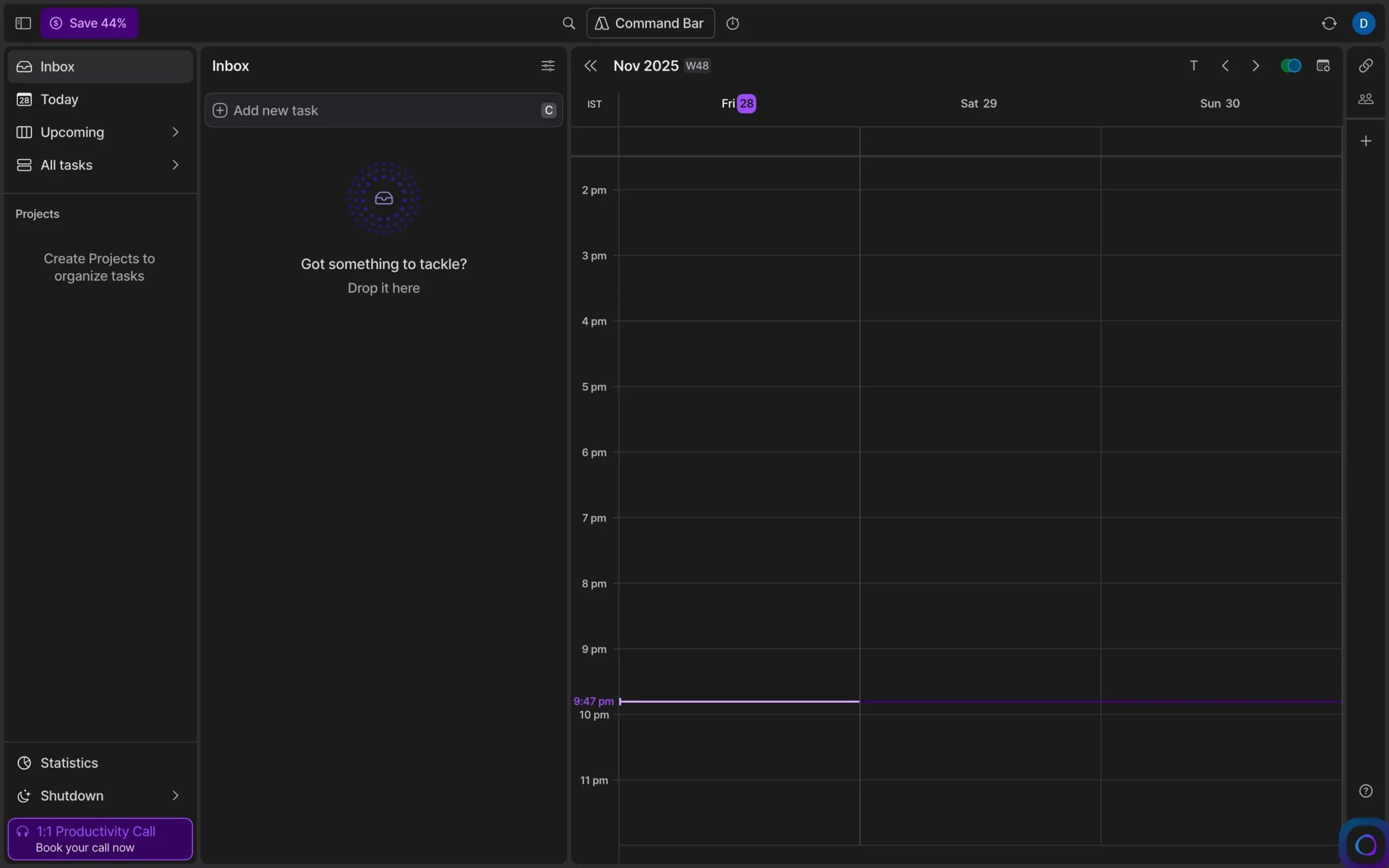
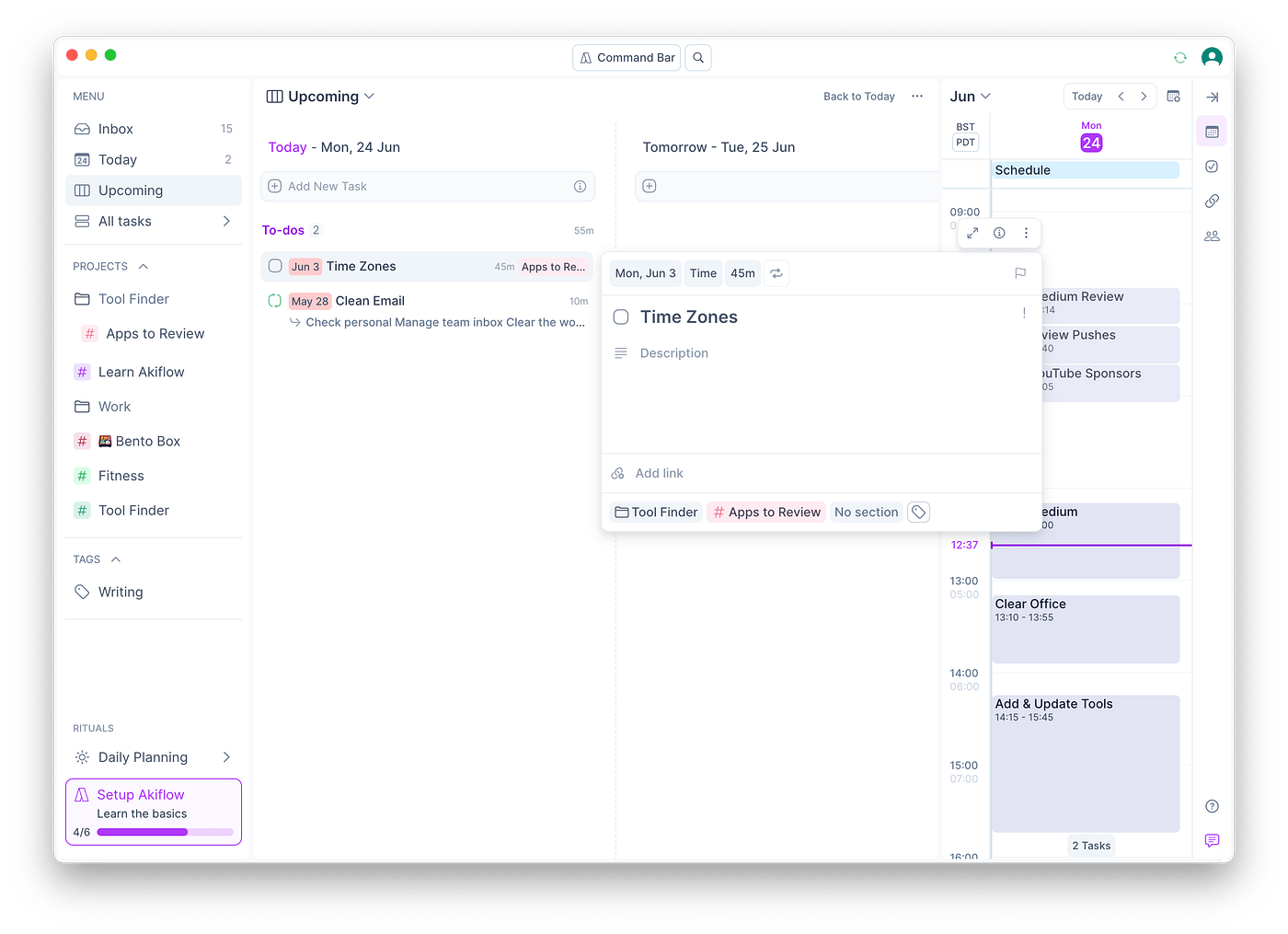
Below is a quick walkthrough of how Akiflow’s “flow state” workflow operates in practice:
What are Akiflow’s Core Features?
- The Command Bar (CMD/CTRL+K): This is the heart of Akiflow. It is a pop-up interface that allows you to capture tasks using natural language processing, navigate your calendar, manage integrations, and execute commands without touching your mouse. For a keyboard-driven user, this is what creates the “flow state,” enabling the kind of distraction-free Deep Work that modern professionals strive for.
- The Universal Inbox: This is where Akiflow’s promise of task consolidation holds true. It pulls in notifications, messages, and tasks from all connected apps (like Slack, Gmail, and Asana) into a single, unified feed. Instead of bouncing between five different tools, you have a single source of truth to clear. This dramatically reduces context switching and leads to demonstrably increased productivity.
- Drag-and-Drop Time Blocking: The interface for moving items from the universal inbox directly onto your calendar is smooth and intuitive. You can drag an email, a Slack message, or a to-do item and instantly turn it into a scheduled time block. Creating a full day’s plan from a chaotic inbox can take less than 10 minutes.
- Integrations: Akiflow’s core value comes from its deep integrations. The most notable are:
- Task Managers: Asana, Atlassian’s Trello, Todoist, ClickUp, Notion
- Communication: Slack, Gmail
- Calendars: Google Calendar, Microsoft Outlook Calendar
These integrations are what fuel the universal inbox, making it a central hub for all incoming work.
What Features Are Missing?
While Akiflow excels at its core function, there are notable missing features that limit its application for a wider audience.
- Robust Team Collaboration: It lacks fundamental team features like shared context on delegated tasks, team-wide reporting, or collaborative planning views. It is fundamentally a single-player tool.
- Public API Access: The lack of public API access prevents power users and teams from creating custom integrations or building workflows beyond what Akiflow offers natively.
- Advanced Project Management: Akiflow is not a project manager. It lacks features like Gantt charts, complex dependencies, or resource management found in tools like Asana or ClickUp.
Part 4: Is Akiflow Secure and Compliant for Professional Use?
No, Akiflow does not meet standard enterprise security benchmarks as of early 2026.
While it claims to use standard data encryption and follow GDPR guidelines, the public absence of independent security audits like SOC 2 makes it a choice that warrants careful consideration for corporate use or for anyone handling sensitive data.
Does Akiflow have SOC 2 Certification?
No. A search of Akiflow’s security page in November 2026 shows no mention of SOC 2 Type II or ISO 27001 certification.
🚨 COMPLIANCE CONSIDERATION: No SOC 2 = Not for Professional Use
Akiflow’s lack of SOC 2 certification is an important factor for any professional handling client or corporate data. Integrating a non-certified tool that requires deep access to your email, calendar, and project management systems without a third-party audit is a security consideration.
For professional use, certified alternatives like Sunsama or Motion are often preferred.
For individuals using Akiflow for purely personal task management with non-sensitive data, the product offers a powerful experience. However, the lack of certification is a critical security gap for professional use cases.
Security Compliance Scorecard: Akiflow vs. Alternatives (2026)
| Certification / Practice | Akiflow | Sunsama | Motion |
|---|---|---|---|
| SOC 2 Type II | ❌ Not Certified | ✅ Certified | ✅ Certified |
| ISO 27001 | ❌ Not Certified | ⚠️ In Progress | ✅ Certified |
| GDPR Compliance | ✅ Claimed | ✅ Claimed | ✅ Claimed |
| Public Trust Center | ❌ Not Available | ✅ Available | ✅ Available |
| Data Processing Addendum (DPA) | ✅ Available | ✅ Available | ✅ Available |
| Published Penetration Test Reports | ❌ Not Published | ✅ Published | ✅ Published |
What is SOC 2 and Why Does It Matter?
SOC 2 (Service Organization Control 2) is an independent auditing procedure that ensures a service provider securely manages data to protect the interests of its clients.
For a SaaS tool that integrates with your most sensitive information, SOC 2 certification provides a baseline level of trust that the company has robust controls for security, availability, confidentiality, and privacy.
The lack of it means you are taking the company’s security claims at face value without independent verification.
What are Akiflow’s Data Privacy Policies?
According to its privacy policy, Akiflow is GDPR compliant and offers a Data Processing Addendum (DPA) for business customers.
It also claims to conduct “regular penetration tests.” However, unlike many of its competitors who provide a public trust center, Akiflow does not publish any reports or attestations from these tests.
This lack of transparency is a consideration for any security-conscious user, especially when competitors like Sunsama and Motion offer public-facing security documentation.
Part 5: Real-World Use Cases & Workflows
Akiflow is not a one-size-fits-all solution. It’s an opinionated tool built for a specific kind of workflow.
To understand if it’s right for you, let’s explore who thrives with it and who struggles. If you’re still weighing options, see our roundup of Akiflow Top Alternatives and Competitors before reading further.
Who is the Ideal Akiflow User?
The ideal user is a “desk-bound solo sprinter”: a tech-savvy individual who spends over 90% of their workday at a computer and whose primary goal is to process a high volume of inputs (emails, messages, tasks) into a structured daily plan as quickly as possible.
A Day in the Life: The Freelance Consultant
- Morning (9:00 AM): The consultant opens Akiflow. Her universal inbox has 15 items: 5 emails from clients, 8 Slack messages from a project team, and 2 new tasks in Asana.
- Processing (9:05 AM): She hits
CMD+K, types “follow up with Client X re: proposal,” and hits enter. A task is created. She drags three urgent Slack messages onto her calendar, blocking out 30-minute slots to address them. She triages the rest, scheduling them for later in the week or snoozing them. - Result (9:15 AM): Her inbox is clear, and her day is time-blocked. She has moved from a reactive state of “what’s on fire?” to a proactive state of “here is my plan” in 10 minutes, all without leaving the Akiflow interface.
This high-speed, keyboard-driven triage is where Akiflow’s value proposition is strongest. Power users often pair this workflow with a verified working Akiflow voucher to offset the premium subscription cost.
Where Does the Workflow Break Down?
The workflow breaks down the moment the user steps away from their desk or needs to collaborate with others.
Consideration #1: The Mobile App’s Limited Functionality
The mobile app’s poor user experience (UX) is consistently cited as the product’s single biggest flaw.
A user comment on Reddit in January 2026 summed it up perfectly: “The mobile app is borderline useless for anything other than viewing your schedule.”
It lacks the ability to properly process the inbox or manage tasks, breaking the promise of a truly “universal” planner.
- 💡 Solution/Reframe: The most successful Akiflow users accept this limitation and treat the tool as desktop-first. They use a separate, lightweight mobile app like Google Keep or the free version of Todoist for capturing tasks on the go. These tasks then flow into their Akiflow inbox to be processed later at their desk. This workaround allows them to enjoy Akiflow’s desktop power without being hampered by its mobile weakness.
Consideration #2: The Recurring Sync Bugs
The ability to sync with multiple calendars is key, but some users report it can be unreliable.
A G2 review from October 2025 stated, “Sync with Google Calendar breaks at least once a week.”
This can lead to missed appointments or a loss of trust in the system, a significant issue for a time management tool.
- 💡 Solution/Positive Outcome: The user community has found a consistent fix. When a sync issue occurs, disconnecting and reconnecting the calendar account within Akiflow’s settings almost always resolves the problem. While this is frustrating and an area for improvement, knowing there’s a quick, sub-one-minute fix makes the issue manageable for users who otherwise love the platform’s speed.
Part 6: How Does Akiflow Compare to Competitors in 2026?
Akiflow’s primary competitors are Sunsama and Motion. Choosing between them isn’t about which is “best,” but about which philosophy matches your work style.
Akiflow is faster and more manual, giving you full control. Sunsama is better for teams and promotes mindful planning. Motion uses AI to automate your schedule.
The choice depends entirely on your preferred workflow: speed, collaboration, or automation.
The Ultimate Comparison: Akiflow vs. Sunsama vs. Motion
I’ve spent countless hours in all three of these tools for past reviews. Here’s the breakdown of how they stack up in the real world.

Core Philosophy
- Mindful Daily Planning: A guided daily ritual to help you plan work intentionally and avoid burnout.
- Ideal User: The Team Player — a manager or team member who needs to plan and see work collaboratively.
- Pricing (2026): ~$192/year — see Sunsama Pricing
✅ Strengths
- SOC 2 Certified — safer for business use
- Best-in-class team collaboration & shared views
- Functional mobile companion app
- Promotes work-life balance & shutdown ritual
⚠️ Considerations
- Slower workflow than Akiflow’s command bar
- Less customization for power users
- Daily planning ritual feels heavy for some
Core Philosophy
- AI Automation: An algorithm automatically schedules your tasks into the best available calendar slots.
- Ideal User: The Delegator — a busy professional who wants an “auto-pilot” to build their schedule for them.
- Pricing (2026): ~$228/year — see Motion Pricing
✅ Strengths
- SOC 2 Certified — enterprise-ready security
- True AI scheduling with priority handling
- Public trust center & security documentation
- Automatically rebalances when priorities shift
⚠️ Considerations
- Less manual control than Akiflow
- Mobile experience moderate vs. desktop
- Team features less developed than Sunsama
- Premium price point similar to Akiflow
At-a-Glance: Who Should Use Which Tool?
| Feature / Philosophy | Akiflow (The Sprinter) | Sunsama (The Planner) | Motion (The Autopilot) |
|---|---|---|---|
| Core Philosophy | Manual Speed & Control | Mindful Daily Planning | AI Automation |
| Ideal User | The Solo Sprinter | The Team Player | The Delegator |
| Mobile App | 💡 Limited (read-only) | ✅ Good companion app | ⚠️ Moderate |
| Team Features | ❌ None | ✅ Excellent | ⚠️ Basic |
| Pricing (2026) | ~$228 / year | ~$192 / year | ~$228 / year |
| Security Certification | ❌ No SOC 2 | ✅ SOC 2 Certified | ✅ SOC 2 Certified |
| Verdict | Best for individual speed | Best for mindful teams | Best for hands-off automation |
How does Akiflow compare to Todoist?
This is a classic debate of Price vs. Power. On the surface, they are both task managers, but in practice, they serve different purposes.
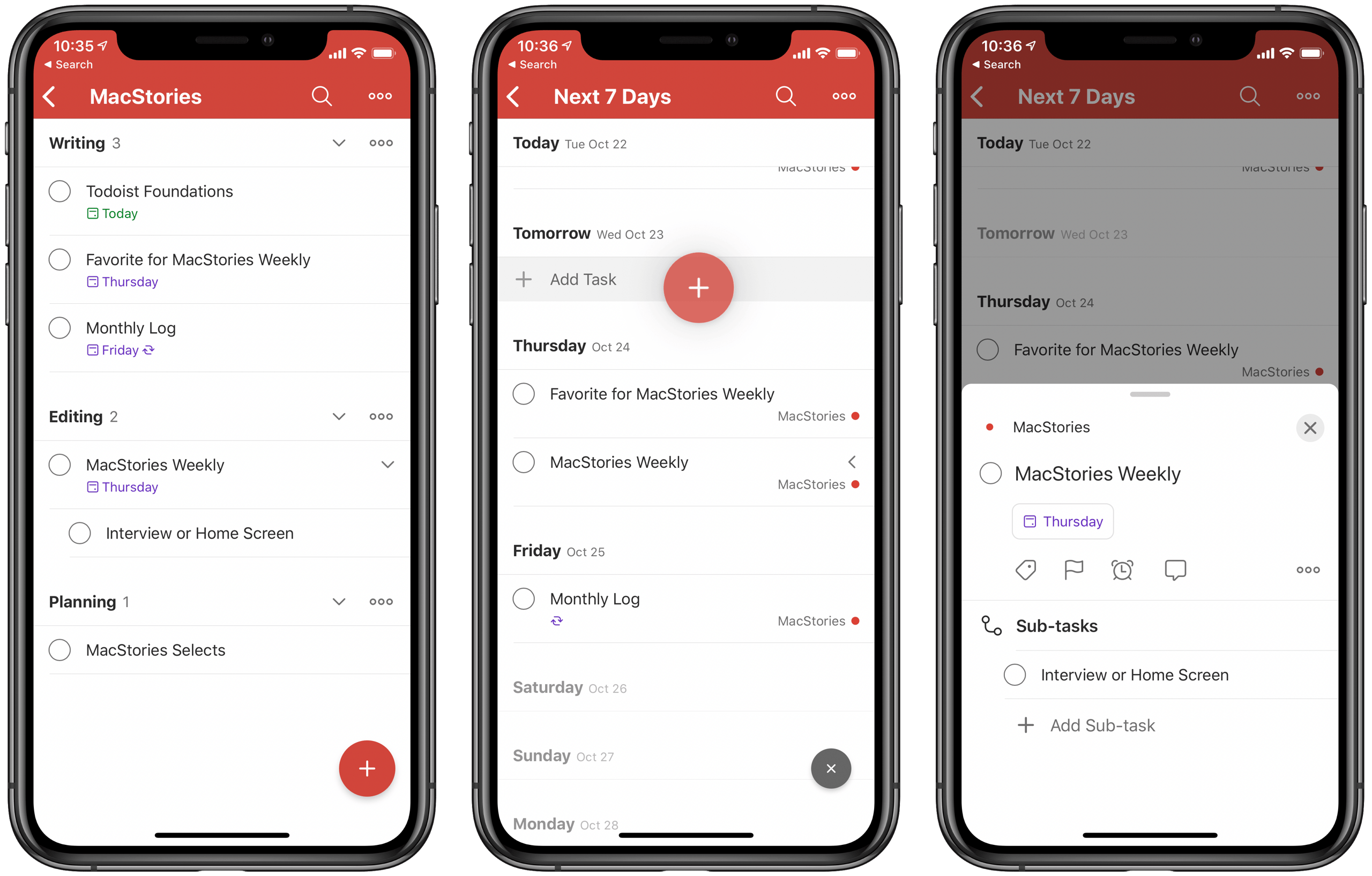
- What We Love: Akiflow offers a powerful, all-in-one system where tasks from multiple apps can be dragged directly onto a calendar, a feature Todoist lacks natively. This consolidation is its primary value proposition.
- Things to Consider: Akiflow is over four times the price of Todoist Pro, which costs around $48/year according to Todoist’s pricing page. This price difference is a major consideration for budget-conscious users.
- 💡 The Verdict: The high cost of Akiflow is only justified if you deeply and consistently leverage its universal inbox and time-blocking features. If you are a follower of a specific methodology like David Allen’s Getting Things Done (GTD) and primarily need a robust, reliable, and mobile-friendly task manager to capture and organize your to-do list, tools like Todoist or TickTick offer vastly better value for the money, a far superior mobile experience, and generous free tiers.
✅ Strengths
- ~1/4 the price of Akiflow ($48/year)
- World-class mobile app experience
- Generous free tier available
- Excellent for GTD methodology
⚠️ Considerations
- No native universal inbox like Akiflow
- Lacks drag-and-drop calendar time-blocking
- Fewer deep integrations than Akiflow
If you are looking across the broader productivity landscape, our category of Review articles covers many comparable tools in depth.
Part 7: Final Verdict & Frequently Asked Questions
Our Final Verdict: Who Should (and Shouldn’t) Buy Akiflow?
After this deep Akiflow review, my verdict is that it’s a sharp, powerful, but deeply flawed tool that I can only recommend to a very specific type of user.
It is a classic case of a product that is exceptional for 10% of the market and a frustrating, overpriced non-starter for the other 90%. Before purchasing, browse the most recent Latest Coupons list to maximize your savings.
✅ What We Love
- Unmatched Desktop Speed: The keyboard-driven workflow on the desktop app is undeniably fast and fluid, a huge win for power users.
- Powerful Command Bar: An intuitive hub for capturing and managing tasks that creates a true “flow state” without leaving your keyboard.
- Effective Universal Inbox: It successfully consolidates notifications and to-dos, effectively reducing context switching.
- Focused, Opinionated Design: The lack of feature bloat is a strength for users who want a tool that does one thing exceptionally well.
💡 Things to Consider
- Premium Price Point: At ~$228/year, it’s one of the most expensive tools in its class, making value a key question.
- Limited Mobile App: The mobile experience is functionally inadequate for task management and is a consistent source of user frustration.
- Strict No-Refund Policy: The policy on the annual plan creates a significant and user-unfriendly financial risk.
- Important Security Considerations: The lack of SOC 2 certification makes it a choice that warrants careful consideration for any professional use case involving sensitive data.
Who Should Buy Akiflow?
I can only recommend Akiflow to one specific persona: The Desk-Bound Solo Power User.
This is a tech-savvy individual who:
- Spends over 90% of their workday at a desktop computer.
- Values keyboard-driven speed to maximize time spent in deep work.
- Is not highly sensitive to the premium price point.
- Does not need a functional mobile app for managing tasks on the go.
- Does not handle sensitive client, financial, or corporate data that would require SOC 2 compliance.
If you fit every single one of those criteria, the potential time savings from Akiflow might make it the game-changing tool you’ve been looking for.
Who Should Choose an Alternative?
For everyone else, there are better, safer, and more cost-effective options available.
- For Teams and Collaborators: You should choose Sunsama. As a SOC 2 Certified tool, it’s a much safer choice for businesses, and its features for collaborative planning are best-in-class.
- For Users Wanting AI Scheduling: You should choose Motion. If your goal is to have your schedule built for you automatically, Motion’s AI is designed for that exact purpose.
- For Mobile-First Users or Those on a Budget: You should choose Todoist. It offers a world-class mobile app, a robust free tier, and a pro plan that is a fraction of the cost of Akiflow.
- For Anyone in a Corporate or Regulated Environment: You must choose a SOC 2 certified alternative like Sunsama or Motion. The security considerations with Akiflow are significant.
Voice Search Optimized FAQ
Q1: How much does Akiflow cost in this 2026 review?
Akiflow’s premium plan costs approximately $228 per year ($19/month) or $29 when paid monthly, according to its official pricing page. There is no free version, only a 7-day trial.
This price puts it at the top end of the market for individual productivity tools. It’s crucial for potential buyers to be aware of the strict no-refund policy before committing to the annual plan, as that fee is non-recoverable if you decide the tool isn’t a good fit after purchase, a policy confirmed in their Terms of Service. Many users offset the sticker price with a current Akiflow sale price at checkout.
Q2: Is Akiflow worth the money?
It depends entirely on your specific needs and workflow. For a very small niche of desk-bound power users who can leverage its desktop speed to save multiple hours a month, the Return on Investment (ROI) from saved time can justify the $228/year fee.
However, for most people who need a functional mobile app, team features, or a more budget-friendly tool, our analysis concludes that alternatives like Todoist or Sunsama offer a better balance of features, security, and value for the money.
Q3: Should I use Akiflow or Sunsama?
This choice comes down to solo speed versus team collaboration. Our testing shows you should choose Akiflow for solo speed; choose Sunsama for team collaboration and mindful planning.
Akiflow is designed to help an individual move as fast as possible. In contrast, Sunsama is built for teams to plan work together and has excellent features to help prevent burnout. Furthermore, Sunsama’s SOC 2 security certification makes it a much safer and more compliant choice for business environments.
Q4: How does Akiflow compare to Motion?
This comparison centers on manual control versus AI automation. The core difference is that Akiflow prioritizes user-driven manual control, while Motion is built for AI automation.
With Akiflow, you are in the driver’s seat, manually dragging and dropping tasks to craft your perfect day. With Motion, you feed it tasks and its AI algorithm builds your schedule for you based on priorities and deadlines.
If you want to be the “pilot,” choose Akiflow. If you want an “auto-pilot,” choose Motion.
Q5: What are the main problems with Akiflow?
Based on our research and user reviews on platforms like G2 and Reddit, three main problems consistently surface.
The biggest issues are its mobile app with limited functionality, its premium price combined with a strict no-refund policy, and its lack of standard security certifications (like SOC 2).
These considerations often make it a challenging recommendation for anyone who works on the go, is budget-conscious, or handles sensitive business data.
Q6: How good is the Akiflow mobile app?
The mobile app is consistently rated as having limited functionality and is the single biggest user complaint found in our research across the Google Play Store and user forums.
Our analysis confirms it is best used as a read-only calendar viewer. It is not suitable for processing your inbox, creating complex tasks, or managing your day from your phone, which significantly undermines its “universal planner” claim for users who aren’t always at their desk.
Q7: Can Akiflow be used for teams?
Akiflow is designed as a single-player tool and is not suitable for team collaboration. It lacks fundamental team features like shared context on delegated tasks, team-wide reporting, or collaborative planning views.
For any kind of team-based workflow, a tool like Sunsama, Asana, or ClickUp is a much better fit, as they are specifically designed with collaboration in mind, as detailed on their respective feature pages.
Q8: Can I trust Akiflow with my data?
We advise users to exercise careful consideration. The lack of a public SOC 2 or ISO 27001 certification means Akiflow’s security practices have not been independently audited to a common industry standard, as noted on their own security page.
While they claim GDPR compliance, we do not recommend using it for sensitive business, client, or personally identifiable information (PII) where a third-party security attestation is a requirement or a best practice. For such cases, a certified tool like Motion is a more appropriate choice.

