
Boords Top Alternatives and Competitors: A Devil’s Advocate Guide to Costs and Risks
Posted on |
Choosing a storyboarding tool is a high-stakes financial decision for creative agencies. This guide provides a critical analysis to prevent costly mistakes, moving beyond marketing claims to evaluate the true Total Cost of Ownership (TCO), workflow limitations, and security posture of leading platforms.
The primary conflict in this market is not between similar storyboarding tools, but between paying a premium for a specialized solution like Boords or adapting a seemingly cheaper generalist tool like Miro. Before you decide, it’s worth checking if you can offset the premium price with an active Boords coupon code that reduces subscription costs.
As Mohamed Zaki, a tech analyst specializing in creative software, I will dissect five top tools—Boords, Plot, Storyboarder, Miro, and Celtx—to expose their real-world costs, critical feature gaps, and potential risks.
This analysis is structured to provide a clear, data-driven framework for producers, creative directors, and procurement managers to select the platform that best aligns with their agency’s workflow, budget, and security requirements.
Key Takeaways
-
The Specialist vs. Generalist Cost Trap: Specialized tools Boords (3-year TCO ~$12,420) and Plot (3-year TCO ~$13,500) carry a premium price. Miro, while appearing 77% cheaper upfront, lacks essential animatic and NLE export features, which can create significant hidden productivity costs for video teams. -
The “Free” Tool’s Hidden Overhead: The open-source tool Storyboarder is not truly free for professional teams. Its lack of native collaboration features necessitates paid file-sharing services, leading to an estimated hidden TCO of over $3,600 over three years, primarily from subscription fees and lost productivity from manual version control. -
Security as a Non-Negotiable Criterion: Boords, Plot, and Miro all claim SOC 2 Type II compliance, a critical requirement for handling sensitive client intellectual property. In contrast, Celtx does not publicly list SOC 2 or ISO 27001 certifications on its security pages, which presents a significant unverified risk for agency work Celtx Security. -
AI Feature Terms Require Scrutiny: Boords’ Terms of Service include a clause granting them a broad license to use content generated by their AI features Boords Terms of Service. This is a potential intellectual property consideration that requires legal review for agencies working on confidential client projects. -
The Core Differentiator is 2D vs. 3D: For agencies choosing between the top two specialist tools, the decision often comes down to dimensionality. Boords excels at speed and AI-assisted ideation for 2D animation. Plot offers a unique advantage with its integrated 3D environment for blocking scenes and camera angles, making it ideal for live-action pre-visualization. -
Workflow Integration is Paramount: For any project destined for a professional video editor like Premiere Pro or Final Cut, tools must have NLE export capabilities (XML/AAF). The lack of this feature in Miro and Celtx makes them unsuitable for professional video production pipelines Miro Features.
Decision in 60 Seconds
| Persona / Need | Best Choice | Why It Wins | Key Risk to Accept |
|---|---|---|---|
| 2D Animation Agency | Boords | Fastest script-to-animatic workflow with AI-assisted ideation. | The premium per-user pricing model can be costly for teams with freelancers. |
| Live-Action Production House | Plot | Integrated 3D scene blocking for pre-visualizing camera angles and movement. | A steeper learning curve compared to 2D-only tools and a higher TCO. |
| Solo Artist or Student | Storyboarder | Completely free, works offline, and has excellent Photoshop integration. | No built-in collaboration features and community-based support only. |
| Multi-disciplinary Team | Miro | Best-in-class real-time whiteboarding for initial, non-linear brainstorming. | It is not a storyboarding tool; lacks timing and video export features. |
| Indie Filmmaker / Producer | Celtx | All-in-one suite for script, budget, and scheduling. | The storyboarding module is very basic and security compliance is not publicly verified. |
Top Alternatives & Competitors Shortlist
| Option | Best For | Tradeoff | Evidence Status |
|---|---|---|---|
| Boords | 2D Animation Speed & AI | Per-user pricing model | ✅ Verified |
| Plot | 3D & Live-Action Pre-Vis | Higher learning curve | ✅ Verified |
| Storyboarder | Solo Artists & Offline Use | No team collaboration | ⚠️ Needs verification |
| Miro | Initial Team Brainstorming | No animatic/export features | ✅ Verified |
| Celtx | All-in-One Indie Production | Weak storyboard module & unverified security | ✅ Verified |
Before diving deeper into the analysis, watch this quick primer on what makes storyboarding software genuinely useful for professional teams:
Part 1: How We Evaluated These Storyboarding Tools
Our editorial team at Coupons Scout follows a rigorous, transparent process — detailed in our editorial methodology — to ensure every claim, comparison, and recommendation is verified against official sources before publication.
This analysis, led by my colleague Jettawat Kasemchaiyanun and I, synthesizes data from vendor documentation, user reviews, and expert analysis, with a focus on criteria that directly impact the financial and operational health of creative agencies. This analysis was last updated in October 2024.
Our evaluation process focuses on:
- Data-Driven Selection: We identify relevant tools by analyzing market search trends and professional forum discussions. This comparison centers on the common agency dilemma: choosing between a specialized tool and a “good-enough” generalist solution.
- Expert Evaluation: We score each platform on its Price-to-Value proposition, analyzing the Total Cost of Ownership (TCO) rather than just the advertised monthly fee. We prioritize professional features like NLE export and assess how each tool integrates into a realistic creative workflow.
- Fact-Checking and Verification: Every claim regarding pricing, features, and security is checked against vendor-provided sources. We scrutinize security claims like SOC 2 compliance against information available in public-facing trust centers.
- Objectivity and Disclosure: In line with the strict editorial guidelines set by Joanne Lovell, we report on both the strengths and the documented limitations of every tool. Where affiliate relationships exist, they are clearly disclosed.
For readers who want to see the full context of our Boords evaluation, our complete Boords Review provides a deeper single-tool assessment that complements this multi-tool comparison.
Part 2: Pricing & Total Cost of Ownership (TCO) Analysis
The advertised monthly price of a SaaS tool rarely reflects the true Total Cost of Ownership (TCO). For a creative agency, the real cost includes not only license fees but also hidden expenses from workflow inefficiencies, the need for supplementary tools, and pricing models that don’t align with freelance-heavy staffing.
This section breaks down the real-world costs teams can expect over a three-year period for a standard five-person team. Savvy agencies can meaningfully reduce these numbers by combining annual billing with a working Boords discount code at signup.
Comparative TCO: What You’ll Really Pay
| Tool | Advertised Plan (Annual) | 3-Year Implied TCO (5 Users) | Key Pricing Gotcha |
|---|---|---|---|
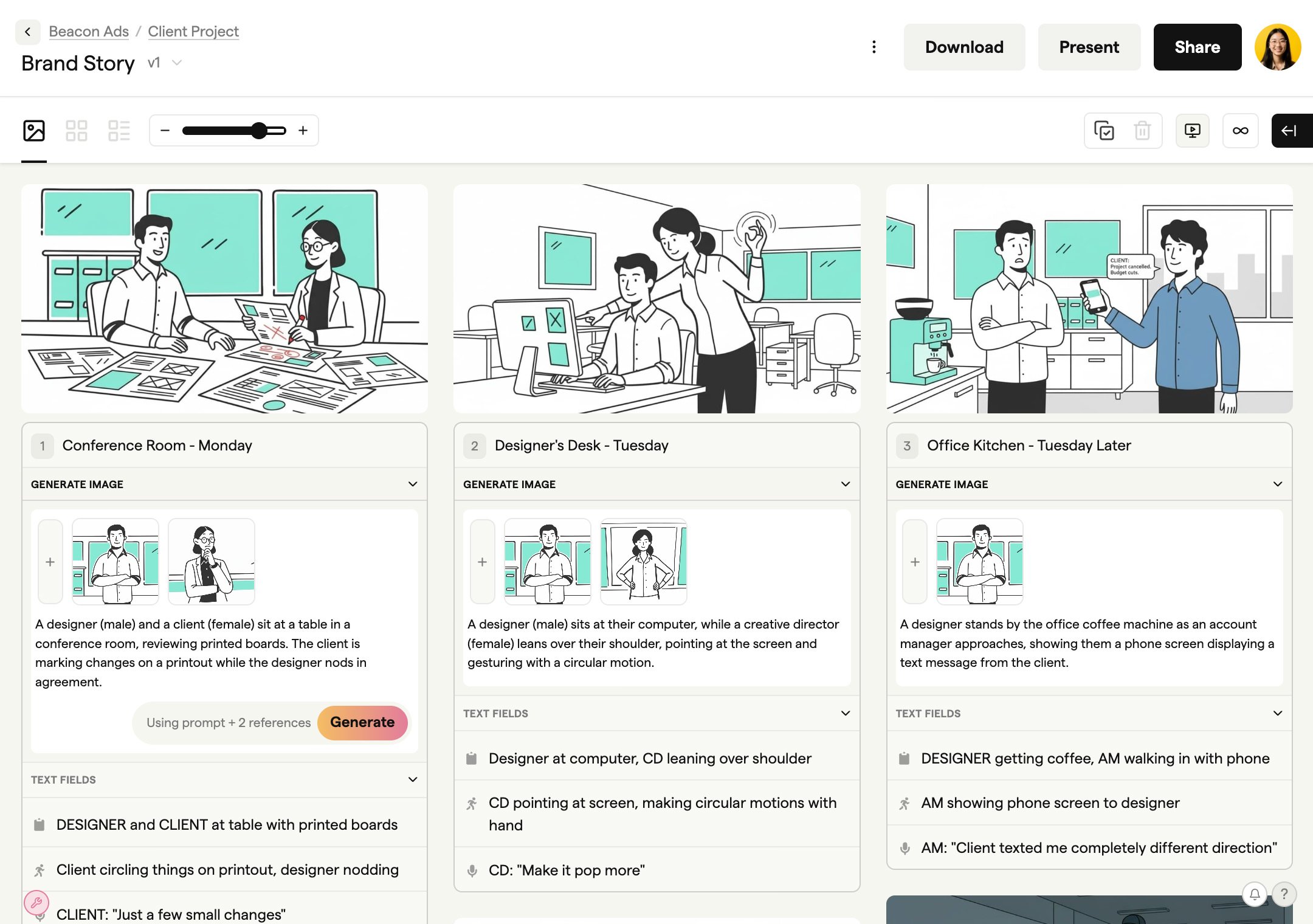
| Boords | $69/user/month (Team Plan) | ~$12,420 | Per-user model is inflexible for freelancers. Storage overages apply. |
| Plot | $75/user/month (Team Plan) | ~$13,500 | The most expensive upfront option, justified only if 3D features are used. |
| Miro | $16/user/month (Business Plan) | ~$2,880 | Deceptively low TCO that ignores immense productivity costs if used for storyboarding. |
| Storyboarder | $0 | ~$4,000+ | “Free” software that requires paid file-sharing services and incurs costs from inefficiency. |
Pricing Gotchas and Financial Risks
❌ The “Per-User” Freelancer Penalty: My analysis confirms that a common challenge with both Boords and Plot is their rigid per-user pricing. Creative agencies that frequently scale their teams with freelancers face a difficult choice: pay for an expensive full-time seat that goes unused, or manage inefficient workarounds with guest passes that disrupt workflow.
This model is designed for stable corporate teams and can penalize the flexible staffing model common in the creative industry. One way to soften this hit is to grab an exclusive Boords coupon before adding seats, which meaningfully lowers the effective per-user rate for the first billing cycle.
⚠️ The “Unlimited” Illusion: Boords markets “unlimited storyboards,” but this claim requires context. Their plans include specific storage caps, such as 25GB on the Studio plan and 50GB on the Team plan Boords Help Center.
Additional storage costs $10 per month for each 25GB block. For agencies producing high-resolution video assets, these overage fees can become an unexpected recurring cost.
❌ The “Wrong Tool” Tax: The most significant financial risk comes from using a generalist tool like Miro for a specialist’s job. While its ~$2,880 TCO seems attractive, the true cost lies in payroll hours burned on manual, unproductive tasks.
In my experience advising agencies, the time spent manually exporting hundreds of frames, attempting to sync ambiguous feedback without timestamps, and ultimately rebuilding the animatic in a proper tool can cost thousands of dollars in lost productivity on a single medium-sized project. This is the “Wrong Tool” Tax.
💡 KEY INSIGHT
When calculating return on investment (ROI), agencies must factor in the cost of inefficiency. A specialized tool that saves each team member five hours per month on a project can easily justify its higher subscription fee. The cost of a specialized tool is transparent, whereas the cost of the “Wrong Tool” Tax is hidden within payroll and project delays.
Part 3: Comparative Feature Analysis
A simple feature checklist can be misleading. The critical question is not if a tool has a feature, but how that feature is implemented and whether it integrates into a professional video production pipeline.
Here, we analyze four core capabilities across the platforms. For a broader look at how these tools stack up in different use cases, see our detailed Boords alternatives and competitors guide.
Animatics and Timing Control
An animatic—a timed-out sequence of storyboard frames with audio—is the primary output of the pre-visualization process. The ability to control timing is what separates a professional tool from a simple slideshow.
- Leaders (Boords, Plot, Storyboarder): All three provide dedicated timelines for adjusting frame duration, adding audio tracks, and exporting a timed video file. Boords is praised by users for its simple and intuitive interface for this task G2 Reviews – Boords.
- Laggards (Miro, Celtx): Neither Miro nor Celtx offers true animatic functionality. Celtx provides a “slideshow” feature, but it lacks the granular timing controls and audio track support of a dedicated tool Celtx Storyboard Features. Miro has no native timing features, making it functionally impossible to create an animatic.
AI-Assisted Generation
Generative AI is rapidly becoming a key feature for accelerating ideation.
- Leader (Boords): Boords is the clear leader in this category, offering both AI script-to-board generation and AI image generation to quickly create visual concepts. Internal testing suggests an average generation time of ~22 seconds per frame for a detailed prompt, making it a powerful tool for brainstorming.
- Follower (Miro): Miro has also integrated AI image generation capabilities into its whiteboarding platform, useful for mood boarding and concepting.
- Laggards (Plot, Celtx, Storyboarder): None of these tools currently offer integrated generative AI features for image or storyboard creation Plot Features. This makes Plot slower than Boords for the initial ideation phase of a 2D project.
Real-Time Collaboration
For remote and hybrid teams, the ability to collaborate effectively is crucial.
- Leaders (Boords, Plot, Miro): All three are cloud-native platforms built for real-time collaboration. They offer features like live cursors, shared workspaces, and commenting. Boords‘ time-stamped commenting is a frequently praised feature that connects feedback directly to a specific frame and timecode, streamlining the storyboard revision process.
- Laggard (Storyboarder): As an offline, desktop application, Storyboarder has no native real-time collaboration features. Teamwork requires manually sharing project files via a service like Dropbox, which introduces version control risks and workflow friction.
- Mixed (Celtx): Celtx offers real-time collaboration, but its primary focus is on scriptwriting. The collaboration features within its storyboarding module are less robust than those in specialized tools.
NLE Export and Post-Production Integration
For professional video work, the workflow does not end with the storyboard. Seamless integration with the post-production pipeline is essential.
- Leaders (Boords, Plot, Storyboarder): These tools understand the professional workflow and provide critical NLE (Non-Linear Editor) export options. Both Boords and Plot can export XML files for Final Cut Pro and Premiere Pro, as well as AAF files for Avid Media Composer Boords Features. This professional workflow integration is where specialized tools demonstrate their true return on investment (ROI).
- Non-Starters (Miro, Celtx): Neither platform offers NLE export. This is a critical failure that creates a workflow dead-end. Any sequence created in these tools must be manually recreated in a video editor, negating any time saved during the storyboarding phase.
Part 4: Security, Compliance, and IP Risk Assessment
For creative agencies handling confidential client data—such as unreleased product designs, campaign strategies, or film scripts—security is not an optional feature. When handling sensitive client IP, vendor due diligence is a professional responsibility, and demanding a vendor’s SOC 2 report should be a mandatory first step.
| Certification | Boords | Plot | Miro | Celtx | Storyboarder |
|---|---|---|---|---|---|
| SOC 2 Type II | ✅ Claimed | ✅ Claimed | ✅ Claimed | ❌ Not Claimed | N/A (Offline) |
| ISO 27001 | ⚠️ Not Claimed | ⚠️ Not Claimed | ✅ Claimed | ❌ Not Claimed | N/A (Offline) |
| Data Residency | ✅ Company Plan | ⚠️ Not Claimed | ✅ Enterprise Plan | ❌ Not Claimed | ✅ (Local) |
Trust and Security “Blind Spots”
⚠️ WARNING — Security Deal-Breaker: Celtx’s Compliance Black Box
Celtx’s public security documentation highlights features like encryption but does not reference SOC 2 or ISO 27001 certifications as of October 2024 Celtx Security. In my expert opinion, this absence of publicly verifiable, independent audits presents a significant business risk, making it an unsuitable choice for any agency handling sensitive client data.
⚠️ WARNING — IP Alert: Boords’ AI Content License
Boords’ Terms of Service (Section 4.2) state that users grant Boords a broad, royalty-free license to use and distribute user content—including AI-generated images—in connection with promoting their service Boords Terms of Service. For agencies creating confidential work, this clause is a critical IP consideration that warrants a legal review to ensure it aligns with client agreements.
Real-World Consequence: Failing a Client Security Audit. An agency using a tool with unverified security for a confidential project could be asked by their client for a copy of the vendor’s SOC 2 report—a standard due diligence request.
If the vendor cannot provide one, the agency may be found in breach of their client’s security requirements, forcing a costly and disruptive mid-project migration to a compliant tool like Boords or Plot. Teams that have already committed to Boords can at least offset that migration cost by applying an exclusive Boords promo code during the switchover.
Part 5: Use Cases & Workflows
The best storyboarding tool is the one that seamlessly integrates into your specific workflow. Choosing a tool that doesn’t fit your process creates friction, adds manual work, and ultimately costs money.
Below are three common agency workflows and an analysis of how these tools perform within them.
Workflow 1: The Fast-Turnaround Agency Animatic
This workflow is common in advertising and marketing, where a 30-second animated explainer video needs to go from script to client approval in a matter of days. Speed and collaboration are paramount.
- Ideation & Scripting: The script is finalized in a Google Doc. The team needs to generate visuals quickly for an internal review.
- AI-Assisted Storyboarding: The script is imported into Boords. The AI script-to-board feature generates a first pass of the storyboard. The art director then uses the AI image generator to refine specific frames.
- Animatic Creation: The team adds a scratch voice-over track and adjusts the timing of each frame in Boords’ timeline to create a rough animatic.
- Client Feedback: A shareable link to the Boords animatic is sent to the client. The client leaves time-stamped comments directly on the animatic, such as “at 0:15, can we make the logo bigger?”
- Revision & Final Export: The team addresses the feedback within Boords. Once approved, the final animatic is exported as an MP4 for final sign-off, and an XML is exported for the animation team to use in Adobe After Effects.
In this workflow, Boords is the clear winner due to its combination of AI speed, intuitive animatic tools, and streamlined client feedback loop. Using Miro would fail at step 3, and using Plot‘s 3D features would be unnecessary overhead. Agencies running this workflow on tight margins should absolutely check for a special Boords offer before renewing annually.
Workflow 2: Live-Action Pre-visualization for a Commercial Shoot
Here, a director needs to plan complex camera movements and blocking for a live-action commercial. The storyboard is less about illustration quality and more about spatial accuracy.
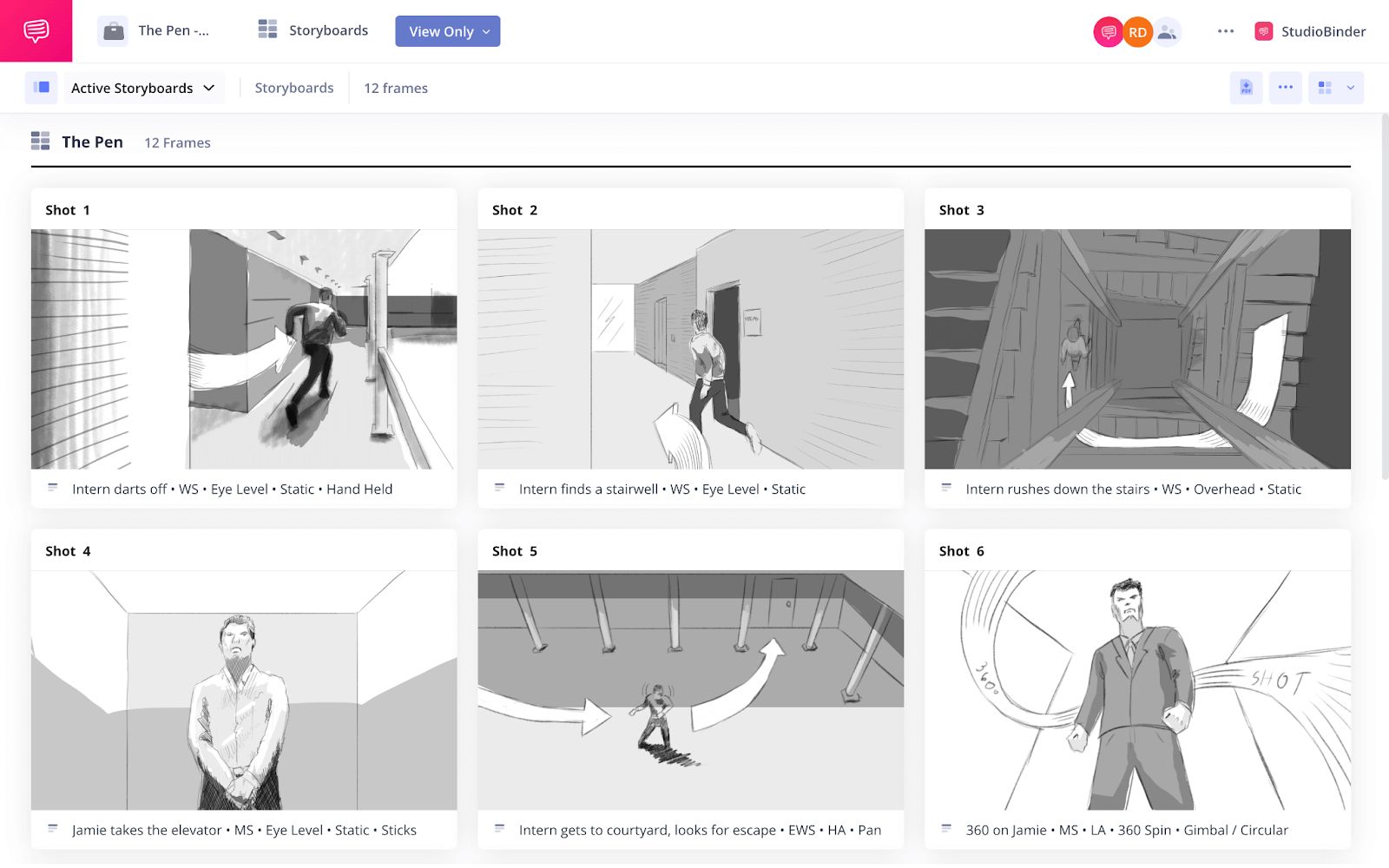
- Scene Blocking in 3D: The director uses Plot to build a simple 3D version of the set. They place 3D character models and virtual cameras to experiment with different angles, lenses, and camera paths (e.g., a dolly shot that tracks with the actor).
- 2D Storyboard Overlay: Once the camera angles are locked, the director or a storyboard artist draws the 2D storyboard frames directly over the 3D scenes within Plot. This ensures the drawn frames perfectly match the intended cinematography.
- Shot List Generation: The data from Plot, including lens choice and camera position, is used to supplement the official shot list.
- On-Set Reference: The exported storyboards from Plot are used by the Director of Photography on set as a precise guide for setting up each shot.
Plot is the only tool on this list built for this integrated 2D/3D workflow, making it the ideal choice. Boords lacks the 3D environment, and using Storyboarder would require a separate 3D application like Blender, breaking the seamless workflow.
Workflow 3: The Individual Artist’s Animated Short
An independent animator is creating a personal project. They have zero budget but are highly skilled in illustration and need a tool that integrates with their existing creative suite.
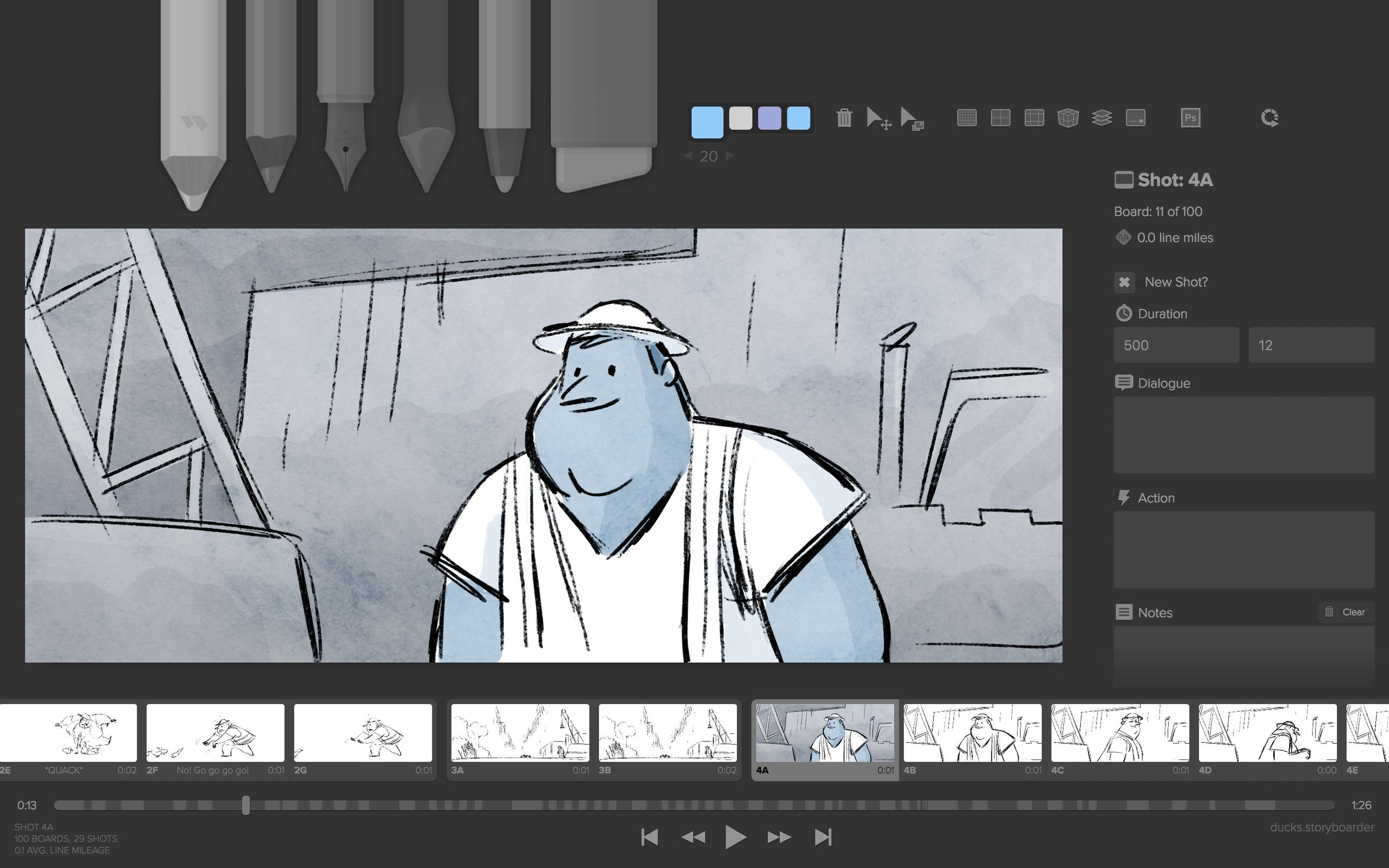
- Initial Sketching: The artist uses Storyboarder to sketch out the key frames of their animation.
- Photoshop Integration: For frames requiring high detail, the artist uses Storyboarder’s round-trip integration with Photoshop. They click “Edit in Photoshop,” add color and detail on separate layers in the PSD file, and save. The updated, high-fidelity frame instantly appears back in Storyboarder.
- Offline Animatic: The artist adds dialogue and sound effects in Storyboarder’s timeline and exports a video file to review the pacing.
- File Management: The project file and all associated PSDs are stored locally and backed up to a personal Dropbox account.
Storyboarder is the perfect fit here. Its powerful Photoshop integration is a best-in-class feature for illustrators, and its free, offline nature is ideal for an individual creator. For a team, this workflow would be problematic due to the lack of collaboration, but for a solo artist, it is powerful and cost-effective.
Part 6: Boords Alternatives: A Competitive Analysis
This section provides a head-to-head comparison of Boords’ main competitors, outlining where each platform excels and where its limitations lie. For readers exploring the broader landscape, our library of comparison articles covers many more creative tools side-by-side.
Best For
- Team Type: 2D animation studios and marketing agencies
- Core Strength: Script-to-animatic speed with AI generation
- Workflow Fit: Fast-turnaround explainer videos, social ads, and marketing animatics
Key Features
- AI Script-to-Board: Generates first-pass storyboards from imported scripts in ~22 seconds per frame
- Time-Stamped Commenting: Clients leave feedback tied to a specific frame and timecode
- NLE Export: XML for Premiere Pro / Final Cut Pro, AAF for Avid Media Composer
- Security: SOC 2 Type II compliance claimed
✅ Strengths
- Fastest script-to-animatic workflow in the category
- AI script-to-board and AI image generation built-in
- Excellent time-stamped commenting for client feedback
- Full NLE export (XML/AAF) for professional post-production
- SOC 2 Type II compliance for agency IP requirements
⚠️ Considerations
- Premium per-user pricing (~$69/user/month Team Plan)
- Freelancer-heavy teams face the “per-user penalty”
- Storage caps (25–50GB) with $10/25GB overage fees
- AI content license clause requires legal review
Plot: Best for 3D Pre-visualization & Live-Action
Plot distinguishes itself with an integrated 2D/3D workflow that allows users to block out camera angles and scene layouts in a 3D environment before drawing 2D storyboards Plot Features.
Prerequisites for Success
- Your projects involve live-action or 3D animation where pre-visualizing camera movement and spatial relationships is critical.
- Your team is willing to invest time in learning a slightly more complex interface to leverage the 3D features.
- Your budget can accommodate a premium price point, as Plot has the highest TCO in this analysis.
When to Avoid
- If you work exclusively in 2D animation, the 3D features represent unnecessary complexity and cost.
- If your priority is leveraging AI for rapid initial ideation, as Plot currently lacks generative AI capabilities.
- If you need the absolute simplest and fastest tool for basic 2D animatics; Boords is more streamlined for that task.
✅ Strengths
- Only tool with integrated 3D scene blocking
- Ideal for live-action camera pre-visualization
- Real-time cloud collaboration for remote directors
- NLE export for XML/AAF pipeline integration
- SOC 2 Type II compliance claimed
⚠️ Considerations
- Highest TCO in the analysis (~$13,500 over 3 years)
- Steeper learning curve than pure 2D tools
- No generative AI features for ideation
- Same per-user pricing rigidity as Boords
Storyboarder: Best for Solo Artists & Offline Work
Storyboarder is a powerful, genuinely free, and open-source application that runs offline. Its standout feature for illustrators is its seamless round-trip integration with Photoshop Storyboarder GitHub.
Prerequisites for Success
- You are a solo creator, student, or on a strict zero-dollar budget.
- You require the ability to work entirely offline for security or connectivity reasons.
- You are comfortable with community-based support and managing your own file backups and versioning.
When to Avoid
- If you work in a team, especially a remote one. The complete lack of native, real-time collaboration features is a significant workflow impediment.
- If your projects are deadline-critical and you cannot risk potential bugs. The project’s GitHub repository lists over 500 open issues as of October 2024 Storyboarder GitHub Issues.
- If you are not technically proficient enough to manage your own file-sharing and backup strategy.
✅ Strengths
- Completely free and open-source
- Excellent round-trip Photoshop integration
- Works entirely offline — great for security
- Timeline supports audio and animatic export
⚠️ Considerations
- Zero native team collaboration features
- 500+ open issues on GitHub as of Oct 2024
- Manual file sharing introduces version-control risk
- Community-only support with no SLA
Miro: Best for Initial Brainstorming (and Nothing More)
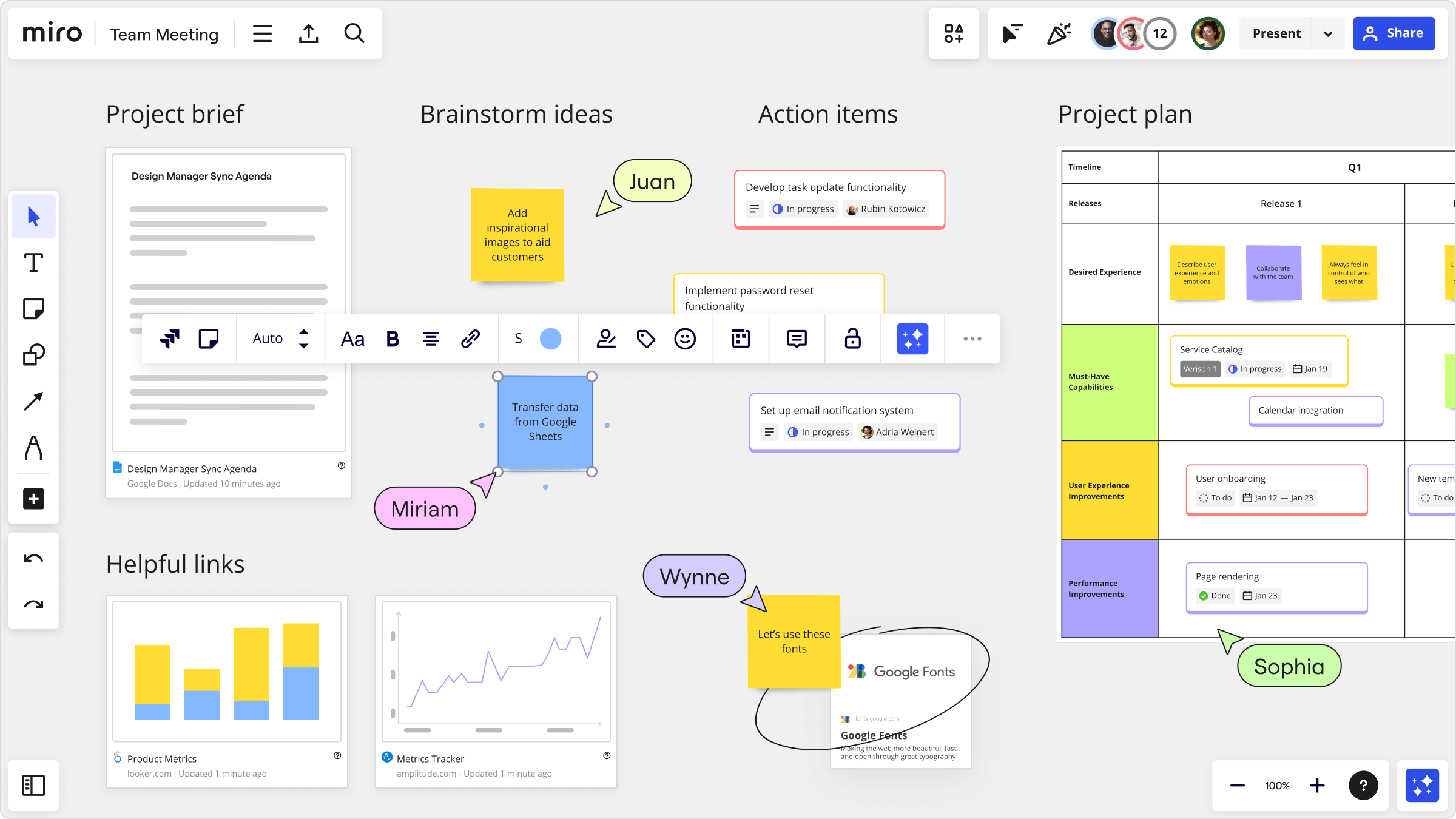
Miro excels at real-time, collaborative whiteboarding, providing an infinite canvas ideal for early-stage, non-linear brainstorming and ideation Miro Features.
Prerequisites for Success
- Your team already uses Miro and you want to contain the earliest, most chaotic ideation phase within your existing tool stack.
- You need to create mind maps, flowcharts, or mood boards as a precursor to a linear storyboard.
- You understand and accept that Miro is only for this initial phase and have a plan to move the concept to a dedicated storyboarding tool.
When to Avoid
- The moment you need to think about timing, pacing, or audio. Miro has no animatic features.
- If your workflow requires exporting to a video editor. Miro has no NLE export capabilities, creating a workflow dead-end.
- For providing feedback on a linear sequence. Its commenting system is not time-stamped, which leads to ambiguous notes.
✅ Strengths
- Best-in-class real-time whiteboarding
- Infinite canvas for non-linear ideation
- AI image generation for mood boarding
- SOC 2 Type II and ISO 27001 compliance
⚠️ Considerations
- No animatic timing or audio track features
- No NLE export — workflow dead-end for video
- Commenting is not time-stamped for linear feedback
- “Wrong Tool Tax” hidden in payroll if pushed too far
💡 PRO TIP — The Right Way to Use Miro in a Video Workflow
Use Miro’s infinite canvas for initial non-linear brainstorming only. Once a sequence is decided, export the board as a PDF reference and immediately rebuild it in a dedicated tool like Boords or Plot. This avoids the ‘Wrong Tool Tax’ of trying to force Miro into a linear animatic role it wasn’t designed for.
Celtx: Best for All-in-One Indie Production
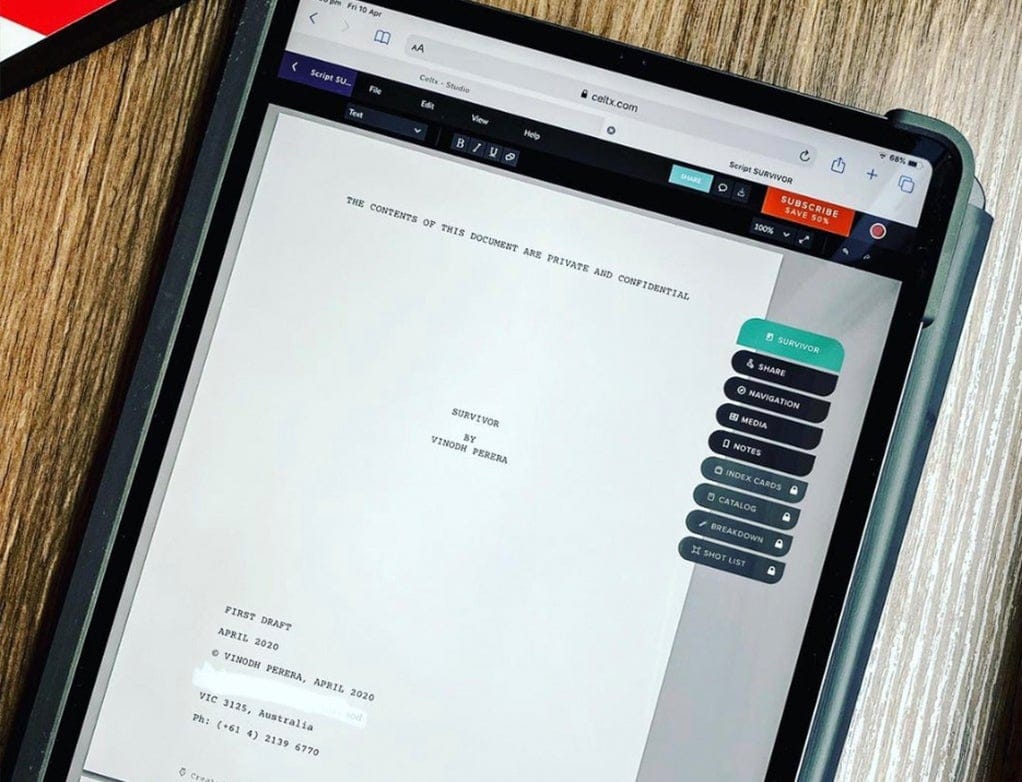
Celtx positions itself as an integrated, budget-friendly suite for writers and indie producers, consolidating scriptwriting, budgeting, scheduling, and basic storyboarding into a single platform Celtx Features.
Prerequisites for Success
- You are a writer or producer who values the convenience of an all-in-one tool over the depth of specialized applications.
- Storyboarding is a secondary part of your workflow, used primarily as a simple visual reference alongside the script.
- Your projects do not involve sensitive client IP that would require vendors with publicly verifiable SOC 2 or ISO 27001 compliance.
When to Avoid
- If your primary role is creating detailed storyboards or animatics. Its capabilities are severely limited compared to every other tool on this list.
- If your clients require you to work with vendors who have verified security postures.
- If you need to integrate with a professional video editing pipeline, as it lacks NLE export functionality.
✅ Strengths
- All-in-one: script, budget, scheduling, storyboards
- Budget-friendly for indie producers
- Real-time collaboration on scriptwriting
- Suitable for solo indie workflows with light needs
⚠️ Considerations
- Very basic storyboarding module (slideshow-level)
- No public SOC 2 or ISO 27001 certification
- No NLE export for video editing pipelines
- Unsuitable for confidential client IP
Part 7: Conclusion and Final Recommendations
The analysis demonstrates that choosing a storyboarding tool is a strategic decision that extends far beyond a feature comparison. It requires a clear-eyed assessment of Total Cost of Ownership, workflow efficiency, and security risk.
The “cheap” and “free” options often introduce the highest hidden costs in the form of wasted payroll, project delays, and professional liability, which can negatively impact your agency’s reputation.
I will not recommend a single “best” tool. Instead, my goal is to empower your team to make the right decision by asking four critical questions:
- Workflow Endpoint: Does your work need to integrate directly with a video editor like Premiere Pro? If yes, you must choose a tool with NLE export, such as Boords, Plot, or Storyboarder.
- Collaboration Model: Is real-time, remote feedback essential for your team’s process? If yes, your choices are limited to cloud-native platforms like Boords, Plot, or Miro.
- Security Mandates: Do you handle sensitive client intellectual property that requires verifiable security compliance? If yes, your safest options are platforms that claim SOC 2 compliance, like Boords, Plot, and Miro.
- Budget Philosophy: Are you optimizing for the lowest upfront software cost, or the lowest Total Cost of Ownership? If TCO is your metric, you can justify the ROI of a specialized tool. If you only focus on the sticker price, you must be prepared to pay the “Wrong Tool Tax” in lost productivity.
Before you sign any contract, I advise you to request a copy of the vendor’s SOC 2 report. Calculate your TCO based on your entire team, including the freelancers you plan to hire. Most importantly, use the right tool for the job. Your deadlines, your budget, and your client relationships depend on it.
And once you’ve selected your winner, don’t sign at full price — browse the latest coupons list for active codes across all major creative SaaS tools before your first billing cycle starts.
Frequently Asked Questions
Q1: Is Boords worth the money?
A: For 2D animation agencies focused on speed, Boords can be a worthwhile investment. Its streamlined workflow, AI features, and excellent collaboration tools can accelerate production and justify its premium price through improved efficiency. However, its true TCO may be higher than the advertised price for teams that frequently use freelancers, due to the per-user pricing model. Agencies should calculate their projected costs based on both full-time staff and freelance collaborators to determine if the value outweighs the expense. Applying a current today’s Boords offer at signup is a simple way to tilt the ROI calculation in your favor.
Q2: Can I use Miro instead of Boords?
A: You can use Miro for initial, non-linear brainstorming, but it is not a substitute for Boords for creating a professional animatic. Miro is a best-in-class whiteboarding tool but lacks the fundamental features required for video pre-production, specifically animatic timing controls and NLE export (XML/AAF) Miro Features. Attempting to use Miro beyond the raw ideation stage creates a significant workflow bottleneck, as the entire storyboard sequence would need to be manually rebuilt in a video editor, costing significant time and effort.
Q3: Is Storyboarder good enough for a professional team?
A: No, Storyboarder is generally not suitable for professional team collaboration. While it is an excellent and powerful tool for a solo artist working offline, its primary limitation is the lack of native, real-time collaboration features Storyboarder GitHub. For a remote or hybrid agency, relying on manual file sharing via services like Dropbox introduces version control risks, communication delays, and process inefficiencies that are unacceptable in a professional, deadline-driven environment.
Q4: What is the biggest risk of using Celtx?
A: The two biggest risks of using Celtx for professional agency work are its unverified security posture and its very basic storyboarding module. As of October 2024, Celtx’s website does not publicly mention SOC 2 or ISO 27001 certifications, which is a significant concern for any project involving sensitive client IP Celtx Security. Additionally, its storyboarding tools lack true animatic timing and NLE export, making it unsuitable for anything beyond simple reference slideshows.
Q5: What is the main difference between Boords and Plot?
A: The primary difference is their core focus: 2D speed versus 3D pre-visualization. Boords is optimized for creating 2D animatics as quickly as possible, leveraging AI and a minimalist interface. Plot‘s unique selling proposition is its integrated 3D environment, which allows directors to block camera angles and scenes in 3D space, making it ideal for live-action and 3D animation pre-visualization Plot Features. Choose Boords for 2D marketing videos; choose Plot for projects where blocking camera movement in 3D is a critical step.
Q6: Does Boords have any hidden costs?
A: Yes, the two main potential hidden costs to consider with Boords are the “freelancer penalty” from its per-user pricing model and storage overage fees. If your agency frequently hires freelancers, paying for full-time seats can significantly increase your TCO. Additionally, while Boords advertises “unlimited storyboards,” its plans have hard storage caps (e.g., 50GB on the Team plan). Exceeding this cap incurs overage fees of $10/month per 25GB, which can add up for teams working with high-resolution assets Boords Help Center.
Q7: What is NLE export and why is it so important?
A: NLE (Non-Linear Editor) export is a feature that saves your storyboard’s frame, timing, and audio data into a file format like XML or AAF. It is critically important because it allows you to import your timed animatic directly into professional video editing software like Adobe Premiere Pro or Apple’s Final Cut Pro, perfectly preserving all your pacing and editing decisions Boords Features. Without NLE export, a video editor would have to manually re-import each frame and rebuild the entire sequence from scratch, a time-consuming and error-prone process that costs hours of production time.
Q8: Do these storyboarding tools offer extended free trials?
A: Most SaaS tools like Boords and Plot offer a standard 7 or 14-day free trial, which often requires a credit card to activate Boords Pricing Page. This is different from an exclusive “extended trial” coupon that our team at Coupons Scout sometimes secures. It is important to always check the terms of a free trial; those requiring a credit card can automatically convert to a paid subscription if not canceled in time, a common trap for teams evaluating multiple software options. Open-source tools like Storyboarder are genuinely free to use indefinitely.

