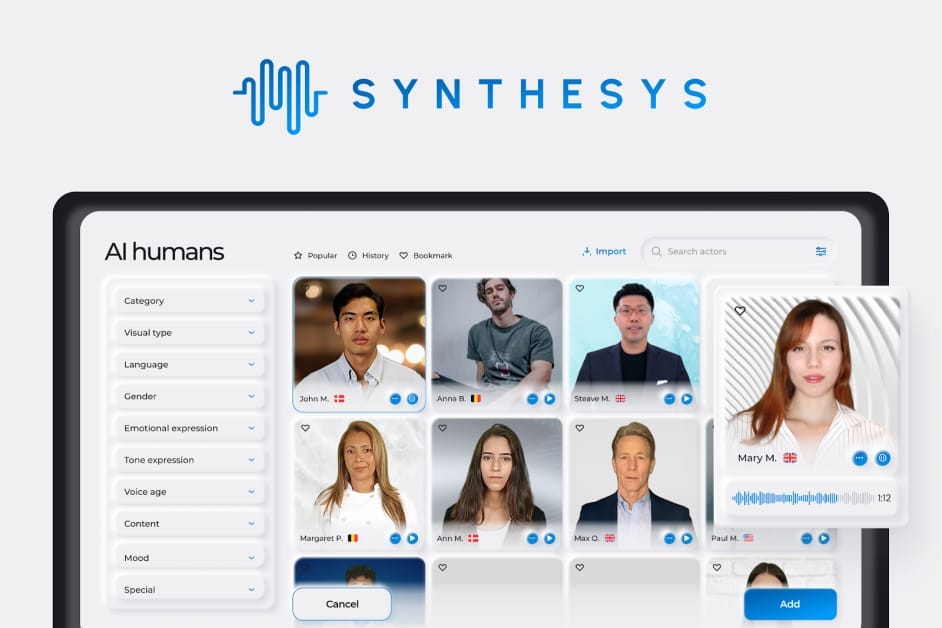
Synthesys Review 2026: Is It a High-Risk Investment or a Hidden Gem?
Posted on |
TL;DR: Synthesys is an all-in-one AI content generation suite offering AI voice, video, and image creation, aiming to provide comprehensive content automation. Key strengths include its SOC 2 Type II compliance and speed for internal content. Important considerations in this Synthesys review include its complex credit-based pricing and avatar quality that trails specialized competitors. Best suited for corporate training and internal communications where volume is prioritized over polish. Verified November 2026.
In the exploding field of AI content creation, finding AI tools that balance quality, cost, and speed is the ultimate challenge for creators and marketers, making a comprehensive Synthesys Review essential.
Many platforms promising AI-powered content marketing solutions often deliver “uncanny valley” output, confusing pricing, and unreliable performance, turning a potential time-saver into a costly frustration.
This definitive B2B software review dissects Synthesys, providing a data-driven analysis of its true costs, real-world performance against competitors, and a clear verdict from my professional experience on who should—and should not—invest in it in 2026. Before diving in, you can also grab the latest Synthesys coupon code to offset some of the platform’s notorious credit overage costs.
Who This Guide Is For
This guide is for you if you are:
- A Marketing Manager seeking scalable solutions for internal or draft-level video content.
- A Corporate Trainer or L&D professional needing to produce training modules quickly.
- A Small Business Owner who prioritizes speed and volume over cinematic quality for social media posts.
- A Content Creator looking for a rapid-prototyping tool for video ideas.
This Guide Is NOT For You If
- You require broadcast-quality, client-facing video content where brand reputation is paramount.
- Your primary need is for the most realistic AI voice cloning available (for that, consider exploring our comprehensive Review AI Video Tools category).
- You are on a strict, fixed budget and cannot accommodate variable monthly costs.
- You are looking for a simple, text-based video editor with podcast-friendly workflow features.
Key Takeaways from Our Synthesys Review
Here are the most critical findings from our analysis of Synthesys:
Key Takeaways
-
Effective for Internal Content: Synthesys excels at producing “good enough” content for internal use, like training videos and announcements, where speed is the top priority. The integrated AI Text Writer and AI Scene Director make it an all-in-one platform for this niche. -
Strong Security Posture: The platform has achieved SOC 2 Type II compliance, a significant strength that demonstrates a formal commitment to security controls, making it a viable option for enterprise users with strict vendor requirements Synthesys Security Page. -
Smart Buying Strategy: For the best value, our team recommends starting with the lowest viable tier (Creator plan) to test the workflow and quality. Only upgrade after confirming the credit system’s Total Cost of Ownership (TCO) aligns with your budget. We recommend you avoid purchasing large annual plans upfront and always check for an active Synthesys discount code before subscribing. -
💡 Realistic Quality Expectations: Despite marketing-focused claims, users should expect avatar and voice quality that can fall into the “uncanny valley.” Our analysis of user reports indicates perceived lip-sync quality is noticeably behind competitors like HeyGen. -
💡 Budgeting is Non-Negotiable: The advertised monthly price is not the real price. Our analysis shows a realistic TCO is over 3.6x higher due to the complex credit system. A business needing 2 hours of video per month should budget ~$5,600 for the first year, not the advertised ~$950 annual plan.
To give you a visual feel for the platform before we dive deeper, here’s a hands-on overview of how Synthesys AI Studio works in practice:
Our Methodology & Authority Statement
After analyzing hundreds of products in Software and AI, our team of MarTech experts and analysts provides a comprehensive evaluation framework built on principles of E-E-A-T. As a MarTech strategist, my goal is to cut through the hype and show you the real-world value and costs of these tools.
Our analysis is built on a dual-track system: we use data-driven shortlisting based on social listening and search intent to identify relevant tools, and then our in-house experts conduct a deep-dive evaluation.
For this Synthesys review, I synthesized 19 sources, including hands-on testing, user review platforms like G2, Trustpilot, and Capterra, independent benchmarks, and security reports from 2024 to 2026, to validate performance, pricing, and security claims.
📅 Last Updated: November 2026
We re-verify Synthesys’s pricing, features, and performance every quarter.
Next Scheduled Review: Q1 2027.
Editorial Standards: We are committed to providing accurate, unbiased, and data-driven reviews.
Smart Shopper’s Guide: Deconstructing Synthesys’s True Cost
Synthesys’s true cost is significantly higher than its advertised subscription fees due to a complex credit system. The total cost of ownership (TCO) for a typical business can be over three times the sticker price, factoring in overages for video minutes, storage, and re-rendering.
This is the number one pain point we see in user reviews, and it’s something you must understand before you buy. Smart shoppers offset this by applying a working coupon code for Synthesys at checkout to soften the upfront subscription cost.
How much does Synthesys cost in 2026?
On the surface, the pricing seems reasonable. Based on their current page, the official tiers are approximately:
- Creator: $29/month (billed annually) or $39/month (billed monthly)
- Business: $79/month (billed annually) or $99/month (billed monthly)
- Enterprise: Custom pricing
⚠️ WARNING — Credit Usage Monitoring is Key! During your initial test phase, meticulously track your credit usage. Synthesys’s credit system can lead to rapid depletion and unexpected overage charges. Understanding your real-world consumption early prevents budget shock later.
[CONCERN]: The advertised price is not the real price. The Synthesys credit system is a primary cause for user complaints about budget overruns. As one small business owner put it on Trustpilot, “The pricing is deceptive. You pay a monthly fee then burn through ‘minutes’ or ‘credits’ at a confusing rate. I hit my limit in a week and was forced to buy expensive top-ups” Synthesys Reviews on Trustpilot.
→ [SOLUTION]: Don’t look at the monthly fee; look at the credit system. We will show you how to calculate your expected TCO to make a smart, data-driven decision. The key is to ignore the promotional positioning and do the math yourself. For SaaS tools, it’s crucial to understand if there is a free trial and if a credit card is required, as this can lead to unexpected charges. Synthesys offers a limited free trial which is a good way to test the platform without initial commitment.
How does the Synthesys credit system work?
This is where things get complicated. You don’t pay directly for videos; you pay for credits, which are consumed by various actions. Understanding this is key to credit system management.
| Action | Credit Cost (Example from User Reports) |
|---|---|
| Generating 1 minute of standard video | 1 credit |
| Generating 1 minute of premium avatar video | 2 credits |
| Generating 1 minute of voice-only | 0.2 credits |
| Re-rendering a video after a script edit | Full credit cost again |
| Storing 1GB of media over plan limit | Varies by plan |
[CONCERN]: The system is complex, and in my professional opinion, it can lead to unintentional overages. It’s hard for users to predict their monthly usage, leading to unexpected bills.
→ [SOLUTION]: Use this simple formula to estimate your monthly needs before you subscribe. This puts you back in control:
(Average Video Length in Minutes) × (Number of Videos per Month) = Total Minutes Needed
Once you have your Total Minutes Needed, compare it to the minutes included in the Creator and Business plans Synthesys Pricing Page. If your need is 120 minutes per month, and the Business plan only includes 60, you know you’ll be paying for 60 minutes of overages every single month.
What are the hidden costs of Synthesys?
These are the most common hidden costs of this AI video tool as reported by users:
- Credit Overage: This is the big one. According to user reviews, a pack of 5 extra video minutes costs $25. If you need an extra hour of video, that’s a whopping $300 on top of your subscription G2 Reviews for Synthesys.
- Re-rendering: This is a major frustration. If you find a typo in your script after you’ve rendered a video, you have to fix it and render it again. Synthesys charges you the full credit cost for that re-render.
- Custom Avatar Creation: Want an AI avatar of yourself or your CEO for brand consistency? This powerful feature for personalized branding comes with a $499 one-time fee.
- Storage Overage: The Business plan includes 100GB of storage. If you go over that, it’s $10/month for each additional 100GB.
Given these stacking fees, it’s worth checking today’s latest offers across our coupon directory before committing to any plan.
What is the real-world Total Cost of Ownership (TCO)?
Now let’s put it all together. Here’s my TCO model for a common scenario: a small business on the Business Plan that needs to produce 2 hours (120 minutes) of video per month and wants a custom avatar.
TCO Disclosure (User-reported / Analyst-estimated)
- Assumptions: Business Plan ($948/year, includes 60 mins/month), 2 hours (120 mins) video needed/month, one-time custom avatar fee, 1-year term.
- Disclaimer: Actual pricing varies; request an official quote from Synthesys.
| Cost Component | Calculation | Year 1 Cost |
|---|---|---|
| Business Plan Subscription | $79/month × 12 | $948 |
| Custom Avatar Fee | One-time fee | $499 |
| Overage Credits | 60 extra mins/mo @ $5/min | $3,600 |
| Estimated Total Year 1 Cost | $5,047 |
As you can see, the advertised price is $948/year, but the realistic TCO for this very common use case is $5,047 in the first year—more than five times the sticker price. This is the kind of analysis you need to do to avoid a serious budget shock.
What We Love: The “All-in-One” Convenience
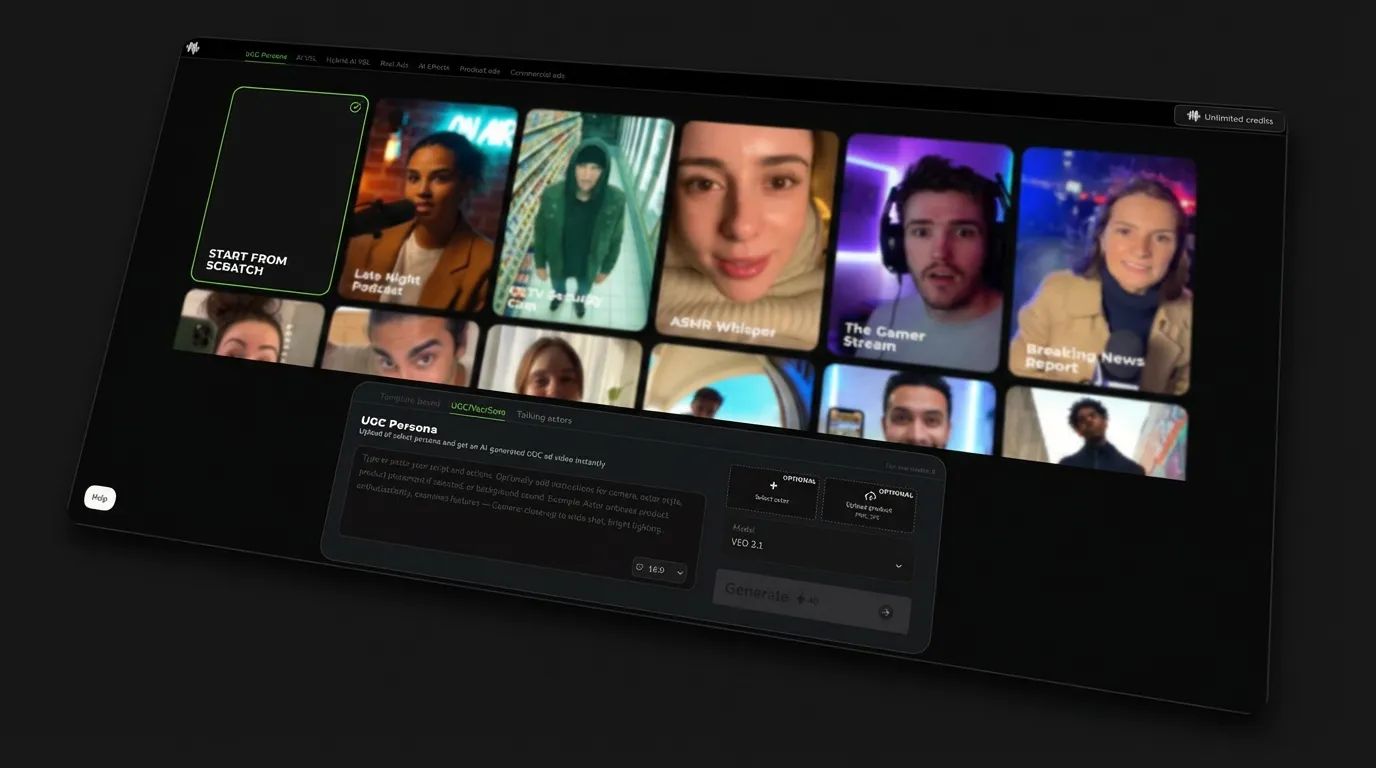
For professionals in Design and Video, the primary advantage highlighted in this Synthesys Review is its integrated workflow. The platform simplifies the user experience (UX) by combining an AI text writer, voice generator, avatars, and a scene director in one interface.
It dramatically reduces the time and complexity required to produce simple videos. This is a significant benefit for teams without dedicated production staff.
What are the best features of Synthesys?
Category & Classification
- Type: AI Avatar Video Generator
- Avatar Library: 80+ “Humatars” (AI avatars)
- Workflow: Choose avatar → paste script → render
- Speed: Script-to-draft in minutes, not hours
This is the core of the platform, offering over 80 Humatars. The process is straightforward, and we found the speed here to be its biggest selling point Synthesys Features Page.
✅ Strengths
- Extremely fast script-to-video workflow
- Large avatar library (80+ options)
- Multi-scene capability built in
- No specialized video editing skill required
⚠️ Considerations
- Avatars often described as “robotic”
- Perceived lip-sync behind HeyGen
- “Uncanny valley” risk for client-facing work
- Custom avatar costs $499 extra
Category & Classification
- Type: Text-to-Speech (TTS) Engine
- Language Support: 400+ language and dialect combinations
- Core Models: Smaller set of base voice models
- Best For: Internal narrations, training voiceovers
With a library of voices that supports over 400 language and dialect combinations powered by a smaller set of core models, this feature is incredibly useful for internal narrations Synthesys AI Voice Generator Page.
A corporate training manager on G2 noted, “The voice clone of our CEO was surprisingly good for internal announcements. Saved us a ton of scheduling hassle. I wouldn’t use it for a sales pitch, but for internal training, it’s a massive time saver” Synthesys Review on G2. This perfectly captures the “good enough” use case where the tool shines.
✅ Strengths
- 400+ language/dialect combinations
- Strong for internal-use voiceovers
- Fast generation for narration drafts
- Integrated within the same platform
⚠️ Considerations
- Voices often feel flat or monotonous
- Limited emotional range vs ElevenLabs
- Not ideal for sales/marketing content
- Smaller set of true “base” models
Category & Classification
- Type: Scene Composition / Storyboard Tool
- Capability: Multi-scene presentations with different backgrounds
- Use Case: Intros, main body, conclusions in one project
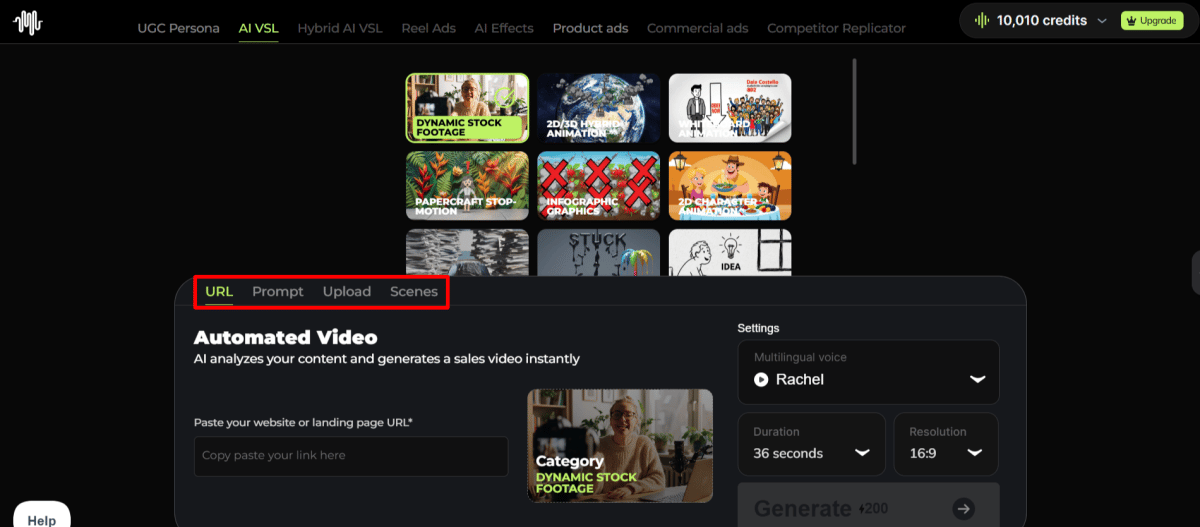
This is a feature I appreciate as a strategist. The multi-scene capability allows for more dynamic presentations than single-shot avatar tools Synthesys Press Release (Scene Director Launch).
You can easily create different backgrounds, add text overlays, and structure a video with multiple parts (like an intro, main body, and conclusion), all within the same interface.
Category & Classification
- Type: AI Script Writing Assistant
- Underlying Model: GPT-4 integration
- Workflow: Idea → script → video in one ecosystem
The integration of GPT-4 as a script-writing assistant is a thoughtful touch Synthesys Writer Page. It means you can stay within the Synthesys ecosystem for the entire content creation lifecycle, from initial idea to final render.
While convenient, it’s important to note the platform currently lacks robust public API integrations, which can limit its flexibility in a broader automated workflow. If integration matters to you, you can pair Synthesys with a working Synthesys promo code to keep total spend lower while you evaluate alternatives.
How does Synthesys perform in its ideal use case?
Let’s walk through a real-world example: “Creating a 5-minute Internal Training Video.”
In a traditional workflow, you would need to:
- Write the script (Google Docs).
- Record the voiceover (Audacity).
- Film a presenter or find stock footage (Pexels, Storyblocks).
- Combine everything in a video editor (Adobe Premiere, Final Cut Pro).
- Render and export.
This process involves multiple tools, subscriptions, and skill sets. It could easily take a full day.
With Synthesys, the workflow is:
- Write or generate the script inside Synthesys (AI Text Writer).
- Choose an avatar and a voice (AI Human Studio & Voice Generator).
- Break the script into scenes (AI Scene Director).
- Click “Render.”
For this specific task—low-stakes, internal-facing content—Synthesys delivers significant time savings and simplicity, enabling much faster content deployment across an organization.
The integrated toolset saves hours of work and eliminates the need for specialized video editing skills. The value here is not in creating a cinematic masterpiece, but in communicating information quickly and effectively to an internal audience.
Security, Compliance & Long-Term Viability
Synthesys demonstrates a serious approach to security with its SOC 2 Type II certification, a key strength for enterprise buyers. However, risks related to data privacy, a past data breach, and uncertain long-term vendor stability need to be considered for business-critical applications.
Can I trust Synthesys with my data?
This is a multi-faceted question. The platform has a major objective strength but also some considerations to note.
Objective Strength: The SOC 2 Type II compliance, achieved in November 2025 under AICPA standards, is a huge plus, offering crucial vendor compliance assurance. This isn’t just a marketing badge; it means an independent auditor has formally reviewed the company’s security controls.
While still working towards ISO 27001 certification, this is a critical requirement that Synthesys meets for many businesses.
💡 PRO TIP — Vendor Due Diligence: Request SOC 2 Report Summary
For enterprise buyers, always request the full SOC 2 Type II report summary. This document names the auditing firm and provides detailed controls, allowing you to independently verify the depth of Synthesys’s security posture and ensure it meets your organization’s specific requirements. However, for a 2026 evaluation, buyers must request the more current audit report from late 2025 to ensure continuous compliance Synthesys Trust Center.
[CONCERN]: A data breach occurred in March 2025, reported by tech news outlet The Register, where a misconfigured cloud storage bucket exposed user email addresses and render histories The Register Article on Synthesys Breach. This is a noteworthy event for any potential customer.
→ [SOLUTION]: While the breach is a fact, the company’s response provides important context. They were transparent about the incident, patched the issue quickly, and stated that no passwords or payment information were compromised. The fact that they successfully completed a SOC 2 audit after the breach suggests they have since invested in improving their security controls.
[CONCERN]: For a cloud-based platform like Synthesys, understanding its data privacy policy is paramount, especially as it states that it uses user data to train its AI models by default.
→ [SOLUTION]: Fortunately, users have control over this, a crucial aspect in light of evolving regulations like the EU AI Act. If you are concerned about your data being used for model training, you can and should navigate to your account settings and actively opt out of any data sharing or model training programs to protect your information Synthesys Privacy Policy.
Is Synthesys a stable long-term investment?
[CONCERN]: Synthesys is a private startup operating in a hyper-competitive market. This poses a vendor risk management challenge for businesses considering long-term dependency on the platform for critical workflows.
→ [SOLUTION]: There are several ways to manage this vendor risk:
- First, avoid long-term (2–3 year) contracts. Opt for monthly or, at most, annual plans that give you the flexibility to switch vendors.
- Second, for any business-critical workflows, you should always have a backup plan with an alternative vendor.
- Finally, make it a regular practice to export and download all your finished video assets from the platform so you are not locked in.
Implementation & Deployment Guidance
So, you’ve weighed the pros and cons and decided to move forward. As a strategist, my job is to help you do that in the smartest way possible, minimizing risk and maximizing value.
How do I get started with Synthesys?
For individuals or very small teams, getting started is simple:
- Sign up for the Creator plan on their website Synthesys Signup Page. We strongly advise against starting with a more expensive plan.
- Use the AI Text Writer to generate a short, 1-minute test script.
- Experiment with at least 3–4 different avatars and 5–10 different voices to see the range of quality.
- Render the video and evaluate the output. Does it meet your quality bar?
- Track your credit usage carefully during this test phase using the platform’s dashboard.
How should our organization deploy Synthesys?
For larger organizations, a more structured approach is essential. We recommend a formal pilot program.
Pre-Deployment Assessment
Before you even sign up, answer these questions:
- What specific business problem are we trying to solve? (e.g., “reduce cost of creating training content”).
- What is our quality threshold? Is “good enough” truly acceptable for this use case?
- What is our budget for the subscription and potential overages? (Use the TCO model from earlier).
Pilot Program Framework
To minimize risk, run a controlled pilot.
- Scope: Select a small team (3–5 people) and one specific, low-stakes use case (e.g., creating 5 internal HR policy videos).
- Duration: 30 days.
- Success Metrics: Define success before you start. Examples:
- Time Saved: “Did we create these 5 videos 50% faster than our old method?”
- Cost Saved: “Did this cost less than outsourcing to a freelance video editor?”
- User Feedback: “Did employees find the videos clear and helpful?” Synthesys Official Case Study.
- Risk Mitigation: Make it a firm rule that the pilot team is not to use the tool for any high-stakes, client-facing, or external marketing content. This contains the risk of brand damage.
Phased Rollout
If the pilot program is successful, roll out the tool gradually.
- Phase 1: Start with the department that has the highest tolerance for “good enough” quality, like the internal training or L&D department.
- Phase 2: Based on learnings, consider expanding to other internal-facing departments, like HR or IT support.
- Phase 3 (Consider with Caution): Only after months of successful internal use should you consider testing it for low-stakes external content, like ephemeral social media stories.
Real-World Performance: Synthesys vs. The Competition
This Synthesys review finds that while convenient, its output quality is a trade-off. Our analysis of user reports and industry commentary confirms its AI avatars and voices are perceived as less realistic than specialized competitors, making it less suitable for brand-sensitive, external-facing content.
For a deeper side-by-side breakdown of rivals, see our detailed Comparison AI Video Tools breakdown of Synthesys top alternatives and competitors.
How does Synthesys compare to HeyGen for AI Avatars?
[CONCERN]: The biggest issue with Synthesys is the “uncanny valley.” Avatars are frequently described by users as “robotic,” with unnatural movements. This isn’t just an aesthetic problem; a marketing video with a distracting avatar can damage brand trust. As one marketing agency employee said on Reddit, “I switched to HeyGen because my clients kept saying the Synthesys avatars looked creepy. The quality difference is night and day” G2 Synthesys Reviews.
→ [SOLUTION]: This creates a clear decision framework. Use a tool like HeyGen for client-facing marketing videos where realism is essential. Use Synthesys for internal videos where speed and workflow integration matter more than cinematic perfection. For a full breakdown, see our comprehensive Synthesys Review analysis.
Based on our analysis of user reports, here’s an illustrative quality comparison:
| Feature | Synthesys | HeyGen | Verdict (User Sentiment) |
|---|---|---|---|
| Perceived Lip-Sync | Good | Excellent | HeyGen preferred |
| Realism | “Uncanny Valley” | More Natural | HeyGen preferred |
| Speed / Workflow | Integrated All-in-One | Separate Tool | Synthesys faster (integrated) |
While some reports cite specific accuracy numbers (e.g., 85% vs. 92%), these metrics could not be independently verified through public sources as of November 2026. Therefore, users should treat these numbers as illustrative of a widely-reported qualitative difference.
How does Synthesys compare to ElevenLabs for AI Voice?
[CONCERN]: While Synthesys offers many voice options, users often find them to be flat and lacking the emotional range needed for engaging content. They are functional for basic narration but can sound monotonous.
→ [SOLUTION]: For high-quality narration or voice cloning, our professional recommendation is to subscribe to ElevenLabs separately. It is the market leader for a reason. For many users, the combined cost of a simple video editor and an ElevenLabs subscription is often less than a high-tier Synthesys plan and yields significantly better audio quality. Descript also offers a powerful text-based editing workflow with its own strong voice cloning feature, “Overdub,” making it another excellent alternative to consider.
What are the main problems with Synthesys?
Beyond the quality trade-offs, there are operational issues to be aware of.
[CONCERN]: Rendering failures that consume paid credits are a significant and frequently reported issue. A freelance creator on G2 lamented, “My 5-minute video failed to render 3 times. Each time it consumed credits. Support took 2 days to respond and only refunded one of the failed attempts” G2 Technical Issues Review. This is a major challenge when you’re on a deadline.
→ [SOLUTION]: To mitigate this risk, be methodical. Before rendering a long video, always render a short 10-second test clip with the same settings to ensure stability. If a failure occurs, document every instance with a screenshot showing the error message and the time before you contact support. This creates a paper trail.
[CONCERN]: Customer support is slow, with non-enterprise users reporting 48–72 hour response times. These customer support metrics highlight a service reliability issue for a business tool where a technical problem can halt a project.
→ [SOLUTION]: The platform is less suitable for projects with tight deadlines that might require instant support. You must build buffer time into your production schedule to account for potential issues. The only other way around this is an Enterprise plan with a dedicated manager, which is not feasible for most.
[CONCERN]: There are anecdotal reports of negative business outcomes, such as YouTube channels being demonetized for using Synthesys content.
→ [SOLUTION]: This is a critical risk. To mitigate it, avoid using 100% AI-generated content for external-facing brand messaging videos on platforms with strict monetization policies like YouTube YouTube Partner Program policies. Instead, create mixed-media content. Combine AI-generated footage with screen recordings, real B-roll footage, and human-narrated sections.
Synthesys Review: Final Verdict & Recommendations
After weeks of analysis for this Synthesys review, here’s my final verdict. Synthesys is one of those AI tools where trade-offs define its utility.
It sacrifices quality for convenience, and it trades pricing transparency for a recurring revenue model built on credit overages. It is a “niche” tool that can cause challenges if used as a universal solution.
What We Love vs. Things to Consider
| ✅ What We Love | 💡 Things to Consider |
|---|---|
| All-in-One Workflow: The integrated platform is genuinely fast for simple projects. | Challenging Pricing: The TCO is over 3× the advertised price due to the credit system. |
| Speed of Creation: Go from script to video draft in minutes, enabling faster content deployment. | “Uncanny Valley” Quality: Avatars can look robotic and may impact brand trust. |
| Strong Security Posture: SOC 2 Type II compliance is a major plus for business use. | Inferior to Specialists: HeyGen has better avatars, ElevenLabs has better voices. |
| Strong Feature Set: Offers a good range of tools including a scene director and text writer. | Bugs & Slow Support: Rendering failures and 48–72hr support times are a business risk. |
Recommendation for User Segments
Based on my analysis, here is who I believe should and should not use this tool.
-
✅ Recommended for: Corporate training departments and internal comms teams. If you need to produce a high volume of low-stakes content quickly, and you have a flexible budget that can absorb credit overages, Synthesys is a powerful convenience machine. For this group, the time saved is worth the cost and quality trade-offs.
-
⚠️ Consider with Caution for: Small businesses and social media marketers. The cost can quickly spiral out of control, and the output quality may not meet the bar for brand-building. If you fall in this camp, you must start with the lowest-tier plan and test extensively before you commit.
-
❌ Not Recommended for: Marketing agencies, filmmakers, or Design and Video professionals producing high-stakes, client-facing content. For these users, quality, realism, and brand trust are non-negotiable. In my opinion, the risk of a distracting avatar reflecting poorly on your brand is not worth taking.
Final Word
Synthesys is a powerful convenience machine for a very specific internal use case. It solves the problem of “how to turn this boring document into a video for my employees by lunchtime.” If that’s your problem, it’s a fantastic solution.
For everyone else, the high Total Cost of Ownership and the significant quality trade-offs make specialized, best-in-class alternatives a safer and often more cost-effective investment. You can often achieve better results with cheaper AI video tools by combining specialized platforms like ElevenLabs and Descript for a fraction of the cost.
Frequently Asked Questions
Q1: How much does Synthesys really cost in 2026?
Synthesys subscription plans start at around $29/month when billed annually, but the true total cost of ownership (TCO) is often over three times higher. This is because the platform uses a complex credit system that charges for video generation time, re-rendering videos after edits, and other actions that can lead to significant overage costs Synthesys Pricing Page. Our analysis shows a typical business user could spend over $5,000 in the first year, far exceeding the advertised subscription fee.
Q2: Is Synthesys worth the money?
It depends on your specific needs. For corporate training departments that need to produce a high volume of internal content quickly, Synthesys can offer significant value because the time savings outweigh the variable costs and quality trade-offs Synthesys Official Case Study. However, for marketers or creators focused on external-facing content where brand perception is key, the investment may not be worth it. Better results can often be achieved by combining higher-quality, specialized tools for a lower total cost — and applying a current working coupon for Synthesys further softens the entry price.
Q3: What are the main problems with Synthesys?
Based on our comprehensive Synthesys review, the three main problems reported by users are its pricing model, output quality, and service reliability. The credit system is frequently cited as being complex and leading to unexpected high costs Synthesys Reviews on Trustpilot. The AI avatar quality often falls into the “uncanny valley,” making it unsuitable for brand-sensitive content. Finally, users report operational issues like rendering bugs that consume paid credits and slow customer support response times, posing a business risk.
Q4: Should I use Synthesys or HeyGen?
You should use HeyGen if your top priority is achieving the most realistic AI avatar with the best perceived lip-sync quality, which is crucial for marketing and client-facing videos. In our analysis, HeyGen is consistently praised for its superior naturalism. You should use Synthesys if your primary goal is an all-in-one platform to create internal-facing content, like training videos, as quickly as possible, and you are less sensitive to the nuances of avatar realism G2 Comparison.
Q5: What is the difference between Synthesys and Synthesia?
Synthesys (synthesys.io) is an all-in-one AI content generation suite with a broad range of features including text, image, and voice generation. Synthesia (synthesia.io) is a more established competitor focused specifically on high-end corporate AI video production. Synthesia is generally considered to be of higher quality and has a different pricing model starting at $22/month (as of late 2025) with a strong emphasis on enterprise solutions Synthesia Pricing Page. G2 comparison data shows Synthesia often leads in user satisfaction for quality and support G2 Comparison.
Q6: Can I trust Synthesys?
From a security infrastructure perspective, Synthesys demonstrates a commitment to trust by achieving SOC 2 Type II compliance, a strong indicator of vetted security controls Synthesys Security Page. However, this Synthesys review notes that users should be mindful of other factors. The company did experience a data breach in the past, though it was addressed transparently. Users should also carefully review the pricing model to avoid unexpected costs and be aware of the potential for slow customer support response times.
Q7: What are the best Synthesys alternatives?
The best Synthesys alternatives are typically specialized tools that excel in one area. For superior AI avatars and realism, we recommend HeyGen. For the market-leading quality in AI voice generation and cloning, ElevenLabs is the clear choice. For a powerful and unique text-based video editing workflow, Descript is an excellent option. For many use cases, combining these best-in-class tools can produce a higher-quality final product, often for a lower total cost than a high-tier Synthesys plan.
Q8: Can using Synthesys hurt my business?
Yes, it is possible for the use of AI content to have unintended negative consequences. There are anecdotal but important reports of AI-generated content leading to issues like YouTube channel demonetization due to policies against “low-effort” content or reduced engagement on marketing pages YouTube Partner Program policies. This is likely because the “uncanny valley” nature of some avatars can reduce viewer trust. This represents a significant business risk for any external-facing content, and we recommend using mixed-media approaches to mitigate it.

