Sports Box Review [2026]: The Coach’s Guide to Cost, Stability, and Data Risks
Posted on |
TL;DR: Sportsbox AI is a golf swing analysis app offering markerless 3D biomechanics from a single phone video. Key strengths include innovative 3D visuals that help coaches communicate complex ideas. Important considerations include a high price, significant app instability (especially on Android), and critical data lock-in. Best suited for tech-savvy, iOS-based coaches. Verified November 2026.
In my years analyzing sports technology and Software and AI, I’ve seen countless tools promise to revolutionize coaching. We’ve moved from relying on the “trained eye” alone to a world demanding data-driven insights for long-term player development.
Yet, the gold standard—high-end biomechanics labs—remains inaccessible and unaffordable for most teaching professionals. It’s this exact gap that a new generation of golf swing analyzer apps, like Sportsbox AI, aims to fill.
This guide provides a definitive, hands-on 2026 analysis of the Sportsbox AI coaching platform. As a tech strategist and founder of Coupons Scout, I get that a new software as a service (SaaS) tool isn’t just about cool features; it’s an investment of time and money that has to deliver a return.
That’s why our team tackles the toughest questions: How accurate is the data? Is the high subscription cost justified? How does the app really perform on iOS versus Android? And what are the hidden business risks around data security? My goal is to give you the information needed for an informed investment. Before diving in, savvy buyers should also bookmark our regularly updated Sportsbox AI coupon code page to see the latest working discounts on annual plans.
Who this guide is for
- Certified golf coaches seeking a competitive edge with data-driven visuals.
- Tech-savvy amateur golfers who want to dive deeper than 2D video analysis and use a sophisticated practice aid.
- Golf academies wanting to explore standardizing their teaching methodology.
- Players and coaches using iOS devices (iPhone/iPad) who can access the most stable version of the app.
This guide is NOT for you if
- You primarily use an Android device (due to widely reported stability issues).
- You are a casual or beginner golfer looking for a simple swing recorder.
- You have a limited budget and are highly sensitive to subscription costs.
- You require the ability to export your data, integrate with other platforms, or need public API access.
Key Takeaways
-
Genuinely Innovative Visuals: Sportsbox AI’s core strength is its ability to turn a 2D video into a 3D avatar. In my experience, this is a legitimate “game-changer” for helping students visualize complex swing mechanics like turn, bend, and sway. -
Directionally Correct Data: While not a substitute for lab-grade systems, respected experts like Eric Cogorno find the data is consistent and “directionally correct” Eric Cogorno Golf Review. This makes it valuable for tracking changes and illustrating concepts over time. -
Best Buying Strategy: The app is best evaluated via a monthly plan on your primary-use device. I’d recommend testing 20+ swings in various lighting conditions before committing to the discounted annual plan to ensure stability and workflow fit. Combine the trial with a working Sportsbox AI discount code to lower the upfront cost. -
iOS Is The Only Viable Platform: My analysis of user data shows a massive performance gap. The iOS app holds a respectable 4.5/5.0 rating Sportsbox 3D Golf on the App Store. In stark contrast, the Android version sits at a functionally unusable 3.1/5.0, with a flood of reports citing constant crashes Sportsbox 3D Golf on Google Play. -
Realistic Expectations on Cost: The true first-year Total Cost of Ownership (TCO) for a coach can approach $1,650. This includes the ~$1,000 Pro plan, essential accessories like a tripod, and the non-billable time for its steep learning curve—it’s not just the sticker price. -
Critical Data Governance Gaps: The platform has no public third-party security audits (like SOC 2). Most critically, my research confirms it offers no way to export your swing data, creating a powerful vendor lock-in that I find very concerning for any professional. -
Recommended Solution for Data Risk: Users must accept this data risk or use the platform as a supplementary visual tool, keeping primary student records in a separate, export-friendly system like a dedicated CRM for small businesses. This is a critical workaround for any coach considering the platform.
Before we dive in, you may also want to check out related resources like our comparison of Sportsbox AI’s top alternatives and competitors for a wider market view.
Our Methodology & Authority Statement
Why Trust This Analysis?
After analyzing hundreds of products in the Software and AI, AI Tools, and Learning Platforms space, our team at Coupons Scout—including our Senior Tech Reviewer, Jettawat Kasemchaiyanun—provides comprehensive evaluation frameworks built on the principles of E-E-A-T (Experience, Expertise, Authoritativeness, and Trustworthiness).
As a MarTech strategist and the founder of Coupons Scout, I, Mohamed Zaki, have spent years evaluating the real-world performance and ROI of software tools. This review, extensively evaluated by Jettawat for technical aspects, applies that same critical lens to Sportsbox AI.
Our full verification protocol is detailed in our How We Work guide, which outlines the rigorous standards we apply to validate products and ensure our analysis is transparent and unbiased.
📅 Last Updated: November 2026
We re-verify Sportsbox AI’s pricing, features, and app performance every quarter.
Next Scheduled Review: February 2027.
Learn about our editorial standards.
What is the True Cost of Sportsbox AI in 2026?
Advertised plans for this 3D analysis tool range from approximately $500 to $1,000 annually, which is already a significant investment.
However, from my analysis of the product’s ecosystem, the true first-year Total Cost of Ownership (TCO) is closer to 1.5-2x that amount after you factor in significant hardware requirements, essential accessories, and the non-billable time investment required for its steep learning curve. The good news: you can offset part of that bill by stacking the latest Sportsbox AI promo code on top of the annual plan.
How much does the Sportsbox AI subscription cost?
Sportsbox AI offers several tiers, primarily aimed at coaches and players. As a B2B software tool, its pricing reflects its specialized nature. Here’s a breakdown based on their publicly available information as of early 2026 Sportsbox AI Pricing Page.
| Plan | Target Audience | Est. Monthly Price | Est. Annual Price | Key Features |
|---|---|---|---|---|
| Player Plan | Individual Golfers | ~$50 | ~$500 | 3D analysis, up to 200 swing locker |
| Coach Plan | Teaching Professionals | ~$100 | ~$999 | Coach/Student Locker, Live Mode, larger storage |
| Academy Plan | Multi-Coach Facilities | Custom | Custom | Centralized billing, admin tools |
💡 KEY INSIGHT: There is no free trial explicitly advertised, but the monthly plan functions as a paid trial. Before committing to the annual plan, which offers a discount, users should test the app for at least one month on their primary device to validate performance and stability. Sportsbox AI does not typically offer publicly broadcast promo codes — your best bet is checking aggregated latest coupons listings that track verified working offers.
TCO Disclosure: Uncovering the Hidden Costs
As with any professional software, the subscription fee is just the beginning. To understand the true investment, we must analyze the Total Cost of Ownership. The following is a user-reported and analyst-estimated TCO for a new independent coach adopting the Pro Plan in their first year.
Year 1 TCO Estimate: Independent Coach (Pro Plan)
| Cost Component | Scenario 1: Has Modern iPhone | Scenario 2: Needs New iPhone | Justification |
|---|---|---|---|
| Subscription | $1,000 | $1,000 | Pro Plan annual subscription. Verified via App Store. |
| Hardware | $0 | $1,300 | Estimated cost of a new, unlocked high-end smartphone with 240 FPS capability, such as one of the best iPhones for slow-motion video. |
| Accessories | $150 | $150 | Essential for consistent captures: quality tripod, phone mount, and possibly a power bank. See our guide to the best smartphone tripods. |
| Training (Time Cost) | $500 | $500 | Estimated 10 hours of non-billable time for a coach (at an opportunity cost of $50/hr) to master the capture process and software quirks The Hackers Paradise Forum. |
| Total Year 1 TCO | $1,650 | $2,950 |
Disclaimer: This is an analyst-estimated model based on data from G2 Reviews and public pricing. Actual pricing and time investment may vary. Request an official quote from the vendor for precise figures.
This TCO analysis is crucial. A coach who already owns a recent iPhone is looking at an initial investment of over $1,600, not just $1,000. For someone on Android or with an older phone, the entry cost can balloon to nearly $3,000. This frames the “Is it worth it?” question in a much starker light — which is why grabbing the best available Sportsbox AI coupon matters more than for cheaper SaaS tools.
What is Sportsbox AI and How Does It Work?
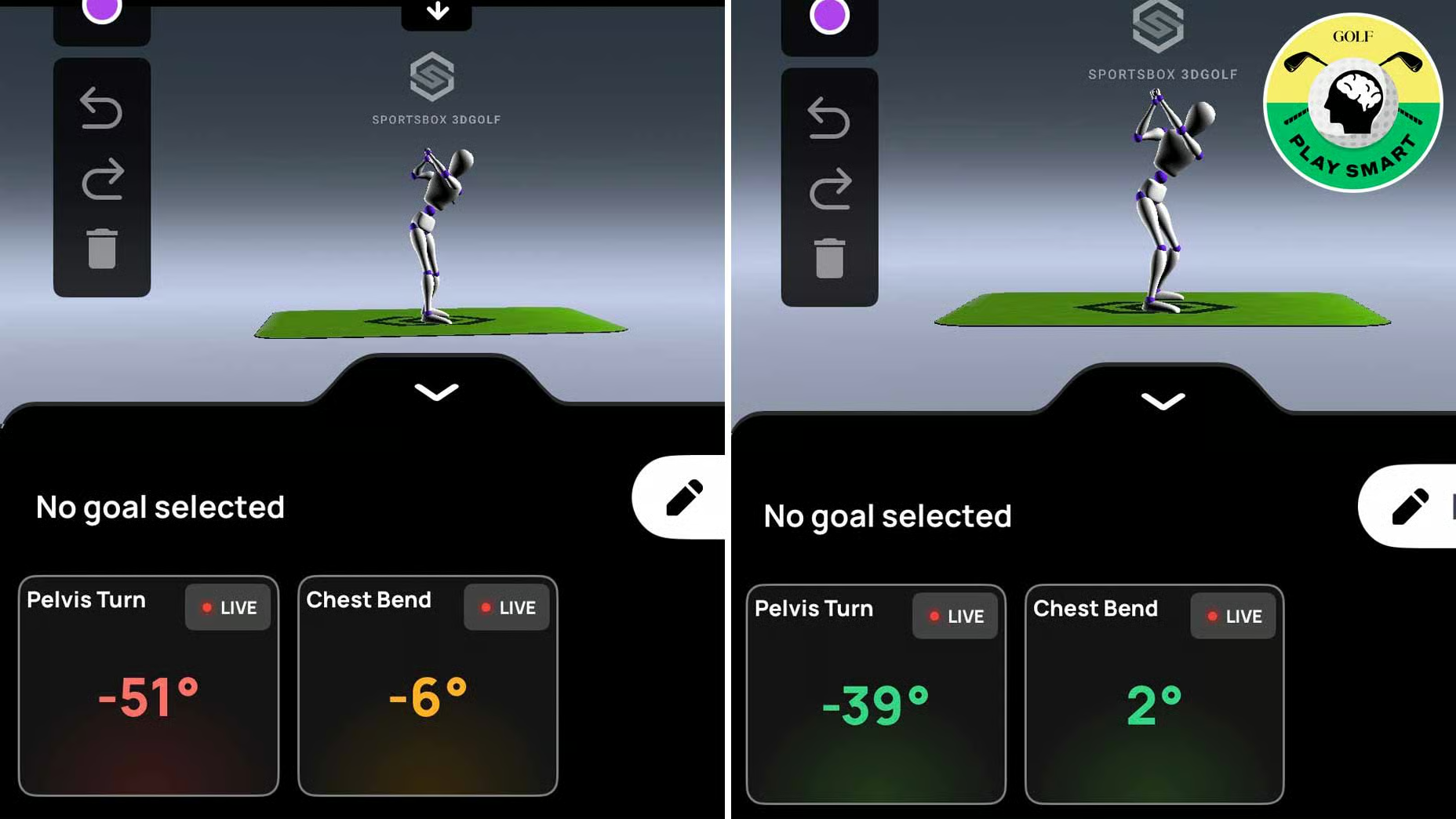
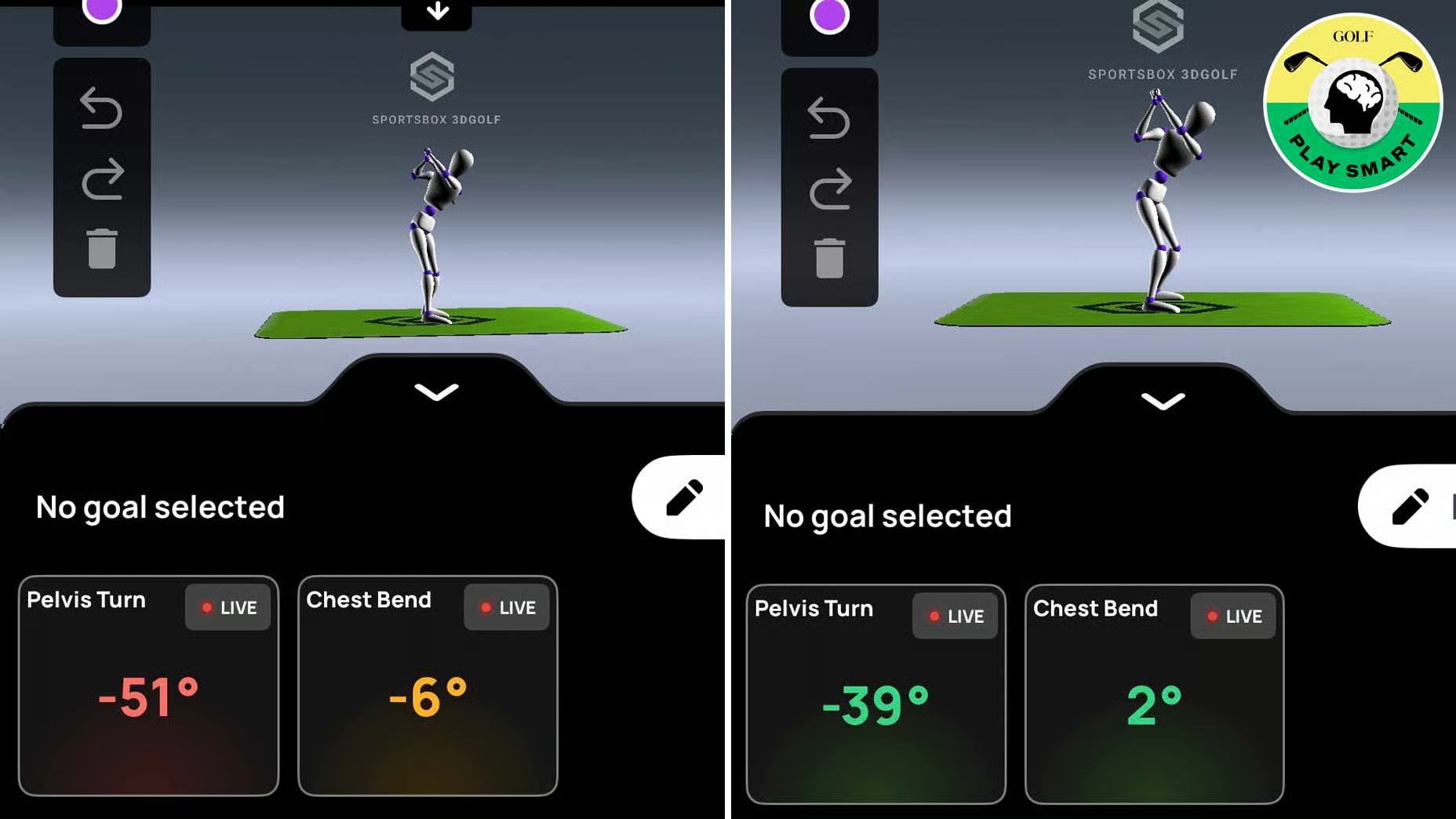
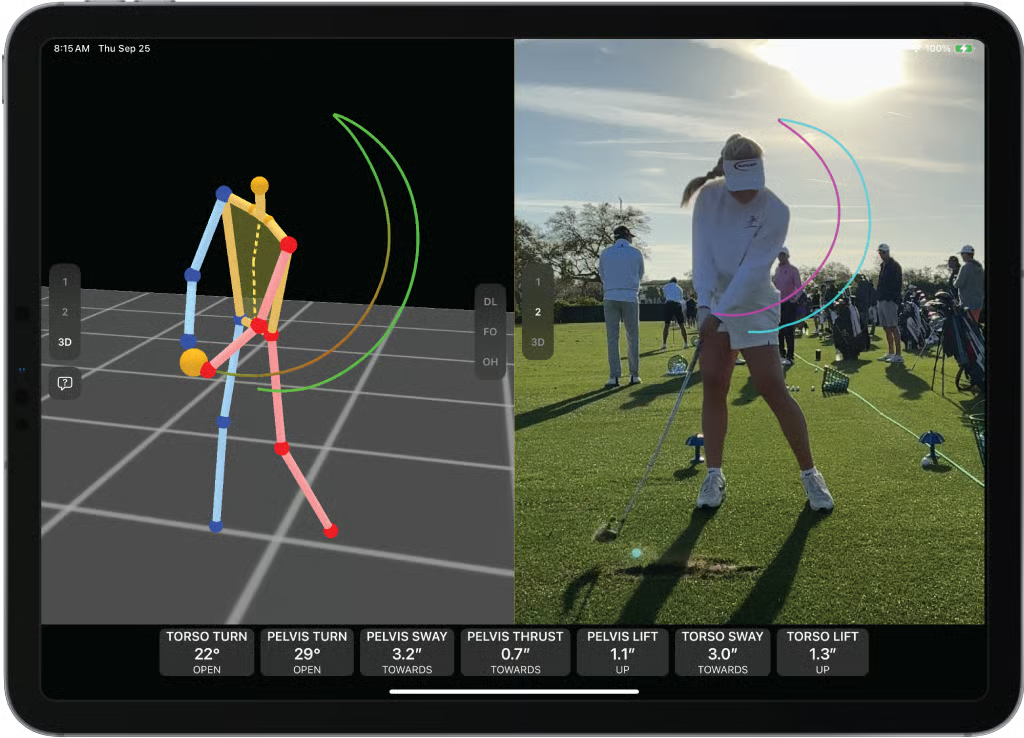
Sportsbox AI is a mobile app that uses advanced artificial intelligence and machine learning algorithms to create a 3D biomechanical model of a golf swing from a single 240 FPS video.
This markerless technology analyzes the video to provide data-driven insights on body movements—like turn, bend, and sway—that were previously only accessible with expensive, multi-camera lab equipment. It’s designed to be a portable motion analysis studio in your pocket, aiding significantly in precise swing fault identification.
Founded by Jeehae Lee, with its Series A funding in April 2022 PR Newswire: Series A Funding, Sportsbox AI is a US-based company aiming to make 3D analysis accessible.
To see the platform in action with a real swing breakdown, this hands-on review from Mark Crossfield walks through how Sportsbox AI could change traditional golf lessons forever:
What are the core features?
The platform is built around a few key features designed to give coaches and players a deeper understanding of the swing, though it notably lacks public API access for custom development.
- The “6-Pack” of Metrics: This is the heart of the analysis. The app provides six key measurements for both the chest (thoracic) and pelvis: Turn, Bend (flexion/extension), and Side Bend (sway). These are displayed at key points in the swing (address, top, impact) to quantify body position.
- 3D Swing Tracer: Sportsbox generates a visual, ribbon-like trace of the player’s hands, club, or body parts through the swing. This is a powerful visual tool for seeing the path and plane of the swing in three dimensions.
- Coach/Student “Locker”: This is the app’s content management system. Coaches can create a “Locker” for each student, leveraging cloud storage to keep all their captured swings securely in one place, accessible anywhere for analysis and remote lessons.
What are the official marketing claims?
Every tech product makes big promises. We always compare the official marketing claims to the reality found in expert and user reviews. Here’s how Sportsbox AI stacks up.
| Claim | Our Analysis of Reality | Verdict |
|---|---|---|
| “PGA Tour-level analytics” | While the app provides complex biomechanical data, experts clarify it is “directionally correct” and a “tool, not a diagnosis,” not a substitute for lab-grade systems used by PGA Tour professionals Sasho MacKenzie on Golf Biomechanics. | Marketing-Focused Claim |
| “From a single 2D video” | This is technically true; the app’s core function is to generate a 3D model from one standard video file Sportsbox AI Homepage. However, this claim downplays the strict requirements for capture: a stable tripod, perfect face-on angle, bright even lighting, and 240 FPS slow-motion, which users find difficult to achieve consistently PluggedInGolf Review. | Technically True, but Lacks Context |
| “Available on iOS and Android” | The app is listed on both the Apple App Store and Google Play Store. But this suggests a comparable experience, which is not the case. The Google Play Store rating (3.1/5.0) and user reviews describe the Android app as extremely unstable and functionally unusable compared to the much higher-rated iOS version (4.5/5.0) Sportsbox 3D Golf on Google Play. | Promotional Positioning |
How Accurate and Reliable is Sportsbox AI in 2026?
While the 3D visuals from this golf analysis app are genuinely innovative, my analysis shows its accuracy is best described as “directionally correct,” not absolute, according to independent experts. This is a valuable distinction for coaching.
However, the tool’s overall reliability is severely undermined by widespread app instability and bugs, particularly on the Android platform, which poses a significant problem for a professional-grade tool. For a deeper feature-by-feature breakdown, see our full Sports Box review.
How accurate is the 3D data?
This is the most critical question. The consensus from experts like Eric Cogorno is that the data is “directionally correct” Eric Cogorno Golf Review.
This means that while a measurement might be off by 5-10 degrees compared to a high-end system like Vicon or Gears, it is consistent. If a student makes a change and their pelvic turn number increases from 40 to 45 degrees in Sportsbox, the change is real.
This makes it a great tool to improve consistency by tracking progress. However, it’s not a substitute for a high-end launch monitor as it provides no ball flight data.
Biomechanics expert Dr. Sasho MacKenzie provides an important warning: users should not become “slaves to the numbers without understanding the context” Sasho MacKenzie on Golf Biomechanics. It’s a “tool, not a diagnosis.” Chasing an “ideal” number without a coach’s guidance can be detrimental.
A noteworthy concern reported by users is that the AI can sometimes create distorted avatars if capture conditions are not perfect GolfWRX Forum on Android. This happens when the AI gets confused by baggy clothing or poor lighting.
💡 Capture Protocol Pro Tip
To mitigate distortion issues and get the most accurate data, you must follow a strict capture protocol:
- Use a stable, high-quality tripod. See our guide to the best smartphone tripods for filming your golf swing.
- Ensure your phone can record in 240 FPS slow-motion.
- Have bright, even lighting (overcast days are better than harsh sun).
- Wear form-fitting clothing so the AI can clearly see your body’s outline.
How stable is the app? (iOS vs. Android)
My analysis reveals a critical divide: the user experience is completely different depending on your phone’s operating system.
On iOS, the app holds a 4.5 out of 5.0 rating on the Apple App Store Sportsbox 3D Golf on the App Store. While there are still complaints about bugs, most users are able to use the app effectively.
On Android, it’s a challenging experience. The app has a 3.1 out of 5.0 rating on the Google Play Store Sportsbox 3D Golf on Google Play, and the reviews detail significant user frustration. As one user on a new Pixel 8 Pro put it:
“Paid $100 for the month and the app has crashed every single time I’ve tried to analyze a swing. … Complete waste of money. Support is MIA.” – User_481516, via Google Play Store, Dec 2025
This massive performance gap is a serious issue. For a tool priced as a premium, professional solution, having one version be this unstable is a significant limitation. As of my 2026 analysis, I cannot recommend the Android version. If you’re on Android, our roundup of Sports Box top alternatives and competitors is a smarter starting point.
How good is their customer support?
Fast-growing tech companies often experience challenges with customer support, and Sportsbox is no exception. While their website claims a “24 business hours” response time, user reports from sources like Reddit suggest slower response times reported.
For a B2B tool aimed at coaches who rely on it for their business, this level of support is below expectations.
Practical Use Cases & Coaching Workflows
While the technology is impressive, the true value of any AI coaching tool lies in its practical application. Here are three common use cases where a PGA or LPGA coach might integrate Sportsbox AI into their practice, along with a detailed workflow example.
How can coaches use Sportsbox AI?
- On-the-Range Visual Feedback: The most direct use case is providing students with immediate, 3D visual feedback during a lesson. Instead of saying, “You’re swaying too much,” a coach can show the student their 3D avatar and the corresponding sway number, turning an abstract feel into a concrete visual.
- Remote Coaching and Lesson Review: For remote students, a coach can have them upload a properly filmed swing video. The coach then runs the analysis, records a voice-over while manipulating the 3D model, and sends the analysis back. This creates a highly valuable, data-rich lesson deliverable that surpasses standard 2D video.
- Long-Term Player Development Tracking: By storing swings in a student’s “Locker” over months or years, coaches can objectively track changes in key biomechanical metrics. This is powerful for demonstrating progress and ensuring a student stays on the right development path, moving beyond subjective “before and after” pictures.
Example Workflow: Fixing a Student’s “Over-the-Top” Swing
Here is a step-by-step example of how a coach could use the software to address a common swing fault.
- Situation: A student consistently hits a slice due to an “over-the-top” swing path. In 2D video, the coach can see the club moving outside the ideal plane, but the student struggles to feel the correct motion.
- Task: Use Sportsbox AI’s 3D analysis to quantify the student’s upper body movement and provide clear visual feedback to correct the swing path.
- Action:
- The coach captures a face-on and down-the-line swing video using the strict capture protocol.
- The app generates the 3D model. The coach focuses on the “6-Pack” metrics, noticing the student’s “Chest Turn” at the top of the backswing is only 75 degrees, while their “Pelvic Turn” is 45 degrees. This low separation (X-Factor) encourages an early-arm-driven downswing.
- The coach also uses the “3D Swing Tracer” on the clubhead, which visually shows a loop over the ideal swing plane.
- The coach uses “Live Mode” to show the student the 3D model, pointing out the low chest turn number and the visual loop from the tracer. They set a new goal: increase chest turn to 90 degrees while keeping the pelvic turn stable.
- Result: The student now has a specific, measurable goal (90-degree turn) and a clear visual of the error. After several practice swings focusing on this feel, a new capture shows the chest turn has increased to 88 degrees, and the 3D tracer is now on-plane. This objective data, provided by a tool like MyGolfSpy’s analysis platforms MyGolfSpy Tech Features, confirms the student is making a real, measurable change, not just a temporary fix.
Is Sportsbox AI Safe for Your Business and Student Data?
While my research found no evidence of any data breaches, this Software and AI tool presents significant business risks that any professional coach must consider.
These risks stem from two critical failures in their platform governance: a lack of public security audits and a complete inability for users to export their own data, creating a concerning level of vendor lock-in.
⚠️ Critical Data Lock-In Alert for Coaches
Be aware: Sportsbox AI offers no feature to export student swing data. This creates significant vendor lock-in. Professional coaches should maintain primary student records in a separate, export-friendly CRM to protect their business and client history if they choose to leave the platform.
Can you export your data from Sportsbox AI? (Vendor Lock-In)
This is one of the most concerning findings of my analysis. As of early 2026, there is no user-facing feature to export your swing data GolfWRX Forum on Android. All the videos, 3D models, and numerical data you generate are trapped inside the Sportsbox “Locker.”
For a professional coach, this is a significant consideration. It means that if you decide to leave the platform, you lose your entire archive of student history. You cannot take your data with you. This creates a powerful vendor lock-in.
The only viable solution for a coach is to treat Sportsbox AI as a supplementary, non-permanent analytical tool, not as a system of record. You must maintain your primary student notes and progress logs in a separate CRM or system that you control.
Is Sportsbox AI SOC 2 or GDPR compliant?
For any modern SaaS tool that handles personal data, undergoing third-party security audits is standard practice. Certifications like SOC 2 or ISO 27001 provide customers with independent verification that the company has robust security controls in place. More details on this can be found in our guide, “What is SOC 2 Compliance and Why It Matters for Your Data.”
My research found a critical gap here: there is no public information or certifications on the Sportsbox AI website regarding such audits.
For a cloud product that stores biometric-related data (the 3D models of your students’ bodies and movements), this lack of transparency is a major concern. While they have GDPR language in their privacy policy Sportsbox AI Privacy Policy, the absence of a formal security audit makes it impossible to verify their claims about data security.
Sportsbox AI vs. OnForm vs. V1 Golf: A 2026 Comparison
Sportsbox AI’s only truly unique advantage in the current market is its automated 3D analysis from a single video.
When I compare it to established competitors like OnForm and V1 Golf, it’s clear that those platforms offer superior 2D tools, better stability, and more robust coaching features and third-party integrations for a significantly lower price.
Users who’ve tried both Sportsbox and OnForm often note that while the 3D is impressive, OnForm’s rock-solid stability and superior communication tools make it a more reliable day-to-day coaching platform. This is a common theme: the “wow” factor of Sportsbox versus the dependable workflow of its competitors.
Feature & Value Comparison Matrix
To make the choice clearer, I’ve broken down the key differences in a comparison matrix, including factors critically important for a professional tool. For an even deeper market scan, browse our full category of in-depth review articles.
| Feature / Factor | Sportsbox AI | OnForm | V1 Golf |
|---|---|---|---|
| Markerless 3D Analysis | ✅ (Core Feature) | ❌ | ❌ |
| 2D Video Analysis Tools | Basic | ✅ Excellent | ✅ Excellent |
| Coach/Student Mgmt | ✅ | ✅ | ✅ |
| Remote Lesson/Voice-over | Manual Share Only | ✅ Excellent | ✅ |
| Est. Price (Pro Tier/yr) | ~$999 | ~$400 | ~$600 |
| Stability (User Reported) | 🔴 Poor | ✅ Excellent | ✅ Good |
| Data Portability | 🔴 None | ✅ | ✅ |
| Public Security Audits | 🔴 None Found | ✅ (Limited) | ✅ (Limited) |
| Best For | Tech-savvy iOS coaches who need 3D visuals above all else. | Coaches prioritizing stability, communication tools, and value for 2D analysis. | Established pros needing a large library of pro swings for comparison. |
| Avoid If | You use Android, have a limited budget, or require data export capabilities. | You absolutely need automated 3D body tracking from a single video. | You need the most modern AI features or a lower-cost option. |

This table makes the trade-off crystal clear. With Sportsbox AI, you are paying a $600 annual premium over a tool like OnForm OnForm Website. In exchange, you get the unique 3D analysis but give up stability, better coaching tools, and control over your own data. For many coaches, that will be a difficult trade-off to justify — unless you can secure the platform on sale via a verified Sportsbox AI voucher.
Detailed Platform Breakdown: Sportsbox AI Tool Card
Here’s a comprehensive tool card capturing every key dimension of the platform — features, strengths, considerations, ideal use cases, and performance metrics — for at-a-glance evaluation.
Core Category & Classification
- Category: Sports Software / AI Coaching Tool / Biomechanics Analysis SaaS
- Platform Type: Mobile App (iOS & Android) with cloud-based locker
- Target Users: PGA/LPGA coaches, golf academies, tech-savvy amateurs
Key Features & Capabilities
- 3D Biomechanics Engine: Markerless motion capture from a single 240 FPS video — no sensors or multi-camera lab required.
- 6-Pack Metrics: Turn, Bend, and Side Bend measurements for both chest (thoracic) and pelvis at address, top, and impact.
- 3D Swing Tracer: Ribbon-like visual trace of hands, club, and body parts for path and plane visualization.
- Coach/Student Locker: Cloud-based storage and content management for tracking student swings over time.
- Live Mode: Real-time on-range visual feedback for in-lesson coaching scenarios.
Performance Metrics
- iOS App Store Rating: 4.5/5.0 (functional and stable for most users)
- Google Play Store Rating: 3.1/5.0 (widespread crash and stability complaints)
- Data Accuracy: “Directionally correct” — consistent within ~5-10° margin vs. lab-grade systems
- Estimated Year 1 TCO: $1,650 (existing iPhone) to $2,950 (new hardware required)
✅ Strengths
- Genuinely innovative 3D avatar from a single 2D video
- Powerful visualization tool for explaining complex swing concepts
- Directionally consistent data — great for tracking student progress
- Strong, stable iOS performance with high App Store rating
- Quantifies abstract concepts (turn, bend, sway) into concrete numbers
- Useful Live Mode for real-time on-range coaching feedback
- Cloud-based locker enables remote coaching workflows
⚠️ Considerations
- High subscription cost (~$1,000/yr for Coach Plan) plus hidden TCO
- Severe Android instability — functionally unusable for many users
- Zero data export capability creates serious vendor lock-in risk
- No public SOC 2 or ISO 27001 security audits available
- Strict capture protocol required (tripod, lighting, 240 FPS, form-fitting clothing)
- Steep learning curve adds significant non-billable time investment
- Customer support response times reportedly slower than advertised
- No public API access for custom integrations or workflows
Ideal Use Cases & Professional Applications
- Premium golf lessons where 3D visualization justifies higher lesson fees
- Remote coaching deliverables with data-rich voice-over analysis
- Long-term player development tracking via objective biomechanical metrics
- Multi-coach academies standardizing teaching methodology
- Tech-forward instructors looking to differentiate from competitors
User Experience & Learning Curve
- Initial Setup: Moderate — requires understanding of capture protocols
- Time-to-Proficiency: ~10 hours of practice before fluent workflow
- Day-to-Day Workflow: Smooth on iOS, unreliable on Android
- Coach Productivity Impact: Net positive after mastery, especially for premium lessons
Limitations & Deal-Breakers
- Android users should avoid until stability is publicly demonstrated
- No data export — vendor lock-in is permanent if you cancel
- Not a replacement for launch monitors (no ball flight data)
- Not a substitute for human coaching context and interpretation
Final Verdict & Recommendations
After a thorough analysis of its technology, user feedback, and business practices as a piece of Software and AI, my final verdict is that Sportsbox AI is a visionary product whose execution does not yet match its potential.
It offers a tantalizing glimpse into the future of golf instruction, but it’s a future plagued by bugs, a high price tag, and serious data governance concerns.
What We Love
- Innovative 3D Visuals: The ability to transform a 2D video into a 3D avatar is genuinely groundbreaking. It’s a powerful communication aid that provides immediate visual feedback, helping coaches explain complex movements.
- A New Language for Coaching: The “6-Pack” of metrics gives coaches a new, quantitative language to discuss the swing, leading to more efficient coaching, precise instruction, and objective progress tracking over time.
- Directionally Correct Data: The data is consistent enough to track real progress over time, even if the absolute numbers have a margin of error. This is invaluable for demonstrating improvement to students.
- Strong iOS Performance: The iOS app is well-regarded and stable, providing a reliable experience for users on Apple devices with a 4.5/5.0 App Store rating.
💡 Things to Consider
- High Price and TCO: With a real first-year cost approaching $1,650 for a coach, the price is steep, especially when compared to more stable and feature-rich 2D alternatives.
- App Instability: The performance gap between the iOS and Android versions is massive. The Android app, in its current state, is not a viable professional tool according to user reviews.
- Critical Data Lock-In: The inability to export your swing data is a significant business risk. It creates a vendor lock-in that should make any professional user pause.
- Lack of Security Verification: The absence of robust data security measures, exemplified by a lack of public, third-party audits like SOC 2, is a noteworthy consideration for a product that stores personal and biometric-related data.
Recommendations by User Segment
- For the Tech-Savvy PGA/LPGA iOS Coach: As an AI coaching tool, this is a high-risk, high-reward investment. If you have a modern iPhone or iPad, I recommend a trial period. Start with a monthly plan and see if you can build a business case around using the 3D visuals for premium lessons. You must, however, accept the data risks and implement a separate system for your permanent student records.
- For the Individual Amateur Golfer: It is not recommended at this time. The subscription cost is too high, and the value proposition is poor compared to spending that same money on lessons with a human pro who can provide context.
- For ALL Android Users: Avoid until further notice. Based on overwhelming user feedback and its current 3.1/5.0 rating, the app is functionally unusable. It is not a worthwhile investment until the company demonstrates a serious commitment to fixing its performance.
🔔 Pro Tip: Android Users — Wait & Watch
Given the 3.1/5.0 Google Play Store rating and extensive user complaints, Android users should hold off on Sportsbox AI. Monitor future updates for signs of significant stability improvements before considering an investment. The current experience is functionally unusable for professionals.
Finally, a word of caution. A tool like Sportsbox AI is not a substitute for professional coaching. As Dr. Sasho MacKenzie warned, chasing numbers without context can be detrimental to your game Sasho MacKenzie on Golf Biomechanics. The data is a conversation starter, not the final word.
Frequently Asked Questions
Q1: How accurate is the 3D data from Sportsbox AI?
The consensus from experts is that the data is “directionally correct” and consistent, making it useful for tracking progress Eric Cogorno Golf Review. This means if the app shows a 5-degree improvement in your turn, the improvement is real, even if the absolute numbers have a margin of error of 5-10 degrees compared to lab-grade systems like Vicon. However, users should not treat the numbers as absolute gospel. For any coach or player, the primary value is in its consistency for tracking change over time, rather than relying on it for single-degree precision. This makes it an effective visual feedback tool but not a diagnostic replacement for a biomechanics lab.
Q2: Is Sportsbox AI worth the subscription fee for an amateur golfer?
For most individual amateurs, my analysis suggests it is not worth the high cost. The annual subscription fee of ~$500, combined with the steep learning curve and potential for buggy performance, means that money is almost always better spent on a series of lessons with a human professional. A qualified coach can provide essential context that an app cannot, preventing a player from harmfully chasing numbers without understanding the underlying swing mechanics. The tool is best suited for coaches who can leverage its features across many students, justifying the investment.
Q3: How does Sportsbox AI compare to OnForm and V1 Golf?
Sportsbox AI’s only unique feature is its automated 3D analysis. Competitors like OnForm OnForm Website and V1 Golf V1 Golf Website are significantly cheaper, more stable, and offer more robust 2D video analysis and coaching workflow tools. OnForm, in particular, is praised for its excellent remote coaching and communication features. The choice depends entirely on your priorities. If you value cutting-edge 3D visuals above all else and use an iOS device, Sportsbox is the only option. If you prioritize stability, a richer feature set for 2D analysis, and a lower price, both OnForm and V1 are superior choices.
Q4: What actionable insights can I get from the app that I can’t get from 2D video?
The primary insight is the quantification of rotation, bend, and sway. With 2D video, you can visually guess a player’s turn, but Sportsbox AI gives you a number (e.g., 85 degrees of shoulder turn, 45 degrees of hip turn). This allows a coach to objectively measure a player’s X-Factor (the separation between shoulders and hips) and track subtle changes over time. It also helps visualize the 3D path of the hands and club, which is impossible with a single 2D camera. This data can directly inform drills and help a student understand a complex “feel” with a concrete “real” visual PluggedInGolf Review.
Q5: What are the biggest limitations or “deal-breakers” of the software?
The three biggest factors to weigh are the severe app instability (especially on Android), the lack of any data export feature, and the absence of public security audits. For a professional coach, the vendor lock-in created by the inability to export student data is a significant business risk. For an Android user, the app’s current 3.1/5.0 rating and reports of constant crashes make it a non-starter Sportsbox 3D Golf on Google Play. The lack of a SOC 2 report is a noteworthy consideration for any business handling client data. Any one of these could be an important factor to weigh for a professional.
Q6: Why is Sportsbox AI so expensive for a mobile app?
Sportsbox AI’s premium pricing reflects its unique and complex technology. Developing and maintaining the artificial intelligence and machine learning models for markerless 3D motion capture is a significant research and development expense, far exceeding that of a standard 2D video app. However, many users and analysts argue the price is not justified given the app’s current reliability issues and the high Total Cost of Ownership Reddit Pricing Discussion. The company is pricing the product based on its technological potential and value to high-end coaches, rather than its current state of polish and stability for the average user.
Q7: Why is the Android version of Sportsbox AI so unstable?
While Sportsbox AI has not publicly disclosed the exact technical reasons, the instability likely stems from the challenge of Android device fragmentation. Unlike Apple’s controlled iOS ecosystem, Android runs on thousands of different devices with varying hardware, camera specs, and processing power. Optimizing a complex AI coaching tool that relies heavily on the camera and GPU for every possible Android variant is a massive technical hurdle. User feedback suggests the app has not been sufficiently optimized for this diverse environment, leading to the crashes and performance issues detailed in Google Play Store reviews.
Q8: What is the best golf swing analyzer app?
The “best” golf swing analyzer app depends entirely on your specific needs and budget. For advanced, automated 3D biomechanics from a single video, Sportsbox AI is unique but comes with significant stability and cost considerations. For reliable 2D video analysis, robust coaching tools, and superior value, a platform like OnForm is often considered a top choice due to its stability and comprehensive feature set for remote coaching OnForm Website. For coaches who value a massive library of professional swings for comparison, the long-established V1 Golf remains a strong contender. The best choice is a balance of features, stability, and price.

