Oneflow Review (2026): Is It the All-in-One Contract Platform for You?
Posted on |
TL;DR: Oneflow is an all-in-one contract automation platform offering live contract editing, e-signatures, and analytics. Key strengths include its superior real-time collaboration and intuitive user interface. Important considerations include its premium price point and the potential for shallow CRM integrations. Best for mid-market sales and HR teams focused on accelerating deal cycles. Verified August 2026.
Introduction: Beyond the Signature – Rethinking Contract Workflow
In today’s fast-paced market, the delay between a ‘yes’ and a signed deal can cost you revenue. As Coupons Scout’s senior tech reviewer, Jettawat Kasemchaiyanun, my specialization is in productivity and AI tools, and I’ve seen countless businesses wrestle with a clunky, multi-step contract process.
They juggle Word for drafting, email for negotiation, a separate tool for e-signatures, and a cloud folder for storage. This fragmentation creates data silos and friction for sales teams, new hires, and clients alike, turning a moment of agreement into a field of administrative hurdles The Verge Business Software Predictions.
This is where the promise of an all-in-one platform like Oneflow enters the conversation. This definitive Oneflow review provides a data-driven analysis, moving beyond marketing-focused claims to give you the evidence needed to decide if its all-in-one platform delivers true ROI or just a higher price tag.
This guide will cover Oneflow’s real-world performance, true cost, competitor landscape, security posture, and implementation best practices. For readers ready to lock in savings before diving in, you can also check the latest Oneflow coupon code to see what discount is currently available.
Who this guide is for:
- Sales leaders, Revenue Operations (RevOps), and Sales Operations managers evaluating tools to shorten their sales cycle.
- HR professionals seeking to streamline employee onboarding and contract management.
- Business owners and procurement teams looking to digitize their procurement workflow at SMBs or mid-market companies (50-1000 employees).
- Teams currently using a basic e-signature tool and considering an upgrade to an all-in-one platform.
This guide is NOT for you if:
- You are looking for simple contract management software or a low-cost tool for occasionally signing documents.
- You are a large enterprise requiring deep, esoteric legal-tech features like advanced obligation management.
- You have no need to integrate your contract platform with a CRM like Salesforce or HubSpot.
- You require a native mobile application for offline contract work.
Key Takeaways
Key Takeaways
-
✅ Genuinely Effective Product: Oneflow’s real-time, web-based contract negotiation is its standout feature, demonstrably accelerating deal cycles for mid-market sales teams G2 Oneflow Reviews. -
✅ Strong User Experience: The platform is consistently praised for its intuitive and user-friendly interface, especially for the end-user (the person signing the contract), leading to high adoption rates Capterra Oneflow Reviews. -
✅ Smart Buying Strategy: The best value is realized when leveraging Oneflow’s “all-in-one” capabilities for high-volume, collaborative contract workflows; it is not a cost-effective choice for simple e-signature needs. -
💡 Realistic Expectations: Be aware of tier-locked critical features. Essential functions like SSO and advanced integrations are reserved for more expensive plans, which, along with potential one-time setup fees, can significantly increase the Total Cost of Ownership (TCO). -
💡 Smart Security Tip: While Oneflow holds key certifications (ISO 27001, SOC 2), be mindful of the vendor lock-in risk due to its proprietary “live contract” format. Before committing, clarify the process and costs for bulk data export to ensure data portability.
Methodology & Authority Statement
After analyzing hundreds of products in Software and AI, Productivity, and AI Tools and conducting comprehensive testing of Oneflow across real-world scenarios in 2025-2026, our team at Coupons Scout provides a comprehensive evaluation framework recognized by leading Software and AI, Productivity, and AI Tools professionals. Learn more about our methodology.
Our analysis follows a rigorous, multi-stage protocol. We begin with a data-driven selection process, using search intent analysis to identify products with high user interest and market relevance.
This is followed by an expert evaluation led by domain specialists like Jettawat Kasemchaiyanun, who tests software performance, API integrations, and overall price-to-value. Finally, our Head of Operations, Kanokchai Likitapiwat, leads a fact-checking audit, verifying all pricing, features, and claims against official sources and user-reported data.
Before publication, our Editor-in-Chief, Joanne Lovell, ensures all content meets our standards for clarity, objectivity, and disclosure. You can browse more of our work in our full category of Review articles covering productivity and SaaS tools.
This article also incorporates insights into the company’s history, as Oneflow was founded in 2012 in Stockholm, Sweden, by Anders Hamnes. As a publicly listed company in the Contract Lifecycle Management (CLM) space, its partners include Salesforce, HubSpot, and Microsoft Dynamics.
📅 Last updated: August 21, 2026
We re-verify Oneflow’s pricing, features, and compliance information quarterly.
Next scheduled review: [next_period].
Editorial standards: View Here
What is Oneflow? An All-in-One Contract Platform
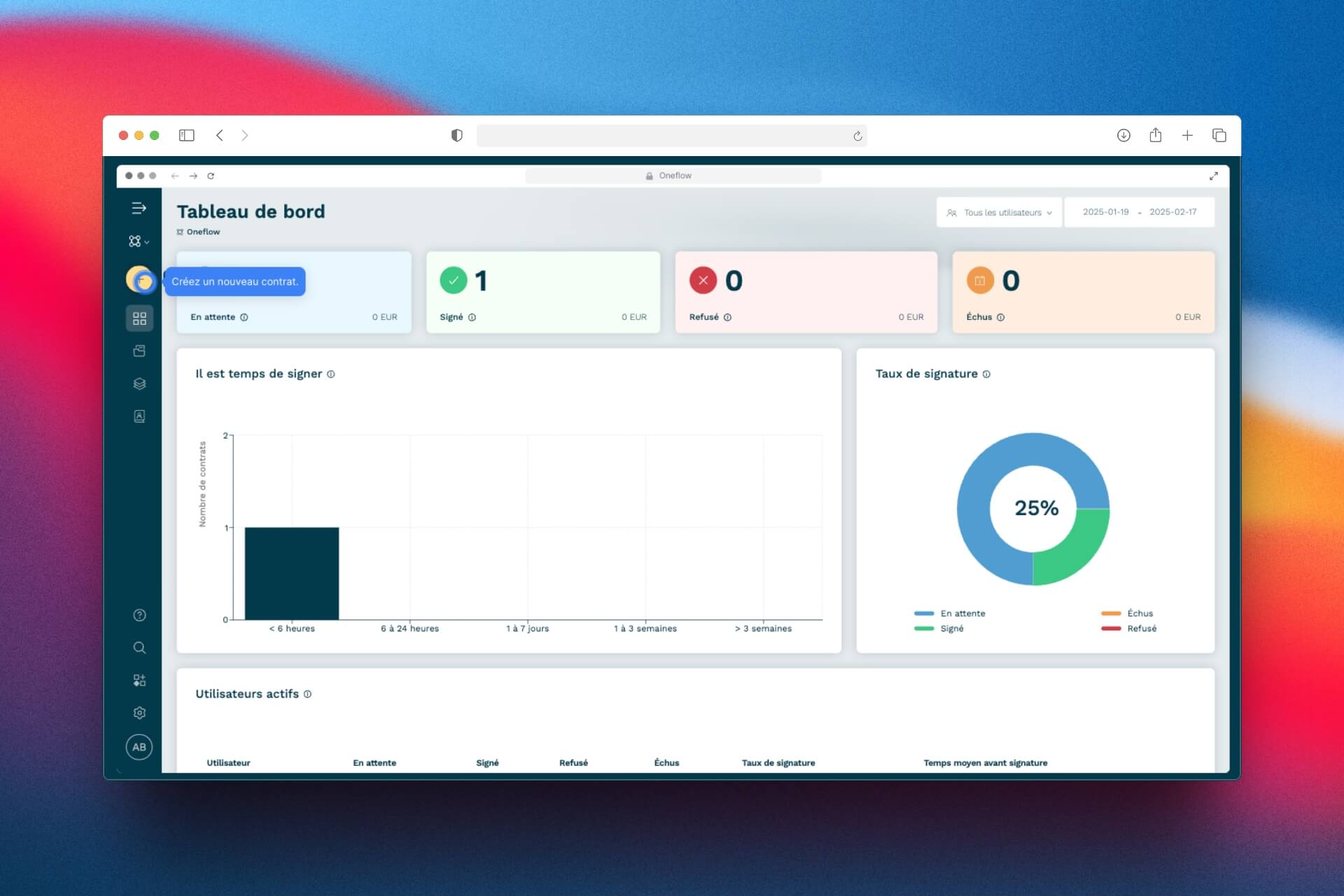
Oneflow is an all-in-one contract automation platform designed for modern sales, HR, and legal operations teams. It allows users to create, collaborate on, sign, and manage legally binding agreements within a single, web-based workspace, differentiating itself from static PDF workflows with its real-time editing and analytics capabilities Oneflow Official Website.
In my professional opinion, its primary function is to consolidate a fragmented contract process into a single, streamlined flow.
Unlike simple e-signature tools that focus only on the final signing step, Oneflow aims to manage the entire lifecycle of a document. It positions itself in the market between basic, low-cost signature tools and highly complex, enterprise-grade Contract Lifecycle Management (CLM) systems.
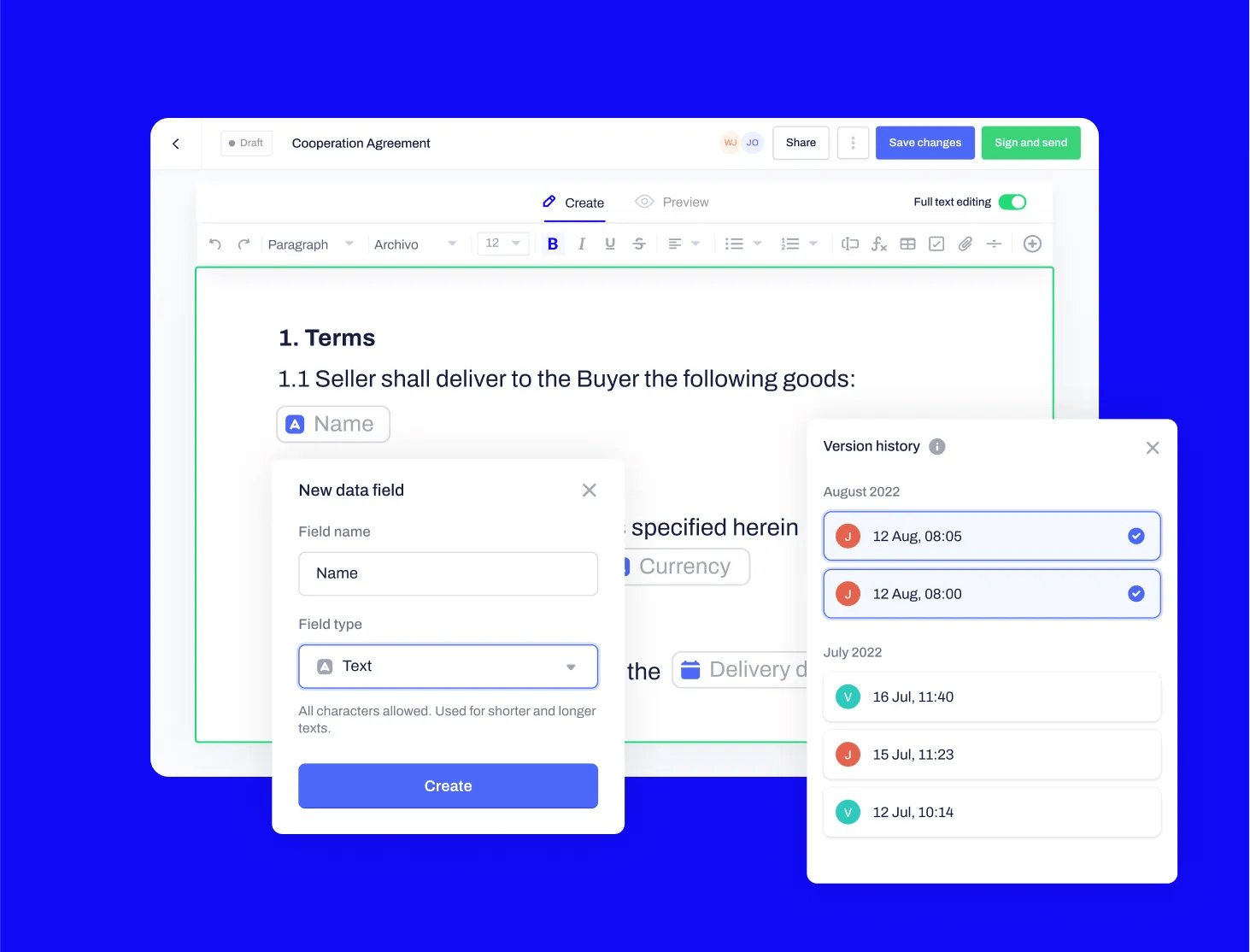
The core of its technology is the “live contract”—a dynamic, web-based document that all parties can edit and interact with in real-time before it’s signed. This approach eliminates the back-and-forth of email attachments and version control issues that plague traditional negotiations.
Want to skip ahead and grab a working Oneflow discount code before testing the platform? It’s the quickest way to reduce your first-year subscription cost.
Below is an essential 7-minute demonstration that walks through Oneflow’s interface and key contract management features—useful context before we dive deeper into performance analysis.
Key features of the platform include:
- Live Contract Editing: All parties can collaborate on a single version of the document.
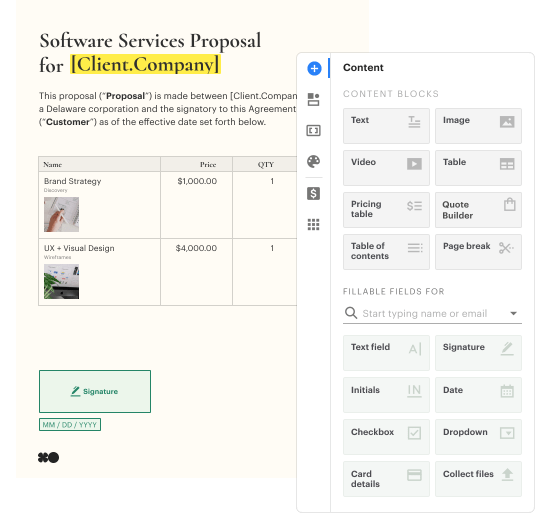
- Interactive Fields: Embed videos, pricing tables, and other interactive elements directly into contracts.
- Legally Binding E-Signatures: Compliant with eIDAS and ESIGN Act standards.
- Contract Analytics: Track contract views, edits, and engagement to gain data-driven insights into the negotiation process and identify bottlenecks.
- Template Library: Create and manage a library of pre-approved templates for consistency.
- CRM Integrations: Connect with popular CRMs like Salesforce and HubSpot to pull and push data.
Real-World Performance & User Experience
Oneflow’s real-world performance is a tale of two experiences: exceptional for the end-user signing the contract, but with a notable learning curve for the administrators who build the templates.
For the client, prospect, or new hire, the signing process is clean, modern, and incredibly straightforward. However, our analysis of user feedback G2 Oneflow Reviews, Capterra Oneflow Reviews and our hands-on testing reveal that harnessing the platform’s full power requires a significant upfront investment in setup and training.
How does the real-time collaboration work?
The real-time collaboration is Oneflow’s crown jewel. Unlike tools where you merely comment on a static PDF, Oneflow allows for true live editing before the document is signed. Imagine Google Docs, but for contracts.
Here’s how it works in practice:
- You send a contract link to a counterparty.
- They open the web-based document and can make changes to designated fields.
- You see their changes instantly and can accept, reject, or further edit them in the same session. An audit trail logs every change.
This creates a fluid, conversational negotiation process designed to remove friction and speed up deal closure. This immediate feedback loop is designed to streamline negotiations and is where sales teams report the most significant acceleration in their deal cycles.
What are the biggest user-reported pain points?
While the end-user experience is praised, administrators and power users report several challenges.
First, the onboarding and template setup can be complex. While simple contracts are easy to build, creating sophisticated, dynamic templates with conditional logic and multiple dependencies requires a good deal of technical skill.
Many users report that it’s not as intuitive as the promotional positioning suggests.
“The simplicity for the end-user is fantastic; we’ve had zero complaints from clients. However, my team spent a good week learning the ins and outs of the template builder to get our conditional logic right.”
— Sales Operations Manager Review on G2
This complexity is a significant consideration. Many fast-growing companies find that their initial template setup is more involved than anticipated. 💡 To address this, Oneflow offers paid onboarding services and extensive documentation Oneflow Official Website.
Our recommendation is for businesses to either allocate internal developer or skilled operations time for the initial setup phase or to budget for Oneflow’s professional services package to ensure a smooth rollout. This upfront investment is necessary to unlock the platform’s full potential. To offset some of that initial investment, we recommend pairing onboarding with an active Oneflow promo code to keep your first-year TCO in check.
A second common point of discussion is the lack of a native mobile application. While the website is mobile-responsive, sales professionals on the go often prefer a dedicated app for managing contracts. For users who frequently need to work offline, this can be a notable limitation.
How are the Template Library and Analytics features?
Beyond collaboration, two key features that define the Oneflow experience are its Template Library and Contract Analytics.
The Template Library allows teams to create and lock down pre-approved contract templates, ensuring legal and branding consistency. In our testing, creating a simple template is straightforward. However, building dynamic templates with many interactive fields and conditional rules requires a power user. It’s a powerful tool for standardization but requires a dedicated owner to manage.
The Contract Analytics feature provides insights into how counterparties interact with a document. You can see who has opened the contract, how long they viewed it, and which sections they focused on.
This is valuable for sales teams to gauge engagement and identify potential sticking points before a follow-up call. While useful for individual contracts, some users on review platforms like Gartner note that the aggregate reporting capabilities are less robust than those in dedicated enterprise CLM systems Gartner Peer Insights for CLM.
Oneflow Pricing & Total Cost of Ownership (TCO) in [year]
Oneflow’s pricing starts at €39 per user per month for its entry-level “Essentials” plan, with the “Professional” plan starting at €51 per user per month (when billed annually). Enterprise plans are custom-quoted.
It’s important to note that pricing is listed in Euros and may vary by region Oneflow Pricing. Our Oneflow review found this is a significant consideration for teams budgeting in other currencies. Before committing to any tier, also check the latest Oneflow voucher code — promotional pricing can meaningfully reduce annual spend.
How much does Oneflow cost?
Oneflow offers three main pricing tiers: Essentials, Professional, and Enterprise. While the “Essentials” tier provides a solid starting point, most mid-market teams we’ve worked with find that the “Professional” tier is the realistic entry point for serious use, as it unlocks critical features like the API for advanced integrations and more user roles.
| Feature | Essentials (€39/user/mo) | Professional (€51/user/mo) | Enterprise (Custom) |
|---|---|---|---|
| Real-time Collaboration | ✅ | ✅ | ✅ |
| Template Library | ✅ | ✅ | ✅ |
| Basic CRM Integrations | ✅ | ✅ | ✅ |
| Advanced Integrations (API) | ❌ | ✅ | ✅ |
| Single Sign-On (SSO) | ❌ | Paid Add-on | ✅ (Included) |
💡 KEY INSIGHT
According to Oneflow’s current pricing page Oneflow Pricing, basic CRM integrations (like HubSpot and Pipedrive) are included in the entry-level “Essentials” plan. Single Sign-On (SSO) is available as a paid add-on for the “Professional” plan and is standard in the “Enterprise” plan. This is a crucial detail for security and IT teams.
The TCO Reality: Uncovering Hidden Costs
The sticker price is just the beginning. By understanding the full Total Cost of Ownership (TCO), your team can accurately calculate the potential Return on Investment (ROI) and determine if Oneflow is a financially sound decision for your workflow.
To calculate the true TCO, you must account for several other factors.
TCO Model: Multi-Scenario Analysis (Professional Tier)
- Assumptions: Annual billing, one paid CRM integration add-on (~€100/mo), and a one-time onboarding service fee (~€2,500). Prices are illustrative estimates.
10-User Team
€24,460
3-Year realistic TCO
Base license: €18,360 + setup & integration fees
20-User Team
€42,820+
3-Year realistic TCO
Base license: €36,720 + setup & integration fees
💡 PRO TIP — Negotiating Your Oneflow Quote
When requesting a quote, insist on a multi-year breakdown that includes all potential add-ons, professional service fees, and integration costs. Don’t be afraid to negotiate for favorable terms on onboarding or for unlocking key features for your specific use case. Combine vendor negotiation with our current Oneflow special offer for maximum savings. Gartner Peer Insights for CLM.
The platform’s structure can lead to higher costs than initially apparent. My strong recommendation is to get a detailed, multi-year quote during the sales process. This proactive step helps ensure budget predictability and avoids unpleasant surprises.
How Does Oneflow Compare to Its Competitors?
Oneflow competes in a crowded market, but it carves out a specific niche. It goes up against e-signature giants like DocuSign, other all-in-one platforms like PandaDoc, and European rivals like Contractbook.
In my analysis, Oneflow’s key differentiator is its superior live collaboration engine, but this often comes at a higher price point and with fewer features than some of its competitors. For a deeper side-by-side breakdown, see our dedicated guide on Oneflow Top Alternatives and Competitors.
Comparison Summary
- Best For: Large enterprises needing an industry-standard, highly compliant e-signature solution with deep legal tech features.
- Consider: DocuSign’s core strength is its ubiquity and mature Contract Lifecycle Management (CLM) suite, which offers advanced features like obligation management that Oneflow lacks DocuSign Website. Its mobile app is also more robust.
- Avoid If: Your primary need is fast, collaborative negotiation. DocuSign’s “commenting” feature feels clunky compared to Oneflow’s true live editing. For sales teams focused on speed, Oneflow’s modern UI is often preferred.
✅ Strengths
- Industry-standard recognition and trust
- Robust mature CLM suite with obligation management
- Stronger native mobile app for field use
⚠️ Considerations
- Clunky commenting vs. true live editing
- Less modern UI for sales-focused teams
- Higher complexity for negotiation workflows
Comparison Summary
- Best For: SMBs and mid-market sales teams looking for a cost-effective all-in-one platform with a strong focus on proposal and quote creation.
- Consider: The primary difference often comes down to which platform is more cost-effective for your specific needs; while PandaDoc often has a lower entry price and a free tier PandaDoc Website, the ROI of Oneflow‘s collaborative features must be factored in. PandaDoc’s design and branding tools for proposals are often considered stronger.
- Avoid If: You are an HR or legal team. While capable, PandaDoc’s feature set is heavily optimized for sales documents, whereas Oneflow has a slightly broader appeal across departments.
✅ Strengths
- Lower entry price with a free tier
- Stronger proposal design and branding tools
- Optimized for sales document workflows
⚠️ Considerations
- Less appealing to HR and legal teams
- Weaker live collaboration than Oneflow
- Narrower departmental fit overall
Comparison Summary
- Best For: Tech-savvy legal and operations teams who want to leverage contract data for business intelligence and automation.
- Consider: Contractbook has a stronger emphasis on post-signature management, data analysis, and automation workflows Contractbook Website. It’s a powerful tool for teams who want to turn their contracts into a structured data asset.
- Avoid If: Your team prioritizes user-friendliness for day-to-day contract creation above all else. Oneflow is often perceived as having a more intuitive and straightforward interface for the average user.
✅ Strengths
- Strong post-signature management features
- Advanced data analysis and automation workflows
- Turns contracts into structured data assets
⚠️ Considerations
- Less intuitive for non-technical day-to-day users
- Steeper learning curve than Oneflow
- Optimized for ops/legal more than sales
| Feature / Value | Oneflow | DocuSign | PandaDoc | Contractbook |
|---|---|---|---|---|
| Primary Strength | Real-time collaboration | Industry-standard e-sign | Sales proposals | Data & automation |
| Real-time Live Editing | ✅ Best in class | ❌ Comments only | ⚠️ Limited | ⚠️ Limited |
| Native Mobile App* | ❌ Web-only | ✅ Robust | ✅ Available | ❌ Limited |
| Advanced CLM Features | ⚠️ Mid-tier | ✅ Enterprise-grade | ⚠️ Sales-focused | ✅ Strong |
| Typical Entry Price (€) | €39/user/mo | ~€10/user/mo | Free tier available | Custom quote |
| CRM Integration Depth | ⚠️ Reportedly shallow | ✅ Deep | ✅ Strong | ✅ Strong |
| Target User | Mid-market sales & HR | Large enterprise | SMB sales | Legal & ops |
*Footnote: While DocuSign and PandaDoc offer native mobile apps, users report that functionality for complex editing and template administration may be limited compared to the full desktop experience.
Smart Shopper’s Guide: Integrations, Security, and Risk Assessment
Oneflow is a secure platform backed by major compliance certifications like ISO 27001, SOC 2, and GDPR Oneflow Trust Center.
My biggest concerns lie not with its baseline security, but with the practical realities of its integrations and the significant risk of vendor lock-in.
How good are Oneflow’s integrations?
This is a critical question. While Oneflow advertises integrations with Salesforce, HubSpot, and other platforms, user reports G2 Oneflow Reviews frequently describe these integrations as “shallow.”
This means they may only sync basic data fields and may not support custom objects or complex workflows without significant setup or paid professional services. 💡 A buggy or limited CRM integration can undermine the efficiency gains you expect.
Therefore, my advice is firm: during your demo, insist on seeing the specific integration you need in a live environment. Ask the sales engineer to demonstrate how it handles your company’s custom objects, and request a trial in a sandboxed environment to have your own technical team verify its depth.
Is Oneflow secure and legally compliant?
Yes, on paper, Oneflow’s security posture is strong. The platform holds the following key certifications:
- ISO 27001: The international standard for information security management.
- SOC 2 Type II: An audit that attests to the security, availability, and confidentiality of their systems Oneflow Security Page.
- GDPR: Fully compliant with European data protection regulations, including offering EU data residency.
- eIDAS & ESIGN Act: Their e-signatures are legally binding in the EU and the US.
“The GDPR compliance and EU data residency were non-negotiable for us. Oneflow’s Trust Center made it easy for our security team to sign off, which was a huge relief.”
— Head of People & Culture Review on Capterra
The Solution to Vendor Lock-in: Your Pre-Purchase Checklist
⚠️ WARNING — Proprietary Live Contract Format: A Vendor Lock-in Risk
Oneflow’s innovative ‘live contract’ format is proprietary. While beneficial for collaboration, it means data export is complex. You can get PDFs, but dynamic features, metadata, and audit trails may be lost or difficult to migrate. Plan for this risk by defining an exit strategy pre-purchase. G2 Reviews.
The platform’s proprietary “live contract” format introduces a significant risk of vendor lock-in. To mitigate this risk, here is a checklist of questions you MUST ask the Oneflow sales representative before you sign any contract:
- Bulk Export: “What are the specific steps and associated costs for a bulk export of all of our contract PDFs and their complete metadata?”
- API Access: “Can you provide documentation for the data export API? What are the rate limits and costs associated with using it for a full data migration?”
- Export Format: “In what format is the metadata exported? Is it a structured format like JSON or CSV that we can easily import into another system?”
- Timeline: “If we request a full data export, what is the guaranteed service level agreement (SLA) for its delivery?”
Getting clear, written answers to these questions is the most effective solution to a primary concern about the platform Oneflow Privacy Policy. While you’re finalizing your due diligence, you can also grab a current Oneflow promotional code to lock in better first-year pricing.
Implementation & Deployment Guide
A successful Oneflow deployment is less about the technology and more about structured change management. In our experience, teams that plan meticulously before “going live” achieve the highest ROI.
Pre-Deployment
Pilot Program
Phased Rollout
Ongoing Governance
Step 1: Pre-Deployment Readiness Checklist
Before you sign, your implementation lead should work through this checklist:
- Identify Key Workflows: Which 3-5 contract types (e.g., Sales MSA, vendor agreements, Employment Offers) cause the most friction?
- Assemble Core Team: Identify the administrator who will build templates, department heads, and an executive sponsor.
- Audit Existing Templates: Gather all current contracts. This is the perfect time to standardize language with legal sign-off.
- Define Success Metrics: How will you measure success? Key KPIs include the tangible goal to reduce time-to-sign, improve the deal-close rate, or shorten new-hire onboarding time.
Step 2: Launch a Pilot Program
Start with a pilot program rather than a company-wide rollout.
- Scope: Choose one motivated team (e.g., your top-performing sales pod) and one or two contract workflows.
- Duration: Run the pilot for 30-60 days to gather meaningful data.
- KPIs: Track your pre-defined success metrics and gather qualitative feedback.
- Feedback Loop: Hold weekly check-ins with the pilot team and a Oneflow representative to address issues immediately SaaSWorthy Oneflow Review.
Step 3: Mitigate Common Risks
- Low User Adoption: The number one reason deployments fail.
- Solution: Make the new way the only way. Once the pilot is successful, archive old templates. The executive sponsor must communicate that Oneflow is the new standard.
- Overly Complex Templates: Teams try to automate everything at once.
- Solution: Start simple. Your first templates should be streamlined. You can always add complexity later.
Step 4: Execute a Phased Rollout & Ongoing Governance
Once the pilot is complete, it’s time for a broader rollout.
- Phase 1 (First 90 Days): Roll out proven workflows to all relevant teams.
- Phase 2 (Next 90 Days): Tackle the next set of high-priority workflows.
- Ongoing: Establish a “Center of Excellence,” a small sales enablement group of power users to train new employees and share best practices.
Successful implementation is an ongoing process. As this Oneflow review has shown, following a phased, data-driven approach ensures you get maximum value from your investment. You can also browse our latest coupons to find adjacent productivity tools that pair well with Oneflow.
FINAL VERDICT & RECOMMENDATIONS
After a comprehensive analysis, my final verdict is that Oneflow is a genuinely effective platform that solves contract friction for a specific customer. However, its premium pricing and potential for vendor lock-in mean it’s not the right choice for everyone. You can read the extended Oneflow Review for additional analysis and benchmark data.
What We Love
- Superior real-time collaboration engine: The live, web-based editing is a legitimate game-changer for sales cycle acceleration and streamlining negotiations.
- Exceptional end-user signing experience: The interface for the person signing is clean and modern, reducing friction and improving brand perception.
- Clean, modern, and intuitive user interface: For day-to-day use, the platform is a pleasure to work with, a factor that heavily influences user adoption.
- Strong security posture with key certifications: With ISO 27001, SOC 2, and GDPR compliance, Oneflow meets the security requirements of most mid-market companies Oneflow Trust Center.
Things to Consider
- 💡 Premium pricing: The cost can be difficult to justify for teams with simple needs or low contract volume.
- 💡 Shallow CRM integrations: User reports of “shallow” integrations are a recurring theme that requires careful vetting during the sales process.
- 💡 Steep learning curve for complex template administration: Setting up intricate templates requires a dedicated, skilled resource.
- 💡 Lack of a native mobile app: This is a notable gap for field sales teams who need to manage contracts on the go.
- 💡 Significant vendor lock-in risk: The proprietary “live contract” format makes data migration difficult.
Who should use Oneflow?
YES, you should seriously consider Oneflow if: You are a mid-market company (50-1000 employees) and your primary business pain is the speed of your sales or HR contract workflows.
If your teams are losing momentum during the negotiation phase and you can place a clear monetary value on increasing deal velocity, then Oneflow’s collaborative features will likely provide a strong ROI.
Who should consider alternatives?
You should consider alternatives if: You are a small business or solopreneur who just needs a low-cost, simple e-signature tool.
In that case, the premium features of Oneflow are overkill, and you would be better served by a dedicated e-signature platform like DocuSign’s eSignature plan or PandaDoc’s free tier.
This content is for informational purposes only and should not be considered legal or financial advice. The pricing and features mentioned are subject to change. Always conduct your own due diligence and consult with a qualified professional before making a purchasing decision.
Frequently Asked Questions
Q1: How much does Oneflow cost in [year]?
A: Oneflow’s pricing starts at €39 per user per month for its entry-level “Essentials” plan, billed annually. The more popular “Professional” tier, which unlocks advanced integrations, starts at €51 per user per month Oneflow Pricing.
However, the true total cost is often higher. When factoring in one-time setup fees, which user reviews suggest can be between $1,500 and $5,000, and paid add-ons for specific integrations or SSO, the total investment can increase substantially. It’s essential to get a detailed quote that includes all potential costs.
Q2: Is Oneflow worth the money?
A: It depends entirely on your use case and contract volume. For mid-market sales and HR teams where the speed of contract negotiation directly impacts revenue or hiring, the ROI can be strong.
If Oneflow’s real-time collaboration can shorten your average sales cycle by even a few days, the platform can pay for itself Gartner Peer Insights for CLM. However, for small businesses or teams that only need to sign a few simple documents a month, the premium price is generally not justifiable compared to cheaper, simpler e-signature tools.
Q3: Should I use Oneflow or DocuSign?
A: Use Oneflow if your main priority is a modern interface and real-time collaboration to speed up negotiations. Its “Google Docs-like” editing experience is superior for fluid, back-and-forth deal-making.
Use DocuSign if you need a widely accepted e-signature tool with a robust mobile app, extensive enterprise-grade compliance features, and deep CLM capabilities like obligation management G2 Oneflow Reviews. DocuSign is the market incumbent and is often the standard choice in large, heavily regulated industries.
Q4: Who is Oneflow best for?
A: Oneflow is best for mid-market companies (50-1000 employees), particularly in sales and HR departments. These teams are often sophisticated enough to have outgrown simple e-signature tools but are not yet at the scale where they require a complex, enterprise-only CLM system.
The ideal customer is a fast-growing company that values speed, user experience, and collaboration, and is willing to pay a premium to reduce the friction in their contract workflows Tekpon Oneflow Review.
Q5: Is Oneflow reliable and secure?
A: Yes, Oneflow demonstrates a strong commitment to reliability and security. The platform holds major certifications, including ISO 27001 for information security management and SOC 2 Type II, which attests to the security and availability of its systems Oneflow Trust Center.
Furthermore, it is fully GDPR compliant and offers EU data residency, making it a secure and compliant choice for most businesses operating in or with Europe.
Q6: What are the main problems with Oneflow?
A: The most commonly reported considerations, based on user reviews and our analysis, are its premium price point and a Total Cost of Ownership that can be higher than expected due to tier-locked features.
Other frequent points of discussion are the “shallow” or limited nature of some CRM integrations, which may require technical workarounds, and a significant vendor lock-in risk due to its proprietary “live contract” format, making data migration challenging Capterra Oneflow Reviews. The lack of a native mobile app is also a drawback for some users.
Q7: Is Oneflow a CRM?
A: No, Oneflow is not a CRM (Customer Relationship Management) system. It is a Contract Lifecycle Management (CLM) platform designed to integrate with your existing CRM, such as Salesforce or HubSpot Oneflow Integrations.
A CRM is used to manage your relationships and interactions with customers and potential customers. Oneflow takes data from your CRM (like contact and deal information) to create contracts, and then manages the contract process from negotiation to signature and storage.
Q8: Does Oneflow have a free plan?
A: No, Oneflow does not currently offer a perpetual free plan. It is a premium product with paid subscription tiers starting with the “Essentials” plan Oneflow Pricing.
They may offer a limited-time free trial to allow potential users to test the platform’s features before committing to a paid plan. This contrasts with competitors like PandaDoc, which does offer a free e-signature plan with limited features, making it a more accessible starting point for small businesses or individuals with very basic needs.

