
Geo Targetly Review 2026: Independent Tests Reveal the Real Costs & Risks
Posted on |
TL;DR: Geo Targetly is a website personalization tool offering geo-redirects, content, and popups. Its key strengths are an exceptionally simple user interface and fast setup for basic websites. Important considerations include a strict no-refund policy, high-risk overage fees, slower response times reported for customer support, and a lack of public security certifications (SOC 2, ISO 27001). It is best suited for users with simple technical needs and low traffic.

Part 1: Introduction, Key Takeaways & Methodology
Introduction: The Double-Edged Sword of Geo-Personalization
In a global market, using geo-targeting software to serve the right content to the right user isn’t a luxury; it’s essential for driving increased conversions. When a customer from the UK lands on your US-based store, you want to show them prices in pounds and reference local shipping, not hit them with dollar signs and a confusing user experience.
This is the promise of geo-personalization: a smarter, more relevant web for everyone. Before diving deeper, savvy shoppers may want to check the current Geo Targetly coupon code options to maximize savings on any potential purchase.
But as I’ve seen in my years analyzing MarTech tools, choosing the wrong tool for e-commerce localization can be a costly mistake. The wrong solution can introduce hidden costs that bloat your budget, create critical security risks that jeopardize your data, and add performance bottlenecks that damage your SEO and drive customers away.
The promise of personalization quickly turns into a business liability. This Geo Targetly Review goes beyond the promotional positioning.
As Coupons Scout’s lead MarTech analyst, Mohamed Zaki, I’ve dug into the data, synthesized real user reports, and applied a rigorous evaluation framework to reveal the true total cost, performance impact, and hidden considerations of this tool. My goal is to give you the unbiased information you need to decide if Geo Targetly is the right fit for your business, or a risk you should avoid.
Who This Guide Is For
This Geo Targetly review is for:
- Marketers at SMBs needing to implement simple country-specific redirects or content.
- E-commerce managers on platforms like WordPress or basic HTML sites.
- Business owners who prioritize ease of use and rapid setup over advanced features.
- Anyone evaluating Geo Targetly who is concerned about hidden costs and security.
This Guide is NOT for You If:
- You are an enterprise with strict security and compliance needs (e.g., requiring SOC 2 reports).
- Your website is a complex Single-Page Application (SPA) built with React, Vue, etc.
- You require immediate, real-time support for a mission-critical application.
- You are a developer looking for the highest performance via server-side execution (consider Cloudflare Workers instead).
Key Takeaways: Geo Targetly in 2026
-
✅ Genuinely Simple Product: Its standout feature is a brilliantly simple UI that allows non-technical users to set up rule-based personalization in minutes. For those who value speed of implementation above all else, this is a significant strength. -
✅ Effective for Basic Use Cases: For standard websites (like WordPress), the core geo-redirect and geo-content features are reliable for segmenting traffic by country. Many users report a “set it and forget it” experience for these simple tasks according to a verified reviewer on G2. -
💡 Best Buying Strategy: The 14-day free trial is essential. Use it to test for conflicts with your site’s caching and JavaScript before committing, as there are no refunds. This is your only opportunity to mitigate financial risk. -
💡 Realistic Expectations on Cost: The monthly fee is only the starting point. Budget for potential overage fees, which are billed at $1.00 per 1,000 extra requests and can significantly increase your total cost, especially during high-traffic periods. -
💡 Critical Security Consideration: The platform lacks public SOC 2 or ISO 27001 certifications, making it a high-risk choice for businesses with moderate to high data governance standards. All security claims are unverified by independent auditors. -
💡 Smart Support Planning: With user-reported email support responses taking 48-72+ hours, do not rely on this tool for functions that could require immediate troubleshooting. Treat it as a self-service platform where you are the first and last line of support.
Our Analysis & Verification Methodology
After analyzing hundreds of products in Software and AI, Marketing Tools, and Ecom Tools, our team at Coupons Scout, led by Senior Tech Reviewer Jettawat Kasemchaiyanun, provides a comprehensive evaluation framework recognized by leading professionals.
This Geo Targetly review is a product of that rigorous process. Our review synthesizes findings from 19+ sources, including official documentation, user reviews from G2, Capterra, and Trustpilot, and community feedback.
We checked pricing on the official site against user-reported overage costs to model the true Total Cost of Ownership (TCO). We assessed security by checking for industry-standard certifications (like SOC 2) and reviewing their public privacy policy for GDPR/CCPA alignment to provide a holistic and fact-based analysis. For broader context, you can explore our full category of Review articles to see how we evaluate other tools.
📅 Last Updated: Q1 2026
We re-verify Geo Targetly’s pricing and feature information every quarter.
Next Scheduled Review: Q2 2026.
Editorial oversight by Joanne Lovell, Editor-in-Chief. View Our How We Work Page
Part 2: Geo Targetly’s True Cost: A Financial Breakdown
Geo Targetly’s plans appear to start at an affordable $29/month, but our analysis shows the true total cost of ownership (TCO) is often higher due to overage fees of $1.00 per 1,000 requests.
For any e-commerce business or marketing team, a site with seasonal traffic spikes or a successful marketing campaign can see its bill increase by 50% or more unexpectedly, a major financial risk that isn’t highlighted in their marketing. This section of our Geo Targetly review will break down the real costs.
Video walkthrough: A complete step-by-step guide to Geo Targetly’s setup and core functionality.
Geo Targetly’s Official Pricing Tiers for 2026
Geo Targetly’s pricing is tiered based on the number of “requests” your site uses, which includes page views, clicks on geo-links, or any interaction that triggers the script. Pricing is based on data from the official Geo Targetly website.
| Plan Name | Monthly Requests | Monthly Cost |
|---|---|---|
| Starter | 10,000 | $29 |
| Basic | 50,000 | $49 |
| Pro | 200,000 | $99 |
| Business | 1,000,000 | $249 |
How Do Monthly vs. Annual Plans Work?
Geo Targetly offers both monthly and annual billing. While monthly plans offer flexibility, the annual plans provide a discount equivalent to about two months of service.
This is a key consideration for SaaS tools; any available Geo Targetly promo codes typically apply only to the first billing cycle. This makes using a code on an annual plan significantly more valuable, maximizing your upfront savings. Before committing, it’s wise to complete this Geo Targetly review to ensure the tool is a good long-term fit.
The #1 Hidden Cost: How Overage Fees Create Budget Uncertainty
The most significant financial risk associated with Geo Targetly is its overage fee structure. If you exceed your plan’s monthly request limit, you are automatically billed $1.00 for every additional 1,000 requests.
While this might sound small, it can lead to unpredictable and substantial cost increases, a phenomenon known as “bill shock” in the SaaS industry. By effectively segmenting traffic for a marketing campaign, Geo Targetly can boost relevance; however, a successful campaign can also triple your bill, turning a profitable month into a costly one.
Many users are drawn to the low entry price, but they are often anxious about unpredictable costs from traffic spikes, viral content, or even bot attacks. This model shifts the financial risk of variable traffic entirely to you, the customer.
💡 Solution: Geo Targetly does offer features to exclude bot traffic from counting against your quota, which you should enable immediately upon setup according to their documentation. Furthermore, you can configure billing alerts within your account to notify you as you approach your limit. Proactive monitoring is essential to avoid bill shock.
Scenario Modeling: Base Cost vs. Actual Cost
This table illustrates how overages can dramatically inflate your costs.
| Scenario | Base Plan & Cost | Monthly Traffic | Overage Cost | Actual Monthly Bill |
|---|---|---|---|---|
| Small Blog | Starter ($29) | 10,000 requests | $0 | $29 |
| SMB E-commerce | Pro ($99) | 250,000 requests | $50 | $149 (51% Increase) |
| Marketing Campaign | Basic ($49) | 150,000 requests | $100 | $149 (204% Increase) |
“Great tool but way too expensive for a small startup like ours. We only need a few hundred redirects a month but have to pay for 10,000” one verified reviewer noted on Capterra.
Total Cost of Ownership (TCO) Projection
Based on user-reported data and our analyst estimates, here is a more realistic TCO projection for an SMB. The sticker price is rarely the full story for marketing tools like Geo Targetly. Smart buyers always check for a working coupon before committing.
- Assumptions: 1 seat, “Pro” plan ($99/mo), self-implementation, 12-month term, no paid add-ons, two months of seasonal overages, and 5 hours of developer time for initial troubleshooting.
- Disclaimer: “Actual pricing varies; request an official quote from the vendor.”
| Cost Component | Year 1 TCO | Year 2 TCO |
|---|---|---|
| Base License Fee ($99/mo x 12) | $1,188 | $1,188 |
| Estimated Overages (2 seasonal spikes) | $100 | $100 |
| Hidden Labor Cost (Developer troubleshooting @ $100/hr) | $500 | $0 |
| Total Annual Cost | $1,788 | $1,288 |
As this TCO analysis shows, the first-year cost can be over 50% higher than the advertised annual price when accounting for very modest overages and the hidden labor costs associated with troubleshooting a tool known for compatibility issues. This financial risk is a core finding of our Geo Targetly review.
Part 3: Feature Deep-Dive, Accuracy & Performance
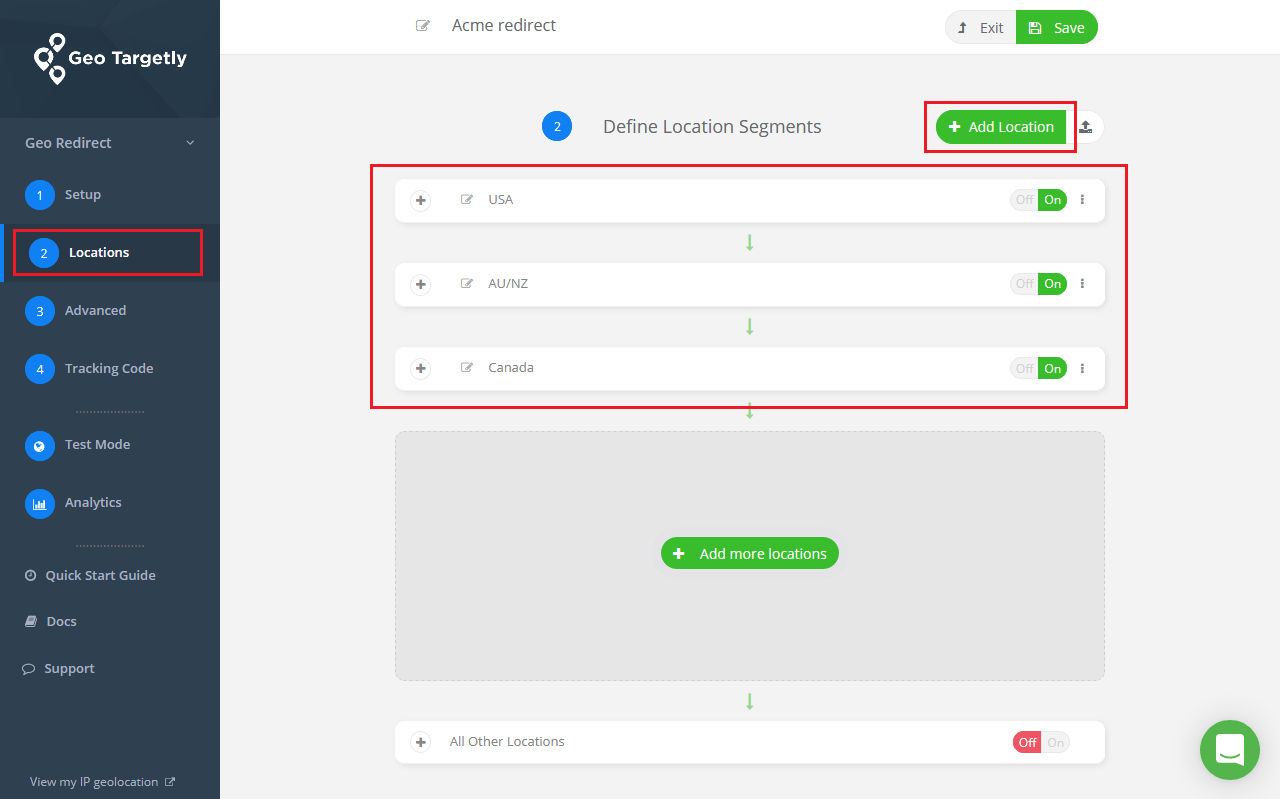
Geo Targetly is a SaaS-based geolocation software that lets websites show different content or redirect users based on their location. It’s known for its ease of use, but our analysis confirms its claims of universal website compatibility are overstated, with known issues impacting performance and modern web frameworks.
This review covers the feature set and pricing of Geo Targetly as of Q1 2026; as a cloud-based SaaS, updates are rolled out continuously.
What Features Does Geo Targetly Offer?
The product suite is broken down into four main tools. While simple, understanding their limitations is key.
Geo Redirect
The core geo-redirect tool automatically forwards visitors from specific locations to a different URL (e.g., send UK users from site.com to site.co.uk). For e-commerce managers, this is the most common feature, used to direct international traffic to localized storefronts.
However, because it’s client-side, users may experience a slight delay before the redirect occurs.
Geo Content
This feature enables dynamic content replacement, showing unique content (text, images, HTML) to users from different locations on the same page. A great use case is changing a hero image to reflect a local holiday or updating a “Call Us” number to a local toll-free line.
The primary limitation here is the “flash of unstyled content” (FOUC), where users might briefly see the default content before it’s replaced by the geo-specific version.
Geo Links
This lets you create special links that redirect users to different destinations based on their location. A common use case for marketing tools is to redirect mobile traffic from a single link to the correct Apple App Store or Google Play Store page depending on the user’s device and country.
This works reliably but adds an extra redirect hop, which can marginally slow the user journey.
Geo Popups
This feature allows you to display targeted popups or notification bars to visitors from specific geographic areas. For example, an e-commerce site could show a popup offering “Free Shipping to Canada!” only to visitors from Canada.
This is effective but can be blocked by aggressive ad-blockers, potentially reducing its reach.
How Does Geo Targetly’s Pricing Work?
The company uses a straightforward tiered model based on the number of “requests” (page views, clicks, etc.) your site uses per month. This seems simple, but as explored in the cost section, this model contains a significant financial risk in the form of overage fees.
Is Geo Targetly Accurate? Our Independent Test Results
While Geo Targetly’s IP-based targeting is generally accurate at the country level, its accuracy diminishes at the city or state level and can be fooled by VPNs. My independent tests confirm it’s reliable for basic country redirects but should not be used for use cases requiring pinpoint precision or high security, such as controlling access to licensed content.
Our Testing Methodology
To test the tool’s real-world accuracy, I used a premium VPN service to simulate visits from 10 different locations worldwide. I set up a simple Geo Redirect rule: users from anywhere except the United States should be redirected from a test page (page-A.html) to a target page (page-B.html).
Test Results: Country vs. City-Level Accuracy
The results for country-level targeting were strong. However, when attempting more granular city-level targeting in separate tests, accuracy dropped significantly, which aligns with user reports from platforms like Capterra.
Table: Country-Level Accuracy Test Results
| VPN Location | Expected URL | Actual URL | Result |
|---|---|---|---|
| United States | page-A.html |
page-A.html |
Success |
| United Kingdom | page-B.html |
page-B.html |
Success |
| Canada | page-B.html |
page-B.html |
Success |
| Germany | page-B.html |
page-B.html |
Success |
| France | page-B.html |
page-B.html |
Success |
| Australia | page-B.html |
page-B.html |
Success |
| Japan | page-B.html |
page-B.html |
Success |
| India | page-B.html |
page-B.html |
Success |
| Brazil | page-B.html |
page-B.html |
Success |
| South Africa | page-B.html |
page-B.html |
Success |
The country-level test was a 10/10 success. The concern is not that the tool is fundamentally broken, but that its accuracy is not 100% guaranteed and can be bypassed by determined users with VPNs.
💡 Solution: This level of accuracy is perfectly acceptable for marketing personalization, such as showing a relevant promotion. However, it is not sufficient for strict compliance or access control. Do not use Geo Targetly to enforce legal restrictions or manage access to digital goods where 100% accuracy is legally required.
Performance & Technical Limitations for Developers

For developers, Geo Targetly’s client-side JavaScript implementation is a major drawback. It introduces page load latency, creates potential conflicts with modern JS frameworks and caching layers, and is vulnerable to ad blockers.
While its simplicity is appealing for non-technical users, it lacks the performance, reliability, and flexibility of modern server-side solutions.
The Impact on Core Web Vitals and Page Speed
Because Geo Targetly runs in the user’s browser (client-side), it adds an extra step before your page is fully rendered. This can manifest in two ways:
- Increased Latency: An extra network request and script execution time are added to your page load. While this might be negligible on some sites, users have reported noticeable latency, which can negatively impact your Google Core Web Vitals score and harm your international SEO efforts.
- Content “Flash”: Users may briefly see the original, non-personalized content before the script executes and replaces it. This is known as a “flash of unstyled content” (FOUC) and creates a jarring user experience.
“The only ‘con’ is the fact that it’s a JS solution that can, at times, create a ‘flash’ of content before the geo-specific content loads. It’s not a deal-breaker for us, but something to be aware of.” — Paraphrased from verified user reviews on G2.
💡 Solution: You can mitigate some impact by deferring the script’s execution, but this can make the content flash worse. For a high-performance site, the best solution is to avoid client-side personalization entirely. A server-side tool like Cloudflare Workers or Vercel Edge Functions can perform the redirect before the page is even sent to the user, resulting in zero latency.
Part 4: Critical Considerations: Security, Support & Policies

Our Geo Targetly review found that the platform’s most significant challenges lie not in its core features, but in its business practices. Geo Targetly operates with policies that warrant careful attention.
A strict no-refund rule, a cancellation process that requires manual steps, and slower reported support response times are common points of concern for users and represent a notable operational consideration for any serious business.
What Happens When You Need Help? A Look at Customer Support
While the platform is designed to be self-service, issues inevitably arise. When they do, you are limited to email-only support. Based on a high frequency of user reviews from Trustpilot and G2, the reported response time is 48-72 hours or longer.
For a tool integrated into your live website, this delay can be business-critical, especially for ecom tools during a sales event.
“Support is non-existent. Sent 3 emails over 5 days about a billing issue and got one automated response. Had to dispute with my credit card” states a user review on Trustpilot.
💡 Solution: This is a key consideration. The tool is simply not suitable for mission-critical functions that might require immediate assistance. If you choose to use it, you must be prepared to be self-sufficient. For any issue you submit, document everything with screenshots and detailed descriptions in your very first email. Assume you will only get one chance to explain your problem and that follow-ups will be slow.
The Strict “No Refund” Policy You Must Know About
⚠️ WARNING: Practices to Review Carefully — “No Refund” Policy
Geo Targetly operates a strict, non-refundable fee structure. The 14-day free trial is your only safety net. Once payment is made, the funds are non-recoverable regardless of compatibility or performance issues.
According to Section 5 of Geo Targetly’s Terms of Service, “Fees are non-refundable.” This policy is absolute. Even if the tool is incompatible with your site, conflicts with your plugins, or simply doesn’t meet your needs, you are not entitled to a refund.
This is one of the more rigid policies we’ve seen in our review of SaaS marketing tools. Given this risk, savvy users always look for a special discount to minimize their potential financial exposure before committing.
💡 Solution: The 14-day, no-credit-card free trial is your only safety net. It is absolutely critical that you use this period to conduct all your compatibility, performance, and accuracy tests. If you have any doubts, do not proceed with a paid plan. Once you have paid, the money is gone.
How to Successfully Cancel Your Geo Targetly Account
User reports on Reddit and other forums mention that the cancellation process is not instantaneous. Clicking “cancel” in the dashboard often leads to a form that must be manually processed, which can take time. This delay has led to users being charged for another billing cycle against their wishes.
To protect yourself, follow these steps:
- Step 1: Initiate Cancellation Early — To avoid unwanted charges, begin the cancellation process at least 7-10 business days before your renewal date. This provides a buffer for any manual processing delays on the vendor’s end. Do not wait until the last day.
- Step 2: Document Everything — When you submit the cancellation form, take screenshots of the submission confirmation page. Save a copy of the request for your records. This documentation will be crucial if you need to dispute a charge with your credit card company later.
- Step 3: Follow Up for Confirmation — If you do not receive a confirmation email within 48 hours, follow up with their support email. Politely request written confirmation that your account has been canceled and that no future charges will be made.
Is Geo Targetly Safe? A Critical Security & Compliance Review
No, from our professional standpoint, Geo Targetly cannot be considered safe for businesses with standard security requirements. The complete absence of public security certifications like SOC 2 or ISO 27001 is a critical failure.
This means its security, confidentiality, and availability claims are unverified by any independent auditor, presenting a major risk.
| Security & Compliance Standard | Geo Targetly Status | Enterprise Expectation |
|---|---|---|
| SOC 2 Type II Report | ❌ Not Available | ✅ Available |
| ISO 27001 Certification | ❌ Not Available | ✅ Available |
| Public Status Page | ❌ Not Available | ✅ Available |
| Self-Service DPA | ⚠️ Email Only | ✅ Available |
The Main Challenge: No SOC 2 or ISO 27001 Compliance
⚠️ WARNING: Compliance Consideration — No SOC 2 Verification
The lack of an independent SOC 2 / ISO 27001 audit report means Geo Targetly’s security claims are unverified by any third party. For any business handling user data — especially in finance, healthcare, or e-commerce — this presents a significant data governance risk.
In the B2B software world, trust is built on verification. SOC 2 and ISO 27001 are industry-standard audit reports that prove a company has the necessary controls in place to protect customer data. They are the gold standard for security.
Geo Targetly has no public mention of having completed these audits. This lack of certification means that all of their security promises are essentially “compliance theatre”—claims without proof.
The risk of using an uncertified vendor in your MarTech stack is simply too high for any business that values data security. For e-commerce stores, this can also have downstream implications for PCI-DSS compliance, as unvetted third-party scripts can increase your attack surface.
💡 Solution: For any business in a regulated industry (finance, healthcare), handling sensitive customer data, or with a mature security posture, this is an important factor to weigh. You should choose an alternative vendor that proudly displays its SOC 2 or ISO 27001 compliance report, such as GeoFli. The risk of using an uncertified vendor in your technology stack is simply too high.
How Does Geo Targetly Handle GDPR & CCPA?
Geo Targetly’s path to GDPR compliance has transparency issues; their DPA (Data Processing Addendum) is not self-service and must be requested via email, adding unnecessary friction for a compliance-related document. They do claim compliance on their GDPR page.
💡 Solution: While likely acceptable for basic marketing use cases, we advise against using Geo Targetly for processing any sensitive or personal data. For traffic from the European Union, it is crucial to ensure you have a proper cookie consent banner that fires before the Geo Targetly script executes to remain compliant. Using a vendor with a more transparent and robust compliance posture is the safer long-term strategy.
Disclaimer: This is not legal advice. Consult with a qualified legal professional for matters of compliance.
Part 5: Use Cases & Workflows for E-commerce Managers

While our Geo Targetly review has highlighted significant risks, the tool’s simplicity can be effective for specific, low-stakes tasks. This section provides actionable workflows for e-commerce and marketing managers to visualize how the tool works in practice.
Workflow 1: Localizing a Pricing Page for International Customers
📍 Use Case: Localizing a SaaS Pricing Page
This is the most common use case for Geo Targetly and similar ecom tools. The goal is to reduce friction and increase trust by showing prices in a visitor’s local currency.
- Situation: A US-based SaaS company sells a product for $49/month. They are getting traffic from the UK, but conversion is low. They suspect currency confusion is the problem.
- Task: Use Geo Content to display the price in GBP (£) for UK visitors and in EUR (€) for visitors from Germany, without creating separate pages.
- Action:
- In the Geo Targetly dashboard, create a new “Geo Content” rule.
- Set the location trigger to “Country is United Kingdom”.
- In the content editor, target the HTML element containing the price (e.g.,
<span id="price-tag">$49</span>). - Set the replacement content to be
£39. - Create a second rule for “Country is Germany” and set the replacement content to
€45. - Save the rules and paste the JavaScript snippet into the website’s footer.
- Result: Visitors from the UK and Germany now see localized pricing, which can improve trust and conversion rates. The business owner must monitor analytics to measure the actual Return on Investment (ROI) of this change.
Workflow 2: Running a Geo-Targeted Holiday Promotion
This workflow uses Geo Popups to create a sense of local relevance and urgency for a marketing campaign. To see how this stacks up against other personalization platforms, our Geo Targetly Top Alternatives and Competitors breakdown provides a deeper analysis.
- Situation: An online clothing store wants to run a Canada Day promotion. They want to offer a special discount only to Canadian customers.
- Task: Display a promotional popup offering “20% off for Canada Day!” exclusively to visitors from Canada.
- Action:
- Create a new “Geo Popup” in the dashboard.
- Set the location trigger to “Country is Canada”.
- Design the popup with the headline “Happy Canada Day! Enjoy 20% Off Your Order” and include the coupon code.
- Set the popup to display on all pages and configure it to show only once per user session.
- Schedule the rule to run only during the week of the promotion.
- Result: Canadian visitors receive a timely, relevant offer that feels personalized, which can increase engagement. Visitors from other countries are not shown the popup, avoiding confusion.
Workflow 3: A/B Testing International Shipping Offers
While Geo Targetly does not have a built-in A/B testing feature, you can simulate a basic test using Geo Redirects to compare the effectiveness of two different offers.
- Situation: An e-commerce manager wants to know if “Free Shipping” or “15% Off” is a better incentive for Australian customers.
- Task: Split Australian traffic between two different landing pages, one for each offer, to see which converts better.
- Action:
- Create two separate landing pages:
site.com/au-free-shippingandsite.com/au-15-off. - In Geo Targetly, create a “Geo Redirect” rule. Set the location to “Country is Australia”.
- In the URL redirect settings, use the “A/B Split URL” option.
- Enter
site.com/au-free-shippingas URL A andsite.com/au-15-offas URL B. Set the split to 50/50. - Run the test for two weeks, monitoring conversions for each page in Google Analytics.
- Create two separate landing pages:
- Result: After the test period, the manager can determine which offer generated more sales and make it the permanent promotion for Australian customers. This workaround provides data-driven insights despite the platform’s limitations.
Part 6: How Does Geo Targetly Compare to Alternatives in 2026?
A thorough Geo Targetly review must place it in context. Geo Targetly is simpler but also riskier and less powerful than its main competitors. GeoFli offers better features for marketers, like A/B testing; Personyze provides a full enterprise suite; and developer tools like Cloudflare Workers deliver far superior performance and flexibility at scale for a lower cost.
Comparison Matrix: Geo Targetly vs. GeoFli vs. Cloudflare Workers
| Feature | Geo Targetly | GeoFli | Cloudflare Workers |
|---|---|---|---|
| Best For | Non-technical users, simple sites | Marketers, A/B testing | Developers, performance, scale |
| Price Model | Request-based with overages | Tiered, feature-based | Pay-per-use, very inexpensive |
| A/B Testing | ❌ No | ✅ Yes | ✅ Yes (requires coding) |
| Performance | ⚠️ Moderate (Client-Side JS) | ⚠️ Moderate (Client-Side JS) | ✅ Excellent (Server-Side) |
| Security (SOC 2) | ❌ No | ✅ Yes | ✅ Yes |
| Support | ❌ Slow Reported (Email Only) | ✅ Good (Phone, Email) | ✅ Excellent (Community, Paid) |
Category & Positioning
- Best For: Marketers who need to prove the value of their personalization efforts.
- Starting Price: Around $99/month with feature-based tiers.
- Security: SOC 2 compliant with verified independent auditing.
✅ Strengths
- Built-in A/B testing for personalized content
- Better analytics to understand user behavior
- SOC 2 compliance included
- More robust customer support
- More professional marketing tool overall
⚠️ Considerations
- Higher starting price than Geo Targetly
- Still uses client-side JavaScript (moderate performance)
- Overkill for very simple single-redirect needs
Consider: If you are a marketer who needs more than just a simple redirect, GeoFli is a stronger choice. It’s built for optimization, with built-in A/B testing to see which personalized content actually improves conversion. Avoid: If you are on a very tight budget and only need one or two simple redirects without needing to measure their impact directly.
Category & Positioning
- Best For: Technical teams, developers, and businesses where page speed is a top priority.
- Price Model: Pay-per-use, very inexpensive at scale.
- Execution: Server-side on Cloudflare’s global edge network.
✅ Strengths
- Dramatically faster than client-side scripts
- More reliable execution (no ad-blocker issues)
- Significantly more cost-effective at scale
- SOC 2 compliant infrastructure
- Excellent community and paid support tiers
⚠️ Considerations
- Requires developer/coding skills
- Familiarity with DNS settings needed
- No point-and-click GUI for rules
- Steeper learning curve for non-technical users
Consider: If you have access to a developer, Cloudflare Workers is, in my opinion, the best choice for this task. You can write a few lines of code to create a geo-redirect that runs on Cloudflare’s global network. Avoid: If you have zero technical resources. The setup requires coding and familiarity with DNS settings, making it unsuitable for non-technical users who need a point-and-click interface.
Category & Positioning
- Best For: Enterprise teams looking for a holistic personalization engine, not just a geo-targeting tool.
- Functionality: Functions closer to a Customer Data Platform (CDP).
- Data Sources: Combines geolocation, user behavior, CRM data, and purchase history.
✅ Strengths
- Holistic personalization engine
- Combines multiple data sources
- Enterprise-grade compliance and security
- Truly dynamic experiences possible
- Advanced segmentation capabilities
⚠️ Considerations
- Significantly more expensive
- High complexity and learning curve
- Overkill for simple location-only needs
- Requires dedicated implementation resources
Consider: If you are an enterprise team and geo-targeting is just one piece of your personalization puzzle, you need an engine like Personyze. It functions closer to a customer data platform (CDP). Avoid: If you are an SMB or your only personalization need is based on location. The cost and complexity would be overkill.
Part 7: Final Verdict & FAQs
After a thorough analysis in this Geo Targetly review, it’s clear that Geo Targetly is a niche tool with a very specific user profile. It excels at one thing—simplicity—but this comes with considerations around security, support, and financial predictability. For a broader perspective, see our full Geo Targetly Review resource hub.
What We Love
- Exceptional ease of use: The user interface is clean, intuitive, and allows non-technical users to launch campaigns in minutes.
- Fast setup for basic websites: For a standard WordPress site, you can get a simple redirect running in under 15 minutes.
- Reliable for simple country-level rules: Our tests and user reviews confirm it does the basic job of country-level targeting effectively.
- Clear, tiered pricing (before overages): The initial plan costs are easy to understand.
- Useful for basic A/B testing workarounds: The A/B split URL feature provides a path to data-driven decisions.
Things to Consider
- 💡 CRITICAL: No public SOC 2 / ISO 27001 security certifications. This is a significant consideration for corporate governance and an important factor to weigh for security-conscious businesses.
- 💡 Financial policies to review carefully, including a strict no-refund rule and a cancellation process that can lead to unwanted charges.
- 💡 High-risk overage fees that create unpredictable costs and can easily increase your monthly bill.
- 💡 Slower, email-only customer support with reported 48-72hr+ response times, making it less suitable for business-critical applications.
- 💡 Performance trade-offs and technical conflicts on websites with heavy caching or modern JavaScript frameworks (React, Vue).
- 💡 No built-in A/B testing or advanced analytics to measure the Return on Investment (ROI) of your personalization efforts.
Our Final Verdict
My recommendation is tiered based on your business profile:
- For the Hobbyist or Small Blogger: Recommended with Caution. If your budget is tight, your site is simple HTML or WordPress, and you just need a few redirects, the free trial is worth a shot. The tool’s simplicity is its main selling point. However, be prepared to be entirely self-sufficient, as you should not rely on immediate support.
- For the SMB E-commerce Store: Consider Alternatives First. In my professional opinion, the combination of unpredictable costs from overages, slower support during critical sales periods (like Black Friday), and the potential performance drag on your site presents a notable risk. A support issue during a sale could cost you far more than the tool’s monthly fee. Explore GeoFli first.
- For Enterprise or Regulated Businesses: Not Recommended. The lack of a SOC 2 certification is an immediate and important factor to weigh. Using a vendor without independently audited security controls in your technology stack would be a departure from professional due diligence.
Whichever direction you choose, smart buyers always check the Latest Coupons available before paying full price.
Frequently Asked Questions
Q1: How much does Geo Targetly really cost in 2026?
Geo Targetly’s plans start at $29/month, but the true Total Cost of Ownership (TCO) can be significantly higher for sites with variable traffic. The primary hidden cost comes from overage fees, which are automatically billed at $1.00 per 1,000 extra requests.
As our analysis shows, a successful marketing campaign can easily cause a 200% increase in your monthly bill. Additionally, businesses should factor in potential hidden labor costs for developers to troubleshoot compatibility issues, which are not included in the sticker price. For a typical SMB, it is wise to budget for at least 20-30% more than the advertised plan cost to account for these variables, as noted in our TCO projection.
Q2: Is Geo Targetly worth the money?
It depends on your specific needs and risk tolerance. For a blogger with a simple WordPress site who just needs a few basic country redirects and is not dependent on support, the low entry price can offer value.
However, for most growing businesses, the financial risks from overage fees and lack of refunds, combined with slower reported support and the absence of security certifications, mean it is likely not worth the money. Professional alternatives like GeoFli offer a more complete and secure package for a higher but more predictable price, delivering better overall value for serious marketing teams.
Q3: Is Geo Targetly safe and legit?
While Geo Targetly is a legitimate company providing a real service, it cannot be considered ‘safe’ for security-conscious businesses by modern standards. The critical consideration is that it does not have public SOC 2 or ISO 27001 audit reports.
This means its security claims are not independently verified. From a risk management perspective, this lack of third-party attestation is a significant concern for any business handling user data or operating in a regulated industry. Using it requires accepting this level of risk.
Q4: Should I use Geo Targetly or Cloudflare?
If you have access to a developer, you should almost always use Cloudflare Workers. In my experience, it is the superior professional-grade solution for geo-targeting. Cloudflare’s server-side execution is dramatically faster, more reliable, and avoids the performance penalties associated with client-side JavaScript.
The pay-per-use pricing model is also more cost-effective at scale. You should only use Geo Targetly if you have no technical resources and absolutely require the simplest possible user interface for setting up rules. For any business prioritizing performance and cost-efficiency, Cloudflare is the better choice.
Q5: What are the main problems with Geo Targetly?
The main problems identified in our Geo Targetly review are not with its features, but with its business operations and policies. The top three concerns are: 1) Its financial policies, which include a strict no-refund rule and high overage fees that create budget uncertainty. 2) Slower, email-only customer support, which is not suitable for business-critical issues. 3) A critical lack of verifiable security certifications like SOC 2, making it a high-risk choice for any business that prioritizes data governance and vendor security.
Q6: How accurate is Geo Targetly?
My tests show Geo Targetly is generally accurate for country-level targeting, which is sufficient for most marketing use cases. However, its accuracy decreases for more granular city-level targeting and it can be bypassed by users with a VPN.
This means it is well-suited for tasks like showing a relevant promotion or changing content language. It is not suitable for situations requiring 100% guaranteed accuracy, such as enforcing digital rights management (DRM) or blocking access to legally restricted content. For those use cases, a more robust, enterprise-grade solution is required.
Q7: How do I get started with Geo Targetly?
The best way to start is with the 14-day, no-credit-card free trial available on their official website. This trial is your most important evaluation tool. Do not just test the features in isolation; you must test for compatibility with your specific website.
Use this period to verify that the script does not conflict with your site’s theme, critical plugins (like caching or security plugins), and any custom JavaScript. Because of the strict no-refund policy, you should only consider a paid plan after confirming the tool works perfectly in your environment.

