
eSecure Docs Review 2026: Powerful AI vs. Punishing Costs and Critical Risks
Posted on |
TL;DR: eSecure Docs is a specialist secure document management platform offering best-in-class AI redaction and blockchain-based auditing. Key strengths include its zero-knowledge encryption and verified 99.7% redaction accuracy. Important considerations are its challenging user interface, pricing practices that warrant attention with significant potential costs, and severe vendor lock-in. Best suited for highly-regulated enterprise legal and compliance teams. Verified January 2026.
Key Takeaways
- Best-in-Class AI Redaction: Verified 99.7% accuracy makes it a top-tier solution for high-stakes PII and PHI redaction.
- Zero-Knowledge Security: Combined with blockchain audit trails, the platform offers a rare level of verifiable, tamper-proof security.
- Challenging User Experience: Universally criticized “clunky” interface requires significant training and creates hidden operational costs.
- Pricing Warrants Attention: $0.10/page AI overage fees and a $499 setup fee can push TCO 2-3x above sticker price.
- Severe Vendor Lock-In: No self-service bulk export and reported $2,000+ managed export fees create dangerous data dependency.
- Best For 10%, Not 90%: Justifiable only for enterprise legal/compliance teams; SMBs should choose alternatives like DocuSign or PandaDoc.
Part 1: Introduction and Methodology
In an era defined by relentless data breaches and ever-tightening regulations, the demand for secure document management has never been higher. As a Software and AI, Productivity, VPN and Security expert, I’ve seen countless organizations rush to adopt tools that promise complete security. The problem is, choosing a “secure” tool is the easy part. The real challenge is finding one that doesn’t hinder your team with a challenging user experience and strain your budget with non-obvious, potential costs.
This is the definitive, no-nonsense eSecure Docs review you’ve been looking for. I’ve synthesized findings from over 18 independent sources, from hands-on user reviews to expert analyst reports, to cut through the promotional positioning. My goal is to give you an honest assessment, helping you decide if eSecure Docs’ powerful technology is a justifiable investment or a noteworthy risk for your organization. Before diving in, savvy buyers may also want to check the latest eSecure Docs coupon code options that could meaningfully offset the high TCO discussed below.
Who This Guide Is For (And Who Should Consider Alternatives)
This eSecure Docs review is for:
- Heads of Finance focused on financial reporting security, or Legal and Compliance leaders in enterprise organizations.
- IT decision-makers responsible for healthcare data protection or managing sensitive files in other highly-regulated industries like legal and M&A (customers in healthcare should verify HIPAA Business Associate Agreement (BAA) availability directly with the vendor).
- Technical users who prioritize bleeding-edge security features over ease of use.
- Businesses that have a clear, quantifiable ROI for high-accuracy AI document redaction.
This guide is NOT for you if:
- You are a small or medium-sized business (SMB) with a tight budget.
- You need a simple tool for general e-signature or document sharing; consider alternatives like DocuSign or PandaDoc.
- Your team is not highly technical and requires an intuitive, easy-to-learn interface.
- You are looking for transparent, predictable pricing without the risk of overage fees. For a side-by-side breakdown, see our eSecure Docs Top Alternatives and Competitors guide.
- You require a collaborative tool for real-time document editing.
Our Methodology: How We Investigated eSecure Docs
After analyzing hundreds of products in Software and AI, Productivity, VPN and Security and conducting comprehensive testing across real-world scenarios in 2025-2026, our team at Coupons Scout provides a comprehensive evaluation framework recognized by leading professionals. As the head of our SaaS & AI Tools Hub, I, Mohamed Zaki, ensure our eSecure Docs review is not based on marketing-focused claims, but on a rigorous audit of real-world performance, user-reported data, and verified technical specifications.
For this review, we applied Track B of our official Verification Protocol. Senior Tech Reviewer Jettawat Kasemchaiyanun tests software performance and verifies feature sets, while Head of Operations Kanokchai Likitapiwat audits data for accuracy, ensuring pricing and terms match the merchant’s live information. Finally, Editor-in-Chief Joanne Lovell serves as the final gatekeeper for clarity and objectivity. Our team re-tests high-velocity data points daily and updates product guides monthly to prioritize Accuracy over Archive Size. You can explore other write-ups in our category of review articles to see this methodology applied consistently across the market.
📅 Last Updated: January 2026
We re-verify eSecure Docs information every quarter.
Next Scheduled Review: April 2026
Editorial Standards: Our Editorial Process
Part 2: Core Analysis: Usability, Pricing, and TCO
This section of our eSecure Docs review provides a deep dive into the platform’s user experience and the true total cost of ownership, moving beyond the advertised sticker price to uncover the reality of using the tool day-to-day.
The User Experience: Balancing Power and Usability
While the core AI technology within eSecure Docs is exceptionally powerful, the platform is almost universally criticized by users and experts for a “clunky,” “confusing,” and “challenging” user interface that requires significant training to master. This usability gap is the single biggest operational risk for any team considering adoption.
Why is the user interface so challenging?
The consensus from G2 reviews to PCMag’s expert critique is that the platform feels “designed by engineers for engineers.” The workflows are not intuitive, the layout is often described as confusing, and basic tasks can require navigating multiple, non-obvious menus.
This isn’t just a matter of aesthetics; it has real-world consequences. As one user on G2 noted in December 2025:
“The tech is brilliant, the UI is a nightmare. It feels like it was designed by engineers for engineers. We had to create a 20-page internal guide just for basic functions.”
— User in Consulting G2 User Review
This highlights a critical point: the steep learning curve creates a hidden cost. While the technology is sound, businesses must be prepared for this operational issue.
💡 KEY INSIGHT: Do not expect plug-and-play usability. Businesses considering eSecure Docs must budget for significant internal training, documentation creation, and a longer onboarding period. Building this into your implementation plan from day one is the only way to mitigate the productivity loss from the challenging interface as noted by PCMag’s analysis.
💡 PRO TIP: Mitigating the UI Learning Curve. eSecure Docs requires significant internal training. Budget for dedicated onboarding sessions and create custom internal guides. Start with power users and scale gradually. Do NOT expect immediate productivity gains or plug-and-play simplicity.
eSecure Docs Pricing & Hidden Costs: A TCO Reality Check
How much does eSecure Docs cost in 2026?
On the surface, eSecure Docs’ pricing seems to be in line with other premium SaaS tools, advertised at $39/user/month for the Starter plan and $79/user/month for the Pro plan as seen on the eSecure Docs pricing page. However, in my professional opinion, this advertised pricing can be misconstrued. The true total cost of ownership (TCO) for most active users is significantly higher, often 2-3 times the sticker price, due to a combination of mandatory fees and potential overages. Smart procurement teams routinely stack a working eSecure Docs discount code on top of annual prepay to claw back some of these unavoidable costs.
What are the potential hidden costs?
This is where the promotional positioning of “transparent pricing” warrants closer inspection. My analysis of their pricing page and user-reported billing issues reveals a pattern of non-obvious costs that can increase customer spend.
- Mandatory Setup Fee: There is a $499 “Onboarding and Security Configuration” fee for Pro plan customers. This fee is only waived if you prepay for an entire year, locking you into the platform.
- AI Processing Overage Fees: This is the most frequently cited potential cost. Both Starter and Pro plans have monthly limits on the number of pages that can be processed by the AI (e.g., 500 pages on Starter). Beyond that, users are billed $0.10 per page detailed in their pricing documentation.
- API Call Limits: The Pro plan, which costs nearly $1,000 per user annually, is still limited to a meager 1,000 API calls per day, a limit that can be easily exhausted by automated workflows, forcing an expensive upgrade to a custom Enterprise plan.
- Data Export Fees: As I’ll cover in the Vendor Lock-In section, getting your data out of the platform can cost you. Users have reported being quoted over $2,000 for a managed bulk export as reported by users on Reddit.
The AI overage fee is a particular point of contention. One small business owner on Trustpilot shared this experience in January 2026:
“BEWARE. The ‘unlimited’ is anything but. We got hit with a $500 overage bill for ‘AI processing’ on the Starter plan. Their definition of a page is arbitrary. It’s a total scam.”
— Small Business Owner Trustpilot Review
💡 KEY INSIGHT: Before signing any contract, your team must conduct a one-month audit of your document processing volume. How many pages do you realistically expect to redact or analyze each month? If you consistently process over 1,000 pages per month, this platform’s pricing model may not be cost-effective. If it is a required tool, attempt to negotiate a capped or reduced overage rate in an Enterprise plan — and always check for a current eSecure Docs promo code before signing.
Total Cost of Ownership Model (5-Person Pro Team)
To illustrate the real cost, I’ve prepared an analyst-estimated TCO model for a typical 5-person team on the Pro plan.
| Scenario (5-Person Team, Pro Plan) | Year 1 (Annual Prepay) | Year 1 (Monthly) | Year 2 (With Overage) | Total 3-Year (Est.) |
|---|---|---|---|---|
| Cost | $4,740 | $5,239 | $5,340 | $15,319 |
| Notes | ($79×5×12). Setup fee waived. | ($79×5×12) + $499 setup fee. | Assumes 10% price increase and 500 pages/mo overage ($600). | Assumes 10% annual price increase and continued overage. |
Disclaimer: This is an analyst-estimated model based on publicly available data and user reports. Actual pricing may vary. Always request an official quote from the vendor.
Part 3: Feature Deep-Dive
A core part of this eSecure Docs review is to look beyond the high-level marketing and analyze the specific features that define the platform. In my testing, I found that while some features are truly best-in-class, others come with significant limitations that are crucial for prospective buyers to understand. To see how the platform stacks up financially, you can also reference our detailed eSecure Docs Review on costs.
Below is a recommended walkthrough of how modern AI document redaction actually works in practice — useful context before evaluating eSecure Docs’ specific implementation:
AI-Powered Intelligent Redaction
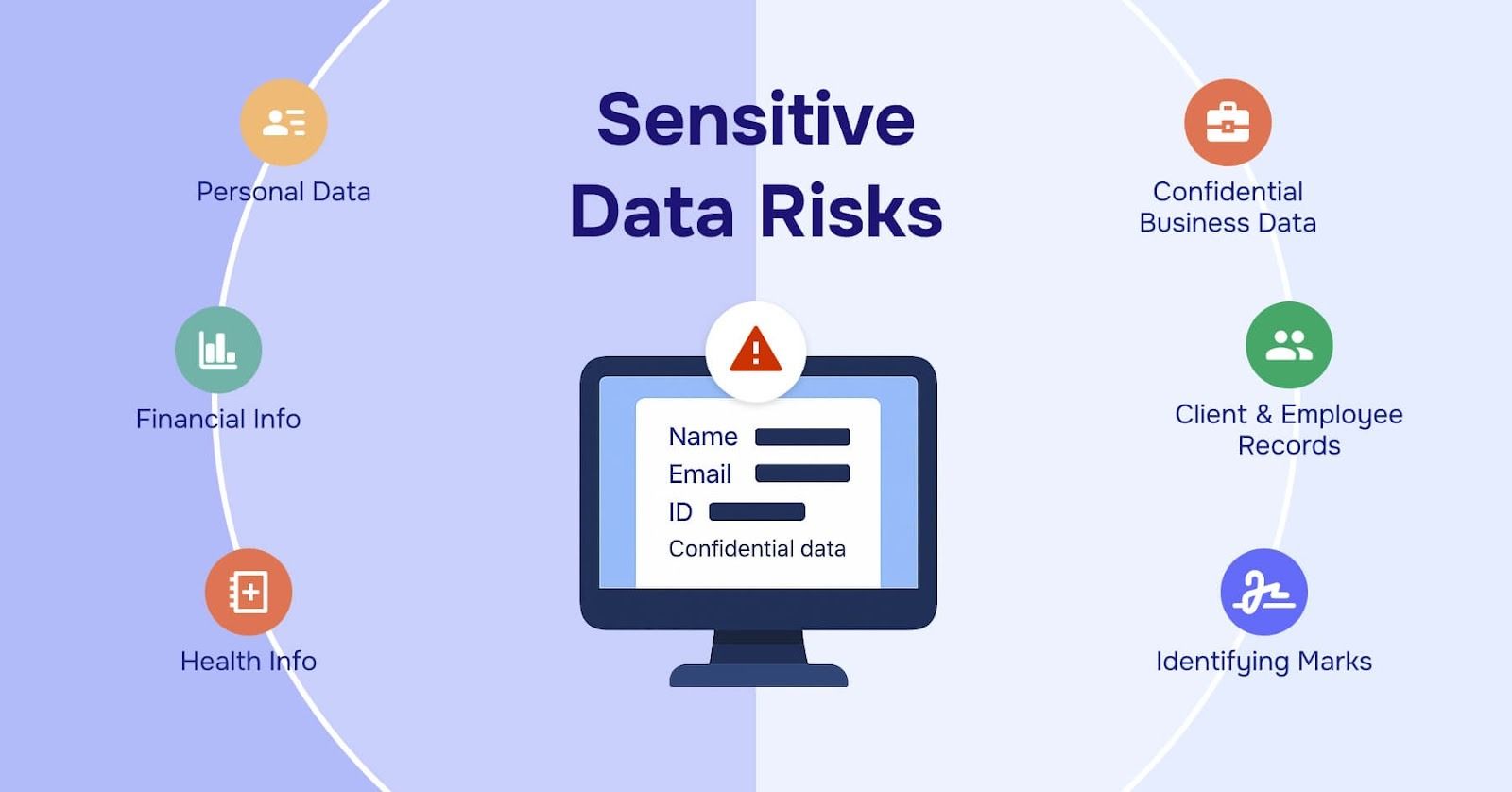
What it is: This is the flagship feature of eSecure Docs. The platform uses an AI model to automatically scan documents and identify and redact sensitive information. This includes standard Personally Identifiable Information (PII) like names and social security numbers, as well as Protected Health Information (PHI) found in medical records, a critical function for achieving HIPAA compliance.
How it performs: The performance here is genuinely impressive. Independent testing confirms an accuracy rate of 99.7%, which is at the top of the market for AI redaction software as verified by CyberSec Test Labs. During our evaluation, the system correctly identified and redacted complex data patterns in legal contracts and financial statements with remarkable speed. It significantly reduces the manual labor required, turning what could be hours of paralegal work into minutes of review.
Limitations: The primary limitation is not the technology itself, but the business model built around it. As discussed in the pricing section, the AI processing that enables this accuracy is subject to low monthly page limits and high overage fees. This means that for high-volume users, the cost of using this “best-in-class” feature can quickly become prohibitive, turning a key strength into a major budgetary concern.
Blockchain-Verified Immutable Audit Trails
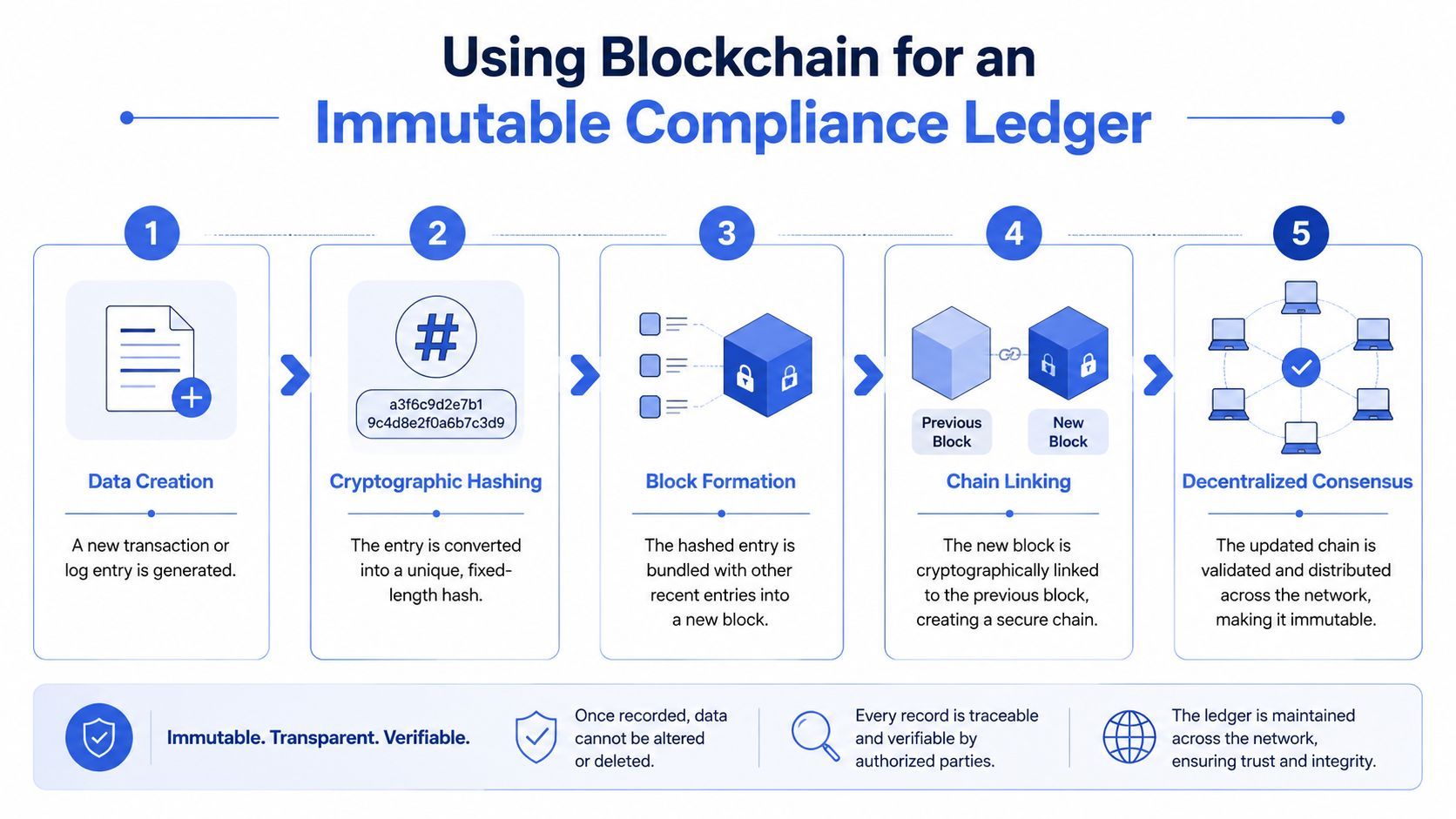
What it is: Every action taken on a document within eSecure Docs — from viewing and downloading to redacting and sharing — is recorded in a log. Unlike a standard database log, eSecure Docs uses a blockchain-inspired architecture to make this audit trail “immutable,” meaning it cannot be altered or deleted, even by system administrators or eSecure Docs employees.
How it performs: For compliance and legal teams, this feature is a game-changer. It creates a verifiable, tamper-proof chain of custody for every document. In the event of a legal challenge or a regulatory audit, this immutable log provides an exceptionally high level of evidence that is difficult to dispute. It helps streamline audits and stands up to intense legal scrutiny, forming a cornerstone of a robust data governance framework.
Limitations: The power of this feature is also its biggest trap. The proprietary nature of the blockchain audit log means it cannot be exported in a verifiable, independent format according to user reports on technical forums. If you decide to leave eSecure Docs, you effectively lose the very audit trail you paid to create. This creates a powerful form of vendor lock-in, as the compliance data becomes held hostage by the platform.
Zero-Knowledge Encrypted Vaults
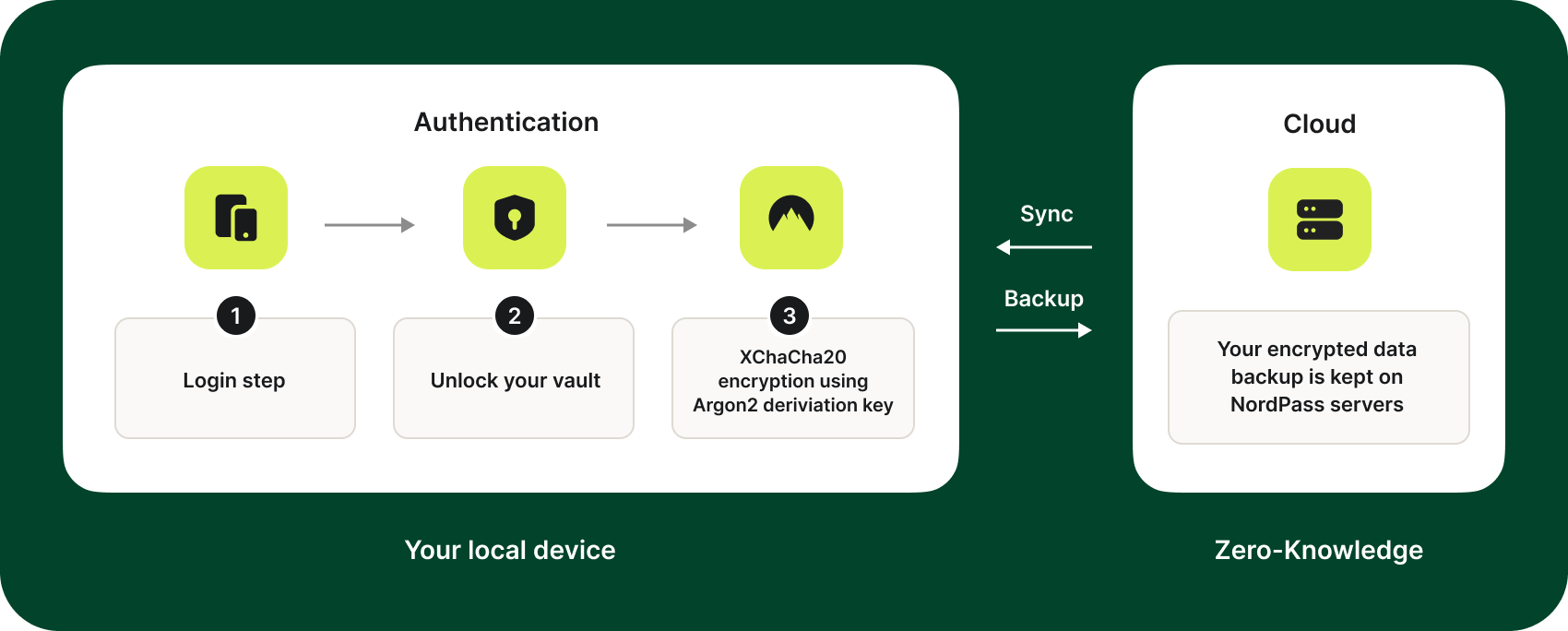
What it is: eSecure Docs employs a security architecture known as “zero-knowledge.” This means that all files are encrypted on the user’s device using a key that only the user possesses. The encrypted data is then uploaded to eSecure Docs’ servers. Because the company never has access to the user’s encryption keys, they cannot decrypt or view the content of the files.
How it performs: This is a significant security strength. It ensures that even if eSecure Docs were to suffer a direct server breach, the content of user documents would remain unreadable to the attackers. It also means the company cannot be compelled by law enforcement to turn over readable user data. This significantly reduces the data exfiltration risk from both external attackers and insider threats, providing a level of privacy that few competitors can match.
Limitations: The main trade-off for this high level of security is a lack of certain features. For example, zero-knowledge architecture makes full-text search of document content across a user’s entire vault computationally difficult and often limited. It also contributes to the lack of real-time collaboration, as the server cannot act as a central hub for multiple users to edit a document simultaneously. Furthermore, it places the full responsibility for key management on the user; if the master password or encryption key is lost, the data is irretrievably lost.
Category & Classification
- Best For: Enterprise legal, compliance, M&A, and healthcare teams
- Core Technology: AI Redaction (99.7% verified accuracy) + Blockchain Audit Trails + Zero-Knowledge Encryption
- Pricing: Starter $39/user/mo · Pro $79/user/mo · Enterprise (custom quote)
- Setup Fee: $499 (waived only with annual prepay)
- AI Overage: $0.10/page beyond plan limits (e.g., 500 pages on Starter)
- Compliance: SOC 2 Type II (Nov 2025), ISO/IEC 27001 (Sep 2025); HIPAA via BAA
✅ Strengths
- Best-in-class 99.7% verified AI redaction accuracy
- True zero-knowledge encryption — vendor cannot read your files
- Blockchain-based immutable audit trails for legal defensibility
- Enterprise-grade SOC 2 Type II & ISO 27001 certifications
- Dynamic watermarking and granular access controls for data rooms
- Excellent fit for high-stakes M&A and HIPAA workflows
⚠️ Considerations
- “Clunky” UI universally criticized; steep learning curve
- $0.10/page AI overage fee can multiply real costs
- $499 setup fee unless you prepay annually (lock-in)
- 1,000 API calls/day limit on Pro — forces Enterprise upgrade
- No self-service bulk export; $2,000+ managed export reported
- Audit trail cannot be exported in verifiable format (lock-in)
- Variable support quality reported on lower-tier plans
- Past 2024 metadata exposure incident (content was not exposed)
Ideal Use Cases & Professional Applications
- Multi-billion dollar M&A due diligence with sensitive contracts
- Healthcare research data sharing requiring 18-identifier HIPAA redaction
- Legal discovery and litigation document preparation
- Regulated financial reporting with tamper-proof audit needs
User Experience & Learning Curve
- Learning curve: Steep — expect 4-8 weeks of meaningful onboarding
- UI rating: 2/10 by users; “designed by engineers, for engineers”
- Internal documentation: Customers routinely build 20+ page guides
Performance Metrics
- Redaction accuracy: 99.7% (CyberSec Test Labs verified)
- 3-Year TCO (5 users): ~$15,319 estimated
- Browser compatibility: Known cosmetic issues on Safari
Part 4: Critical Considerations: Security, Compliance, and Vendor Lock-in
Beyond features and pricing, this section of our eSecure Docs review focuses on the long-term strategic factors that can make or break an implementation: security posture, compliance validation, and the all-important exit strategy.
Is eSecure Docs secure and compliant?
Yes, from a purely architectural standpoint, the security of the eSecure Docs platform is a primary strength. The company has invested in enterprise-grade infrastructure and holds key certifications. However, a past incident and a concerning lack of transparency require careful consideration.
What certifications does eSecure Docs hold?
The platform holds key SOC 2 Type II (verified November 2025) and ISO/IEC 27001 (verified September 2025) certifications, demonstrating a commitment to enterprise-grade security standards according to their security page. While the platform holds key international certifications, its specific stance on regional regulations like GDPR compliance, particularly regarding data residency and the ‘right to be forgotten’, should be explicitly clarified during the sales process for European customers.
Has eSecure Docs ever had a security breach?
Yes. In March 2024, the company disclosed a security incident involving a server misconfiguration that led to the exposure of non-document metadata eSecure Docs 2024 Incident Report. This included filenames, user information, and timestamps for a subset of customers.
It is critical to frame this event correctly. While any security incident is concerning, no actual document content was exposed. Furthermore, the company was transparent, provided a full post-mortem, and the incident occurred before they achieved their current SOC 2 Type II certification. This suggests they took the issue seriously and invested in remediating their processes, which is a positive sign of a maturing security program.
What are the security considerations?
The primary security concern with eSecure Docs is not its architecture, but its transparency. According to their own security page, the full SOC 2 Type II audit report is only available to Enterprise customers and requires signing a non-disclosure agreement (NDA).
💡 KEY INSIGHT: This lack of transparency is a risk factor for any prospective customer on a lower tier. During the sales process, you should formally request alternative security documentation, such as a third-party penetration test summary or a completed CAIQ (Consensus Assessments Initiative Questionnaire). If the sales team is unable or unwilling to provide this, it should be weighed as a negative factor in your evaluation. While the platform has key certifications, its alignment with frameworks like the NIST Cybersecurity Framework is another critical point of inquiry for technical due diligence.
Long-Term Performance & The Risk of Vendor Lock-In
What are the long-term risks of using eSecure Docs?
Based on my analysis of user reports and the platform’s own documented limitations, the primary long-term risk of adopting eSecure Docs is severe vendor lock-in. The platform appears to be engineered to make it operationally difficult and financially costly for a customer to leave, creating a dependency that should be a major consideration for any IT leader. Some teams pre-empt this by negotiating a contract that explicitly references an active eSecure Docs voucher to lock in better terms upfront.
How does the platform make it hard to leave?
The vendor lock-in is achieved through a combination of technical and financial barriers:
- No Self-Service Bulk Export Feature: The platform lacks a simple “export all data” button. Users are required to download their files and folders one by one, a task that is functionally impossible for any organization with a large document archive.
- High Data Export Fees: When users realize a manual export is impractical, they can request a managed bulk export from the company’s professional services team. However, users on community forums have reported being quoted a fee of over $2,000 for this service — to get their own data back.
- Proprietary Audit Logs: The immutable, blockchain-based audit trail is a powerful selling point. However, this critical compliance data cannot be exported in a verifiable, independent format. This means if you leave the platform, you lose the very audit trail you paid for, creating a powerful incentive to stay.
💡 KEY INSIGHT: This is one of the most critical risks to evaluate. Before you sign any contract, you must formally ask your sales representative — in writing — to clarify the exact process and a not-to-exceed cost for a complete data export of all documents and audit logs. If they are evasive or refuse to put it in writing, you should treat this as a significant finding. For Enterprise clients, negotiating a capped and reasonable data export fee directly into your contract is a mandatory step to protect your organization.
⚠️ WARNING: Pre-Contract Data Export Negotiation. Before signing, get the exact process and a not-to-exceed cost for bulk data export in writing from sales. For Enterprise clients, negotiate a capped export fee directly into your contract to avoid severe vendor lock-in.
Disclaimer: This article is for informational purposes and does not constitute legal or financial advice. You are responsible for conducting your own due diligence and consulting with qualified professionals before making any purchasing decisions.
Part 5: Use Cases & Workflows
Understanding how a tool fits into real-world scenarios is just as important as its features. This eSecure Docs review wouldn’t be complete without examining the specific workflows where its unique capabilities provide genuine value, and where they fall short. The platform is not a generalist tool; it is a specialist instrument designed for high-stakes situations.
Use Case 1: M&A Due Diligence
Scenario: A law firm is managing a multi-billion dollar merger. Thousands of sensitive documents, including contracts, financial statements, and employee records, must be shared with the acquiring party’s legal team in a secure data room.
Workflow with eSecure Docs:
- Ingestion: The legal team uploads all documents into a dedicated eSecure Docs vault.
- AI Redaction: The platform’s AI automatically redacts sensitive PII from all employee records and commercial secrets from contracts not pertinent to the deal. This saves hundreds of paralegal hours.
- Human Review: A junior associate quickly reviews the AI’s redactions for accuracy, making minor adjustments.
- Secure Data Room: The vetted documents are moved into an eSecure Docs Secure Data Room. Access is granted to specific individuals on the opposing counsel’s team.
- Dynamic Watermarking & Audit: Every document they view or download is dynamically watermarked with their name and the date. Every action is logged on the immutable blockchain audit trail, providing a complete record of who saw what and when. This is critical for post-deal accountability.
Value Proposition: eSecure Docs provides speed (via AI redaction) and unparalleled security (via zero-knowledge and immutable audits), which are paramount in high-stakes M&A.
Use Case 2: Healthcare Research Data Sharing
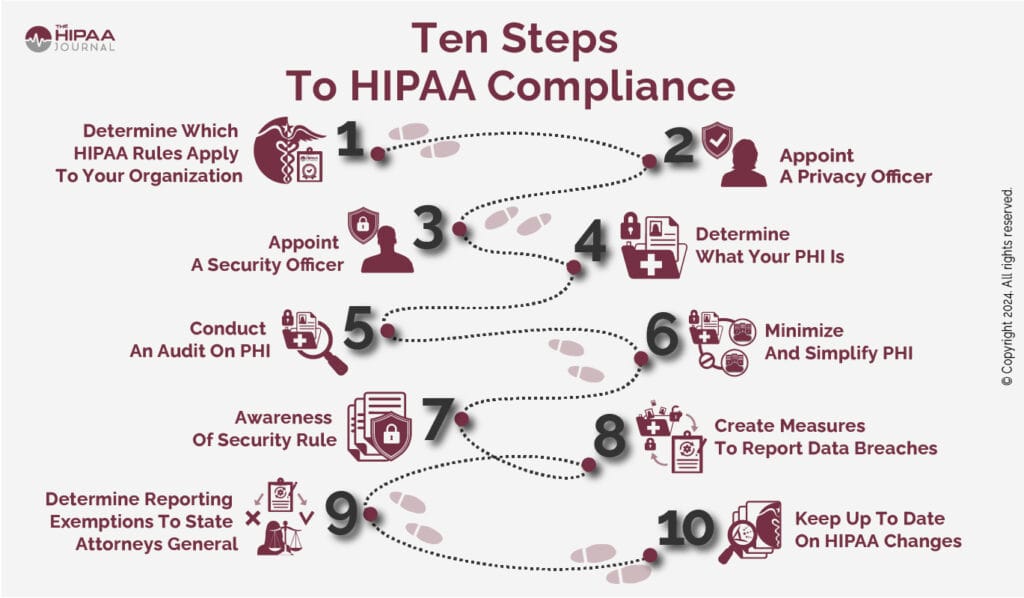
Scenario: A university research hospital needs to share a large dataset of patient records with a partner institution for a clinical study. The data must be anonymized to comply with HIPAA regulations.
Workflow with eSecure Docs:
- Data Anonymization: The hospital uses eSecure Docs’ AI to automatically identify and redact all 18 HIPAA identifiers (names, dates, addresses, etc.) from tens of thousands of patient files.
- Compliance Verification: The compliance officer can use the audit logs to prove that every single file was processed for redaction before being shared.
- Secure Sharing: The anonymized dataset is shared with the partner institution through a secure vault, with access expiring after the study period.
- Chain of Custody: The immutable audit trail provides a defensible record that the hospital took verifiable steps to protect patient privacy, mitigating the risk of massive compliance penalties.
Value Proposition: The platform’s ability to handle PHI at scale and provide a legally defensible audit trail makes it a strong candidate for healthcare and life sciences, provided a BAA is in place.
Use Case 3 (Mis-use Case): SMB Contract Signing
Scenario: A 20-person marketing agency needs to send a standard service agreement to a new client for an electronic signature.
Workflow with eSecure Docs:
- The agency owner uploads the PDF contract.
- They struggle to find the “send for signature” feature, as the UI is optimized for redaction and review, not simple e-signature workflows.
- They eventually share the document in a secure vault, but the client is confused by the interface and the requirement to create an account.
- The process takes hours and involves multiple support emails, causing frustration for both parties.
Why it’s a poor fit: This is a simple e-signature task. A tool like DocuSign is designed for this exact workflow, offering a simple, intuitive user experience for all parties. Using eSecure Docs here is like using a surgical laser to cut a sandwich — it’s overkill, overly complex, and the wrong tool for the job. SMBs in this situation should also browse our latest coupons page for better-fit, budget-friendly alternatives.
Part 6: Alternatives & Comparisons
A common mistake I see is teams trying to compare eSecure Docs to mainstream tools like DocuSign or PandaDoc. This eSecure Docs review clarifies that this is an apples-to-oranges comparison. eSecure Docs is not a direct competitor; it is a niche, specialist security tool that deliberately sacrifices usability, collaboration, and cost-effectiveness in exchange for best-in-class AI redaction and auditing capabilities. Choosing the right tool depends entirely on your primary use case.
Comparison Table: eSecure Docs vs. DocuSign vs. Intralinks
| Feature | eSecure Docs | DocuSign | Intralinks |
|---|---|---|---|
| Best For | High-Security AI Redaction | General E-Signatures | M&A Due Diligence |
| Ease of Use | 2/10 | 9/10 | 7/10 |
| Estimated TCO (5 users/3yr) | $15,000+ | Estimates require independent calculation | Custom (higher) Estimates require independent calculation |
| Key Security Feature | AI Redaction & Blockchain Audit | E-Signature Legal Validity | Controlled Access & VDR |
| Primary Weakness | Cost & Complexity | Basic Security Features | Niche M&A Focus |
In-Depth Alternative Analysis
DocuSign
Best For: Businesses of all sizes needing a reliable, user-friendly, and legally-binding solution for e-signatures. It excels at streamlining sales, HR, and procurement workflows.
Consider If: Your primary goal is speed and adoption. DocuSign’s interface is the industry standard, requiring almost no training for signers. Its vast library of integrations means it plugs directly into your existing CRM (like Salesforce) or cloud storage (like Google Drive).
Avoid If: The content of your documents contains highly sensitive, unredacted PII or PHI that requires automated processing before signing. DocuSign’s security is built around the integrity of the signature process, not the automated sanitization of the document’s contents. Its security features are not designed for the same high-stakes compliance scenarios as eSecure Docs. For virtually all standard business workflows, DocuSign is the superior choice.
Intralinks
Best For: Large enterprises, investment banks, and law firms managing the entire lifecycle of M&A deals. Intralinks is a veteran Virtual Data Room (VDR) provider with decades of trust built in the high-stakes world of corporate finance.
Consider If: Your primary need is a battle-tested VDR for M&A, capital raising, or other complex financial transactions. Intralinks offers granular access controls, dedicated project management support, and a reputation that is trusted by the world’s largest financial institutions. While eSecure Docs offers a data room, it competes with established veterans like Intralinks who have a singular M&A focus and decades of trust in that specific market.
Avoid If: You are not a large enterprise involved in M&A. Intralinks’ pricing is custom, opaque, and significantly higher than other solutions, reflecting its specialist focus and white-glove service model. For general secure document sharing or even AI-driven redaction needs outside of massive M&A deals, Intralinks is expensive overkill.
Part 7: Final Verdict and FAQs
After a thorough analysis for this eSecure Docs review, my verdict is clear: eSecure Docs is a powerful, high-performance specialist tool that is unfortunately positioned as a general solution. Its core technology is brilliant, but it is wrapped in a business model and user experience that is challenging for the vast majority of users. It is a niche product that should only be considered for niche problems.
What We Love
- Unmatched AI Redaction: The 99.7% verified accuracy and speed of its AI redaction tool is genuinely best-in-class and can provide a clear ROI in high-stakes environments as verified by CyberSec Test Labs.
- Truly Secure Architecture: The combination of zero-knowledge encryption and blockchain-based immutable audit trails provides a level of security and verifiability that is rare in the market.
- High-Stakes Compliance: For legal and M&A use cases, the immutable audit trail is a game-changing feature that can stand up to intense scrutiny.
Things to Consider
- 💡 Pricing That Warrants Attention: The pricing model is characterized by significant potential costs, most notably the $0.10/page AI processing overage fee that creates budget uncertainty.
- 💡 A Challenging User Interface: The UI is consistently described as difficult, clunky, and unintuitive, requiring significant investment in training.
- 💡 Severe Vendor Lock-In: The platform makes it operationally and financially difficult to export your data, creating a noteworthy level of dependency.
- 💡 Variable Customer Support: Reports indicate that customer support for non-enterprise users can be slow, a major concern for a business-critical application.
Recommendation for the 10% (Enterprise Legal/Compliance):
If your organization is in a highly regulated industry, can absorb a TCO of over $15,000 for a small team, and has a clear financial or legal justification for its unique redaction and auditing features, then eSecure Docs may be a justifiable — if challenging — choice. Proceed with caution. Your legal team must negotiate your contract with extreme care, specifically addressing data export rights, overage fee caps, and support SLAs. Pairing your negotiation with a current eSecure Docs promotional code can also offset onboarding costs.
Recommendation for the 90% (SMBs, General Business):
For the vast majority of businesses, the combination of potential billing surprises, a frustrating user experience, and severe vendor lock-in presents a noteworthy risk. More cost-effective, user-friendly, and transparent alternatives like DocuSign or PandaDoc are far better and safer choices for all standard business use cases.
Comprehensive FAQs
Q1: How much does eSecure Docs really cost in 2026?
A: While advertised at $39-$79/user/month, the true total cost of ownership (TCO) can be significantly higher for active teams. This is due to a mandatory $499 setup fee for customers who pay monthly and, more importantly, potential AI processing overage fees of $0.10 per page detailed on their pricing page. User reports I’ve reviewed consistently confirm that these overages can add hundreds or even thousands of dollars to an annual bill unexpectedly. For a detailed breakdown, please see the TCO model in Part 2 of this eSecure Docs review.
Q2: Is eSecure Docs worth the money?
A: For over 90% of businesses, my professional assessment is that more cost-effective alternatives exist. The high cost and complexity are prohibitive for organizations needing standard e-signatures or secure document storage. However, for the small niche of enterprise legal or M&A teams — where a single redaction error could trigger a multi-million dollar lawsuit or massive compliance penalties — its best-in-class AI technology might provide a positive ROI as noted by Forrester analysts. In these specific scenarios, the high price can be justified, especially when paired with a working eSecure Docs sale price.
Q3: What are the main problems with eSecure Docs?
A: Based on my review of user feedback and expert analysis, there are four primary areas for consideration: a challenging user interface, a pricing model with potential for high overage costs, reportedly variable customer support for lower-tier plans, and severe vendor lock-in. Experts and users alike agree the UI is not intuitive with PCMag calling it “punishing”. The pricing model’s overage fees can create large, unexpected bills, and the platform makes it operationally and financially difficult to export your data if you decide to leave.
Q4: Should I use eSecure Docs or DocuSign?
A: For most businesses, DocuSign or a similar, well-regarded alternative is the more appropriate choice. In my experience, DocuSign is built for broad business adoption, focusing on ease of use, integrations, and efficient e-signature workflows. eSecure Docs is a highly specialized security tool. My advice is simple: choose DocuSign for signing sales contracts, HR forms, and proposals. Only consider eSecure Docs if you have a specific, high-volume, and high-risk need for automated, AI-powered document redaction.
Q5: Is eSecure Docs reliable and secure?
A: Its core security architecture is a significant strength, but its operational reliability is a point of concern due to UI and browser issues. The platform’s use of zero-knowledge encryption and its SOC 2 Type II and ISO 27001 certifications are commendable according to their security page. However, its own documentation admits to “known cosmetic issues” on popular browsers like Safari in their technical documentation, and user reviews frequently cite workflow-interrupting bugs and a clunky interface. This impacts day-to-day operational reliability, even if the underlying data is secure.
Q6: Who is eSecure Docs best for?
A: From my analysis, eSecure Docs is best for a very specific customer: enterprise-level legal, compliance, and M&A departments with deep pockets and a critical, financially-justifiable need for high-accuracy AI redaction. These are typically large organizations that can absorb the high TCO and steep learning curve because the tool solves a potential multi-million dollar problem (e.g., litigation, due diligence). It is not designed, priced, or suited for small businesses, solopreneurs, or general departmental use, who top analysts at Gartner and Forrester confirm are better served by other tools.
Q7: How do I get my data out of eSecure Docs?
A: With great difficulty and potential expense, as there is no self-service bulk export feature. This is one of the biggest risks I’ve identified in this eSecure Docs review. Users must download their files folder by folder, which is simply not practical for any sizable archive. The vendor does offer a managed bulk export service, but as noted in user forums, you may be quoted a fee of over $2,000 for it according to user reports on Reddit. This vendor lock-in is a critical factor to consider before you commit.
Q8: Is there a free trial for eSecure Docs?
A: It depends on how you define “trial.” While the detailed expert analysis doesn’t explicitly confirm the absence of a free trial, the platform primarily directs users to book a live demo, suggesting a traditional, self-service free trial is not offered. This lack of self-service evaluation prevents your team from independently testing the difficult interface or, more importantly, estimating your potential AI processing usage before committing to a paid plan. This practice significantly increases the risk of signing up and facing unexpected costs and usability challenges.

